
Introduction
In the previous lesson, you learned about Python Arithmetic Operators and how they perform mathematical calculations such as addition, subtraction, multiplication, division, and more. Those operators help Python compute new values by performing operations on data.
However, calculating a value is only part of the process. Once Python produces a result, it usually needs to store that result somewhere so it can be used later. This is where Python Assignment Operators come into play.
Assignment operators are responsible for placing values into variables and updating those values as your program runs. Whether you’re saving user input, keeping track of a score, updating a bank balance, counting loop iterations, or modifying data, assignment operators make it possible to store and manage information efficiently.
In fact, it’s difficult to write even a small Python program without using assignment operators. Variables are the foundation of programming, and assignment operators are what allow those variables to receive and update values throughout a program’s execution.
In this lesson, you’ll build a complete understanding of Python Assignment Operators.
In This Lesson, You’ll Learn
- What Python Assignment Operators are.
- Why they are called assignment operators.
- How the assignment operator (
=) works. - The difference between assigning a value and updating an existing value.
- What augmented (shorthand) assignment operators are.
- How operators like
+=,-=,*=,/=,%=and others work. - Why augmented assignment operators make code shorter and easier to read.
- Common beginner mistakes when using assignment operators.
- Best practices for writing clean and maintainable Python code with assignment operators.
Before we understand what Python Assignment Operators are, let’s first answer an important question: why are they called “assignment operators”? Understanding the meaning behind the name will make the rest of this lesson much easier to follow.
Why Are They Called “Assignment Operators”?
Before we understand how assignment operators work, it’s helpful to understand why they have this name. Along the way, we’ll also clear up some common terminology that you may encounter in different Python tutorials and books.
A Quick Note About the Name
In the previous lesson, we learned that names like Arithmetic Operators, Assignment Operators, Comparison Operators, and others are widely accepted educational categories used to organize Python operators.
Although these category names are used in almost every tutorial, book, and online course, Python’s language specification does not officially declare them as predefined operator categories. Instead, Python defines each operator individually as part of its expression syntax and grammar.
For simplicity and consistency, we’ll continue using these familiar category names throughout this chapter. If you’d like to learn more about why these categories exist and how Python officially defines operators, you can refer to the “Are Python Operator Categories Official?“ section from the previous lesson.
What Does “Assign” Mean?
The word assign simply means to give, to set, or to allocate something to someone or something else.
In Python, assigning means giving a value to a variable so that the variable can refer to and use that value later.
For example:
language = "Python"Here:
- The variable
languageis given the value"Python". - In other words, the value
"Python"is assigned to the variablelanguage.
That’s why the = operator is called the assignment operator—its primary job is to assign a value to a variable.
Why the Name Fits
Assignment operators are responsible for giving variables their values. Sometimes they assign a value for the first time, and sometimes they assign a new value by updating an existing one.
For example:
score = 50Here, the value 50 is assigned to the variable score.
Later, you might write:
score += 10Although this looks different, it is still performing an assignment.
Python first calculates the new value:
50 + 10Then it assigns the result (60) back to the variable score.
So even operators like +=, -=, *=, and /= are still assignment operators because their final step is always to assign the resulting value back to a variable.
This is why the name Assignment Operators fits the entire category—they all involve assigning values, whether directly or after performing another operation.
You May See Other Names Too
As you continue learning Python, you may notice that different tutorials don’t always use the same terminology. Alongside Assignment Operators, you may also encounter names such as:
- Augmented Assignment Operators
- Compound Assignment Operators
- Shorthand Assignment Operators
At first glance, these names can seem confusing, but they’re closely related.
| Term | Meaning | Includes the = Operator? |
|---|---|---|
| Assignment Operators | The complete category of assignment operators in Python. | Yes |
| Augmented Assignment Operators | Operators like +=, -=, *=, etc., that combine an operation with an assignment. | No |
| Compound Assignment Operators | Another commonly used name for augmented assignment operators. | No |
| Shorthand Assignment Operators | An informal, beginner-friendly name because these operators provide a shorter way to write assignments. | No |
Notice that Assignment Operators is the broader category, while the other three terms refer specifically to operators such as +=, -=, *=, and similar operators.
You can think of their relationship like this:
Python Assignment Operators
│
├── =   (Simple Assignment Operator)
│
└── Augmented Assignment Operators
      ├── +=
      ├── -=
      ├── *=
      ├── /=
      ├── //=
      ├── %=
      ├── **=
      ├── &=
      ├── |=
      ├── ^=
      ├── <<=
      ├── >>=
      └── @=
The terms Augmented Assignment Operators, Compound Assignment Operators, and Shorthand Assignment Operators are often used interchangeably because they all describe the same group of operators.
However, there is one small difference worth remembering:
- Augmented Assignment Operators is the terminology used by Python’s official documentation.
- Compound Assignment Operators is a widely used alternative term in programming books and tutorials.
- Shorthand Assignment Operators is an informal, beginner-friendly term commonly used in educational content because these operators provide a shorter way to write assignments.
Remember: Every augmented (compound/shorthand) assignment operator is an assignment operator, but not every assignment operator is an augmented assignment operator. The simple assignment operator (
=) belongs only to the broader Assignment Operators category.
Part 1: Overview of Python Assignment Operators
Python provides several assignment operators that allow you to assign values to variables or update existing values. While the simple assignment operator (=) assigns a value directly, other assignment operators combine an operation with an assignment, making your code shorter and more readable.
Together, these operators form the Python Assignment Operators category.
The table below gives an overview of the assignment operators available in Python.
| Operator | Name | Covered in This Lesson |
|---|---|---|
= | Assignment Operator | Yes |
+= | Addition Assignment Operator | Yes |
-= | Subtraction Assignment Operator | Yes |
*= | Multiplication Assignment Operator | Yes |
/= | Division Assignment Operator | Yes |
//= | Floor Division Assignment Operator | Yes |
%= | Modulus Assignment Operator | Yes |
**= | Exponentiation Assignment Operator | Yes |
&= | Bitwise AND Assignment Operator | Later |
|= | Bitwise OR Assignment Operator | Later |
^= | Bitwise XOR Assignment Operator | Later |
<<= | Left Shift Assignment Operator | Later |
>>= | Right Shift Assignment Operator | Later |
@= | Matrix Multiplication Assignment Operator | Later |
Why Are Only Some Assignment Operators Covered in This Lesson?
As you may have noticed, not every assignment operator is covered in this lesson.
This lesson focuses on the simple assignment operator (=) and the arithmetic assignment operators, which are built on Python’s arithmetic operators:
+=-=*=/=//=%=**=
These are the assignment operators you’ll use most frequently in everyday Python programming, making them the best place to begin.
By the end of this lesson, you’ll have a solid understanding of the assignment operators that you’ll encounter most often as a Python beginner. The remaining assignment operators will be much easier to learn once you’ve studied the operator categories they are built upon.
Visual Overview: Python Assignment Operators
The infographic below provides a quick visual overview of all Python Assignment Operators, showing which operators you’ll learn in this lesson and which ones will be covered later in their respective operator categories.
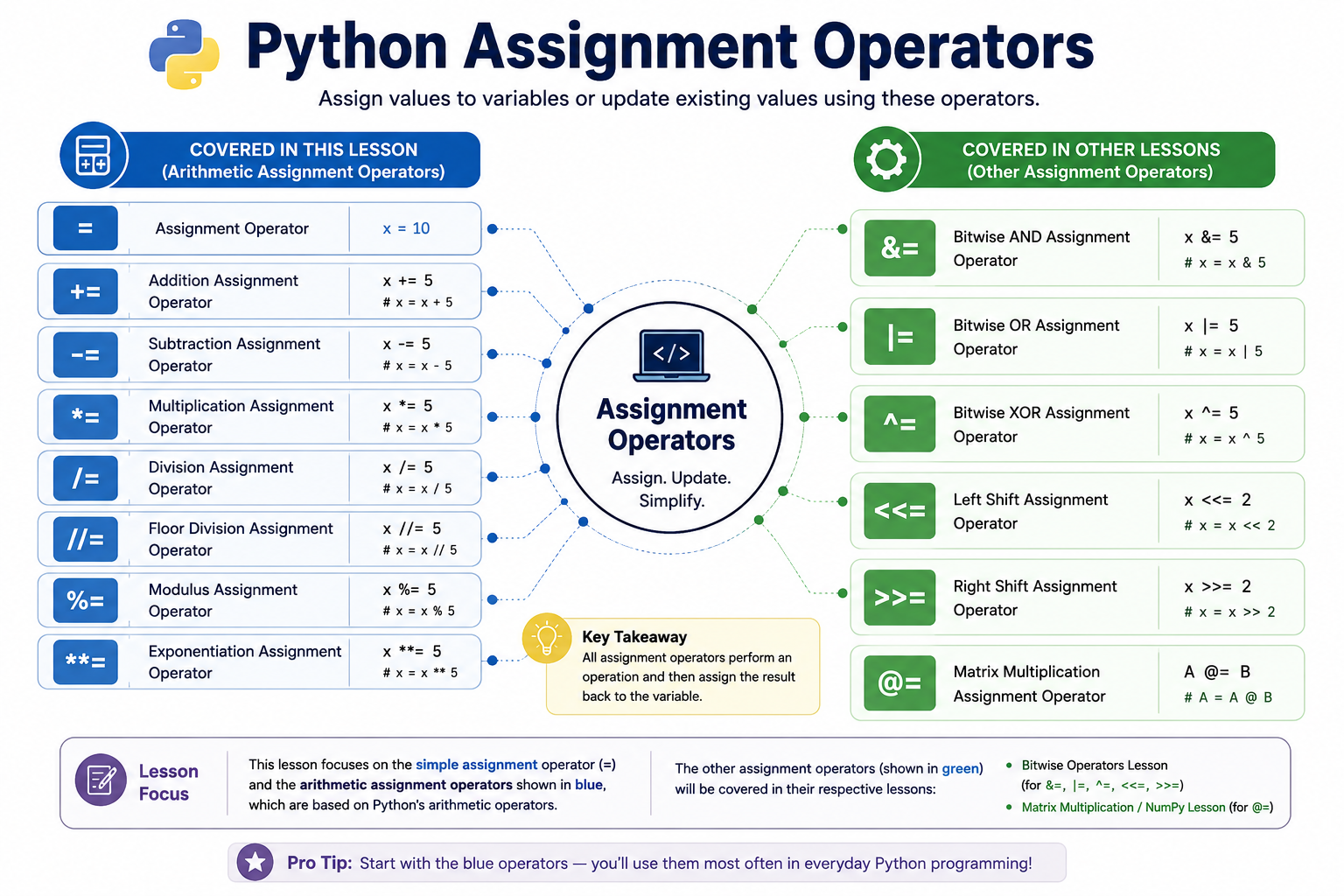
Use this infographic as a quick reference while reading the lesson. We’ll begin with the simple assignment operator (=) and then explore each arithmetic assignment operator one by one before briefly introducing the remaining assignment-related features.
Part 2: The Basic Assignment (=) Operator
The assignment operator (=) is one of the most fundamental operators in Python. In fact, it’s difficult to write even the simplest Python program without using it. Whether you’re storing user input, saving the result of a calculation, creating a list, or working with objects, the assignment operator is what allows variables to receive and hold values.
Although Python provides several assignment operators, they all build upon the concept introduced by the simple assignment operator (=). Once you understand how = works, the rest of the assignment operators become much easier to learn.
2.1 What Is the Assignment (=) Operator?
The assignment operator (=) is used to assign a value to a variable.
Its job is straightforward:
- Evaluate the value or expression on the right-hand side.
- Assign the resulting value to the variable on the left-hand side.
Syntax
variable_name = valueor
variable_name = expressionIn both cases:
- The left-hand side (LHS) must be a variable (or another valid assignment target).
- The right-hand side (RHS) can be a literal value, an expression, a function call, another variable, or any object that produces a value.
For example:
user_name = "PyCoder"Python evaluates "PyCoder" and assigns it to the variable user_name .
2.2 Assigning Literal Values
One of the most common uses of the assignment operator is assigning literal values directly to variables.
course_name = "Python Basics"
total_lessons = 20
course_price = 999.99
is_published = True
Here, each variable receives a literal value:
course_namereceives a string.total_lessonsreceives an integer.course_pricereceives a floating-point number.is_publishedreceives a Boolean value.
This is usually the first way beginners learn to create variables in Python.
2.3 Assigning the Result of an Expression
The value on the right side doesn’t have to be a fixed literal. It can also be an expression.
For example:
price = 1200
discount = 200

final_price = price - discount
Python first evaluates:
price - discountwhich produces:
1000Then it assigns that result to final_price.
This demonstrates an important rule:
The assignment operator itself does not perform the calculation—it simply stores the result of the expression.
2.4 Assigning Values from Other Variables
You can also assign the value of one variable to another.
primary_language = "Python"
favorite_language = primary_language
After execution, both variables refer to the same value.
This is useful when you want another variable to start with an existing value.
2.5 Reassigning Variables
Variables are not limited to a single value. You can assign a new value to the same variable whenever needed.
status = "Draft"

status = "Published"
The second assignment replaces the previous one.
After these statements execute, the value of status is:
"Published"The earlier value is no longer associated with the variable status.
Reassigning variables is a common part of programming because data often changes while a program is running.
2.6 Common Beginner Mistakes
When learning the assignment operator, beginners often make a few common mistakes.
Mistake 1: Confusing Assignment with Equality
Many new programmers think the assignment operator (=) checks whether two values are equal.
It doesn’t.
The assignment operator assigns a value to a variable, whereas the equality operator (==) compares two values.
We’ll explore this important difference in the next section.
Mistake 2: Reading the Assignment from Left to Right
Consider this statement:
total = 15 + 5Some beginners read it as:
“Assign
totalto15 + 5.”
A better way to understand it is:
“Evaluate
15 + 5, then assign the result tototal.”
Thinking in this order makes assignment much easier to understand.
Mistake 3: Assuming Assignment Copies Everything Independently
When assigning one variable to another:
first_language = "Python"
second_language = first_language
Python creates another variable that refers to the same object, rather than making a completely independent copy in every situation.
Python Learning Tip:
Assigning one variable to another can behave differently for mutable and immutable objects. For a detailed explanation with practical examples, see Mutable vs Immutable in Python.
Now that you understand how the basic assignment operator (=) works, let’s look at another concept that often confuses beginners—the difference between the assignment operator (=) and the equality operator (==).
Part 3: Assignment (=) vs Equality (==)
One of the most common mistakes beginners make is confusing the assignment operator (=) with the equality operator (==). Although these operators look similar, they serve completely different purposes.
Understanding the difference is essential because using the wrong operator can lead to errors or unexpected program behavior.
3.1 The Assignment Operator (=)
The assignment operator (=) is used to assign a value to a variable.
Its purpose is to store a value or the result of an expression so that it can be used later in the program.
For example:
score = 95Here, Python assigns the value 95 to the variable score.
3.2 The Equality Operator (==)
The equality operator (==) is used to compare two values.
Instead of assigning a value, it checks whether the values on both sides are equal and returns a Boolean result:
Trueif they are equal.Falseif they are not.
For example:
score = 95

print(score == 95)
Output:
TrueHere, score == 95 does not change the value of score. It simply asks:
“Is the value stored in
scoreequal to95?”
Since the answer is yes, Python returns True.
Another example:
print(10 == 20)Output:
FalseBecause 10 and 20 are different values.
3.3 Assignment vs Equality at a Glance
Assignment (=) | Equality (==) |
|---|---|
| Assigns a value to a variable. | Compares two values. |
| Stores or updates a value. | Checks whether two values are equal. |
| Changes the program’s state. | Does not change any values. |
Does not return True or False. | Returns either True or False. |
| Used for creating and updating variables. | Commonly used in conditions and comparisons. |
3.4 A Simple Example
Consider the following code:
age = 18

print(age == 18)
Here’s what happens:
age = 18assigns the value18to the variableage.age == 18compares the value stored inagewith18.- The comparison returns
True.
Notice that the assignment and comparison are two separate operations, even though they use similar-looking symbols.
3.5 Common Beginner Mistakes
Mistake 1: Using = Instead of == in a Condition
Beginners sometimes write:
if age = 18:
    print("Eligible")
This is incorrect and raises a SyntaxError because Python expects a comparison inside an if statement, not an assignment.
The correct code is:
if age == 18:
    print("Eligible")
Here, == compares the value of age with 18.
Mistake 2: Thinking = Checks Equality
Some beginners read:
score = 100as:
“Score equals 100.”
A more accurate way to read it is:
“Assign the value
100to the variablescore.”
Thinking of = as assign rather than equals helps prevent confusion.
Mistake 3: Forgetting That == Doesn’t Change Values
Consider this example:
count = 5

count == 10

print(count)
Output:
5The statement:
count == 10only performs a comparison. It does not modify the value of count.
If you want to change the value, you must use the assignment operator:
count = 10Remember:
A simple way to distinguish these operators is:
- Use
=when you want to assign or update a variable.- Use
==when you want to compare two values.
3.6 Visual Comparison: Assignment (=) vs Equality (==)
The infographic below compares the assignment operator (=) and the equality operator (==) side by side, making it easy to understand their different purposes, how they work, and the common mistakes beginners often make.
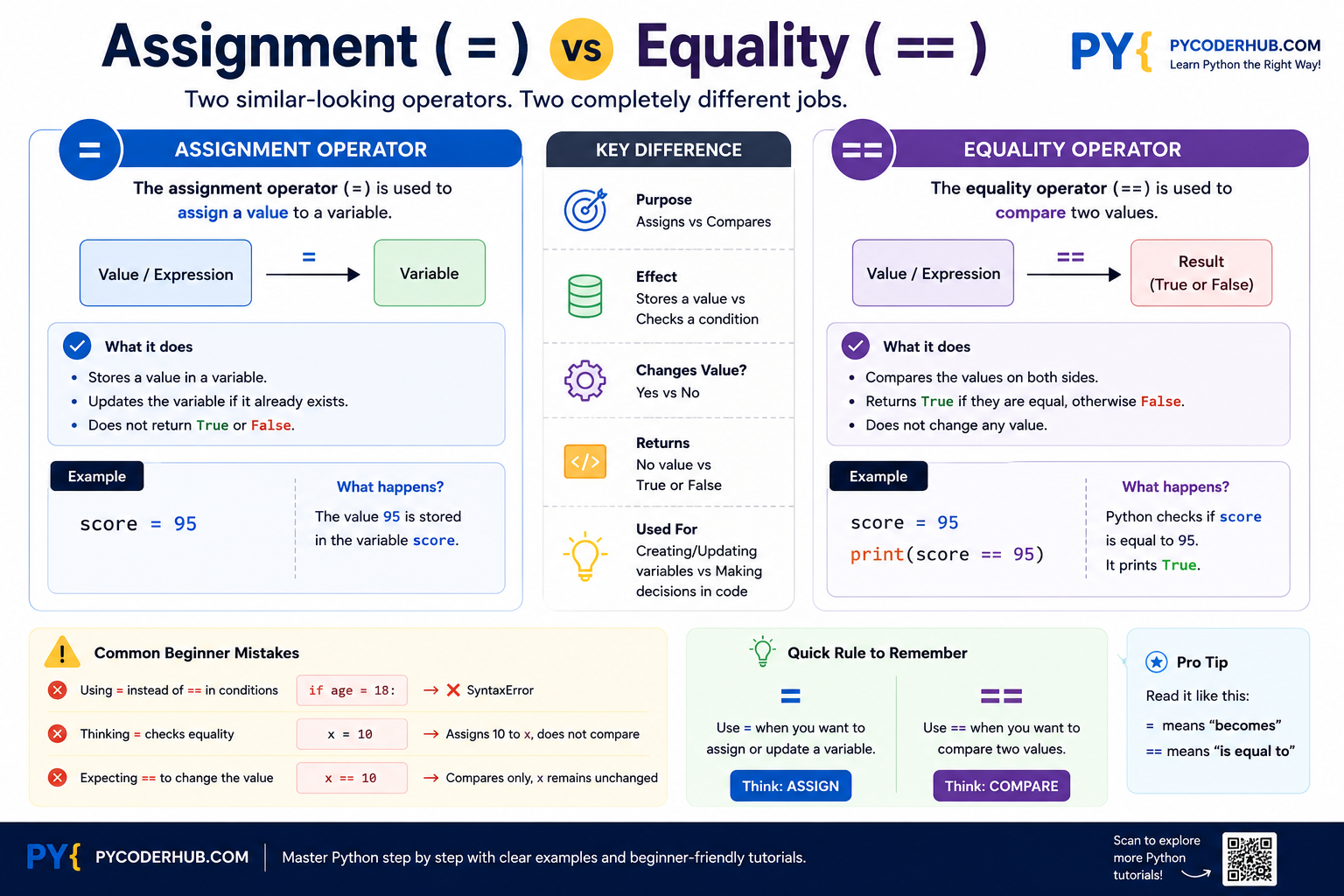
Remember this simple rule: use = when you want to assign or update a variable, and use == when you want to compare two values.
So far, you’ve learned how the basic assignment operator (=) works. Next, we’ll explore another group of assignment operators that combine an operation with an assignment, starting with the addition assignment operator (+=).
Part 4: Addition Assignment (+=) Operator
After learning the basic assignment operator (=), let’s explore the first and one of the most commonly used augmented assignment operators—the addition assignment operator (+=).
The += operator combines addition and assignment into a single operation. Instead of writing a longer assignment statement, you can update a variable using a shorter and more readable syntax.
4.1 What Is the Addition Assignment (+=) Operator?
The addition assignment operator (+=) adds a value to the current value of a variable and then assigns the result back to the same variable.
In other words, the statement:
number += 5is equivalent to:
number = number + 5Python first performs the addition and then stores the new result back into the variable.
Python Terminology Note:
The+=operator is known as an Augmented Assignment Operator because it combines addition and assignment into a single operation. It is also commonly referred to as a Compound Assignment Operator or Shorthand Assignment Operator in many books, tutorials, and programming resources.Throughout the rest of this lesson, every assignment operator you’ll learn after the basic assignment operator (
=)—such as-=,*=,/=,//=,%=, and**=—belongs to this same group of augmented (compound/shorthand) assignment operators. Since they all follow the same idea, we won’t repeat this terminology in each section.
4.2 Syntax
variable += valueThis is equivalent to:
variable = variable + value4.3 How the += Operator Works
Consider the following example:
score = 80

score += 15

print(score)
Output:
95Here’s what happens step by step:
- The variable
scoreinitially stores the value80. - Python evaluates the expression
score + 15. - The result is
95. - Python assigns
95back toscore.
4.4 Adding Numbers
The most common use of += is updating numeric values.
total_marks = 450

total_marks += 25

print(total_marks)
Output:
475This is much cleaner than writing:
total_marks = total_marks + 254.5 Concatenating Strings
The += operator also works with strings.
Instead of performing numerical addition, it concatenates (joins) strings together.
message = "Hello"

message += " Python"

print(message)
Output:
Hello PythonThe statement:
message += " Python"is equivalent to:
message = message + " Python"4.6 Real-World Examples
Keeping Score in a Game
score = 0

score += 10
score += 20

print(score)
Output:
30Counting Website Visitors
visitor_count = 250

visitor_count += 1

print(visitor_count)
Every new visitor increases the counter by one.
Building a Sentence
sentence = "Python"

sentence += " is"
sentence += " awesome!"

print(sentence)
Output:
Python is awesome!4.7 Common Beginner Mistakes
Mistake 1: Using += Before a Variable Exists
count += 1This raises an error because count has not been assigned a value yet.
The correct approach is:
count = 0
count += 1
Always initialize a variable before using an augmented assignment operator.
Mistake 2: Forgetting That += Updates the Variable
Some beginners expect += to create a new variable.
points = 50

points += 25
After execution, the value of points becomes:
75The original value is replaced by the updated value.
Mistake 3: Assuming += Only Works with Numbers
Many beginners think += is only for arithmetic.
In reality, it also works with other data types that support addition, such as strings and lists.
For example:
language = "Py"

language += "thon"

print(language)
Output:
PythonNow that you’ve learned how the addition assignment operator works, let’s continue with another commonly used augmented assignment operator—the subtraction assignment operator (-=).
Part 5: Subtraction Assignment (-=) Operator
The subtraction assignment operator (-=) subtracts a value from the current value of a variable and then assigns the updated result back to the same variable.
Like the += operator, it provides a shorter and more readable way to update a variable without writing a longer assignment statement.
5.1 What Is the Subtraction Assignment (-=) Operator?
The subtraction assignment operator (-=) subtracts a value from a variable and stores the result back in the same variable.
For example:
balance -= 500is equivalent to:
balance = balance - 500Python first performs the subtraction and then assigns the updated value back to the variable.
5.2 Syntax
variable -= valueThis is equivalent to:
variable = variable - value5.3 How the -= Operator Works
Consider the following example:
temperature = 35

temperature -= 5

print(temperature)
Output:
30Here’s what happens step by step:
- The variable
temperatureinitially stores the value35. - Python evaluates the expression
temperature - 5. - The result is
30. - Python assigns
30back totemperature.
5.4 Subtracting Numbers
The -= operator is commonly used to decrease numeric values.
remaining_lives = 5

remaining_lives -= 1

print(remaining_lives)
Output:
4This is much shorter than writing:
remaining_lives = remaining_lives - 15.5 Real-World Examples
Withdrawing Money from a Bank Balance
account_balance = 5000

account_balance -= 1200

print(account_balance)
Output:
3800Reducing Product Stock
available_stock = 75

available_stock -= 8

print(available_stock)
Output:
67This is useful for updating inventory after products are sold.
Decreasing a Countdown Timer
seconds_remaining = 10

seconds_remaining -= 1

print(seconds_remaining)
Output:
9Countdown timers and loop counters often use the -= operator to reduce values repeatedly.
5.6 Common Beginner Mistakes
Mistake 1: Using -= Before Initializing a Variable
count -= 1This raises an error because count has not been assigned a value yet.
The correct approach is:
count = 10
count -= 1
Always initialize a variable before using an augmented assignment operator.
Mistake 2: Using -= with Unsupported Data Types
Unlike +=, which also works with strings and lists, the -= operator is primarily used with numeric data types.
For example, the following code raises an error:
text = "Python"

text -= "Py"
This is because Python does not support subtracting one string from another.
Now that you’ve learned how the subtraction assignment operator works, let’s continue with another useful augmented assignment operator—the multiplication assignment operator (*=).
Part 6: Multiplication Assignment (*=) Operator
The multiplication assignment operator (*=) multiplies the current value of a variable by another value and then assigns the result back to the same variable.
Like the other augmented assignment operators you’ve learned so far, it provides a shorter and more readable way to update a variable without writing a longer assignment statement.
6.1 What Is the Multiplication Assignment (*=) Operator?
The multiplication assignment operator (*=) multiplies a variable by a value and stores the result back in the same variable.
For example:
quantity *= 3is equivalent to:
quantity = quantity * 3Python first performs the multiplication and then assigns the updated value back to the variable.
6.2 Syntax
variable *= valueThis is equivalent to:
variable = variable * value6.3 How the *= Operator Works
Consider the following example:
price = 250

price *= 4

print(price)
Output:
1000Here’s what happens step by step:
- The variable
priceinitially stores the value250. - Python evaluates the expression
price * 4. - The result is
1000. - Python assigns
1000back toprice.
6.4 Multiplying Numbers
The most common use of the *= operator is updating numeric values through multiplication.
salary = 25000

salary *= 2

print(salary)
Output:
50000This is much shorter than writing:
salary = salary * 26.5 Repeating Strings
Unlike the subtraction assignment operator (-=), the multiplication assignment operator can also be used with strings.
When a string is multiplied by an integer, Python repeats the string that many times.
For example:
message = "Hi "

message *= 3

print(message)
Output:
Hi Hi HiThis feature is useful when generating repeated text, decorative separators, or formatted output.
6.6 Real-World Examples
Calculating Bulk Quantities
boxes = 12

boxes *= 5

print(boxes)
Output:
60Increasing a Game Score with a Multiplier
score = 150

score *= 2

print(score)
Output:
300Games often apply score multipliers during bonus rounds or special events.
Creating Decorative Text
line = "-"

line *= 30

print(line)
Output:
------------------------------This is a simple way to create separators in console output.
6.7 Common Beginner Mistakes
Mistake 1: Expecting String Multiplication with Another String
The following code is invalid:
text = "Python"

text *= "3"
Python only allows strings to be multiplied by integers, not by other strings.
The correct version is:
text = "Python"

text *= 3
Mistake 2: Assuming *= Only Works with Numbers
Many beginners think *= is limited to arithmetic.
However, it also works with strings and lists by repeating their contents.
Now that you’ve learned how the multiplication assignment operator works, let’s continue with another arithmetic assignment operator—the division assignment operator (/=).
Part 7: Division Assignment (/=) Operator
The division assignment operator (/=) divides the current value of a variable by another value and then assigns the result back to the same variable.
Like the other augmented assignment operators, it provides a shorter and more readable way to update a variable without writing a longer assignment statement.
7.1 What Is the Division Assignment (/=) Operator?
The division assignment operator (/=) divides a variable by a value and stores the result back in the same variable.
For example:
total_amount /= 4is equivalent to:
total_amount = total_amount / 4Python first performs the division and then assigns the updated value back to the variable.
7.2 Syntax
variable /= valueThis is equivalent to:
variable = variable / value7.3 How the /= Operator Works
Consider the following example:
distance = 120

distance /= 4

print(distance)
Output:
30.0Here’s what happens step by step:
- The variable
distanceinitially stores the value120. - Python evaluates the expression
distance / 4. - The result is
30.0. - Python assigns
30.0back todistance.
7.4 A Key Point: /= Always Produces a Float
One important rule to remember is that the / operator in Python always performs true division, which returns a floating-point (float) result.
Since the /= operator uses the / operator internally, it also produces a float.
For example:
value = 20

value /= 5

print(value)
print(type(value))
Output:
4.0
<class 'float'>
Even though both operands are integers, the result becomes a floating-point number.
This behavior is different from floor division (//), which you’ll learn about in the next section.
7.5 Real-World Examples
Calculating an Average
total_marks = 450

total_marks /= 5

print(total_marks)
Output:
90.0This calculates the average marks across five subjects.
Splitting a Bill
bill_amount = 1800

bill_amount /= 6

print(bill_amount)
Output:
300.0Each person pays an equal share of the bill.
Reducing an Image Size by Half
image_width = 1920

image_width /= 2

print(image_width)
Output:
960.0This kind of calculation is common in graphics and image processing.
7.6 Common Beginner Mistakes
Mistake 1: Expecting an Integer Result
Some beginners expect the following code to produce an integer:
count = 10

count /= 2

print(count)
Output:
5.0Even though the mathematical result is 5, Python returns 5.0 because the / operator always performs true division.
Mistake 2: Dividing by Zero
The following code raises an error:
number = 25

number /= 0
Python raises a ZeroDivisionError because division by zero is undefined.
Always make sure the divisor is not zero before using the /= operator.
Now that you’ve learned how the division assignment operator works, let’s continue with another arithmetic assignment operator—the floor division assignment operator (//=).
Part 8: Floor Division Assignment (//=) Operator
The floor division assignment operator (//=) divides the current value of a variable by another value using floor division and then assigns the result back to the same variable.
Unlike the division assignment operator (/=), which always performs true division and returns a floating-point result, the //= operator performs floor division, discarding the fractional part according to Python’s floor division rules.
8.1 What Is the Floor Division Assignment (//=) Operator?
The floor division assignment operator (//=) divides a variable by a value using floor division and stores the result back in the same variable.
For example:
total_items //= 4is equivalent to:
total_items = total_items // 4Python first performs the floor division and then assigns the updated value back to the variable.
8.2 Syntax
variable //= valueThis is equivalent to:
variable = variable // value8.3 How the //= Operator Works
Consider the following example:
apples = 17

apples //= 5

print(apples)
Output:
3Here’s what happens step by step:
- The variable
applesinitially stores the value17. - Python evaluates the expression
17 // 5. - The result is
3. - Python assigns
3back toapples.
8.4 Understanding Floor Division
The //= operator follows the same rules as the floor division operator (//).
Instead of returning the exact quotient, it returns the floor of the result.
For example:
value = 20

value //= 3

print(value)
Output:
6Since:
20 / 3 = 6.666...the floor of 6.666... is 6.
Floor Division with Floating-Point Numbers
The result of floor division is not always an integer. If either operand is a floating-point number, the result is also a float.
For example:
number = 20.0

number //= 3

print(number)
print(type(number))
Output:
6.0
<class 'float'>
8.5 Real-World Examples
Finding Complete Groups
students = 42

students //= 5

print(students)
Output:
8This calculates how many complete groups of five students can be formed.
Calculating Full Boxes
cookies = 95

cookies //= 12

print(cookies)
Output:
78.6 Common Beginner Mistakes
Mistake 1: Assuming Floor Division Simply Removes the Decimal Part
Many beginners think floor division simply truncates the decimal portion.
This is only true for positive numbers.
For negative numbers, Python returns the largest integer less than or equal to the exact result.
For example:
number = -7

number //= 2

print(number)
Output:
-4Because:
-7 / 2 = -3.5and the mathematical floor of -3.5 is -4, not -3.
Note: We covered this behavior in detail in the Python Floor Division (
//) Operator lesson. If you’d like a deeper explanation with more examples, refer to that lesson.
Mistake 2: Dividing by Zero
The following code raises an error:
value = 50

value //= 0
Python raises a ZeroDivisionError because division by zero is not allowed.
Always ensure the divisor is not zero before using the //= operator.
Now that you’ve learned how the floor division assignment operator works, let’s continue with another arithmetic assignment operator—the modulus assignment operator (%=).
Part 9: Modulus Assignment (%=) Operator
The modulus assignment operator (%=) calculates the remainder after dividing a variable by another value and then assigns the result back to the same variable.
Like the other augmented assignment operators, it provides a shorter and more readable way to update a variable without writing a longer assignment statement.
9.1 What Is the Modulus Assignment (%=) Operator?
The modulus assignment operator (%=) finds the remainder after division and stores the result back in the same variable.
For example:
number %= 4is equivalent to:
number = number % 4Python first calculates the remainder using the modulus operator (%) and then assigns that result back to the variable.
9.2 Syntax
variable %= valueThis is equivalent to:
variable = variable % value9.3 How the %= Operator Works
Consider the following example:
number = 23

number %= 5

print(number)
Output:
3Here’s what happens step by step:
- The variable
numberinitially stores the value23. - Python evaluates the expression
23 % 5. - The remainder is
3. - Python assigns
3back tonumber.
9.4 Understanding the Remainder
The %= operator follows the same rules as the modulus operator (%).
For example:
value = 18

value %= 7

print(value)
Output:
4Since:
18 ÷ 7 = 2 remainder 4the remainder (4) becomes the new value of value.
Note: We explored how the modulus operator works in detail, including its behavior with negative numbers, in the Python Modulus (
%) Operator lesson. If you’d like a deeper explanation, refer to that lesson.
9.5 Real-World Examples
Checking Whether a Number Is Even or Odd
number = 17

number %= 2

print(number)
Output:
1A remainder of 0 indicates an even number, while a remainder of 1 indicates an odd number.
Finding the Remaining Seats
students = 38

students %= 6

print(students)
Output:
2This calculates how many students remain after forming groups of six.
9.6 Common Beginner Mistakes
Mistake 1: Confusing %= with Percentage Calculations
Some beginners assume the % symbol always represents a percentage.
For example:
value %= 20does not calculate 20% of value.
Instead, it calculates the remainder after dividing value by 20.
Mistake 2: Forgetting That the Variable Is Updated
Consider the following code:
number = 14

number %= 5
After execution, number becomes:
4The original value (14) is replaced by the remainder (4).
Now that you’ve learned how the modulus assignment operator works, let’s continue with the final arithmetic assignment operator—the exponentiation assignment operator (**=).
Part 10: Exponentiation Assignment (**=) Operator
The exponentiation assignment operator (**=) raises the current value of a variable to the power of another value and then assigns the result back to the same variable.
Like the other augmented assignment operators, it provides a shorter and more readable way to update a variable without writing a longer assignment statement.
10.1 What Is the Exponentiation Assignment (**=) Operator?
The exponentiation assignment operator (**=) raises a variable to a specified power and stores the result back in the same variable.
For example:
number **= 3is equivalent to:
number = number ** 3Python first performs the exponentiation and then assigns the updated value back to the variable.
10.2 Syntax
variable **= valueThis is equivalent to:
variable = variable ** value10.3 How the **= Operator Works
Consider the following example:
number = 4

number **= 3

print(number)
Output:
64Here’s what happens step by step:
- The variable
numberinitially stores the value4. - Python evaluates the expression
4 ** 3. - The result is
64. - Python assigns
64back tonumber.
10.4 Real-World Examples
Calculating the Area of a Square
side_length = 12

side_length **= 2

print(side_length)
Output:
144This calculates the square of the side length.
Calculating the Volume of a Cube
edge = 4

edge **= 3

print(edge)
Output:
64Cubing a value is commonly used when calculating the volume of a cube.
10.5 Common Beginner Mistakes
Mistake 1: Confusing **= with Multiplication
Some beginners mistakenly think:
number **= 2means:
number *= 2These are different operations.
For example:
number = 5

number **= 2

print(number)


number = 5

number *= 2

print(number)
Output:
25
10
The **= operator raises a value to a power, while the *= operator multiplies it by another value.
Mistake 2: Expecting ^= to Mean Exponentiation
Beginners coming from mathematics sometimes assume the ^ symbol represents exponentiation.
In Python, this is not true.
The exponentiation operator is:
**and the exponentiation assignment operator is:
**=The ^ symbol is used for bitwise XOR, not exponentiation.
Now that you’ve learned all of Python’s arithmetic assignment operators, let’s step back and explore why Python provides these augmented assignment operators and how they make code shorter, cleaner, and easier to read.
Part 11: Why Python Provides Augmented Assignment Operators
By now, you’ve learned all of Python’s arithmetic augmented assignment operators, including +=, -=, *=, /=, //=, %=, and **=.
A natural question many beginners ask is:
If I can already write
number = number + 5, then why does Python also providenumber += 5?
The answer is simple: augmented assignment operators make code shorter, cleaner, and easier to read.
Instead of repeating the same variable name on both sides of the assignment, you can perform the operation and update the variable in a single statement.
For example, these two statements produce the same final result:
score = score + 10score += 10However, the second version is shorter and avoids repeating the variable name, making the code easier to write and understand.
Benefits of Augmented Assignment Operators
Augmented assignment operators offer several practical advantages:
- Less typing: They reduce the amount of code you need to write.
- Better readability: Shorter statements are often easier to understand at a glance.
- Less repetition: The variable name appears only once, making the code cleaner.
- Reduced chance of mistakes: Repeating long variable names increases the risk of typing errors, which augmented assignment operators help avoid.
- Common programming practice: These operators are supported by Python and many other programming languages, making them a familiar and widely accepted coding style.
For these reasons, you’ll frequently encounter augmented assignment operators in Python code, especially when updating counters, totals, scores, balances, and other values that change during program execution.
Python Learning Tip:
In most everyday situations, statements such asnumber += 5andnumber = number + 5produce the same final value. However, they are not always identical internally, particularly when working with mutable objects such as lists. We’ve already explored the concepts of mutable and immutable objects in a dedicated lesson, and you’ll gain an even deeper understanding of this behavior when you learn about Python’s built-inid()function later in this course.
Lesson Summary
In this lesson, you learned the fundamentals of Python Assignment Operators and how they are used to assign and update values in Python programs. Here’s a quick recap of the key concepts:
- Python Assignment Operators
- Assignment operators are used to assign values to variables or update existing values.
- They are among the most frequently used operators because almost every Python program relies on variable assignment.
- Why They Are Called Assignment Operators
- The term assignment refers to associating (binding) a variable name with a value or object.
- Although Assignment Operators is a widely accepted educational category, it is not an official category defined in Python’s language specification.
- You also learned that terms like Augmented Assignment Operators, Compound Assignment Operators, and Shorthand Assignment Operators are commonly used interchangeably in programming resources.
- Overview of Python Assignment Operators
- Python provides one basic assignment operator (
=) and several augmented assignment operators such as+=,-=,*=,/=,//=,%=, and**=. - In this lesson, you focused on the arithmetic assignment operators, while the remaining assignment operators will be covered in their respective chapters.
- Python provides one basic assignment operator (
- Basic Assignment Operator (
=)- The
=operator assigns a value or expression to a variable. - You learned how to assign literals, expressions, and the values of other variables.
- You also explored reassignment, dynamic typing, and the concept of variable binding.
- The
- Assignment (
=) vs Equality (==)- The assignment operator (
=) stores or updates a value in a variable. - The equality operator (
==) compares two values and returnsTrueorFalse. - Understanding this difference helps avoid one of the most common beginner mistakes in Python.
- The assignment operator (
- Addition Assignment Operator (
+=)- Adds a value to the current value of a variable and stores the updated result.
- You also saw how it can concatenate strings and extend lists.
- Subtraction Assignment Operator (
-=)- Subtracts a value from a variable and stores the updated result.
- Commonly used for counters, balances, and countdowns.
- Multiplication Assignment Operator (
*=)- Multiplies the current value of a variable and stores the result.
- Besides numbers, it can also repeat strings and lists when multiplied by an integer.
- Division Assignment Operator (
/=)- Performs true division and stores the result back in the variable.
- Remember that
/=always produces a floating-point (float) result.
- Floor Division Assignment Operator (
//=)- Performs floor division before storing the updated value.
- It follows the same floor division rules as the
//operator, including its behavior with negative numbers.
- Modulus Assignment Operator (
%=)- Calculates the remainder after division and stores it back in the variable.
- Frequently used for tasks such as checking even or odd numbers and determining leftover quantities.
- Exponentiation Assignment Operator (
**=)- Raises a variable to a specified power and stores the result.
- Useful for mathematical calculations involving squares, cubes, and higher powers.
- Why Python Provides Augmented Assignment Operators
- Augmented assignment operators reduce repetition, improve readability, and make code easier to write and maintain.
- They are widely used throughout Python and many other programming languages because they offer a concise way to update variables.
Historical Note: The Walrus Operator (:=)
In Python 3.8, the walrus operator (:=) was introduced as the assignment expression operator.
Unlike the assignment operators covered in this lesson, the walrus operator allows you to assign a value to a variable as part of an expression.
For example:
The following code is invalid:
(number = 3)This raises a SyntaxError because the assignment operator (=) can only be used as a statement, not as part of an expression.
However, using the walrus operator is valid:
print(number := 3)Output:
3Here, the walrus operator assigns the value 3 to number and returns that value as part of the expression, allowing print() to display it immediately.
The walrus operator is primarily used in situations such as loops and conditional statements, where assigning and using a value in a single expression can make code more concise.
Since it introduces several concepts beyond the scope of this lesson, we’ll explore the walrus operator in detail in a dedicated lesson later in this course.
Conclusion
Python Assignment Operators are among the most fundamental tools you’ll use throughout your programming journey. Whether you’re assigning a value to a variable for the first time or updating it as your program runs, these operators make it possible to store, modify, and manage data efficiently.
In this lesson, you learned not only how the basic assignment operator (=) works, but also how Python’s arithmetic augmented assignment operators (+=, -=, *=, /=, //=, %=, and **=) provide a cleaner and more concise way to update variables. Along the way, you also explored important concepts such as variable binding, the difference between assignment and equality, and the purpose of augmented assignment operators.
As you continue learning Python, you’ll notice that assignment operators appear almost everywhere—from simple calculations and counters to loops, functions, and larger programs. Building a solid understanding of how they work now will make it much easier to read, write, and understand Python code in future chapters.

One thought on “Python Assignment Operators Explained: Complete Guide with Examples”