
Introduction
In Lesson 1, we learned what Python type hinting is, why it was introduced, and how it helps make Python code easier to understand and maintain. Then in Lesson 2, we explored Python type annotations and learned how to write type hints for variables, functions, parameters, and return values.
Now it is time to move into the most practical part of type hinting — using Python’s built-in types directly as type hints.
In this lesson, we’ll explore Python Built-in Type Hints Explained with practical examples. You’ll learn how modern Python uses built-in types like int, str, list, dict, tuple, and set to describe expected data types clearly and cleanly without needing extra imports in most cases.
This lesson will also help you understand how modern Python typing syntax works, how nested type hints are written, and why collection type hints are one of the most important parts of real-world Python code.
What You’ll Learn
In this lesson, you’ll learn:
- How to use primitive built-in types like
int,float,str,bool, andbytes - How to annotate lists, dictionaries, tuples, and sets
- The difference between fixed-length and variable-length tuples
- How nullable values work using
X | None - How to write nested collection type hints
- Modern Python 3.9+ syntax vs older
typingmodule syntax - Common beginner mistakes and best practices
- How built-in type hints are used together in real-world examples
Now that you understand what this lesson is about, let’s start with: What Are Built-in Type Hints?
1. What Are Built-in Type Hints?
Python already comes with many built-in data types such as int, str, float, list, dict, and tuple. Normally, we use these types to create and work with data in our programs.
For example:
user_age = 25
user_name = "PyCoder"
scores = [85, 90, 78]
Here:
25is an integer"PyCoder"is a string[85, 90, 78]is a list
These are all regular Python built-in types.
But modern Python allows these same built-in types to also be used as type hints
For example:
user_age: int = 25
user_name: str = "PyCoder"
scores: list[int] = [85, 90, 78]
Now the code does not just store data — it also clearly describes what kind of data is expected.
This is the core idea behind built-in type hints.
Built-in Types as Type Descriptions
When Python sees:
user_age: intthe int part acts as a type description.
It tells:
- developers
- IDEs
- static type checkers
that this variable is expected to contain integer values.
Similarly:
user_name: strsuggests the variable should contain text data.
And:
scores: list[int]means:
- this is a list
- and the list is expected to contain integers
This makes Python code easier to understand without reading the entire program logic.
Built-in Type Hints Do Not Create New Types
One important thing to understand is that type hints do not change how Python itself works.
This code:
user_age: int = 25does not create a “special typed variable.”
The variable still behaves like a normal Python variable.
The annotation simply adds extra information about the expected type.
This is why Python type hints are often described as:
- optional
- informational
- non-enforcing
We will explore this behavior more deeply later in the lesson.
Modern Python Made Built-in Type Hints Much Cleaner
In older Python versions, collection type hints usually required importing types from the typing module.
For example:
from typing import List

user_scores: List[int] = [85, 90, 78]
But modern Python now allows this cleaner syntax:
user_scores: list[int] = [85, 90, 78]This newer style:
- is easier to read
- requires fewer imports
- feels more natural
- is now the preferred modern approach
You’ll see this modern syntax throughout the rest of this lesson.
Now that you understand what built-in type hints are and why they matter, let’s start exploring the most commonly used built-in type hints in Python.
2. Simple / Primitive Built-in Types
Primitive built-in types are the most basic and commonly used type hints in Python.
These types are used to represent:
- numbers
- text
- boolean values
- binary data
- general objects
Even in large real-world projects, these simple type hints appear everywhere because most complex data structures are ultimately built from these smaller fundamental types.
Let’s understand each one step by step.
int Type Hint
The int type hint represents whole numbers.
This includes:
- positive numbers
- negative numbers
- zero
Examples:
user_age: int = 25
temperature: int = -5
total_score: int = 0
Function example:
def double_score(score: int) -> int:
    return score * 2
Here:
- the parameter
scoreis expected to be an integer - the function is also expected to return an integer
The int type hint is commonly used for:
- counters
- IDs
- quantities
- indexes
- scores
- age values
float Type Hint
The float type hint represents decimal numbers.
Examples:
product_price: float = 99.99
temperature: float = 36.5
discount_percentage: float = 12.5
Function example:
def calculate_discount(price: float) -> float:
    return price * 0.9
The float type hint is commonly used for:
- prices
- measurements
- percentages
- scientific calculations
One important thing beginners should know is that Python allows integers to be used where floats are expected.
For example:
product_price: float = 100This is still valid because integers can safely behave like decimal numbers in many situations.
str Type Hint
The str type hint represents text data.
Examples:
user_name: str = "PyCoder"
website_url: str = "https://pycoderhub.com"
welcome_message: str = "Welcome to Python"
Function example:
def greet_user(name: str) -> str:
    return f"Hello, {name}"
The str type hint is one of the most commonly used type hints in Python because text data appears almost everywhere in programming.
It is commonly used for:
- names
- messages
- URLs
- file paths
- email addresses
- user input
bool Type Hint
The bool type hint represents boolean values.
A boolean value can only be:
Trueor:
FalseExamples:
is_logged_in: bool = True
has_permission: bool = False
Function example:
def is_adult(age: int) -> bool:
    return age >= 18
Here the function returns:
Trueif age is 18 or aboveFalseotherwise
The bool type hint is commonly used for:
- flags
- conditions
- toggle states
- permission checks
A common beginner confusion is thinking values like "yes" or "no" are booleans.
They are not.
These are strings:
"yes"
"no"
Actual boolean values are only:
True
False
bytes Type Hint
The bytes type hint represents binary data.
Examples:
file_content: bytes = b"Hello"
image_data: bytes = b"\x89PNG"
Function example:
def process_audio(data: bytes) -> bytes:
    return data.upper()
The bytes type is commonly used when working with:
- files
- images
- audio
- networking
- encoded data
At first, bytes may look confusing because most beginner programs mainly work with strings instead of raw binary data.
But in lower-level operations, binary data becomes very important.
object Type Hint
The object type hint is much broader than the other primitive types.
In Python, almost everything is an object.
That means values like:
- strings
- integers
- lists
- dictionaries
- functions
all ultimately inherit from object.
Example:
data: object = "Hello"This is valid.
And this is also valid:
data: object = 100Function example:
def log_data(value: object) -> None:
    print(value)
The object type hint basically means:
“This value can be any Python object.”
However, there is an important tradeoff.
When you use a very broad type like object, Python tools lose detailed information about the actual value type.
For example, if a variable is typed as:
user_name: stran IDE can safely suggest string methods like:
upper()
lower()
split()
But with:
value: objectthe IDE no longer knows what operations are safe.
So in real-world code:
- use
objectonly when necessary - prefer more specific type hints whenever possible
These primitive built-in type hints form the foundation of modern Python type hinting.
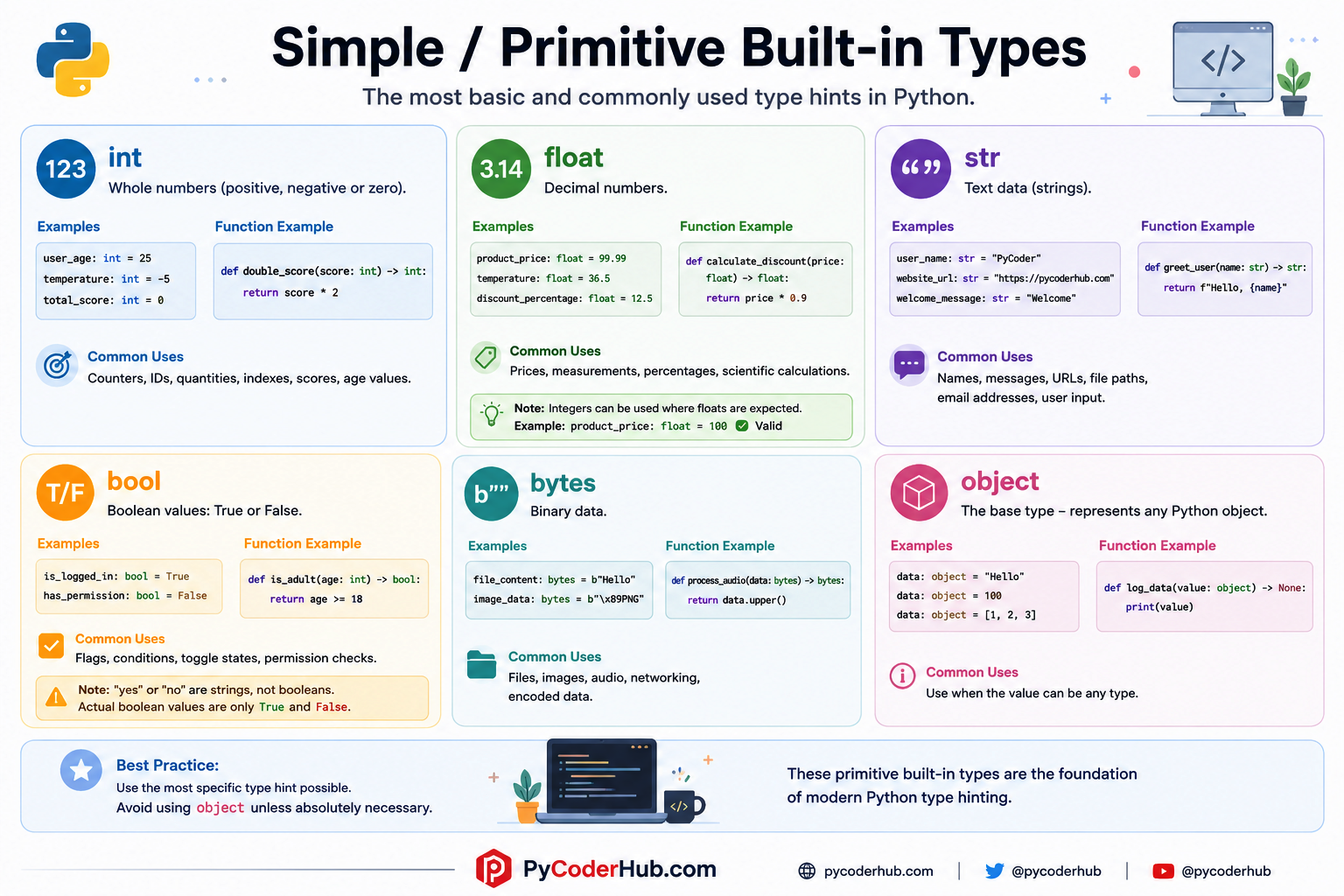
Python Primitive Built-in Type Hints Infographic
So these are the simple / primitive built-in type hints you learned in the section above. Before moving to the next section, let’s quickly summarize what we learned through the infographic below.
Now that you understand the foundation of primitive built-in type hints, let’s move to one special built-in value that behaves slightly differently from normal types: None.
3. The Special Role of None
Unlike types such as int, str, or list, the value None has a very unique role in Python.
It represents:
the absence of a value
or:
“nothing meaningful is currently stored here.”
Because of this special behavior, None appears very frequently in Python programs and is also extremely common in type hints.
You’ll often see it used:
- in function return types
- as a default parameter value
- in nullable variables
- when a value may or may not exist
Let’s understand its role step by step.
-> None as a Return Type
One of the most common places beginners first encounter None type hints is in function return annotations.
Example:
def log_message(message: str) -> None:
    print(message)
This function performs an action:
- it prints a message
But it does not return any meaningful result.
That is why the return type is:
-> NoneThis explicitly tells readers:
“This function is not meant to return useful data.”
Why Explicit None Is Important
Now compare these two functions carefully.
Function with -> None
def save_file(filename: str) -> None:
    print(f"Saving {filename}")
Function without return annotation
def save_file_unannotated(filename: str):
    print(f"Saving {filename}")
Both functions behave similarly at runtime.
However, from a type hinting perspective, they communicate different things.
The first function explicitly says:
“This function intentionally returns nothing meaningful.”
The second function simply has:
- no return annotation
- unknown return intent
This difference becomes important for:
- static type checkers
- IDE analysis
- large codebases
- API readability
Functions Without return Still Return None
This is a very important Python behavior beginners often miss.
Even if a function does not explicitly write:
return NonePython still automatically returns None.
Example:
def greet() -> None:
    print("Hello")
Internally, Python treats it similarly to:
def greet() -> None:
    print("Hello")
    return None
This is why functions that only perform actions usually use:
-> Noneas their return annotation.
None as a Possible Value
None is not only used in return types.
It can also be used as a normal value.
Example:
user_name: str | None = NoneThis means:
user_namemay contain a string- or it may contain
None, means a string value is expected, but the value may temporarily be missing.
In other words:
- the value is optional
- it may not exist yet
This pattern is extremely common in real-world Python programs.
Always remember:
str | Nonemeans:
“This variable is allowed to contain either a string OR the value None.”
It does not mean both at the same time.
Nullable Values in Python Type Hints
When a value can contain:
- a normal type
- or
None
it is called a nullable type.
Modern Python writes this using the union operator (|).
Example:
profile_image: str | None = NoneMeaning:
- the variable may store a string
- or no value at all
Function example:
def find_user(user_id: int) -> dict[str, str] | None:
    if user_id == 1:
        return {"name": "PyCoder"}

    return None
This function may:
- return a dictionary
- or return
Noneif the user is not found
This style appears constantly in modern Python codebases.
Older Style: Optional[T]
Before modern union syntax became common, Python typically used Optional from the typing module.
Example:
from typing import Optional

user_name: Optional[str] = None
This means exactly the same thing as:
user_name: str | None = NoneBoth are equivalent.
None Is an Actual Object in Python
Another interesting detail is that None itself is a real Python object.
Its type is:
type(None)which produces:
<class 'NoneType'>So while None represents “nothing,” it is still a valid Python object internally.
Why None Matters So Much in Real Python Code
In real-world applications, values are often unavailable temporarily.
For example:
- a database query may fail
- a user profile may not exist
- an API may return missing data
- an image may not be uploaded yet
In these situations, Python commonly uses None to represent:
- missing data
- unavailable values
- unfinished states
That is why understanding None properly is one of the most important parts of learning Python type hints.
4. Collection Type Hints
Most applications deal with collections of data:
- lists of users
- dictionaries of settings
- sets of unique IDs
- tuples containing grouped information
This is where collection type hints become extremely important.
Collection type hints allow us to describe:
- what kind of collection we are using
- and what types of values exist inside that collection
Let’s understand each one step by step.
list[T] Type Hint
Lists are one of the most commonly used collection types in Python.
A list type hint is written using:
list[TYPE]where TYPE represents the expected item type inside the list.
Example:
student_names: list[str] = ["Alice", "Bob", "Charlie"]This means:
student_namesis a list- every item is expected to be a string
Another example:
scores: list[int] = [85, 90, 78]This list is expected to contain integers.
Now consider this example:
scores: list[int] = [85, 90, 78, "Python", "Programming"]This program will still run successfully because Python does not strictly enforce type hints at runtime.
However, now we are no longer following the type hint correctly.
The annotation says:
list[int]which means:
“this list should contain only integers.”
But the actual list now contains both:
intstr
Because of this, most IDEs and static type checkers will show a warning similar to:
Expected type 'list[int]', got 'list[int | str]' insteadNotice something important here.
Since the list now contains both integers and strings, the IDE automatically interprets the list as:
list[int | str]This is called a union type.
It means:
“this list contains either integers or strings.”
Another example: function
def get_passing_scores(scores: list[int]) -> list[int]:
    return [score for score in scores if score >= 50]
Here:
- the parameter is a list of integers
- the function also returns a list of integers
Why list[int] Is Better Than Just list
You can also use a plain list as a type hint instead of list[TYPE].
For example:
scores: listThis is called a generic list annotation because it does not specify what kind of values the list should contain.
Although this is valid Python syntax, it is usually not very helpful because it only tells us that the variable is a list, without describing the type of items stored inside it.
Compare these two annotations:
Generic list
scores: listSpecific list
scores: list[int]The first version only tells us:
“this is some kind of list.”
But the second version tells us:
“this list should contain integers.”
This extra specificity helps:
- developers
- IDEs
- static type checkers
understand the code more accurately.
In modern Python, it is usually better to be as specific as reasonably possible.
dict[K, V] Type Hint
Dictionaries store:
- keys
- values
So dictionary type hints require two types:
dict[KEY_TYPE, VALUE_TYPE]Example:
user_ages: dict[str, int] = {
    "Alice": 30,
    "Bob": 25
}
This means:
- keys are strings
- values are integers
Function example:
def get_user_age(users: dict[str, int], name: str) -> int:
    return users[name]
This style is extremely common in:
- configuration systems
- API responses
- JSON-like data
- application settings
Dictionary Type Hints Describe Structure
Consider this annotation:
settings: dict[str, bool]This instantly tells us:
- setting names are strings
- each setting stores a boolean value
Without the type hint, we would need to inspect the entire dictionary manually to understand its structure.
This is one reason dictionaries benefit enormously from type hints.
You can also use a generic dict annotation instead of dict[KEY_TYPE, VALUE_TYPE].
For example:
settings: dictThis is valid, but it only tells us:
“this variable is some kind of dictionary.”
It does not explain:
- what type the keys should be
- what type the values should be
tuple[T1, T2, …]
Tuples behave differently from lists.
Lists usually store:
- many similar values
But tuples often store:
- grouped positional information
For example:
coordinates: tuple[float, float] = (45.2, 18.7)This means:
- first value is a float
- second value is also a float
Another example:
user_record: tuple[str, int, bool] = ("PyCoder", 25, True)Here:
- position 1 → string
- position 2 → integer
- position 3 → boolean
This is called a fixed-length tuple.
The number and order of elements matter.
Variable-Length Tuples
Tuples also support variable-length patterns.
Example:
numbers: tuple[int, ...] = (1, 2, 3, 4, 5)This means:
- the tuple can contain any number of elements
- but every element should be an integer
The ... here is called:
- Ellipsis
and it has a very special meaning inside tuple type hints.
It tells Python:
“repeat this type for all remaining elements.”
This syntax is unique to tuples and often surprises beginners at first.
Empty Tuple Type Hint
Python also allows empty tuple annotations.
Example:
empty_values: tuple[()] = ()This specifically represents:
- a tuple with zero elements
This is less common in beginner code but useful to know exists.
Unlike tuples, lists do not support a special “empty list” structure annotation.
For example, this is NOT valid:
empty_values: list[()] = []because lists are designed to describe:
“what type of elements the list may contain”
not:
“how many elements exist.”
Single Item Tuple Type Hint
Single-item tuples are one of the most common beginner confusion points in Python.
Many beginners write something like this:
user_tup: tuple[str] = ("PyCoder")At first glance, this may look like a tuple containing one string value.
But it is actually NOT a tuple.
Instead:
("PyCoder")is treated as a normal string expression surrounded by parentheses.
So the actual value becomes:
"PyCoder"not a tuple.
Because of this, IDEs and static type checkers will often show a warning since the annotation expects a tuple, but the assigned value is just a string.
This is a very important Python rule:
Parentheses do not create tuples.
The comma creates the tuple.
So to create a single-item tuple correctly, you must write:
("PyCoder",)Notice the trailing comma.
Now Python correctly recognizes it as a tuple.
set[T] Type Hint
Sets are unordered collections of unique values.
Type hint syntax:
set[TYPE]Example:
unique_tags: set[str] = {"python", "typing","tutorial"}This means:
- the set stores strings
- duplicate values are automatically removed
Function example:
def get_unique_ids(ids: list[int]) -> set[int]:
    return set(ids)
This function:
- accepts a list of integers
- returns a set of unique integers
Collection Type Hints Improve Readability Enormously
Compare these two function definitions.
Without detailed collection hints
def process_data(data):
    ...
We know almost nothing about the expected structure.
Now compare:
def process_data(data: list[dict[str, int]]) -> None:
    ...
Now we immediately understand:
datais a list- each item is a dictionary
- dictionary keys are strings
- dictionary values are integers
This level of clarity becomes extremely valuable in larger codebases.
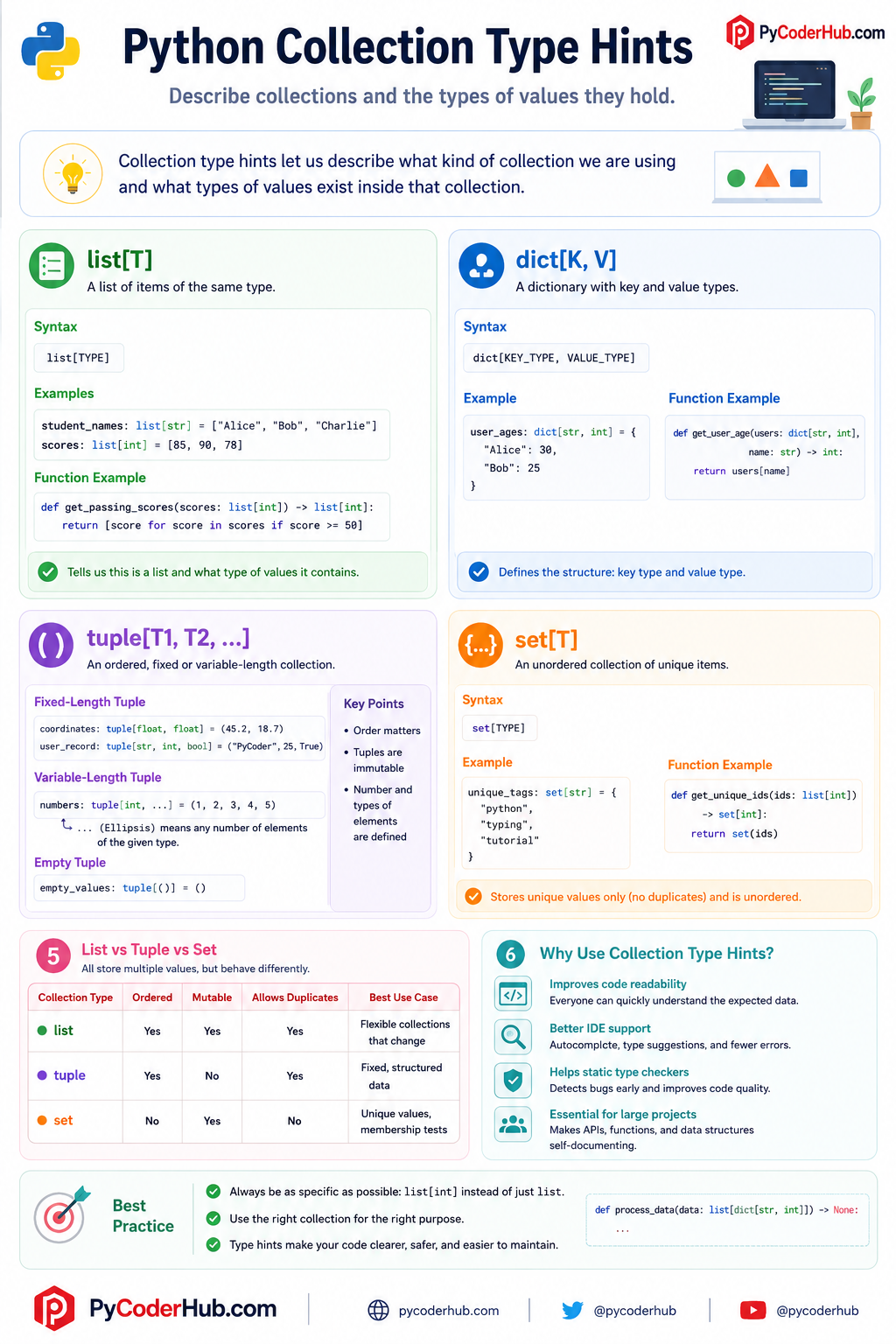
Python Collection Type Hints Infographic
So list, dict, tuple, and set are the most important collection type hints you’ll use in modern Python. Before moving to the next section, let’s quickly summarize these collection type hints through the infographic below.
Collection type hints are one of the biggest reasons modern Python typing became so useful in real-world development.
5. Homogeneous vs Heterogeneous Collections
Homogeneous vs Heterogeneous Collections
Now that you understand collection type hints like:
list[str]dict[str, int]tuple[int, str]set[float]
there is another very important concept you should understand:
homogeneous collections vs heterogeneous collections
At first, these names may sound technical, but the idea behind them is actually very simple.
The difference is based on this question:
“Does the collection store the same type of values, or different types of values?”
Understanding this concept helps you write:
- better type hints
- cleaner data structures
- more predictable Python code
What Is a Homogeneous Collection?
A homogeneous collection stores:
values of the same type
For example:
scores: list[int] = [85, 90, 78]Every value inside the list is:
- an integer
So this is a homogeneous collection.
Why Homogeneous Collections Are Common
Homogeneous collections are extremely common because many real-world datasets naturally contain similar values.
For example:
- a list of usernames
- a list of prices
- a set of IDs
- a tuple of coordinates
These usually contain one consistent type of data.
This consistency helps:
- readability
- validation
- autocomplete
- static type checking
It also makes the program logic easier to reason about.
Homogeneous Collection Examples
List of integers
numbers: list[int] = [1, 2, 3, 4]Set of strings
tags: set[str] = {
    "python",
    "typing",
    "tutorial"
}
Tuple of floats
coordinates: tuple[float, float] = (45.3, 19.2)Even though the tuple has multiple values:
- all values are floats
So it is still homogeneous.
What Is a Heterogeneous Collection?
A heterogeneous collection stores:
different types of values together
Example:
user_record: tuple[str, int, bool] = (
    "PyCoder",
    25,
    True
)
This tuple contains:
- a string
- an integer
- a boolean
So it is heterogeneous.
Tuples Are Commonly Heterogeneous
Unlike lists and sets, tuples are very often used for heterogeneous data.
This is because tuples usually represent:
- grouped positional information
For example:
product: tuple[str, float, int]might represent:
(name, price, quantity)Each position has a different meaning.
So different types make sense here.
Lists Can Also Be Heterogeneous
Python itself allows lists to contain mixed types.
Example:
mixed_values: list = [
    "PyCoder",
    25,
    True,
    99.5
]
This is valid Python.
But from a type hinting perspective, this creates a problem:
What type should the list contain?
Because the items are inconsistent.
Type Hinting Heterogeneous Lists
Sometimes heterogeneous lists are intentional.
In such cases, you may see:
list[str | int | bool]Example:
mixed_values: list[str | int | bool] = [
    "PyCoder",
    25,
    True
]
This means:
- each item may be:
- a string
- an integer
- or a boolean
This uses a union type (|) which we’ll explore more deeply in a later lesson.
Tuple Structure vs List Flexibility
This is one of the biggest conceptual differences between lists and tuples in type hinting.
Lists usually represent:
- many similar values
Example:
scores: list[int]Tuples usually represent:
- fixed structured data
Example:
employee: tuple[str, int, bool]This distinction helps make your code much clearer.
Important Beginner Insight
Beginners often think:
“A collection is just a collection.”
But type hinting introduces a much deeper idea:
- what type of data exists inside the collection
- whether types are consistent
- whether positions matter
- whether structure matters
This is one reason modern type hinting makes Python code much more expressive than plain unannotated code.
6. Nested Collection Type Hints
So far, we have worked with simple collection type hints such as:
list[str]
dict[str, int]
tuple[float, float]
set[int]
These describe collections containing single-level values.
But in real-world Python programs, data structures are often more complex.
For example:
- a list may contain dictionaries
- a dictionary may contain lists
- a tuple may contain sets
- collections may contain other collections inside them
This is where nested collection type hints become important.
A nested type hint simply means:
one collection type hint exists inside another collection type hint
At first, nested types can look intimidating, but they become much easier to understand once you learn to read them layer by layer.
Understanding Nested Types Step by Step
Consider this type hint:
list[dict[str, int]]This may look complicated initially, but let’s break it down carefully.
Outer layer
list[...]This tells us:
- the main structure is a list
Inner layer
dict[str, int]This tells us:
- each item inside the list is a dictionary
- dictionary keys are strings
- dictionary values are integers
So the full meaning becomes:
“A list containing dictionaries where keys are strings and values are integers.”
Example: List of Dictionaries
student_scores: list[dict[str, int]] = [
    {"Alice": 90},
    {"Bob": 85},
    {"Charlie": 95}
]
Here:
- the outer structure is a list
- each list item is a dictionary
- dictionary keys are strings
- dictionary values are integers
This kind of structure appears frequently when working with:
- JSON data
- APIs
- databases
- configuration systems
Dictionary Containing Lists
Nested structures can also work the other way around.
Example:
scores_by_subject: dict[str, list[int]] = {
    "math": [85, 90, 78],
    "science": [92, 88, 95]
}
Let’s read this carefully.
Outer structure
dict[...]Main structure:
- dictionary
Dictionary key type
strKeys are strings.
Dictionary value type
list[int]Values are lists of integers.
So this structure means:
“A dictionary where each key is a string and each value is a list of integers.”
How to Read Nested Type Hints More Easily
A common beginner mistake is trying to understand the entire nested type all at once.
Instead:
- start from the outer structure
- then move inward gradually
For example:
dict[str, list[int]]Read it like this:
- Main structure → dictionary
- Keys → strings
- Values → lists
- List items → integers
This step-by-step approach makes nested types much easier to understand.
Deep Nesting Can Become Hard to Read
Although nested type hints are powerful, too much nesting can quickly reduce readability.
Example:
dict[str, list[dict[str, tuple[int, str]]]]This is still valid.
But reading it becomes mentally exhausting.
When nested structures become too deep, developers often switch to:
- custom classes
- dataclasses
TypedDict- type aliases
These topics are usually introduced later in advanced type hinting lessons.
Best Practice Recommendation
For nested collection type hints:
Keep structures as simple as possible
Prefer:
dict[str, list[int]]over unnecessarily complex designs.
Read nested types from outside to inside
This single habit removes most beginner confusion.
Use meaningful variable names
Good names make nested structures much easier to understand.
Example:
scores_by_subject: dict[str, list[int]]is much clearer than:
data: dict[str, list[int]]Nested collection type hints are extremely common in modern Python applications because real-world data is rarely flat or simple.
7. The Any Type Hint
So far in this lesson, we have focused heavily on writing precise type hints such as:
list[str]
dict[str, int]
tuple[float, float]
hese type hints clearly describe:
- what kind of data is expected
- what operations are likely safe
- and how the data structure should behave
But sometimes, a value truly can be:
- anything
- unknown
- dynamic
- or impossible to predict ahead of time
This is where Python provides a special type hint called:
AnyWhat Is Any?
Any is a special type from the typing module.
Example:
from typing import AnyWhen a variable is annotated as Any, it basically means:
“Type checking is disabled for this value.”
In other words:
- the value can be any type
- any operation is allowed
- type checkers stop enforcing strict rules
Basic Example
from typing import Any

data: Any = "PyCoder"
This is valid.
And later:
data = 100is also valid.
The variable can freely change types because Any removes type restrictions.
Any vs object
Beginners often confuse:
Anyobject
because both seem to accept all types.
But they behave very differently.
object Still Preserves Safety
Example:
value: object = "Hello"This accepts any value.
However, type checkers still behave cautiously.
For example:
value.upper()may produce warnings because:
objectdoes not guarantee.upper()exists
The type checker only knows:
“this is some generic Python object.”
Any Disables Type Checking
Now compare:
from typing import Any

value: Any = "Hello"
With Any, this becomes acceptable:
value.upper()
value.non_existing_method()
value + 100
Type checkers usually allow all of this because:
Anyturns off strict checking
This is the biggest conceptual difference between:
object- and
Any
Why Any Can Be Dangerous
At first, Any may seem convenient because it removes restrictions.
But excessive use of Any weakens the entire purpose of type hinting.
For example:
from typing import Any

user_data: Any = get_data()
Now type checkers can no longer help verify:
- available methods
- expected structure
- safe operations
- possible mistakes
This increases the chance of runtime bugs.
Example of Hidden Errors
from typing import Any

price: Any = "100"
print(price + 50)
A type checker may not complain because:
priceisAny
But at runtime, this causes an error because:
- strings cannot be added to integers
This demonstrates why overusing Any reduces type safety significantly.
When Any Is Actually Useful
Despite its risks, Any still has legitimate real-world uses.
It is commonly used when:
- working with dynamic external data
- gradually adding type hints to old projects
- handling unknown JSON structures
- integrating third-party libraries without type information
- prototyping early code
Example:
from typing import Any

api_response: dict[str, Any]
This means:
- dictionary keys are strings
- values may contain any type of data
This is very common when processing API responses.
Important Beginner Insight
Many beginners initially think:
“If
Anyaccepts everything, why not just use it everywhere?”
But doing that removes most benefits of type hinting itself.
The real strength of Python type hints comes from:
- precision
- predictability
- and clear structure
So while Any is useful, it should generally be used carefully and intentionally.
Want to learn more about the Any type hint? Check out this deep dive
Lesson Summary
In this lesson, we explored how Python’s built-in types are used directly as modern type hints.
Here’s a quick recap of what you learned:
- Built-in type hints use normal Python types like
int,str,list, anddictas type annotations - Primitive type hints include:
intfloatstrboolbytesobject
Nonehas a special role in Python type hinting and is commonly used for:- functions that return nothing
- nullable values
- Modern nullable syntax uses:
str | None
instead of older:Optional[str]
- Collection type hints allow you to describe data structures more precisely:
list[str]dict[str, int]tuple[int, str]set[float]
- Tuples support both:
- fixed-length structures
- variable-length structures using
...
- Homogeneous collections contain similar types, while heterogeneous collections contain mixed types
- Nested collection type hints allow collections to contain other collections
Anydisables strict type checking and should be used carefully- Modern Python 3.9+ syntax is cleaner and preferred over older
typing.List,typing.Dict, and similar syntax
You now understand the foundation of modern built-in type hints in Python and how they are used to describe real-world data structures more clearly and safely.
Conclusion
At first, Python built-in type hints may seem like simple labels added beside variables and functions. But after understanding how they work, their real purpose becomes much clearer.
Type hints are not about making Python overly strict. Instead, they help make code easier to read, understand, maintain, and reason about — especially as programs become larger and data structures become more complex.
In this lesson, you learned how Python’s built-in types such as:
int
str
bool
can describe simple values clearly, while collection type hints like:
list[str]
dict[str, int]
tuple[int, str]
help describe entire data structures in a much more readable and organized way.
You also explored modern Python syntax, nullable values using X | None, nested collection type hints, and the role of flexible types like Any.
One of the most important ideas to remember is that type hints are mainly about communication. They help developers quickly understand:
- what kind of data is expected
- how collections are structured
- and what assumptions are safe to make about the code
That is why good type hints often improve code clarity even before they improve type checking.
As you continue learning Python type hinting, these built-in type hints will become the foundation for understanding more advanced typing features used in modern Python development. 🐍
Suggested Posts
- Python Type Hinting Explained (Beginner’s Guide)
- Python Type Annotations Explained (Syntax Guide With Examples)
- Python Union and Optional Type Hints Explained (With Any, Literal & Final)
- Python Generic Types Explained: TypeVar, Generics, Constraints & PEP 695
- Python Type Hinting Rules and Guidelines (PEP Recommendations Explained)
- Python Type Hint Errors Explained: Common Problems and How to Fix Them
- Python Type Hinting FAQs: Common Questions Answered


7 thoughts on “Python Built-in Type Hints Explained (Lists, Dicts, Tuples & More)”