
Introduction: Python Type Casting Functions (int, float, complex, bool, str)
In the previous lesson, you learned what type casting is and why it matters in Python. You saw how Python can convert data from one type to another, and you also got a brief overview of different built-in type casting functions like int(), float(), and str().
But here’s the thing…
Just knowing that these functions exist is not enough.
Real confusion starts when you actually try to use them in real programs:
- Why does
int("10.5")give an error? - Why does
bool("False")returnTrue? - Why does converting numbers sometimes lose data?
What You’ll Learn in This Lesson
In this lesson, you will deeply understand the Python type casting functions that form the foundation of data conversion:
- How
int()converts values into integers (and where it fails) - How
float()handles decimal numbers and precision - How
complex()represents real and imaginary numbers - How
bool()determines truthy and falsy values (a very important concept) - How
str()converts any value into text and acts as a bridge between data types - Common mistakes and confusion points beginners face
- How Python internally handles these conversions (simple behind-the-scenes insights)
- Real-world use cases where type casting is essential
By the end of this lesson, you won’t just use these functions—you’ll understand their behavior deeply and avoid common pitfalls.
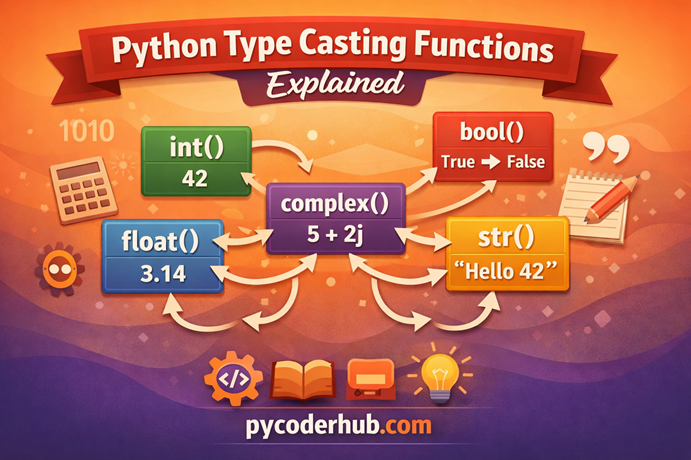
Now that you know what you’re going to learn, let’s first see an overview of the Python type casting functions that we will cover in this lesson.
Section 1: Core Conversion Functions Overview
Before we dive deep into each function, it’s important to first get a clear big-picture understanding of the Python type casting functions we’re going to explore in this lesson.
Think of these functions as basic tools that help Python understand and transform data.
For example:
- Sometimes you need a number instead of text
- Sometimes you need text to display a number
- Sometimes you need a value to behave like
TrueorFalse
This is exactly where Python type casting functions come into play.
Each function has a specific role, and understanding that role will remove a lot of confusion later.
Overview of Python Type Casting Functions
| Function | Converts To | Category | What It Does |
|---|---|---|---|
int() | Integer | Numeric | Removes decimal part and converts value to whole number |
float() | Decimal Number | Numeric | Converts value into a floating-point (decimal) number |
complex() | Complex Number | Numeric | Converts value into a number with real + imaginary part |
bool() | True / False | Logical | Determines whether a value is truthy or falsy |
str() | String (Text) | Text | Converts any value into its string representation |
Key Insight (Very Important)
These functions are not random—they are deeply connected.
- Numeric flow:
int → float → complex - Logical connection:
bool()evaluates these values - Representation layer:
str()can convert any of them into text
This means:
You are not just learning separate functions—you are learning how Python interprets and transforms data at its core
Now that you’ve seen what we will cover, let’s start with the first and most commonly used function: int().
Section 2: int() Function — Complete Deep Dive
What is int()?
The int() function is used to convert a value into an integer (whole number).
In simple terms:
It takes a value and tries to turn it into a number without any decimal part.
Real-world analogy:
Think of int() like cutting off the decimal portion of a number:
- 10.9 → 10
- 5.3 → 5
It does not round, it simply removes everything after the decimal.
Syntax and Parameters
int(value, base=10)Explanation:
- value → The data you want to convert into an integer
- base (optional) → Used when converting from strings (like binary, octal, hexadecimal)
Default base is 10 (decimal system)
Understanding int() Through a Simple Example
Before jumping into different types of conversions, let’s first understand why we even need int() in real programs.
Problem: Mixing String and Integer
user_age_input = "25"
extra_years = 5

total_age = user_age_input + extra_years
print(total_age)
This will give an error:
TypeError: can only concatenate str (not "int") to strWhy This Happens?
"25"is a string (text)5is an integer (number)
Python does not automatically combine text and numbers
This creates confusion for Python:
“Should I treat this as text or as a number?”
Solution: Use int() to Convert
user_age_input = "25"
extra_years = 5

total_age = int(user_age_input) + extra_years
print(total_age)  # Output: 30
Key Insight
int()converts the string"25"into the number25, making mathematical operations possible.
Understanding Default Base (Very Important Concept)
Now let’s clear one of the most confusing concepts for beginners:
What does “default base = 10” actually mean?
Example: With and Without Base
numeric_string_value = "25"

result_with_default = int(numeric_string_value)
result_with_base_10 = int(numeric_string_value, 10)

print(result_with_default)   # Output: 25
print(result_with_base_10)   # Output: 25
What’s Happening Here?
Both lines give the same output because:
- Python already assumes base 10 by default
- Writing
10explicitly does not change anything
Key Takeaway
Writing
int(value)is the same as writingint(value, 10)
That’s what “default value” means:
- If you don’t provide it, Python automatically uses it
When Does the Output Change?
Only when you change the base:
int("1010", 2) # Binary → Output: 10This is exactly what you’ll see in the next section.
Basic Conversions
Let’s start with the most common use cases.
Float → Integer
price_value = 10.8
converted_price = int(price_value)
print(converted_price)  # Output: 10
Decimal part is removed (not rounded)
String → Integer
user_input_value = "25"
converted_number = int(user_input_value)
print(converted_number)  # Output: 25
Works only if the string contains a valid integer
Boolean → Integer
true_value = True
false_value = False

print(int(true_value))   # Output: 1
print(int(false_value))  # Output: 0
Internally:
True= 1False= 0
Advanced Conversions
Base Conversion (Very Powerful Feature)
binary_value = "1010"
decimal_result = int(binary_value, 2)
print(decimal_result)  # Output: 10
Here:
"1010"is treated as a binary number- Base
2tells Python how to interpret it
Other Bases
octal_value = "12"
print(int(octal_value, 8))   # Output: 10

hex_value = "A"
print(int(hex_value, 16))    # Output: 10
Negative Numbers
negative_string = "-15"
converted_number = int(negative_string)
print(converted_number)  # Output: -15
Common Errors & Confusion Points
This is where most beginners struggle.
Invalid String Input
invalid_value = "hello"
print(int(invalid_value))
Raises:
ValueError: invalid literal for int()Why This Fails
When Python tries to convert "hello":
- It reads each character →
h,e,l,l,o - None of these are numeric digits
So Python cannot form a valid integer
Float String Confusion
float_string_value = "10.5"
print(int(float_string_value))  # Error
Why?
"10.5"is not a valid integer string
Correct way:
correct_value = int(float(float_string_value))
print(correct_value)  # Output: 10
Empty String
empty_value = ""
print(int(empty_value))  # Error
Real-World Use Cases
User Input Handling
user_age_input = input("Enter your age: ")
user_age = int(user_age_input)
Input always comes as string → must convert
Data Cleaning
data_value = "100"
clean_number = int(data_value)
Loop Counters & Indexing
total_items = 5.9
items_count = int(total_items)
Summary Table
| Input Value | Conversion | Output | Notes |
|---|---|---|---|
10.8 | int() | 10 | Decimal removed |
"25" | int() | 25 | Valid string |
"10.5" | int() | Error | Not valid integer string |
True | int() | 1 | Boolean conversion |
False | int() | 0 | Boolean conversion |
Visual Representation of Python int() Function
To better understand how the int() function works, here’s a simple visual representation covering its key behavior, conversions, and common errors.
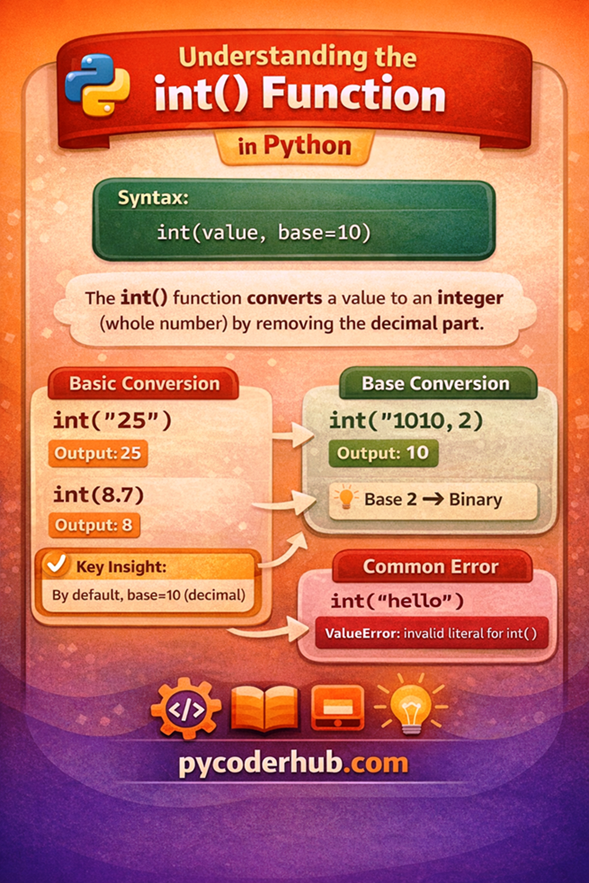
This visual gives you a quick overview.
Now that you clearly understand how int() works—including its behavior, limitations, and real-world usage—let’s move to the next important function: float().
Section 3: float() Function — Complete Deep Dive
What is float()?
The float() function is used to convert a value into a floating-point number (decimal number).
In simple terms:
It allows Python to work with numbers that have fractional (decimal) parts.
Real-world analogy
Think of float() like measuring things more precisely:
int()→ counts whole items (5 apples)float()→ measures exact quantity (5.75 kg apples)
Whenever precision matters, float() is used.
Syntax and Parameters
float(value)Explanation:
- value → The data you want to convert into a decimal number
Understanding float() Through a Simple Example
Before looking at different conversions, let’s first understand why float() is actually useful.
Example: Integer vs Float Behavior
num1 = 10
num2 = 3

# Default division
default_result = num1 / num2

# Force integer result
integer_result = int(num1 / num2)

# Force float explicitly
float_result = float(num1) / num2

print(default_result, type(default_result))   # Output: 3.333... <class 'float'>
print(integer_result, type(integer_result))   # Output: 3 <class 'int'>
print(float_result, type(float_result))       # Output: 3.333... <class 'float'>
What’s Happening Here?
Default Behavior
- Python automatically converts the result into float
- Because division can produce decimals
Using int()
- Converts the result into a whole number
- Decimal part is removed
Using float()
- Ensures the value is treated as a decimal number
- Useful when working with values that must stay precise
Key Insight
Even though Python sometimes automatically uses
float, explicitly usingfloat()ensures your data is always treated as a decimal number.
Another Practical Example
Sometimes your data starts as an integer, but you want to ensure decimal precision in calculations:
total_value = 5
price_per_unit = 2

result_without_float = total_value * price_per_unit
result_with_float = float(total_value) * price_per_unit

print(result_without_float, type(result_without_float))  # Output: 10 <class 'int'>
print(result_with_float, type(result_with_float))        # Output: 10.0 <class 'float'>
Why This Matters?
10→ treated as integer10.0→ treated as decimal
This becomes important in:
- Financial systems
- Scientific calculations
- Data consistency
Important Clarification
Python often converts to float automatically when needed, but
float()gives you explicit control over how your data is handled.
Implicit vs Explicit Casting with float()
Implicit vs Explicit Casting (float Perspective)
In Python, type conversion can happen in two ways:
- Implicit Casting (automatic)
- Explicit Casting (manual using functions like
float()andint())
Let’s understand both using float().
Implicit Casting (Automatic Conversion)
integer_value = 10
float_value = 2.5

result = integer_value + float_value

print(result)         # Output: 12.5
print(type(result))   # <class 'float'>
What’s Happening?
- Python sees two different types:
intandfloat - It automatically converts
int → float - Because float can safely hold integer values
This is called implicit casting
Explicit Casting (Manual Control)
float_value = 10.8

converted_value = int(float_value)

print(converted_value)  # Output: 10
What’s Happening?
- You are forcing Python to convert
float → int - Python follows your instruction
- Decimal part is removed
This is called explicit casting
Risk: Data Loss (Very Important)
value = 10.9
converted = int(value)

print(converted)  # Output: 10
What You Lost?
- Original value:
10.9 - Converted value:
10
The decimal part is permanently lost
Important Note for Beginners
- Use
float()when you want precision - Use
int()only when you are okay with losing decimal values - Never assume Python will “handle it automatically” in reverse
Basic Conversions
Integer → Float
total_items = 10
converted_value = float(total_items)

print(converted_value)  # Output: 10.0
String → Float
price_value = "19.99"
converted_price = float(price_value)

print(converted_price)  # Output: 19.99
Boolean → Float
print(float(True))   # Output: 1.0
print(float(False))  # Output: 0.0
Advanced Examples
Scientific Notation (Very Useful)
large_number = "1e3"
converted_value = float(large_number)

print(converted_value)  # Output: 1000.0
"1e3" means:
- 1×103=1000
Negative Values
negative_value = "-45.6"
converted_value = float(negative_value)

print(converted_value)  # Output: -45.6
Common Errors & Confusion
Invalid String
invalid_value = "hello"
print(float(invalid_value))
Error:
ValueError: could not convert string to floatMixed Text and Number
mixed_value = "10.5kg"
print(float(mixed_value))  # Error
Empty String
empty_value = ""
print(float(empty_value))  # Error
Very Important
print(float("10"))   # Output: 10.0
print(float("10.0")) # Output: 10.0
Both work because they represent valid numeric formats
Behind the Scenes (Deep Insight)
When you write:
float("10.5")Python:
- Reads the string
- Checks if it matches a valid floating-point format
- Converts it into a decimal number
Why Some Values Fail?
float("10.5.3") # ErrorBecause:
- Multiple decimal points are not valid
Floating-Point Precision Issue (Important)
print(0.1 + 0.2)Output:
0.30000000000000004Why This Happens?
- Computers store floating numbers in binary format
- Some decimal numbers cannot be represented exactly
This leads to small precision errors
Real-World Use Cases
Financial Calculations
price = float("99.99")
quantity = 2

total_cost = price * quantity
print(total_cost)
Measurements
length_value = float("5.75")
width_value = float("2.5")

area = length_value * width_value
Data Processing
data_value = "45.8"
clean_value = float(data_value)
Summary Table
| Input Value | Conversion | Output | Notes |
|---|---|---|---|
10 | float() | 10.0 | Integer → decimal |
"19.99" | float() | 19.99 | Valid string |
"10" | float() | 10.0 | Works fine |
"hello" | float() | Error | Invalid string |
True | float() | 1.0 | Boolean conversion |
Visual Representation of Python float() Function
To understand how decimal conversions work in Python, here’s a simple visual guide explaining the behavior of the float() function.
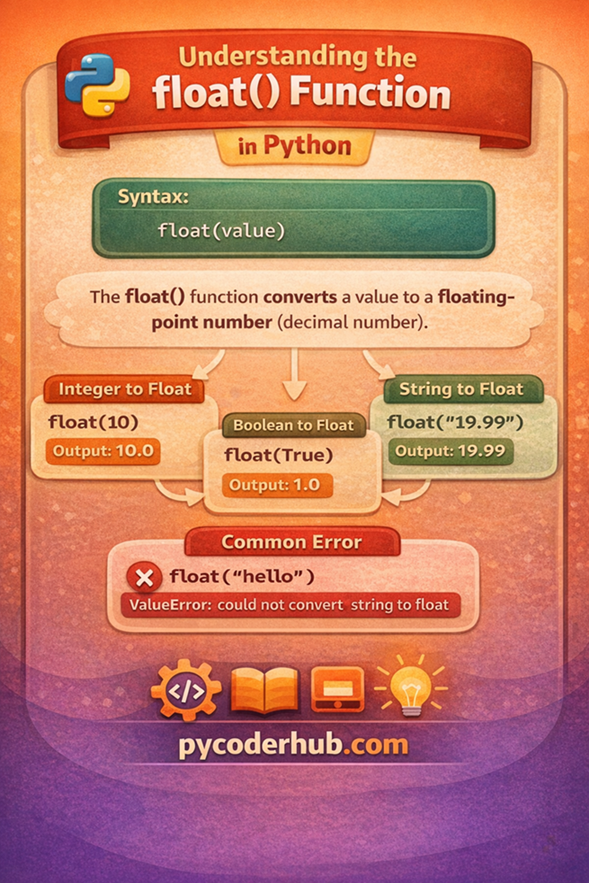
This visual gives you a quick understanding of float().
Section 4: complex() Function — Complete Deep Dive
What is complex()?
The complex() function is used to convert values into a complex number, which consists of:
Real part + Imaginary part
In Python, a complex number looks like this:
3 + 4j3→ real part4j→ imaginary part (jrepresents √-1 in Python)
Real-world analogy
Think of a complex number like a position on a map:
- One axis → real values
- Another axis → imaginary values
Together, they represent a point in a 2D space.
Syntax and Parameters
complex(real, imaginary)Explanation:
- real → the real part (default = 0)
- imaginary → the imaginary part (default = 0)
Understanding complex() Through a Simple Example
Example: Creating a Complex Number
real_value = 3
imaginary_value = 4

result = complex(real_value, imaginary_value)

print(result)        # Output: (3+4j)
print(type(result))  # <class 'complex'>
What’s Happening?
- Python combines both values
- Converts them into a complex number object
Key Insight
Even if you provide only one value, Python treats it as the real part
Basic Conversions
Integer → Complex
number_value = 5
converted_value = complex(number_value)

print(converted_value)  # Output: (5+0j)
Float → Complex
decimal_value = 3.5
converted_value = complex(decimal_value)

print(converted_value)  # Output: (3.5+0j)
Boolean → Complex
print(complex(True))   # Output: (1+0j)
print(complex(False))  # Output: 0j
String to Complex Conversion
Valid String Format
complex_value = complex("3+4j")
print(complex_value)  # Output: (3+4j)
Important Rule
The string must follow valid complex number format
Invalid String Example
invalid_value = "3 + 4j"
print(complex(invalid_value))  # Error
Explanation
- The
complex()function expects a properly formatted string "3 + 4j"→ contains spaces, so Python cannot parse it correctly"3+4j"→ valid format, no spaces allowed between parts
Another Invalid String Example
invalid_value = "3+4i"
print(complex(invalid_value))  # Error
Why This Fails?
- Python uses
jfor the imaginary part (noti) "3+4i"→ invalid in Python"3+4j"→ correct format
Advanced Examples
Separate Real and Imaginary Inputs
result = complex(2.5, 6.7)
print(result)  # Output: (2.5+6.7j)
Negative Values
result = complex(-3, -4)
print(result)  # Output: (-3-4j)
Common Errors & Confusion
Invalid String Format
complex("hello") # ErrorMixing Parameters Incorrectly
complex("3", "4") # ErrorStrings must be in full complex format if used
Confusion: j vs i
In Python:
jis used for imaginary numbers- Not
i(used in mathematics)
Behind the Scenes (Deep Insight)
When you write:
complex(3, 4)Python internally:
- Stores real part →
3 - Stores imaginary part →
4 - Combines them into a complex object
Accessing Parts
value = complex(3, 4)

print(value.real)  # Output: 3.0
print(value.imag)  # Output: 4.0
Python stores both parts separately
Real-World Use Cases
Scientific Calculations
- Electrical engineering
- Signal processing
Mathematical Modeling
- Advanced equations
- Physics simulations
Practical Note
In everyday programming,
complex()is less commonly used, but it is essential in technical fields.
Summary Table
| Input Value | Conversion | Output | Notes |
|---|---|---|---|
5 | complex() | (5+0j) | Integer → complex |
3.5 | complex() | (3.5+0j) | Float → complex |
"3+4j" | complex() | (3+4j) | Valid string |
"hello" | complex() | Error | Invalid format |
True | complex() | (1+0j) | Boolean conversion |
Visual Representation of Python complex() Function
To understand how Python handles real and imaginary numbers, here’s a simple visual guide explaining the behavior of the complex() function.
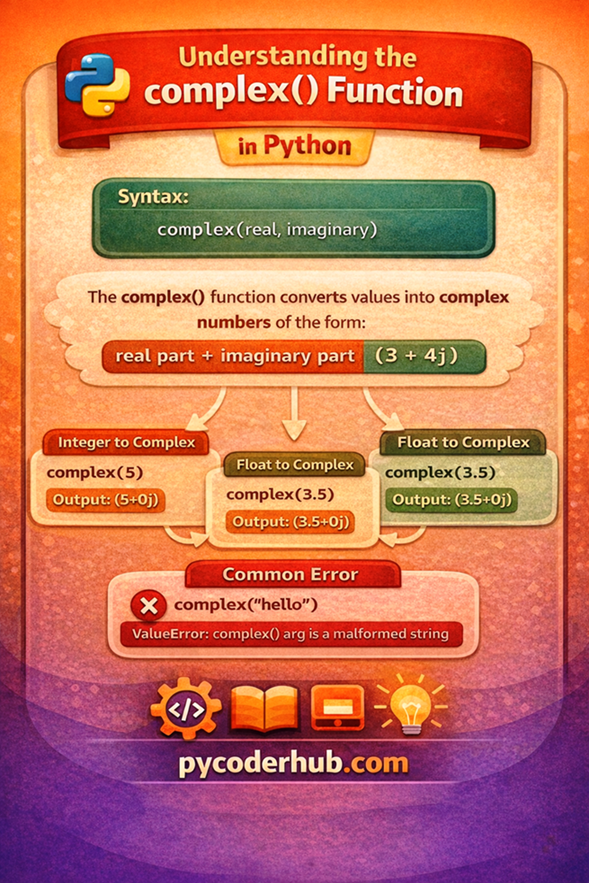
This visual gives you a quick understanding of complex().
Section 5: bool() Function — Complete Deep Dive
What is bool()?
The bool() function is used to convert a value into a Boolean value:
TrueorFalse
In simple terms:
It helps Python decide whether something is valid, present, or meaningful
Real-world analogy
Think of bool() like a simple decision switch:
- Light ON →
True - Light OFF →
False
It doesn’t care about the exact value—only whether it should be considered True or False
Syntax and Parameters
bool(value)Explanation:
- value → Any data you want to evaluate as
TrueorFalse
Understanding bool() Through a Simple Example
Example: Decision Making
user_input_value = "Hello"

result = bool(user_input_value)

print(result)        # Output: True
print(type(result))  # <class 'bool'>
What’s Happening?
"Hello"is non-empty- Python treats it as True
Key Insight
bool()does not convert values into numbers—it evaluates whether a value is empty or meaningful
Truthy vs Falsy (Core Concept)
This is the most important part of bool().
Falsy Values (Always False)
These values always return False:
print(bool(0))        # False
print(bool(0.0))      # False
print(bool(""))       # False
print(bool([]))       # False
print(bool({}))       # False
print(bool(None))     # False
Truthy Values (Everything Else)
Anything that is not empty or zero is considered True:
print(bool(10))       # True
print(bool("Hello"))  # True
print(bool([1, 2]))   # True
print(bool(-5))       # True
Important Rule
Empty = False
Non-empty = True
Common Confusion Points
"False" is Actually True
print(bool("False")) # Output: TrueWhy?
- It is a non-empty string
"0" vs 0
print(bool("0"))  # True
print(bool(0))    # False
"0" is text → non-empty → True
0 is number → zero → False
Empty vs Space
print(bool(""))   # False
print(bool(" "))  # True
Space " " is still a character → True
Behind the Scenes (Deep Insight)
When you write:
bool(value)Python:
- Checks if the value is empty or zero
- If empty → returns
False - Otherwise → returns
True
Internal Rule
Falsebehaves like0Truebehaves like1
print(True + True)   # Output: 2
print(False + True)  # Output: 1
Real-World Use Cases
Conditional Statements
user_name = "PyCoder"

if bool(user_name):
    print("Valid input")
Input Validation
user_input_value = ""

if not bool(user_input_value):
    print("Input is empty")
Filtering Data
data_values = [0, 1, "", "Hello", None]

filtered_values = [value for value in data_values if bool(value)]
print(filtered_values)  # Output: [1, 'Hello']
Summary Table
| Input Value | Conversion | Output | Notes |
|---|---|---|---|
0 | bool() | False | Zero value |
"" | bool() | False | Empty string |
"Hello" | bool() | True | Non-empty |
"False" | bool() | True | Still non-empty |
None | bool() | False | Null value |
Visual Representation of Python bool() Function
To clearly understand how Python evaluates values as True or False, here’s a simple visual guide to the bool() function.
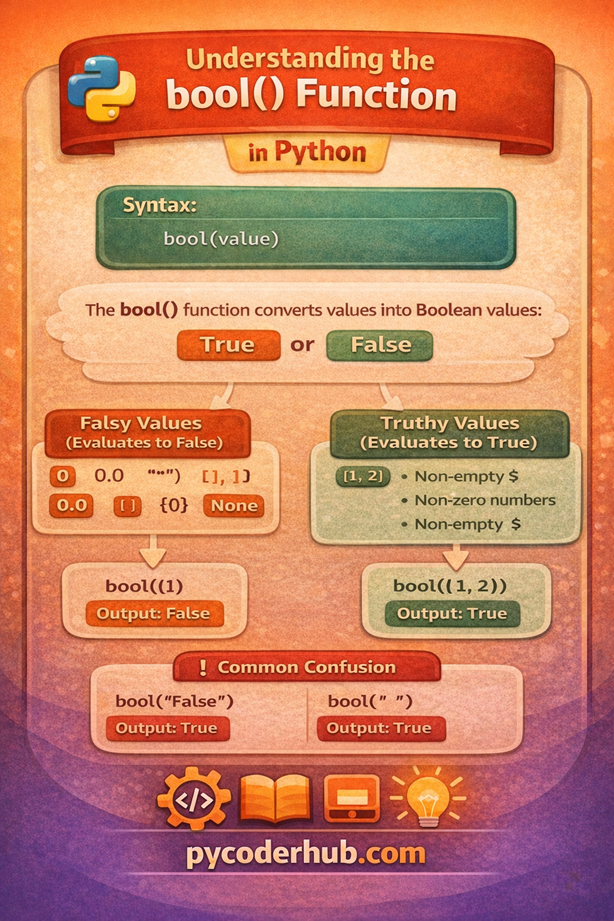
This visual gives you a quick overview of truthy and falsy values.
Section 6: str() Function — Complete Deep Dive
What is str()?
The str() function is used to convert a value into a string (text format).
In simple terms:
It turns any data into something that can be read, displayed, or combined as text
Real-world analogy
Think of str() like a label maker:
- Number → becomes readable text
- Boolean → becomes “True” / “False”
- Complex data → becomes printable form
It makes data presentable and human-readable
Syntax and Parameters
str(value)Explanation:
- value → Any data you want to convert into a string
Understanding str() Through a Simple Example
Problem: Combining Text and Numbers
user_name = "PyCoder"
user_score = 95

message = "Score: " + user_score
print(message)
Error:
TypeError: can only concatenate str (not "int") to strSolution: Use str()
user_name = "PyCoder"
user_score = 95

message = "Score: " + str(user_score)
print(message)  # Output: Score: 95
What’s Happening?
user_scoreis converted into"95"(string)- Now Python can safely combine both values
Key Insight
str()acts as a bridge between numbers and text
Basic Conversions
Integer → String
number_value = 100
converted_value = str(number_value)

print(converted_value)        # Output: "100"
print(type(converted_value))  # <class 'str'>
Float → String
price_value = 19.99
converted_value = str(price_value)

print(converted_value)  # Output: "19.99"
Boolean → String
print(str(True))   # Output: "True"
print(str(False))  # Output: "False"
Complex → String
value = complex(3, 4)
print(str(value))  # Output: "(3+4j)"
Converting Collections to String
data_list = [1, 2, 3]
print(str(data_list))  # Output: "[1, 2, 3]"
Common Errors & Confusion
Forgetting str() in Concatenation
value = 10
print("Value: " + value)  # Error
String vs Number Confusion
print("10" + "5") # Output: "105"This is concatenation, not addition
Extra Spaces or Formatting
print(str(10) + "5") # Output: "105"Behind the Scenes (Deep Insight)
When you write:
str(100)Python:
- Takes the value
- Converts it into its string representation
- Returns it as text
Important Concept
str()does not change the value—it changes how it is represented
Example
number_value = 10
string_value = str(number_value)

print(number_value)        # 10
print(string_value)        # "10"
Same value, different type
Real-World Use Cases
Display Output
score_value = 95
print("Score is: " + str(score_value))
Logging & Debugging
error_code = 404
print("Error Code: " + str(error_code))
Data Formatting
price_value = 99.99
print("Price: ₹" + str(price_value))
Summary Table
| Input Value | Conversion | Output | Notes |
|---|---|---|---|
100 | str() | "100" | Integer → string |
19.99 | str() | "19.99" | Float → string |
True | str() | "True" | Boolean |
[1,2,3] | str() | "[1, 2, 3]" | List |
10 + 5 | str() | "15" | Expression |
Visual Representation of Python str() Function
To understand how Python converts different data types into text, here’s a simple visual guide explaining the str() function.
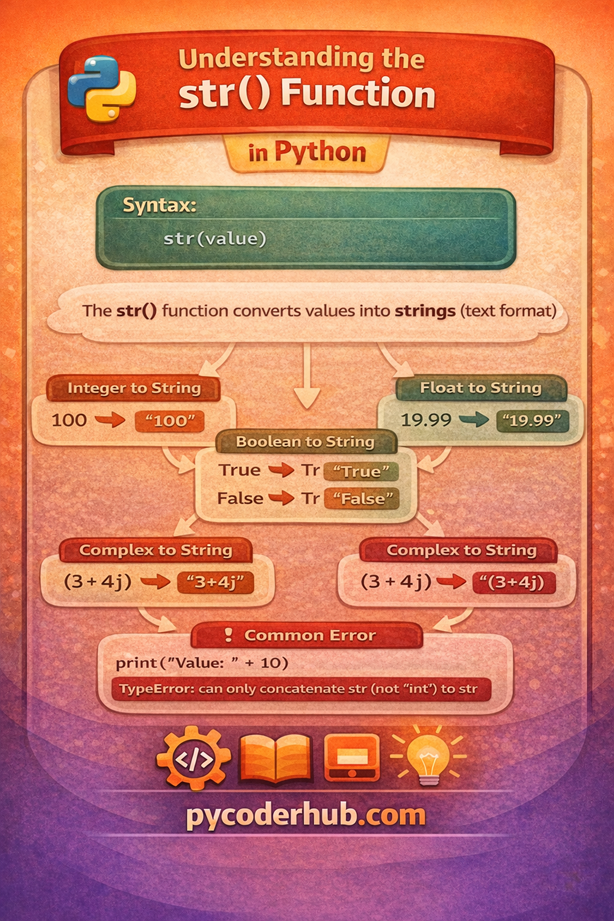
This visual gives you a quick understanding of str().
Section 7: Conversion Relationship & Confusion Breaker
By now, you’ve learned all the core Python type casting functions:
int()float()complex()bool()str()
But here’s where most beginners get stuck:
“How are all these conversions connected?”
“Which conversion works and which doesn’t?”
“Why does Python allow some conversions but not others?”
This section is your confusion breaker—it connects everything into one clear mental model.
How Types Relate to Each Other
Think of Python data types like a flow of increasing capability:
int → float → complexWhat This Means
int→ whole numbersfloat→ decimal numbers (more flexible)complex→ real + imaginary (most flexible)
As we move right:
Each type can represent more complex data
Safe Conversions (Automatic / Implicit)
print(10 + 2.5) # Output: 12.5Python converts:
int → floatautomatically
Unsafe Conversions (Not Automatic)
value = 10.8
# Python will NOT convert this to int automatically
Because:
- Data would be lost (
10.8 → 10)
Key Rule
Python automatically converts from simpler → more flexible type
But NOT the reverse
Where bool() Fits
bool() works differently from numeric types.
Think of it like a filter:
- Checks if value is empty or meaningful
Example
print(bool(10))     # True
print(bool(0))      # False
print(bool("Hi"))   # True
print(bool(""))     # False
Key Insight
bool()doesn’t measure size—it checks existence or emptiness
Where str() Fits
str() is the most flexible function.
Think of it as a universal converter:
print(str(10))       # "10"
print(str(2.5))      # "2.5"
print(str(True))     # "True"
print(str(3+4j))     # "(3+4j)"
Key Insight
str()can convert almost anything into text
But…
It does not preserve behavior, only representation
Biggest Confusion Points (Cleared)
Confusion 1: Why "10" works but "10.5" fails in int()
int("10")    # Works
int("10.5")  # Error
Because:
"10"→ valid integer"10.5"→ not an integer format
Confusion 2: Why "False" becomes True
bool("False") # TrueBecause:
- It’s a non-empty string
Confusion 3: Why "10" + "5" is not 15
print("10" + "5") # "105"Because:
- Strings concatenate, not add
Confusion 4: Why float loses precision
print(0.1 + 0.2)Output:
0.30000000000000004Due to internal binary representation
Golden Rules (Must Remember)
- Rule 1: Use
int()only when you need whole numbers - Rule 2: Use
float()when precision (decimals) matters - Rule 3: Use
bool()for conditions and checks - Rule 4: Use
str()for display and text operations - Rule 5: Be careful when converting from float → int (data loss)
Final Mental Model (Very Important)
Think of everything like this:
- Numbers flow:
int → float → complex - Logic layer:
bool()evaluates values - Representation layer:
str()displays values
One-Line Summary
Python type casting is not random—it follows a clear pattern of capability, safety, and purpose
Section 8: Quick Recap — Python Type Casting Functions
What You Learned in This Lesson
In this lesson, you moved from a basic understanding of type casting to a deep, practical understanding of Python type casting functions.
You explored how Python converts data between different types and, more importantly, when and why to use each function.
Core Functions Recap
Here’s a quick summary of all the functions you covered:
| Function | Purpose | Key Behavior |
|---|---|---|
int() | Convert to whole number | Removes decimal part (no rounding) |
float() | Convert to decimal number | Supports precision (may have small errors) |
complex() | Convert to complex number | Adds imaginary part (j) |
bool() | Convert to True/False | Based on emptiness or zero |
str() | Convert to text | Makes values printable |
Type casting is not just about converting data—it’s about controlling how Python understands and processes your data
Conclusion
Python’s five core type casting functions — int(), float(), complex(), bool(), and str() — are some of the most frequently used tools in everyday Python programming. Yet they’re often misunderstood or used without a clear grasp of what’s actually happening under the hood.
By now, you’ve seen that these functions don’t just “change the label” on a value — they perform real conversions that follow strict, predictable rules. int() truncates, never rounds. float() introduces floating-point precision. complex() builds two-part numbers. bool() evaluates truthiness based on Python’s concept of “falsy” values. And str() gives you a human-readable string representation of virtually anything.
Mastering these functions means writing code that handles data cleanly — whether you’re parsing user input, processing API responses, working with files, or doing numerical computation. Type errors and unexpected behavior often trace back to a missing or misplaced conversion, and knowing exactly how each function behaves puts you in control.
Keep experimenting. Open your interpreter, try the edge cases, and push each function until it breaks. That’s how the rules stick. 🐍
What’s Next?
Now that you’ve learned how Python’s core type casting functions like int(), float(), complex(), bool(), and str() work, it’s time to move beyond basic data conversions.
In the next lesson, you’ll explore advanced type casting functions like list(), tuple(), set(), dict(), and more. You’ll learn how Python converts and manages collections, structures data, and handles more practical real-world conversion scenarios.
👉 Continue your learning here: Advanced Python Type Casting Functions Explained (list, tuple, set, dict & More)
Suggested Posts
- Python Type Casting Explained (Type Conversion for Beginners)
- Advanced Python Type Casting Functions Explained (list, tuple, set, dict & More)
- Python Type Promotion Explained (Implicit Type Conversion & Type Hierarchy)
- Python Type Casting Rules: Complete Guide to Safe and Predictable Conversions
- Python Type Casting in Real-World Applications: Truthiness, Data Conversion & Safe Casting
- Python Type Casting Best Practices: Write Safe, Predictable & Bug-Free Code
- Python Type Casting FAQs: Common Conversion Questions, Errors & Confusions Explained

5 thoughts on “Python Type Casting Functions Explained (int, float, complex, bool, str)”