
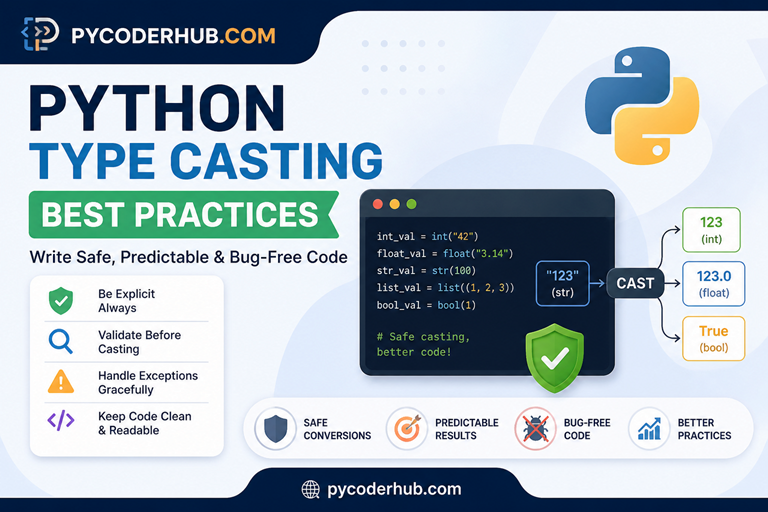
Introduction: Python Type Casting Best Practices
In the previous lesson on Python type casting rules, we explored how Python automatically handles conversions and what actually happens behind the scenes.
But here’s the important shift:
Knowing the rules tells you what Python allows. But knowing the best practices tells you what you should actually do — and more importantly, what to avoid.
In real-world Python code, type casting bugs are among the most common sources of silent errors, unexpected None returns, and hard-to-debug crashes. A program that can cast doesn’t mean it should — and how you cast matters just as much as whether you cast.
This lesson walks you through the key best practices for type casting in Python, one at a time, with clear examples of what to do and what to avoid.
What You’ll Learn in This Lesson
By the end of this lesson, you will:
- Understand what “good” type casting looks like in real-world Python code
- Learn practical best practices to write safe and predictable conversions
- Avoid common mistakes that lead to runtime errors and hidden bugs
- Handle user input and external data more reliably
- Know when to use type casting — and when to avoid it
- Improve code readability and maintainability using clean casting patterns
- Apply smarter decision-making instead of relying only on rules
Before we start with Best Practice #1, let’s first understand:
What are best practices, and why are they necessary for type casting?
What Are Best Practices, and Why Are They Necessary for Type Casting?
Best practices are recommended ways of writing code that make it safer, clearer, and more reliable—especially in real-world situations where data isn’t always clean or predictable.
In type casting, best practices are not about how Python converts data (you already learned that).
They are about how you should use those conversions responsibly.
Why Best Practices Matter in Type Casting
Python gives you a lot of flexibility with type conversion—but that flexibility comes with responsibility.
Without best practices, you might:
- Convert invalid data and crash your program
- Lose important information (like converting
3.9 → 3) - Assume the wrong data type and introduce hidden bugs
- Write code that works now but breaks later
The Cost of Ignoring Best Practices
Consider this real-world scenario:
# No best practices — "it works on my machine"
price = float(input("Enter price: "))
total = price * 1.1  # Add 10% tax
print(f"Total: ${total}")
This code runs smoothly when the user provides a valid numeric input like 19.99.
However, in real-world usage, inputs are often unpredictable:
- If the user enters “nineteen ninety nine” (text instead of numbers) → Crash
- If the user presses Enter without typing anything → Crash
- If the user enters “$19.99” (number mixed with symbols) → Crash
Result:
- Broken application
- Poor user experience
- Emergency debugging at the worst possible time
Now With Best Practices
def safe_float(user_input_value, default_value=0.0):
    try:
        return float(user_input_value)
    except (ValueError, TypeError):
        return default_value

price = safe_float(input("Enter price: "))
total = price * 1.1
print(f"Total: ${total:.2f}")
Same functionality — but now:
- No crashes
- Handles invalid input safely
- Works reliably in real-world scenarios
Simple Mental Model
Think of type casting like handling raw data:
Rules tell you what Python can do
Best practices guide what you should do
“Code that works once is not enough —
Code should work with real user behavior.”
In Short
Best practices help you:
- Avoid errors before they happen
- Write predictable and stable code
- Handle real-world data safely
- Make your code easier to understand and maintain
Now that you understand why best practices matter, let’s explore them one by one. Each practice below will protect you from a specific type casting pitfall.
Best Practice #1: Validate Before Casting
Explanation
One of the most common mistakes in type casting is assuming the input is always valid.
But in real-world applications, data is often:
- incomplete
- incorrectly formatted
- unpredictable
Casting without validation can cause your program to crash instantly.
That’s why the rule is simple:
Validate first, then cast. Never assume input is safe.
Example
Bad Practice (Blind Casting)
user_input_value = input("Enter your age: ")
age_number = int(user_input_value)  # Crashes if input is invalid
Problem:
The program assumes the user will always enter numbers. But in reality, users can type anything—and that causes crashes:
"abc"(letters instead of numbers) → Crash""(no input at all) → Crash"12.5"(unexpected format) → Crash
Better Practice (Basic Validation)
user_input_value = input("Enter your age: ")

if user_input_value.isdigit():
    age_number = int(user_input_value)
    print(f"Your age is {age_number}")
else:
    print("Invalid input. Please enter a valid number.")
This prevents crashes by checking input before conversion.
Even Better (Robust Approach)
user_input_value = input("Enter your age: ")

try:
    age_number = int(user_input_value)
    print(f"Your age is {age_number}")
except ValueError:
    print("That's not a valid integer!")
This handles:
- negative numbers
- unexpected formats
- edge cases more reliably
Insight
Many beginners rely only on methods like isdigit() for validation.
It works correctly for positive whole numbers, but has an important limitation:
"-5"→ treated as invalid"10.5"→ treated as invalid
The program doesn’t crash — but it rejects valid numeric inputs.
For real-world code, try-except is usually the safer approach.
When to Use / When NOT to Use
Use validation before casting when:
- Taking user input (
input()) - Reading data from files (CSV, text)
- Handling API or external data
Avoid over-validating when:
- Data source is already trusted and controlled
- You’ve already validated earlier in the flow
Mini Validator Cheat Sheet
| Goal | Method |
|---|---|
| Check digits only | value.isdigit() |
| Check alphabets | value.isalpha() |
| Check type | isinstance(value, int) |
| Check non-empty | value.strip() |
Key Takeaway
Never assume input is correct — validate first, then cast.
This single habit can prevent most runtime errors related to type conversion.
Best Practice #2: Always Be Explicit with Type Conversion
Explanation
Relying on Python’s implicit behavior can make your code unclear and error-prone.
Even if Python can handle certain conversions automatically, it doesn’t always do what you expect.
Explicit type casting means:
- You clearly define the data type
- Your intent is obvious
- Your code becomes predictable and easier to debug
Don’t let Python guess — tell it exactly what you want.
Example
Bad Practice (Implicit / Unclear Behavior)
user_input_value = "10"
total_result = user_input_value + "5"   # Result: "105" (string concatenation)
Problem:
- Looks like numeric addition
- Actually performs string concatenation
- Can silently produce wrong results
Better Practice (Explicit Conversion)
user_input_value = "10"
numeric_value = int(user_input_value)
total_result = numeric_value + 5   # Result: 15
Now:
- Behavior is clear
- Output is correct
- No confusion for future readers
Insight
Many beginners assume Python will “do the right thing” automatically.
But Python follows a key philosophy:
“Explicit is better than implicit.”
This means:
- Python avoids guessing your intention
- You are responsible for defining behavior clearly
When to Use / When NOT to Use
Use explicit conversion when:
- Mixing data types (string + number)
- Performing calculations on user input
- Working with external data (files, APIs)
- You want clear, readable code
Avoid unnecessary explicit casting when:
- The value is already in the correct type
- You are repeatedly casting the same value (convert once, reuse it)
Common Confusion
Wrong thinking:
“Python will automatically convert strings to numbers when needed.”
Correct understanding:
Python does not convert strings to numbers automatically in most cases.
You must explicitly define the conversion.
Key Takeaway
Explicit casting removes confusion and prevents hidden bugs.
Writing explicit conversions may feel like extra work, but it makes your code safer, clearer, and more reliable.
Best Practice #3: Handle Conversion Errors Gracefully
Explanation
Even with validation and explicit casting, errors can still happen.
Real-world data is messy—and sometimes unpredictable.
If you don’t handle these errors, your program will:
- crash unexpectedly
- stop execution
- create a poor user experience
That’s why you should always handle conversion errors using try-except.
Don’t let your program crash — handle the failure gracefully.
Example
Bad Practice (No Error Handling)
user_input_value = input("Enter price: ")
price_value = float(user_input_value)  # Crashes if input is invalid

final_total = price_value * 1.1
print(f"Total: {final_total}")
The program assumes the user will always enter a valid number. But in reality, users can type anything—and that leads to crashes.
Better Practice (Basic Error Handling)
user_input_value = input("Enter price: ")

try:
    price_value = float(user_input_value)
    final_total = price_value * 1.1
    print(f"Total: {final_total}")
except ValueError:
    print("Invalid input. Please enter a valid number.")
Now:
- Program doesn’t crash
- User gets feedback
- Flow continues safely
Insight
Many beginners think validation alone is enough.
But here’s the reality:
- Validation can miss edge cases
- Unexpected formats can still break your code
try-except is your safety net when validation fails.
When to Use / When NOT to Use
Use error handling when:
- Converting user input
- Working with external data (APIs, files)
- Data format is uncertain
Avoid overusing try-except when:
- You’re hiding important errors silently
- You already validated data properly and want strict failure
Common Confusion
Wrong thinking:
“If I use try-except, I don’t need validation.”
Correct understanding:
Validation and error handling work together:
- Validation → prevents obvious errors
try-except→ handles unexpected cases
Key Takeaway
Good code doesn’t just work — it handles failure safely.
Handling errors properly turns fragile code into production-ready code.
Best Practice #4: Avoid Unnecessary Type Casting
Explanation
Type casting is useful—but overusing it can make your code messy, inefficient, and harder to read.
Many beginners develop a habit of casting values repeatedly, even when it’s not needed.
This leads to:
- redundant operations
- cluttered code
- reduced readability
Convert once, then reuse the value. Don’t cast again and again.
Example
Bad Practice (Repeated Casting)
user_input_value = input("Enter quantity: ")

total_price = int(user_input_value) * 10
discounted_price = int(user_input_value) * 8
final_value = int(user_input_value) * 9
Problem:
- Same conversion repeated multiple times
- Harder to maintain
- Slight performance overhead
Better Practice (Convert Once)
user_input_value = input("Enter quantity: ")
quantity_value = int(user_input_value)

total_price = quantity_value * 10
discounted_price = quantity_value * 8
final_value = quantity_value * 9
Now:
- Conversion happens only once
- Code is cleaner and easier to understand
Even Better (Validate + Convert Once)
user_input_value = input("Enter quantity: ")

try:
    quantity_value = int(user_input_value)

    total_price = quantity_value * 10
    discounted_price = quantity_value * 8
    final_value = quantity_value * 9

except ValueError:
    print("Invalid quantity entered.")
Combines:
- safe conversion
- clean structure
- reusable value
Insight
Repeated casting often happens when developers:
- rush implementation
- don’t store intermediate results
- treat conversion as a “quick fix”
Type casting should be a one-time decision, not a repeated action.
When to Use / When NOT to Use
Use single conversion when:
- The value is used multiple times
- You want cleaner and faster code
- Working with calculations
Avoid repeated casting when:
- You already converted the value earlier
- The type doesn’t change
Common Confusion
Wrong thinking:
“Calling int() multiple times doesn’t matter.”
Correct understanding:
While it may still work, it:
- reduces readability
- adds unnecessary operations
- makes code harder to maintain
Key Takeaway
Convert once, reuse everywhere — keep your code clean and efficient.
This simple habit improves both readability and performance.
Best Practice #5: Preserve Data Precision During Conversion
Explanation
Not all type conversions are harmless.
Some conversions can silently change or lose data, especially when converting between numeric types.
This is one of the most dangerous issues because:
- your program doesn’t crash
- but your results become incorrect
Always be aware of what information might be lost during conversion.
Example
Bad Practice (Unintentional Data Loss)
price_value = 19.99
final_price = int(price_value)

print(final_price)  # Output: 19 (decimal part lost)
Problem:
- Decimal value is truncated, not rounded
- You lose important precision
Better Practice (Preserve Precision)
price_value = 19.99
final_price = round(price_value)

print(final_price)  # Output: 20
Now:
- Value is rounded properly
- More accurate for real-world scenarios
Even Better (Control Precision Explicitly)
price_value = 19.99
final_price = round(price_value, 2)

print(final_price)  # Output: 19.99
Gives you:
- full control over decimal places
- predictable results
Insight
Many beginners assume:
int()will “round” the number
But that’s incorrect.
int()→ truncates (cuts off decimal part)round()→ rounds to nearest value
When to Use / When NOT to Use
Use precision-aware conversion when:
- Working with money or pricing
- Handling measurements or scientific data
- Accuracy matters
Avoid careless conversion when:
- You might lose important decimal values
- You don’t fully understand the impact
Common Confusion
Wrong thinking:
“Converting float to int will round the number.”
Correct understanding:
It simply removes the decimal part without rounding.
Key Takeaway
Not all conversions are safe — some silently change your data.
Always think before converting:
“Am I losing important information here?”
Best Practice #6: Keep Type Casting Close to the Data Source
Explanation
One common mistake is delaying type conversion or spreading it across different parts of the code.
This makes your program:
- harder to understand
- more error-prone
- difficult to debug
Instead, convert data as soon as you receive it and then work with the correct type throughout your code.
Clean data early → simpler logic later.
Example
Bad Practice (Delayed / Scattered Casting)
user_input_value = input("Enter quantity: ")

# Many lines later...
total_price = int(user_input_value) * 10

# Even later...
discount_price = int(user_input_value) * 8
Problem:
- Conversion is repeated
- Easy to forget conversion in some places
- Code becomes inconsistent
Better Practice (Convert at Source)
user_input_value = input("Enter quantity: ")

try:
    quantity_value = int(user_input_value)
except ValueError:
    print("Invalid input")
    quantity_value = 0

total_price = quantity_value * 10
discount_price = quantity_value * 8
Now:
- Conversion happens once
- Rest of the code works with clean data
- Fewer chances of mistakes
Even Better (Encapsulate Input + Conversion)
def get_valid_quantity():
    user_input_value = input("Enter quantity: ")
    try:
        return int(user_input_value)
    except ValueError:
        print("Invalid input")
        return 0

quantity_value = get_valid_quantity()

total_price = quantity_value * 10
discount_price = quantity_value * 8
Benefits:
- Centralized logic
- Cleaner main code
- Reusable input handling
Insight
When casting is scattered across the code:
You increase:
- duplication
- inconsistency
- chances of bugs
Early conversion creates a single source of truth for your data type.
When to Use / When NOT to Use
Use early casting when:
- Handling user input
- Processing file or API data
- You need consistent data types across logic
Avoid early casting when:
- You’re unsure of the final required type
- You need raw data for validation or logging first
Common Confusion
Wrong thinking:
“I can convert the value whenever I need it.”
Correct understanding:
Late or repeated conversion leads to inconsistent and messy code.
Key Takeaway
Convert once at the source, then trust the data everywhere else.
This practice keeps your code structured, predictable, and easier to maintain.
Advanced Note — When Delaying Conversion Makes Sense
In some situations, it’s better to delay type casting and keep data in its original form.
For example:
- when you need to validate or clean raw input first
- when early conversion might lose important information
- when different parts of your code may require different types
Convert early for clean logic—but delay conversion when you need flexibility or data integrity.
Best Practice #7: Choose the Right Data Type for the Context
Explanation
Type casting is not just about converting values—it’s about choosing the correct data type for the job.
Using the wrong type can lead to:
- incorrect results
- loss of information
- confusing or misleading code
The key idea:
Don’t just convert—convert to the right type based on how the data will be used.
Example
Bad Practice (Wrong Type Choice)
user_input_value = input("Enter phone number: ")
phone_number_value = int(user_input_value)  # Converting to integer

print(phone_number_value)
Problem:
- Phone numbers are identifiers, not quantities
- Converting to
intcan:- remove leading zeros (
"0123456789"→123456789) - break formatting
- remove leading zeros (
- You cannot easily store or display it correctly later
Better Practice (Use Correct Type)
user_input_value = input("Enter phone number: ")
phone_number_value = user_input_value  # Keep as string

print(phone_number_value)
Now:
- Leading zeros are preserved
- Formatting remains intact
- Data stays accurate
Insight
Many beginners assume:
“Numbers should always be stored as numbers.”
But that’s not always true.
- Phone numbers, ZIP codes, IDs → should be strings
- They look numeric, but are not used for calculations
When to Use / When NOT to Use
Choose types carefully when:
- Working with money, measurements, or counts
- Handling user input or external data
- Performing calculations
Avoid poor type choices when:
- You might lose precision (
intinstead offloat) - You treat numeric data as strings
- You pick types without considering usage
Common Confusion
Wrong thinking:
“int and float are mostly interchangeable.”
Correct understanding:
They serve different purposes:
int→ whole numbers (counts, quantities)float→ decimal values (prices, measurements)
Key Takeaway
The correct type is not just a detail—it defines how your data behaves.
Choosing the right type ensures your program produces correct and meaningful results.
Best Practice #8: Be Careful with Boolean Type Casting
Explanation
Boolean casting in Python can be misleading if you don’t understand how it works.
Many beginners assume that values like "False" or "0" will behave as False.
But Python doesn’t check the meaning of the value—it checks whether it is empty or non-empty.
In Python, most non-empty values are treated as True.
Example
Bad Practice (Assuming Meaning-Based Conversion)
user_input_value = "False"

boolean_result = bool(user_input_value)
print(boolean_result)  # Output: True
Problem:
"False"is a non-empty string → treated asTrue- This can create serious logical bugs
Better Practice (Explicit Comparison)
user_input_value = "False"

boolean_result = user_input_value.lower() == "true"
print(boolean_result)  # Output: False
Now:
- Logic is based on actual meaning
- No unexpected behavior
Insight
Boolean casting follows a simple rule:
- Empty values →
False - Non-empty values →
True
Examples:
bool("")→ Falsebool("0")→ Truebool("False")→ True
Python checks “emptiness”, not “meaning”.
When to Use / When NOT to Use
Use bool() when:
- Checking if a value exists (empty vs non-empty)
- Evaluating truthy/falsy behavior in conditions
Avoid direct bool() casting when:
- You need logical meaning (e.g., user input “true/false”)
- You expect string values to behave like actual booleans
Key Takeaway
Boolean casting checks emptiness—not intention. Always define logic explicitly.
Understanding this prevents subtle bugs that are hard to detect.
Best Practice #9: Handle None and Empty Values Explicitly
Explanation
In real-world programs, you won’t always get clean, valid data.
Sometimes values are:
- missing (
None) - empty (
"") - filled with only spaces (
" ")
If you try to cast these directly, your program can crash or behave unexpectedly.
Always check for empty or missing values before casting.
Example
Bad Practice (Ignoring Empty / None Values)
user_input_value = input("Enter your age: ")
age_number = int(user_input_value)  # Crashes if input is empty

print(age_number)
Problem:
""(user presses Enter) → crash" "(only spaces) → crash
Better Practice (Check Before Casting)
user_input_value = input("Enter your age: ")

if user_input_value.strip() != "":
    age_number = int(user_input_value)
    print(age_number)
else:
    print("Input cannot be empty.")
Now:
- Empty input is handled safely
- No crash
When to Use / When NOT to Use
Handle empty/None values when:
- Taking user input
- Reading files (CSV, text)
- Working with APIs or forms
Avoid ignoring empty values when:
- Data is optional but still affects logic
- You assume “user will always enter something”
Key Takeaway
Before casting, always ask: “What if this value is empty or missing?”
Handling these cases makes your code far more robust and user-friendly.
Best Practice #10: Write Readable and Maintainable Conversion Logic
Explanation
Type casting should not make your code harder to read.
But many developers write conversions inline and compact, which quickly becomes confusing.
When casting is buried inside expressions:
- logic becomes difficult to follow
- debugging becomes harder
- small mistakes are easier to miss
Good code is not just correct—it should be easy to understand.
Example
Bad Practice (Inline / Hard-to-Read Casting)
final_total = int(input("Enter quantity: ")) * float(input("Enter price: "))
print(final_total)
Problem:
- Multiple conversions in one line
- Hard to debug if something goes wrong
- No clarity about what each value represents
Better Practice (Break Into Steps)
quantity_input_value = input("Enter quantity: ")
price_input_value = input("Enter price: ")

quantity_value = int(quantity_input_value)
price_value = float(price_input_value)

final_total = quantity_value * price_value
print(final_total)
Now:
- Each step is clear
- Easier to debug
- Variables have meaning
When to Use / When NOT to Use
Use step-by-step casting when:
- Working with multiple inputs
- Writing production-level code
- You want clarity and maintainability
Avoid inline casting when:
- Expressions become complex
- You need debugging or validation
- Code readability is reduced
Key Takeaway
Clear conversion logic makes your code easier to read, debug, and maintain.
Writing clean casting logic is a habit that separates beginner code from professional code.
Best Practice #11: Avoid Chained or Nested Type Casting
Explanation
Chaining multiple type conversions in a single expression might seem convenient, but it often makes your code harder to understand and riskier to debug.
Patterns like:
int(float(value))may work—but they hide important steps and assumptions.
Break conversions into clear steps instead of chaining them.
Example
Bad Practice (Chained Casting)
user_input_value = "19.99"
final_value = int(float(user_input_value))  # Hard to understand
print(final_value)
Problem:
- Multiple conversions hidden in one line
- Not obvious what’s happening first
- Hard to debug if input changes
Better Practice (Step-by-Step Conversion)
user_input_value = "19.99"

float_value = float(user_input_value)
final_value = int(float_value)

print(final_value)
Now:
- Each step is visible
- Easier to understand and debug
Key Takeaway
Break complex conversions into steps—clarity is more important than brevity.
This practice helps you write safer, more maintainable code.
Best Practice #12: Use Type Hints to Communicate Type Intent
Explanation
Type casting tells Python how to convert data—but type hints tell humans (and tools) what type your data is supposed to be.
👉 This makes your code:
- easier to read
- easier to debug
- easier to maintain
Type hints don’t change runtime behavior—they clarify your intent.
Example
Bad Practice (No Type Clarity)
def calculate_total(quantity, price):
    return quantity * price
Problem:
- What type is
quantity? - What type is
price? - Should it return
intorfloat?
This creates confusion, especially in larger codebases.
Better Practice (Add Type Hints)
def calculate_total(quantity: int, price: float) -> float:
    return quantity * price
Now:
- Input types are clear
- Return type is defined
- Easier for others to understand
Insight
Many beginners think:
“Type hints are optional, so they’re not important.”
But in real-world development:
- they help catch mistakes early
- they improve collaboration
- they make your code self-documenting
When to Use / When NOT to Use
Use type hints when:
- Writing functions
- Building reusable code
- Working in teams
- You want better readability
Avoid overusing complex hints when:
- Writing very small scripts
- It reduces readability instead of improving it
Key Takeaway
Type casting controls data behavior, but type hints communicate your intent.
Using both together helps you write code that is not only correct—but also clear and professional.
Now that we’ve covered all 12 Python type casting best practices, you have a complete foundation to write safe and predictable code.
Before we move into real-world implementation, let’s take a quick look at a visual representation of these best practices to reinforce your understanding.
Python Type Casting Best Practices — Visual Summary (Infographic)
A quick visual breakdown of all 12 best practices to help you revise and connect the key ideas at a glance.
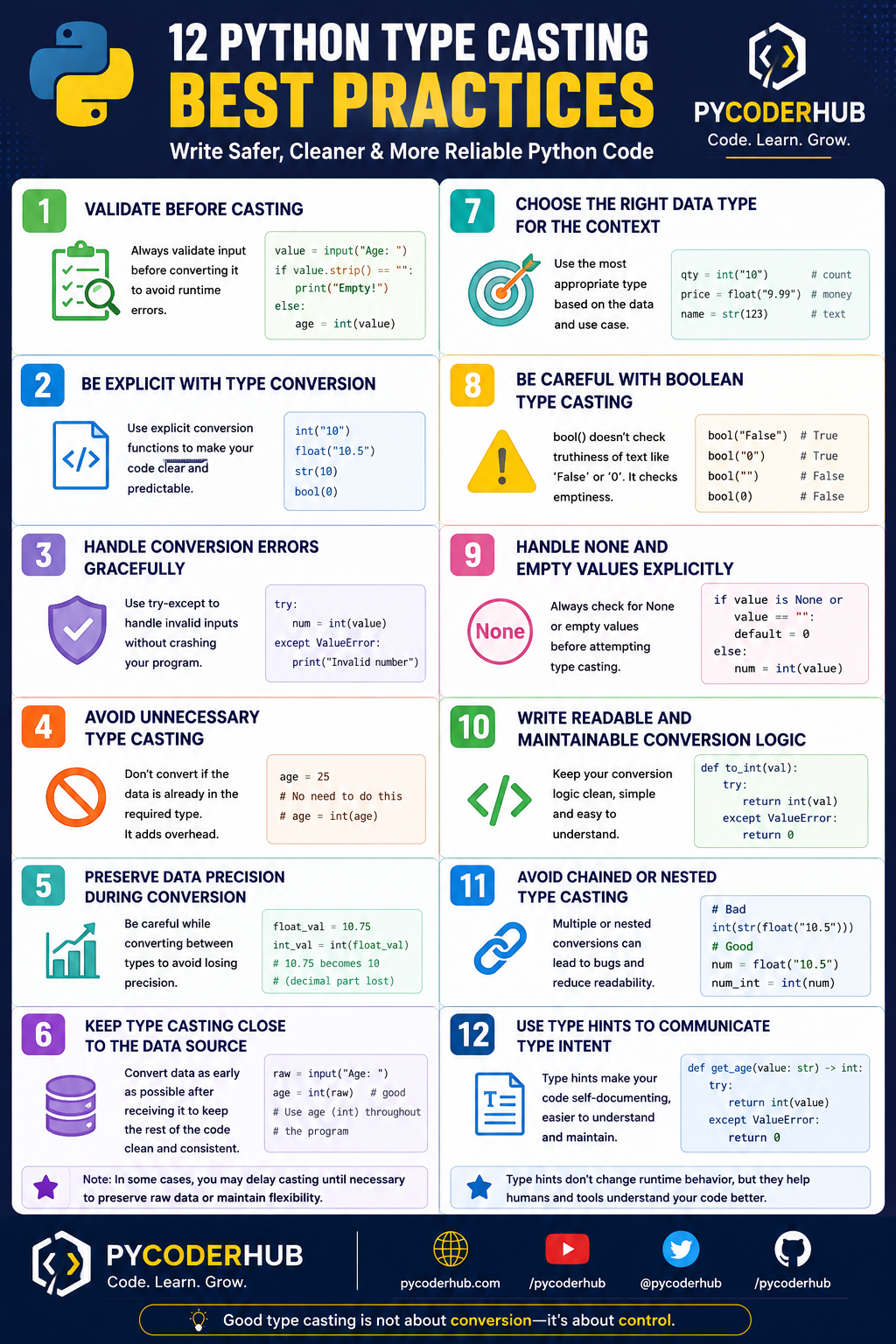
Now that you’ve seen the complete picture, let’s apply these best practices in a real-world scenario to understand how they work together.
Real-World Example — Applying Type Casting Best Practices Together
Scenario
Let’s build a small but realistic program:
A checkout system where a user enters:
- quantity
- price
- discount percentage
Then the program calculates the final total.
Without Best Practices (What Most Beginners Write)
quantity = int(input("Enter quantity: "))
price = float(input("Enter price: "))
discount = float(input("Enter discount %: "))

total = quantity * price
final_total = total - (total * discount / 100)

print(f"Final Total: {final_total}")
Problems in This Code
- Crashes on invalid input (
"abc","") - No handling for empty values
- No validation (negative or incorrect values)
- Inline casting reduces readability
- No control over edge cases
This code works only in perfect conditions—not in real-world usage.
With Best Practices Applied
def get_valid_integer(prompt_message):
    user_input_value = input(prompt_message)

    if user_input_value is None or user_input_value.strip() == "":
        print("Empty input. Using default value 0.")
        return 0

    try:
        return int(user_input_value)
    except ValueError:
        print("Invalid number. Using default value 0.")
        return 0


def get_valid_float(prompt_message):
    user_input_value = input(prompt_message)

    if user_input_value is None or user_input_value.strip() == "":
        print("Empty input. Using default value 0.0.")
        return 0.0

    try:
        return float(user_input_value)
    except ValueError:
        print("Invalid value. Using default value 0.0.")
        return 0.0


quantity_value = get_valid_integer("Enter quantity: ")
price_value = get_valid_float("Enter price: ")
discount_value = get_valid_float("Enter discount %: ")

total_amount = quantity_value * price_value
discount_amount = total_amount * (discount_value / 100)
final_total_amount = total_amount - discount_amount

print(f"Final Total: {final_total_amount:.2f}")
What Best Practices Are Applied Here?
| Best Practice | How It’s Applied |
|---|---|
| Validate before casting | Checks for empty input |
| Handle errors gracefully | Uses try-except |
| Avoid unnecessary casting | Converts once, reuses values |
| Keep casting close to source | Conversion happens immediately |
| Handle None/empty values | Explicit checks |
| Write readable logic | Separate functions |
| Choose correct types | int for quantity, float for price |
Mini Mental Model
When handling real-world data:
- Receive input
- Clean and validate
- Convert safely
- Use in logic
Key Takeaway
Good type casting is not about conversion—it’s about control.
Final Summary — Python Type Casting Best Practices at a Glance
| # | Best Practice | What It Helps You Achieve |
|---|---|---|
| 1 | Validate Before Casting | Prevent crashes by checking input first |
| 2 | Be Explicit with Conversion | Make code clear and predictable |
| 3 | Handle Errors Gracefully | Keep programs running safely |
| 4 | Avoid Unnecessary Casting | Reduce clutter and redundant operations |
| 5 | Preserve Data Precision | Avoid silent data loss |
| 6 | Keep Casting Close to Source | Maintain consistent data types early |
| 7 | Choose the Right Data Type | Ensure correct behavior and logic |
| 8 | Be Careful with Boolean Casting | Avoid truthiness confusion |
| 9 | Handle None and Empty Values | Safely manage missing or blank data |
| 10 | Write Readable Conversion Logic | Improve clarity and maintainability |
| 11 | Avoid Chained Casting | Make transformations easy to understand |
| 12 | Use Type Hints | Communicate intent and improve code quality |
Final Insights
- Type casting is not just a function—it’s a decision about how your data behaves.
- Most real-world bugs happen due to poor handling of input, not syntax mistakes.
- Readable and explicit code is always more reliable than clever shortcuts.
- Good developers don’t just convert data—they control and validate it.
With these best practices, you now have a complete toolkit to write safe, predictable, and professional Python code using type casting.
Conclusion
Type casting in Python isn’t just about converting data—it’s about making safe and intentional decisions with that data.
Throughout this lesson, you’ve seen that most problems don’t come from syntax, but from assumptions about input and data types. By validating early, converting explicitly, and handling edge cases, you gain full control over how your program behaves.
A simple mental model to remember:
Validate → Convert → Use
Apply these best practices in your everyday code, and you’ll not only avoid common bugs—but also write code that is clean, predictable, and production-ready. 🐍
What’s Next?
Now that you’ve learned the best practices for Python type casting, you understand how to write safer, cleaner, and more predictable conversion logic while avoiding common coding mistakes.
In the next lesson, you’ll explore the most common Python type casting questions, errors, and confusion points that beginners often face. You’ll learn why certain conversions fail, how Python behaves in tricky situations, and how to debug confusing conversion problems more confidently.
👉 Continue your learning here: Python Type Casting FAQs: Common Conversion Questions, Errors & Confusions Explained
Suggested Posts
- Python Type Casting Explained (Type Conversion for Beginners)
- Python Type Casting Functions Explained (int, float, complex, bool, str)
- Advanced Python Type Casting Functions Explained (list, tuple, set, dict & More)
- Python Type Casting Rules: Complete Guide to Safe and Predictable Conversions
- Python Type Promotion Explained (Implicit Type Conversion & Type Hierarchy)
- Python Type Casting in Real-World Applications: Truthiness, Data Conversion & Safe Casting
- Python Type Casting FAQs: Common Conversion Questions, Errors & Confusions Explained

5 thoughts on “Python Type Casting Best Practices: Write Safe, Predictable & Bug-Free Code”