
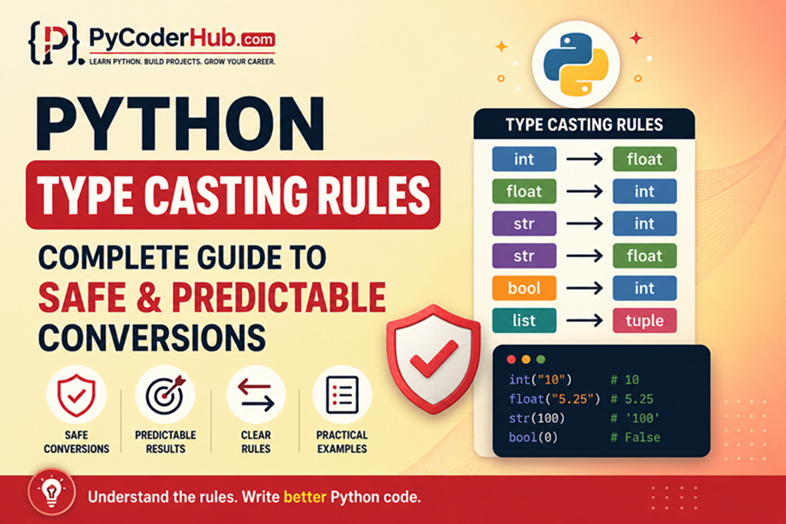
Introduction: Python Type Casting Rules
So far in this chapter, you’ve built a strong foundation:
- You understood what type casting is and why it matters
- You explored conversion functions like
int(),float(),str()and more - You went deeper into advanced conversions with collections
- You learned how Python automatically promotes types during operations
At this point, you know how conversions work.
But there’s still an important gap.
Knowing how something works doesn’t always tell you:
- when it’s safe to use
- when it can break your program
- or why it sometimes gives unexpected results
This is exactly where confusion usually begins for learners.
That’s why this lesson focuses on something different:
Not just how to convert, but how to do it correctly and predictably.
What You’ll Learn
In this lesson, you’ll learn:
- The core rules that Python follows during type casting
- Which conversions are allowed and which are not
- Situations where type casting can silently change your data
- How Python handles truth values during boolean conversion
- Practical guidelines to write safer and clearer conversions
- How to avoid unpredictable behavior while working with different data types
How This Lesson is Structured
This lesson is divided into two clear parts:
1. Rules (mandatory)
Rules are the fundamental behaviors of Python.
These are not suggestions — they define how Python actually works.
- If you ignore them, your code may fail or behave unexpectedly
- These rules come from Python’s core design and official behavior
2. Guidelines (recommended)
Guidelines are practical suggestions based on real-world usage.
They are not enforced by Python, but they help you:
- write cleaner code
- avoid confusion
- make your programs easier to understand and maintain
In simple terms:
- Rules = how Python works
- Guidelines = how you should work with Python
Let’s start with rule #1.
Rule 1: Always Know The Source Data Type Before Casting
Type casting is not just about converting values—it’s about converting one specific type into another.
If you don’t clearly know the original data type, the result of conversion can easily become confusing or incorrect.
Why This Rule Matters
Python’s conversion functions behave differently depending on the input type.
The same value can produce different results depending on how it is stored:
user_input_value = "10"      # string
numeric_value = 10           # integer

print(int(user_input_value))  # 10
print(int(numeric_value))     # 10
At first glance, both look the same. But internally:
"10"is text10is numeric
This difference becomes critical in more complex situations.
Where Confusion Usually Happens
Let’s take a slightly tricky example:
string_number_with_space = "  25  "
string_invalid_number = "25abc"

print(int(string_number_with_space))   # Works → 25
print(int(string_invalid_number))      # Error
If you don’t know the exact structure of the input:
- One conversion works
- Another crashes your program
This is why blindly casting values is risky.
Real-world Analogy
Think of type casting like pouring liquid into a container.
- If you know the liquid is water, you can safely pour it into a glass
- If you assume it’s water but it’s actually oil or something else, the result may not be what you expect
In the same way:
- You must know the type and format of data before converting it
A Practical Pattern to Follow
Before casting, always verify the type:
user_data_value = "42"

print(type(user_data_value))  # <class 'str'>

converted_number_value = int(user_data_value)
print(converted_number_value)  # 42
In real programs, this becomes even more important when dealing with:
- user input
- file data
- API responses
What Happens if You Ignore This Rule
- Unexpected errors (
ValueError,TypeError) - Incorrect conversions
- Silent bugs that are hard to trace
Example:
price_text_value = "19.99"

print(int(price_text_value))  # Error
If you didn’t know this was a string representing a float, the failure might feel confusing.
Key Takeaway
Type casting starts with awareness, not conversion.
Before using any conversion function, always ask:
- What is the current data type?
- Is it in a valid format for conversion?
Once you know that, casting becomes predictable instead of risky.
Rule 2: Not All Type Conversions Are Allowed
A common assumption is that you can convert any data type into any other type.
That’s not how Python works.
Python only allows conversions that make logical sense. If a conversion is invalid or unclear, Python will raise an error instead of guessing.
Why This Rule Matters
Each conversion function has strict expectations about the input.
If those expectations are not met, Python does not try to “fix” the value—it simply stops with an error.
integer_value = 10

print(list(integer_value))  # TypeError
Here, Python does not know how to break an integer into individual elements, so it refuses the conversion.
Examples of Allowed vs Not Allowed Conversions
Allowed Conversions
print(int("100"))        # 100
print(float(10))         # 10.0
print(str(25))           # "25"
print(list("abc"))       # ['a', 'b', 'c']
These work because:
- The input format matches what the function expects
- The conversion is logically possible
Not Allowed Conversions
print(int("hello"))      # ValueError
print(dict([1, 2, 3]))   # TypeError
print(tuple(10))         # TypeError
Reasons:
"hello"is not a valid numberdict()expects key-value pairs, not single valuestuple()expects an iterable, not a single integer
Real-world Analogy
Think of type conversion like filling out a form with strict requirements.
- Some fields accept only numbers → you can enter
100, but not"hello" - Some fields require a specific format → like a date (
DD/MM/YYYY) - Some fields expect structured input → like “Name: Value” pairs
If you enter something in the wrong format:
- The form doesn’t “guess” what you meant
- It simply rejects the input
Python behaves the same way:
- Each type expects data in a specific structure
- If the input doesn’t match, conversion fails immediately
A Practical Pattern to Follow
Before casting, always ask:
- Does this conversion logically make sense?
- Does the target type expect a specific structure?
Example:
user_scores_list = [("math", 90), ("science", 85)]

converted_dict = dict(user_scores_list)
print(converted_dict)  # {'math': 90, 'science': 85}
Here, conversion works because the structure matches what dict() expects.
What Happens if You Ignore This Rule
- Immediate runtime errors (
TypeError,ValueError) - Program crashes in real-world applications
- Debugging becomes harder because the issue is in data structure, not syntax
Key Takeaway
Type casting is not universal.
- Some conversions are valid
- Some are invalid by design
Understanding this boundary helps you avoid errors and write more predictable code.
Rule 3: Type Casting May Lead To Data Loss
Not all conversions preserve the original value exactly.
In some cases, Python has to adjust, truncate, or approximate the data to fit the target type.
This means after conversion, the value may not be exactly the same as before.
Why This Rule Matters
Certain data types can store more information than others.
When you perform a narrowing conversion (a concept introduced in the previous lesson), Python converts a value from a type that can hold more information to one that can hold less. As a result, some data may be lost.
price_float_value = 19.99

converted_integer_value = int(price_float_value)
print(converted_integer_value)  # 19
Here:
- The decimal part (
.99) is removed - Python does not round—it simply truncates
Common Cases Where Data Loss Happens
1. Float → Integer
temperature_float_value = 36.8
print(int(temperature_float_value))  # 36
Decimal precision is lost.
2. Large numbers → Lower Precision Types
large_number_value = 12345678901234567890
print(float(large_number_value))
You may not see an exact value due to floating-point limitations.
3. Complex → Integer (not allowed directly)
complex_number_value = 5 + 3j

# print(int(complex_number_value))  # TypeError
Python avoids silent data loss here by blocking the conversion entirely.
Real-world Analogy
Think of this like compressing a high-quality image into a smaller file.
- The image still exists
- But fine details are lost
Similarly:
- The value still exists after casting
- But some precision or information is removed
A Practical Pattern to Follow
Before casting, ask:
- Will this conversion remove any important information?
- Is precision important in this context?
Example:
user_price_value = 19.99

rounded_price_value = round(user_price_value)
print(rounded_price_value)  # 20
If you care about accuracy, use proper methods instead of direct casting.
What Happens if You Ignore This Rule
- Loss of decimal precision
- Incorrect calculations
- Subtle bugs in financial, scientific, or data-related programs
Key Takeaway
Type casting is not always reversible.
Once data is lost during conversion, you cannot recover it.
Always be aware of what information might disappear when changing data types.
Rule 4: Boolean Conversion Follows Truthiness Rules
When converting values to bool, Python does not look at the meaning of the value—it only checks whether the value is considered truthy or falsy.
This behavior is consistent across all data types.
Why This Rule Matters
Many beginners expect boolean conversion to behave like human logic.
For example:
"False"should becomeFalse"0"should becomeFalse
But Python doesn’t interpret strings that way.
text_value = "False"
print(bool(text_value))  # True
Even though the word says False, Python returns True.
Why?
Because the string is not empty.
How Truthiness Works in Python
Python has a simple rule:
- Empty / zero values →
False - Non-empty / non-zero values →
True
Common Falsy Values
print(bool(0))        # False
print(bool(0.0))      # False
print(bool(""))       # False
print(bool([]))       # False
print(bool({}))       # False
print(bool(None))     # False
Common Truthy Values
print(bool(1))        # True
print(bool(-10))      # True
print(bool("hello"))  # True
print(bool([0]))      # True
Even values like "0" or "False" are considered True because they are non-empty strings.
Real-world Analogy
Think of this like checking whether a container is empty.
- If the container has anything inside, it is treated as “present” →
True - If the container is completely empty, it is treated as “absent” →
False
Python does the same:
- It checks presence, not meaning
A Practical Pattern to Follow
Be careful when converting user input to boolean:
user_input_value = "False"

print(bool(user_input_value))  # True (unexpected)
If you need logical interpretation, handle it manually:
user_input_value = "False"

converted_boolean_value = user_input_value.lower() == "true"
print(converted_boolean_value)  # False
What Happens if You Ignore This Rule
- Incorrect condition checks
- Unexpected behavior in
ifstatements - Bugs in user input handling
Key Takeaway
Boolean casting is based on truthiness, not meaning.
Python does not interpret strings like humans do—it only checks whether the value is empty or not.
Rule 5: String Conversion Must Match a Valid Format
When converting a string into another data type, the content of the string must follow a valid and recognizable format for that target type.
Python does not interpret or correct malformed strings. If the format is not valid, the conversion fails.
Why This Rule Matters
String-to-type conversion is one of the most common operations in real programs:
- user input
- file data
- API responses
But strings are flexible—they can contain anything.
Because of this, Python requires the string to strictly match the expected format.
user_age_text = "25"
print(int(user_age_text))  # 25
This works because the string is a valid integer.
Where Things Break
If the format is even slightly off, conversion fails:
invalid_age_text = "25 years"
print(int(invalid_age_text))  # ValueError
Python does not extract 25 from the text.
It expects the entire string to represent a valid number.
More Examples
Valid Formats
print(float("3.14"))     # 3.14
print(int("100"))        # 100
Invalid Formats
print(int("10.5"))       # ValueError
print(float("3,14"))     # ValueError
print(int("abc"))        # ValueError
Reasons:
"10.5"is not a valid integer"3,14"uses a comma instead of a dot"abc"is not numeric at all
Real-world Analogy
Think of this like entering a password.
- If the format is exactly correct → access granted
- Even a small mistake → access denied
Python treats string conversion the same way:
- Exact match → conversion works
- Any mismatch → conversion fails
A Practical Pattern to Follow
Always ensure the string is clean and properly formatted before casting:
raw_user_input = "  42  "

clean_input = raw_user_input.strip()
converted_value = int(clean_input)

print(converted_value)  # 42
You can also validate input when needed:
user_input_text = "123"

if user_input_text.isdigit():
    safe_number = int(user_input_text)
    print(safe_number)
What Happens if You Ignore This Rule
- Frequent
ValueErrorexceptions - Program crashes during input handling
- Unexpected failures in real-world data processing
Key Takeaway
String conversion is strict.
Python does not “fix” or “interpret” strings—it only converts them if they already match the expected format exactly.
Rule 6: Collection Conversions Follow Structural Requirements
When converting data into collection types like list, tuple, set, or dict, Python expects the input to follow a specific structure.
These conversions don’t just depend on the value—they depend on how the data is organized internally.
Why This Rule Matters
Collection types are designed to store multiple values in a structured way.
So when you convert into them, Python checks:
- Is the input iterable?
- Does it match the expected pattern?
If not, the conversion fails.
Basic Requirement: Input Must be Iterable
Most collection conversions require an iterable (something you can loop over).
text_value = "abc"

print(list(text_value))   # ['a', 'b', 'c']
print(tuple(text_value))  # ('a', 'b', 'c')
print(set(text_value))    # {'a', 'b', 'c'}
This works because strings are iterable.
Where Conversion Fails
number_value = 10

print(list(number_value))   # TypeError
An integer is not iterable, so Python cannot break it into elements.
Special Case: Dictionary Conversion
dict() has stricter structural requirements.
It expects:
- key-value pairs
- usually in the form of tuples or lists
pairs_list = [("name", "PyCoder"), ("age", 25)]

print(dict(pairs_list))  # {'name': 'PyCoder', 'age': 25}
Invalid Dictionary Conversion
invalid_data = [1, 2, 3]

print(dict(invalid_data))  # TypeError
Because:
- There are no key-value pairs
- Python doesn’t know how to interpret the structure
Real-world Analogy
Think of this like assembling furniture from parts.
- If all parts are organized and labeled → assembly works
- If parts are random and unstructured → you can’t build anything
Python does the same:
- Structured input → valid conversion
- Unstructured input → failure
A Practical Pattern to Follow
Before converting to a collection, make sure the input is something Python can actually break into parts (an iterable like a string, list, or tuple).
user_name_text = "PyCoder"

# Convert only if it's a string or similar iterable
converted_list = list(user_name_text)
print(converted_list)  # ['P', 'y', 'C', 'o', 'd', 'e', 'r']
Now compare this with an invalid case:
user_age_value = 25

# This will fail because an integer is not iterable
# print(list(user_age_value))  # TypeError
Simple rule to remember
- If Python can loop over it → conversion works
- If Python cannot loop over it → conversion fails
What Happens if You Ignore This Rule
TypeErrorduring conversion- Unexpected results (especially with
set()removing duplicates) - Logical bugs due to incorrect data structure
Key Takeaway
Collection casting is not just about converting values—it’s about matching structure.
Python only performs these conversions when the input data is organized in a way that the target collection can understand.
Rule 7: Type Casting Creates a New Object, it Does Not Modify The Original
When you perform type casting in Python, a new value is created in the target type.
The original value remains unchanged.
This behavior is important because it affects how data flows in your program.
Why This Rule Matters
Many beginners assume that casting changes the original variable.
But Python does not modify the existing object—it returns a new converted value.
user_input_text = "50"

converted_number_value = int(user_input_text)

print(user_input_text)         # "50"
print(converted_number_value)  # 50
Here:
- The original string is still
"50" - A new integer
50is created
Where Confusion Usually Happens
If you don’t store the result of casting, nothing changes:
price_text_value = "100"

int(price_text_value)

print(price_text_value)  # Still "100"
Even though casting was called, the result was not saved.
Reassigning vs Modifying
If you want to update the value, you must reassign it:
price_text_value = "100"

price_text_value = int(price_text_value)

print(price_text_value)  # 100
Now the variable refers to a new object (integer instead of string).
Real-world Analogy
Think of this like translating a document.
- The original document stays the same
- A translated version is created separately
If you want to replace the original, you must explicitly use the translated version.
A Practical Pattern to Follow
Always assign the result of casting:
raw_score_text = "85"

score_integer_value = int(raw_score_text)
This makes your intention clear and avoids confusion.
What Happens if You Ignore This Rule
- You think data has changed when it hasn’t
- Bugs caused by using old values
- Confusion during debugging
Key Takeaway
Type casting does not modify existing data.
It returns a new value, and it’s your responsibility to store or use that result correctly.
Rule 8: Numeric Casting Truncates, It Does Not Round
When converting a floating-point number to an integer, Python does not round the value.
Instead, it simply removes the decimal part.
This behavior is known as truncation.
Why This Rule Matters
Many beginners expect:
int(3.9) # Expected → 4 But Python returns:
print(int(3.9))   # 3
print(int(-3.9))  # -3
Python does not move the value up or down—it just cuts off everything after the decimal point.
Connection With Previous Rule
This is a specific case of narrowing conversion (discussed in Rule 3), where:
- a float (more precise)
- is converted into an integer (less precise)
As a result, the decimal information is lost.
Real-world Analogy
Think of this like removing the fractional part of a measurement.
- 3.9 meters → 3 meters (fraction ignored)
- −3.9 meters → −3 meters
No rounding—just dropping the extra part.
A Practical Pattern to Follow
If you need rounding instead of truncation, use the appropriate function:
price_value = 3.9

rounded_value = round(price_value)
print(rounded_value)  # 4
What Happens if You Ignore This Rule
- Incorrect calculations
- Unexpected results in financial or scoring systems
- Logical errors when precision matters
Key Takeaway
int() does not round values.
It always truncates the decimal part, regardless of whether the number is positive or negative.
Rule 9: Casting is Not The Same as Parsing
Type casting and parsing are often confused, but they are not the same thing.
- Casting → converts a value as it is into another type
- Parsing → extracts or interprets data from within a value
Python’s casting functions only perform direct conversion. They do not analyze or clean the input.
Why This Rule Matters
Many beginners expect Python to “understand” messy input:
user_input_text = "Age: 25"

print(int(user_input_text))  # ValueError
This fails because:
- The string is not purely numeric
- Python does not extract
25from the text
What Casting Actually Does
Casting expects the input to already be in a valid format:
valid_number_text = "25"

print(int(valid_number_text))  # 25
It converts the entire value directly—nothing more.
What Parsing Would Mean
Parsing involves processing or cleaning data before conversion.
Example:
user_input_text = "Age: 25"

# Extract only the numeric part
clean_number_text = user_input_text.split(":")[1].strip()

converted_value = int(clean_number_text)
print(converted_value)  # 25
Here:
- First step → parsing (extracting “25”)
- Second step → casting (
int())
Real-world Analogy
Think of this like reading a label:
- Casting → accepting the label exactly as written
- Parsing → reading the label and picking out specific information
Python’s casting functions only do the first part.
A Practical Pattern to Follow
When working with real-world data:
- Clean or extract the required part (parsing)
- Then convert it to the desired type (casting)
What Happens if You Ignore This Rule
- Frequent conversion errors
- Confusion when working with user input or text data
- Incorrect assumptions about how Python handles strings
Key Takeaway
Type casting does not interpret or extract data.
It only converts values that are already in the correct format.
Rule 10: Implicit Conversion Happens Only in Numeric Operations
Python performs automatic (implicit) type conversion in a very limited set of cases.
In practice, this mostly happens during numeric operations.
Outside of that, Python does not try to convert types automatically.
Why This Rule Matters
A common confusion is expecting Python to automatically handle all mixed-type operations.
But Python follows a strict rule:
- It allows implicit conversion only when it is safe and unambiguous
- That safety exists mainly in numeric calculations
Where Implicit Conversion Works
integer_value = 5
float_value = 2.5

result_value = integer_value + float_value
print(result_value)  # 7.5
Here:
- Python automatically converts
5→5.0 - Then performs the operation
This follows the type promotion (widening) concept from the previous lesson.
Where It Does NOT Work
number_value = 5
text_value = "10"

print(number_value + text_value)  # TypeError
Even though "10" looks like a number:
- Python does not convert it automatically
- The operation fails
Real-world Analogy
Think of this like a calculator:
- If you enter numbers → it calculates automatically
- If you enter text → it cannot interpret it as a number
Python behaves the same way:
- Numeric types → automatic handling
- Non-numeric types → require explicit conversion
A Practical Pattern to Follow
When working with mixed data types:
- Convert values manually when needed
number_value = 5
text_value = "10"

converted_value = int(text_value)
print(number_value + converted_value)  # 15
What Happens if You Ignore This Rule
TypeErrorin mixed-type operations- Confusion about why similar-looking values behave differently
- Bugs when handling user input or external data
Key Takeaway
Implicit conversion is limited.
Python only performs it in numeric contexts where the conversion is safe. In all other cases, you must convert types explicitly.
Rule 11: Some Casting Functions Accept Additional Parameters
Type casting in Python is not always limited to a single input value.
Some casting functions allow extra parameters that control how the conversion is performed.
Why This Rule Matters
Most examples use simple casting like:
int("10")
float("3.14")
But in certain cases, Python provides additional control to handle different formats or representations.
If you are not aware of this, you might think some conversions are impossible when they are actually supported.
Example: int() With Base Parameter
The int() function can accept a second argument called base.
This allows conversion from different number systems:
binary_value = "1010"
print(int(binary_value, 2))  # 10

hex_value = "FF"
print(int(hex_value, 16))    # 255
Here:
"1010"is interpreted as binary (base 2)"FF"is interpreted as hexadecimal (base 16)
Another Useful Case
auto_detect_value = "0xff"

print(int(auto_detect_value, 0))  # 255
Using base=0, Python automatically detects prefixes like:
0b→ binary0o→ octal0x→ hexadecimal
Real-world Analogy
Think of this like reading numbers in different languages.
- “10” in decimal means ten
- “1010” in binary also represents ten
- “FF” in hexadecimal represents 255
The extra parameter tells Python how to interpret the input correctly.
A Practical Pattern to Follow
When working with:
- binary data
- hexadecimal values
- data from systems or files
Check if the casting function supports additional parameters before writing custom logic.
What Happens if You Ignore This Rule
- You may think certain conversions are not possible
- You might write unnecessary or complex code
- You lose the benefit of built-in functionality
Key Takeaway
Type casting functions can offer more control than they appear.
Understanding optional parameters helps you handle a wider range of data formats efficiently.
Now that we’ve covered all the rules, you have a clear understanding of how Python type casting behaves.
Before moving to the guidelines section, let’s look at a quick summary of these rules using a visual representation.
Python Type Casting Rules – Visual Summary
After going through each rule in detail, it’s helpful to step back and see the big picture.
Instead of remembering rules individually, this visual summary helps you:
- quickly revise all key concepts
- connect related behaviors
- build a clearer mental model of how type casting works
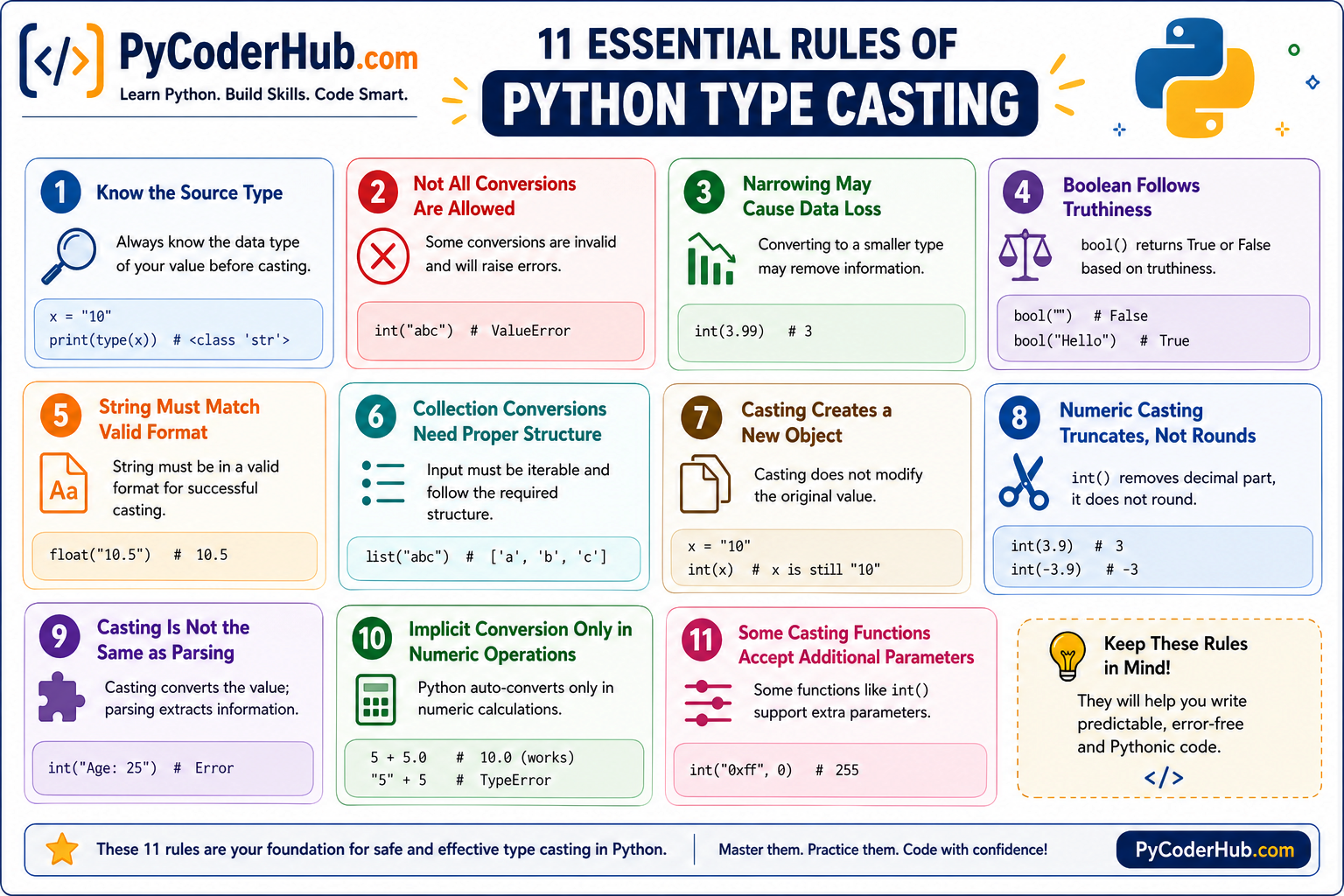
Now that we’ve covered all the rules, let’s move forward and understand the guidelines that will help you apply these concepts more effectively in real-world code.
Python Type Casting Guidelines (Quick Practical Tips)
These guidelines are not rules enforced by Python.
They are practical habits that help you write cleaner, safer, and more predictable code when working with type casting.
Guideline 1: Prefer Explicit Conversion When Clarity Matters
Even though Python sometimes performs automatic conversion, relying on it can make your code harder to understand.
Explicit casting makes your intention clear:
user_score_text = "50"
user_score_number = int(user_score_text)
This is easier to read and avoids confusion compared to relying on implicit behavior.
Guideline 2: Always Validate External Data Before Casting
Data from outside your program is not always reliable.
Before casting:
- check format
- clean the input if needed
user_input_text = " 42 "

clean_input = user_input_text.strip()

if clean_input.isdigit():
    user_number = int(clean_input)
This reduces the chance of runtime errors.
Guideline 3: Choose The Right Target Type Based on Use Case
Type casting should not be random. The target type should match your goal.
For example:
- use
intfor counting - use
floatfor precision - use
strfor display
Choosing the wrong type can lead to issues later in your program.
Guideline 4: Avoid Unnecessary Repeated Casting
Repeated casting makes code harder to read and maintain.
Instead of doing this:
total_value = int(user_input_text) + int(user_input_text)Convert once and reuse:
converted_value = int(user_input_text)
total_value = converted_value + converted_value
Guideline 5: Use Casting Intentionally, Not as a Quick Fix
Casting should be part of your logic, not just a way to silence errors.
If you find yourself casting just to “make it work,” it usually means:
- the data is not in the correct format
- or the logic needs adjustment
Use casting thoughtfully to keep your code reliable.
These guidelines will help you apply type casting more effectively in real programs.
Python Type Casting Guidelines – Quick Visual Guide
Rules help you understand how Python behaves during type conversion.
Guidelines help you apply those rules more effectively in real code.
This quick visual guide summarizes practical habits that can help you:
- write cleaner conversions
- avoid unnecessary confusion
- handle data more safely in real-world programs
Use this infographic as a quick reference whenever you work with type casting in Python.
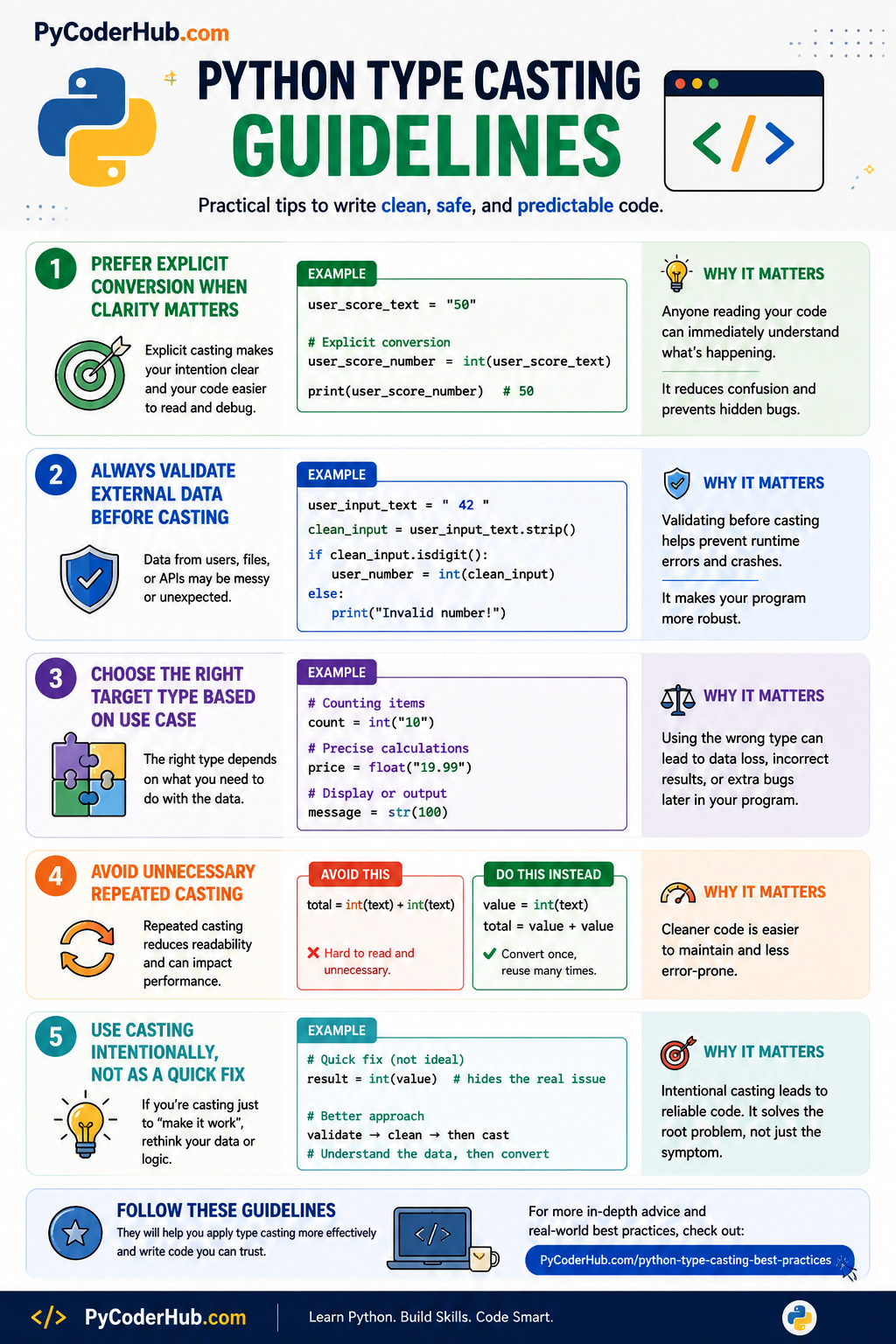
For a deeper understanding and more advanced techniques, you can explore the dedicated guide on Python type casting best practices.
Python Type Casting Rules – Final Summary
Quick Decision Guide
| Situation | What to Do | Why |
|---|---|---|
| Working with user input or external data | Clean and validate before casting | Prevent errors and unexpected failures |
| Mixing different data types | Use explicit conversion | Makes behavior clear and predictable |
| Converting float to int | Expect truncation, not rounding | Decimal part is always removed |
| Converting strings to numbers | Ensure correct format first | Invalid format raises errors |
| Working with collections | Check structure and iterability | Required for successful conversion |
| Using boolean conversion | Remember truthiness rules | Based on emptiness, not meaning |
Key Takeaways
- Always understand the original data type before converting
- Python allows only valid and meaningful conversions
- Narrowing conversions can lead to data loss
- String values must match the expected format exactly
- Clean and validate data when working with real-world inputs
Conclusion
Type casting is more than just converting one data type into another—it’s about understanding how Python handles data and making deliberate decisions while writing code.
In this lesson, you didn’t just learn how to use functions like int() or str(). You learned:
- The rules that define what is possible
- The limits of conversions
- And the behaviors that can lead to unexpected results
From knowing your source type to understanding narrowing, truthiness, structure requirements, and truncation—you now have a clear mental model of how type casting works in Python.
The visual summary helped you connect all rules together, and the guidelines showed how to apply them in real scenarios.
At this point, you are no longer just using type casting—you are using it intentionally and correctly. 🐍
What’s Next?
Now that you’ve learned Python’s type casting rules and how to perform safe, predictable conversions, it’s time to see how these concepts work in real programming situations.
In the next lesson, you’ll explore real-world type casting applications like truthiness checks, user input conversion, data cleaning, validation, and safe casting techniques commonly used in practical Python projects.
👉 Continue your learning here: Python Type Casting in Real-World Applications: Truthiness, Data Conversion & Safe Casting
Suggested Posts
- Python Type Casting Explained (Type Conversion for Beginners)
- Python Type Casting Functions Explained (int, float, complex, bool, str)
- Advanced Python Type Casting Functions Explained (list, tuple, set, dict & More)
- Python Type Casting Rules: Complete Guide to Safe and Predictable Conversions
- Python Type Casting in Real-World Applications: Truthiness, Data Conversion & Safe Casting
- Python Type Casting Best Practices: Write Safe, Predictable & Bug-Free Code
- Python Type Casting FAQs: Common Conversion Questions, Errors & Confusions Explained

7 thoughts on “Python Type Casting Rules: Complete Guide to Safe and Predictable Conversions”