Introduction
In the previous lessons, you learned how arithmetic operators perform mathematical calculations and how assignment operators store or update values in variables. These operators help you calculate results and manage data, but they don’t answer questions about the relationship between two values.
This is where comparison operators come in.
Comparison operators are used to compare two values and determine how they relate to each other. Instead of performing calculations, they answer questions such as:
- Are the two values equal?
- Is one value greater than the other?
- Is one value less than or equal to another?
The answer to every comparison is always one of two Boolean values: True or False.
Although this may seem simple at first, comparison operators are one of the most important building blocks in Python. They form the foundation of decision-making, allowing your programs to make choices, validate data, check conditions, and control the flow of execution. You’ll see them used extensively in future lessons on if statements, loops, logical operators, and many other Python features.
In this lesson, you’ll learn what comparison operators are, how each of the six comparison operators works, how Python compares different types of values, how comparison chaining works.
Before we learn what comparison operators are, let’s first clear up a common question: Why are they called “comparison operators”?
Why Are They Called “Comparison Operators”?
The word comparison simply means examining two things to determine how they relate to each other. In everyday life, we compare values all the time. For example, we might compare two prices to see which one is lower, compare two students’ scores to find out who scored higher, or compare two dates to determine which comes first.
Python Comparison Operators work in exactly the same way. They compare two values (called operands) and evaluate the relationship between them.
For example:
print(10 > 5)Output:
TrueHere, Python compares the values 10 and 5. Since 10 is greater than 5, the comparison evaluates to True.
Unlike arithmetic operators, which produce numerical results such as 15 or 3.5, comparison operators always produce a Boolean value—either True or False. This makes them ideal for checking conditions and forming the basis of decision-making in Python programs.
In many programming languages and programming books, comparison operators are also called Relational Operators because they describe the relationship between two values.
Are Python Comparison Operators Official?
In Lesson 2, we learned that names like Arithmetic Operators and Assignment Operators are widely used by educators, books, and tutorials, but they aren’t official category names in the Python Language Reference.
Comparison operators are a little different.
Python’s official documentation includes a dedicated section titled “Comparisons,” where these operators are formally defined. The documentation doesn’t use the exact heading “Comparison Operators” — but that’s where the commonly used name comes from.
If you’d like to explore how Python officially classifies operators and why educational resources often use different category names, revisit Lesson 2: Are Python Operator Categories Official? You can also read the official Python Language Reference section on Comparisons.
Part 1: What Are Python Comparison Operators?
Python Comparison Operators are operators that compare two values (operands) and determine the relationship between them. Instead of performing mathematical calculations or assigning values to variables, they evaluate a comparison and produce a Boolean result.
Every comparison operator works with two operands—one on the left side and one on the right side. Python compares these two values according to the operator being used and always produces a single Boolean value as the result:
True— if the comparison is true.False— if the comparison is false.
For example, a comparison operator can check whether two values are equal, whether one value is greater than another, or whether one value is less than or equal to another. Regardless of which comparison operator you use, the final result is always either True or False.
Comparison Expression
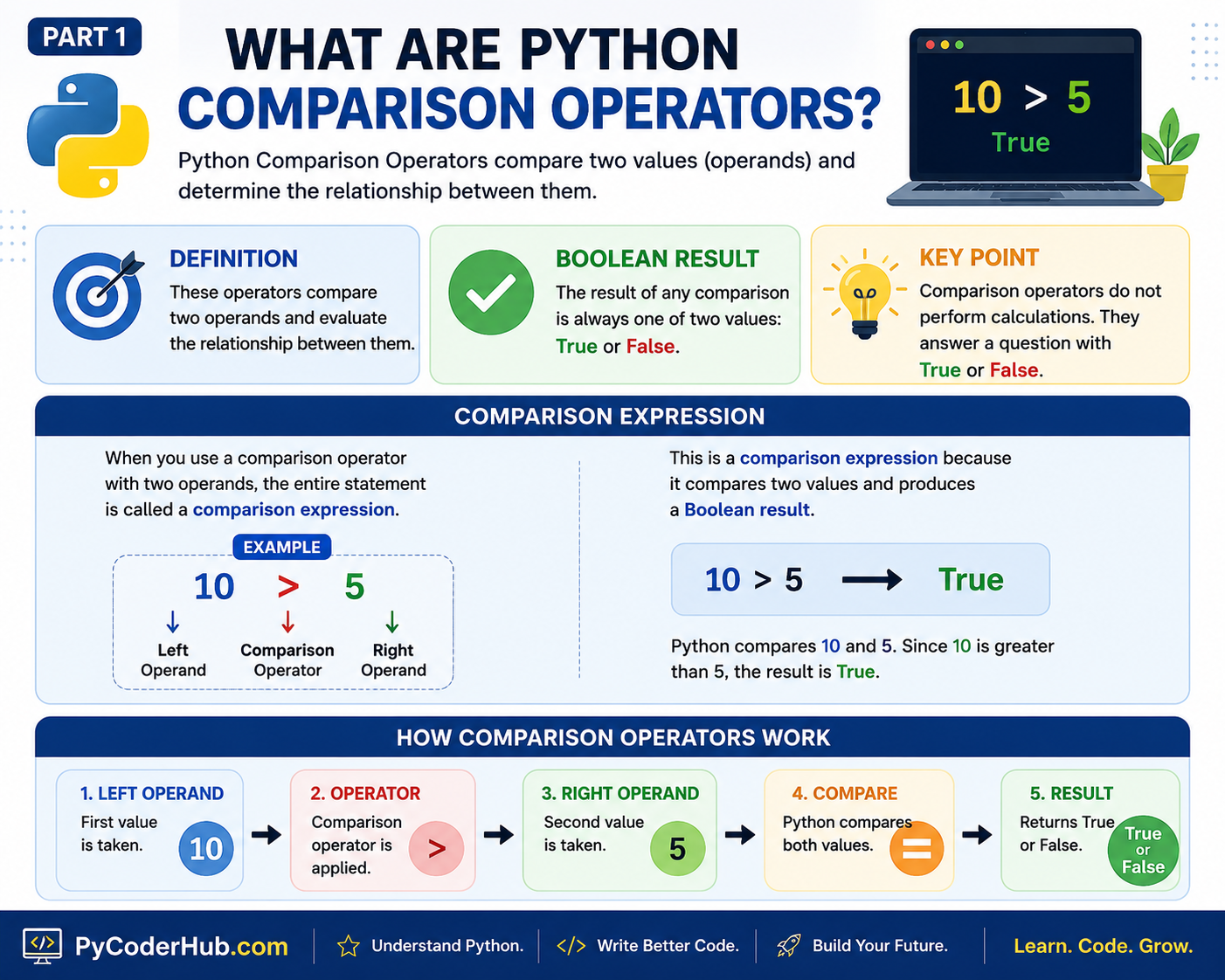
When you use a comparison operator together with two operands, the entire statement is called a comparison expression. In other words, a comparison expression is simply an expression that compares two values and evaluates to a Boolean result.
For example:
10 > 5This is a comparison expression because:
10is the left operand.>is the comparison operator.5is the right operand.- The expression compares the two values and evaluates to
True.
You can think of a comparison expression as asking Python a question. Python evaluates the comparison and answers with either True or False.
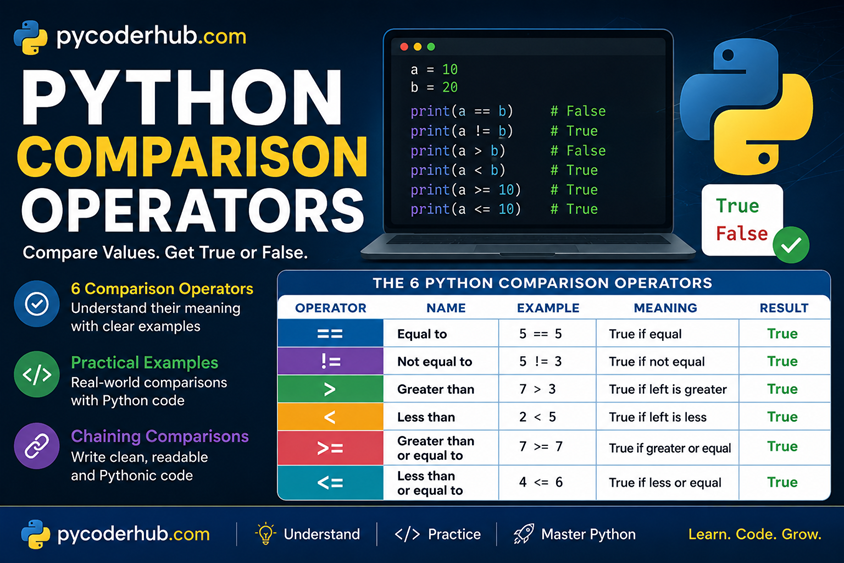
Visual Recap: How Comparison Operators Work
The following infographic summarizes the core idea of Python Comparison Operators, showing how they compare two operands, produce a Boolean result (True or False), and form a comparison expression.
Now that you understand what Python Comparison Operators are and how they form comparison expressions, let’s look at the six comparison operators that Python provides.
Part 2: Overview of Python Comparison Operators
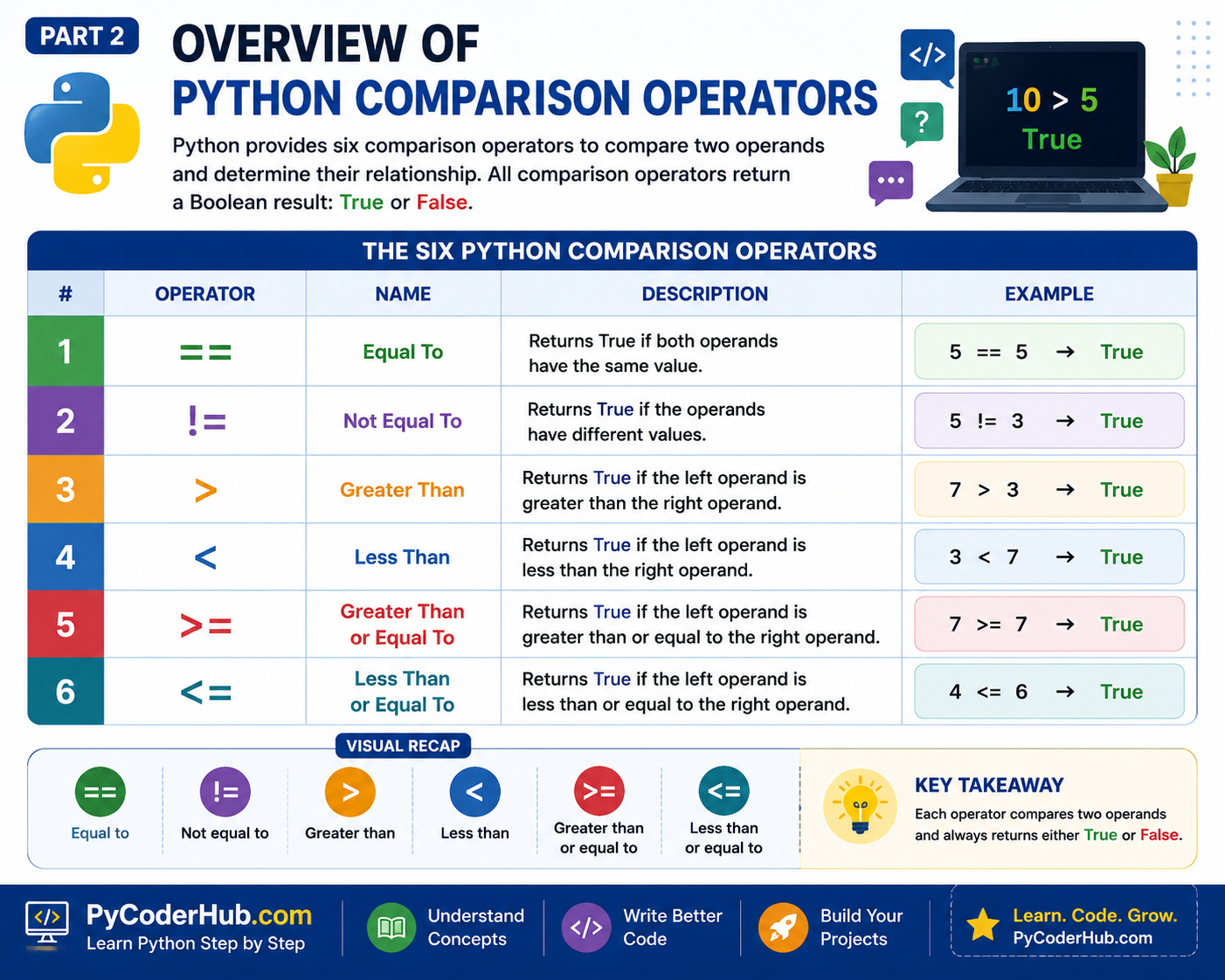
Python provides six comparison operators, each designed to compare two operands and evaluate a specific relationship between them. Although each operator performs a different type of comparison, they all have one thing in common—they always return a Boolean value, either True or False.
The following table provides a quick overview of all six Python Comparison Operators:
| Operator | Name | Description |
|---|---|---|
== | Equal To | Returns True if both operands have the same value. |
!= | Not Equal To | Returns True if the operands have different values. |
> | Greater Than | Returns True if the left operand is greater than the right operand. |
< | Less Than | Returns True if the left operand is less than the right operand. |
>= | Greater Than or Equal To | Returns True if the left operand is greater than or equal to the right operand. |
<= | Less Than or Equal To | Returns True if the left operand is less than or equal to the right operand. |
Visual Recap: The Six Python Comparison Operators
The infographic below provides a quick visual overview of all six Python Comparison Operators, including their names, meanings, descriptions, and example results. Use it as a handy reference before exploring each operator in detail in the following sections.
These six operators are all you need to compare values in Python. In the following sections, we’ll explore each comparison operator individually, understand how it works, and practice using it with clear, beginner-friendly examples.
Part 3: The Boolean Result (True or False)
Before we start exploring the first comparison operator, there’s one very important concept you should understand and remember.
Every Python Comparison Operator always produces a Boolean result.
No matter which comparison operator you use—==, !=, >, <, >=, or <=—the final result of the comparison can only be one of two Boolean values:
True— if the comparison is true.False— if the comparison is false.
For example:
8 > 5Python compares the two values and determines that 8 is greater than 5, so the expression evaluates to:
TrueSimilarly, if the comparison is not true, Python returns:
FalseThis behavior is the same for every comparison operator. Although each operator checks a different relationship between two values, they all produce the same type of output—a Boolean value (True or False).
This is one of the biggest differences between comparison operators and arithmetic operators.
For example, arithmetic operators perform calculations and produce a new value:
10 + 5Result:
15On the other hand, comparison operators evaluate a relationship and produce a Boolean value:
10 > 5Result:
TrueYou can think of comparison operators as asking Python a yes-or-no question. Instead of calculating a new number, Python simply answers the question with either True or False.
These Boolean values are extremely important because they form the foundation of decision-making in Python. In upcoming chapters, you’ll use them to write programs that make decisions with if, elif, and else statements, repeat actions using loops, and combine multiple conditions with logical operators such as and, or, and not.
Part 4: The Equal To (==) Operator
The Equal To (==) operator checks whether the values of two operands are equal. If both values are the same, the comparison evaluates to True; otherwise, it evaluates to False.
Among all comparison operators, == is one of the most frequently used because checking whether two values are equal is a common task in programming.
4.1 Syntax
The general syntax of the Equal To operator is:
left_operand == right_operandPython compares the values on both sides of the == operator and returns either True or False.
4.2 Comparing Numbers
The Equal To operator works with both integers and floating-point numbers.
For example:
print(10 == 10)
print(10 == 5)
print(7.5 == 7.5)
Output:
True
False
True
In the first and third comparisons, both values are equal, so Python returns True. In the second comparison, the values are different, so Python returns False.
The operator also works when comparing different numeric types if they represent the same value.
For example:
print(5 == 5.0)Output:
TrueAlthough 5 is an integer (int) and 5.0 is a floating-point number (float), they represent the same numeric value, so the comparison evaluates to True.
4.3 Comparing Strings
The Equal To operator can also compare strings.
For example:
print("Python" == "Python")
print("Python" == "python")
print("Python" == "Java")
Output:
True
False
False
Notice that string comparisons are case-sensitive. This means uppercase and lowercase letters are treated as different characters.
For example:
print("Python" == "python")returns False because "P" and "p" are not the same character.
4.4 Comparing Variables
You can also compare the values stored in variables.
For example:
first_number = 25
second_number = 25
third_number = 30

print(first_number == second_number)
print(first_number == third_number)
Output:
True
False
Python compares the values stored inside the variables, not the variable names themselves.
4.5 Quick Reminder: = vs ==
Beginners often confuse the assignment operator (=) with the Equal To operator (==), but they serve completely different purposes.
- The assignment operator (
=) assigns or stores a value in a variable. - The Equal To operator (
==) compares two values and returns eitherTrueorFalse.
For example:
age = 18Here, = assigns the value 18 to the variable age.
Now compare it with:
age == 18This does not assign a value. Instead, it checks whether the value stored in age is equal to 18.
Note: We already covered the difference between
=and==in detail in the previous lesson on Python Assignment Operators, so we won’t go into it in detail here. If you’d like a refresher, see the “Assignment (=) vs Equality (==)“ section from that lesson.
4.6 Developer’s Note: Comparing Floating-Point Numbers
In most situations, the Equal To operator works exactly as expected. However, floating-point numbers deserve a small note of caution.
Consider the following comparison:
print(0.1 + 0.2 == 0.3)Output:
FalseAt first glance, this result may seem surprising because mathematically, 0.1 + 0.2 equals 0.3.
This happens because floating-point numbers cannot always be represented exactly in a computer’s memory. Floating-point numbers are not always stored with perfect precision. Because of this, expressions like 0.1 + 0.2 == 0.3 may return False. We’ll explore floating-point precision in detail in a later lesson.
4.7 How Python Evaluates Comparison Expressions
When learning the Equal To (==) operator, it’s easy to think that Python simply compares whatever appears on the left side with whatever appears on the right side. In reality, there’s an important step that happens first.
Before any comparison operator performs a comparison, Python first evaluates both operands. Once both sides have been evaluated to their final values, Python compares those values and returns either True or False.
You can think of the process like this:
Evaluate Left Operand
          │
          ▼
Evaluate Right Operand
          │
          ▼
 Compare the Final Values
          │
          ▼
 Return True or False
Let’s look at a few examples.
Example 1: Comparing Simple Values
print(5 == 5)Here, both operands are simple values, so there is nothing extra to evaluate. Python directly compares 5 with 5 and returns:
TrueExample 2: Comparing Arithmetic Expressions
print(5 + 2 == 6 + 1)Python does not compare the expressions 5 + 2 and 6 + 1 directly.
Instead, it first evaluates each side:
Left operand:   5 + 2  →  7
Right operand:  6 + 1  →  7
Then Python performs the comparison:
7 == 7which produces:
TrueExample 3: Comparing Function Results
The same rule applies when function calls are used.
print(type(5) == type(5.0))Python first evaluates both type() function calls:
Left operand:   type(5)    →   <class 'int'>
Right operand:  type(5.0)  →   <class 'float'>
Then it compares the results:
<class 'int'> == <class 'float'>Since the two type objects are different, the comparison evaluates to:
FalseSimilarly:
print(type(5) == type(4))Both function calls evaluate to:
<class 'int'>So Python compares:
<class 'int'> == <class 'int'>and returns:
TrueNotice that in these examples, Python is not comparing the numbers themselves. It is comparing the values returned by the type() function.
Value Equality vs. Type Equality
This also explains why the following two comparisons produce different results:
print(5 == 5.0)
print(type(5) == type(5.0))
Output:
True
False
In the first comparison, Python compares the numeric values 5 and 5.0. Although they belong to different numeric types (int and float), they represent the same numeric value, so the comparison returns True.
In the second comparison, Python first evaluates both type() calls and then compares the resulting type objects:
type(5)evaluates to<class 'int'>type(5.0)evaluates to<class 'float'>
Since these are different types, the comparison returns False.
Developer’s Note: Python’s numeric types (
int,float, andcomplex) are designed to work together consistently. That’s why values like5and5.0compare as equal, even though their data types are different.
Important: This evaluation-first behavior is not unique to the Equal To (
==) operator. It applies to every comparison operator in Python (!=,>,<,>=, and<=). Whether an operand is a literal value, a variable, an arithmetic expression, or a function call, Python always evaluates it first and then performs the comparison. As you continue through this lesson, remember that whenever we say an operator “compares two operands,” we really mean it compares the values that those operands evaluate to.
The Equal To operator is ideal when you want to check whether two values are the same. Next, let’s look at its opposite—the Not Equal To (!=) operator, which checks whether two values are different.
Part 5: The Not Equal To (!=) Operator
The Not Equal To (!=) operator is the opposite of the Equal To (==) operator. Instead of checking whether two values are equal, it checks whether they are different.
If the values of both operands are not equal, the comparison evaluates to True. If the values are equal, it evaluates to False.
Like every comparison operator in Python, the != operator always returns a Boolean value—either True or False.
5.1 Syntax
The general syntax of the Not Equal To operator is:
left_operand != right_operandPython evaluates both operands, compares their final values, and returns the appropriate Boolean result.
5.2 Comparing Numbers
The != operator works with integers, floating-point numbers, and other numeric types.
For example:
print(10 != 20)
print(10 != 10)
print(7.5 != 7.5)
Output:
True
False
False
In the first comparison, the values are different, so Python returns True.
In the second and third comparisons, the values are equal, so Python returns False.
Just like the Equal To operator, Python compares numeric values, not just their data types.
For example:
print(5 != 5.0)Output:
FalseAlthough 5 is an int and 5.0 is a float, they represent the same numeric value. Therefore, they are not considered different, and the comparison returns False.
5.3 Comparing Strings
The != operator can also compare strings.
For example:
print("Python" != "Java")
print("Python" != "Python")
print("Python" != "python")
Output:
True
False
True
Notice that string comparisons are case-sensitive. Since "Python" and "python" contain different characters, Python considers them different values.
5.4 How Python Evaluates the != Operator
The != operator follows the same evaluation process as the Equal To (==) operator.
Before checking whether two values are different, Python first evaluates both operands and then compares their final values.
For example:
print(5 + 2 != 6 + 1)Python first evaluates both arithmetic expressions and then compares the results.
Similarly:
print(type(5) != type(5.0))Python first evaluates both type() function calls before performing the comparison.
We explored this evaluation process in detail in Section 4.7: How Python Evaluates Comparison Expressions, so we won’t repeat it here. The same evaluation-first behavior applies to all comparison operators you’ll learn in this lesson.
5.5 Practical Examples
Here are a few practical examples of the Not Equal To operator:
age = 16

print(age != 18)
Output:
TrueAnother example:
language = "Python"

print(language != "Java")
Output:
TrueThe Not Equal To operator is useful whenever you want to check that two values are different, such as validating user input, comparing settings, or detecting changes in data.
Next, let’s explore the Greater Than (>) operator, which compares whether one value is larger than another.
Part 6: The Greater Than (>) Operator
The Greater Than (>) operator checks whether the value of the left operand is greater than the value of the right operand.
If the left operand is greater than the right operand, the comparison evaluates to True. Otherwise, it evaluates to False.
Like every comparison operator in Python, the > operator always returns a Boolean value—either True or False.
6.1 Syntax
The general syntax of the Greater Than operator is:
left_operand > right_operandBefore performing the comparison, Python first evaluates both operands and then compares their final values. As explained in Section 4.7, this evaluation-first behavior applies to all comparison operators.
6.2 Comparing Numbers
The Greater Than operator is most commonly used to compare numeric values.
For example:
print(10 > 5)
print(8 > 12)
print(15 > 15)
Output:
True
False
False
Let’s understand each comparison:
10 > 5returnsTruebecause10is greater than5.8 > 12returnsFalsebecause8is smaller than12.15 > 15returnsFalsebecause the values are equal, not greater.
Remember, the Greater Than operator checks for a strictly greater relationship. If both values are equal, the result is False. Later in this lesson, you’ll learn about the Greater Than or Equal To (>=) operator, which also considers equality.
The > operator also works when comparing different numeric types.
For example:
print(8 > 5.5)
print(5.0 > 5)
Output:
True
False
Python compares the numeric values, regardless of whether they are integers or floating-point numbers.
6.3 Comparing Strings
The Greater Than operator can also compare strings.
Unlike numbers, Python does not compare strings based on their length. Instead, it compares them alphabetically, using a method called lexicographical order.
For example:
print("zebra" > "apple")
print("apple" > "banana")
Output:
True
False
In the first comparison, "zebra" comes after "apple" alphabetically, so the result is True.
In the second comparison, "apple" comes before "banana", so the result is False.
6.4 How Python Compares Strings (Lexicographical Order)
When comparing numbers, it’s easy to determine which value is greater. For example, 10 is greater than 5, and 25 is greater than 18.
But how does Python compare strings?
For example:
print("car" > "cat")How does Python decide whether "car" is greater than "cat"?
Python compares strings using lexicographical order, which is similar to dictionary order. Instead of comparing the entire words at once, Python compares them one character at a time, from left to right, until it finds the first difference.
Let’s see how this works.
Example 1: Character-by-Character Comparison
print("car" > "cat")Python compares the characters in this order:
"car"      "cat"
  │          │
  c    ==    c
  │          │
  a    ==    a
  │          │
  r    >     t   # False
The first two characters (c and a) are the same, so Python continues to the next character.
The third characters are r and t. Since r comes before t in lexicographical order, the comparison r > t is False.
Therefore, the entire comparison evaluates to:
FalseThe important point to remember is that Python stops comparing as soon as it finds the first different character.
Example 2: Uppercase vs Lowercase Letters
Now consider this example:
print("Python" > "apple")At first glance, you might expect this comparison to return True because many people think of words in normal alphabetical order and often ignore the difference between uppercase and lowercase letters.
However, Python compares strings exactly as they are written. Since string comparisons are case-sensitive, uppercase and lowercase letters are treated as different characters.
Python first compares the first character of each string:
Python      apple
  │           │
  P     ?     a
For English letters, Python considers uppercase letters to come before lowercase letters during string comparisons. In other words, an uppercase letter is considered smaller than its lowercase counterpart.
For example:
print("a" > "A")   # True
print("b" > "B")   # True
print("z" > "C")   # True
Because "P" is considered smaller than "a", the comparison:
print("Python" > "apple")evaluates to:
FalseDeveloper’s Note: The ordering of characters is based on their Unicode values. We’ll learn more about Unicode and character encoding in a dedicated lesson later in the course. For now, simply remember that string comparisons are case-sensitive, and for English letters, uppercase letters are ordered before lowercase letters.
Example 3: Comparing Letters and Numbers
Now consider this example:
print("Python" > "245")Since both operands are strings, Python compares them character by character, starting with the first character of each string.
Python      245
  │          │
  P    ?     2
For English letters and digits, Python considers digits (0–9) to come before letters (A–Z and a–z) during string comparisons.
For example:
print("A" > "9")   # True
print("a" > "9")   # True
Because "P" comes after "2" in Python’s character ordering, the comparison:
print("Python" > "245")evaluates to:
TrueNote: Even though
"245"looks like a number, it is enclosed in quotes, so Python treats it as a string, not as the numeric value245. Therefore, Python compares characters, not numeric values.
Example 4: Comparing Letters and Symbols
Python can also compare strings that contain symbols.
For example:
print("Python" > "##")Again, Python starts by comparing the first character of each string.
Python      ##
  │          │
  P    ?     #
For common symbols, digits, and English letters, Python generally orders them like this:
Symbols → Digits → Uppercase Letters → Lowercase LettersFor example:
print("5" > "#")   # True
print("A" > "5")   # True
print("a" > "A")   # True
Since "P" comes after "#" in this ordering, the comparison:
print("Python" > "##")evaluates to:
TrueDeveloper’s Note: This ordering comes from the Unicode values assigned to characters. You don’t need to memorize the Unicode values themselves. For now, simply remember that Python follows a consistent character ordering when comparing strings.
Example 5: Comparing an Empty String
Python can also compare a string with an empty string.
print("Python" > "")Output:
TrueAn empty string ("") contains no characters at all.
Since "Python" contains characters while the other string is empty, Python considers "Python" to be greater than "".
Key Points to Remember
When Python compares two strings, remember these simple rules:
- Python compares strings one character at a time, from left to right.
- It stops as soon as it finds the first different character.
- String comparisons are case-sensitive.
- Python compares the characters, not the meaning of the words.
- The same comparison rules apply to all comparison operators (
==,!=,>,<,>=, and<=).
Developer’s Note: In this lesson, it’s enough to understand that Python compares strings using lexicographical (dictionary-like) order. Internally, Python compares the Unicode value of each character, but you don’t need to worry about those details yet. We’ll explore character encoding and Unicode in a dedicated lesson later in the course.
Now that you understand how Python compares strings, the remaining comparison operators will be much easier to understand because they all follow the same comparison rules.
Part 7: The Less Than (<) Operator
The Less Than (<) operator checks whether the value of the left operand is less than the value of the right operand.
If the left operand is less than the right operand, the comparison evaluates to True. Otherwise, it evaluates to False.
Like every comparison operator in Python, the < operator always returns a Boolean value—either True or False.
7.1 Syntax
The general syntax of the Less Than operator is:
left_operand < right_operandBefore performing the comparison, Python first evaluates both operands and then compares their final values. As explained in Section 4.7, this evaluation-first behavior applies to all comparison operators.
7.2 Comparing Numbers
The Less Than operator is commonly used to determine whether one numeric value is smaller than another.
For example:
print(5 < 10)
print(12 < 8)
print(15 < 15)
Output:
True
False
False
Let’s understand each comparison:
5 < 10returnsTruebecause5is less than10.12 < 8returnsFalsebecause12is greater than8.15 < 15returnsFalsebecause the values are equal, not less.
Like the Greater Than operator, the Less Than operator checks for a strictly smaller relationship. If both values are equal, the result is False.
The < operator also works with different numeric types.
For example:
print(4 < 7.5)
print(5.0 < 5)
Output:
True
False
Python compares the numeric values regardless of whether they are integers or floating-point numbers.
7.3 Comparing Strings
The Less Than operator also works with strings.
Just like the Greater Than operator, Python compares strings using lexicographical (dictionary-like) order. It compares the characters one by one, from left to right, until it finds the first difference.
For example:
print("apple" < "banana")
print("zebra" < "apple")
Output:
True
False
The same comparison rules discussed in Section 6.4: How Python Compares Strings (Lexicographical Order) apply here as well.
That means:
- Python compares strings one character at a time.
- String comparisons are case-sensitive.
- Python follows the same character ordering for letters, digits, and symbols.
Rather than repeating those rules here, simply remember that the Less Than operator uses the same comparison process as the Greater Than operator—the only difference is that it checks whether the left value is smaller instead of greater.
The Less Than operator is useful whenever you need to determine whether one value comes before or is smaller than another. In the next section, you’ll learn the Greater Than or Equal To (>=) operator, which combines the concepts of “greater than” and “equal to” into a single comparison.
Part 8: The Greater Than or Equal To (>=) Operator
The Greater Than or Equal To (>=) operator checks whether the value of the left operand is greater than or equal to the value of the right operand.
In other words, the comparison evaluates to True if either of the following conditions is true:
- The left operand is greater than the right operand.
- The left operand is equal to the right operand.
If neither condition is true, the comparison evaluates to False.
Like every comparison operator in Python, the >= operator always returns a Boolean value—either True or False.
8.1 Syntax
The general syntax of the Greater Than or Equal To operator is:
left_operand >= right_operandBefore performing the comparison, Python first evaluates both operands and then compares their final values. As explained in Section 4.7, this evaluation-first behavior applies to all comparison operators.
8.2 Understanding the “Or Equal To” Part
The greater than or equal to operator combines two comparisons into a single operator.
It checks whether the left operand is:
- greater than the right operand, or
- equal to the right operand.
If either of these conditions is true, the result is True.
You can think of it like this:
left_operand >= right_operand

      │
      ├── Is the left operand greater?
      │          │
      │          └── Yes → True
      │
      └── Otherwise, are both operands equal?
                 │
                 └── Yes → True

If neither condition is true → False
8.3 Comparing Numbers
The Greater Than or Equal To operator is commonly used when you want to check whether a value is greater than a specific value or exactly equal to it.
For example:
print(10 >= 5)
print(10 >= 10)
print(5 >= 10)
Output:
True
True
False
Let’s understand each comparison:
10 >= 5returnsTruebecause10is greater than5.10 >= 10returnsTruebecause both values are equal.5 >= 10returnsFalsebecause5is neither greater than nor equal to10.
You can think of the >= operator as combining the behavior of the Greater Than (>) operator and the Equal To (==) operator into a single comparison.
The operator also works with different numeric types.
For example:
print(8 >= 8.0)
print(4.5 >= 5)
Output:
True
False
8.4 Comparing Strings
The >= operator can also compare strings.
Like the > and < operators, Python compares strings using lexicographical (dictionary-like) order.
For example:
print("banana" >= "apple")
print("Python" >= "Python")
print("apple" >= "banana")
Output:
True
True
False
Here’s why:
"banana" >= "apple"returnsTruebecause"banana"comes after"apple"in lexicographical order."Python" >= "Python"returnsTruebecause both strings are equal."apple" >= "banana"returnsFalsebecause"apple"comes before"banana".
The same string comparison rules explained in Section 6.4 apply here as well, so we won’t repeat them.
8.5 When Should You Use >=?
Use the Greater Than or Equal To operator whenever both possibilities are acceptable—the value can either be greater than a limit or exactly equal to it.
For example:
age = 18

print(age >= 18)
Output:
TrueThis comparison returns True because the value is exactly equal to the minimum required age.
The Greater Than or Equal To operator is commonly used for checking minimum limits, eligibility requirements, passing marks, age restrictions, and many other conditions where meeting the limit is just as valid as exceeding it.
Next, let’s explore its opposite—the Less Than or Equal To (<=) operator.
Part 9: The Less Than or Equal To (<=) Operator
The Less Than or Equal To (<=) operator checks whether the value of the left operand is less than or equal to the value of the right operand.
In other words, the comparison evaluates to True if either of the following conditions is true:
- The left operand is less than the right operand.
- The left operand is equal to the right operand.
If neither condition is true, the comparison evaluates to False.
Like every comparison operator in Python, the <= operator always returns a Boolean value—either True or False .
9.1 Syntax
The general syntax of the Less Than or Equal To operator is:
left_operand <= right_operandBefore performing the comparison, Python first evaluates both operands and then compares their final values. As explained in Section 4.7, this evaluation-first behavior applies to all comparison operators.
9.2 Understanding the “Or Equal To” Part
The less than or equal to operator combines two comparisons into a single operator.
It checks whether the left operand is:
- less than the right operand, or
- equal to the right operand.
If either of these conditions is true, the result is True.
You can think of it like this:
left_operand <= right_operand

      │
      ├── Is the left operand less than?
      │          │
      │          └── Yes → True
      │
      └── Otherwise, are both operands equal?
                 │
                 └── Yes → True

If neither condition is true → False
9.3 Comparing Numbers
The Less Than or Equal To operator is commonly used when you want to check whether a value is less than a specific value or exactly equal to it.
For example:
print(5 <= 10)
print(10 <= 10)
print(15 <= 10)
Output:
True
True
False
Let’s understand each comparison:
5 <= 10returnsTruebecause5is less than10.10 <= 10returnsTruebecause both values are equal.15 <= 10returnsFalsebecause15is neither less than nor equal to10.
You can think of the <= operator as combining the behavior of the Less Than (<) operator and the Equal To (==) operator into a single comparison.
The operator also works with different numeric types.
For example:
print(5 <= 5.0)
print(7.5 <= 6)
Output:
True
False
9.4 Comparing Strings
The <= operator can also compare strings.
Like the other ordering operators (>, <, and >=), Python compares strings using lexicographical (dictionary-like) order.
For example:
print("apple" <= "banana")
print("Python" <= "Python")
print("zebra" <= "apple")
Output:
True
True
False
Here’s why:
"apple" <= "banana"returnsTruebecause"apple"comes before"banana"in lexicographical order."Python" <= "Python"returnsTruebecause both strings are equal."zebra" <= "apple"returnsFalsebecause"zebra"comes after"apple".
The same string comparison rules discussed in Section 6.4 apply here as well, so we won’t repeat them.
9.5 When Should You Use <=?
Use the Less Than or Equal To operator whenever both possibilities are acceptable—the value can either be less than a limit or exactly equal to it.
For example:
temperature = 30

print(temperature <= 30)
Output:
TrueThis comparison returns True because the value is exactly equal to the maximum allowed temperature.
The Less Than or Equal To operator is commonly used when checking upper limits, maximum values, deadlines, size restrictions, and many other conditions where meeting the limit is just as acceptable as being below it.
Now that you’ve learned all six Python Comparison Operators, the next section explores an important question: what happens when you compare values of different data types?
Part 10: Comparing Different Data Types
So far, you’ve seen comparison operators used with numbers and strings. But a common question beginners often ask is:
Can Python compare every data type with every other data type?
The answer is no.
Some data types can be compared directly, while others cannot. Whether a comparison is valid depends on the data types involved and the comparison operator being used.
Let’s look at some common scenarios.
10.1 Comparing Different Numeric Types
Python’s numeric types are designed to work together, so comparing integers and floating-point numbers is perfectly valid.
For example:
print(5 == 5.0)
print(10 > 7.5)
print(3 <= 3.0)
Output:
True
True
True
Although int and float are different data types, Python compares their numeric values, so these comparisons work as expected.
10.2 Comparing the Same Data Type
Python can compare many values that belong to the same data type.
For example, comparing two strings:
print("Python" == "Python")
print("apple" < "banana")
Or comparing two numbers:
print(20 != 15)
print(8 >= 5)
These comparisons work because Python knows how to compare values of the same type.
10.3 Comparing Incompatible Data Types
Now consider this example:
print("Python" > 245)Instead of returning True or False, Python raises an error:
TypeError: '>' not supported between instances of 'str' and 'int'Why?
The > operator does not know how to determine whether a string is greater than an integer. Since these are incompatible data types for this comparison, Python stops the program and raises a TypeError.
The same happens with the other ordering operators:
><>=<=
For example:
print("Python" < 245)also raises a TypeError.
10.4 Why Does == Behave Differently?
You may have noticed something interesting.
Earlier in this lesson, you learned that this comparison works perfectly:
print(5 == 5.0)But this comparison also works:
print("Python" == 245)Output:
FalseUnlike the ordering operators (>, <, >=, and <=), the Equal To (==) and Not Equal To (!=) operators can compare values of different data types.
If the values are considered equal, == returns True. Otherwise, it returns False.
For example:
print("10" == 10)
print("Python" != 245)
Output:
False
True
Notice that these comparisons do not raise an error because equality operators are checking whether two values are equal or different, not which one is greater or smaller.
10.5 Key Points to Remember
When comparing different data types, keep these simple rules in mind:
- Python can compare different numeric types such as
intandfloat. - Most values of the same data type can be compared normally.
- Ordering operators (
>,<,>=, and<=) cannot compare incompatible data types such asstrandint. - Attempting such a comparison raises a
TypeError. - Equality operators (
==and!=) can compare different data types, but the result is simplyTrueorFalse.
Understanding these rules will help you avoid one of the most common beginner mistakes when working with comparison operators.
Next, you’ll learn one of Python’s most elegant features—chaining comparison operators, which allows you to write multiple comparisons in a single, readable expression.
Part 11: Chaining Comparison Operators
So far in this lesson, every comparison we’ve written has involved two operands.
For example:
print(10 > 5)
print(5 == 5)
print(8 <= 12)
Each of these expressions compares one value with another value.
However, Python also allows you to compare more than two values in a single expression. This feature is called comparison chaining (or chained comparisons).
Comparison chaining lets you write multiple comparisons in a single, readable expression without repeating the middle value.
11.1 What Is Comparison Chaining?
A chained comparison is an expression that contains two or more comparison operators.
For example:
print(2 < 5 < 10)
print(10 > 5 > 1)
print(5 == 5 == 5)
Output:
True
True
True
Notice that each expression compares three values, not just two.
Instead of writing separate comparison expressions, Python allows you to combine them into a single expression, making your code cleaner and easier to read.
Comparison chaining also works with different comparison operators.
For example:
print(1 < 5 <= 10)
print(20 > 10 != 5)
Python automatically evaluates each comparison in the chain and combines the results according to Python’s comparison chaining rules.
11.2 Mathematical-Style Syntax
One of the reasons comparison chaining is popular is that it closely resembles the way comparisons are written in mathematics.
For example, in mathematics you might write:
1 < x < 10Python allows you to write exactly the same idea:
x = 5

print(1 < x < 10)
Output:
TrueThis mathematical-style syntax makes many comparisons feel more natural and easier to understand.
11.3 How Python Evaluates Chained Comparisons
A common question beginners ask is:
How does Python evaluate a chained comparison?
Consider this example:
x = 5

print(1 < x < 10)
Output:
TruePython treats this as if you had written:
(1 < x) and (x < 10)Let’s evaluate each comparison separately:
1 < 5    → True
5 < 10   → True
Since both comparisons are True, the entire chained comparison also evaluates to:
TrueComparison chaining is not limited to just three values. You can chain any number of comparisons together.
For example:
print(2 < 5 < 6 < 7)Output:
TruePython evaluates this as if you had written:
(2 < 5) and (5 < 6) and (6 < 7)Now evaluate each comparison:
2 < 5   → True
5 < 6   → True
6 < 7   → True
Since every comparison evaluates to True, the final result is:
TrueNow look at another example:
print(2 < 5 < 4 < 7)Python evaluates it as:
(2 < 5) and (5 < 4) and (4 < 7)Evaluating each comparison gives:
2 < 5   → True
5 < 4   → False
4 < 7   → True
Since one of the comparisons is False, the entire chained comparison evaluates to:
FalseNote: You don’t need to fully understand how the
andoperator works yet. It’s shown here only to help you understand how Python evaluates chained comparisons behind the scenes. In the next lesson, you’ll learn Logical Operators (and,or, andnot) in detail, including how expressions likeTrue and Trueproduce their final result. For now, simply remember that Python evaluates each comparison separately and combines the results to determine the final Boolean value.
11.4 Practical Range Checking
One of the most common uses of comparison chaining is checking whether a value falls within a specific range.
For example:
score = 85

print(70 <= score <= 100)
Output:
TrueWithout comparison chaining, you would need to write:
score >= 70 and score <= 100Both expressions produce the same result, but the chained version is shorter and resembles the way we naturally write mathematical ranges.
Another example:
age = 18

print(13 <= age <= 19)
Output:
True11.5 Mixing Different Comparison Operators
Comparison chaining is not limited to using the same comparison operator.
You can freely mix different comparison operators within the same expression.
For example:
x = 8

print(10 > x >= 5)
print(1 <= x != 10)
Output:
True
True
Python evaluates each comparison separately while following the same chaining rules you learned in the previous section.
You can even combine multiple comparison operators in a longer chain.
For example:
x = 8

print(20 > x >= 5 != 10)
Output:
TruePython evaluates this expression as:
(20 > x) and (x >= 5) and (5 != 10)Substituting the value of x gives:
(20 > 8) and (8 >= 5) and (5 != 10)Now evaluate each comparison one by one:
20 > 8    → True
8 >= 5    → True
5 != 10   → True
Since every comparison evaluates to True, the entire chained comparison also evaluates to:
TrueThe important thing to remember is that you can freely combine different comparison operators in a chained comparison. Python evaluates each comparison individually, and the entire expression returns a single Boolean value (True or False).
11.6 Comparison Operators with Arithmetic Operators
Comparison operators and arithmetic operators are often used together in Python programs. Understanding how Python evaluates expressions that contain both types of operators will help you avoid confusion and write more predictable code.
Let’s start with a simple example.
print(5 + 2 > 6)Output:
TrueHow did Python arrive at this result?
Python first evaluates the arithmetic expression:
5 + 2which produces:
7The expression now becomes:
print(7 > 6)Finally, Python performs the comparison:
7 > 6which evaluates to:
TrueThe same rule applies when arithmetic appears on both sides of a comparison operator.
For example:
print(5 + 2 == 6 + 1)Python first evaluates both arithmetic expressions:
5 + 2  →  7
6 + 1  →  7
The expression then becomes:
print(7 == 7)which evaluates to:
TrueComparison Chaining Works Differently
You might wonder whether comparison operators are evaluated in the same way as arithmetic operators.
The answer is no.
Arithmetic operators evaluate expressions step by step.
For example:
print(5 + 6 + 7)Python evaluates it like this:
(5 + 6) + 7Step by step:
5 + 6  →  11
11 + 7 →  18
So the final result is:
18Comparison operators follow a different rule.
Consider this expression:
print(5 < 6 < 7)It might seem similar to the arithmetic example above, but Python does not evaluate it like this:
(5 < 6) < 7Instead, Python treats it as a chained comparison:
(5 < 6) and (6 < 7)Evaluating each comparison separately:
5 < 6   →  True
6 < 7   →  True
Since both comparisons are True, the final result is:
TrueThe important difference is that arithmetic operators combine values to produce a new value, while comparison operators evaluate the relationship between values. When multiple comparison operators appear together, Python automatically interprets them as a chained comparison rather than evaluating them one operator at a time.
Key Takeaway: When arithmetic and comparison operators appear in the same expression, Python first evaluates the arithmetic expressions. Once the operands have been reduced to their final values, Python performs the comparison. If multiple comparison operators appear together, Python applies its special comparison chaining rules instead of evaluating them like arithmetic operators.
Part 12: Lesson Summary
In this lesson, you learned the fundamentals of Python Comparison Operators and how they help programs compare values and produce Boolean results.
Here’s a quick recap of the key concepts:
- Comparison operators compare two values and always return a Boolean value (
TrueorFalse). - Python provides six comparison operators:
==(Equal To)!=(Not Equal To)>(Greater Than)<(Less Than)>=(Greater Than or Equal To)<=(Less Than or Equal To)
- The
=operator assigns a value to a variable, while the==operator compares two values for equality. - Before performing a comparison, Python first evaluates both operands and then compares their resulting values.
- String comparisons follow lexicographical (dictionary-like) order, comparing characters one by one from left to right.
- String comparisons are case-sensitive, and Python distinguishes between uppercase and lowercase letters.
- Different numeric types, such as
intandfloat, can be compared directly, while some incompatible data types (such asstrandintwith<or>) raise aTypeError. - Python supports comparison chaining, allowing multiple comparisons to be written in a single expression, such as
1 < x < 10. - Chained comparisons improve readability by expressing mathematical relationships in a clean and natural way.
- When arithmetic and comparison operators appear in the same expression, Python evaluates the arithmetic expressions first and then performs the comparison.
Conclusion
Comparison operators are one of the most important building blocks in Python because they allow your programs to ask questions and evaluate conditions. Instead of producing numeric results like arithmetic operators or assigning values like assignment operators, comparison operators determine the relationship between values and return a simple Boolean result—True or False.
Although the individual operators are easy to learn, understanding how Python evaluates comparisons, how strings are compared, how different data types behave, and how comparison chaining works will help you write code that is both correct and easy to read.
More importantly, the Boolean values produced by comparison operators are the foundation of Python’s decision-making features. They are used throughout the language to control the flow of programs, validate conditions, filter data, and solve real-world problems.
In the next lesson, you’ll build directly on these concepts by learning Python Logical Operators (and, or, and not), where you’ll discover how to combine multiple comparison results into more powerful and expressive conditions. Together, comparison operators and logical operators form the core of decision-making in Python and prepare you for writing if, elif, else, loops, and many other essential programming constructs.