Introduction: Python Arithmetic Operators
In the previous lesson, you learned what operators are, how they work with operands, the difference between expressions and statements, and the major categories of Python operators. That lesson built the foundation you need before exploring each operator category in detail.
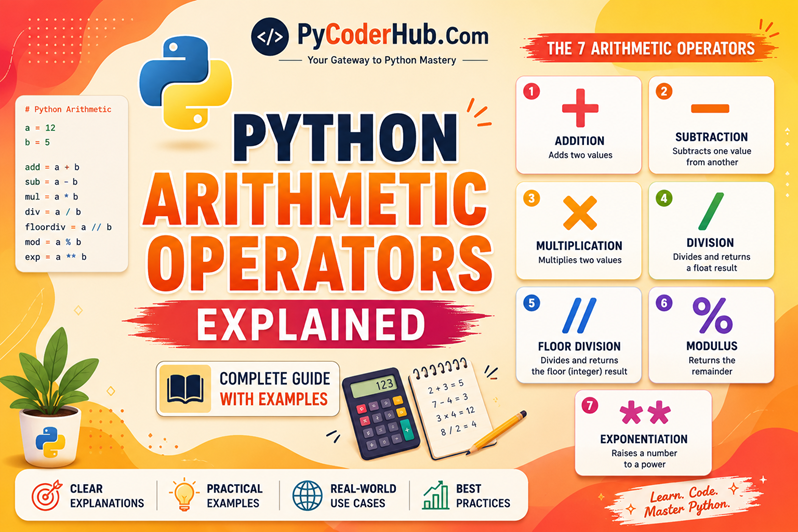
In this lesson, we’ll begin with the Python Arithmetic Operators—the most fundamental and frequently used operators in Python. Whether you’re adding two numbers, calculating a percentage, finding a remainder, or raising a value to a power, arithmetic operators make these mathematical operations possible. They are used in everything from simple calculators and shopping cart totals to scientific applications, data analysis, game development, and machine learning.
Rather than simply memorizing seven operator symbols, this lesson focuses on understanding how, when, and why each arithmetic operator is used. By the end of this lesson, you’ll not only know what each operator does but also understand its behavior, common confusion points, and practical applications in real-world Python programs.
In this lesson, you’ll learn:
- What Python Arithmetic Operators are and why they are called “arithmetic” operators.
- Whether arithmetic operators are an official Python language category or a commonly used educational classification.
- The purpose and behavior of all seven Python arithmetic operators.
- The syntax, practical examples, and real-world use cases for each operator.
- How arithmetic operators behave with different Python data types.
- The basics of arithmetic operator precedence and evaluation order.
- Common beginner mistakes and how to avoid them.
- Best practices for writing clear and reliable arithmetic expressions.
Before we understand what Python Arithmetic Operators are, let’s first answer an important question:
Why are they called “Arithmetic Operators” in the first place?
Why Are They Called “Arithmetic Operators” in the First Place?
Before learning what Python Arithmetic Operators are, it helps to understand the meaning behind their name.
The word arithmetic refers to the branch of mathematics that deals with basic numerical calculations, such as addition, subtraction, multiplication, division, finding remainders, and working with powers. These are the same types of calculations we learn in school and use in everyday life—for example, calculating a shopping bill, finding an average, measuring distance, or determining a discount.
Python uses a special set of symbols to perform these mathematical calculations in code. Since these symbols are used for arithmetic operations, they are commonly known as Arithmetic Operators.
For example, when you write an expression like:
total_price = item_price + taxthe + symbol tells Python to perform an arithmetic operation by adding two values together. Similarly, symbols like -, *, /, //, %, and ** instruct Python to perform different kinds of mathematical calculations.
In simple terms:
Arithmetic + Operators = Symbols that perform mathematical calculations.
The name itself is quite descriptive—it tells you both what these symbols do (perform operations) and what kind of operations they perform (arithmetic or mathematical calculations).
However, this raises another interesting question.
If these are called Arithmetic Operators, does that mean Python officially divides its operators into categories such as arithmetic, comparison, logical, assignment, and others? Or are these categories simply a convenient way to organize and teach the language?
Let’s clear up that confusion before we explore the operators themselves.
Are Python Operator Categories Official?
If you’ve searched for Python operators online, you’ve probably noticed that almost every tutorial, book, or course divides them into categories such as:
- Arithmetic Operators
- Assignment Operators
- Comparison Operators
- Logical Operators
- Identity Operators
- Membership Operators
- Bitwise Operators
This naturally raises an interesting question:
Are these categories officially defined by Python, or are they simply a convenient way to organize the language?
The short answer is:
These categories are a widely accepted educational classification, but they are not formally declared as predefined operator categories in Python’s language specification.
In other words, Python does not have an official statement saying:
“Python operators are divided into these seven categories.”
Instead, the Python language defines each operator individually and explains how it behaves as part of its expression syntax and grammar.
How Does Python Officially Define Operators?
Python’s official language specification describes operators in The Python Language Reference, specifically in Chapter 6: Expressions.
Rather than organizing operators into educational categories, the language reference explains:
- how expressions are formed,
- how different operators behave,
- how Python evaluates expressions,
- operator precedence,
- operator associativity,
- and the exact syntax and semantics of each operator.
This approach is designed for precisely defining the language, rather than teaching it.
Official Reference: The Python Language Reference – Chapter 6: Expressions explains how Python defines expressions, operators, precedence, and evaluation rules. If you’re interested in the formal language specification, it’s an excellent resource to explore alongside this chapter.
Python Language Insight
There is an important difference between how a programming language is specified and how it is taught.
The Python Language Reference focuses on describing the language with technical precision, while books, tutorials, and courses focus on making the language easier to understand.
That’s why educational resources commonly group operators into categories like Arithmetic, Comparison, or Logical Operators. These groupings make learning much more structured and beginner-friendly, even though they are not presented as formal categories in the language specification.
Why Do Almost All Tutorials Use These Categories?
Although the categories are educational in origin, they are grounded in real distinctions.
Each group is based on the primary purpose of its operators.
| Category | Primary Purpose |
|---|---|
| Arithmetic Operators | Perform mathematical calculations |
| Assignment Operators | Assign or update values |
| Comparison Operators | Compare two values |
| Logical Operators | Combine or negate Boolean expressions |
| Identity Operators | Check whether two objects are the same object |
| Membership Operators | Test whether a value exists in a collection |
| Bitwise Operators | Perform operations on individual bits |
Because these purposes are clear and well-defined, this classification has become the standard used throughout the Python community. You’ll find these same categories in most tutorials, books, online courses, and reference materials.
What Approach Will We Follow in This Chapter?
Throughout this chapter, we’ll use these widely accepted operator categories because they provide a clear and logical learning path.
At the same time, whenever appropriate, we’ll also refer to Python’s official language specification so you understand not only how operators are commonly taught, but also how the Python language itself defines and interprets them.
This approach gives you the best of both worlds: a beginner-friendly learning experience backed by an accurate understanding of the language.
Part 1: Arithmetic Operators
Now that we’ve understood why these operators are called Arithmetic Operators and how this category is commonly used throughout the Python community, let’s explore what they actually are and how they work.
Arithmetic operators are among the first operators every Python programmer learns because they are used to perform mathematical calculations. Whether you’re writing a simple calculator, calculating a student’s average marks, processing financial data, or building scientific applications, arithmetic operators allow Python to manipulate numeric values quickly and efficiently.
In this section, we’ll build a solid understanding of what arithmetic operators are, the kinds of calculations they perform, the data types they commonly work with, and a few interesting behaviors that make them more powerful than they might first appear.
1.1 What Are Arithmetic Operators?
Arithmetic operators are special symbols that tell Python to perform mathematical operations on one or more operands (values or variables).
Just as a calculator uses symbols like + and − to perform calculations, Python uses arithmetic operators to evaluate mathematical expressions and produce a result.
For example:
number_one = 15
number_two = 5

result = number_one + number_two

print(result)
Output:
20In this example:
number_oneandnumber_twoare the operands.+is the arithmetic operator.- Python adds the two values and stores the result in
result.
Arithmetic operators allow Python to perform calculations such as:
- Addition
- Subtraction
- Multiplication
- Division
- Floor division
- Finding the remainder
- Raising numbers to a power
These operations form the foundation of numerical programming in Python.
1.2 What Kinds of Calculations Can Arithmetic Operators Perform?
Python provides arithmetic operators for many of the mathematical calculations you perform every day.
Some common examples include:
- Adding two or more values
- Subtracting one value from another
- Multiplying numbers
- Dividing values
- Finding the integer (floor) quotient of a division
- Finding the remainder after division
- Calculating powers and exponents
These operations are used in countless real-world applications, such as:
- Calculating shopping totals and discounts
- Computing percentages and averages
- Measuring distance, speed, and time
- Financial calculations
- Scientific and engineering programs
- Data analysis and machine learning
- Games and simulations
Because mathematical calculations appear in almost every type of software, arithmetic operators are among the most frequently used operators in Python.
1.3 Which Data Types Can Be Used with Arithmetic Operators?
Arithmetic operators are primarily designed to work with Python’s numeric data types, allowing you to perform mathematical calculations on numbers. The three main numeric data types that commonly use arithmetic operators are:
int– Whole numbers such as10,-5, and42float– Decimal (floating-point) numbers such as3.14,0.5, and-8.75complex– Complex numbers such as2 + 3jand5 - 4j
For example:
whole_number = 20
decimal_number = 3.5
complex_number = 4 + 2j
As a beginner, you’ll work mostly with integers and floating-point numbers, while complex numbers are primarily used in scientific, engineering, and mathematical applications.
Do Arithmetic Operators Work Only with Numbers?
Not always.
Although arithmetic operators are mainly intended for mathematical calculations, Python allows some arithmetic operators to have additional behavior for certain non-numeric data types, such as strings, lists, and tuples.
For example, the + operator can join (concatenate) two strings:
greeting = "Hello"
website_name = " PyCoder"

print(greeting + website_name)
Output:
Hello PyCoderSimilarly, the * operator can repeat a string multiple times:
print("Python " * 3)Output:
Python Python PythonThis doesn’t mean that all arithmetic operators work with strings or other non-numeric data types. Only certain operators support these additional behaviors, while others are designed exclusively for numeric calculations.
For now, simply remember that numbers are the primary data types for arithmetic operators, while some operators also support additional behaviors with specific non-numeric data types. We’ll explore these behaviors later in this lesson.
Now that you understand what Python Arithmetic Operators are, the kinds of calculations they perform, and the data types they commonly work with, it’s time to meet all seven arithmetic operators.
Part 2: The Seven Arithmetic Operators (Overview)
Now that you understand what Python Arithmetic Operators are and the kinds of data they commonly work with, let’s take a quick look at all seven arithmetic operators provided by Python.
Each operator performs a specific type of mathematical operation. Some, like addition and multiplication, are familiar from everyday mathematics, while others, such as floor division and modulus, are unique to programming and may be new to many beginners.
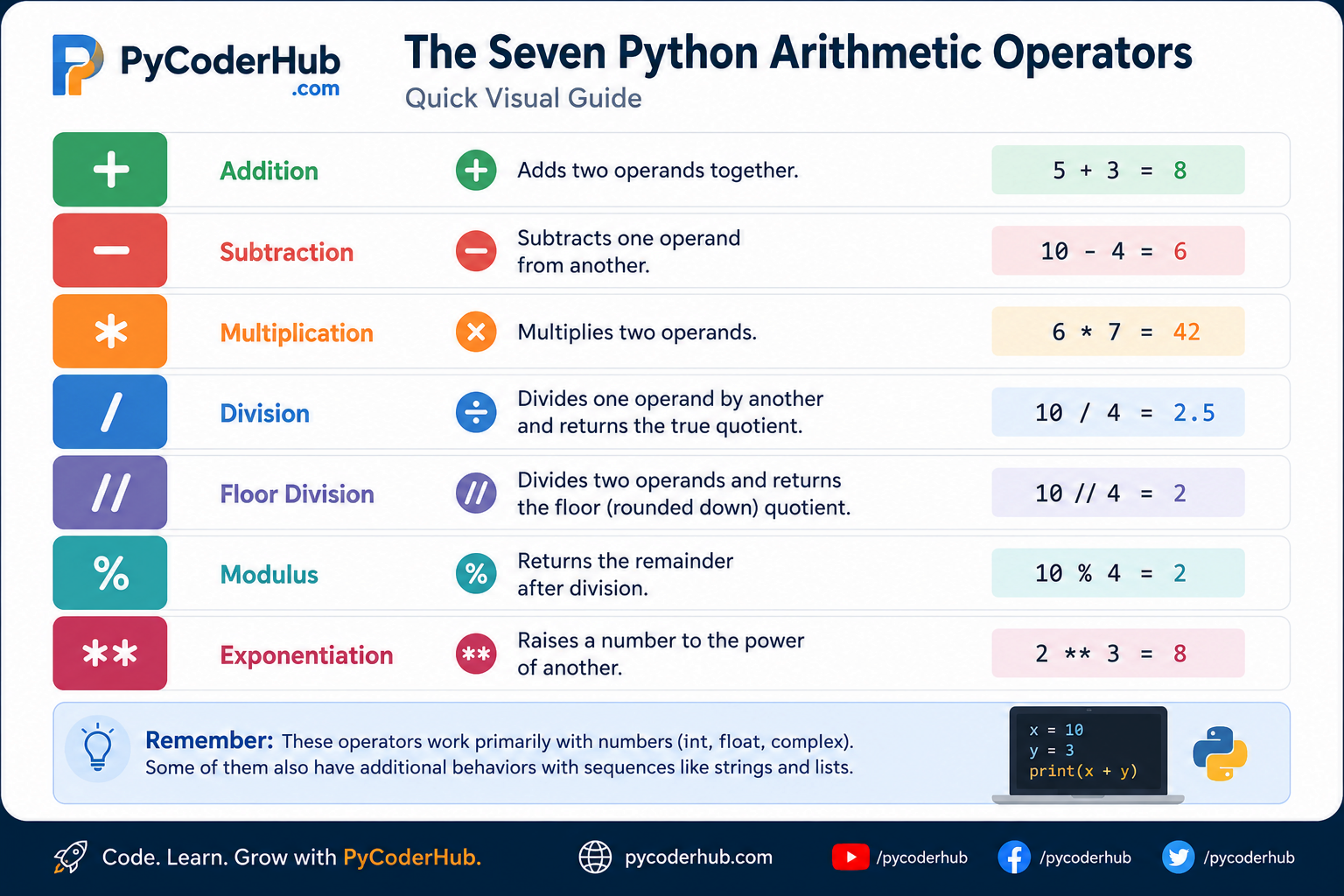
The table below provides a quick overview of each operator and its primary purpose.
| Operator | Name | Primary Purpose | Example |
|---|---|---|---|
+ | Addition | Adds two operands together | 5 + 3 |
- | Subtraction | Subtracts one operand from another | 10 - 4 |
* | Multiplication | Multiplies two operands | 6 * 7 |
/ | Division | Divides one operand by another and returns the true quotient | 10 / 4 |
// | Floor Division | Divides two operands and returns the floor (rounded down) quotient | 10 // 4 |
% | Modulus | Returns the remainder after division | 10 % 4 |
** | Exponentiation | Raises a number to the power of another | 2 ** 3 |
At this stage, you don’t need to memorize every operator or worry about how they behave in different situations. The goal is simply to become familiar with the symbols and the type of calculation each one performs.
In the following sections, we’ll explore each arithmetic operator individually, learning its syntax, behavior, practical examples, common confusion points, and real-world use cases.
Visual Recap: The Seven Python Arithmetic Operators
Before we study each operator in detail, take a quick look at this visual summary of all seven Python arithmetic operators. It provides an easy way to recognize each operator and remember its primary purpose at a glance.
Now that you have a quick overview of all seven Python Arithmetic Operators, let’s explore each one individually, beginning with the most fundamental operator—the Addition (+) operator.
Part 3: The Addition (+) Operator
The addition operator (+) is one of the most frequently used operators in Python. Its primary purpose is to add two numeric values and return their sum.
If you’ve ever used a calculator to add numbers, the Python addition operator works in the same way.
Although the addition operator is primarily used for mathematical calculations, Python also gives it additional meanings for certain data types, such as joining strings and combining lists. We’ll briefly look at these behaviors later in this section.
3.1 What Does the Addition Operator Do?
The addition operator tells Python to add two operands together.
These operands are usually numbers, but depending on the data type, the + operator can perform different operations.
For numeric values:
int + intint + floatfloat + floatcomplex + complex
the operator performs mathematical addition.
For example:
first_number = 15
second_number = 8

result = first_number + second_number

print(result)
Output
23Python first evaluates the expression first_number + second_number, then stores the result in the variable result.
3.2 Syntax
The general syntax of the addition operator is:
operand1 + operand2where:
operand1is the first value.+is the addition operator.operand2is the second value.
Python evaluates the expression and returns the sum of both operands.
3.3 Basic Examples
Adding two integers
number_one = 12
number_two = 5

print(number_one + number_two)
Output
17Adding floating-point numbers
price = 19.95
tax = 2.50

print(price + tax)
Output
22.45Adding an integer and a float
whole_number = 10
decimal_number = 2.5

print(whole_number + decimal_number)
Output
12.5Notice that Python returns a float because one operand is a floating-point number.
Adding a Positive Sign (Unary +)
The + operator can also be used as a unary operator, meaning it operates on a single operand.
For example:
number = +10

print(number)
Output
10In this case, the unary + simply indicates that the value is positive, unary + does not modify the value—it simply returns the operand unchanged.
Because positive numbers are assumed by default, you’ll rarely see unary + used in everyday Python code. Nevertheless, it’s part of the language and demonstrates that the same symbol can act as either a binary operator or a unary operator, depending on how it’s used.
3.4 Real-World Example
Suppose you’re building an online shopping application.
You want to calculate the total amount a customer has to pay before tax.
laptop_price = 65000
mouse_price = 1200
keyboard_price = 1800

total_price = laptop_price + mouse_price + keyboard_price

print(total_price)
Output
68000This is exactly how addition operators are used in real applications—combining multiple values to produce a final result.
3.5 The Addition Operator with Strings
As mentioned earlier in this lesson, Python allows the addition operator to perform string concatenation.
Instead of adding numbers, Python joins the two strings into a single string.
first_name = "PyCoder"
last_name = "Hub"

print(first_name + last_name)
Output
PyCoderHubIf you want a space between the words, include it in one of the strings:
first_name = "PyCoder"
last_name = " Hub"

print(first_name + last_name)
Output
PyCoder HubThis behavior is known as string concatenation.
We’ll study string concatenation in much greater detail when we cover Python strings. For now, simply remember that the + operator has an additional meaning when used with string operands.
3.6 Common Beginner Mistakes
Mixing incompatible data types
A common mistake is trying to add a string and a number.
age = 25

print("Age: " + age)
This raises an error because Python cannot automatically add a string and an integer.
TypeError: can only concatenate str (not "int") to strTo fix this, convert the number to a string:
age = 25

print("Age: " + str(age))
Output
Age: 25Note: If you’re unfamiliar with converting values between different data types, see our Python Type Casting chapter, where you’ll learn how functions like
str(),int(), andfloat()convert values from one type to another with practical examples.
Key Takeaways
- The
+operator primarily performs mathematical addition. - It returns the sum of two numeric operands.
- It works with Python’s numeric data types, including
int,float, andcomplex. - Python also uses
+to concatenate strings and combine certain sequence types. - Mixing incompatible data types, such as a string and an integer, raises a
TypeError.
Part 4: The Subtraction (-) Operator
The subtraction operator (-) is used to subtract one operand from another and return the difference between them. Like the addition operator, subtraction is one of the most commonly used arithmetic operations in Python and is widely used in everyday programming.
For example, you might use subtraction to:
- Calculate a discount on a product.
- Determine the remaining account balance after a withdrawal.
- Find the difference between two temperatures.
- Calculate profit or loss.
- Measure the time or distance between two events.
Whenever you need to determine how much one value differs from another, the subtraction operator is the appropriate choice.
4.1 What Does the Subtraction Operator Do?
The subtraction operator tells Python to subtract the second operand from the first operand.
The general syntax is:
operand1 - operand2Python evaluates the expression and returns the difference.
For example:
first_number = 20
second_number = 8

result = first_number - second_number

print(result)
Output
12In this example:
20is the first operand.8is the second operand.- Python subtracts 8 from 20 and returns 12.
4.2 Basic Examples
Subtracting Two Integers
current_score = 95
penalty_points = 10

final_score = current_score - penalty_points

print(final_score)
Output:
85Subtracting Floating-Point Numbers
original_price = 99.99
discount = 15.50

print(original_price - discount)
Output:
84.49Subtracting Different Numeric Types
Arithmetic operators work naturally with different numeric data types.
whole_number = 25
decimal_number = 4.5

print(whole_number - decimal_number)
Output:
20.5Subtracting a Larger Number from a Smaller Number
If the second number is larger than the first, Python returns a negative value.
available_balance = 20
purchase_amount = 35

print(available_balance - purchase_amount)
Output:
-154.3 Unary Minus (-)
The subtraction symbol (-) can also be used as a unary operator, meaning it operates on a single operand instead of two.
When used this way, it changes the sign of a number.
For example:
temperature = -12

print(temperature)
Output:
-12Notice the difference between the unary + and unary - operators: unary + leaves the value unchanged (so no + sign appears in the output), whereas unary - changes the value to its negative form, so the output includes a minus (-) sign.
You can also apply unary minus to an existing value:
number = 18

print(-number)
Output:
-18Unlike binary subtraction, which calculates the difference between two operands, unary minus simply returns the negative form of a single operand.
This is another example of how the same symbol can act as either a binary operator or a unary operator, depending on how it is used.
4.4 Real-World Example
Suppose you’re developing a simple banking application.
A customer has a balance of ₹15,000 and withdraws ₹3,500.
account_balance = 15000
withdrawal_amount = 3500

remaining_balance = account_balance - withdrawal_amount

print(remaining_balance)
Output:
11500Subtraction operators are commonly used whenever values need to be reduced, adjusted, or compared.
4.5 Common Beginner Mistakes
Reversing the Operands
Remember that subtraction is not commutative, which means changing the order of the operands changes the result.
For example:
print(15 - 5)
print(5 - 15)
Output:
10
-10
Although both expressions use the same numbers, they produce different results because Python always subtracts the second operand from the first operand.
Expecting Subtraction to Work with Strings
Unlike the addition operator, the subtraction operator cannot be used with strings.
For example:
first_name = "Py"
last_name = "Coder"

print(first_name - last_name)
Python raises:
TypeError: unsupported operand type(s) for -: 'str' and 'str'The subtraction operator is designed for numeric calculations only. It does not support string subtraction or other sequence operations.
Key Takeaways
- The
-operator subtracts one operand from another. - It works with Python’s numeric data types, including
int,float, andcomplex. - The order of operands matters because subtraction is not commutative.
- The same symbol also acts as a unary operator, allowing you to represent or produce negative values.
- Unlike the addition operator, subtraction does not support operations such as string concatenation.
Part 5: The Multiplication (*) Operator
The multiplication operator (*) is used to multiply two operands and return their product. Like addition and subtraction, it’s one of the most commonly used arithmetic operators in Python and appears in programs ranging from simple calculations to scientific computing and data analysis.
Beyond basic multiplication, Python gives the * operator an additional role with certain non-numeric data types, such as repeating strings and other sequences. We’ll see both behaviors in this section.
5.1 What Does the Multiplication Operator Do?
The multiplication operator tells Python to multiply two operands together.
The general syntax is:
operand1 * operand2Python evaluates the expression and returns the product.
For example:
first_number = 8
second_number = 6

result = first_number * second_number

print(result)
Output:
48In this example:
8is the first operand.6is the second operand.- Python multiplies both values and returns 48.
5.2 Basic Examples
Multiplying Two Integers
rows = 12
columns = 5

total_cells = rows * columns

print(total_cells)
Output:
60Multiplying Floating-Point Numbers
length = 5.5
width = 3.2

print(length * width)
Output:
17.65.3 Real-World Example
Suppose you’re creating an online shopping application.
A customer purchases three wireless headphones, each costing ₹2,499.
price_per_headphone = 2499
quantity = 3

total_price = price_per_headphone * quantity

print(total_price)
Output:
7497Multiplication is commonly used to calculate totals, areas, volumes, salaries, interest, and many other quantities where one value is repeated multiple times.
5.4 The Multiplication Operator with Strings
As mentioned earlier in this lesson, Python allows the multiplication operator to work with certain non-numeric data types.
When a string is multiplied by an integer, Python repeats the string the specified number of times.
For example:
print("Python " * 3)Output:
Python Python PythonThis behavior is known as string repetition.
You can also use it to create simple patterns.
print("*" * 10)Output:
**********Similarly, the * operator also supports repetition with other sequence data types, such as lists and tuples.
5.5 Common Beginner Mistakes
Multiplying Two Strings
A common misconception is that two strings can be multiplied together.
For example:
first_word = "Py"
second_word = "Coder"

print(first_word * second_word)
Python raises:
TypeError: can't multiply sequence by non-int of type 'str'The multiplication operator only supports string × integer, not string × string.
Using a Floating-Point Number for Repetition
The repetition count must be an integer.
print("Python " * 2.5)Python raises:
TypeError: can't multiply sequence by non-int of type 'float'This doesn’t work because Python needs an exact whole number to determine how many times to repeat the sequence, and a floating-point value can represent fractional amounts.
Key Takeaways
- The
*operator multiplies two numeric operands and returns their product. - It works with Python’s numeric data types, including
int,float, andcomplex. - Python also allows string × integer to repeat a string multiple times.
- The repetition count must be an integer.
- The multiplication operator does not support multiplying one string by another.
Part 6: The Division (/) Operator
The division operator (/) is used to divide one operand by another and return the true quotient (the exact result of the division).
Unlike some programming languages—and unlike Python 2—the division operator in Python 3 always returns a floating-point (float) value, even when the mathematical result is a whole number.
This consistent behavior makes division more predictable and helps avoid confusion when performing mathematical calculations.
6.1 What Does the Division Operator Do?
The division operator tells Python to divide the first operand (dividend) by the second operand (divisor) and return the exact quotient.
The general syntax is:
dividend / divisorFor example:
total_marks = 450
number_of_subjects = 5

average_marks = total_marks / number_of_subjects

print(average_marks)
Output:
90.0Notice that the result is 90.0, not 90.
This is because the / operator always returns a float in Python 3, regardless of whether the result is mathematically a whole number.
6.2 Basic Examples
Dividing Two Integers
print(12 / 3)Output:
4.0Although 12 ÷ 3 = 4, Python returns 4.0.
Dividing Two Floating-Point Numbers
print(15.5 / 2.5)Output:
6.2Dividing an Integer by a Float
print(18 / 4.0)Output:
4.5Python automatically performs the calculation and returns a floating-point result.
6.3 Why Does Python Always Return a Float?
One of the most common beginner questions is:
Why does
6 / 2return3.0instead of3?
The answer is simple.
The / operator is designed to return the true mathematical quotient, which may include a fractional part.
Even when the fractional part happens to be zero, Python keeps the result as a floating-point number to ensure the behavior of the operator is consistent.
For example:
print(8 / 4)
print(9 / 3)
print(10 / 2)
Output:
2.0
3.0
5.0
All three expressions return floating-point values, even though the mathematical answers are whole numbers.
This means you never have to wonder whether / will return an integer or a float—it always returns a float.
Python 2 vs Python 3
Python 2 handled division differently. When both operands were integers, the / operator performed integer division, discarding any fractional part.
# Python 2

print(8 / 4)
print(9 / 3)
print(10 / 2)
Output:
2
3
5
In Python 2, the result is an integer because dividing two integers with / always produced an integer. This design often caused confusion, especially when the mathematical result contained a fractional part.
For example:
# Python 2

print(5 / 2)
Output:
2To obtain the true mathematical result, at least one operand had to be a floating-point number.
# Python 2

print(5.0 / 2)
print(5 / 2.0)
Output:
2.5
2.5
Python 3 changed this behavior by making the / operator always perform true division, returning a floating-point value. This provides consistent behavior and avoids the confusion that often occurred in Python 2.
6.4 Real-World Example
Suppose a teacher wants to calculate the average marks of a student.
total_marks = 428
number_of_subjects = 5

average_marks = total_marks / number_of_subjects

print(average_marks)
Output:
85.6Division is commonly used when calculating:
- Average values
- Speed
- Percentages
- Unit prices
- Ratios
- Scientific measurements
6.5 Division by Zero
A divisor can never be zero.
For example:
print(10 / 0)Python raises:
ZeroDivisionError: division by zeroThis happens because division by zero is mathematically undefined.
Whenever there’s a possibility that the divisor might be zero, it’s good practice to check its value before performing the division.
6.6 Common Beginner Mistakes
Expecting an Integer Result
Many beginners expect:
print(20 / 5)to produce:
4Instead, Python returns:
4.0Remember:
The
/operator always returns afloatin Python 3.
If you need the integer quotient instead, use the floor division (//) operator, which we’ll study next.
Key Takeaways
- The
/operator performs true division. - It always returns a floating-point (
float) value in Python 3. - The first operand is the dividend, and the second is the divisor.
- Dividing by zero raises a
ZeroDivisionError. - Use
//when you need the floor (integer) quotient instead of the true quotient.