
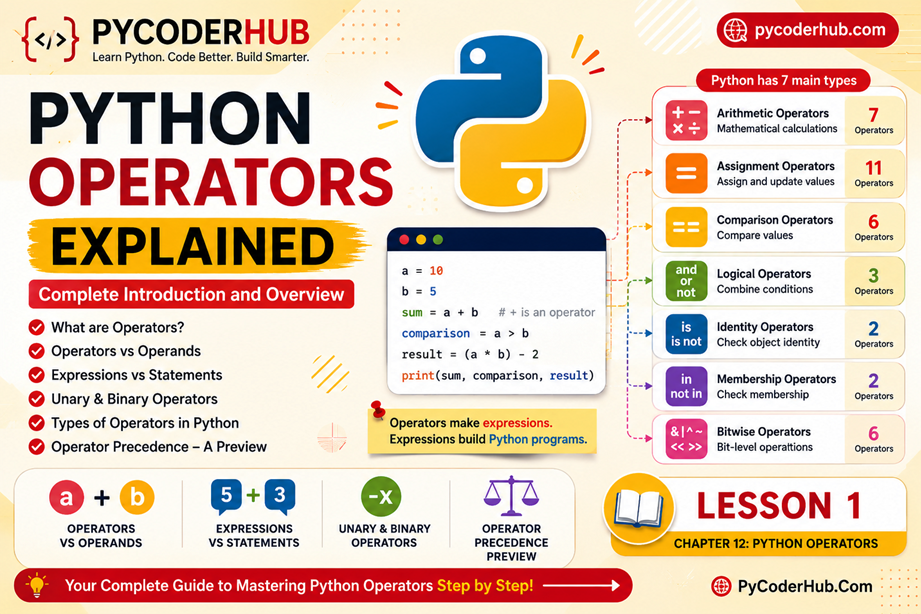
Part 1: Introduction to Python Operators
In the previous chapters, we gradually built the foundation needed to write Python programs. We learned how to store information using variables, how Python organizes information through data types, how values can be converted using type casting, and how type hints help describe the types of data our code expects to work with.
However, storing data is only one part of programming.
A program becomes useful when it can perform actions on that data. We may want to add numbers, compare values, check conditions, combine multiple rules, search for items inside a collection, or manipulate information in various ways. This is where Python operators come into the picture.
Operators are among the most frequently used features in Python. Whether you are writing a simple calculator, validating user input, processing files, building websites, analyzing data, or creating automation scripts, operators are constantly working behind the scenes.
In this chapter, Python Operators Explained, you will learn what operators are, how they work, the different categories Python provides, and how to use them effectively. More importantly, you will build a deeper understanding of how Python evaluates expressions and performs operations internally.
Let’s begin by understanding why operators are such an important part of programming.
1.1 — Welcome to Python Operators
Every chapter we have covered so far has focused on a different aspect of working with data.
For example:
- Variables allow us to store data.
- Data types define the kind of data being stored.
- Type casting allows us to convert data from one type to another.
- Type hints help document and describe expected data types.
But once data exists inside a program, we need a way to actually do something with it.
Imagine storing two numbers in variables:
first_number = 10
second_number = 20
At this point, the values exist in memory, but no action has been performed yet.
What if we want to:
- Add the numbers together?
- Compare them?
- Check whether they are equal?
- Determine which value is larger?
- Use them in a decision-making process?
To perform these actions, Python provides operators.
In simple terms, operators are special symbols or keywords that tell Python to perform a particular operation on one or more values.
You can think of operators as the action tools of programming.
Variables hold information, while operators allow us to work with that information.
Throughout this chapter, you will discover that operators are not limited to mathematics. Some operators compare values, some test conditions, some check membership, some work directly with binary data, and others perform specialized tasks.
Understanding operators is a major step toward writing more powerful and expressive Python code.
1.2 — Why Operators Matter
Operators appear in almost every Python program.
Even the simplest programs often rely on multiple operators without us consciously noticing them.
For example, consider a simple variable assignment:
user_name = "PyCoder"Most beginners focus on the variable and the value, but there is also an operator involved here.
The = symbol is an operator that tells Python to assign a value to a variable.
This means that even one of the first Python statements many people learn already uses an operator.
Now consider a basic calculation:
total_price = 100 + 50Here, the + operator tells Python to add two values together.
Or a comparison:
user_age >= 18The >= operator checks whether a value satisfies a particular condition.
Or a logical decision:
is_logged_in and has_permissionThe and operator combines multiple conditions into a single result.
These examples may seem simple, but they represent some of the most common tasks performed in software development.
1.3 — Real-World Examples of Operators
Before diving into formal definitions, let’s look at a few real-world situations where operators are commonly used.
Arithmetic Operation Example
Suppose an online store needs to calculate the total cost of an order.
product_price = 750
shipping_charge = 50

total_amount = product_price + shipping_charge
Here, the + operator combines two values to produce a new result.
Without the operator, Python would have no way to calculate the total amount.
Comparison Operation Example
Imagine a website that allows access only to users who are at least 18 years old.
user_age = 21

user_age >= 18
The >= operator compares two values and determines whether the condition is true.
This type of comparison is extremely common in real-world applications, such as age verification, eligibility checks, and validation systems.
Logical Operation Example
A system may require a user to be both logged in and verified before accessing a secure area.
is_logged_in = True
is_verified = True

is_logged_in and is_verified
The and operator combines multiple conditions and evaluates them together.
This allows programs to make more sophisticated decisions based on several requirements at the same time.
Note: You don’t need to fully understand these operators yet. Each operator category will be covered in its own dedicated lesson later in this chapter.
For now, simply notice the pattern: operators work with values, perform an action, and produce a result.
Although these examples use different operators, they all follow the same basic pattern:
- Python receives one or more values.
- An operator performs an action.
- A result is produced.
This simple pattern forms the foundation of everything you will learn throughout this chapter.
In the next section, we’ll answer the most fundamental question:
What exactly is an operator in Python, and how does it work?
Part 2: What Is an Operator?
In the previous section, you saw several examples of operators being used in real-world situations. Some operators performed calculations, others compared values, and some helped combine conditions.
Now it’s time to answer a more fundamental question:
What exactly is an operator?
Although operators are used constantly in Python code, many beginners focus only on the values involved and overlook the role operators play. Understanding what an operator is and how it works will make every future operator category easier to learn.
2.1 — Definition of an Operator
An operator is a special symbol or keyword that tells Python to perform a specific operation on one or more values.
In simple terms, operators instruct Python to do something with data.
For example:
10 + 5Here, the + symbol tells Python to add two values together.
Similarly:
20 > 10The > symbol tells Python to compare two values.
And:
True and FalseThe and keyword tells Python to combine two conditions.
Think of operators as instructions that tell Python what action should be performed.
Variables and objects provide the data, while operators provide the actions. They allow Python to calculate values, compare information, evaluate conditions, update existing data, and perform many other tasks that make programs useful.
Real-World Analogy
Imagine you have two numbers written on a piece of paper:
10 5Simply looking at the numbers does not tell you what should happen.
Should they be added?
Should they be multiplied?
Should they be compared?
The answer depends on the instruction placed between them:
10 + 5Add them.
10 - 5Subtract them.
10 > 5Compare them.
The numbers remain the same, but changing the operator completely changes the meaning of the expression.
This is exactly how operators work in Python.
2.2 — How Operators Perform Operations
Operators act as the bridge between values and actions.
When Python encounters an operator, it performs the operation associated with that operator and produces a result.
Consider this example:
8 + 4Python performs the following steps:
- Reads the first value (
8). - Encounters the
+operator. - Reads the second value (
4). - Applies the addition operation.
- Produces the result (
12).
The same idea applies to other operators.
Example:
15 > 10Python:
- Reads
15. - Encounters the
>operator. - Reads
10. - Performs a comparison.
- Produces
True.
Notice something important here:
The operator itself does not store data.
Instead, it performs an action using existing data and produces a new result.
This concept appears throughout programming and forms the foundation of expressions, calculations, comparisons, and decision-making.
2.3 — Operators Can Be Symbols or Keywords
When people first hear the word “operator,” they often think only of symbols such as:
+
-
*
/
==
While many Python operators are symbols, not all operators look like mathematical symbols.
Some operators are written as keywords.
For example:
Symbol Operators
+==>=Keyword Operators
andornotinThis is an important detail because beginners sometimes fail to recognize keywords such as and or in as operators.
For example:
is_logged_in and has_permissionThe word and is performing an operation just as much as the + symbol performs an operation in:
10 + 5The appearance is different, but the purpose is the same: instruct Python to perform a specific action.
Common Beginner Confusion
Many newcomers assume that operators must always be symbols.
However, in Python, both symbols and keywords can function as operators.
As you continue through this chapter, you’ll encounter many examples of both styles.
2.4 — Operators Produce Results
One of the most important ideas to understand is that operators produce results.
Whenever an operator performs an operation, Python evaluates that operation and returns a value.
For example:
10 + 5Produces:
15Example:
20 > 10Produces:
TrueExample:
True and FalseProduces:
FalseAlthough the operations are different, they all share a common pattern:
Input → Operation → Result
You provide values.
The operator performs an action.
Python produces a result.
This idea may seem simple, but it is one of the most important concepts in programming.
In fact, much of Python programming revolves around creating expressions that produce useful results.
We will explore expressions in greater detail later in this lesson.
2.5 — Operators Do Not Modify Values Automatically
A common beginner misconception is that simply using an operator automatically changes a variable’s value.
Consider this example:
account_balance = 100
account_balance + 50
Some beginners expect account_balance to become 150.
However, that is not what happens.
The expression:
account_balance + 50produces the result 150, but the result is not stored anywhere.
The original variable remains unchanged:
account_balanceOutput:
100If you want to keep the new value, you must store the result:
account_balance = account_balance + 50Now the variable contains:
150This distinction is extremely important.
Operators perform operations and produce results, but those results are not automatically saved.
A result must be assigned to a variable if you want to reuse it later.
Key Insight
An operator’s job is to perform an operation.
Storing the result is a separate action.
Understanding this difference helps prevent many beginner mistakes and prepares you for the next concepts we’ll discuss.
In the next section, we’ll examine another important piece of the puzzle: the values that operators work on, known as operands.
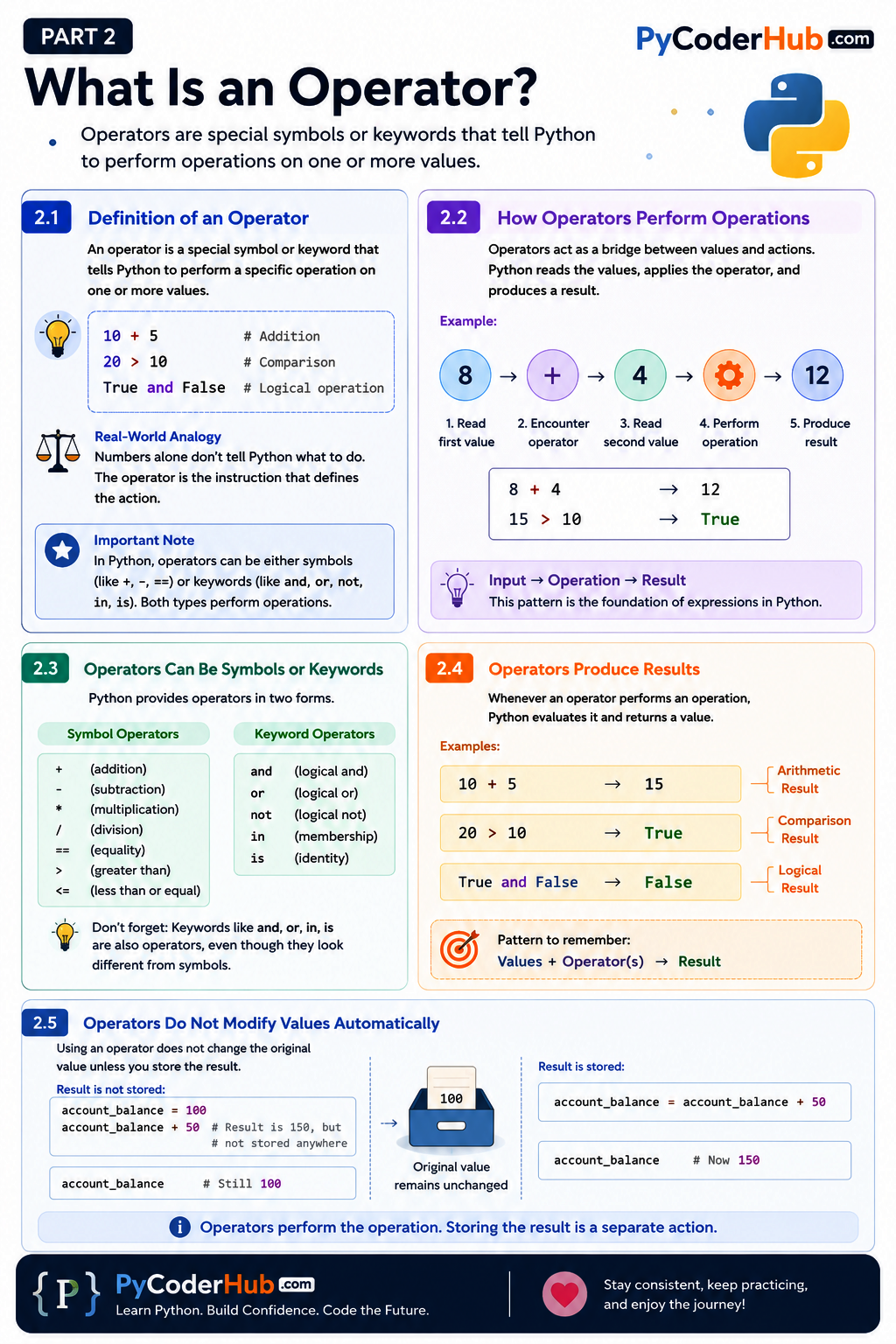
Visual Recap: Understanding Python Operators
Before we move on to the next section, let’s take a quick visual recap of what an operator is and how operators work in Python. This infographic summarizes the key ideas we’ve covered so far, including operator definitions, operator types, how operators produce results, and the relationship between operators and values.
Now that you have a solid understanding of what operators are and how they perform operations, it’s time to look at another important concept: the values that operators work with. In the next section, we’ll explore operands and learn how operators and operands work together to form meaningful expressions.
Part 3: Operators vs Operands
In the previous section, we learned that operators are special symbols or keywords that tell Python to perform a specific operation.
However, an operator cannot work by itself.
Consider the following expression:
+The + symbol is an operator, but by itself it doesn’t have enough information to perform any operation.
To do something useful, an operator needs values to work with.
These values are called operands.
Understanding the difference between operators and operands is important because almost every expression in Python is built from these two components working together. Once you understand their relationship, many other topics—such as expressions, comparisons, logical operations, and operator precedence—become much easier to understand.
Let’s begin by looking at what operands are.
3.1 — What Is an Operand?
An operand is a value, variable, object, or expression that an operator acts upon.
In simple terms, operands are the pieces of data that operators work with.
Consider this example:
10 + 5In this expression:
10is an operand.5is an operand.+is the operator.
The operator performs an action using the operands and produces a result.
Visualized another way:
10 + 5
│    │
│    └── Operand
│
└────── Operand

+ = Operator
The same idea applies to many different types of operators.
Example:
20 > 10Here:
20is an operand.10is an operand.>is the operator.
Example:
is_logged_in and has_permissionHere:
is_logged_inis an operand.has_permissionis an operand.andis the operator.
Notice that operands are not limited to numbers.
Operands can be:
- Numeric values
- Strings
- Boolean values
- Variables
- Objects
- Expressions
As long as an operator can work with them, they can serve as operands.
Key Insight
Operators perform actions.
Operands provide the data on which those actions are performed.
Both are required for most operations in Python.
3.2 — Operator vs Operand
Because the names are similar, beginners sometimes confuse operators and operands.
A simple way to remember the difference is:
| Term | Purpose |
|---|---|
| Operator | Performs an action |
| Operand | Receives the action |
Consider:
8 * 4Breaking it apart:
8    *    4
│    │    │
│    │    └── Operand
│    │
│    └─────── Operator
│
└──────────── Operand
In this expression:
8is data.4is data.*tells Python what action to perform on that data.
Without operands, the operator has nothing to work with.
Without an operator, the operands simply remain values without any action being performed.
Real-World Analogy
Think of a calculator.
If you enter:
10and
5nothing happens yet.
You must press a button such as:
+or
-to tell the calculator what action to perform.
In this analogy:
- Numbers are operands.
- Calculator buttons are operators.
The same principle applies in Python.
3.3 — Left Operand vs Right Operand
When an operator works with two operands, the operands are often referred to as the left operand and right operand.
Consider:
10 + 20Visual breakdown:
10   +   20
│        │
│        └── Right Operand
│
└────────── Left Operand
The operand appearing before the operator is called the left operand.
The operand appearing after the operator is called the right operand.
This terminology is widely used in programming documentation and technical discussions.
For example:
50 - 1550→ left operand15→ right operand
Likewise:
user_age >= 18user_age→ left operand18→ right operand
Understanding these terms becomes useful when learning about operator behavior, precedence, and evaluation rules later in this chapter.
What About Expressions with Multiple Operators?
So far, we’ve looked at expressions containing a single operator:
10 + 20In this example, identifying the left operand and right operand is straightforward.
However, real-world Python expressions often contain multiple operators.
Consider:
10 + 20 + 5The important thing to remember is that:
Python evaluates it as two binary operations: first 10 + 20 (producing 30), then 30 + 5 (producing 35)
10 + 20and
30 + 5Python evaluates the expression step by step and applies the concept of left and right operands to each individual operation.
Step 1 — First operation:
10 + 2010is the left operand.20is the right operand.
This produces:
30Step 2 — Second operation:
30 + 530is the left operand — this is the result of Step 1, not a value from the original expression.5is the right operand — this is the original literal value from the expression.
This produces:
35The key takeaway is that left operand and right operand describe the values involved in a specific operation. In larger expressions, Python evaluates step by step, and the result of one operation becomes the left operand of the next.
Operators Can Also Work with a Single Operand
Not every operator works with two operands.
Some operators require only a single operand to perform their operation.
For example:
negative_value = -5Here, the minus sign (-) is acting on only one value:
-5
│
└── Operand

- = Operator
Unlike the earlier examples, there is no separate left operand and right operand.
The operator simply works with a single operand and produces a result.
This is an important observation because beginners often assume that every operator must appear between two values:
value_a + value_bHowever, Python provides operators that can work with one operand, two operands, and even more complex forms.
Does Order Matter?
Sometimes yes.
For example:
10 - 5produces:
5But:
5 - 10produces:
-5The operator is the same, but the order of the operands changes the result.
This shows that operands are not always interchangeable.
The position of an operand can affect how an operation behaves.
In the next section, we’ll explore this concept through unary, binary, and ternary operations, which classify operators based on the number of operands they use.
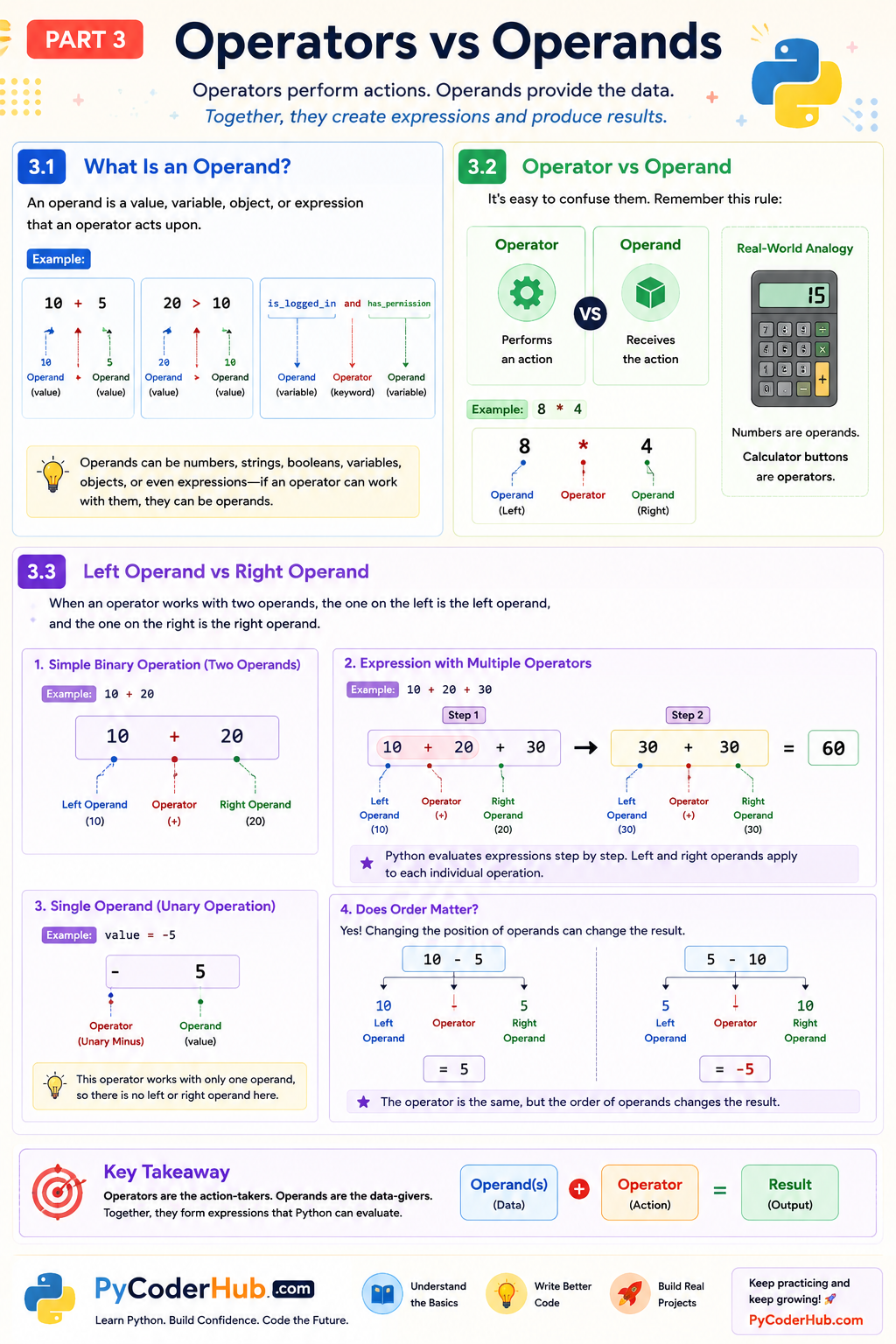
Visual Recap: Understanding Operators and Operands
Before we move on to the next section, let’s take a quick visual recap of the relationship between operators and operands. Understanding the difference between these two concepts is essential because almost every Python expression is built from operators acting on operands to produce a result.
Now that you understand what operands are and how they work alongside operators, we can explore another important concept: arity. In the next section, you’ll learn why some operators work with one operand, others work with two operands, and how Python classifies operations as unary, binary, or ternary.
Part 4: Unary, Binary, and Ternary Operations
In the previous section, we learned that operators perform actions and operands provide the values on which those actions are performed.
However, not all operators work with the same number of operands.
Some operators work with a single operand, some require two operands, and a few operations involve three parts working together.
This brings us to an important concept known as arity.
Understanding arity helps us classify operators based on the number of operands they work with. Although the term may sound technical at first, the underlying idea is actually quite simple.
4.1 — What Does Arity Mean?
In programming, arity refers to the number of operands that a single operator (or operation) requires.
In simple terms, arity answers the question:
How many pieces of data does this operation need in order to work?
Based on the number of operands involved, operations are commonly classified into three groups:
| Type | Number of Operands |
|---|---|
| Unary | 1 |
| Binary | 2 |
| Ternary | 3 |
For example:
-valueUses one operand, making it a unary operation.
value_a + value_bUses two operands, making it a binary operation.
value_if_true if condition else value_if_falseUses three logical components, making it a ternary operation.
Most operators you encounter in everyday Python programming are binary operators, but unary and ternary operations are also important to understand.
Can an Expression Contain More Than Three Operands?
Yes.
An expression can contain four, five, or many more operands.
For example:
total = 10 + 20 + 30 + 40This expression contains four operands:
10203040
At first glance, you might wonder:
If this expression contains four operands, does that make it a quaternary operation?
The answer is no.
Remember that arity applies to an individual operator, not to the entire expression.
In this example, each + operator is still a binary operator because it works with only two values at a time.
Python interprets the expression roughly as:
((10 + 20) + 30) + 40Let’s break it down step by step.
First:
10 + 20This is a binary operation because the + operator works with two operands.
Result:
30Then:
30 + 30Another binary operation.
Result:
60Finally:
60 + 40Another binary operation.
Result:
100Even though the overall expression contains four operands, every individual + operator remains binary because each operation works with only two operands at a time.
This is an important distinction:
Arity describes a single operator, not the total number of values appearing in an expression.
Why We Usually Stop at Unary, Binary, and Ternary
Most programming languages define operators that fall into one of these categories:
| Type | Example |
|---|---|
| Unary | -value, not condition |
| Binary | a + b, x * y |
| Ternary | value_if_true if condition else value_if_false |
Operators requiring four or more operands are uncommon.
Instead, programming languages typically:
- Combine multiple binary operations.
- Build larger expressions from smaller operations.
- Use function calls when many values must be processed together.
For this reason, when discussing operators in Python, you’ll almost always encounter the terms unary, binary, and ternary.
Let’s look at each category individually.
4.2 — Unary Operators
A unary operator works with exactly one operand.
The word unary simply means “one.”
Consider this example:
-negative_numberVisual breakdown:
- negative_number
│
└── Operand
The unary minus operator (-) acts on a single operand and produces a new value.
Another example:
not is_logged_inVisual breakdown:
not is_logged_in
│
└── Operand
Here, the not operator works with a single Boolean value and reverses its truth value.
Common Unary Operators in Python
| Operator | Purpose |
|---|---|
+ | Unary positive |
- | Unary negative |
not | Logical negation |
~ | Bitwise inversion |
Examples:
account_balance = -100not TrueAt this stage, you don’t need to understand the detailed behavior of every unary operator. The important takeaway is that unary operators work with only one operand.
4.3 — Binary Operators
A binary operator works with exactly two operands.
The word binary means “two.”
Binary operations are by far the most common type of operation in Python.
Consider:
10 + 5Visual breakdown:
10 + 5
│    │
│    └── Right Operand
│
└────── Left Operand
The + operator works with two operands and produces a result.
Most operator categories introduced later in this chapter consist primarily of binary operators.
4.4 — Ternary Conditional Expression
A ternary operation works with three parts.
Unlike unary and binary operations, Python does not provide many ternary operators. Instead, the most common ternary construct is the conditional expression, sometimes informally called the ternary operator.
Its syntax looks like this:
value_if_true if condition else value_if_falseExample:
access_message = "Allowed" if user_age >= 18 else "Denied"This expression contains three logical components:
- A value returned when the condition is true.
- A condition being evaluated.
- A value returned when the condition is false.
Visualized conceptually:
value_if_true
       │
       ▼
condition
       │
       ▼
value_if_false
The expression chooses one of two values depending on the result of a condition.
Note
You don’t need to master ternary expressions yet. We’ll encounter them again later when discussing conditional logic and practical Python coding patterns.
4.5 — Prefix, Infix, and Postfix Operators
Now that we understand how operators are classified by the number of operands they use, let’s look at another way operators can be classified: by their position relative to the operand.
This classification is less important for everyday Python programming, but it helps explain some common beginner questions, especially for readers coming from other programming languages.
Prefix Operators
A prefix operator appears before its operand.
Examples:
-negative_numbernot is_logged_inVisualized:
Operator → OperandExamples:
-5
not True
Many unary operators in Python are prefix operators.
Infix Operators
An infix operator appears between two operands.
Examples:
10 + 5user_age >= 18Visualized:
Operand → Operator → OperandExamples:
10 + 5
20 > 10
Most operators used in Python are infix operators.
Arithmetic, comparison, logical, identity, and membership operators are commonly written in infix form.
Postfix Operators
A postfix operator appears after its operand.
Visualized:
Operand → OperatorExamples from other languages:
counter++
counter--
If you’ve previously used languages such as C, C++, Java, or JavaScript, you may have seen syntax like this.
However, Python does not provide postfix increment or decrement operators.
The following code is invalid in Python:
counter++Likewise:
counter--Why Doesn’t Python Have ++ and --?
Python’s design philosophy favors clarity and readability.
Instead of using increment and decrement operators, Python encourages explicit code:
counter = counter + 1or more commonly:
counter += 1Similarly:
counter -= 1This design choice helps reduce confusion and keeps Python code more readable.
Key Takeaway
Operators can be classified in two different ways:
By number of operands:
- Unary
- Binary
- Ternary
By position relative to operands:
- Prefix
- Infix
- Postfix
Understanding these classifications gives you a deeper understanding of how operators work behind the scenes.
In the next section, we’ll build on everything we’ve learned so far by exploring an important concept that appears throughout Python code: expressions and statements.
Part 5: Expressions vs Statements
So far in this lesson, we’ve learned what operators are, what operands are, and how operators are classified based on the number of operands they work with.
Now it’s time to look at a larger concept that appears throughout Python programming: expressions and statements.
These two terms are often confused because they both represent pieces of Python code. However, they serve different purposes.
Understanding the difference is important because operators are most commonly used to build expressions, and expressions are then used within statements to perform meaningful tasks.
Let’s begin by exploring what an expression is.
5.1 — What Is an Expression?
An expression is any combination of values, variables, operators, and function calls that Python can evaluate to produce a single result.
In simple terms, an expression is something that produces a value.
For example:
10 + 5Python evaluates this expression and produces:
15Another example:
user_age > 18If user_age is 20, Python evaluates the expression and produces:
TrueExpressions can also be very simple.
A single value is an expression:
100A single variable is also an expression:
user_nameA function call that returns a value is an expression as well:
len("Python")Produces:
6Notice that every example above has one thing in common:
Python evaluates it and produces a value.
Operators Build Expressions
Most expressions are formed by combining operators with operands.
For example:
price * quantityHere:
priceandquantityare operands.*is the operator.- The entire line is an expression.
Similarly:
score >= passing_scoreAgain:
- Two operands.
- One operator.
- One expression.
This is why operators are such an important topic—they are one of the primary building blocks used to create expressions.
Key Insight
If Python can evaluate a piece of code and produce a value, that piece of code is an expression.
5.2 — What Is a Statement?
A statement is a complete instruction that tells Python to perform an action.
Unlike an expression, a statement is executed to do something rather than simply produce a value.
For example:
user_age = 25This is an assignment statement.
Its purpose is to assign a value to a variable.
Another example:
if user_age >= 18:
    print("Access granted")
This is an if statement.
Its purpose is to control the flow of the program based on a condition.
Here are some other common statements:
Variable assignment:
message = "Welcome"Import statement:
import mathLoop statement:
for number in range(3):
    print(number)
Function definition:
def greet():
    print("Hello!")
Each of these tells Python to perform an action.
Unlike expressions, statements are primarily about doing something, not simply producing a value.
Important Note
Many statements contain expressions.
For example:
total = price * quantityThe entire line is an assignment statement.
However:
price * quantityis the expression inside that statement.
This demonstrates an important relationship:
Expressions often exist within statements.
5.3 — Key Differences Between Expressions and Statements
Although expressions and statements are closely related, they have different purposes.
The easiest way to remember the difference is this:
- An expression produces a value.
- A statement performs an action.
The following table summarizes the differences.
| Expression | Statement |
|---|---|
| Produces a value | Performs an action |
| Can be evaluated | Is executed |
| Often used inside statements | May contain one or more expressions |
| Can appear as part of larger expressions | Forms a complete instruction |
Consider this example:
result = 10 + 5Breaking it apart:
result = 10 + 5
│         │
│         └── Expression
│
└──────────── Assignment Statement
The expression:
10 + 5produces the value:
15The assignment statement then stores that value in result.
Another example:
if score >= 50:
    print("Pass")
Here:
score >= 50is an expression.
The entire if structure is an if statement.
A Helpful Way to Think About It
Think of an expression as an answer.
Think of a statement as an instruction.
Expressions generate information.
Statements tell Python what to do with that information.
In the next part of this lesson, we’ll explore the different categories of operators available in Python.
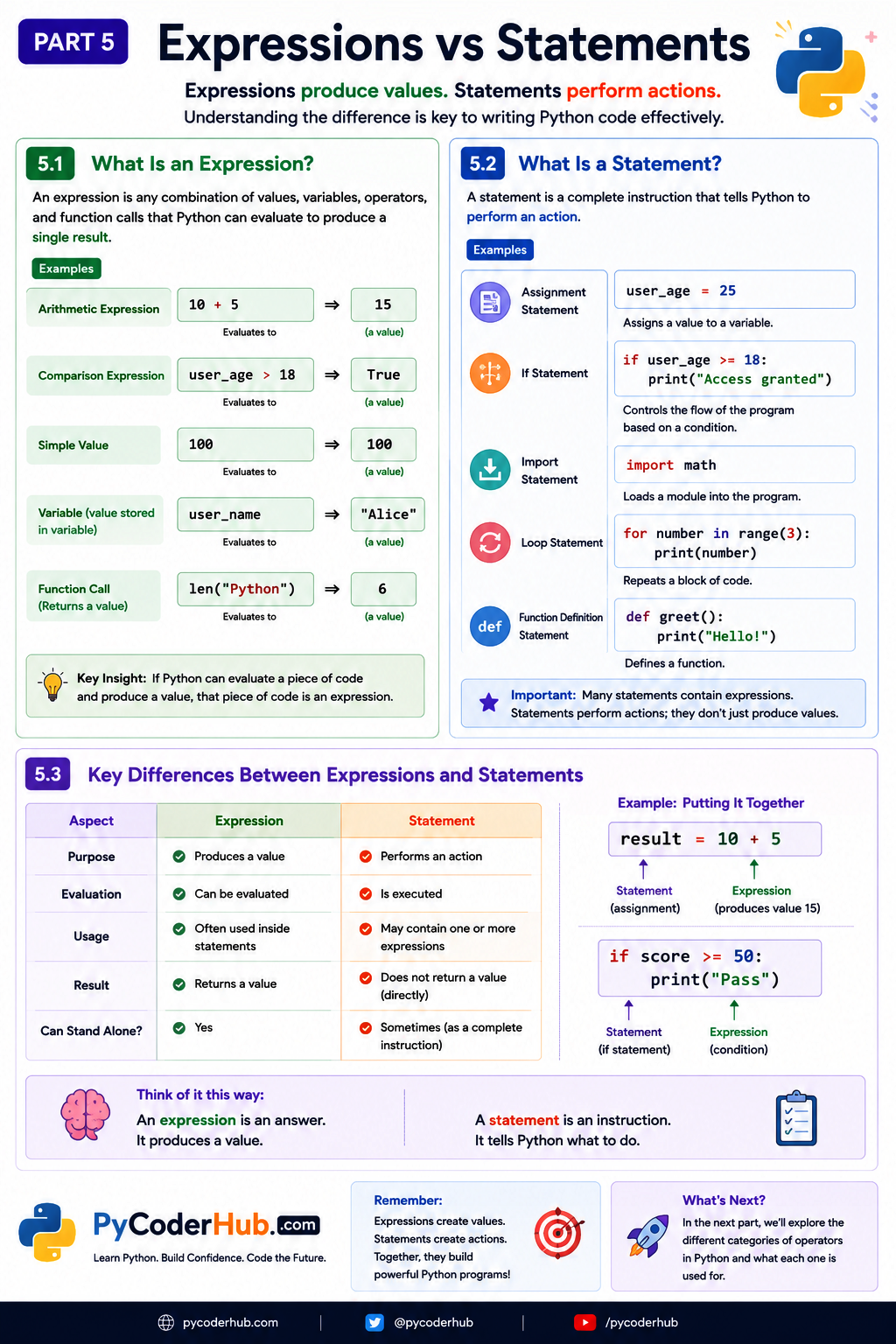
Visual Recap: Expressions vs Statements in Python
Before we move on to the different categories of Python operators, let’s take a quick visual recap of the concepts we’ve covered so far. This infographic summarizes what expressions and statements are, how they differ, and how they work together to form meaningful Python code.
Now that you understand the difference between expressions and statements—and how operators help create expressions—we’re ready to explore the main categories of operators available in Python. In the next section, you’ll get a high-level overview of each operator category and see how the rest of this chapter is organized.
Part 6: Types of Operators in Python
Up to this point, we’ve focused on the fundamental concepts behind operators. We’ve learned what operators are, how they work with operands, how they are classified based on arity, and how they help build expressions.
Now it’s time to answer another important question:
What kinds of operators does Python provide?
Python includes several categories of operators, each designed for a different purpose. Some operators perform mathematical calculations, some compare values, some combine logical conditions, while others check object identity or membership within collections.
Rather than memorizing every operator immediately, it’s more useful to understand why each category exists and what problems it helps solve.
In the following sections, we’ll briefly introduce each operator category. Later in this chapter, each category will be explored in its own dedicated lesson with detailed explanations, rules, examples, common mistakes, and best practices.
6.1 — How Python Classifies Operators
Python groups its operators into several categories based on the type of operation they perform.
Each category serves a different purpose, making it easier to choose the right operator for a particular task.
The seven primary operator categories are:
- Arithmetic Operators
- Assignment Operators
- Comparison Operators
- Logical Operators
- Identity Operators
- Membership Operators
- Bitwise Operators
Think of these categories as different tools in a toolbox.
Just as you would choose a screwdriver instead of a hammer depending on the task, you choose different operator categories depending on what you want your program to accomplish.
Let’s briefly introduce each category.
6.2 — Arithmetic Operators
Arithmetic operators are used to perform mathematical calculations.
They allow you to add, subtract, multiply, divide, and perform other common mathematical operations.
Example:
total_price = 100 + 50Here, the + operator adds two values together.
Arithmetic operators are among the first operators most programmers learn because they closely resemble the mathematical symbols we already use in everyday life.
In the dedicated lesson, you’ll learn about operators such as:
- Addition (
+) - Subtraction (
-) - Multiplication (
*) - Division (
/) - Floor Division (
//) - Modulus (
%) - Exponentiation (
**)
along with their behavior, common use cases, and important edge cases.
6.3 — Assignment Operators
Assignment operators are used to assign values to variables.
The most familiar assignment operator is:
user_name = "PyCoder"Here, the = operator assigns the string "PyCoder" to the variable user_name.
Python also provides compound assignment operators, which combine an operation with assignment.
For example:
score += 10Instead of writing:
score = score + 10you can use the shorter and more readable compound assignment operator.
We’ll explore all assignment operators in detail in a dedicated lesson.
6.4 — Comparison Operators
Comparison operators compare two values.
Instead of producing a numeric result, they produce a Boolean value:
Trueor
FalseExample:
user_age >= 18This expression checks whether the value of user_age is greater than or equal to 18.
Comparison operators are essential for decision-making because they are commonly used with statements such as if, while, and conditional expressions.
Some common comparison operators include:
==!=><>=<=
We’ll study each one in depth later in this chapter.
6.5 — Logical Operators
Logical operators work with Boolean values and conditions.
They allow you to combine, reverse, or evaluate logical expressions.
Example:
is_logged_in and has_permissionThe and operator returns True only when both conditions are true.
Python provides three logical operators:
andornot
These operators are widely used in conditional statements, loops, and decision-making throughout Python programs.
6.6 — Identity Operators
Identity operators check whether two references point to the same object in memory.
This is different from checking whether two objects contain equal values.
Example:
first_list is second_listThe is operator checks object identity, not object equality.
Python provides two identity operators:
isis not
Many beginners confuse identity operators with comparison operators.
We’ll explore the important differences—and why they matter—in a dedicated lesson.
6.7 — Membership Operators
Membership operators check whether a value exists within another object, such as a list, tuple, string, dictionary, or set.
Example:
"Python" in programming_languagesThe in operator checks whether "Python" is a member of the collection.
Python provides two membership operators:
innot in
These operators make searching collections simple and readable.
6.8 — Bitwise Operators
Bitwise operators work directly with the individual bits of integer values.
Instead of operating on numbers as whole values, they manipulate their binary representation.
Example:
5 & 3Although bitwise operators may seem advanced at first, they are useful in areas such as:
- Low-level programming
- Performance optimization
- Flags and permissions
- Embedded systems
- Network programming
Python provides several bitwise operators, including:
&|^~<<>>
If these operators seem unfamiliar right now, don’t worry. They are typically introduced later because they require a basic understanding of binary numbers.
6.9 — Python Operator Categories at a Glance
The following table summarizes the seven primary operator categories you’ll learn throughout this chapter.
| Category | Primary Purpose | Example |
|---|---|---|
| Arithmetic | Perform mathematical calculations | 10 + 5 |
| Assignment | Assign or update variable values | score += 5 |
| Comparison | Compare two values | age >= 18 |
| Logical | Combine or negate conditions | is_admin and is_active |
| Identity | Compare object identity | obj1 is obj2 |
| Membership | Check whether a value exists in a collection | "a" in word |
| Bitwise | Perform operations on binary bits | 5 & 3 |
Notice that each category focuses on a different kind of problem.
Some categories work primarily with numbers, others with Boolean values, while others deal with objects or collections.
Understanding when to use each category is just as important as learning how to use each individual operator.
Key Takeaway
Python provides a rich collection of operators, each designed for a specific purpose. Rather than trying to memorize every operator at once, focus on understanding the role of each category. Once you know what problem a category solves, learning the individual operators within that category becomes much easier.
Visual Recap: The Main Types of Python Operators
Before we wrap up this lesson, let’s take a quick visual recap of the seven primary categories of Python operators. This infographic provides a high-level overview of each operator category, its purpose, the operators it includes, and the number of operators in each group. Think of it as a roadmap for the lessons you’ll explore throughout the rest of this chapter.
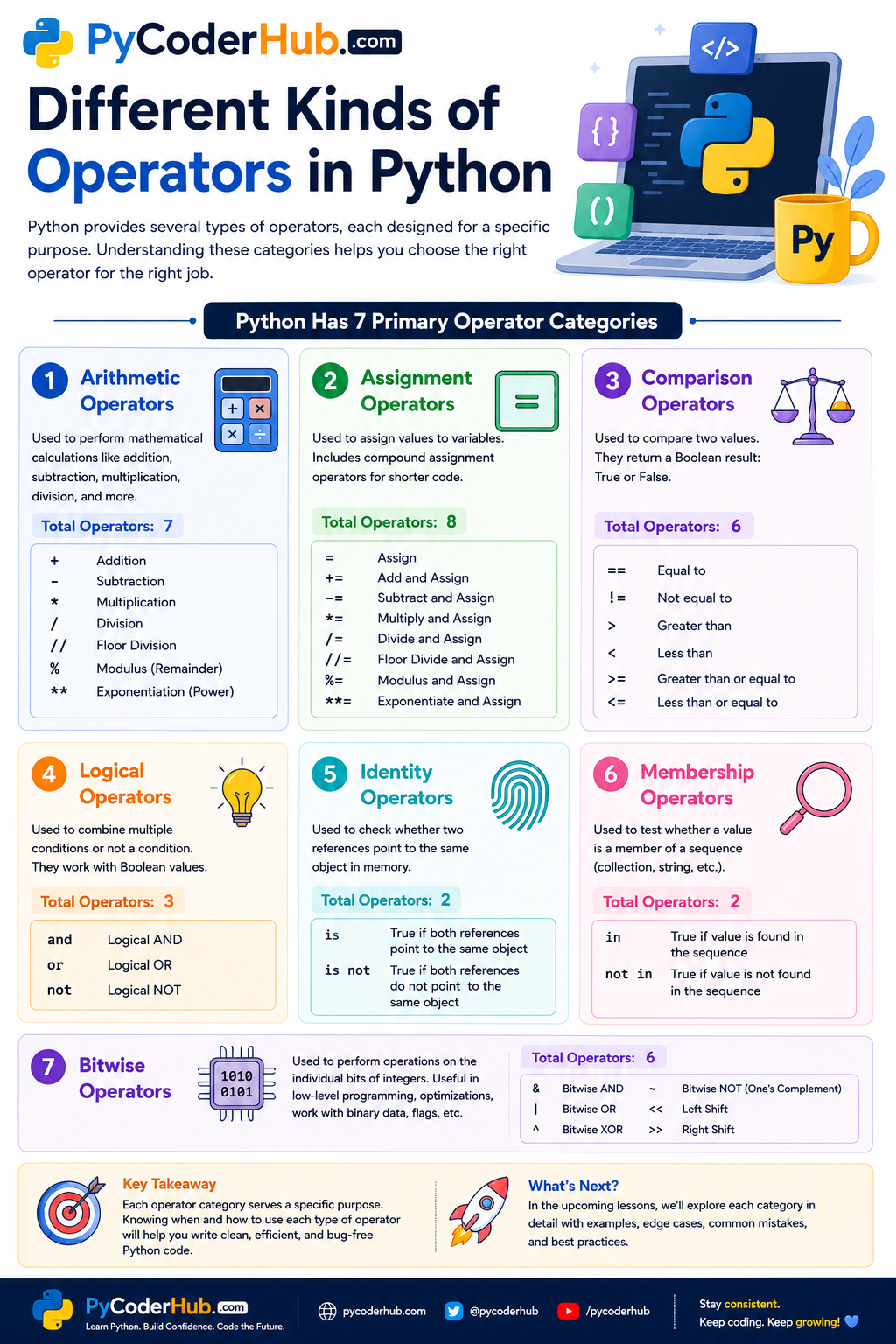
Now that you’ve seen the complete landscape of Python operators, you have a solid understanding of what each category is designed to do.
Part 7: Historical Note — Operators in Older Python Versions
As you continue learning Python, you’ll mostly work with modern Python 3 code. However, if you ever read older tutorials, maintain legacy applications, or browse historical code examples, you may occasionally encounter syntax that no longer exists in today’s versions of Python.
While these older operators are not part of modern Python, knowing about them can help you recognize outdated code and understand why it no longer works.
Let’s look at two well-known examples.
7.1 — The <> Operator
In Python 2, the <> operator was an alternative way to write “not equal to.”
For example:
10 <> 20This had the same meaning as:
10 != 20Both expressions evaluated to:
TrueHowever, beginning with Python 3, the <> operator was removed from the language.
Today, the correct way to test whether two values are different is to use the != operator.
For example:
10 != 207.2 — The Backtick (`) Operator
Another feature that existed in older versions of Python was the backtick syntax.
In Python 2, surrounding an object with backticks produced its string representation.
For example:
`100`This behaved similarly to:
repr(100)The backtick syntax was removed in Python 3 because using the built-in repr() function is clearer and more explicit.
Today, if you want the official string representation of an object, use:
repr(100)instead of backticks.
Key Takeaway
You don’t need to memorize obsolete operators, and you should never use them in new Python code.
If you encounter syntax such as <> or backticks in Python code, it’s a strong indication that the code was written for an older version of Python.
Python has evolved over the years, and some operators that existed in earlier versions have been removed or replaced. Although these operators are no longer used in modern Python, being aware of them can make it easier to recognize and understand legacy code when you come across it.
Lesson Summary
By the end of this lesson, you should understand that:
- Operators are special symbols or keywords that tell Python to perform a specific operation.
- Operators can be symbols (such as
+,==, and=) or keywords (such asand,or,not,in, andis). - Operators work with operands, which are the values, variables, objects, or expressions on which operations are performed.
- In binary operations, operands are commonly referred to as the left operand and right operand.
- Arity describes how many operands a single operator requires, leading to unary, binary, and ternary operations.
- An expression may contain many operands, but each individual operator still has its own arity.
- Expressions produce values, while statements perform actions.
- Most expressions are built by combining operators with operands, and many statements contain one or more expressions.
- Python organizes its operators into seven primary categories:
- Arithmetic Operators
- Assignment Operators
- Comparison Operators
- Logical Operators
- Identity Operators
- Membership Operators
- Bitwise Operators
- Some operators found in older versions of Python, such as
<>and the backtick syntax, are obsolete and should not be used in modern Python code. - This lesson provides the conceptual foundation for the rest of the chapter, where each operator category will be explored in detail with practical examples, rules, best practices, and common pitfalls.
Conclusion
Python operators may look like small symbols or simple keywords, but they are one of the most fundamental building blocks of the language. Almost every Python program—whether it’s a simple calculator, a data-processing script, or a large application—relies on operators to perform calculations, compare values, evaluate conditions, assign data, and manipulate information.
In this lesson, the goal wasn’t to memorize every operator. Instead, it was to build a solid conceptual foundation by understanding what operators are, how they work with operands, how expressions and statements are related, and how Python organizes its operators into different categories. Once these core ideas become clear, learning individual operators becomes much more intuitive because you’ll understand not only what they do, but also why they exist and when they should be used.
As you continue through this chapter, you’ll gradually move from broad concepts to practical application. Each operator category will be explored in depth with detailed explanations, real-world examples, common mistakes, best practices, and practical coding scenarios. By the end of the chapter, you’ll have a comprehensive understanding of Python operators and the confidence to use them effectively in your own programs.
What’s Next?
In the next lesson, we’ll begin with one of the most frequently used operator categories: Python Arithmetic Operators. You’ll learn how Python performs mathematical operations, explore each arithmetic operator individually, understand important behaviors such as division and modulus, and discover common pitfalls that every Python programmer should know.

One thought on “Python Operators Explained: Complete Introduction and Overview”