Introduction: Python Type Hint Errors
You have spent the last six lessons learning how Python type hints work—what they are, how to write them, and which rules and guidelines to follow. Now it is time to look at what happens when things go wrong.
But before diving into errors, there is one truth you must keep in mind throughout this entire lesson:
Python does not enforce type hints.
This is not a limitation or a bug. It is a deliberate design decision. Python is a dynamically typed language, and type hints were added as an optional layer on top—not as a replacement for Python’s dynamic nature.
You learned this in Lesson 1, but it becomes especially important now because it changes what a type hint error actually means.
Type Hint Errors Are Usually Not Python Errors
When you make a syntax mistake in Python, such as forgetting a colon or mismatching parentheses, Python immediately raises an error and refuses to run the code.
Type hint errors work differently.
Consider this example:
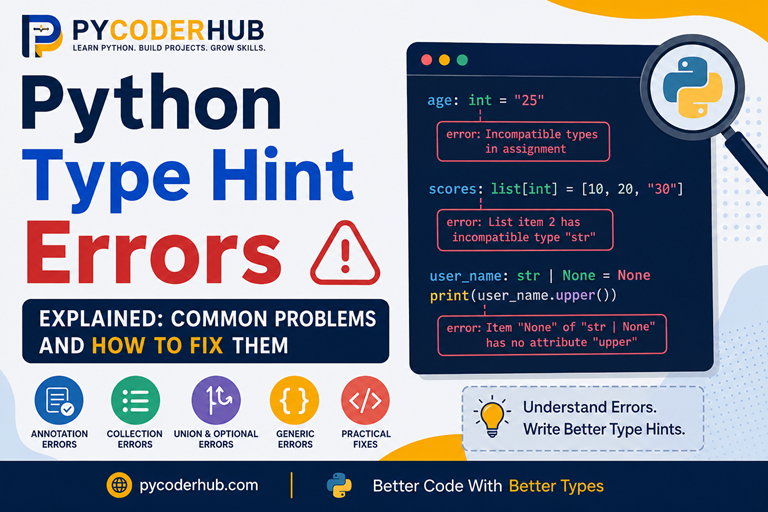
user_age: int = "25"Python runs this code without complaint. No exception is raised. No warning appears. The value "25" is stored in user_age, and execution continues normally.
So where do type hint errors come from?
They usually come from static analysis tools that examine your code and compare your annotations against how values are actually used.
Some of the most common tools are:
- mypy
- Pyright
- Pylance
These tools do not execute your program. Instead, they analyze your annotations and look for inconsistencies.
Throughout this lesson, when we say that code produces a “type hint error,” we mean that a type checker reports a problem—not that Python itself crashes.
This distinction is important because you are usually not fixing broken code. You are fixing incorrect or inconsistent type information.
Why These Errors Still Matter
If Python ignores type hints at runtime, you might wonder why these errors matter at all.
The answer is simple: type hints are only useful when they accurately describe your code.
When annotations become incorrect, type checkers become less reliable. They may miss real problems, report misleading warnings, or make your code harder to understand.
Think of type hints as documentation that tools can verify automatically.
Accurate type hints help both the type checker and future readers of your code. Inaccurate type hints can mislead both.
What This Lesson Covers
This lesson focuses on the most common mistakes developers make with the type hinting concepts covered in Lessons 1–6.
The errors are grouped into several categories:
| Part | Topic |
|---|---|
| Part 1 | Understanding Type Hint Errors |
| Part 2 | Basic Annotation Errors |
| Part 3 | Collection Type Hint Errors |
| Part 4 | Union, Optional, Any, Literal, and Final Errors |
| Part 5 | Generic Type Errors |
| Part 6 | Readability and Maintainability Mistakes |
For each error, we’ll examine:
- What the mistake is
- Why it happens
- What type checkers report
- How to fix it correctly
- The underlying concept you should understand
You do not need to read this lesson in a single sitting. If you encounter a specific type checker warning while working with collections, generics, or optional types, you can jump directly to the relevant section and use it as a reference.
With that foundation in place, let’s begin by understanding what a type hint error actually is.
Part 1 — Understanding Type Hint Errors
Before looking at specific mistakes, it is important to understand what type hint errors actually are.
Many beginners encounter a warning from a type checker and immediately assume their Python code is broken. In reality, most type hint errors are not Python errors at all. They are warnings that the type information in your code does not match how the code is being used.
Understanding this distinction will make every error in the rest of this lesson much easier to understand.
1.1 What Is a Type Hint Error?
A type hint error occurs when a type checker detects a mismatch between your annotations and your code.
For example:
user_name: str = 42The annotation says user_name should contain a string.
The assigned value is an integer.
A type checker sees this mismatch and reports an error.
The important thing to understand is that the error is not about Python being unable to run the code. The error is about the annotation and the actual value disagreeing with each other.
In simple terms:
- The annotation describes what type is expected.
- The code provides a different type.
- The type checker reports the inconsistency.
Most type hint errors fall into this category.
1.2 Type Hint Errors vs Runtime Errors
One of the biggest sources of confusion is the difference between type hint errors and runtime errors.
A runtime error occurs while Python is executing your program.
For example:
result = 10 / 0This produces:
ZeroDivisionError: division by zeroPython immediately stops execution because something went wrong during runtime.
Type hint errors are different.
user_name: str = 42Python runs this code without any problem.
The value is stored successfully.
Only a type checker reports an issue because the annotation says str while the assigned value is an int.
Think of it this way:
| Runtime Error | Type Hint Error |
|---|---|
| Detected by Python | Detected by a type checker |
| Happens while code runs | Usually found before code runs |
| Can stop execution | Does not stop execution |
| Indicates a programming problem | Indicates inconsistent type information |
This distinction is fundamental to understanding modern Python type hinting.
1.3 Confusing Type Hints With Runtime Enforcement
Another common misconception is believing that type hints enforce types automatically.
Consider this code:
user_age: int = "25"Many beginners expect Python to reject this assignment because the annotation says int.
But Python does not enforce the annotation.
The code runs normally.
You can even verify the actual type:
user_age: int = "25"

print(type(user_age))
Output:
<class 'str'>Despite the annotation, the value remains a string.
This behavior surprises developers coming from statically typed languages where type declarations are enforced by the compiler.
Python takes a different approach.
Annotations are metadata. They provide information about expected types, but Python itself does not use them to restrict assignments.
This is why type checkers exist. They provide the validation that Python intentionally does not perform.
Common Beginner Confusion
Many newcomers assume:
user_age: int = "25"means:
user_age = int("25")These are completely different operations.
The first adds type information.
The second performs an actual conversion.
Understanding this difference prevents many future misunderstandings.
1.4 Treating Type Hints as Type Casting
Closely related to the previous confusion is the idea that annotations automatically convert values.
Consider this example:
user_age: int = "25"Some developers expect the string "25" to become the integer 25.
That does not happen.
The annotation merely describes the intended type.
The value remains unchanged.
If you want conversion, you must perform it explicitly:
user_age: int = int("25")Now the value actually becomes an integer.
You learned this distinction earlier when comparing type hinting and type casting.
Type hinting answers the question:
“What type should this value be?”
Type casting answers the question:
“Convert this value into another type.”
These concepts serve completely different purposes.
Whenever you see a type annotation, remember that it describes data. It does not transform data.
1.5 Reading Type Checker Messages
When developers first use a type checker, the error messages can look intimidating.
For example, you might see something like:
Incompatible types in assignment
(expression has type "int", variable has type "str")
At first glance, messages like this may seem complicated.
Fortunately, most type checker errors can be understood by focusing on just two pieces of information:
- The type that was expected
- The type that was actually found
Consider this example:
user_name: str = 42A type checker might report:
Incompatible types in assignment
(expression has type "int", variable has type "str")
The message is essentially saying:
- Expected:
str - Found:
int
Once you learn to identify those two pieces of information, many type checker messages become much easier to understand.
Start With the Core Mismatch
When reading an error message, do not try to understand every word immediately.
Instead, ask:
- What type was expected?
- What type was provided?
- Where did the mismatch occur?
Most beginner type hint errors can be solved by answering those three questions.
Error Messages Become Easier Over Time
Type checker output often looks unfamiliar at first because it uses terminology such as:
- expression
- assignment
- argument
- return value
- compatible
- incompatible
Don’t worry if these messages seem confusing initially.
As you work through more examples, you will begin recognizing common patterns. Eventually, you’ll be able to glance at an error message and immediately identify the problem.
The goal is not to memorize error messages.
The goal is to understand what type information the tool expected and why the code failed to satisfy that expectation.
Different Tools May Report Errors Differently
One final thing to remember is that Python does not have a built-in type checker. Type hint errors are reported by external tools and IDEs.
For example, PyCharm includes its own type analysis, while tools such as mypy, Pyright, and Pylance perform static type checking separately. Because these tools are developed independently, they may use slightly different wording when describing the same problem.
Don’t focus too much on the exact text of the error message. Instead, focus on the underlying mismatch being reported. Even when the wording differs, the core issue is usually the same.
Now that you understand what type hint errors are and how type checkers report them, we can begin examining the most common mistakes developers make when writing type annotations.
Part 2 — Basic Annotation Errors
Now that we understand what type hint errors are and how type checkers report them, let’s start with the most common category of mistakes: annotation errors.
These errors usually occur when the type information written in an annotation does not match how a variable is actually used. They are often the first type hint errors beginners encounter because they involve the most basic annotation syntax introduced in Lesson 2.
2.1 Assigning a Value That Does Not Match Its Annotation
The simplest type hint error occurs when a variable is assigned a value that does not match its declared type.
Consider this example:
user_name: str = 42The annotation says that user_name should contain a string.
However, the assigned value is an integer.
A type checker will typically report something similar to:
Incompatible types in assignment
(expression has type "int", variable has type "str")
Correct Version
user_name: str = "PyCoder"Why This Happens
Type annotations describe the type of value a variable is expected to hold.
When the assigned value belongs to a different type, the annotation and the actual value no longer agree with each other.
Important Reminder
Python still runs the incorrect example:
user_name: str = 42The error comes from the type checker, not from Python itself.
2.2 Reassigning a Variable With an Incompatible Type
A similar mistake occurs when a variable starts with the correct type but is later reassigned to a different type.
For example:
user_name: str = "PyCoder"

user_name = 100
The initial assignment matches the annotation.
The second assignment does not.
A type checker may report:
Incompatible types in assignment
(expression has type "int", variable has type "str")
Correct Version
user_name: str = "PyCoder"

user_name = "Python"
Why This Happens
The annotation applies to the variable, not just the first assignment.
Once a variable is annotated as str, type checkers expect future assignments to remain compatible with str.
Think of the annotation as a promise:
“This variable is intended to hold string values.”
Reassigning an integer breaks that promise.
2.3 Using Annotation Syntax Not Supported by Your Python Version
Another common problem occurs when developers copy examples from a newer Python version into an older project.
For example, modern Python allows:
user_names: list[str] = ["Alice", "Bob"]However, this syntax was introduced in Python 3.9.
Older versions typically require:
from typing import List

user_names: List[str] = ["Alice", "Bob"]
Similarly, modern Python allows:
user_id: int | strbut this syntax requires Python 3.10 or newer.
Older versions use:
from typing import Union

user_id: Union[int, str]
Why This Happens
Type hint syntax has evolved significantly over time.
Many online tutorials use the newest syntax available, but your project may be running an older Python version.
As a result, code that works perfectly in one version may produce syntax errors or type-checking issues in another.
How to Avoid This Problem
Before using modern type hint syntax, verify which Python version your project supports.
If you work on multiple projects, always write annotations that are compatible with the project’s Python version rather than simply copying examples from the internet.
2.4 Using Unnecessary String Annotations
In Lesson 6, we learned about forward references and string annotations.
They are useful when a type name is not yet available at the moment the annotation is evaluated.
For example:
class Employee:
    manager: "Manager"
Historically, string annotations were often necessary in situations like this.
However, some developers start placing quotes around every type annotation:
user_name: "str" = "PyCoder"
user_age: "int" = 25
user_score: "float" = 99.5
While this may work, it adds unnecessary clutter.
Better Version
user_name: str = "PyCoder"
user_age: int = 25
user_score: float = 99.5
Why This Happens
After learning about forward references, some developers assume that all annotations should be written as strings.
In reality, string annotations should be used only when they solve a specific problem, such as referencing a type that has not been defined yet.
2.5 Annotating the Wrong Return Type
Type hint mismatches are not limited to variables. They can also occur when a function returns a value that does not match its return annotation.
Consider this example:
def get_user_name() -> str:
    return 42
The return annotation says that the function returns a string.
However, the actual returned value is an integer.
A type checker may report something similar to:
Incompatible return value type
got "int", expected "str"
Correct Version
def get_user_name() -> str:
    return "PyCoder"
Why This Happens
A return annotation describes the type of value callers should expect from a function.
def get_user_name() -> str:This annotation tells both developers and type checkers:
“This function returns a string.”
Returning an integer breaks that expectation.
Another Common Example
def calculate_total() -> int:
    return "100"
The annotation promises an integer result, but the function returns a string.
Even if the string contains numeric characters, it is still a string.
The type checker focuses on the actual type, not the value’s appearance.
Important Reminder
Just like variable annotation errors, Python usually allows this code to run:
def get_user_name() -> str:
    return 42
The problem is detected by the type checker, not by Python itself.
When writing return annotations, always ensure that the values returned by the function match the type you declared.
Common Pattern Behind These Errors
All of the mistakes in this section share the same underlying problem:
The annotation does not accurately describe the code.
Sometimes the value does not match the annotation. Sometimes the annotation syntax does not match the Python version. Sometimes the annotation is technically correct but unnecessarily complicated.
The solution is always the same: make sure your type hints accurately and clearly describe the values your code is intended to work with.
In the next section, we’ll move beyond simple variables and explore type hint errors involving lists, dictionaries, tuples, sets, and other collection types.
Part 3 — Collection Type Hint Errors
In Lesson 3, we learned how to annotate Python collections such as lists, dictionaries, tuples, and sets.
Collection type hints are often more useful than simple variable annotations because they describe not only the container itself but also the types of values stored inside it.
However, this extra detail also creates more opportunities for mistakes.
Many collection-related type hint errors occur because the annotation describes one kind of data while the collection actually contains something else.
Let’s look at the most common collection type hint mistakes.
3.1 Using Bare list, dict, set, or tuple Types
One of the most common beginner mistakes is annotating a collection without specifying the types of the elements it contains.
For example:
user_names: list = ["Alice", "Bob", "Charlie"]This annotation tells us that user_names is a list.
But it does not tell us what kind of values the list contains.
Better Version
user_names: list[str] = ["Alice", "Bob", "Charlie"]Now the annotation clearly states that the list contains strings.
The same principle applies to other collection types:
user_scores: dict[str, int]
unique_names: set[str]
coordinates: tuple[int, int]
Why This Is a Problem
Using bare collection types removes much of the information that type hints are supposed to provide.
Compare these annotations:
products: listproducts: list[str]The second version immediately tells both developers and type checkers what type of data belongs in the collection.
3.2 Mixed Types in a Typed List
Another common mistake occurs when a list annotation specifies one type, but the list contains values of different types.
For example:
user_ids: list[int] = [101, 102, "103"]The annotation says the list should contain integers.
However, the third element is a string.
A type checker may report something similar to:
List item has incompatible type "str"
expected "int"
Correct Version
user_ids: list[int] = [101, 102, 103]Why This Happens
When a list is annotated as:
list[int]the type checker expects every element to be compatible with int.
Even a single incompatible element can produce an error.
What About Lists With Multiple Types?
If a list is intentionally designed to contain multiple types, the annotation should reflect that.
For example:
user_values: list[int | str] = [101, "Admin", 102]The annotation and the data now agree with each other.
3.3 Dictionary Key or Value Type Mismatch
Dictionaries have two type parameters:
dict[key_type, value_type]This means both keys and values must match their declared types.
Consider this example:
user_scores: dict[str, int] = {
    "Alice": 95,
    "Bob": "88"
}
The annotation says:
- Keys should be strings
- Values should be integers
However, "88" is a string.
A type checker may report:
Dict entry has incompatible typeCorrect Version
user_scores: dict[str, int] = {
    "Alice": 95,
    "Bob": 88
}
Key Type Mismatches
Problems can also occur with keys:
user_scores: dict[str, int] = {
    101: 95
}
The key is an integer, but the annotation expects a string.
Both keys and values must satisfy the declared types.
3.4 Tuple Element Type Mismatch
Unlike lists, tuples can specify the type of each individual position.
For example:
user_record: tuple[str, int] = ("Alice", 25)This annotation means:
- Position 1 must be a string
- Position 2 must be an integer
Now consider:
user_record: tuple[str, int] = (25, "Alice")The types are reversed.
A type checker will report an incompatibility because each position has a specific expected type.
Correct Version
user_record: tuple[str, int] = ("Alice", 25)Why This Happens
Tuple annotations are positional.
The type checker evaluates each element according to its position rather than treating all elements as interchangeable.
Think of:
tuple[str, int]as a fixed structure rather than a general collection.
What About Tuples With Repeated Types?
Not all tuples use a fixed structure.
Sometimes a tuple contains an unknown number of elements that all share the same type.
For example:
scores: tuple[int, ...] = (95, 88, 91, 100)The ellipsis (...) means:
This tuple can contain any number of integers.
Now consider:
scores: tuple[int, ...] = (95, 88, "91")The first two elements are integers, but the third element is a string.
A type checker will report an error because every element is expected to be compatible with int.
3.5 Nested Collection Type Confusion
Nested collections are one of the most common sources of confusion for beginners.
Consider this annotation:
user_data: list[dict[str, int]]This means:
- The outer container is a list
- Each item in the list is a dictionary
- Dictionary keys are strings
- Dictionary values are integers
Now consider:
user_data: list[dict[str, int]] = [
    {"score": 95},
    {"score": "88"}
]
The second dictionary contains a string value instead of an integer.
A type checker will flag the mismatch.
Why This Happens
As collections become nested, it becomes easier to lose track of which type belongs where.
A useful strategy is to read nested annotations from the inside out.
For example:
list[dict[str, int]]can be interpreted as:
A list containing dictionaries that map strings to integers.
Breaking nested annotations into smaller pieces often makes them easier to understand.
3.6 Assuming Collection Type Hints Validate Data at Runtime
This is perhaps the most important collection-related misconception.
Consider this example:
user_ids: list[int] = [101, 102, "103"]A beginner might expect Python to reject the string value because the list is annotated as list[int].
That does not happen.
Python happily creates the list:
[101, 102, "103"]The annotation does not inspect the contents of the collection.
It does not remove invalid values.
It does not perform validation.
It does not raise an exception.
Why This Confusion Happens
Collection annotations often look very precise:
list[int]
dict[str, int]
set[str]
tuple[str, int]
Because they are so descriptive, it is easy to assume that Python actively enforces them.
In reality, these annotations are simply metadata.
They describe what should be stored in the collection.
They do not control what can be stored in the collection.
Key Takeaway
Most collection type hint errors occur because the annotation and the actual contents of the collection disagree with each other.
Whether the problem involves a list, dictionary, tuple, set, or nested collection, the underlying question remains the same:
Does the data inside the collection match what the annotation says should be there?
If the answer is no, a type checker will likely report an error.
In the next section, we’ll explore mistakes involving some of Python’s most flexible type hinting tools, including Union, Optional, Any, Literal, and Final.
Part 4 — Union, Optional, Any, Literal, and Final Errors
In Lesson 4, we learned that not every value fits neatly into a single type.
Sometimes a value can be one of several types. Sometimes a value can be None. Sometimes only a few specific values are allowed. And sometimes we want to prevent a value from being reassigned.
Python provides tools such as Union, Optional, Any, Literal, and Final for these situations.
These features make type hints more flexible, but they also introduce some of the most common misunderstandings in modern type hinting.
Let’s look at the mistakes developers frequently make when using them.
4.1 Forgetting That Optional Includes None
One of the most common type hinting mistakes involves misunderstanding what Optional actually means.
Consider this annotation:
from typing import Optional

user_name: Optional[str]
Many beginners focus only on the str part and forget about the None part.
Remember:
Optional[str]is equivalent to:
str | NoneThe annotation means:
This value can be a string or it can be
None.
For example:
user_name: Optional[str] = Noneis perfectly valid.
Common Mistake
A developer sees:
user_name: Optional[str]but writes code assuming the value will always be a string.
user_name: Optional[str] = None

print(user_name.upper())
The type checker may warn that user_name could be None.
Better Approach
Check for None first:
user_name: Optional[str] = None

if user_name is not None:
    print(user_name.upper())
Why This Happens
Developers often read:
Optional[str]as:
“A string that is optional.”
Instead, it actually means:
“A value that may be a string or may be None.”
That distinction is extremely important.
4.2 Confusing Optional With an Optional Parameter
This confusion is so common that it deserves its own section.
Many developers think:
from typing import Optional

def greet(name: Optional[str]) -> None:
    ...
means that the parameter itself is optional.
It does not.
This function still requires an argument:
greet()A type checker will report an error because the required argument is missing.
What Optional Actually Means
def greet(name: Optional[str]) -> None:
    ...
means:
The argument is required, but its value may be either a string or
None.
Valid calls include:
greet("PyCoder")
greet(None)
Making a Parameter Truly Optional
If you want callers to be able to omit the argument entirely, provide a default value:
def greet(name: Optional[str] = None) -> None:
    ...
Now both calls are valid:
greet()
greet("PyCoder")
Why This Happens
The word “Optional” sounds like it refers to the parameter itself.
In reality, it refers to the value type, not whether the argument must be supplied.
4.3 Misunderstanding Union Types
A Union allows a value to be one of several types.
For example:
user_id: int | strmeans:
The value can be either an integer or a string.
A common mistake is assigning a value that is not included in the union.
user_id: int | str = 3.14The annotation allows:
intstr
But not float.
A type checker will report an incompatibility.
Correct Version
user_id: int | str = 101or
user_id: int | str = "A101"Why This Happens
Some developers mistakenly treat a union as:
“Any type is fine.”
That is not what a union means.
A union allows only the specific types listed in the annotation.
Nothing more.
4.4 Overusing Any
The Any type is often called the escape hatch of the typing system.
For example:
from typing import Any

user_data: Any
This tells the type checker:
Stop checking this value.
Because of that flexibility, some developers start using Any everywhere.
from typing import Any

user_name: Any
user_age: Any
user_score: Any
Why This Is a Problem
The more Any you use, the less useful your type hints become.
Consider:
from typing import Any

user_name: Any = 42
A type checker usually won’t complain because Any disables most type checking.
This means mistakes can slip through unnoticed.
Better Approach
Use a specific type whenever possible:
user_name: str
user_age: int
user_score: float
Reserve Any for situations where the type genuinely cannot be known ahead of time.
Guideline
Use Any when necessary, not when convenient.
4.5 Using Invalid Literal Values
Literal allows you to restrict a value to specific choices.
For example:
from typing import Literal

status: Literal["pending", "approved", "rejected"]
Only three values are allowed:
"pending""approved""rejected"
Now consider:
status: Literal["pending", "approved", "rejected"] = "processing"A type checker will report an error because "processing" is not one of the permitted values.
Correct Version
status: Literal["pending", "approved", "rejected"] = "approved"Why This Happens
When using Literal, the type checker compares the actual value against the exact values listed in the annotation.
A value must match one of those choices exactly.
Even small differences matter.
For example:
status: Literal["approved"] = "Approved"is not the same value.
String literals are case-sensitive.
4.6 Reassigning a Final Variable
The purpose of Final is to indicate that a value should not be reassigned.
For example:
from typing import Final

MAX_USERS: Final = 100
This annotation tells readers and type checkers:
This value is intended to remain constant.
A common mistake is reassigning it later:
from typing import Final

MAX_USERS: Final = 100

MAX_USERS = 200
A type checker will report an error because a final variable is being modified.
Correct Version
from typing import Final

MAX_USERS: Final = 100
Leave the value unchanged.
4.7 Creating Redundant Union Types
Another mistake occurs when developers create unions that contain duplicate or unnecessary types.
For example:
user_id: int | intThe second int adds no new information.
The annotation is equivalent to:
user_id: intSimilarly:
user_id: str | str | intcontains a duplicate str.
Better Version
user_id: str | intGuideline
A union should describe distinct possibilities.
If a type appears more than once, remove the duplicates and keep the annotation as simple as possible.
Key Takeaway
Most errors involving Union, Optional, Any, Literal, and Final happen because these features are more flexible than ordinary type hints.
The most important ideas to remember are:
Optional[T]meansT | NoneOptionaldoes not make a parameter optional- A
Uniononly allows the listed types Anyshould be used sparinglyLiteralrestricts values to specific choicesFinalis intended for values that should not be reassigned
Understanding these concepts correctly prevents many of the type hinting mistakes developers encounter in real-world Python code.
Part 5 — Generic Type Errors
In Lesson 5, we learned that generics allow type hints to work with many types while still preserving type information.
Without generics, we often have to choose between being overly restrictive and using Any. Generics solve this problem by allowing type hints to adapt to the types being used.
However, generics introduce their own set of mistakes.
Most generic-related errors occur because developers misunderstand how TypeVar, constraints, bounds, and generic syntax work.
Let’s examine the most common ones.
5.1 TypeVar Name Mismatch
One of the simplest generic mistakes is accidentally using different type variable names when the same type variable should be used throughout the annotation.
Consider this example:
from typing import TypeVar

InputType = TypeVar("InputType")

def identity(value: InputType) -> ReturnType:
    return value
The problem is that ReturnType has never been defined.
A type checker will report an error because the annotation refers to a type variable that does not exist.
Correct Version
from typing import TypeVar

InputType = TypeVar("InputType")

def identity(value: InputType) -> InputType:
    return value
Why This Happens
A TypeVar only has meaning if it has been defined.
When you reference a different name, the type checker cannot determine what type relationship you intended.
Guideline
Use the same type variable consistently throughout the function or class where it is intended to represent the same type.
5.2 Confusing Constraints and Bounds
This is one of the most common conceptual mistakes with TypeVar.
In Lesson 5, we learned that constraints and bounds solve different problems.
Constrained Type Variable
from typing import TypeVar

TextType = TypeVar("TextType", str, bytes)
This means:
The type must be exactly
strorbytes.
Bounded Type Variable
from typing import TypeVar

NumberType = TypeVar("NumberType", bound=int)
This means:
The type must be
intor a subtype ofint.
A common mistake is assuming that constraints and bounds behave the same way.
They do not.
Constraints define a fixed set of allowed types.
Bounds define an upper limit.
Guideline
Ask yourself:
Am I choosing from specific allowed types, or am I defining a maximum allowable type?
The answer determines whether constraints or bounds are appropriate.
5.3 Violating TypeVar Constraints
Once a constrained TypeVar is defined, only the permitted types may be used.
For example:
from typing import TypeVar

TextType = TypeVar("TextType", str, bytes)
The allowed types are:
strbytes
Now consider:
from typing import TypeVar

TextType = TypeVar("TextType", str, bytes)

def process_text(value: TextType) -> TextType:
    return value

process_text(123)
A type checker will report an error because int is not one of the permitted types.
Correct Usage
process_text("Hello")
process_text(b"Hello")
Why This Happens
Developers sometimes see a generic function and assume it accepts any type.
However, constraints deliberately limit which types are valid.
The type checker enforces those limits.
5.4 Violating TypeVar Bounds
Bounded type variables have a different rule.
Consider:
from typing import TypeVar

NumberType = TypeVar("NumberType", bound=int)
The bound requires values to be compatible with int.
Now consider:
from typing import TypeVar

NumberType = TypeVar("NumberType", bound=int)

def process_number(value: NumberType) -> NumberType:
    return value

process_number("100")
The argument is a string, which does not satisfy the bound.
A type checker will report an error.
Correct Usage
process_number(100)Why This Happens
A bound acts like a rule that says:
Every type used here must be compatible with this base type.
If the supplied type falls outside that rule, the type checker rejects it.
5.5 Using PEP 695 Syntax on Unsupported Python Versions
Lesson 5 introduced the modern generic syntax added in Python 3.12 through PEP 695.
For example:
def identity[ValueType](value: ValueType) -> ValueType:
    return value
This syntax is valid only in Python 3.12 and newer.
A common mistake is copying this code into an older project.
For example, in Python 3.11 or earlier:
def identity[ValueType](value: ValueType) -> ValueType:
    return value
produces a syntax error because the language version does not understand this syntax.
Compatible Alternative
For older Python versions:
from typing import TypeVar

ValueType = TypeVar("ValueType")

def identity(value: ValueType) -> ValueType:
    return value
Why This Happens
Many online examples now use the newest syntax available.
Developers often copy those examples without checking which Python version their project uses.
Guideline
Always verify the project’s Python version before adopting modern type hint syntax.
The newest syntax is not automatically compatible with older environments.
Key Takeaway
Generic type hint errors are usually not caused by complicated code. They are usually caused by misunderstanding what a generic type is supposed to represent.
The most important things to remember are:
- Use
TypeVarnames consistently. - Constraints and bounds are different concepts.
- Constrained type variables only allow the specified types.
- Bounded type variables require compatibility with the bound.
- PEP 695 syntax requires Python 3.12 or newer.
Generics are designed to make type hints more flexible while preserving type safety. Once you understand the rules that govern TypeVar, constraints, and bounds, most generic-related type checker errors become much easier to understand and fix.
Part 6 — Readability and Maintainability Mistakes
So far in this lesson, we have focused on errors that type checkers can detect directly. However, not every type hinting problem produces an error message.
Some annotations are technically valid but make code harder to read, understand, and maintain.
Remember that type hints serve two audiences:
- Type checkers
- Humans reading the code
An annotation that satisfies the type checker but confuses every developer who reads it is not a good annotation.
This final section focuses on common readability and maintainability mistakes that reduce the long-term value of type hints.