
Introduction: Python Type Hinting Rules and Guidelines
In the previous lessons, we explored the building blocks of Python’s type hinting system. We started with the fundamentals of type hints and annotations, then learned how to work with built-in collection types, unions, optional values, literals, final values, generic types, TypeVar, and the improvements introduced by PEP 695.
By this point, you already know how to write type hints. However, knowing the syntax is only part of the journey.
Consider the following examples:
user_names: list[str]user_names: List[str]Both can be valid, but which style should you use in modern Python?
Or consider these annotations:
str | NoneOptional[str]Both describe the same type, yet modern Python documentation often prefers one over the other.
Questions like these are not about syntax. They are about understanding the rules, recommendations, and conventions that surround Python’s typing system.
This is where Python Enhancement Proposals (PEPs) become important. Over the years, multiple PEPs have introduced type hinting features, clarified how annotations should be written, and provided guidance for developers and tool authors. These recommendations help create code that is easier to read, easier to maintain, and more consistent across projects.
In this lesson, we will move beyond individual type hints and look at the broader rules and guidelines that shape modern Python typing. You’ll learn which behaviors are formally defined, which practices are recommended, and how to write type annotations that align with current Python standards.
What You’ll Learn
In this lesson, you’ll learn:
- The difference between type hinting rules and guidelines
- The fundamental principles behind Python’s typing system
- Annotation syntax rules for variables and return types
- Collection type hint rules introduced by PEP 585
- Rules governing
Union,Optional,Any,Literal, andFinal - Important rules for
TypeVar, generics, and type aliases - How forward references work and when they are required
- Modern type hinting recommendations introduced by recent PEPs
- Guidelines for writing readable and consistent annotations
- Key PEP recommendations that shape modern Python typing
By the end of this lesson Python Type Hinting Rules and Guidelines, you’ll understand not only how type hints work, but also how to apply them in a way that aligns with modern Python standards and typing recommendations.
Why Learning Syntax Is Not Enough
Learning type hint syntax is similar to learning the grammar of a language. Grammar tells you what is possible, but it doesn’t always tell you what is recommended.
For example, Python may allow multiple ways to express the same type information. Some approaches are older, some are newer, and some are preferred because they improve readability and reduce confusion.
In addition, type hints are interpreted by tools such as IDEs, linters, and static type checkers. Understanding the rules behind annotations helps you write code that works well with these tools and produces more useful feedback.
This is why modern Python developers benefit from learning not only how to write type hints, but also when and why certain forms are preferred.
Rules vs Guidelines
Before we start, it is important to distinguish between two ideas that will appear throughout this lesson.
What Is a Rule?
A rule defines behavior that is formally recognized by Python or by the typing specifications.
Rules answer questions such as:
- Is this annotation valid?
- What syntax should be used here?
- How does a type checker interpret this annotation?
- What does a particular typing feature mean?
These rules establish the foundation of the typing system.
What Is a Guideline?
A guideline is a recommendation rather than a strict requirement.
Guidelines focus on:
- Readability
- Consistency
- Maintainability
- Writing future-proof code
Multiple approaches may be valid according to the rules, but guidelines help developers choose the approach that is generally considered clearer or more modern.
Throughout this lesson, we’ll first explore the fundamental rules of Python type hinting and then look at the guidelines that help developers use those rules effectively.
PEPs Covered in This Lesson
Many of the recommendations discussed in this lesson come from several important Python Enhancement Proposals (PEPs):
- PEP 484 — Type Hints
- PEP 526 — Variable Annotations
- PEP 563 — Postponed Evaluation of Annotations
- PEP 585 — Built-in Generic Types
- PEP 604 — The
|Union Operator - PEP 613 — Explicit Type Aliases
- PEP 695 — Modern Generic Type Syntax
You do not need to read these PEPs before continuing. This lesson will explain the practical rules and recommendations that arise from them while keeping the focus on real-world Python code.
Let’s start by looking at the fundamental rules that form the foundation of Python’s type hinting system.
Part 1 — Fundamental Type Hinting Rules
Before learning the specific syntax rules introduced by various typing PEPs, it is important to understand a few fundamental principles that apply to the entire type hinting system.
These rules explain what type hints are designed to do, what they are not designed to do, and how Python itself treats annotations.
Rule 1.1 — Type Hints Are Optional
One of the most important rules in Python’s typing system is that type hints are completely optional.
Unlike some statically typed languages, Python does not require variables, parameters, or return values to have type annotations.
For example, this code is perfectly valid:
def greet(user_name):
    return f"Hello, {user_name}"
The same function can also be written with type hints:
def greet(user_name: str) -> str:
    return f"Hello, {user_name}"
Both versions run successfully. Python does not require the second form.
This design decision was intentional. When type hints were introduced through PEP 484, they were added as an optional feature rather than becoming a mandatory part of the language.
This allows developers to gradually adopt type hints without rewriting existing codebases.
Key Point: Python works perfectly with or without type hints. Annotations provide additional information, but they are not required for code execution.
Rule 1.2 — Type Hints Do Not Enforce Types at Runtime
A common beginner confusion is assuming that type hints automatically prevent incorrect values from being assigned.
In reality, Python does not enforce type annotations during normal execution.
Consider the following example:
age: int = "twenty"

print(age)
Even though age is annotated as an int, Python runs the code without raising an error.
Output:
twentyThis often surprises developers coming from statically typed languages.
The annotation says that age is intended to contain an integer value, but Python itself does not verify whether that expectation is followed.
Let’s look at another example:
score: float = 100

score = "not a number"
score = [1, 2, 3]

print(score)
Output:
[1, 2, 3]Even though score was originally annotated as a float, Python allows it to be reassigned to a string and later to a list without raising an error.
This demonstrates an important fact about type hints: annotations do not restrict what values can be assigned to a variable at runtime. They simply describe the type that the developer intends the variable to hold.
So who does enforce type hints?
Type checking is usually performed by external tools such as:
- MyPy
- Pyright
- IDE type analyzers
These tools can detect the mismatch and report it before the program runs.
Think of type hints as instructions for tools and developers, not as runtime restrictions enforced by Python itself.
Key Point: Type hints describe expected types, but Python does not automatically reject incorrect values during execution.
Rule 1.3 — Type Hints Support Gradual Typing
Another core principle introduced by PEP 484 is gradual typing.
Gradual typing means you can combine typed and untyped code within the same project.
For example:
def greet(user_name: str) -> str:
    return f"Hello, {user_name}"

def calculate_total(price, quantity):
    return price * quantity
Here:
greet()uses type annotations.calculate_total()does not.
Both functions can exist side by side without any problem.
This flexibility allows developers to introduce type hints gradually rather than annotating an entire codebase at once.
In large projects, teams often start by annotating:
- Public APIs
- Frequently used functions
- Critical modules
and then expand type coverage over time.
Because type hints are optional, Python developers can choose the level of typing that best fits their project.
Key Point: Python’s typing system is designed for gradual adoption. Typed and untyped code can coexist in the same program.
Rule 1.4 — Type Hints Are Primarily for Humans and Tools
If Python does not enforce type hints at runtime, then why are they useful?
The answer is that type hints primarily help humans and development tools understand code more clearly.
Consider this function:
def process_user(user_id: int, user_name: str) -> bool:
    ...
Even without reading the implementation, you can immediately understand:
user_idshould be an integer.user_nameshould be a string.- The function returns a boolean value.
This makes code easier to read and maintain.
Type hints are also heavily used by development tools.
IDE Support
Modern IDEs can use type hints to provide:
- Better auto-completion
- Parameter suggestions
- Error detection
- Smarter navigation
Static Type Checkers
Tools such as MyPy and Pyright analyze annotations and identify potential type-related issues before execution.
For example, they can detect:
- Incorrect assignments
- Invalid function arguments
- Mismatched return types
Documentation
Type annotations also act as lightweight documentation.
Instead of searching through function implementations, readers can often understand expected inputs and outputs directly from the function signature.
def calculate_discount(price: float, percentage: float) -> float:
    ...
The annotation itself communicates valuable information about how the function should be used.
Key Point: Type hints exist to improve communication between developers and tools. Their primary purpose is clarity, maintainability, and better static analysis.
Now that we’ve established the fundamental principles behind Python’s typing system, let’s move on to the annotation syntax rules that define how type hints are written.
Part 2 — Annotation Syntax Rules
Now that we understand the fundamental principles behind type hinting, let’s look at the syntax rules used to write annotations.
Most of these rules were formally introduced by PEP 484 and later expanded by PEP 526. Together, they define how variables, parameters, and return values should be annotated.
Understanding these syntax rules is important because type checkers and development tools rely on them to interpret your code correctly.
Rule 2.1 — Variable Annotations Use Colon Syntax
Python uses a colon (:) to separate a variable name from its type annotation.
Basic syntax:
user_name: strIn this example:
user_nameis the variable name.stris the expected type.
The colon syntax clearly communicates that the variable is intended to store a string value.
This annotation style was introduced by PEP 526 and is now the standard way to annotate variables in Python.
More Examples
age: int

price: float

is_active: bool
The same colon syntax is used regardless of the type being specified.
Key Point: Variable annotations are written using the format
variable_name: type.
Rule 2.2 — Variable Annotations May Include Assignment
A variable can be annotated and assigned a value at the same time.
For example:
user_name: str = "PyCoder"Here:
user_nameis annotated as a string."PyCoder"is assigned as its initial value.
This is one of the most common forms of variable annotation because it combines type information with initialization.
Additional examples:
age: int = 25

price: float = 19.99

is_active: bool = True
The annotation provides type information, while the assignment creates the variable and stores its value.
Key Point: An annotation and an assignment can appear together on the same line.
Rule 2.3 — Return Types Use the Arrow Syntax
Function return types use a different syntax from variable annotations.
Instead of a colon, Python uses an arrow (->) followed by the return type.
For example:
def greet(name: str) -> str:
    return f"Hello, {name}"
In this function:
name: strspecifies the parameter type.-> strspecifies the return type.
The arrow clearly separates input information from output information.
Another example:
def square(number: int) -> int:
    return number * number
Functions that do not return a useful value typically use None:
def display_message(message: str) -> None:
    print(message)
The return type annotation helps readers and tools understand what a function is expected to produce.
Key Point: Function return types are annotated using the
->syntax.
Rule 2.4 — Variables Can Be Annotated Without Assignment
Python allows a variable to be annotated even when no value is assigned immediately.
For example:
user_name: strThis declares the intended type of the variable without creating an initial value.
This feature is useful when a variable will receive its value later in the program.
For example:
user_name: str

user_name = "PyCoder"
Even though no value was assigned during the annotation, Python still records the type information.
The __annotations__ Dictionary
Annotations are stored in a special dictionary called __annotations__.
Consider this example:
user_name: str
age: int
You can inspect the recorded annotations:
print(__annotations__)Output:
{'user_name': <class 'str'>, 'age': <class 'int'>}This shows that Python keeps track of annotations even when variables have not yet been assigned values.
Note
The
__annotations__example shown above reflects the traditional annotation behavior used in Python versions before Python 3.14.Modern Python versions use a newer lazy annotation model, which changes how annotations are stored and evaluated internally. As a result, accessing variable annotations may work differently depending on the Python version you are using.
Since annotation storage is outside the scope of this lesson, we won’t explore those implementation details here. If you’d like a deeper explanation of how annotations are stored and accessed in modern Python, see the earlier lesson on accessing variable annotations.
Always remember that these annotations are metadata. They do not create runtime type enforcement.
Key Point: A variable can be annotated without receiving an initial value, and Python stores the annotation information in
__annotations__.
Rule 2.5 — Follow PEP 8 Annotation Spacing
PEP 8 provides formatting recommendations for type annotations.
The recommended style is:
count: int = 10Notice the spacing:
- No space before the colon.
- One space after the colon.
- One space on both sides of the assignment operator.
This formatting improves readability and creates a consistent appearance across codebases.
Recommended
user_name: str = "PyCoder"price: float = 19.99Not Recommended
user_name:str="PyCoder"price : float = 19.99While Python accepts these forms, they do not follow the formatting conventions recommended by PEP 8.
Function Annotation Spacing
PEP 8 also recommends consistent spacing when annotating function parameters and return types.
Recommended
def greet(name: str) -> str:
    return f"Hello, {name}"
Notice that:
- There is no space before the colon.
- There is one space after the colon.
- The return arrow (
->) is surrounded by spaces.
Not Recommended
def greet(name:str)->str:
    return f"Hello, {name}"
def greet(name : str)-> str:
return f"Hello, {name}"While Python accepts these forms, they do not follow the formatting style recommended by PEP 8.
Quick Reference
| Annotation Type | Recommended Style |
|---|---|
| Variable | count: int = 10 |
| Parameter | name: str |
| Return Type | -> str |
Following these spacing conventions makes annotations easier to read and keeps your code consistent with the style used throughout the Python community.
Key Point: Follow PEP 8 spacing conventions when writing annotations to keep your code clean, readable, and consistent.
Now that we’ve covered the basic annotation syntax rules, let’s look at the rules that govern collection type hints such as lists, dictionaries, tuples, and sets.
Part 3 — Collection Type Hint Rules
In Lesson 3, you learned how to use Python’s built-in collection types — list, dict, tuple, set, and frozenset — as type hints. You saw how modern Python allows you to write list[str] directly instead of importing List from the typing module.
This section covers the specific rules that govern how collection type hints must be written.
Many of these rules come from PEP 585, which modernized collection type hints by allowing built-in collection types to be used directly as generics.
Rule 3.1 — Built-in Generic Types Are Valid in Python 3.9+
Before Python 3.9, developers typically imported collection types from the typing module:
from typing import List

user_names: List[str]
PEP 585 introduced a simpler approach that allows built-in collection types to be used directly.
For example:
user_names: list[str]

scores: dict[str, int]

unique_tags: set[str]

coordinates: tuple[int, int]
These built-in generic types are valid in Python 3.9 and later.
The newer syntax is shorter, easier to read, and eliminates the need to import many collection types from the typing module.
What Happens if You Use Modern Syntax in Python 3.8?
The built-in generic syntax introduced by PEP 585 is only supported in Python 3.9 and later.
For example:
names: list[str] = ["PyCoder"]In Python 3.8 and earlier, this raises:
TypeError: 'type' object is not subscriptableThis happens because built-in collection types such as list, dict, and tuple did not yet support generic type arguments.
Using Modern Syntax in Python 3.8
If you’re working with Python 3.8 but want to write modern annotations such as:
list[str]
dict[str, int]
you can add the following import at the beginning of the file:
from __future__ import annotationsThis allows Python to accept these annotations without raising the runtime error shown above.
However, full native support for built-in generic types was officially introduced in Python 3.9 through PEP 585.
Key Point: In Python 3.9+, built-in collection types such as
list,dict,tuple, andsetcan be used directly with type arguments.
Rule 3.2 — Collection Types Must Receive Correct Type Arguments
Collection types often require one or more type arguments that describe the values they contain.
The number and meaning of these type arguments depend on the collection type being used.
Dictionaries Require Two Type Arguments
A dictionary stores both keys and values, so two type arguments are required.
user_scores: dict[str, int]In this example:
strrepresents the key type.intrepresents the value type.
Tuples Can Contain Multiple Types
Tuple annotations describe the type of each position.
user_record: tuple[int, str]This annotation indicates:
- Position 1 contains an integer.
- Position 2 contains a string.
For example:
user_record: tuple[int, str] = (101, "PyCoder")Sets Require One Type Argument
A set contains elements of a particular type.
unique_tags: set[str]This indicates that all elements are expected to be strings.
For example:
unique_tags: set[str] = {"python", "typing", "pep"}Different collection types expect different numbers of type arguments, so it is important to use the correct form for each collection.
Key Point: The number of type arguments depends on the collection type being annotated.
Rule 3.3 — Variable-Length Tuples Require Ellipsis
A tuple can sometimes contain any number of values of the same type.
In these situations, Python uses an ellipsis (...) to indicate a variable-length tuple.
For example:
scores: tuple[int, ...]This means:
- Every element must be an integer.
- The tuple may contain any number of integers.
Valid examples:
scores: tuple[int, ...] = ()

scores: tuple[int, ...] = (10,)

scores: tuple[int, ...] = (10, 20, 30, 40)
Without the ellipsis, a tuple annotation describes a fixed number of positions.
For example:
tuple[int, int, int]means exactly three integer elements.
The ellipsis changes the meaning from a fixed-length tuple to a variable-length tuple.
Key Point: Use
tuple[T, ...]when a tuple may contain any number of values of the same type.
Rule 3.4 — Type Arguments Should Be Explicit
When the element type is known, it should usually be included in the annotation.
For example, suppose a variable stores a list of strings.
Less specific:
user_names: listMore specific:
user_names: list[str]The second version provides more information to both readers and type checkers.
The same principle applies to dictionaries.
Less specific:
user_scores: dictMore specific:
user_scores: dict[str, int]By including type arguments, you communicate:
- What the collection contains.
- What types are expected.
- How the collection should be used.
This improves code readability and allows type checkers to provide more accurate analysis.
Of course, there are situations where the element type is unknown or intentionally flexible. However, when the contained type is known, explicitly providing type arguments is generally preferred.
Key Point: When you know what a collection contains, specify the appropriate type arguments rather than using bare collection types.
Now that we’ve covered the rules governing collection type hints, let’s move on to the rules for Union, Optional, Any, Literal, and Final.
Part 4 — Union, Optional, Any, Literal, and Final Rules
In Lesson 4, you learned how Union, Optional, Any, Literal, and Final allow type hints to express more complex relationships than a single fixed type. These features make Python’s typing system more flexible, but they also introduce several rules that are easy to misunderstand.
This section focuses on the rules that govern how these type hints behave and how type checkers interpret them.
Rule 4.1 — Optional[X] Means X or None
One of the most common misconceptions about Optional is that it means a parameter is optional.
It does not.
Optional[X] simply means:
A value may be of type
Xor it may beNone.
For example:
from typing import Optional

user_name: Optional[str]
This annotation means:
user_namemay contain a string.user_namemay containNone.
Valid values:
user_name = "PyCoder"

user_name = None
The word optional refers to the value itself, not whether an argument must be supplied.
For example:
from typing import Optional

def greet(user_name: Optional[str]) -> None:
    ...
The parameter is still required unless a default value is provided.
greet()would still raise an error because no argument was supplied.
Key Point:
Optional[X]meansXorNone. It does not automatically make a function parameter optional.
Rule 4.2 — Optional[X], Union[X, None], and X | None Are Equivalent
Python provides multiple ways to express the same idea.
The following annotations are equivalent:
from typing import Optional

user_name: Optional[str]
from typing import Union
user_name: Union[str, None]user_name: str | NoneAll three mean:
The value may be a string or it may be
None.
The relationship exists because:
Optional[str]is essentially shorthand for:
Union[str, None]And since PEP 604 introduced the | operator, the same concept can also be written as:
str | NoneModern Python code often prefers the | syntax because it is shorter and easier to read.
Key Point:
Optional[X],Union[X, None], andX | Nonedescribe the same type relationship.
Rule 4.3 — Union Requires Multiple Types
A Union is used when a value can belong to more than one type.
For example:
from typing import Union

user_id: Union[int, str]
This annotation means:
user_idmay be an integer.user_idmay be a string.
Valid examples:
user_id = 101user_id = "USER-101"The purpose of Union is to combine multiple possible types into a single annotation.
Because of this, a union should contain at least two types.
Meaningful:
Union[int, str]Not meaningful:
Union[int]A single type does not need a union because the type itself already describes the value.
In modern Python, unions are commonly written using the | operator:
int | strKey Point: A union exists to represent multiple possible types.
Rule 4.4 — Any Disables Most Type Checking
The Any type is a special case within Python’s typing system.
When a value is annotated as Any, type checkers largely stop enforcing type rules for that value.
For example:
from typing import Any

data: Any = "PyCoder"
Later:
data = 100

data = [1, 2, 3]

data = {"name": "PyCoder"}
Type checkers generally accept all of these assignments.
The same applies when using operations:
from typing import Any

data: Any = "PyCoder"

data.non_existent_method()
A type checker may not report the same kinds of errors it would report for a more specific type.
This flexibility can be useful when:
- Working with dynamic data
- Interacting with external libraries
- Gradually introducing type hints into an existing codebase
However, excessive use of Any reduces the benefits of static type checking because fewer mistakes can be detected.
Think of Any as telling the type checker:
“Trust me. Don’t perform your normal type analysis here.”
Key Point:
Anyprovides maximum flexibility, but it also disables much of the protection offered by static type checking.
Rule 4.5 — Literal Represents Specific Allowed Values
Most type hints describe categories of values.
For example:
status: strThis allows any string.
Sometimes, however, only a specific set of values should be accepted.
This is where Literal is useful.
For example:
from typing import Literal

status: Literal["pending", "approved", "rejected"]
Now only these exact values are considered valid:
status = "pending"

status = "approved"

status = "rejected"
A type checker can flag other values:
status = "completed"because "completed" is not one of the allowed literals.
Literal can also be used with numbers and other immutable values.
from typing import Literal

retry_count: Literal[1, 2, 3]
In this case, only the values 1, 2, and 3 are permitted.
Key Point:
Literalrestricts a value to a specific set of explicitly listed values.
Rule 4.6 — Final Indicates Intended Non-Reassignment
The Final type hint communicates that a name should not be reassigned after its initial value is set.
For example:
from typing import Final

MAX_USERS: Final = 100
This tells readers and type checkers that MAX_USERS is intended to remain unchanged.
Later reassignment:
MAX_USERS = 200may be reported as an error by a static type checker.
However, just like other type hints, Final is not enforced by Python at runtime.
Python itself will execute:
from typing import Final

MAX_USERS: Final = 100

MAX_USERS = 200
without raising an exception.
The protection comes from static analysis tools rather than from the Python interpreter.
This makes Final useful for:
- Constants
- Configuration values
- Important names that should not change during execution
Key Point:
Finalexpresses the intention that a value should not be reassigned, but enforcement is performed by type checkers rather than by Python itself.
Now that we’ve covered the rules governing Union, Optional, Any, Literal, and Final, let’s move on to the rules for generic types, TypeVar, constraints, bounds, and modern generic syntax.
Part 5 — TypeVar and Generic Type Rules
In Lesson 5, you learned how generic types make type hints more flexible and reusable. You explored TypeVar, constraints, bounds, generic classes, generic functions, and the modern syntax introduced by PEP 695.
This section focuses on the rules that govern generic type variables and type aliases. Understanding these rules helps you write generic type hints that are both valid and consistent with modern typing recommendations.
Rule 5.1 — TypeVar Names Should Match Their String Name
When creating a TypeVar, the variable name should match the string passed to TypeVar().
For example:
from typing import TypeVar

T = TypeVar("T")
Here:
- The variable name is
T. - The string name is
"T".
These names match, which is the recommended convention.
Recommended
from typing import TypeVar

T = TypeVar("T")
from typing import TypeVar
UserType = TypeVar("UserType")Not Recommended
from typing import TypeVar

T = TypeVar("UserType")
from typing import TypeVar
UserType = TypeVar("T")Although Python allows mismatched names, doing so can create confusion when reading error messages, documentation, and type checker output.
Keeping the names consistent makes generic code easier to understand.
Key Point: The variable name and the string name of a
TypeVarshould match.
Rule 5.2 — Constraints Require Two or More Types
A constrained TypeVar limits acceptable types to a specific set of choices.
For example:
from typing import TypeVar

T = TypeVar("T", str, bytes)
This means T can only be:
strbytes
Constraints are designed to provide alternatives, so they require at least two types.
Valid
from typing import TypeVar

T = TypeVar("T", str, bytes)
from typing import TypeVar
NumberType = TypeVar("NumberType", int, float)Invalid
from typing import TypeVar

T = TypeVar("T", str)
A single type is not a meaningful constraint because there are no alternative choices.
If only one type is allowed, a constraint is unnecessary.
Key Point: Constraints are used to choose between multiple allowed types, so at least two types must be provided.
Rule 5.3 — Bounds and Constraints Cannot Be Combined
A TypeVar can be constrained or bounded, but it cannot be both at the same time.
For example:
Constraint
from typing import TypeVar

T = TypeVar("T", str, bytes)
Bound
from typing import TypeVar

T = TypeVar("T", bound=str)
These two mechanisms serve different purposes:
- Constraints specify a fixed set of allowed types.
- Bounds specify a maximum parent type that all valid types must inherit from.
Because these approaches define type behavior differently, Python does not allow them to be combined.
For example:
from typing import TypeVar

T = TypeVar(
    "T",
    str,
    bytes,
    bound=str
)
This is invalid.
When creating a TypeVar, choose either:
- Constraints
or
- A bound
but not both.
Key Point: A
TypeVarmay use constraints or a bound, but never both simultaneously.
Rule 5.4 — Modern PEP 695 Generic Syntax Has Version Requirements
PEP 695 introduced a new syntax for declaring type parameters.
For example:
def identity[T](value: T) -> T:
    return value
This syntax removes the need to create a separate TypeVar declaration.
However, this feature is only available in Python 3.12 and later.
Valid in Python 3.12+
def identity[T](value: T) -> T:
    return value
Required for Earlier Versions
from typing import TypeVar

T = TypeVar("T")

def identity(value: T) -> T:
    return value
Attempting to use the PEP 695 syntax in Python 3.11 or earlier results in a syntax error because the parser does not recognize the new type parameter syntax.
When writing code intended to support older Python versions, continue using traditional TypeVar declarations.
Key Point: PEP 695 generic syntax requires Python 3.12 or later.
Rule 5.5 — Type Aliases Should Be Explicit
A type alias gives a meaningful name to an existing type.
For example:
UserId = intThis allows you to write:
user_id: UserIdinstead of:
user_id: intThe alias does not create a new type. It simply provides a clearer name.
Traditional Type Alias Syntax
Before Python 3.12, type aliases were commonly created through assignment:
UserId = intUserRecord = dict[str, str]Explicit Type Alias Syntax (PEP 695)
PEP 695 introduced a dedicated syntax for declaring type aliases:
type UserId = inttype UserRecord = dict[str, str]This syntax makes the developer’s intention immediately clear.
When Python sees:
type UserId = intthere is no ambiguity about whether UserId is:
- A variable
- A constant
- A type alias
It is explicitly declared as a type alias.
Version Requirement
The type statement was introduced in Python 3.12.
For projects that support earlier versions of Python, the assignment form remains necessary.
Python 3.12+
type UserId = intEarlier Versions
UserId = intBoth forms create a type alias, but the newer syntax is more explicit and easier to understand.
Key Point: Type aliases provide meaningful names for existing types, and Python 3.12 introduces the explicit
typestatement for declaring them.
Now that we’ve covered the rules governing TypeVar, generic type variables, constraints, bounds, and type aliases, let’s examine forward references and the rules that determine when they are required.
Part 6 — Forward Reference Rules
Sometimes a type annotation needs to refer to a type that has not yet been defined. This situation commonly occurs when classes reference themselves or when two classes reference each other.
Python supports these situations through a feature known as forward references.
This section covers the rules that determine when forward references are required and how Python handles them.
Rule 6.1 — Types Not Yet Defined Must Use Forward References
Normally, Python evaluates type annotations when it encounters them.
This means the referenced type must already exist.
For example:
class User:
    ...
Once the class has been defined, it can be used in annotations:
user: UserHowever, problems occur when a type is referenced before Python has finished defining it.
Consider this example:
class User:
    def get_manager(self) -> User:
        ...
At the moment Python reads the return annotation, the User class is still being created. The name User is not yet fully available.
To solve this problem, the type name can be written as a string:
class User:
    def get_manager(self) -> "User":
        ...
This string-based annotation is called a forward reference.
The quoted name tells Python:
“This type will exist later. Resolve it when appropriate.”
Forward references are especially common when:
- A class references itself.
- Two classes reference each other.
- A type is used before its definition appears in the file.
Key Point: When a type has not yet been defined, use a forward reference by placing the type name inside quotes.
Rule 6.2 — from __future__ import annotations Changes Evaluation Behavior
Python provides a special future import that changes how annotations are handled:
from __future__ import annotationsHistorically, Python attempted to evaluate annotations immediately.
This sometimes created problems when annotations referred to types that did not yet exist.
The future import changes this behavior by postponing annotation evaluation.
As a result, annotations can often be written without surrounding type names in quotes.
For example:
from __future__ import annotations

class User:
    def get_manager(self) -> User:
        ...
Without the future import, older Python versions would typically require:
class User:
    def get_manager(self) -> "User":
        ...
Why This Matters
Postponing annotation evaluation makes it easier to:
- Write forward references
- Avoid circular type reference issues
- Use modern typing syntax
However, the exact implementation of annotation evaluation has evolved across Python versions.
For this lesson, the important idea is simply that:
from __future__ import annotationschanges when Python evaluates annotations.
If you’d like to learn more about annotation storage and evaluation, refer to the dedicated lesson covering annotation behavior in greater detail.
Key Point: The future import postpones annotation evaluation, making forward references easier to write and manage
Rule 6.3 — Future Imports Must Appear at the Top of the File
Future imports follow a special rule in Python.
They must appear near the beginning of the file before other executable code.
Correct:
from __future__ import annotations

class User:
    ...
Incorrect:
print("Starting application")

from __future__ import annotations
This produces a syntax error because future imports are required to appear at the top of the module.
In practice, future imports are usually placed immediately after the module docstring (if one exists) and before any other imports.
Example:
"""User management utilities."""

from __future__ import annotations

import json
This placement ensures that Python can apply the future behavior before processing the rest of the file.
Key Point: Future imports are special statements and must appear at the beginning of a Python file.
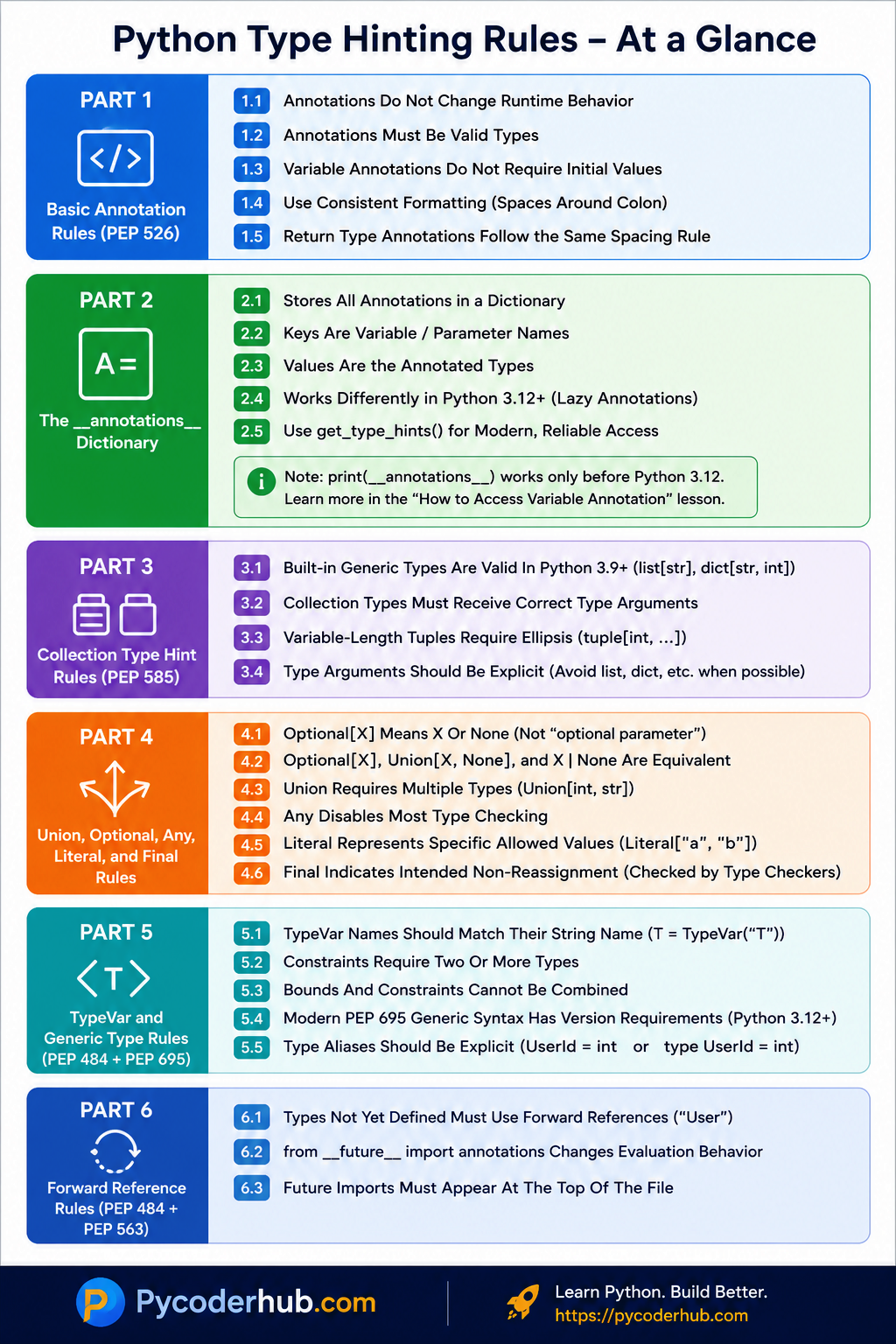
Now that we’ve covered the rules for forward references and annotation evaluation, we have completed the fundamental rules that govern Python type hints. Before moving on to the guideline section, let’s quickly recap the key rules we’ve learned so far with a visual infographic.
Visual Infographic Recap — Python Type Hinting Rules
The previous sections introduced the core rules behind Python’s type hinting system, from basic annotation syntax to generics and forward references.
The infographic below provides a quick visual summary of the most important rules covered so far. Use it as a revision guide or bookmark it for future reference.
Now that we’ve reviewed the fundamental rules, let’s move beyond what is technically valid and explore the modern guidelines and recommendations that help make type hints more readable, consistent, and maintainable in real-world Python code.
Part 7 — Modern Type Hinting Guidelines
With Parts 1 through 6, you covered the rules—the things Python requires, the syntax that must be correct, and the behaviors that type checkers enforce. Everything in those sections had a clear right and wrong answer.
This section is different.
Guidelines are not about right and wrong. They are about better and worse.
The five guidelines in this section are PEP-recommended conventions that the Python community has widely adopted. Python will not raise an error if you ignore them. A type checker usually will not flag your code as broken simply because you chose an older style. However, following these recommendations will make your code cleaner, more modern, and more consistent with how experienced Python developers write type hints today.
Think of this section as the bridge between knowing how to write type hints and knowing how to write them well.
Guideline 7.1 — Prefer Modern Collection Syntax
Python 3.9 introduced built-in generic types through PEP 585. This allows collection types to be used directly without importing their equivalents from the typing module.
Older code often looks like this:
from typing import List

user_names: List[str]
Modern Python code typically uses:
user_names: list[str]The same applies to other collection types:
scores: dict[str, int]tags: set[str]coordinates: tuple[int, int]The newer syntax is:
- Shorter
- Easier to read
- Consistent with Python’s built-in types
- No longer requires importing collection types from
typing
Recommended
user_names: list[str]Older Style
from typing import List

user_names: List[str]
Guideline: When working with Python 3.9 or newer, prefer built-in generic types such as
list[str],dict[str, int], andset[str].
Guideline 7.2 — Prefer X | Y Over Union[X, Y]
PEP 604 introduced the union operator (|) in Python 3.10.
Before Python 3.10, unions were typically written as:
from typing import Union

user_id: Union[int, str]
Modern code usually prefers:
user_id: int | strBoth forms describe exactly the same type.
However, the newer syntax is generally easier to read, especially when multiple types are involved.
Compare:
Union[int, str, float]int | str | floatThe second version is often easier to understand at a glance.
Recommended
user_id: int | strOlder Style
user_id: Union[int, str]Guideline: In Python 3.10 and newer, prefer the
|operator when expressing union types.
Guideline 7.3 — Prefer X | None Over Optional[X]
Earlier in this lesson, we learned that:
Optional[str]Union[str, None]and
str | Noneall represent the same type.
Historically, developers often wrote:
from typing import Optional

user_name: Optional[str]
Modern Python code increasingly uses:
user_name: str | NoneMany developers prefer this style because it follows the same pattern as other unions and makes the relationship immediately visible.
str | Nonecan be read directly as:
“A string or None.”
Recommended
user_name: str | NoneOlder Style
user_name: Optional[str]Guideline: In Python 3.10 and newer, prefer
X | Noneas the modern way to express optional values.
Guideline 7.4 — Prefer Inline Annotations Over Type Comments
Before PEP 526 introduced variable annotations, type information was often written using comments.
For example:
user_name = "PyCoder" # type: strToday, Python provides dedicated syntax for annotations:
user_name: str = "PyCoder"This approach is:
- Easier to read
- Easier to maintain
- Better supported by IDEs
- Consistent with modern Python style
The same applies to more complex types.
Older style:
scores = {} # type: dict[str, int]Modern style:
scores: dict[str, int] = {}Type comments still exist and may be useful in legacy codebases, but they are no longer the preferred approach for modern Python projects.
Recommended
user_name: str = "PyCoder"Older Style
user_name = "PyCoder" # type: strGuideline: Prefer inline annotations whenever possible and reserve type comments for compatibility or legacy code.
Guideline 7.5 — Use Type Aliases for Long Types
As type hints become more sophisticated, they can also become difficult to read.
For example:
dict[str, list[tuple[int, str]]]This annotation is valid, but it takes time to understand what the structure represents.
A type alias can make the code significantly more readable.
Instead of repeating the full type everywhere:
dict[str, list[tuple[int, str]]]create a descriptive alias:
UserData = dict[str, list[tuple[int, str]]]Then use:
user_records: UserDataThe annotation becomes easier to read, and the alias communicates the purpose of the data structure.
Python 3.12 introduced an explicit syntax for declaring type aliases:
type UserData = dict[str, list[tuple[int, str]]]This makes it immediately clear that UserData is intended to be a type alias rather than a normal variable.
Recommended
type UserData = dict[str, list[tuple[int, str]]]user_records: UserDataLess Readable
user_records: dict[str, list[tuple[int, str]]]Guideline: When a type hint becomes lengthy or appears repeatedly throughout your code, consider creating a meaningful type alias.
Now that we’ve explored the modern conventions recommended by recent typing PEPs, let’s look at a broader set of readability and consistency guidelines that help make type-hinted code easier for both humans and tools to understand.
Part 8 — Readability and Consistency Guidelines
The guidelines in Part 7 focused on modern syntax choices recommended by recent typing PEPs. Those recommendations help you write type hints using the latest style.
This section focuses on something broader: readability.
A type hint may be technically correct and still be difficult to understand. The goal of type hints is not only to satisfy a type checker but also to communicate information clearly to other developers—including your future self.
The following guidelines help keep annotations readable, consistent, and maintainable as your codebase grows.
Guideline 8.1 — Keep Annotation Style Consistent
One of the easiest ways to make code harder to read is to mix multiple annotation styles throughout the same project.
For example, suppose one file uses:
user_names: list[str]while another uses:
from typing import List

user_names: List[str]
And a third uses:
from typing import Union

user_id: Union[int, str]
while newer files use:
user_id: int | strAll of these annotations are valid, but the inconsistency creates unnecessary confusion.
Readers should not have to mentally switch between different styles while reading the same codebase.
Once a project adopts a particular style, it is usually best to apply that style consistently.
Consistent Style
user_names: list[str]
user_id: int | str
user_name: str | None
Inconsistent Style
user_names: List[str]
user_id: int | str
user_name: Optional[str]
Consistency improves readability and makes code easier to maintain over time.
Guideline: Choose a typing style and apply it consistently throughout your project.
Guideline 8.2 — Don’t Annotate Every Obvious Variable
A common beginner mistake is to annotate every variable, even when the type is immediately obvious.
For example:
user_name: str = "PyCoder"
age: int = 25
is_active: bool = True
There is nothing wrong with these annotations.
However, in many situations they provide little additional information because the assigned value already makes the type obvious.
Consider:
user_name = "PyCoder"
age = 25
is_active = True
Most developers can immediately understand the types involved.
Excessive annotations can sometimes make code noisier without improving clarity.
Annotations tend to provide the most value when:
- The type is not obvious.
- The value is initialized later.
- A complex type is involved.
- Public APIs need documentation.
For example:
user_scores: dict[str, int] = {}The annotation adds useful information because the empty dictionary alone does not reveal the intended key and value types.
Guideline: Use annotations where they improve understanding, not simply because a variable exists.
Guideline 8.3 — Use the Most Specific Type Available
Type hints become more useful when they accurately describe what a value represents.
For example:
data: objectThis annotation is technically valid, but it communicates very little.
A more specific annotation provides more information:
user_name: strLikewise:
Less specific:
items: listMore specific:
items: list[str]The more precisely you describe a type, the more helpful your annotations become for:
- Readers
- IDEs
- Static type checkers
Of course, annotations should not be artificially restrictive. The goal is to describe the intended type as accurately as possible.
Guideline: Prefer the most specific annotation that correctly represents the data being used.
Guideline 8.4 — Avoid Deeply Nested Type Hints
As applications grow, type hints can become increasingly complex.
For example:
dict[str, list[tuple[int, str, dict[str, float]]]]This annotation is valid, but many readers will need extra time to understand it.
Deeply nested type hints reduce readability and can make code difficult to maintain.
When a type becomes lengthy or appears repeatedly, consider introducing a type alias.
Instead of:
dict[str, list[tuple[int, str, dict[str, float]]]]create an alias:
type UserData = dict[str, list[tuple[int, str, dict[str, float]]]]Then use:
user_records: UserDataThe alias gives the structure a meaningful name while keeping annotations concise.
This approach becomes increasingly valuable as your type hints grow more sophisticated.
Guideline: If a type hint starts looking like a puzzle, consider introducing a descriptive type alias.
Guideline 8.5 — Use Any Deliberately
Earlier in this lesson, we learned that Any disables most type checking.
Because of this flexibility, it can be tempting to use Any whenever a type hint becomes difficult to write.
For example:
from typing import Any

user_data: Any
This certainly works.
However, it also removes many of the benefits that type hints provide.
When a value is annotated as Any, type checkers lose the ability to detect many common mistakes.
Instead of immediately reaching for Any, consider whether a more precise type can be used.
For example:
Less informative:
user_data: AnyMore informative:
user_data: dict[str, str]There are situations where Any is the right choice:
- Interacting with highly dynamic data
- Gradually typing an existing codebase
- Working with APIs whose structure is unknown
The key is to use it intentionally rather than as a shortcut.
Think of Any as an escape hatch. It is useful when needed, but relying on it too often weakens the effectiveness of your type hints.
Guideline: Use
Anywhen flexibility is genuinely required, not simply to avoid writing a more precise type.
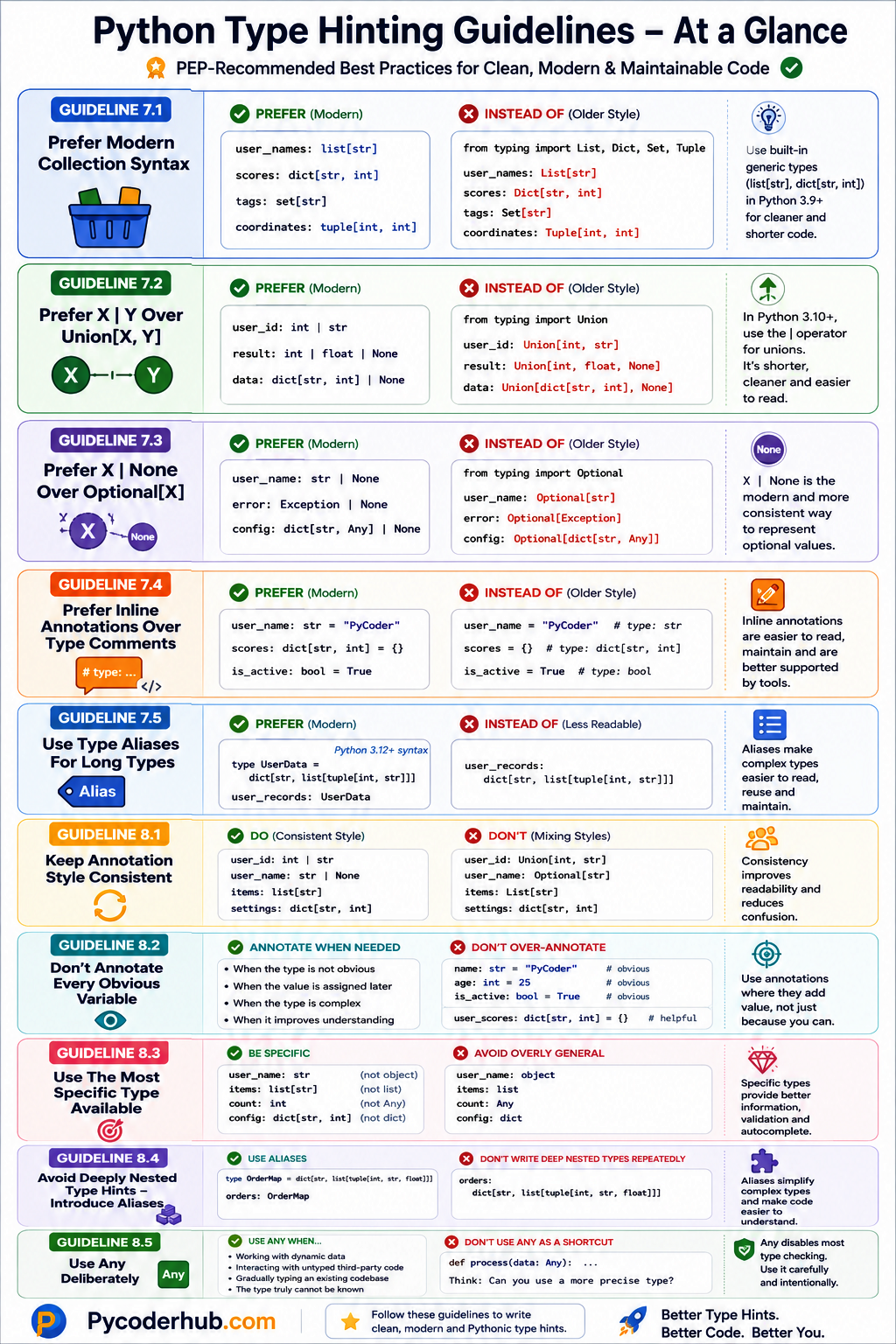
Now that we’ve covered the modern guidelines for writing type hints, we have completed the recommendation side of Python’s typing system. Before moving on to the lesson summary, let’s quickly review the key guidelines we’ve learned with a visual infographic.
Visual Infographic Recap — Python Type Hinting Guidelines
In Parts 7 and 8, you learned the guidelines that help make type hints more readable, consistent, and maintainable. Unlike the rules covered earlier in this lesson, these recommendations focus on writing type hints in a way that aligns with modern Python practices.
The infographic below summarizes the most important type hinting guidelines discussed so far. Use it as a quick reference whenever you’re unsure which style is preferred in modern Python code.
With both the rules and guidelines now covered, you have a solid understanding of not only how Python type hints work, but also how they should be written in real-world code. Let’s finish this lesson by reviewing the key takeaways and creating a practical checklist you can use as a reference in future projects.
Summary and Key Takeaways
You’ve now learned both the rules that govern Python’s type hinting system and the guidelines that help developers write cleaner, more maintainable annotations.
Before moving on, let’s quickly review the most important points from this lesson.
Rules You Must Understand
- Type hints are optional and Python runs perfectly without them.
- Type hints do not enforce types at runtime.
- Python supports gradual typing, allowing typed and untyped code to coexist.
- Type hints primarily help humans, IDEs, and static type checkers.
- Variable annotations use colon (
:) syntax. - Function return types use arrow (
->) syntax. - Collection types should receive the correct type arguments.
- Variable-length tuples require an ellipsis (
tuple[int, ...]). Optional[X]meansXorNone, not an optional parameter.Optional[X],Union[X, None], andX | Noneare equivalent.Unionexists to represent multiple possible types.Anydisables most static type checking.Literalrestricts a value to specific allowed values.Finalindicates a name should not be reassigned.TypeVarnames should match their string names.- Constraints require two or more types.
- Bounds and constraints cannot be combined.
- PEP 695 generic syntax requires Python 3.12+.
- Types that have not yet been defined require forward references.
- Future imports must appear at the top of the file.
Guidelines You Should Follow
- Prefer built-in generic types such as
list[str]anddict[str, int]. - Prefer
X | YoverUnion[X, Y]when using Python 3.10+. - Prefer
X | NoneoverOptional[X]in modern code. - Prefer inline annotations over type comments.
- Use type aliases to simplify long or frequently used types.
- Keep annotation style consistent throughout a project.
- Avoid annotating every obvious variable.
- Use the most specific type available.
- Replace deeply nested type hints with meaningful aliases when appropriate.
- Use
Anydeliberately, not as a shortcut.
With these rules and guidelines in mind, you’ll be able to write type hints that are not only valid, but also clear, maintainable, and aligned with modern Python development practices.
Conclusion
One of the biggest misconceptions about Python type hints is that learning the syntax is enough. In reality, understanding how to write type hints is only the first step. Knowing when to use them, how to structure them, and which conventions to follow is what transforms annotations from simple type labels into a valuable tool for improving code quality.
In this lesson, you learned that type hints are optional, do not enforce types at runtime, and exist primarily to help developers and static analysis tools understand code more clearly. You also explored the rules that govern annotations, collections, unions, generics, type aliases, and forward references, along with the modern guidelines that make type-hinted code easier to read and maintain.
As Python’s typing system continues to evolve, newer syntax and recommendations will continue to appear. However, the principles covered in this lesson—clarity, consistency, specificity, and readability—remain the foundation of good type hinting regardless of which version of Python you use.
Good type hinting is not about adding as many annotations as possible—it’s about using the right annotations in the right places to make code easier to understand, maintain, and reason about. With these rules and guidelines in mind, you now have a strong foundation for writing modern Python type hints confidently and effectively. 🐍

One thought on “Python Type Hinting Rules and Guidelines (PEP Recommendations Explained)”