
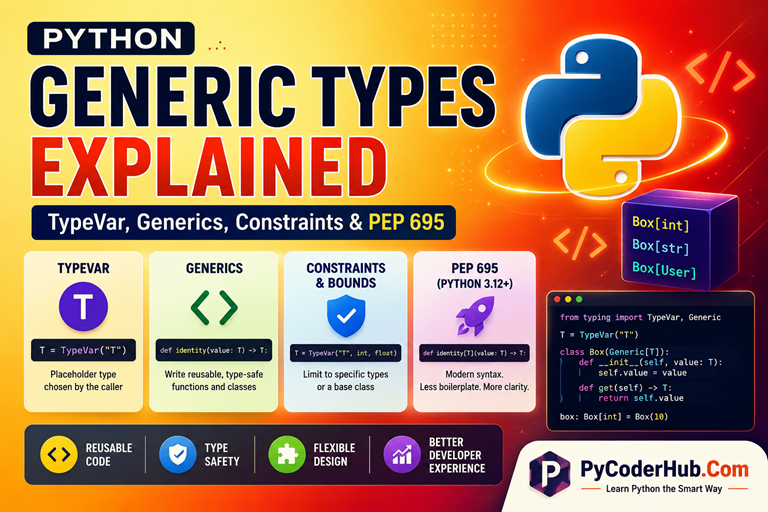
Introduction: Python Generic Types
In the previous lesson, you learned how to make type hints more flexible using tools such as Union, Optional, Any, Literal, and other special type hints. These tools allow variables, function parameters, and return values to work with multiple possible types instead of being restricted to a single type.
You also learned how Python’s built-in collection type hints such as list[str], dict[str, int], and set[float] help describe the types of values stored inside containers. This makes type hints more precise and improves code readability, editor support, and static type checking.
However, as programs become larger, another challenge begins to appear.
Suppose you want to write a function that works with integers, strings, custom classes, or virtually any other type. You could use Any, but that removes much of the type safety that type hints are designed to provide. Alternatively, you could create separate versions of the same function for every possible type, but that quickly becomes repetitive and difficult to maintain.
What we really need is a way to write code once and have it work with many different types while still preserving accurate type information.
This is exactly the problem that Python Generic Types solve.
Generic types allow us to create reusable, type-safe functions and classes without sacrificing flexibility. They are one of the most powerful features of Python’s type hinting system and are widely used throughout the standard library, third-party libraries, and modern Python applications.
What You’ll Learn
In this lesson, you’ll learn:
- What problem generic types solve
- What generic types are and how they work
- How to create and use
TypeVar - How generic functions preserve type information
- How to build reusable generic classes
- The difference between generic types and
Any - How constraints and bounds work
- What
AnyStris and why it exists - The modern generic syntax introduced by PEP 695 (Python 3.12+)
By the end of this lesson, you’ll understand not only how to use generic types, but also why they are considered one of the foundations of modern static typing in Python.
Before we understand what Python generic types are, we first need to understand the problem they solve and why Python needs generic types in the first place.
Part 1 — The Problem Generics Solve
Before learning about TypeVar, generic functions, or generic classes, it’s important to understand why generic types were added to Python’s type hinting system in the first place.
Many Python features exist because developers repeatedly encounter the same practical problem. Generic types are no different. They were introduced to solve a challenge that appears whenever we try to write code that is both flexible and type-safe.
Let’s start by looking at the common approaches developers might try before generics enter the picture.
1.1 The Limitation of Any
One possible solution is to use Any.
Suppose we want a function that simply returns the value it receives:
from typing import Any

def identity(value: Any) -> Any:
    return value
This function can accept any type:
identity(10)
identity("Hello")
identity([1, 2, 3])
At first glance, this seems perfect.
The function is flexible and works with everything.
However, there is a hidden problem.
Because both the parameter and return type are marked as Any, the type checker loses track of the relationship between them.
Consider:
result = identity("Python")As humans, we know that result will contain a string.
However, from the type checker’s perspective:
result: AnyThe specific type information has been lost.
This means:
- Autocompletion becomes less useful.
- Type checking becomes less accurate.
- Mistakes become harder to detect.
- The benefits of type hints begin to disappear.
In other words, Any gives us flexibility, but often at the cost of type safety.
Think of Any as telling the type checker:
“Don’t worry about this value. Trust me.”
Sometimes that’s necessary, but if used everywhere, the type checker can no longer provide meaningful help.
1.2 The Limitation of Writing Separate Functions
If Any removes too much type information, another idea might be to create separate functions for different types.
For example:
def identity_int(value: int) -> int:
    return value

def identity_str(value: str) -> str:
    return value
This works, but a new problem appears immediately.
What if we also need to support:
floatboollistdict- Custom classes
- Future types we haven’t created yet
We would end up writing many nearly identical functions:
def identity_float(value: float) -> float:
    return value

def identity_user(user: User) -> User:
    return user

def identity_product(product: Product) -> Product:
    return product
The logic never changes.
Only the types change.
This creates unnecessary duplication and makes code harder to maintain.
Whenever we find ourselves copying the same logic repeatedly for different types, it’s often a sign that we need a more general solution.
1.3 Why Python Needs Reusable Type-Safe Code
In real-world software, developers frequently write code that should work with many different types.
Consider a function that returns the first item from a collection:
def first_item(items):
    return items[0]
This function works for:
numbers = [1, 2, 3]
names = ["Alice", "Bob"]
users = [user_one, user_two]
The underlying logic is always the same.
The function simply returns the first element.
The challenge is describing this behavior using type hints.
Ideally, we want the type checker to understand:
- If the input contains integers, the return value should be an integer.
- If the input contains strings, the return value should be a string.
- If the input contains
Userobjects, the return value should be aUser.
In other words, we want flexibility without losing type information.
This is the key requirement that neither Any nor duplicated functions can fully solve.
Modern software development relies heavily on reusable components:
- Data structures
- Utility functions
- Frameworks
- Libraries
- APIs
These components must work with many types while still providing accurate type information.
Python needed a way to express this idea.
1.4 What Problem Do Generics Actually Solve?
Generic types solve a very specific problem:
How can we write code that works with many different types while preserving the relationship between those types?
Consider this function:
def identity(value):
    return value
The logic is simple:
- Input type goes in.
- The same type comes out.
If we pass an integer:
identity(10)the result should be an integer.
If we pass a string:
identity("Python")the result should be a string.
The function’s behavior stays the same regardless of the type being used.
What changes is the type itself.
Generic types allow us to describe this relationship directly.
Instead of saying:
“This function accepts any type.”
we can say:
“This function accepts some type, and whatever that type is, the same type will be returned.”
That may sound like a small difference, but it is the foundation of generic programming.
Rather than writing separate versions of the same code for every possible type, we can write the logic once and allow the type to be supplied later.
This gives us both:
- Reusability
- Type safety
And that is exactly what generic types were designed to achieve.
Now that we understand the problem generics solve, we can begin exploring what generic types actually are and how Python represents them using TypeVar.
Part 2 — Understanding Generic Types
Now that we understand the problem generics solve, we can finally answer an important question:
What exactly is a generic type?
The term “generic” can sound intimidating at first, but the underlying idea is actually quite simple. Generic types allow us to create reusable type definitions that can work with many different types while still preserving accurate type information.
Let’s build this idea step by step.
2.1 What Are Generic Types?
A generic type is a type that contains one or more type placeholders.
Instead of being tied to a specific type such as int or str, a generic type allows the actual type to be supplied later.
For example:
list[int]and
list[str]are both based on the same generic type:
listThe structure remains the same, but the type stored inside the list changes.
Similarly:
dict[str, int]and
dict[str, float]both use the same generic dictionary type.
The only difference is the types used for keys and values.
In simple terms:
A generic type is a reusable type template that can be customized with specific types when needed.
This allows us to write flexible code without losing information about the actual types being used.
A Small Observation
You may not realize it, but you’ve already been using generic types throughout this chapter.
For example:
list[str]
dict[str, int]
set[float]
tuple[str, int]
All of these are generic types.
The concept itself is not new. What is new is learning how to create and use our own generic types.
2.2 The Box Analogy
One of the easiest ways to understand generic types is through a box analogy.
Imagine you own a special box.
The box’s design never changes.
However, the contents of the box can vary.
Sometimes the box stores integers:
Box[int]Sometimes it stores strings:
Box[str]The box itself remains the same.
Only the type of object inside the box changes. The box acts as a reusable template.
Instead of creating:
IntegerBox
StringBox
UserBox
we create a single generic box that can work with many different types.
This is exactly the idea behind generic programming.
We write the structure once and allow the specific type to be supplied later.
Real-World Parallel
Python’s built-in collections work the same way:
list[int]
list[str]
list[float]
There is only one list type.
Python doesn’t create a completely different list implementation for each data type.
The list structure remains the same while the contained type changes.
2.3 Generic Types vs Any
At this point, you might wonder:
Why not just use
Anyinstead?
After all, both approaches seem flexible.
Consider this function:
from typing import Any

def process(data: Any) -> Any:
    return data
This function accepts everything:
process(10)
process("Python")
process([1, 2, 3])
However, there is an important difference.
With Any, the type checker stops tracking the actual type.
For example:
result = process("Python")The type checker sees:
result: AnyThe information that the value is a string has been lost.
Generic types work differently.
Their goal is not merely to accept many types.
Their goal is to preserve the relationship between those types.
Think of it this way:
Any says:
“This could be anything. I don’t know what it is.”
Generic types say:
“I don’t know the type yet, but once it is chosen, I’ll remember it.”
That difference is the entire reason generic types exist.
Insight
Many beginners assume that generics are simply a more complicated version of Any.
In reality, they solve opposite problems.
Anyintentionally removes type information.- Generics preserve type information.
That’s why generic types are considered type-safe while Any is often called an escape hatch.
2.4 Generic Types Are Mostly for Type Checkers
When beginners first encounter generic types, they often assume something special happens at runtime.
However, that’s not how Python typically works.
Generic types primarily exist for:
- Type checkers
- IDEs
- Static analysis tools
- Developer understanding
Their main purpose is to provide additional type information.
For example:
numbers: list[int] = [1, 2, 3]A type checker understands:
- Every element should be an integer.
- Operations should be validated accordingly.
- Incorrect types can be reported as errors.
But at runtime:
type(numbers)still produces:
<class 'list'>Python does not create a separate runtime list implementation for every possible type.
Likewise:
list[int]
list[str]
list[float]
all use the same underlying list class.
The generic information mainly exists to help tools and developers reason about code before it runs.
2.5 Visual Summary: Understanding Generic Types
Before moving on to TypeVar, let’s quickly review the key ideas we’ve covered so far. The following infographic summarizes what generic types are, how they differ from Any, why the box analogy is useful, and how generic types help type checkers preserve type information.
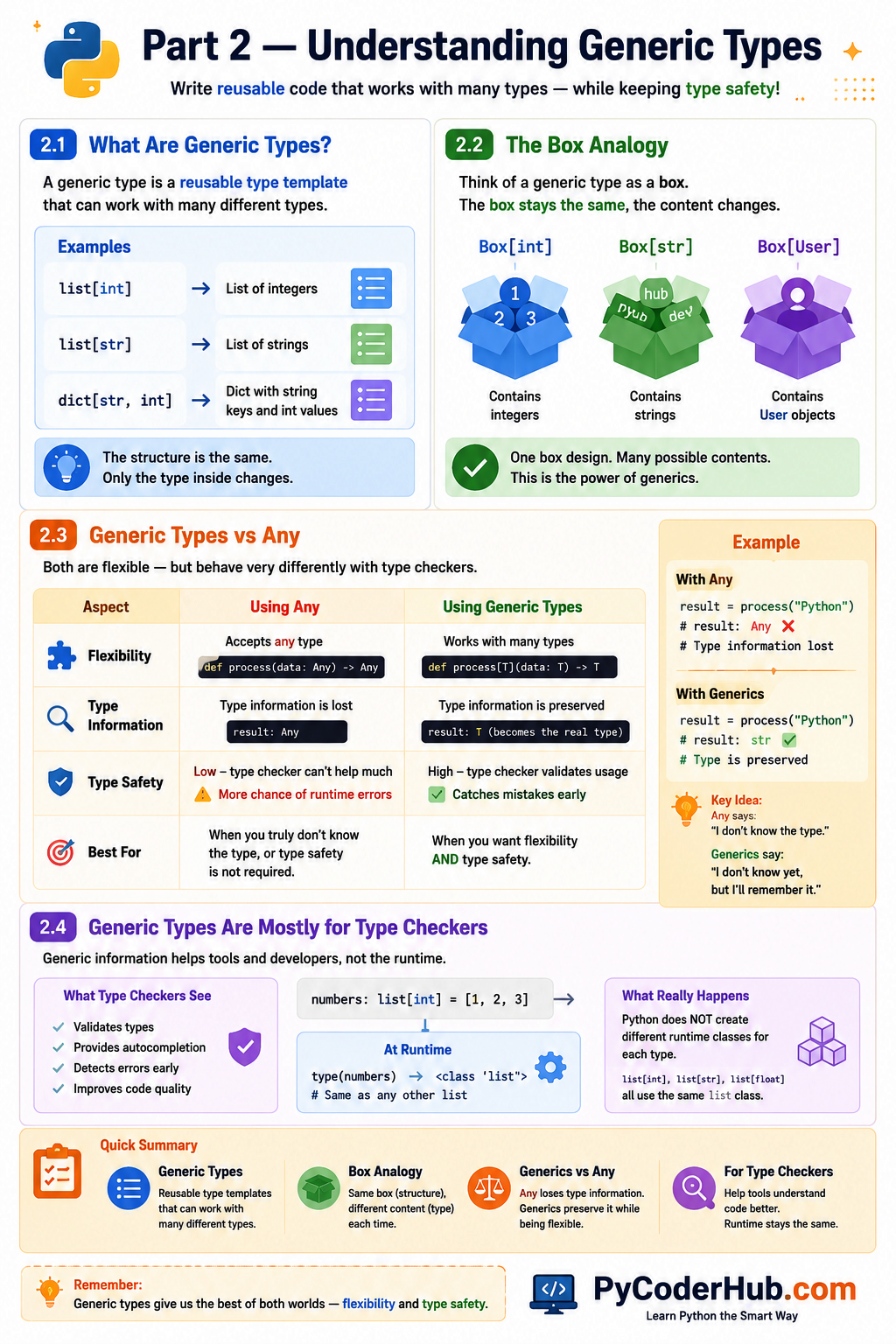
As you can see, generic types provide a balance between flexibility and type safety. Rather than losing type information like Any, generics preserve the relationship between types while allowing code to remain reusable. This idea forms the foundation for everything we’ll learn next, because TypeVar is the mechanism Python uses to create these generic type relationships.
Part 3 — Understanding TypeVar
In the previous section, we learned that generic types allow us to write reusable, type-safe code. However, we still haven’t answered an important question:
How does Python represent the “unknown type” inside a generic type?
For example, if we want a function to work with integers, strings, lists, custom classes, or any other type while preserving type information, how do we describe that relationship?
The answer is TypeVar.
TypeVar is the fundamental building block that makes generic programming possible in Python. Almost every generic function and generic class ultimately relies on one or more type variables.
Let’s see how it works.
3.1 What Is TypeVar?
A TypeVar (Type Variable) is a special object that represents a placeholder for a type.
It allows us to write type hints without knowing the exact type in advance.
For example, imagine we want to describe:
“This function accepts some type and returns the same type.”
At the moment of writing the function, we don’t know whether that type will be:
intstrfloatlistUser- or something else entirely
Instead of choosing a specific type, we can use a placeholder.
That placeholder is a TypeVar.
Important
A TypeVar is not a real type such as int or str.
It simply acts as a symbol that stands in place of an actual type until one is provided.
You can think of it as a blank space in a form:
TypeVar → "A type will go here later."The actual type is chosen when the function or class is used.
3.2 Creating Your First TypeVar
To create a type variable, import TypeVar from the typing module:
from typing import TypeVarThen create a type variable:
from typing import TypeVar

T = TypeVar("T")
This is the most common generic type variable you’ll see in Python code.
The string "T" is simply the name of the type variable.
Now we can use T inside type hints:
from typing import TypeVar

T = TypeVar("T")

def identity(value: T) -> T:
    return value
Here:
- The parameter type is
T - The return type is also
T
We’re telling the type checker:
Whatever type goes in should be the same type that comes out.
For example:
identity(10)The type checker understands:
int -> intAnd:
identity("Python")becomes:
str -> strThe function logic never changes.
Only the actual type represented by T changes.
Insight
Notice that we never explicitly tell Python:
T = intor
T = strThe type checker automatically figures that out based on how the function is called.
This process is called type inference, which we’ll explore in more detail later.
3.3 Common TypeVar Naming Conventions
Technically, you can give a TypeVar almost any valid variable name:
UserType = TypeVar("UserType")or
StoredValueType = TypeVar("StoredValueType")However, Python developers usually follow a few common conventions.
T
Represents a general type.
T = TypeVar("T")Meaning:
T = TypeThis is the most common type variable you’ll encounter.
K
Represents a key type.
K = TypeVar("K")Meaning:
K = KeyOften used with dictionaries.
V
Represents a value type.
V = TypeVar("V")Meaning:
V = ValueUsually paired with K.
Example:
K = TypeVar("K")
V = TypeVar("V")
S
Represents a secondary type.
S = TypeVar("S")Often used when a function or class needs multiple type variables.
Example
K = TypeVar("K")
V = TypeVar("V")
might represent:
dict[K, V]where:
dict[str, int]means:
K = str
V = int
Good Practice
For simple examples, use:
T
K
V
S
For complex codebases, longer descriptive names may improve readability.
3.4 One Important Rule: Consistent Types
This is the most important concept to understand about TypeVar.
A TypeVar represents one consistent type during a single function call.
Consider:
from typing import TypeVar

T = TypeVar("T")

def identity(value: T) -> T:
    return value
If we call:
identity(10)then:
T = intfor that call.
If we call:
identity("Python")then:
T = strfor that call.
The type can change between calls.
However, within a single call, the type must remain consistent.
Think of T as a temporary label.
When a function call begins, the type checker chooses a real type for T.
After that choice is made, every occurrence of T refers to the same type for that specific call.
Why This Matters
Suppose we have:
from typing import TypeVar

T = TypeVar("T")

def duplicate(value: T) -> tuple[T, T]:
    return value, value
If we pass:
duplicate("Hello")the type checker understands:
tuple[str, str]If we pass:
duplicate(100)the result becomes:
tuple[int, int]The same type is preserved throughout the entire relationship.
This consistency is what makes generic programming type-safe.
3.5 Common Questions About TypeVar
As you begin experimenting with TypeVar, you may encounter a few behaviors that seem unusual compared to other type hints. Let’s clear up some common questions and confusion points.
Why Does TypeVar Require an Extra Step?
Most type hints are used directly after importing them.
For example:
from typing import Any, Literal

user_data: Any

status: Literal["active", "inactive"]
After importing Any or Literal, they can immediately be used inside type hints.
TypeVar works differently.
First, you import it:
from typing import TypeVarThen you create a type variable:
T = TypeVar("T")Only after creating T can it be used in type annotations:
def identity(value: T) -> T:
    return value
In other words, TypeVar is not itself a type hint. Instead, it is a tool used to create placeholder types that can later be used in annotations.
A common pattern looks like this:
from typing import TypeVar

T = TypeVar("T")

# Use T in type hints
Why Do We Write Both T and "T"?
When creating a type variable, you may notice that the name appears twice:
T = TypeVar("T")The first T is the Python variable name.
The second "T" is the internal name stored inside the TypeVar object.
These names should match.
For example:
T = TypeVar("T")
K = TypeVar("K")
V = TypeVar("V")
are all correct.
However:
T = TypeVar("K")will usually produce a warning from type checkers.
You may see a message similar to:
The argument to 'TypeVar()' must be a string equal to the variable name to which it is assigned.Does Mismatching the Names Break Generic Type Checking?
No.
Consider:
from typing import TypeVar

T = TypeVar("K")

def identity(value: T) -> T:
    return value

print(identity([1, 2, 3]))
print(identity("Hello"))
This code runs perfectly.
The generic behavior still works.
The warning exists because the typing ecosystem expects the variable name and the internal TypeVar name to match for readability and consistency.
The warning is about convention, not functionality.
How Does Python Know What Type T Represents?
Consider:
from typing import TypeVar

T = TypeVar("T")

def identity(value: T) -> T:
    return value
When we call:
identity("Hello")the type checker infers:
T = strFor that specific function call.
The function is effectively interpreted as:
def identity(value: str) -> str:
    return value
Likewise:
identity(100)is interpreted as:
def identity(value: int) -> int:
    return value
This process is known as type inference.
Does T Permanently Become a Specific Type?
No.
A TypeVar does not permanently store a type.
Instead, the type checker determines a value for T separately for each function call.
For example:
identity("Hello")may infer:
T = strwhile:
identity(100)may infer:
T = intThe type can change from one call to another.
The important rule is that all occurrences of T must refer to the same type within a single call.
Does Using TypeVar Force the Return Type to Be T?
No.
Many beginners assume that if a parameter uses a TypeVar, then the return type must also use the same TypeVar.
This is not true.
For example:
from typing import TypeVar

T = TypeVar("T")

def type_name(value: T) -> str:
    return type(value).__name__
This is perfectly valid.
The function accepts any type but always returns a string.
A TypeVar only creates relationships where it is explicitly used.
Then Why Do Most Generic Examples Use T as Both the Parameter and Return Type?
Consider:
def identity(value: T) -> T:
    return value
This creates a relationship between the parameter and return value.
It tells the type checker:
Whatever type goes in should be the same type that comes out.
For example:
identity("Hello")becomes:
str -> strThis is one of the most common uses of generic programming.
What Happens If I Write T as the Parameter Type but int as the Return Type?
Consider:
from typing import TypeVar

T = TypeVar("T")

def identity(value: T) -> int:
    return value
At first glance, some readers assume the error occurs because:
identity("Hello")causes:
T = strand therefore the return type should also be str.
However, that is not the real issue.
The function signature:
T -> intis completely valid.
For example:
def always_zero(value: T) -> int:
    return 0
is perfectly acceptable.
The problem is the implementation:
return valueThe type checker cannot guarantee that value is always an integer.
Since T could represent many different types, returning value may violate the promise that the function returns an int.
Does TypeVar Perform Runtime Type Checking?
No.
TypeVar exists entirely within Python’s type-hinting system.
For example:
from typing import TypeVar

T = TypeVar("T")

def identity(value: T) -> int:
    return value

print(identity("Hello"))
Python will still execute this code and print:
Hellobecause Python does not enforce type hints at runtime.
Type hints are primarily intended for:
- Type checkers
- IDEs
- Static analysis tools
- Documentation
Can TypeVar Be Used for Ordinary Variables?
A common beginner question is whether a TypeVar can be used directly as the type of a normal variable.
For example:
from typing import TypeVar

T = TypeVar("T")

user_name: T = "PyCoder"
Most type checkers will report a warning similar to:
Type variable "T" is unboundThis happens because a TypeVar is not a real type. It is a placeholder type that must be associated with a generic function, generic class, or generic type alias.
In a generic function:
from typing import TypeVar

T = TypeVar("T")

def identity(value: T) -> T:
    return value
the type checker can determine what T represents when the function is called.
However, in:
user_name: T = "PyCoder"there is no generic context that tells the type checker what T should be, so the type variable remains unbound.
Key Takeaway
A useful way to think about TypeVar is that it does not represent a fixed type. Instead, it represents a relationship between types. The type checker infers a concrete type whenever the function or class is used and then ensures that all occurrences of the same TypeVar remain consistent within that context.
Part 4 — Generic Functions
Now that we understand what a TypeVar is, we can finally start using it for its intended purpose: creating generic functions.
A generic function is simply a function that uses one or more type variables in its type hints. This allows the function to work with multiple types while preserving type information.
The function logic remains the same, but the actual types can vary depending on how the function is called.
This is where generic programming starts becoming truly useful.
4.1 Your First Generic Function
Let’s begin with the classic example:
from typing import TypeVar

T = TypeVar("T")

def identity(value: T) -> T:
    return value
This function returns whatever value it receives.
At runtime, the behavior is extremely simple:
print(identity(100))
print(identity("Python"))
print(identity([1, 2, 3]))
Output:
100
Python
[1, 2, 3]
The interesting part is not the runtime behavior.
The interesting part is the type information.
The function annotation:
def identity(value: T) -> T:tells the type checker:
Whatever type is passed into this function should be the same type returned by the function.
As a result:
identity(100)is interpreted as:
int → intwhile:
identity("Python")is interpreted as:
str → strand:
identity([1, 2, 3])becomes:
list[int] → list[int]The function implementation never changes.
Only the type represented by T changes.
Why Not Use Any?
Compare the generic version:
def identity(value: T) -> T:with:
from typing import Any

def identity(value: Any) -> Any:
    return value
Both functions can accept many types.
However, the generic version preserves the relationship between the parameter and return value, while Any loses that information.
This is why generic functions are considered type-safe.
4.2 How Type Inference Works
One of the most impressive aspects of generic functions is that we rarely need to tell Python what type T represents.
The type checker usually figures it out automatically.
This process is called type inference.
Consider:
from typing import TypeVar

T = TypeVar("T")

def identity(value: T) -> T:
    return value
Now suppose we call:
identity("Hello")The type checker sees:
value parameter: T
actual argument: str
It therefore infers:
T = strand temporarily treats the function as:
def identity(value: str) -> str:
    return value
Important Insight
Many beginners imagine that Python creates a new version of the function for every type.
That is not what happens.
There is only one function object at runtime. The type checker is simply using the type hints to understand how types flow through the function.
4.3 Practical Generic Function Examples
The identity function is useful for learning, but real projects use generic functions for more practical tasks.
Example 1: Returning the First Item
from typing import TypeVar

T = TypeVar("T")

def first_item(items: list[T]) -> T:
    return items[0]
Usage:
first_item([1, 2, 3])Type checker view:
list[int] → intUsage:
first_item(["Alice", "Bob"])Type checker view:
list[str] → strThe function automatically adapts to the type stored inside the list.
Example 2: Returning the Last Item
from typing import TypeVar

T = TypeVar("T")

def last_item(items: list[T]) -> T:
    return items[-1]
Examples:
last_item([10, 20, 30])returns:
intExamples:
last_item(["Alice", "Bob"])returns:
strExample 3: Repeating a Value
from typing import TypeVar

T = TypeVar("T")

def repeat(value: T, count: int) -> list[T]:
    return [value] * count
Usage:
repeat("Python", 3)Type checker view:
str → list[str]Usage:
repeat(100, 3)Type checker view:
int → list[int]Notice how the type information is preserved throughout the function.
4.4 Using Multiple TypeVars
So far, we’ve used a single type variable:
T = TypeVar("T")However, generic functions can use multiple type variables when they need to represent multiple independent types.
For example:
from typing import TypeVar

K = TypeVar("K")
V = TypeVar("V")
Here:
K = Key Type
V = Value Type
Let’s create a function that returns a pair:
from typing import TypeVar

K = TypeVar("K")
V = TypeVar("V")

def make_pair(key: K, value: V) -> tuple[K, V]:
    return key, value
Usage:
make_pair("id", 100)Type checker view:
tuple[str, int]Another example:
make_pair("name", "Alice")Type checker view:
tuple[str, str]Notice that K and V are inferred independently.
The first argument determines K.
The second argument determines V.
Why Multiple TypeVars Matter
Many real-world data structures naturally involve multiple types.
Examples include:
dict[K, V]where:
K = key type
V = value type
and:
tuple[T1, T2]where each element may have a different type.
Using multiple TypeVars allows generic functions to accurately describe these relationships.
At this point, we’ve learned how to create generic functions and how type variables help preserve type information across function parameters and return values. Next, we’ll move beyond functions and explore how the same ideas can be applied to entire classes using generic classes.
Part 5 — Generic Classes
So far, we’ve used generics to create reusable functions. However, functions are only one part of programming. Many real-world programs also rely heavily on objects and classes.
What if we want to create a reusable class that can safely store different types of data while preserving type information?
This is exactly where generic classes become useful.
In fact, many of Python’s built-in collection types and modern libraries rely extensively on generic classes behind the scenes.
5.1 Why Generic Functions Are Not Enough
Generic functions solve the problem of reusable behavior.
For example:
from typing import TypeVar

T = TypeVar("T")

def identity(value: T) -> T:
    return value
This function can work with many different types while preserving type information.
However, functions are not the only things that need to be reusable.
Imagine we want to create a simple container object that stores a value.
Without generics, we might write:
class IntBox:
    def __init__(self, value: int):
        self.value = value
Then later:
class StringBox:
    def __init__(self, value: str):
        self.value = value
And perhaps:
class UserBox:
    def __init__(self, value: User):
        self.value = value
Clearly this becomes repetitive.
The structure of the class remains identical.
Only the stored type changes.
This is the same problem we encountered with generic functions:
We want reusable code without losing type information.
Generic classes solve this problem.
5.2 Introducing Generic[T]
To create a generic class, Python provides the Generic base class.
It is imported from the typing module:
from typing import Generic, TypeVarThen we create a type variable:
T = TypeVar("T")Finally, we inherit from:
Generic[T]Example:
class Box(Generic[T]):
    ...
The meaning is:
This class is generic and uses the type variable
T.
Just as a generic function allows the caller to choose a type, a generic class allows the user of the class to choose a type.
For example:
Box[int]or:
Box[str]or:
Box[User]The class structure remains the same while the contained type changes.
5.3 Creating Your First Generic Class
Let’s create a simple generic container.
from typing import Generic, TypeVar

T = TypeVar("T")

class Box(Generic[T]):
    def __init__(self, value: T):
        self.value = value
Now we can create typed boxes:
number_box = Box[int](100)

text_box = Box[str]("Python")
The type checker understands:
number_box.value -> int

text_box.value -> str
Even though both objects use the same class.
How It Works
When we write:
Box[int]the type checker substitutes:
T = intthroughout the class.
Conceptually, it becomes:
class Box:
    value: int
Similarly:
Box[str]causes:
T = strthroughout the class.
The actual runtime class remains the same.
Only the type checker’s understanding changes.
5.4 Generic Container Examples
The Box example is useful for learning, but let’s look at more practical examples.
Example 1: Stack[T]
A stack stores multiple values of the same type.
from typing import Generic, TypeVar

T = TypeVar("T")

class Stack(Generic[T]):
    def __init__(self):
        self.items: list[T] = []

    def push(self, item: T) -> None:
        self.items.append(item)

    def pop(self) -> T:
        return self.items.pop()
Usage:
number_stack = Stack[int]()

number_stack.push(10)
number_stack.push(20)
The type checker knows:
All items must be intAttempting:
number_stack.push("hello")would produce a type-checking error.
Example 2: Pair[K, V]
Sometimes a class needs multiple type parameters.
from typing import Generic, TypeVar

K = TypeVar("K")
V = TypeVar("V")

class Pair(Generic[K, V]):
    def __init__(self, key: K, value: V):
        self.key = key
        self.value = value
Usage:
user_pair = Pair[str, int]("id", 100)The type checker understands:
key   -> str
value -> int
Each type variable is tracked independently.
Example 3: Repository[T]
Many web frameworks and database libraries use patterns similar to this:
from typing import Generic, TypeVar

T = TypeVar("T")

class Repository(Generic[T]):
    def save(self, item: T) -> None:
        ...

    def get(self) -> T:
        ...
Usage:
user_repository = Repository[User]()

product_repository = Repository[Product]()
The same repository structure can now work with different models while preserving type safety.
5.5 Generic Methods Inside Classes
Generic classes often contain methods that use the class’s type variable.
For example:
from typing import Generic, TypeVar

T = TypeVar("T")

class Box(Generic[T]):
    def __init__(self, value: T):
        self.value = value

    def get_value(self) -> T:
        return self.value
Notice that the method also uses T.
If:
box = Box[str]("Python")then:
box.get_value()is understood by the type checker as returning:
strLikewise:
box = Box[int](100)causes:
box.get_value()to return:
intThe method automatically inherits the class’s type parameter.
Important
You do not need to create a new TypeVar for every method.
Most methods simply reuse the generic type already defined by the class.
Part 6 — Constraints and Bounds
So far, every TypeVar we’ve created has been completely unrestricted.
For example:
from typing import TypeVar

T = TypeVar("T")
Here, T can represent almost any type:
int
str
float
list
dict
User
Product
and many others.
This flexibility is useful, but sometimes it is too flexible.
What if a function only makes sense for certain types?
Or what if we need a type that supports a particular method or behavior?
This is where constraints and bounds become useful.
Both features allow us to place restrictions on a TypeVar, but they work in very different ways.
Understanding that difference is one of the most important concepts in advanced generic programming.
6.1 Type Constraints
A constrained TypeVar limits a type variable to a specific set of allowed types.
The syntax looks like this:
from typing import TypeVar

T = TypeVar("T", int, float)
Here we’re telling the type checker:
Tcan only beintorfloat.
No other types are allowed.
Example
from typing import TypeVar

T = TypeVar("T", int, float)

def double(value: T) -> T:
    return value * 2
Valid calls:
double(10)
double(3.14)
Invalid call:
double("Hello")The type checker reports an error because:
stris not one of the permitted types.
Think of Constraints as a Whitelist
A constrained TypeVar behaves like a whitelist.
T = TypeVar("T", int, float)means:
Allowed:
✓ int
✓ float

Not Allowed:
✗ str
✗ bool
✗ list
✗ User
Only the explicitly listed types can be used.
Can a TypeVar Have Only One Constraint?
When learning constrained TypeVars, some readers naturally try:
from typing import TypeVar

T = TypeVar("T", int)
However, this raises an error:
TypeError: A single constraint is not allowedWhy?
Because constraints are designed to provide a choice between multiple possible types.
For example:
T = TypeVar("T", int, float)means:
Tcan be eitherintorfloat.
The type checker must choose between multiple allowed types.
With only one constraint:
T = TypeVar("T", int)there is no choice to make.
The type variable can only ever be:
intIn that situation, using a TypeVar would provide no benefit.
You can simply write:
def double(value: int) -> int:
    return value * 2
which is clearer and easier to understand.
Can a TypeVar Have More Than Two Constraints?
Yes.
Although two constraints are the minimum, a TypeVar may contain any number of allowed types.
For example:
from typing import TypeVar

T = TypeVar("T", int, float, str)
This means:
Tcan beint,float, orstr.
Similarly:
from typing import TypeVar

T = TypeVar("T", int, float, str, bool)
means:
Tcan beint,float,str, orbool.
The constraint list acts as a whitelist of permitted types.
Allowed Types:
✓ int
✓ float
✓ str
✓ bool
Everything else is rejected:
✗ list
✗ dict
✗ set
✗ User
Important
Constraints are not inheritance-based.
If a type is not explicitly listed, it is not accepted.
The type checker treats the constraint list as the complete set of valid choices.
6.2 Bounded TypeVars
Constraints and bounds may look similar at first, but they solve different problems.
A constrained TypeVar limits a type variable to a fixed set of specific types:
T = TypeVar("T", str, bytes)A bounded TypeVar limits a type variable to a base class and its subclasses:
T = TypeVar("T", bound=Animal)Syntax
from typing import TypeVar

T = TypeVar("T", bound=Animal)
This means:
Tmust beAnimalor any class that inherits fromAnimal.
Example
from typing import TypeVar

class Animal:
    def speak(self) -> str:
        return "..."

class Dog(Animal):
    pass

class Cat(Animal):
    pass

T = TypeVar("T", bound=Animal)

def make_sound(animal: T) -> str:
    return animal.speak()
Valid:
make_sound(Dog())
make_sound(Cat())
Invalid:
make_sound("Hello")because:
strdoes not inherit from:
AnimalThink of Bounds as an Inheritance Rule
When you write:
T = TypeVar("T", bound=Animal)you are telling the type checker:
I don’t care which specific animal this is, as long as it belongs to the Animal family.
Allowed:
✓ Animal
✓ Dog
✓ Cat
✓ Any future Animal subclass
Not Allowed:
✗ str
✗ int
✗ list
Unlike constraints, the set of valid types is not fixed.
If someone later creates:
class Bird(Animal):
    pass
it automatically becomes a valid type for T.
Why Bounds Are Useful
Often a function only needs access to methods provided by a base class.
For example:
class Animal:
    def speak(self) -> str:
        ...
A function that calls:
animal.speak()doesn’t care whether it receives a:
Dog
Cat
Bird
or some subclass that hasn’t even been written yet.
The only requirement is that the object behaves like an Animal.
A bounded TypeVar lets you express exactly that idea.
6.3 Constraints vs Bounds
At first glance, constraints and bounds appear similar because both restrict a TypeVar.
However, they solve different problems.
Constraints
T = TypeVar("T", int, float)Means:
T must be one of these exact types.
Bounds
T = TypeVar("T", bound=Shape)Means:
T must inherit from this base class.
Side-by-Side Comparison
| Feature | Constraints | Bounds |
|---|---|---|
| Restriction Style | Explicit type list | Base class |
| Uses Inheritance | No | Yes |
| Future Subclasses Allowed | No | Yes |
| Exact Types Required | Yes | No |
| Typical Use Case | Small fixed set of types | Family of related types |
Visual Comparison
This infographic provides a side-by-side comparison to help you quickly understand when to use each approach.
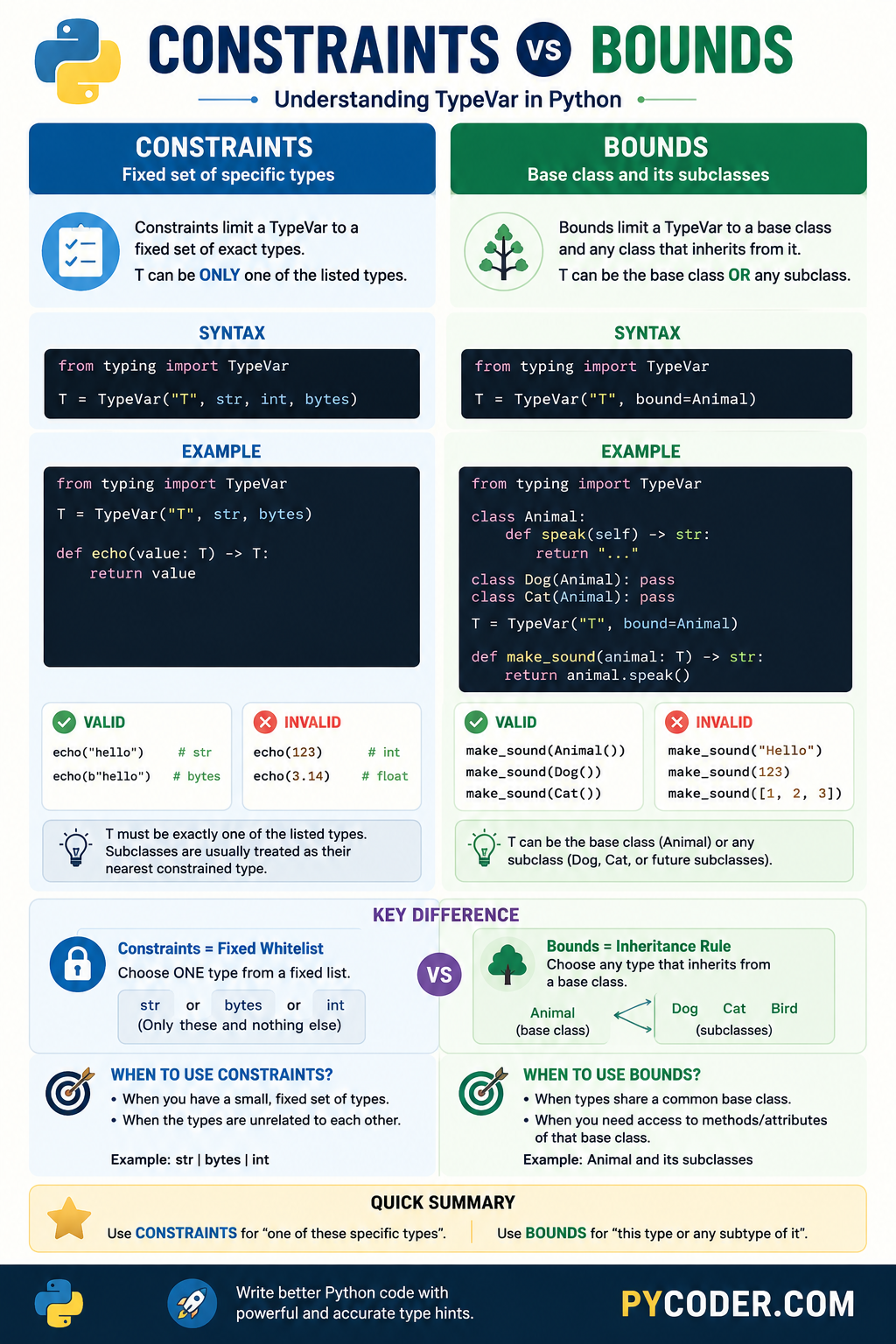
As a simple rule, use constraints when you want to restrict a type variable to a fixed set of specific types, and use bounds when you want to accept a base class along with any of its subclasses.
Part 7 — Understanding AnyStr
Throughout this lesson, we’ve learned how generic programming uses TypeVar to create relationships between types. We’ve also explored constrained TypeVars, which restrict a type variable to a specific set of allowed types.
One of the most famous real-world examples of a constrained TypeVar is AnyStr.
If you’ve read Python’s typing documentation, explored older codebases, or looked at type hints in popular libraries, you’ve probably encountered it before. At first glance, it may seem like just another special type hint, but AnyStr was created to solve a very specific problem involving text data.
Understanding AnyStr not only helps you read existing code, but also reinforces several important generic programming concepts you’ve already learned.
7.1 What Is AnyStr?
AnyStr is a predefined type variable provided by the typing module.
from typing import AnyStrInternally, it behaves roughly like this:
from typing import TypeVar

AnyStr = TypeVar("AnyStr", str, bytes)
As you learned in Part 6, this is a constrained TypeVar.
It means:
AnyStr can be:
✓ str
✓ bytes
and nothing else.
For example:
from typing import AnyStr

def identity(value: AnyStr) -> AnyStr:
    return value
Valid calls:
identity("Hello")
identity(b"Hello")
Invalid calls:
identity(100)
identity(3.14)
identity(["Hello"])
because AnyStr only allows str and bytes.
A Quick Reminder
At this point, you already know how constrained TypeVars work.
The interesting question is not:
“How is AnyStr implemented?”
The more important question is:
“Why was AnyStr created in the first place?”
To answer that, we need to understand the problem it was designed to solve.
7.2 The Problem AnyStr Solves
Python has two common text-related types:
str
bytes
Many functions can work with either of them.
Suppose we write:
def process(data: str | bytes) -> str | bytes:
    return data
This looks reasonable.
The function accepts either:
str
bytes
and returns either:
str
bytes
However, something important has been lost.
Consider:
result = process("Hello")As humans, we know the result must be:
strbecause we passed a string.
But the type checker only sees:
str | bytesLikewise:
result = process(b"Hello")also produces:
str | byteseven though the actual return type must be:
bytesThe relationship between the input type and output type has disappeared.
This is exactly the kind of problem generics were designed to solve.
7.3 How It Maintains Type Consistency
Now let’s rewrite the same function using AnyStr.
from typing import AnyStr

def process(data: AnyStr) -> AnyStr:
    return data
This tells the type checker:
Whatever text type goes in must be the same text type that comes out.
When we call:
process("Hello")the type checker infers:
AnyStr = strTherefore:
str → strWhen we call:
process(b"Hello")the type checker infers:
AnyStr = bytesTherefore:
bytes → bytesThe relationship is preserved.
Preventing Mixed Types
Another advantage of AnyStr is that it prevents accidental mixing of strings and bytes.
Consider:
from typing import AnyStr

def concatenate(first: AnyStr, second: AnyStr) -> AnyStr:
    return first + second
Valid:
concatenate("Hello", "World")concatenate(b"Hello", b"World")Invalid:
concatenate("Hello", b"World")Why?
Because the same AnyStr must represent one consistent type during a single function call.
It cannot simultaneously represent:
strand
bytesThis is the exact same “consistent type” rule we learned earlier with ordinary TypeVars.
Part 8 — PEP 695 Modern Generic Syntax (Python 3.12+)
Throughout this lesson, we’ve used the traditional generic syntax:
from typing import TypeVar

T = TypeVar("T")
and:
from typing import Generic

class Box(Generic[T]):
    ...
This syntax has worked well for many years and remains widely used today. However, as Python’s type system evolved, many developers felt that generic code contained too much boilerplate.
To address this, Python 3.12 introduced PEP 695, which provides a cleaner and more readable way to define generic functions, classes, and type aliases.
If you’re learning modern Python, this is an important feature to understand because you’ll increasingly encounter it in newer codebases and documentation.
8.1 Why PEP 695 Was Introduced
Before Python 3.12, creating generics required several separate steps.
For example:
from typing import TypeVar

T = TypeVar("T")

def identity(value: T) -> T:
    return value
Even for a simple generic function, we needed:
- Import
TypeVar - Create a TypeVar
- Use the TypeVar in the function
The same situation existed for generic classes:
from typing import Generic, TypeVar

T = TypeVar("T")

class Box(Generic[T]):
    ...
Many developers felt this was unnecessarily verbose.
The actual generic information was spread across multiple places in the code.
PEP 695 was introduced to:
- Reduce boilerplate
- Improve readability
- Make generic code easier to write
- Keep generic type parameters closer to where they are used
- Make Python’s syntax more consistent with other modern programming languages
The result is a much cleaner syntax for defining generics.
8.2 Modern Generic Functions
Let’s revisit our familiar identity() function.
Traditional Syntax
from typing import TypeVar

T = TypeVar("T")

def identity(value: T) -> T:
    return value
PEP 695 Syntax
def identity[T](value: T) -> T:
    return value
Notice what changed. We don’t need to import anything from typing module.
And also we no longer need:
T = TypeVar("T")The type parameter is declared directly in the function definition:
def identity[T]This immediately tells readers:
This is a generic function that uses the type parameter
T.
Multiple Type Parameters
Traditional syntax:
from typing import TypeVar

K = TypeVar("K")
V = TypeVar("V")

def make_pair(key: K, value: V) -> tuple[K, V]:
    return key, value
PEP 695 syntax:
def make_pair[K, V](key: K, value: V) -> tuple[K, V]:
    return key, value
The generic parameters are now visible directly in the function signature.
Many developers find this easier to read because everything related to the function appears in one place.
8.3 Modern Generic Classes
PEP 695 also simplifies generic classes.
Traditional Syntax
from typing import Generic, TypeVar

T = TypeVar("T")

class Box(Generic[T]):
    def __init__(self, value: T):
        self.value = value
PEP 695 Syntax
class Box[T]:
    def __init__(self, value: T):
        self.value = value
Again, several pieces of boilerplate disappear:
TypeVar("T")
Generic[T]
The type parameter is declared directly in the class definition.
This makes the generic nature of the class immediately obvious.
Multiple Type Parameters
Traditional syntax:
from typing import Generic, TypeVar

K = TypeVar("K")
V = TypeVar("V")

class Pair(Generic[K, V]):
    ...
PEP 695 syntax:
class Pair[K, V]:
    ...
The more type parameters a class uses, the more noticeable the reduction in boilerplate becomes.
8.4 Old vs New Syntax
Let’s compare the two styles side-by-side.
| Feature | Traditional Syntax | PEP 695 Syntax |
|---|---|---|
| Generic Function | def identity(value: T) -> T | def identity[T](value: T) -> T |
| Generic Class | class Box(Generic[T]) | class Box[T] |
| TypeVar Declaration | Required | Not Required |
| Generic Import | Often Required | Usually Not Needed |
| Boilerplate | More | Less |
| Readability | Good | Often Better |
| Minimum Python Version | Python 3.5+ | Python 3.12+ |
Constraints in PEP 695
Earlier, we learned constrained TypeVars:
from typing import TypeVar

T = TypeVar("T", int, float)
PEP 695 provides a modern equivalent:
def double[T: (int, float)](value: T) -> T:
    return value * 2
Likewise, bounds can also be expressed directly within the type parameter declaration.
Bounds in PEP 695
Earlier in this lesson, we learned how to create a bounded TypeVar. PEP 695 allows the bound to be declared directly in the type parameter:
Traditional syntax:
from typing import TypeVar

T = TypeVar("T", bound=Animal)

def make_sound(animal: T) -> str:
    return animal.speak()
PEP 695 syntax:
def make_sound[T: Animal](animal: T) -> str:
    return animal.speak()
The behavior is identical. The only difference is that the bound is declared directly within the function’s type parameter list.
A Small Observation
You may notice that both constraints and bounds use the : symbol in PEP 695:
T: AnimalT: (int, float)The meaning depends on what appears after the colon:
A single type indicates a bound.
T: AnimalA parenthesized list of types indicates constraints.
T: (int, float)This is one of the reasons many developers find PEP 695 easier to read—the generic type parameter, along with any constraints or bounds, is defined in one place instead of being split across separate TypeVar declarations.
Part 9 — Summary & Key Takeaways
Congratulations! You’ve reached the end of one of the most important topics in modern Python type hinting.
Let’s quickly review everything we’ve learned.
- Generic types solve the problem of writing reusable code without losing type information.
- Unlike
Any, generics preserve relationships between input and output types. - A
TypeVaracts as a placeholder type that is chosen by the caller. - Generic functions use
TypeVarto maintain type consistency across parameters and return values. - Type checkers automatically determine the actual type represented by a
TypeVarthrough type inference. - Generic classes allow a single class definition to work with many different types.
- The same generic class can create typed variations such as
Box[int],Box[str], andBox[User]. - A constrained
TypeVarrestricts allowed types to a fixed set, such asTypeVar("T", int, float). - A bounded
TypeVarrestricts types using inheritance, such asTypeVar("T", bound=Shape). - Constraints and bounds solve different problems and should not be treated as interchangeable.
AnyStris a predefined constrained TypeVar that helps maintain consistency betweenstrandbytes.- Modern Python (3.12+) introduces PEP 695, which provides a cleaner syntax for generic functions and classes.
- The traditional
TypeVarsyntax remains important because it is still widely used in existing codebases. - Most built-in collection types, such as
list[str]anddict[str, int], are themselves examples of generic types.
Key Takeaway
The most important idea from this lesson is that generics are not primarily about supporting multiple types. They are about preserving type relationships while keeping code flexible, reusable, and type-safe.
Conclusion
When developers first encounter generic types, they often focus on the syntax:
T = TypeVar("T")or:
class Box(Generic[T]):
    ...
But generics are not really about learning new syntax. They are about preserving type information while keeping code reusable.
Before generics, we often had to choose between flexibility and type safety. We could use Any and lose valuable type information, or create multiple versions of the same function and class for different types. Generic types solve this problem by allowing us to write code once and safely reuse it with many different types.
Throughout this lesson, you’ve learned how TypeVar works, how generic functions and classes preserve type relationships, the difference between constraints and bounds, why AnyStr exists, and how PEP 695 introduces a cleaner modern syntax for generics.
One of the most important ideas to remember is that generics are not primarily about supporting multiple types. Their real purpose is preserving relationships between types.
By understanding generics, you’ve taken another major step toward mastering Python’s type hinting system and reading the kind of advanced type annotations commonly found in modern libraries and real-world codebases. 🐍

2 thoughts on “Python Generic Types Explained: TypeVar, Generics, Constraints & PEP 695”