
Introduction: Python Union and Optional Type Hints Explained
In the previous lessons of this chapter, we gradually built the foundation of Python type hinting.
First, we learned what type hinting is, why Python introduced it, and how gradual typing works in modern Python. Then we explored Python annotation syntax, function annotations, return type annotations, and how Python stores annotation information internally. After that, we moved into built-in type hints such as int, str, list, dict, tuple, set, and Any.
But real-world programs are rarely limited to a single fixed type.
Sometimes a function may return a value or None.
Sometimes a parameter may accept both int and float.
Sometimes only a few exact values should be allowed, such as "read" or "write".
And sometimes we intentionally want to disable strict type checking temporarily.
This is where Python’s flexible and special type hints become important.
This lesson “Python Union and Optional Type Hints Explained“, is also one of the biggest “confusion-solving” lessons in the entire type hinting chapter because topics like Optional, Union, and Any are commonly misunderstood by beginners.
What You’ll Learn in This Lesson
By the end of this lesson, you’ll understand:
- How
Unionallows multiple possible types - The difference between
Union[int, str]andint | str - What
Optionalactually means - The critical confusion between nullable values and optional parameters
- Why
Optional[str],str | None, andUnion[str, None]are related - How and when to use
Any - Why
Anycan become dangerous in large codebases - The difference between
Anyandobject - How
Literalrestricts values instead of types - How
Finalhelps define constants - What
ClassVarmeans in type hinting
Before we understand what a Union type hint is, first we need to understand why Python even needs flexible type hints like Union in the first place.
Part 1 — Why We Need Flexible Type Hints
In the previous lessons, we learned how to write basic type hints like int, str, list[str], and dict[str, int].
Those type hints work perfectly when a value always stays the same type.
But real-world Python programs are rarely that simple.
Sometimes:
- a function may return different kinds of values
- a database lookup may fail and return
None - an API response may contain success data or an error message
- a configuration setting may allow only a few exact values
- a complex type hint may become too long and unreadable
This is exactly where Python’s flexible type hints become important.
Instead of forcing every value into a single rigid type, Python provides special typing tools that describe more realistic situations.
In this lesson, we’ll explore those tools one by one.
1.1 The Limitation of Single-Type Hints
Basic type hints are straightforward.
Example:
def greet(user_name: str) -> str:
    return f"Hello, {user_name}"
This function clearly says:
user_namemust be a string- the function returns a string
Simple and clean.
But now let’s move closer to real-world programming.
Imagine a function that searches for a user in a database:
def find_user(user_id: int) -> str:
    ...
At first glance, this looks fine.
But what happens if the user does not exist?
The function may return:
"Ankur"or:
NoneNow the original type hint becomes incomplete because the function does not always return str.
The same problem appears in many real applications.
Example 1 — Database Lookups
def find_email(user_id: int) -> str:
    ...
What if the email is missing?
The function may return:
Noneinstead of a string.
Example 2 — API Responses
An API request may succeed:
{
    "status": "success"
}
or fail:
{
    "error": "User not found"
}
Sometimes functions must handle multiple possible result types.
Example 3 — Flexible Numeric Input
Imagine a calculation function:
def calculate_area(radius: float) -> float:
    ...
Technically, Python can also accept integers:
calculate_area(5)
calculate_area(5.5)
Both are valid.
So restricting the parameter to only float may become unnecessarily strict.
The Core Problem
Single-type hints work best when:
- one value
- always has
- one fixed type
But real software often contains:
- multiple valid types
- missing values
- restricted choices
- dynamic data structures
This creates a gap between:
- simple beginner type hints
- and real-world Python behavior
Python solves this using special typing tools like:
UnionOptionalLiteralAnyFinal- type aliases
These allow us to describe data more accurately.
1.2 The Three Major Flexibility Problems
Most flexible typing situations fall into three major categories.
| Problem | Solution |
|---|---|
| “This OR that type” | Union |
| “Value may be missing” | Optional |
| “Only exact values allowed” | Literal |
These three ideas form the foundation of this lesson.
Let’s understand them conceptually before learning the syntax.
Problem 1 — “This OR That Type”
Sometimes a value may legally belong to multiple types.
Example:
user_input = 100or:
user_input = "100"Both may be acceptable.
This is solved using:
Unionor modern | syntax.
Problem 2 — “Value May Be Missing”
Sometimes a value may not exist yet.
Example:
user_profile = NoneThis is extremely common in:
- database queries
- search functions
- cache systems
- APIs
- optional settings
This is solved using:
Optionalor:
str | NoneProblem 3 — “Only Specific Values Allowed”
Sometimes a variable should allow only exact predefined values.
Example:
theme = "dark"Allowed values may be:
"light"
"dark"
"system"
But not:
"banana"This is solved using:
LiteralFlexible typing helps type hints describe how real programs actually behave.
That is why modern Python typing includes far more than just int and str.
1.3 Visual Guide — The Type Flexibility Spectrum
Different type hints provide different levels of strictness.
Some are very restrictive.
Others are extremely flexible.
You can think of Python typing as a spectrum:
The infographic below gives a clearer mental model of how Python type hints become progressively more flexible.
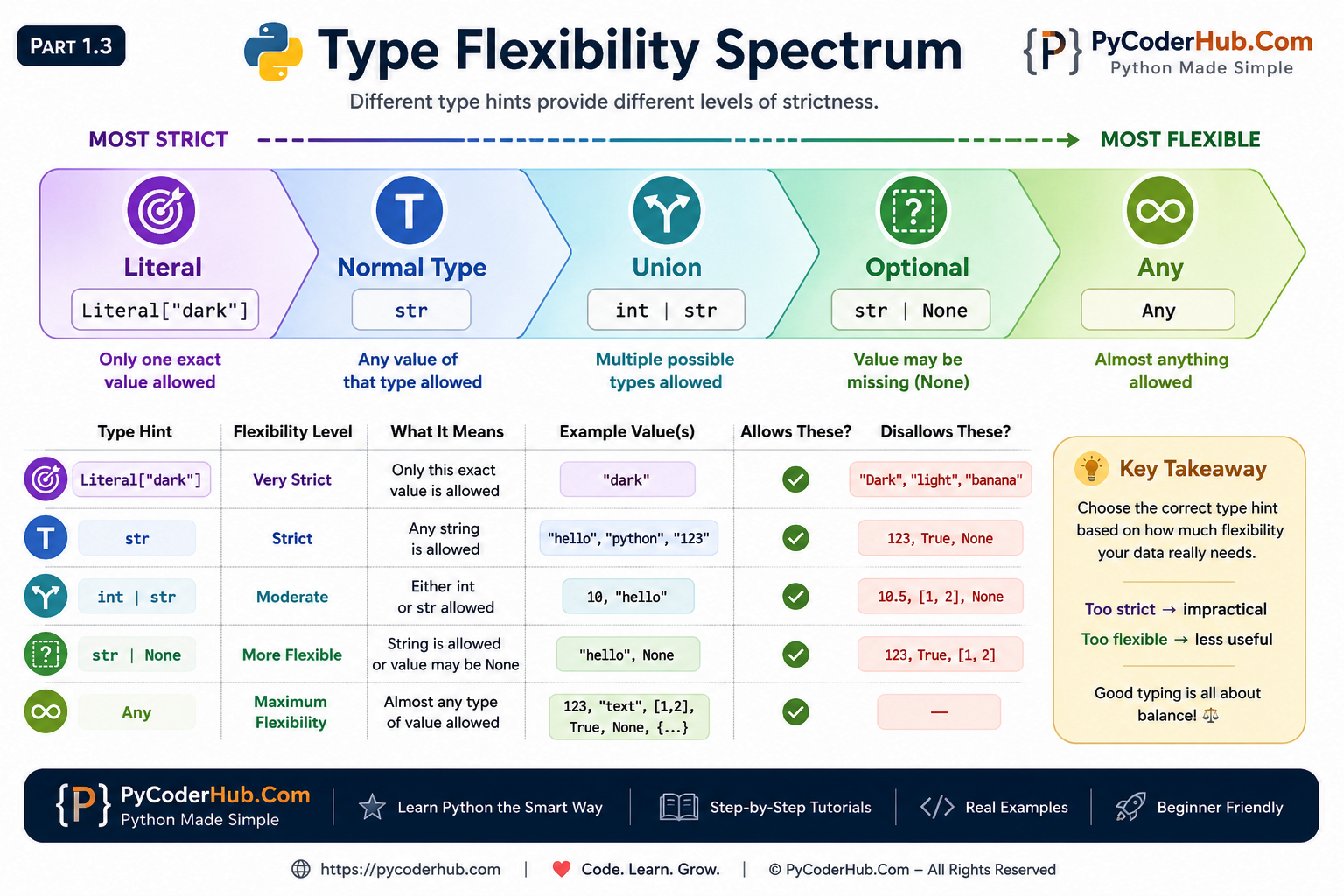
Here’s the conceptual idea behind each one:
| Type Hint Category | Flexibility Level | Example |
|---|---|---|
| Literal | Very Strict | Literal["read", "write"] |
| Normal Types | Strict | str |
| Union | Moderate Flexibility | `int |
| Optional | More Flexible | `str |
| Any | Maximum Flexibility | Any |
This spectrum is important because choosing the correct type hint is often about choosing the correct balance between:
- strictness
- flexibility
- readability
- maintainability
Too strict can become impractical.
Too flexible can remove the benefits of type checking.
Good Python typing usually finds a balance between both.
Part 2 — Union Types (Multiple Possible Types)
In the previous section, we learned that real-world programs often need more flexibility than a single type hint can provide.
Sometimes a value may legitimately belong to multiple possible types.
For example:
- a function may accept both
intandfloat - an API response may return either data or an error message
- a parameter may allow both
strandbytes
This is exactly the problem that Union solves.
2.1 What Is a Union Type Hint?
A Union type means:
int | strThe value can be:
- an
int - OR a
str
Examples:
user_input = 100Valid.
user_input = "100"Also valid.
Important Clarification — Union Does NOT Mean “Both”
This is one of the biggest beginner confusions.
A Union means:
one possible type at a time
NOT:
all types simultaneously
For example:
int | strmeans:
- sometimes
int - sometimes
str
But never:
- “a value that is both int and str together”
Real-World Example
Imagine a search function:
def search_product(product_id: int) -> str | int:
    ...
The function may return:
"Product Found"or:
404Both are possible valid return types.
Union allows the type hint to describe this clearly.
2.2 Old Syntax — Union[X, Y]
Before Python 3.10, Union types were written using:
from typing import UnionExample:
from typing import Union

def process_value(user_input: Union[int, str]) -> str:
    return str(user_input)
Here:
Union[int, str]means:
user_inputmay beint- OR
str
Why Older Syntax Exists
The original typing system was introduced gradually through Python Enhancement Proposals (PEPs).
At that time, Python did not yet support:
int | strinside type hints.
So developers used:
Union[int, str]instead.
You will still see this syntax in:
- older tutorials
- older codebases
- enterprise projects
- Python 3.9 and below
So it is still important to recognize it.
2.3 Modern Syntax — X | Y (Python 3.10+)
Python 3.10 introduced a cleaner syntax:
int | strThis is now the preferred modern style.
Example:
def process_value(user_input: int | str) -> str:
    return str(user_input)
This version:
- is shorter
- easier to read
- feels more natural
- avoids importing
Union
Why Modern Syntax Is Easier to Read
Compare these:
Old style:
Union[int, str, float]Modern style:
int | str | floatThe modern version visually reads almost like English:
int OR str OR float
This improves readability significantly in large projects.
2.4 Visual Comparison — Union vs |
Python now supports two different syntaxes for Union types.
Both achieve the same goal, but the modern | syntax is shorter and easier to read.
![Python Union vs pipe operator infographic comparing Union[int, str] and int | str syntax with differences in Python version support, readability, imports, and modern recommendations.](https://pycoderhub.com/wp-content/uploads/2026/05/Python-Union-vs-Pipe-Operator-Visual-Comparison.png)
Comparison table
| Feature | Union[int, str] | int | str |
|---|---|---|
| Python Version | 3.5+ | 3.10+ |
| Import Needed | Yes | No |
| Readability | More verbose | Cleaner |
| Modern Recommendation | Legacy-compatible | Preferred in modern Python |
The modern | syntax is now the preferred approach in Python 3.10+ because it is shorter, cleaner, and easier to read.
However, Union[] is still commonly used in older codebases and projects that support older Python versions.
2.5 Multiple-Type Unions
Union types are not limited to only two types.
You can combine multiple possible types together.
Example:
int | str | floatThis means the value may be:
- an
int - a
str - or a
float
Example Function
def normalize_input(user_value: int | float | str) -> str:
    return str(user_value)
Valid calls:
normalize_input(10)
normalize_input(5.5)
normalize_input("hello")
All are acceptable because the parameter allows multiple possible types.
2.6 Common Union Mistakes
Union types are simple conceptually, but beginners often make several common mistakes.
Mistake 1 — Thinking Union Means “Both”
Incorrect mental model:
“The value contains multiple types together.”
Correct mental model:
“The value may be one possible type at a time.”
Example:
int | strmeans:
- sometimes
int - sometimes
str
NOT both simultaneously.
Mistake 2 — Redundant Union[int]
Sometimes beginners write:
Union[int]or:
int | intThis is unnecessary because only one type exists.
Simply write:
intinstead.
Mistake 3 — Overly Large Unions
Avoid creating huge unreadable unions like:
int | str | list | dict | tuple | set | floatTechnically valid.
But difficult to understand and maintain.
Very large unions often indicate:
- unclear program design
- inconsistent data structures
- missing abstractions
- overly flexible APIs
Better Design Principle
Good type hints should improve clarity.
If a Union becomes too large:
- readability decreases
- confusion increases
- maintenance becomes harder
Sometimes creating:
- helper classes
- type aliases
- structured data models
is a cleaner solution.
Part 3 — Optional Type Hint (The Biggest Confusion)
Optional type hints are one of the most misunderstood parts of Python typing.
Many beginners assume:
“Optional means the parameter is optional.”
But that is not what Optional actually means.
In reality, Optional is about something completely different:
a value that may be
None
This section is extremely important because understanding Optional correctly solves many common typing confusions in Python.
3.1 The Problem of Missing Values
In real-world programs, values are not always available.
Sometimes data exists.
Sometimes it does not.
For example:
- a database lookup may fail
- an API request may return nothing
- a cache system may miss data
- a search function may not find a result
In Python, missing values are commonly represented using:
NoneExample — User Lookup
def find_username(user_id: int):
    ...
What happens if the user does not exist?
Possible return values:
"PyCoder"or:
NoneThis means the function does not always return a string.
It may also return None.
The Typing Problem
If we write:
def find_username(user_id: int) -> str:
    ...
the type hint becomes incomplete because:
stris not the only possible return typeNoneis also possible
This is exactly the problem Optional solves.
3.2 What Optional Actually Means
The following type hint:
Optional[str]means:
the value may be:
- a
str- OR
None
That is all.
Extremely Important Clarification
Optional[str] does NOT mean:
“This parameter is optional.”
It only means:
“This value may be None.”
This confusion is so common that many Python learners misunderstand Optional for a long time.
Conceptual Translation
You can mentally read:
Optional[str]as:
“String or missing value.”
or:
“String or None.”
Real Example
from typing import Optional

def get_email(user_id: int) -> Optional[str]:
    ...
Possible valid returns:
"hello@example.com"or:
NoneBoth are acceptable because the type hint explicitly allows None.
Optional Restricts Values to the Allowed Types
When you write:
from typing import Optional

user_name: Optional[str] = "PyCoder"
this is valid because str is one of the allowed types.
This is also valid:
from typing import Optional

user_name: Optional[str] = None
because None is the second allowed value type.
However, assigning an integer creates a type mismatch:
from typing import Optional

user_name: Optional[str] = 104
Most type checkers and IDEs will show a warning similar to:
Expected type 'str | None', got 'int' insteadThis happens because:
Optional[str]means:
str | NoneSo only these value types are expected:
strNone
Any other type, such as:
intfloatlistdict
falls outside the declared type hint and may trigger warnings from tools like Pyright, Pylance, mypy, or PyCharm.
Important Reminder
The warning comes from the type checker, not Python itself.
Python will still execute:
user_name: Optional[str] = 104without raising a runtime error.
The purpose of the type hint is to help developers and static analysis tools detect potential mistakes before the code runs.
3.3 The Three Equivalent Forms
Python has multiple ways to express nullable values.
These are all equivalent:
Optional[str]Union[str, None]str | NoneAll three mean:
value may be:
str- OR
None
Modern Recommendation
In modern Python (3.10+), this is usually preferred:
str | Nonebecause it is:
- shorter
- cleaner
- easier to read
3.4 Visual Comparison — Optional Syntax
Python provides multiple ways to express nullable values.
Although the syntax looks different, all of the following forms mean the same thing: the value may be that type or None.
![Python Optional syntax comparison infographic showing Optional[str], Union[str, None], and str | None with explanations, examples, and modern Python recommendations.](https://pycoderhub.com/wp-content/uploads/2026/05/Python-Optional-Syntax-Visual-Comparison.png)
Comparison Table
| Syntax | Meaning | Modern Status |
|---|---|---|
Optional[str] | str or None | Common in older code |
Union[str, None] | str or None | Less preferred |
str | None | str or None | Modern recommended style |
The important thing to remember is that all three syntaxes describe the exact same typing behavior.
The only real difference is readability, Python version compatibility, and modern coding style preferences.
Quick Mental Shortcut
You can mentally read:
Optional[T]as:
T | NoneAnother example
Optional[str]equals:
str | NoneThis mental shortcut makes Optional much easier to understand.
3.5 Optional Does NOT Mean Optional Parameter
This is the single biggest confusion.
Consider this function:
from typing import Optional

def greet(user_name: Optional[str]):
    print(user_name)
Many beginners assume:
“I can call this function without an argument.”
But this is incorrect.
This Still Raises an Error
greet()Result:
TypeErrorbecause the parameter is still required.
What Optional Actually Means Here
This function accepts:
greet("PyCoder")and also:
greet(None)The parameter is required.
The value is nullable.
Huge difference.
Real Optional Parameter
A truly optional parameter is created using a default value.
Example:
def greet(user_name: str = "Guest"):
    print(user_name)
Now this works:
greet()because the argument can actually be omitted.
Combining Both Concepts
You can also combine nullable values with optional parameters:
def greet(user_name: str | None = None):
    print(user_name)
Now:
- the argument may be omitted
- AND the value may be
None
These are two separate concepts working together.
Part 4 — Any (The Escape Hatch)
So far, every type hint we’ve used has placed some kind of restriction on values.
For example:
user_age: intexpects an integer.
user_name: str | Noneexpects either a string or None.
Literal["read", "write"]expects one of a few exact values.
But sometimes developers need a way to temporarily step outside these restrictions.
That is where Any comes in.
The Any type is often called the escape hatch of Python’s typing system because it allows you to bypass most type checking rules.
Used carefully, it can be helpful.
Used excessively, it can remove many of the benefits type hints provide.
4.1 Quick Recap of Any
We briefly introduced Any in the previous lesson.
To use it, import it from the typing module:
from typing import AnyExample:
from typing import Any

user_data: Any = "PyCoder"
Later, the same variable can hold:
user_data = 100or:
user_data = ["Python", "Type Hints"]or even:
user_data = NoneAll of these assignments are acceptable when the variable is annotated with Any.
Why Does Any Exist?
Python is a dynamically typed language.
Sometimes developers work with data whose type is unknown in advance.
Examples include:
- JSON data from external APIs
- third-party libraries without type hints
- legacy codebases
- gradual typing migrations
In these situations, a strict type may be difficult or impossible to define immediately.
Any provides a temporary solution.
4.2 What Any Actually Does
This is the most important concept to understand.
When you use:
from typing import Any

user_data: Any
you are essentially telling the type checker:
“Don’t perform meaningful type checking on this value.”
Example
from typing import Any

user_data: Any = "PyCoder"
Later:
user_data = 100No warning.
Later:
user_data = {"name": "PyCoder"}Still no warning.
The type checker accepts all of these assignments.
Method Calls Also Become Permissive
Consider:
from typing import Any

user_data: Any = "PyCoder"
Then:
user_data.non_existent_method()Many type checkers will not complain because Any disables meaningful type validation.
The type checker simply assumes:
“You know what you’re doing.”
This flexibility is both powerful and dangerous.
4.3 Why Any Can Become Dangerous
At first glance, Any seems convenient.
After all, if type checkers stop complaining, coding becomes easier.
Right?
Not necessarily.
The purpose of type hints is to help catch mistakes early.
When everything becomes Any, those benefits begin to disappear.
Example Without Any
user_name: str = "PyCoder"

user_name = 100
A type checker will usually report:
Expected type 'str', got 'int' insteadThis warning helps detect mistakes.
Example With Any
from typing import Any

user_name: Any = "PyCoder"

user_name = 100
No warning.
The type checker no longer provides useful guidance.
Why This Is Sometimes Called “Contagious”
One of the biggest problems with Any is that it can spread through a codebase.
Example:
from typing import Any

user_data: Any = get_data()
Now:
processed_data = user_datamay also become effectively untyped.
As Any moves through functions and variables, type checking becomes less useful.
This is why experienced developers try to keep Any usage limited and intentional.
4.4 Any vs object
Many beginners assume:
Anyand:
objectmean the same thing.
They do not.
This is one of the most important typing distinctions to understand.
Any Means “Skip Type Checking”
from typing import Any

user_data: Any = "PyCoder"
You can later write:
user_data = 100or:
user_data.some_unknown_method()and type checkers usually allow it.
object Means “Unknown Object”
Example:
user_data: object = "PyCoder"You can assign any object to it:
user_data = 100
user_data = []
user_data = {"name": "PyCoder"}
However, there is an important difference.
Type Checkers Still Protect object
This may trigger warnings:
user_data.upper()Why?
Because the type checker only knows:
user_data: objectIt does not know that the value is actually a string.
As a result, the type checker requires additional validation.
Example:
if isinstance(user_data, str):
    print(user_data.upper())
Now the type checker understands the value is a string.
The Key Difference
Think of them like this:
| Type | Meaning |
|---|---|
Any | Trust me, skip type checking |
object | I don’t know the exact type yet |
This mental model is extremely useful when reading real-world code.
4.5 Visual Comparison — Any vs object
Although Any and object can both hold values of any type, they behave very differently when it comes to type checking.
The infographic below highlights the key differences between these two special type hints.
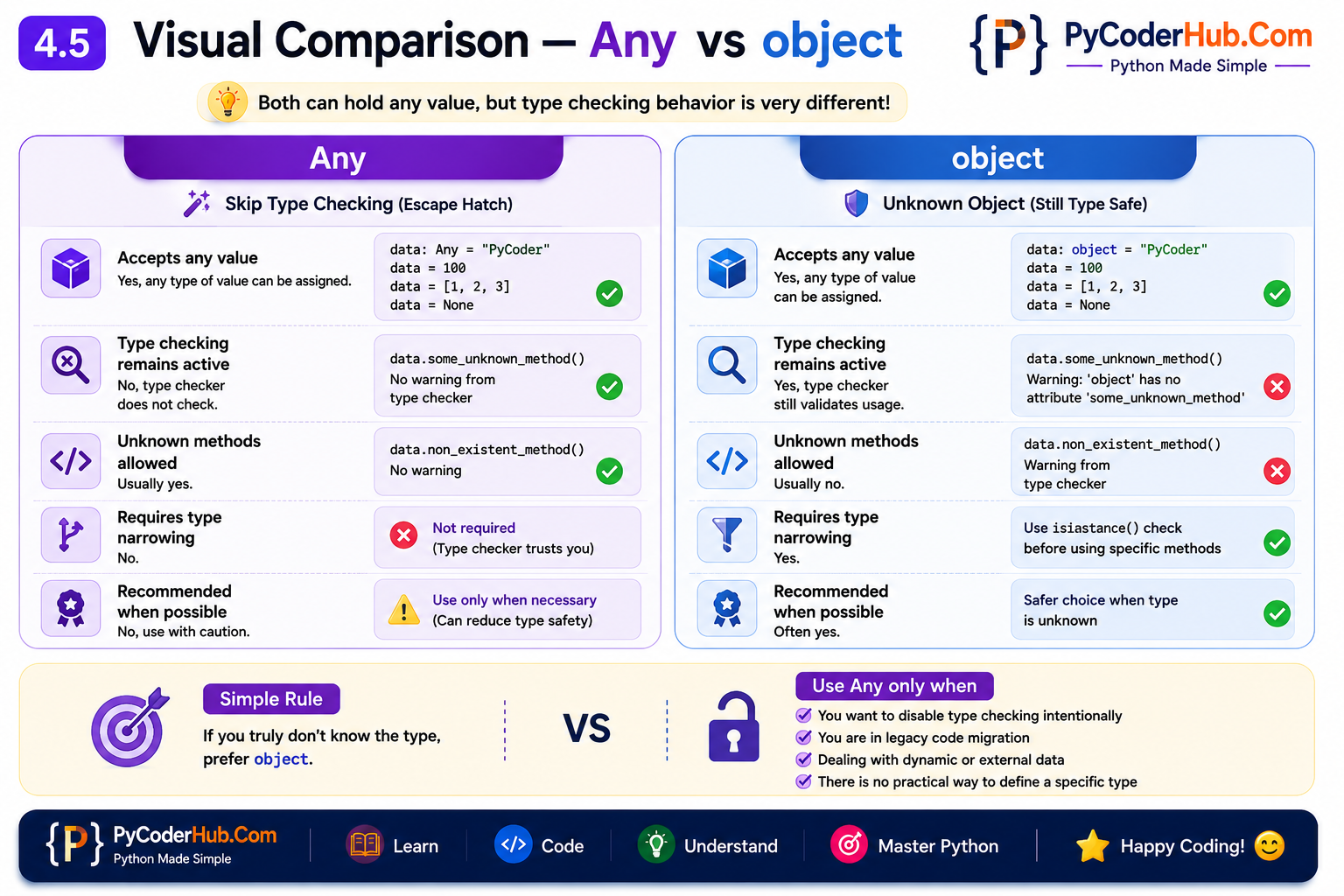
Comparison Table
| Feature | Any | object |
|---|---|---|
| Accepts any value | Yes | Yes |
| Type checking remains active | No | Yes |
| Unknown methods allowed | Usually yes | Usually no |
| Requires type narrowing | No | Yes |
| Recommended when possible | No | Often yes |
The most important distinction is that Any effectively disables meaningful type checking, while object preserves type safety by requiring additional validation before using type-specific operations.
In other words, Any tells the type checker to trust you, whereas object tells the type checker that the exact type is currently unknown.
Quick Rule to Remember
- Use
objectwhen you genuinely do not know the type yet. - Use
Anyonly when you intentionally want to bypass type checking.
When used carefully, Any can be helpful for gradual typing, legacy code, and dynamic data. However, in most situations, a more specific type hint provides better clarity and stronger error detection.
Part 5 — Literal Types (Exact Allowed Values)
So far, we’ve learned about type hints that allow flexibility.
For example:
Unionallows multiple typesOptionalallowsNoneAnyallows almost anything
But sometimes we need the opposite.
Sometimes a variable should accept only a few specific values.
Not any string.
Not any integer.
Only a predefined set of exact values.
This is the problem that Literal solves.
Literal allows us to tell type checkers:
“Only these exact values are valid.”
This makes code easier to understand and helps catch mistakes before they become bugs.
5.1 The Problem Literal Solves
Imagine you’re building a file processing system.
A function accepts a mode:
mode = "read"or:
mode = "write"Those are valid values.
But what about:
mode = "banana"Python will happily allow it.
However, from a design perspective, "banana" makes no sense.
The function only understands:
"read""write"
So how can we tell type checkers about these restrictions?
Using normal type hints:
mode: stris not enough.
Because every string becomes valid.
This is where Literal becomes useful.
Real-World Examples
Many real applications use predefined values.
Examples:
Configuration modes:
"development"
"testing"
"production"
Theme settings:
"light"
"dark"
"system"
HTTP methods:
"GET"
"POST"
"PUT"
"DELETE"
Status values:
"pending"
"success"
"failed"
These situations are ideal candidates for Literal.
5.2 What Literal Means
Literal is available in the typing module:
from typing import LiteralExample:
from typing import Literal

file_mode: Literal["read", "write"]
This means:
file_modemay be:
"read"- OR
"write"
Nothing else.
Valid Assignments
file_mode: Literal["read", "write"] = "read"Valid.
file_mode: Literal["read", "write"] = "write"Also valid.
Invalid Assignment
file_mode: Literal["read", "write"] = "banana"Most type checkers will show a warning similar to:
Expected type 'Literal["read", "write"]',
got 'Literal["banana"]' instead
This happens because "banana" is not one of the allowed values.
The type hint explicitly says that only:
"read""write"
are valid choices.
Since "banana" is not included in the Literal, the type checker reports a mismatch.
Adding New Allowed Values
The important thing to understand is that Literal can contain any exact values you choose.
For example:
from typing import Literal

file_mode: Literal["read", "write", "banana"] = "banana"
This is now valid.
Why?
Because "banana" has been added to the list of allowed values.
The type checker now sees:
Literal["read", "write", "banana"]and understands that the variable may contain:
"read""write""banana"
Therefore:
file_mode = "banana"matches one of the allowed literal values and produces no warning.
The Real Purpose of Literal
A common beginner misconception is that Literal has special meaning attached to words like:
"read"
"write"
It does not.
These are simply values chosen by the developer.
For example, all of the following are valid Literal definitions:
Literal["apple", "banana", "orange"]Literal["small", "medium", "large"]Literal["development", "testing", "production"]Literal[1, 2, 3]The rule is simple:
If a value appears inside the
Literal[...]definition, it is allowed.If it does not appear there, type checkers will usually report a warning.
This mental model makes Literal much easier to understand because you can think of it as a whitelist of exact allowed values.
5.3 Can Literal Contain Any Values?
A common beginner question is whether Literal can contain any number of values and what kinds of values are allowed.
Is There a Limit to How Many Values You Can Add?
There is no small fixed limit on the number of values a Literal can contain.
For example:
from typing import Literal

Environment = Literal[
    "development",
    "testing",
    "staging",
    "production"
]
This is perfectly valid.
You can even add many more values if needed.
However, very large Literal definitions can become difficult to read and maintain. If you find yourself listing dozens of possible values, it may be a sign that an Enum or a different design would be more appropriate.
As a general guideline:
- Small sets of predefined values →
Literal - Large collections of predefined values → Consider
Enum
Enum is a Python feature for creating named constant values and is often a better choice when the list of allowed values becomes large.
We’ll cover Enum in a dedicated future guide and compare it with Literal in greater detail.
What Types of Values Can Literal Contain?
Many developers first encounter Literal with strings:
Literal["read", "write"]However, Literal is not limited to strings.
Valid examples include:
Literal[1, 2, 3]
Literal[True, False]
Literal[None]
The important requirement is that the values must be exact, fixed values known ahead of time.
Can Literal Contain Tuple Values?
Yes.
Tuples are immutable, which makes them valid literal values.
Example:
from typing import Literal

Coordinate = Literal[
    (0, 0),
    (1, 0),
    (0, 1)
]
Valid assignment:
point: Coordinate = (0, 0)Because tuples cannot be modified after creation, type checkers can safely treat them as exact values.
Can Literal Contain List Values?
No.
This is not valid:
Literal[
    [1, 2],
    [3, 4]
]
Lists are mutable objects, meaning their contents can change after creation.
Because Literal is designed to represent fixed, unchanging values, mutable objects such as lists are not allowed.
The same restriction applies to other mutable containers such as dictionaries and sets.
Quick Reference
| Value Type | Allowed in Literal? |
|---|---|
| String | ✅ Yes |
| Integer | ✅ Yes |
| Boolean | ✅ Yes |
| None | ✅ Yes |
| Tuple | ✅ Yes |
| List | ❌ No |
| Dictionary | ❌ No |
| Set | ❌ No |
A Useful Mental Model
A simple rule to remember is:
Literal works best with values that are fixed, immutable, and known ahead of time.
If a value can change after creation, it generally cannot be used inside Literal[...].
5.4 Visual Comparison — str vs Literal
At first glance, str and Literal may look similar because both can work with string values.
However, they serve very different purposes. A normal str accepts any string, while Literal restricts values to a predefined set of exact choices.
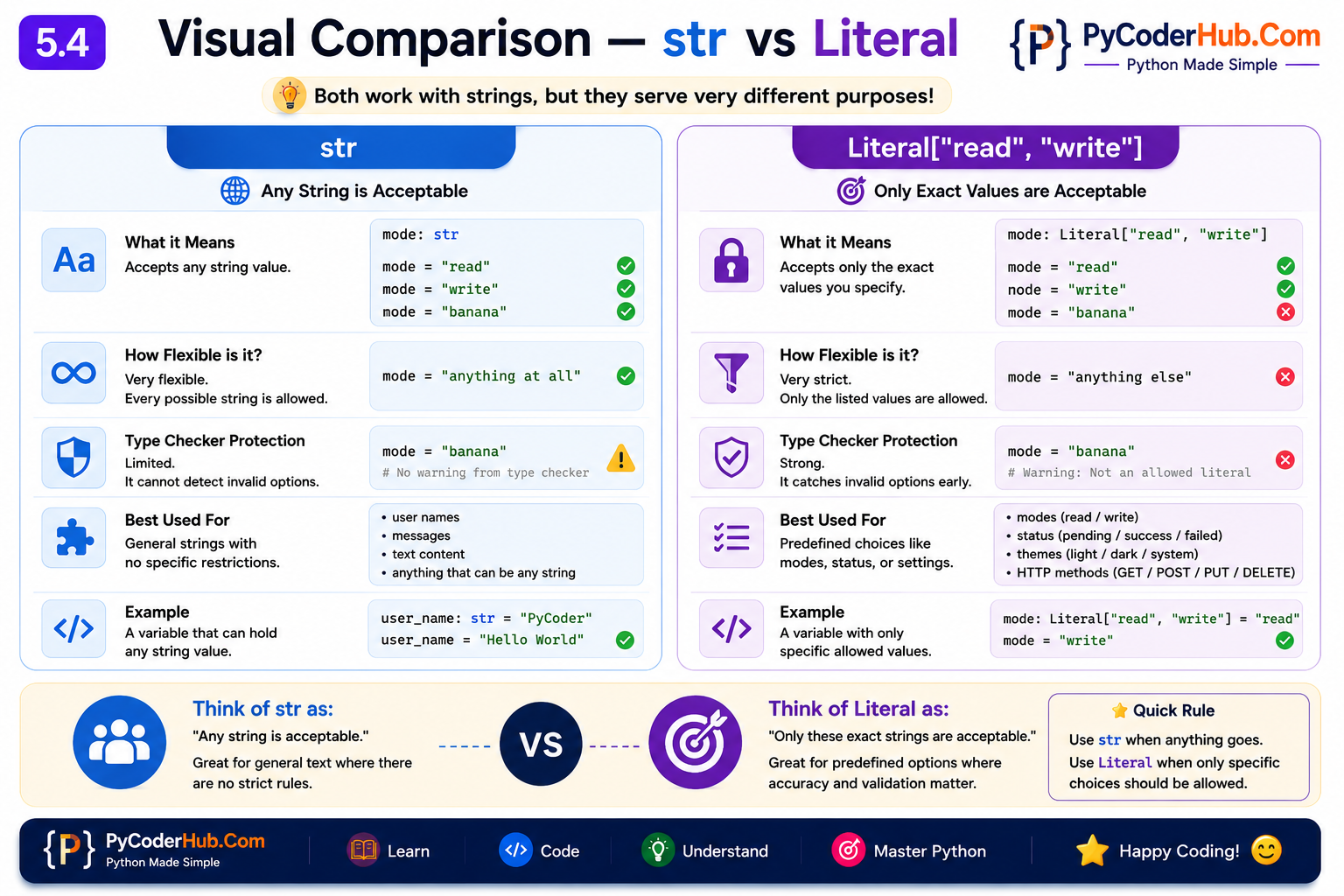
Comparison Table
| Feature | str | Literal["read", "write"] |
|---|---|---|
| Accepts any string | Yes | No |
| Restricts exact values | No | Yes |
| Helps catch invalid options | Limited | Strongly |
| Suitable for predefined choices | No | Yes |
| Type checker validation | General | Specific |
The biggest difference is that str describes a data type, while Literal describes specific allowed values.
With str, any string is considered valid. With Literal, only the exact values listed inside the type hint are accepted by type checkers.
5.5 Best Practices for Literal
Use Literal when:
- only a small set of values is valid
- invalid values should be detected early
- function parameters have predefined options
- configuration values are limited
Avoid using Literal when:
- values are highly dynamic
- the list becomes excessively large
- an Enum would provide a cleaner design
Part 6 — Final & ClassVar
Now we’ll look at two special type hints that solve different kinds of problems:
Finalhelps indicate that a value should not change.ClassVarhelps indicate that a value belongs to the class itself rather than individual objects.
Unlike Union, Optional, or Literal, these type hints are less about value flexibility and more about communicating intent to developers and type checkers.
6.1 Final Type Hint
Sometimes a value is intended to remain constant throughout a program.
For example:
MAX_RETRY_ATTEMPTS = 3Most developers understand that this value should not change. However, Python does not prevent someone from later writing:
MAX_RETRY_ATTEMPTS = 10This is where Final becomes useful.
What Is Final?
Final is a special type hint that tells type checkers:
This variable is intended to be assigned only once.
To use it:
from typing import FinalExample:
from typing import Final

MAX_RETRY_ATTEMPTS: Final[int] = 3
This communicates two things:
- The value should be an integer.
- The value should not be reassigned later.
Valid Usage
from typing import Final

API_VERSION: Final[str] = "v1"
The initial assignment is completely valid.
Reassigning a Final Variable
from typing import Final

API_VERSION: Final[str] = "v1"

API_VERSION = "v2"
Most type checkers will show a warning similar to:
Cannot assign to final name 'API_VERSION'This helps catch accidental modifications early.
Final Preserves Both Intent and Type Information
A common beginner misconception is that Final only prevents a value from changing.
In reality, Final also works together with normal type hints.
Consider this example:
from typing import Final

user_name: Final[int] = "Hello"
Most type checkers will report a warning similar to:
Expected type 'int', got 'str' insteadWhy?
Because:
Final[int]still means the value should be an integer.
The Final part indicates that the variable should not be reassigned, while the int part specifies the expected data type.
A valid version would be:
from typing import Final

user_id: Final[int] = 101
Here, the assigned value matches the declared type, so no warning is produced.
Another Example
from typing import Final

user_name: Final[str] = "PyCoder"
This is valid because:
- the value is a string
- the variable is intended to be assigned only once
This demonstrates an important idea:
Final[T]means:
- the value should have type
T- the variable should only be assigned once
Both rules apply at the same time.
Reassigning This:
from typing import Final

user_name: Final[str] = "PyCoder"

user_name = "Python Coder"
Most type checkers will report a warning because a final variable is being reassigned.
Even though "Python Coder" is still a string, the reassignment itself violates the purpose of Final.
Likewise:
from typing import Final

user_name: Final[str] = "PyCoder"

user_name = 100
This may trigger warnings because:
- the variable is being reassigned
- the new value is not a string
Important Clarification
Some developers assume:
user_name: Final[str] = "PyCoder"means the variable can only ever contain the exact value "PyCoder".
That is not what Final does.
The purpose of Final is to prevent reassignment of the variable, not to restrict which values are allowed.
If you want to restrict a variable to specific exact values, use Literal, which we learned in the previous section.
This distinction is important because Final preserves both the type information (str) and the intent that the variable should not be reassigned later.
Final Is Not Runtime Enforcement
One of the biggest misconceptions about Final is:
“It makes a variable truly immutable.”
That is not correct.
Consider:
from typing import Final

MAX_RETRY_ATTEMPTS: Final[int] = 3

MAX_RETRY_ATTEMPTS = 10
Python will still execute this code.
The warning comes from:
- type checkers
- IDEs
- static analysis tools
not from Python itself.
Why Use Final?
The biggest benefit of Final is clarity.
When another developer sees:
DATABASE_NAME: Final[str] = "production_db"they immediately understand:
This value is intended to remain constant.
This makes code easier to understand and maintain.
6.2 Final vs Literal
At first glance, Final and Literal may look similar because both often involve fixed values.
However, they solve completely different problems.
Final Protects the Variable
from typing import Final

MAX_USERS: Final[int] = 100
The focus is:
This variable should not be reassigned.
The actual value could be anything:
MAX_USERS: Final[int] = 500would also be valid.
Literal Restricts Allowed Values
Example:
from typing import Literal

mode: Literal["read", "write"]
The focus is:
Only these exact values are allowed.
The variable may change later:
mode = "read"
mode = "write"
Both are acceptable because they are allowed literal values.
Comparison Table
| Type Hint | Purpose |
|---|---|
Final | Prevent reassignment |
Literal | Restrict allowed values |
A Simple Mental Model
Think of them like this:
Final answers:
Can this variable change later?
Literal answers:
Which values are allowed?
These are two completely different questions.
6.3 ClassVar Type Hint
Now let’s look at another special type hint: ClassVar.
This one is primarily used when working with classes.
The Problem
Consider the following class:
class User:
    total_users = 0
What does total_users represent?
Is it:
- unique to each object?
- or shared by the entire class?
Humans can usually figure it out.
Type checkers prefer explicit information.
What Is ClassVar?
ClassVar tells type checkers:
This attribute belongs to the class itself, not to individual instances.
To use it:
from typing import ClassVarExample:
from typing import ClassVar

class User:
    total_users: ClassVar[int] = 0
This clearly communicates that:
total_usersis shared by all User objects.
Real-World Example
from typing import ClassVar

class Employee:
    company_name: ClassVar[str] = "PyCoderHub"

    def __init__(self, name: str):
        self.name = name
Here:
company_namebelongs to the class.
Every employee shares the same company name.
Instance Attributes Are Different
Consider:
employee.nameEach employee object has its own value.
However:
Employee.company_nameis shared across all employees.
This distinction is exactly what ClassVar communicates.
Why Use ClassVar?
Without ClassVar, some tools may assume the attribute belongs to every instance.
Adding:
ClassVarmakes your intention explicit and improves type-checking accuracy.
6.4 Best Practices
Use Final When:
- creating constants
- defining configuration values
- documenting values that should not change
Use ClassVar When:
- storing shared class-level data
- creating counters
- defining shared settings
- making class attributes explicit
Avoid Unnecessary Usage
Like every type hint, Final and ClassVar should improve clarity.
If a type hint makes code harder to understand rather than easier, it may not be necessary.
Part 7 — Type Aliases (Cleaner Type Hints)
As type hints become more complex, annotations can quickly become difficult to read.
Consider this example:
user_data: dict[str, str | int | bool | None]The type hint is valid, but repeating it throughout a codebase can hurt readability.
This is where type aliases help.
7.1 What Is a Type Alias?
A type alias allows you to give a complex type a meaningful name.
Example:
UserId = intNow instead of writing:
user_id: intyou can write:
user_id: UserIdThe type remains exactly the same, but the name provides additional meaning.
7.2 Creating Type Aliases
Type aliases are especially useful for long annotations.
Instead of:
dict[str, str | int | bool | None]you can define:
JsonData = dict[str, str | int | bool | None]and then use:
user_profile: JsonDataThis makes code cleaner and easier to understand.
7.3 TypeAlias from typing (Python 3.10)
Before Python 3.12 introduced the dedicated type keyword, Python 3.10 added TypeAlias to make type alias declarations more explicit.
Example
from typing import TypeAlias

UserId: TypeAlias = int
from typing import TypeAlias
JsonData: TypeAlias = dict[str, str | int | bool | None]This tells both readers and type checkers:
This assignment is intended to create a type alias.
Without TypeAlias, the same alias could be written as:
UserId = intBoth approaches work, but TypeAlias makes the intent clearer.
Using the Alias
Once defined, the alias can be used like any other type hint:
from typing import TypeAlias

UserId: TypeAlias = int

user_id: UserId = 100
Here, UserId behaves as an alias for int.
7.3 Modern Alias Syntax (Python 3.12+)
Python 3.12 introduced a dedicated syntax specifically for defining type aliases:
type UserId = inttype JsonData = dict[str, str | int | bool | None]Both approaches create a type alias and can be used in exactly the same way:
Traditional Syntax Example
UserId = int

user_id: UserId = 100
Modern Python 3.12+ Syntax Example
type UserId = int

user_id: UserId = 100
In both examples, UserId acts as an alias for int.
The main advantage of the new syntax is clarity. When reading code, it is immediately obvious that:
type UserId = intis defining a type alias rather than creating a normal variable assignment.
7.4 Best Practices
When creating type aliases:
- Use descriptive names.
- Avoid creating aliases for simple types unless they add meaning.
- Use aliases to simplify complex annotations.
- Prefer aliases that improve readability, not obscure it.
Good example:
UserId = int
JsonData = dict[str, str | int | bool | None]
Less useful:
Number = intbecause it doesn’t add any additional context.
Part 8 — Additional Important Special Types (Quick Overview)
Python’s typing system contains many specialized type hints. Most developers use only a small subset regularly, but it is helpful to be aware of a few additional on
8.1 NoReturn
NoReturn indicates that a function never returns normally.
Example:
from typing import NoReturn

def stop_program() -> NoReturn:
    raise SystemExit()
The function always exits or raises an exception.
It never reaches a normal return statement.
8.2 Never
Never represents a type that should never occur.
Example:
from typing import NeverThis type is mainly used by advanced type checkers and library authors.
For most beginners, it’s enough to know that Never describes impossible code paths.
8.3 Forward References
Sometimes a type refers to a class that has not been defined yet.
Example:
class User:
    def __init__(self, friend: "User"):
        self.friend = friend
The quotation marks tell Python to treat "User" as a type name that will be resolved later.
This technique is called a forward reference.
It is commonly used when classes reference themselves or each other.
Why These Types Matter
You may not use these type hints every day, but you will eventually encounter them in:
- larger codebases
- third-party libraries
- framework source code
- advanced typing examples
Recognizing them makes reading typed Python code much easier.
Lesson Summary
In this lesson, you learned how Python type hints can describe much more than simple types like int and str.
Flexible Type Hints
Unionallows a value to be one of multiple types.- Modern Python (3.10+) uses the
|operator instead ofUnion[...]. int | strmeans the value can be either an integer or a string.- Type hints improve code clarity but do not enforce behavior at runtime.
Optional Values
Optional[T]meansT | None.Optional[str]is equivalent tostr | None.Optionalindicates that a value may beNone.Optionaldoes not mean an argument can be omitted.- A nullable value and an optional parameter are two different concepts.
Any
Anydisables meaningful type checking.- Values typed as
Anycan be assigned almost anything. - Overusing
Anyreduces the benefits of static typing. Anyandobjectare not the same.- Prefer specific types whenever possible.
Literal
Literalrestricts values to specific exact choices.Literal["read", "write"]accepts only those exact values.Literalvalidates values, not just data types.- Literal values can include strings, integers, booleans,
None, and tuples. - Mutable objects such as lists, dictionaries, and sets cannot be used in
Literal.
Final
Finalindicates that a variable should be assigned only once.Final[T]preserves both the type information and the intent that the variable should not be reassigned.Finaldoes not enforce immutability at runtime.- Reassignments are typically reported by type checkers.
ClassVar
ClassVaridentifies attributes that belong to the class rather than individual instances.- It helps type checkers distinguish shared class data from instance attributes.
ClassVarimproves code readability and communicates developer intent.
Type Aliases
- Type aliases provide meaningful names for existing types.
- They help simplify long or complex annotations.
- Traditional aliases use assignment syntax:
UserId = int - Python 3.12 introduced dedicated alias syntax:
type UserId = int
Additional Special Types
NoReturnindicates that a function never returns normally.Neverrepresents an impossible type or unreachable code path.- Forward references allow a type to refer to a class that is defined later.
Key Takeaways
- Use
Unionwhen multiple types are valid. - Use
Optionalwhen a value may beNone. - Use
Literalwhen only specific values are allowed. - Use
Anysparingly and intentionally. - Use
Finalfor constants and values that should not change. - Use
ClassVarfor shared class attributes. - Use type aliases to improve readability and reuse complex type hints.
- Remember that type hints help developers and tools understand code, but they do not change Python’s runtime behavior.
Conclusion
When many developers first encounter Python type hints, they often think typing is only about writing simple annotations like int, str, or list. However, real-world applications rarely deal with data that is always predictable and straightforward.
Sometimes a value can be one of several types. Sometimes it might be missing entirely. Sometimes only a small set of exact values should be allowed. And sometimes the goal is simply to make code easier to understand and maintain. This is where special type hints such as Union, Optional, Any, Literal, Final, ClassVar, and type aliases become incredibly useful.
The most important takeaway from this lesson is that each type hint solves a specific problem. Union provides flexibility, Optional handles nullable values, Literal restricts exact choices, Final communicates constants, ClassVar identifies shared class attributes, and type aliases improve readability. Understanding why each one exists is far more valuable than memorizing their syntax.
It’s also worth remembering that type hints do not change how Python executes your code. Their primary purpose is to help developers, IDEs, and type checkers understand your intentions and catch mistakes before they become bugs. 🐍
Suggested Posts
- Python Type Hinting Explained (Beginner’s Guide)
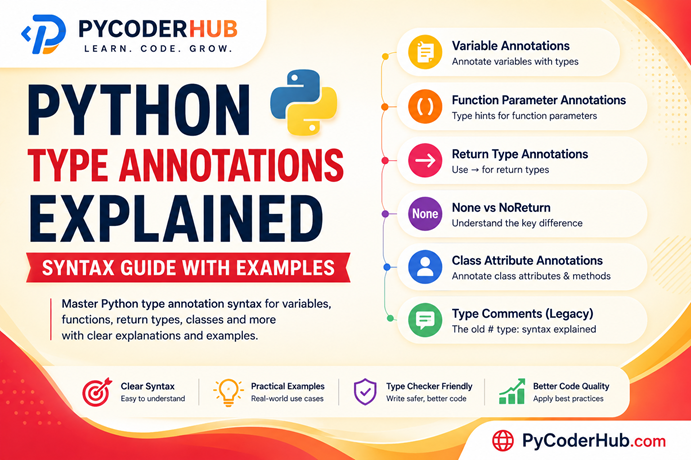
- Python Type Annotations Explained (Syntax Guide With Examples)
- Python Built-in Type Hints Explained (Lists, Dicts, Tuples & More)
- Python Generic Types Explained: TypeVar, Generics, Constraints & PEP 695
- Python Type Hinting Rules and Guidelines (PEP Recommendations Explained)
- Python Type Hint Errors Explained: Common Problems and How to Fix Them
- Python Type Hinting FAQs: Common Questions Answered

7 thoughts on “Python Union and Optional Type Hints Explained (With Any, Literal & Final)”