
Introduction
In the previous lesson, we learned what Python type hinting is, why it was introduced, and how it relates to dynamic typing, static typing, and gradual typing. We also discovered one important truth:
Type hints do not change how Python runs your code.
Now it is time to learn how to actually write those type hints.
This is where Python type annotations come in.
Type annotations are the syntax used to add type hints in Python. They are the : and -> symbols commonly seen in modern Python code:
user_name: str = "PyCoder"

def greet(name: str) -> str:
    return f"Hello, {name}"
For beginners, this syntax can feel confusing at first. Questions like these are very common:
- What does
:actually mean? - Why does Python use
->for return types? - Does
name: strcreate a string variable? - Does
-> strconvert the returned value into a string? - Why do some functions use
-> None? - What is
NoReturn? - Why are annotations sometimes written inside classes?
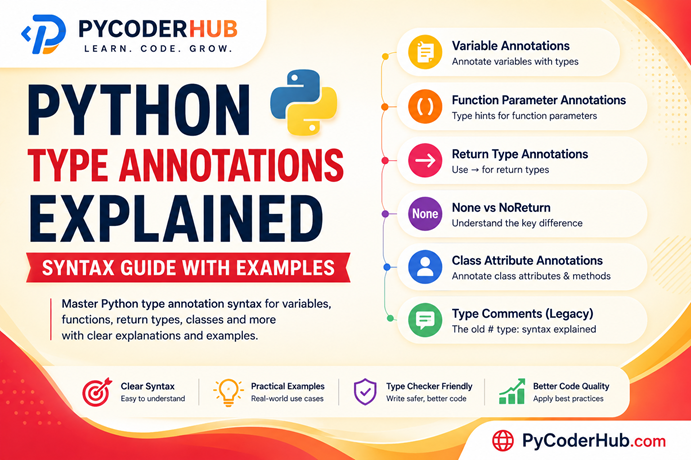
This lesson ‘Python Type Annotations Explained‘ will answer all of these questions step by step.
Our main goal is to understand the annotation syntax itself before moving into advanced typing concepts. We will learn how annotations are written for:
- variables
- function parameters
- return values
- class attributes
- constants
- simple real-world examples
We will also explore important beginner confusion points, including:
- the difference between
NoneandNoReturn - why annotations are stored in
__annotations__ - why annotations do not enforce types at runtime
- how old-style type comments worked before modern annotation syntax
By the end of this lesson, you will be able to confidently read and write basic Python type annotations used in real-world modern Python code.
1. Understanding Python Annotation Syntax
Before learning variable annotations, function annotations, or return type annotations individually, we first need to understand what Python annotation syntax actually is.
Many beginners see syntax like this:
user_name: str = "PyCoder"

def greet(name: str) -> str:
    return f"Hello, {name}"
and immediately assume:
- Python is forcing the variable to become a string
- Python is converting values automatically
- the
->symbol somehow returns the value - annotations change runtime behavior
But none of these assumptions are correct.
To properly understand Python type annotations, we first need to separate three different things:
| Concept | Meaning |
|---|---|
| Variable/Function | The actual object or code |
| Value | The real runtime data |
| Annotation | Extra metadata describing expected types |
This distinction is extremely important.
What Are Python Annotations?
A Python annotation is additional information attached to a variable, parameter, function, or class attribute.
Its main purpose is to describe the expected type of data.
For example:
user_age: int = 25The annotation does not create the variable.
The annotation does not convert the value.
The annotation simply provides extra type information.
Think of annotations like labels attached to your code.
A food storage container analogy makes this easier to understand:
| Container Label | Actual Content |
|---|---|
| “Sugar” | What should ideally be inside |
| Real contents | What is actually stored |
Python annotations work similarly.
user_age: int = 25The annotation says:
“This variable is expected to contain an integer.”
But Python itself does not strictly enforce that expectation.
The Two Main Annotation Symbols in Python
Modern Python type annotations mainly use two symbols:
| Symbol | Purpose |
|---|---|
: | Variable and parameter annotations |
-> | Return type annotations |
Let’s understand both.
The : Symbol
The colon (:) is used to annotate:
- variables
- function parameters
- class attributes
Example:
user_name: str = "PyCoder"Here:
: strmeans:
“This variable is expected to contain a string.”
Another example:
def greet(name: str):
    print(name)
Here:
name: strmeans:
“The
nameparameter is expected to receive a string.”
Notice something important:
The annotation is attached to the variable or parameter name itself.
The -> Symbol
The arrow syntax (->) is used for return type annotations.
Example:
def greet(name: str) -> str:
    return f"Hello, {name}"
Here:
-> strmeans:
“This function is expected to return a string.”
One of the biggest beginner confusion points is this:
Many learners think:
-> strmeans:
- “convert the return value into a string”
- or “return a string now”
But that is not what happens.
The -> syntax only describes the expected return type.
It does not:
- force conversion
- change runtime behavior
- automatically validate anything
It is simply metadata.
Annotations Do NOT Enforce Types
This is the single most important thing to remember in this lesson.
Consider this code:
user_age: int = "25"Even though the annotation says:
intPython will still run this code without raising an error.
Why?
Because annotations are not runtime type enforcement.
They are primarily meant for:
- developers
- editors/IDEs
- type checkers like mypy or pyright
- documentation tools
Python itself usually ignores them during execution.
This directly connects back to the important truth we learned in Lesson 1:
Type hints describe code behavior — they do not control Python’s runtime behavior.
Why Annotation Syntax Matters
At first, annotations may seem like “extra typing.”
But in modern Python, they provide enormous benefits:
| Benefit | Why It Matters |
|---|---|
| Better readability | Easier to understand code |
| IDE support | Better autocomplete and suggestions |
| Error detection | Type checkers catch mistakes early |
| Team collaboration | Makes large projects easier to maintain |
| Documentation | Code explains itself more clearly |
For example:
def calculate_discount(price: float, discount: float) -> float:Even without reading the function body, you can already understand:
- expected inputs
- expected output
- intended data types
This is one reason type annotations became extremely popular in modern Python development.
A Very Important Mindset
When learning annotations, do not think:
“Python is becoming a strictly typed language.”
Instead, think:
“Python is adding descriptive type information to make code easier to understand and analyze.”
That mindset will prevent a huge amount of beginner confusion later when we start exploring more advanced typing features.
Visual Understanding: What Python Annotations Actually Mean
Before moving deeper into annotation syntax, let’s visually understand what Python annotations actually represent, how the : and -> symbols work, and why annotations are considered metadata rather than runtime type enforcement.
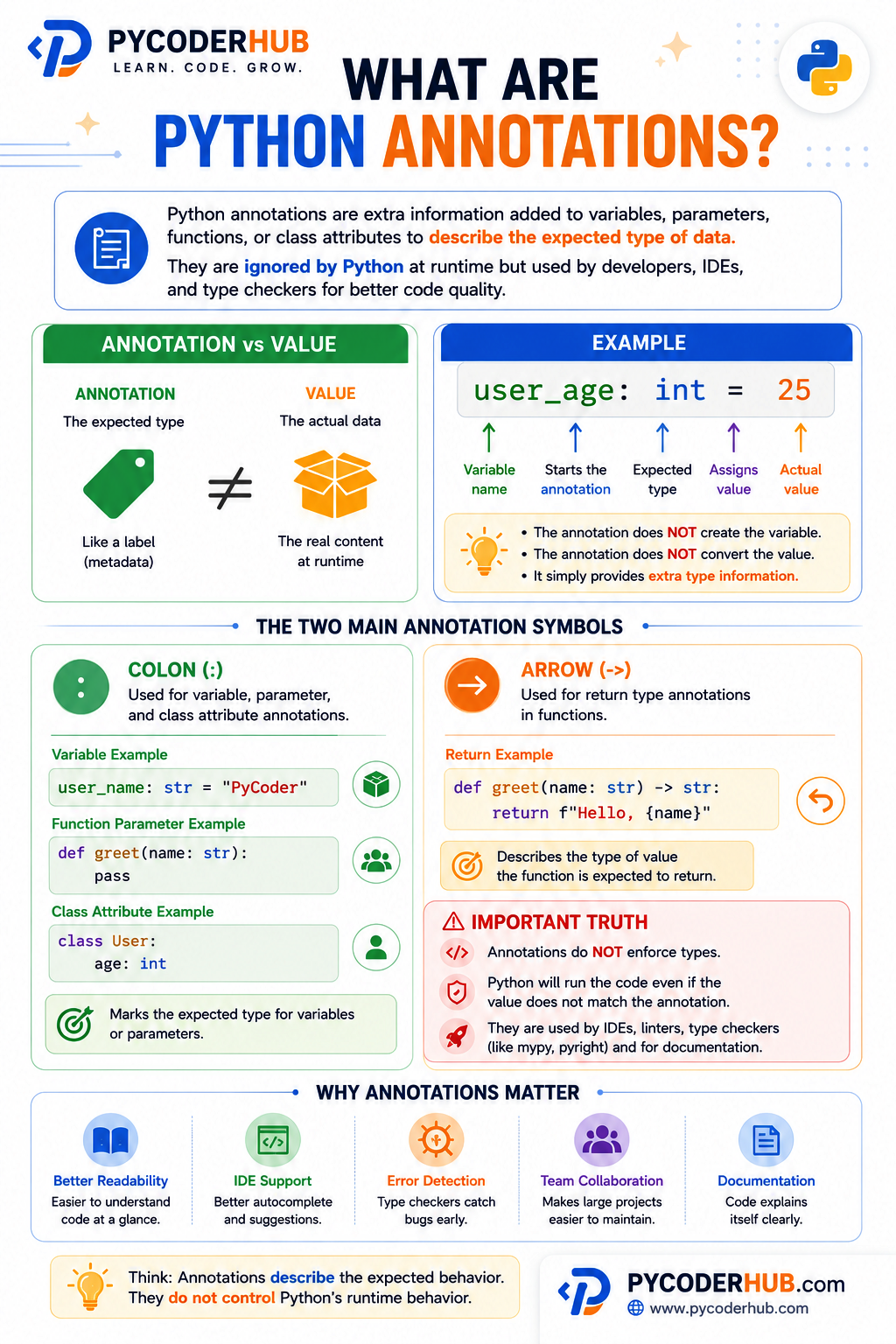
As you can see, annotations mainly act as descriptive labels that help developers, IDEs, and type checkers understand the expected type of data without changing how Python executes the code itself.
In the next section, we will start with the most common and foundational annotation type in Python:
Variable annotations.
2. Variable Annotations Explained
Variable annotations are the most common and foundational form of Python type annotations.
In modern Python code, you will frequently see variables written like this:
user_name: str = "PyCoder"
user_age: int = 25
account_balance: float = 1500.75
is_logged_in: bool = True
At first glance, this may look similar to variable declarations in statically typed languages like Java, C++, or TypeScript. However, Python variable annotations work differently.
The annotation does not create a “strictly typed variable.”
Instead, it simply describes the expected type of the value stored inside the variable.
Basic Variable Annotation Syntax
The basic syntax for a variable annotation is:
variable_name: expected_type = valueExample:
user_name: str = "PyCoder"Let’s break this down carefully.
| Part | Meaning |
|---|---|
user_name | Variable name |
: | Starts the annotation |
str | Expected type |
= | Assignment operator |
"PyCoder" | Actual runtime value |
One of the biggest beginner confusion points is thinking that:
: strcreates a special “string-only variable.”
But that is not what happens.
The annotation only provides descriptive type information.
Python still treats the variable normally at runtime.
Common Built-In Types Used in Variable Annotations
Some of the most common built-in types used in annotations are:
| Type | Meaning | Example |
|---|---|---|
str | Text/string data | "Hello" |
int | Integer numbers | 25 |
float | Decimal numbers | 9.99 |
bool | True/False values | True |
Example:
product_name: str = "Keyboard"
stock_quantity: int = 120
product_price: float = 49.99
is_available: bool = True
We will explore all built-in type hints in much greater detail in upcoming lessons.
Right now, our main goal is understanding the annotation syntax itself.
Understanding the Difference Between Annotation and Assignment
Many beginners accidentally mix these two concepts together:
| Concept | Purpose |
|---|---|
| Annotation | Describes expected type |
| Assignment | Stores actual value |
Example:
user_score: int = 95Here:
: intdoes NOT assign the value.
This part only adds type information.
The actual assignment happens here:
= 95This distinction becomes extremely important later when reading larger Python codebases.
Multiple Variable Annotations
Python allows annotating multiple variables separately:
first_name: str = "Py"
last_name: str = "Coder"
user_age: int = 25
This is perfectly readable and recommended.
However, beginners sometimes try to combine multiple variables into a single line:
first_name: str = "Py"; last_name: str = "Coder"or:
first_name = last_name = "PyCoder"While technically valid in some cases, this usually reduces readability.
In modern Python style, clarity is preferred over compactness.
It is generally better to annotate variables individually.
Runtime Reality Check
Let’s reinforce one of the most important truths again.
Consider this code:
user_age: int = 25

user_age = "twenty five"
Will Python stop this?
No.
The code still runs.
Why?
Because annotations do not lock variables into fixed types.
Python variables remain dynamically typed at runtime.
The annotation only provides guidance for:
- developers
- editors
- IDEs
- linters
- static type checkers
This is one reason Python typing is called:
Gradual typing.
You can gradually add type information without fundamentally changing how Python executes code.
Real-World Example
Without annotations:
customer_name = "PyCoder"
customer_age = 25
customer_balance = 1500.75
This works, but someone reading the code must mentally infer the intended types.
Now compare it with annotations:
customer_name: str = "PyCoder"
customer_age: int = 25
customer_balance: float = 1500.75
Now the code becomes much more self-explanatory.
Even before running the program, developers can quickly understand:
- expected data types
- intended structure
- how values should be used
This readability advantage becomes extremely valuable in larger projects.
3. Where Python Stores Annotations
Earlier, we learned that Python annotations are metadata.
But this naturally leads to an important question:
If annotations are metadata, where does Python actually store them?
The answer is:
Python stores annotations inside a special dictionary called
__annotations__.
This is one of the most important concepts for truly understanding how Python type annotations work internally.
It also proves something very important:
Annotations are real objects stored by Python — not just visual syntax for developers.
Understanding __annotations__
Whenever you add annotations to variables, functions, or classes, Python collects and stores them inside the special attribute:
__annotations__This attribute behaves like a dictionary and stores annotation names with their associated types.
The dictionary stores:
- names
- and their corresponding annotated types
Let’s see this in action.
Function Annotations and __annotations__
Functions store annotations inside their own __annotations__ dictionary.
Example:
def greet(name: str) -> str:
    return f"Hello, {name}"

print(greet.__annotations__)
Output:
{'name': <class 'str'>,
 'return': <class 'str'>}
Notice something interesting here:
| Key | Meaning |
|---|---|
'name' | Parameter annotation |
'return' | Return type annotation |
Python uses the special key:
'return'to store return type annotations.
Class Annotation Storage
Classes also maintain their own __annotations__ dictionary.
Example:
class User:
    name: str
    age: int
    is_active: bool

print(User.__annotations__)
Output:
{'name': <class 'str'>,
 'age': <class 'int'>,
 'is_active': <class 'bool'>}
This becomes extremely useful in:
- frameworks
- ORMs
- dataclasses
- validation libraries
- serialization systems
Many modern Python libraries inspect annotations automatically to understand how your data structures should behave.
We can also access variable annotation metadata. However, the process works slightly differently compared to functions and classes. Because of that, we will cover variable annotation storage in the next separate dedicated section.
Why Python Stores Annotations
Python stores annotations because they provide structured metadata that tools and libraries can inspect and use intelligently. They are useful for:
- IDEs and code editors
- static type checkers
- documentation generators
- frameworks and libraries
- developer tooling
For example:
- mypy reads annotations for static analysis
- editors use annotations for autocomplete
- FastAPI uses annotations for request validation
- Pydantic uses annotations for data parsing
This is one reason type annotations became so important in modern Python development.
__annotations__ Behaves Like a Dictionary
One of the coolest things about __annotations__ is that it behaves like a regular Python dictionary.
Example:
def greet(user_name: str) -> str:
    return f"Hello {user_name}"

print(type(greet.__annotations__))
Output:
<class 'dict'>This means you can:
- inspect it
- access values
- modify values
- iterate through it
just like any normal dictionary.
Example:
print(greet.__annotations__['user_name'])Output:
<class 'str'>Annotations Are Separate From Runtime Values
One of the most important things to understand about Python annotations is this:
Annotations are separate from the actual runtime values stored in variables.
You can think of it like this:
| Runtime Value | Annotation |
|---|---|
| Actual data used while the program runs | Metadata describing the expected type |
Let’s understand this with a simple example.
def greet(user_name: str) -> str:
    return f"Hello {user_name}"
Here:
| Component | Meaning |
|---|---|
user_name | Actual parameter used at runtime |
str | Annotation describing the expected type |
-> str | Annotation describing the expected return type |
Python stores these annotations separately inside the function’s annotation metadata.
You can verify this using:
print(greet.__annotations__)Output:
{
    'user_name': <class 'str'>,
    'return': <class 'str'>
}
Now notice something very important.
Even if someone passes a different runtime value:
print(greet(100))Output:
Hello 100Python still runs the function successfully.
Why?
Because annotations describe the intended types — not the actual runtime state.
Python does not automatically enforce these annotations during execution.
The annotation metadata remains the same:
print(greet.__annotations__)Output:
{
    'user_name': <class 'str'>,
    'return': <class 'str'>
}
Even though an integer was passed at runtime, the annotation still says str.
This clearly proves an important truth:
Annotations are metadata stored separately from runtime values.
They help humans, tools, editors, and frameworks understand your code better.
Important Takeaway
The __annotations__ dictionary reveals one of the most important truths about Python typing:
Annotations are structured metadata attached to code objects.
Python stores them internally so that:
- humans can understand code more easily
- tools can analyze code intelligently
- frameworks can build advanced features
while still preserving Python’s dynamic runtime behavior.
4. Variable Annotation Storage in Python
So far, you have seen how to access function and class annotation metadata. But Python can also store annotations for normal variables. However, the process is slightly different.
These types of annotations are usually called:
- variable annotations
- module-level annotations
- module-level variable annotations
A module-level variable simply means a variable created directly inside a Python file, not inside a function or class.
Example:
user_name: str = "PyCoder"
user_age: int = 25
Here, user_name and user_age are module-level variables because they exist directly in the module — the Python file itself.
Important Clarification
One very important thing to understand is: annotations are not stored inside the variable value itself.
For example:
user_name: str = "PyCoder"does not attach the annotation to the string object "PyCoder".
Instead, Python stores annotations inside the surrounding namespace object, such as:
- a function
- a class
- or a module
That is why:
- functions use
function.__annotations__ - classes use
class.__annotations__ - module-level variable annotations belong to the module object itself
A Note About Local Variables Inside Functions
Before going further, one thing worth knowing is that local variable annotations inside functions are never stored anywhere at runtime — in any Python version:
def example():
    x: int = 10
    print(__annotations__)  # ❌ NameError — always, in every Python version
Python simply ignores annotations on local variables at runtime. They are only useful for static analysis tools like mypy. So when we talk about accessing variable annotations, we always mean module-level variables, not local ones.
Accessing Variable Annotations — Why It Is Trickier Than It Looks
You might expect this to work:
user_name: str = "PyCoder"
user_age: int = 25

print(__annotations__)
But depending on your Python version and environment, you will likely get:
NameError: name '__annotations__' is not definedThis confuses many beginners because older tutorials often show this approach working perfectly. To understand why, you need to know what changed across Python versions.
How Python Versions Handle This Differently
Python 3.12 and Below — Eager Annotation Evaluation
In Python 3.12 and below, module-level annotations were evaluated eagerly — meaning Python immediately populated a global dictionary called __annotations__ as soon as it encountered each annotated variable.
So this worked fine:
user_name: str = "PyCoder"
user_age: int = 25

print(__annotations__)
Output:
{'user_name': <class 'str'>, 'user_age': <class 'int'>}Python 3.14 and Above — Lazy Annotation Evaluation (PEP 649)
In Python 3.14, a major change was introduced through PEP 649, which made annotation evaluation lazy by default.
This means Python no longer eagerly builds the __annotations__ dictionary at the module level during execution. Instead, annotations are stored internally and only resolved on demand when something explicitly asks for them.
Because of this, by the time you call print(__annotations__), the dictionary was never created in the global namespace — hence the NameError.
Python 3.13 — Transitional
Python 3.13 sits in between. Behaviour can be inconsistent depending on the environment and how annotations are used. It is best to avoid relying on __annotations__ directly from Python 3.13 onwards.
What About These Alternatives?
You may see people trying:
print(globals()['__annotations__'])   # ❌ raises KeyError if dict was never created
print(globals().get('__annotations__'))  # returns None silently — no error, but no data either
And via the module object:
import sys
current_module = sys.modules[__name__]
print(current_module.__annotations__)  # ⚠️ raises AttributeError in Python 3.14+
All of these have the same underlying problem — they all depend on __annotations__ being created eagerly, which is no longer guaranteed in Python 3.14+. Accessing it directly via the module object does not solve the problem, it just changes the error from NameError to AttributeError.
The Correct Modern Approach
The safest and most reliable way to inspect annotations in modern Python is usually inspect.get_annotations():
import inspect
import sys

user_name: str = "PyCoder"
user_age: int = 25

current_module = sys.modules[__name__]

print(inspect.get_annotations(current_module))
Output:
{'user_name': <class 'str'>, 'user_age': <class 'int'>}What Is Happening Here?
__name__contains the name of the current modulesys.modulesis a dictionary that stores all currently loaded modulessys.modules[__name__]returns the current module as an objectinspect.get_annotations()then reads annotations from that module object safely, handling lazy evaluation internally
This approach works correctly in both old and new Python versions.
What About typing.get_type_hints()?
You may also come across typing.get_type_hints():
from typing import get_type_hints
import __main__

user_name: str = "PyCoder"
user_age: int = 25

print(get_type_hints(__main__))
This can work, but has important caveats you should know:
- It fully evaluates all annotations, including string-based forward references. This can raise errors if a referenced type is not available in the current scope.
- It is being soft-deprecated in favour of
inspect.get_annotations()for general annotation inspection. - The
import __main__trick only works when running the file directly as a script. It breaks in interactive consoles, Jupyter notebooks, or when the module is imported by another script.
Use get_type_hints() only when you specifically need forward references resolved. For everything else, prefer inspect.get_annotations().
Summary — Which Approach to Use
| Approach | Works in 3.12? | Works in 3.14+? | Recommended? |
|---|---|---|---|
print(__annotations__) | Yes | No | No |
globals().get('__annotations__') | Yes | Returns None | No |
module.__annotations__ directly | Yes | AttributeError | No |
typing.get_type_hints() | Yes | With caveats | Sometimes |
inspect.get_annotations() | Yes | Yes | Yes — always use this |
In modern Python, inspect.get_annotations() is usually the best tool for inspecting module-level annotations, while typing.get_type_hints() remains useful when you need fully evaluated type information.
5. Deep Understanding — How Python Organizes Annotation Storage
At this point, you already know that functions, classes, and module-level variables do not store annotations in exactly the same way.
Now it is time to understand the deeper internal pattern behind annotation storage.
This section may feel slightly repetitive at first, but building a crystal-clear understanding of this storage model is extremely important because many common type hinting confusions come from misunderstanding how Python organizes annotation metadata internally.
Functions Store Their Own Annotation Metadata
Every function in Python maintains its own separate __annotations__ dictionary.
Example:
def greet(user_name: str) -> str:
    return f"Hello {user_name}"

def calculate_total(price: float, tax: float) -> float:
    return price + tax
Each function stores its annotations independently.
So:
print(greet.__annotations__)Output:
{
    'user_name': <class 'str'>,
    'return': <class 'str'>
}
And:
print(calculate_total.__annotations__)Output:
{
    'price': <class 'float'>,
    'tax': <class 'float'>,
    'return': <class 'float'>
}
Notice something important here:
Python does not combine function annotations together.
Each function object owns and stores its own annotation metadata separately.
Classes Also Maintain Separate Annotation Dictionaries
The same idea applies to classes.
Example:
class User:
    user_name: str
    age: int

class Product:
    product_name: str
    price: float
Now:
User.__annotations__and:
Product.__annotations__are completely separate dictionaries.
Each class object maintains its own annotation storage.
Module-Level Variables Work Differently
Now comes the important difference.
When variables are created directly inside a Python file:
user_name: str = "PyCoder"
age: int = 25
is_active: bool = True
Python does not create a separate annotation dictionary for each variable.
Instead, all module-level variable annotations are collected together into a single annotation dictionary belonging to the module itself.
Conceptually, Python stores them like this:
module.__annotations__ = {
    'user_name': str,
    'age': int,
    'is_active': bool
}
This means:
- one module
- one shared module annotation dictionary
- multiple variable annotations inside it
What Does “Module” Mean Here?
In this context, a module simply means the Python file itself.
Every .py file is internally treated as a module object by Python.
So if your file is named:
student.pyPython internally treats it like a module named:
studentAnd all variables created directly inside that file belong to that module namespace.
That is why module-level annotations are stored together.
The Most Important Insight
Annotations belong to the object that owns the namespace.
For example:
| Object Type | Where Annotations Are Stored |
|---|---|
| Function | Inside the function object |
| Class | Inside the class object |
| Module-level variables | Inside the module object |
This is the real internal mental model behind Python annotation storage.
Visual Mental Model
You can imagine Python organizing annotations like this:
MODULE
│
├── module.__annotations__
│      ├── user_name -> str
│      ├── age -> int
│      └── is_active -> bool
│
├── function greet
│      └── greet.__annotations__
│             ├── user_name -> str
│             └── return -> str
│
└── class User
       └── User.__annotations__
              ├── user_name -> str
              └── age -> int
This is very close to how Python internally organizes annotation metadata.
6. Function Parameter Annotations
In the previous sections, we learned the basic syntax of Python function annotations and how Python stores annotation metadata internally.
Now it is time to explore more practical and advanced function annotation patterns used in real-world Python code.
In modern Python code, function annotations are everywhere.
You will regularly see functions written like this:
def greet(name: str, age: int):
    print(f"{name} is {age} years old")
At first glance, beginners often assume:
- Python is enforcing the parameter types
- arguments will automatically be converted
- incorrect argument types will immediately raise errors
But just like variable annotations, parameter annotations mainly act as descriptive metadata.
Basic Function Parameter Annotation Syntax
The basic syntax looks like this:
parameter_name: expected_typeExample:
def greet(name: str, age: int):
    print(f"{name} is {age} years old")
Let’s break this down carefully.
| Part | Meaning |
|---|---|
name | Parameter name |
: str | Expected type for name |
age | Another parameter |
: int | Expected type for age |
This annotation tells developers:
nameshould ideally receive a stringageshould ideally receive an integer
Example of Valid Usage
def greet(name: str, age: int):
    print(f"{name} is {age} years old")

greet("PyCoder", 25)
Output:
PyCoder is 25 years oldEverything behaves as expected.
Now let’s intentionally pass incorrect types:
def greet(name: str, age: int):
    print(f"{name} is {age} years old")

greet(100, "twenty five")
Will Python stop this automatically?
No.
The code still runs.
Output:
100 is twenty five years oldWhy?
Because annotations do not enforce runtime type restrictions.
Parameters With Default Values
Function annotations also work perfectly with default parameter values.
Example:
def greet(name: str, greeting: str = "Hello"):
    print(f"{greeting}, {name}")
Here:
| Parameter | Meaning |
|---|---|
name: str | name should be a string |
greeting: str | greeting should be a string |
"Hello" | Default value |
Many beginners accidentally try to write annotations like this:
def greet(name = "PyCoder": str):This is invalid syntax.
The correct order is:
parameter_name: type = default_valueThe annotation always comes:
- after the parameter name
- before the default value
This syntax order is important to remember.
Default Values Do NOT Change the Annotation Meaning
Consider this function:
def calculate_discount(discount: float = 10.0):
    print(discount)
The annotation still means:
discountis expected to be a float.
The default value does not change the annotation itself.
Also remember that adding an annotation together with a default value still does not enforce the type at runtime.
For example:
def calculate_discount(discount: float = 10.0):
    print(discount)

calculate_discount("100")
Output:
100Even though the annotation says float, Python still allows a string value to be passed.
Why?
Because annotations describe the expected type — they do not automatically restrict or enforce runtime values.
Annotating *args and **kwargs
This is one of the most misunderstood areas of function annotations for beginners.
Let’s start with *args.
Annotating *args
Example:
def calculate_total(*numbers: int):
    print(numbers)
Many beginners think:
*numbers: intmeans:
numbersitself is an integer.
But that is NOT correct.
The actual meaning is:
Each individual argument passed into
*numbersshould be an integer.
Example usage:
calculate_total(10, 20, 30)Inside the function:
numbersbecomes:
(10, 20, 30)which is a tuple.
Annotating **kwargs
Now let’s look at **kwargs.
Example:
def display_user(**details: str):
    print(details)
Again, beginners often misunderstand this.
The annotation:
**details: strdoes NOT mean:
detailsitself is a string
Instead, it means:
Each value inside
detailsshould be a string.
Example:
display_user(name="PyCoder", role="Developer")Inside the function:
detailsbecomes:
{
    "name": "PyCoder",
    "role": "Developer"
}
So the annotation applies to:
- the dictionary values
- not the dictionary object itself
Important Takeaway
Function parameter annotations describe the expected types of values passed into a function.
They improve:
- readability
- maintainability
- tooling support
- developer understanding
without changing Python’s dynamic runtime behavior.
7. Return Type Annotations (->)
Functions have another extremely important part:
their return value.
This is where Python uses the special arrow syntax:
->called a return type annotation.
Just like all other type annotations, return type annotations mainly describe:
- expected behavior
- intended return type
- developer intent
- information for tools and type checkers
Understanding the -> Syntax
The basic syntax looks like this:
def function_name(parameters) -> expected_type:Example:
def calculate_total(price: float, tax: float) -> float:
    return price + tax
Here:
| Part | Meaning |
|---|---|
calculate_total | Function name |
price: float | Parameter annotation |
tax: float | Parameter annotation |
-> float | Expected return type |
The arrow annotation tells developers:
“This function is expected to return a float.”
The Arrow Does NOT Perform the Return
This is one of the biggest beginner confusion points.
Consider this:
-> floatMany learners accidentally think this means:
- “convert the result into a float”
- or “return a float automatically”
But that is not what happens.
The actual return still happens because of the:
returnstatement.
Example:
def get_username() -> str:
    return "PyCoder"
The annotation:
-> stronly describes the expected return type.
It does not:
- perform conversion
- enforce validation
- control execution
Why Return Annotations Matter
Without return annotations:
def calculate_discount(price, discount):
    return price - (price * discount / 100)
Someone reading the function must infer:
- what the function returns
- whether the result is
int,float,str, etc.
Now compare it with:
def calculate_discount(price: float, discount: float) -> float:
    return price - (price * discount / 100)
Now the function becomes much clearer.
Even before reading the function body, developers can understand:
- expected inputs
- expected output
- intended data flow
This becomes extremely valuable in larger projects.
8. Functions That Return Nothing — -> None
Not every function returns meaningful data.
Some functions only perform actions like:
- printing messages
- saving files
- logging information
- updating systems
Example:
def log_message(message: str) -> None:
    print(f"LOG: {message}")
Here:
-> Nonemeans:
“This function intentionally does not return a useful value.”
Important Beginner Confusion About None
Many beginners think:
-> Nonemeans:
- “the function returns absolutely nothing”
But technically, Python functions always return something.
If no explicit return statement exists, Python automatically returns:
NoneExample:
def greet() -> None:
    print("Hello")
Internally, Python behaves roughly like this:
def greet() -> None:
    print("Hello")
    return None
So:
-> Noneactually means:
“The function returns the value
None.”
Explicit vs Implicit None
Both of these are valid:
def do_nothing() -> None:
    return None
and:
def do_nothing() -> None:
    pass
In both cases, the function returns None.
Why Explicit -> None Is Recommended
Technically, you can omit the return annotation:
def log_message(message):
    print(message)
But in modern Python code, explicitly writing:
-> Noneis considered clearer and more professional.
Why?
Because it communicates intent immediately.
Someone reading the function instantly understands:
“This function performs side effects only.”
None vs NoReturn — A Critical Difference
This is one of the most important beginner concepts in Python typing.
At first, these may look similar:
-> Noneand:
-> NoReturnBut they mean completely different things.
-> None
Means:
The function finishes execution normally and returns
None.
Example:
def save_file(filename: str) -> None:
    print("Saving file...")
The function:
- runs normally
- completes execution
- returns
None
-> NoReturn
NoReturn comes from the typing module.
from typing import NoReturnIt means:
“This function never finishes normally.”
Example:
from typing import NoReturn

def crash_system(message: str) -> NoReturn:
    raise RuntimeError(message)
This function never reaches a normal return point because it always:
- raises an exception
- exits the program
- or loops forever
Side-by-Side Comparison
-> None | -> NoReturn |
|---|---|
| Function completes normally | Function never completes normally |
Returns None | Never returns at all |
| Execution continues afterward | Execution stops |
| Used for side-effect functions | Used for fatal/error functions |
Understanding this distinction is extremely important for modern Python typing.
9. Class Attribute Annotations
So far, we have learned how type annotations work with:
- variables
- function parameters
- return values
Now let’s move into another very important area of modern Python typing:
Class attribute annotations.
This is where annotations start becoming especially useful in real-world applications.
Basic Class Attribute Annotation Syntax
The basic syntax looks like this:
class ClassName:
    attribute_name: expected_type
Example:
class User:
    name: str
    age: int
    is_active: bool
Here:
| Attribute | Expected Type |
|---|---|
name | str |
age | int |
is_active | bool |
These annotations describe the intended structure of objects created from the class.
Important Beginner Confusion
One of the biggest beginner misunderstandings is thinking this code:
class User:
    name: str
creates a real value automatically.
It does NOT.
The annotation only registers metadata.
Example:
class User:
    name: str

user = User()

print(user.name)
Output:
AttributeError: 'User' object has no attribute 'name'Why?
Because annotations alone do not create runtime attributes.
They only describe expected attributes.
Actual values still need to be assigned normally.
Assigning Values Inside __init__
In real-world Python classes, attributes are usually assigned inside the constructor method:
__init__Example:
class User:
    name: str
    age: int

    def __init__(self, name: str, age: int) -> None:
        self.name = name
        self.age = age
Now when an object is created:
user = User("PyCoder", 25)the attributes actually receive runtime values.
Why Annotate Both the Class Body and __init__?
This is one of the most common beginner questions.
At first, it may seem repetitive:
class User:
    name: str

    def __init__(self, name: str):
        self.name = name
Why write the annotation twice?
The answer is:
The two annotations serve different purposes.
Class-Level Annotation vs Parameter Annotation
| Location | Purpose |
|---|---|
| Class body annotation | Describes object structure |
__init__ parameter annotation | Describes expected constructor arguments |
Example:
class User:
    name: str
This says:
“Objects of this class are expected to have a
nameattribute of typestr.”
Meanwhile:
def __init__(self, name: str):says:
“The constructor expects a string argument called
name.”
These are related — but not identical.
Class Attributes With Default Values
Class attribute annotations can also include default values.
Example:
class User:
    name: str = "Unknown"
    age: int = 0
    is_active: bool = True
Now the attributes:
- have annotations
- and real runtime values
This means objects can access them immediately unless overridden.
Understanding the Difference Between Class Variables and Instance Variables
This topic confuses many beginners.
Consider this example:
class User:
    role: str = "member"
Here:
roleis actually a class variable because the value belongs to the class itself.
All instances share it unless overridden.
However:
self.name = nameinside __init__ creates an instance variable specific to each object.
Simple Comparison
| Type | Belongs To |
|---|---|
| Class variable | The class itself |
| Instance variable | Individual objects |
Example:
class User:
    role: str = "member"

    def __init__(self, name: str):
        self.name = name
Here:
roleis sharednameis unique per object
Method Return Type Annotations
Methods inside classes use the same annotation rules as normal functions.
Example:
class User:
    name: str

    def __init__(self, name: str) -> None:
        self.name = name

    def get_name(self) -> str:
        return self.name
Here:
-> strmeans the method is expected to return a string.
Nothing changes simply because the function is inside a class.
Why self Is Usually Not Annotated
Beginners often ask:
Why don’t we annotate
self?
Example:
def get_name(self) -> str:instead of:
def get_name(self: User) -> str:The reason is:
- Python automatically understands
self - annotating
selfis usually unnecessary - it adds clutter without much benefit
So in normal Python style:
selfis left unannotatedclsin class methods is also usually left unannotated
Real-World Example
Without annotations:
class Product:
    def __init__(self, name, price, in_stock):
        self.name = name
        self.price = price
        self.in_stock = in_stock
Someone reading this code must infer:
- expected attribute types
- intended structure
Now compare it with:
class Product:
    name: str
    price: float
    in_stock: bool

    def __init__(self, name: str, price: float, in_stock: bool) -> None:
        self.name = name
        self.price = price
        self.in_stock = in_stock
Now the class becomes much clearer and more self-documenting.
Important Takeaway
Class attribute annotations describe the expected structure of class objects.
They:
- improve readability
- help IDEs and type checkers
- support modern frameworks
- make object structures easier to understand
without automatically creating runtime values or enforcing types.
And most importantly:
Annotations describe expected structure — they do not replace normal attribute assignment.
10. Type Comments (Legacy Syntax)
So far, all the type annotations we have written used modern Python syntax like:
user_name: str = "PyCoder"

def greet(name: str) -> str:
    return f"Hello, {name}"
This style is now standard in modern Python.
However, before Python introduced annotation syntax, developers used a much older approach called:
Type comments.
You may still encounter them in:
- older codebases
- legacy tutorials
- old Stack Overflow answers
- Python 2 compatible projects
So even though modern projects rarely use them today, it is still useful to understand what they are.
Why Type Comments Existed
Modern annotation syntax using:
:->
was officially introduced with:
PEP 484
and became widely available in Python 3.
But before that:
- Python did not support annotation syntax
- developers still wanted type hinting support
- static analysis tools needed another solution
So Python introduced:
Type comments.
These allowed developers to write type information inside comments instead of real annotation syntax.
Variable Type Comments
Example:
user_name = "PyCoder"   # type: str
user_age = 25           # type: int
is_active = True        # type: bool
Here:
# type: stracts like an annotation comment.
It tells type checkers:
“This variable is expected to contain a string.”
Important Difference
Unlike modern annotations:
user_name: str = "PyCoder"type comments are not stored inside:
__annotations__Why?
Because they are regular comments.
Python itself ignores them completely during execution.
They mainly existed for:
- static analysis tools
- IDE support
- compatibility with older Python versions
Should You Use Type Comments Today?
For modern Python projects:
Usually no.
Modern annotation syntax is:
- cleaner
- easier to read
- officially preferred
- better supported by tools
So instead of writing:
user_name = "PyCoder" # type: strmodern Python code should use:
user_name: str = "PyCoder"Today, modern inline annotations using:
:->
are strongly preferred because they are cleaner, clearer, and better integrated into Python itself.
Lesson Summary
In this lesson, we explored one of the most important foundations of modern Python typing:
Python type annotation syntax.
This lesson was not about advanced typing yet.
Instead, the main goal was to build a strong understanding of:
- how annotations are written
- where they are used
- what they actually mean
- and what they do not do
This foundation is extremely important because every advanced typing feature in Python builds on these core annotation concepts.
What You Learned in This Lesson
- Learned how Python annotations use the
:syntax for variables and function parameters - Learned how Python uses the
->syntax for return type annotations - Understood that annotations describe expected types rather than enforcing runtime behavior
- Learned how function parameter annotations communicate expected input types
- Learned the correct syntax for annotating parameters with default values
- Understood how
*argsand**kwargsannotations work - Learned how return type annotations describe expected function outputs
- Understood that return annotations do not automatically validate or convert returned values
- Learned the important difference between
-> Noneand-> NoReturn - Explored how class attribute annotations describe object structure
- Learned why
selfis usually not annotated in class methods - Explored how Python stores annotations internally using
__annotations__ - Learned that annotations are stored as metadata for tools, IDEs, and type checkers
- Explored legacy type comments and why they existed before modern annotation syntax
The Most Important Point From This Entire Lesson
Throughout this lesson, one core idea kept appearing again and again:
Type annotations are metadata.
They:
- improve readability
- help developers
- support IDEs and type checkers
- make large codebases easier to understand
But by themselves, they do NOT:
- enforce runtime types
- convert values automatically
- make Python statically typed
Python still remains dynamically typed.
Modern typing simply adds an optional layer of structure on top of Python’s dynamic nature.
Conclusion
At first, Python type annotations can seem like nothing more than extra syntax added on top of normal Python code.
Many beginners look at annotations like:
user_name: stror:
def greet(name: str) -> str:and wonder:
“Why does Python even need this?”
Especially because Python worked perfectly fine without annotations for many years.
But after understanding their real purpose, the picture becomes much clearer.
Type annotations were never introduced to replace Python’s dynamic nature.
Python is still dynamically typed.
Variables can still change types at runtime, and annotations do not automatically enforce strict type safety during execution.
Instead, annotations act as structured metadata and intelligent guidance.
They help:
- developers understand code faster
- IDEs provide better autocomplete
- type checkers detect mistakes earlier
- teams maintain large codebases more safely
while still preserving Python’s flexibility.
Once this syntax becomes familiar, reading and understanding modern Python code becomes dramatically easier.
You begin recognizing function expectations, intended return values, object structures, and data flow patterns almost immediately.
And that is the real power of type annotations.
They are not mainly about making Python stricter.
They are about making Python code more understandable, maintainable, and easier to work with at scale.
Now that you understand the core annotation syntax properly, you have built one of the most important foundations needed for more advanced Python typing concepts later in this chapter. 🐍
Suggested Posts
- Python Type Hinting Explained (Beginner’s Guide)
- Python Built-in Type Hints Explained (Lists, Dicts, Tuples & More)
- Python Union and Optional Type Hints Explained (With Any, Literal & Final)
- Python Generic Types Explained: TypeVar, Generics, Constraints & PEP 695
- Python Type Hinting Rules and Guidelines (PEP Recommendations Explained)
- Python Type Hint Errors Explained: Common Problems and How to Fix Them
- Python Type Hinting FAQs: Common Questions Answered


7 thoughts on “Python Type Annotations Explained (Syntax Guide With Examples)”