
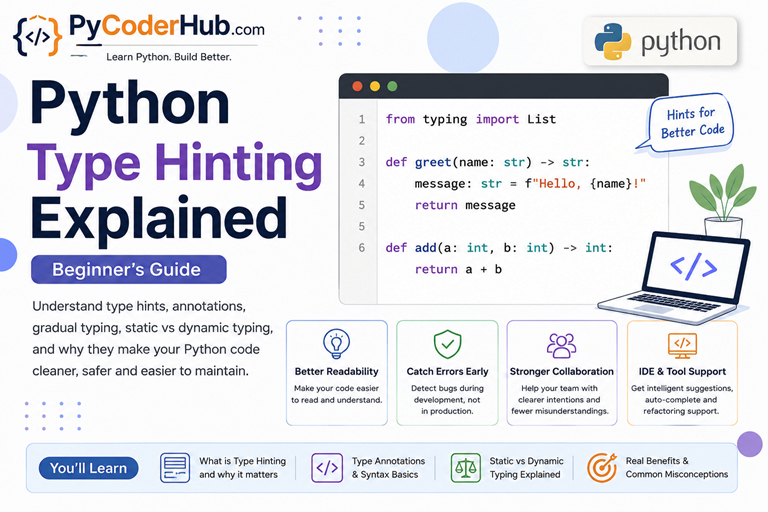
Introduction
In the previous chapter, you learned about Python type casting — how Python can convert one data type into another. You saw how values can change from int to float, str to bool, lists to tuples, and much more.
That chapter focused on changing data types at runtime.
Now, in this new chapter, we are entering a completely different concept: Python type hinting.
Instead of changing data, type hinting helps developers describe and communicate what type of data is expected inside variables, functions, parameters, and return values.
As Python projects grow larger, code can become harder to understand. Sometimes developers may not know:
- what kind of value a function expects,
- what type a variable should contain,
- or what a function returns after execution.
This is exactly where type hinting becomes useful.
Python type hints improve:
- code readability,
- editor support,
- autocomplete,
- collaboration,
- debugging,
- and overall code clarity.
One of the most important things to understand from the beginning is this:
Type hints usually do not change how Python code runs at runtime.
Python still remains a dynamically typed language. Type hints mainly act as guidance for humans and development tools.
In this first lesson of Python type hinting explained, you’ll build a complete beginner-friendly foundation for understanding how Python type hinting works, why it was introduced, and why it has become such an important part of modern Python development.
What You’ll Learn in This Lesson
By the end of this lesson, you’ll understand:
- What Python type hinting actually is
- Why Python introduced type hints
- The difference between dynamic typing, static typing, and gradual typing
- Why Python calls them “type hints” instead of strict types
- How type hints improve readability and developer experience
- Why Python usually ignores type hints at runtime
- The difference between type hinting and type casting
- What type hints can and cannot do
- How gradual typing works in real-world Python projects
You may notice that we are starting with why type hinting exists instead of immediately defining what type hinting is.
That approach is intentional.
Once you understand the problem Python developers were trying to solve, the idea of type hinting becomes much easier and more natural to understand.
1. Why Type Hinting Exists
Python became popular partly because of its simplicity and flexibility.
One of the biggest reasons for that flexibility is dynamic typing.
In Python, you can create variables without declaring their types explicitly:
username = "PyCoder"
user_score = 95
is_active = True
Python automatically understands the type of each value at runtime.
This makes Python fast to write, beginner-friendly, and highly flexible compared to many strictly typed programming languages.
But as Python projects became larger, developers started facing a different kind of problem:
The code could run correctly yet still become difficult to understand.
The Real Problem Appears in Large Codebases
Imagine you are reading code written by another developer.
You find this function:
def process_data(data):
    # Some logic here
    return result
Immediately, several questions appear:
- What kind of data should
datacontain? - Is it a string?
- A list?
- A dictionary?
- What does the function return?
- What format should the result have?
The function may work perfectly at runtime, but the code itself does not communicate enough information clearly.
Now imagine this problem multiplied across:
- hundreds of files,
- thousands of functions,
- and large development teams.
The confusion increases quickly.
Dynamic Typing Is Powerful — But Sometimes Too Flexible
Python’s dynamic nature allows developers to write code quickly, but flexibility can sometimes reduce clarity.
For example:
def calculate_discount(price, discount):
    return price - discount
At first glance:
- Should
pricebe an integer or float? - Should
discountbe a percentage or actual amount? - Can strings accidentally be passed here?
- What type does this function return?
Without additional information, developers must often:
- read surrounding code,
- search through documentation,
- or run the program to understand usage properly.
This becomes especially frustrating in large projects.
Collaboration Made the Problem Bigger
In small personal scripts, developers usually remember what their code does.
But professional software projects are different.
Code may be:
- shared across teams,
- maintained for years,
- updated by new developers,
- or reused in completely different projects.
In these situations, code readability becomes extremely important.
A developer should be able to understand:
- what data is expected,
- what data is returned,
- and how functions are intended to be used
without needing to investigate the entire project manually.
Why Comments Alone Were Not Enough
At first, some developers solved this readability problem using comments.
For example:
# price should be a float
def calculate_total(price):
    return price * 2
This certainly gives more information than having no explanation at all.
But comments have several limitations.
Comments Can Become Outdated
One of the biggest problems is that comments are separate from the actual code logic.
Imagine a developer later changes the function:
# price should be a float
def calculate_total(price, tax_rate):
    return price + tax_rate
The comment may no longer describe the code correctly.
Over time, outdated comments can create even more confusion.
Comments Are Not Standardized
Different developers write comments differently.
For example:
# price should be floatAnother developer may write:
# expects decimal valueAnother may write nothing at all.
Because comments are plain text, there is no consistent structure that Python tools can reliably analyze.
Development Tools Cannot Reliably Understand Comments
Modern IDEs and type-checking tools work best with structured type information.
A comment like this:
# username should be stringis mainly useful for humans reading the code.
But type hints are written in a standardized format that tools can understand automatically.
For example:
def greet(username: str) -> str:
    return "Hello " + username
Now:
- IDEs can provide smarter autocomplete,
- type checkers can detect mistakes,
- and developers can understand the function more quickly.
Type Hints Keep Type Information Closer to the Code
Another important advantage is that type hints stay directly connected to:
- variables,
- parameters,
- and return values.
This makes the code more self-explanatory.
Instead of placing explanations separately in comments, the type information becomes part of the function definition itself.
That is one of the main reasons Python eventually introduced standardized type hinting instead of relying only on comments.
This Is Where Type Hinting Was Introduced
Python introduced type hinting to improve communication inside code.
Type hints allow developers to describe:
- expected variable types,
- function parameter types,
- and return value types
directly in the code itself.
For example:
def calculate_discount(price: float, discount: float) -> float:
    return price - discount
Now the function becomes much clearer immediately:
priceshould be a floatdiscountshould be a float- the function returns a float
The code becomes easier to:
- read,
- maintain,
- debug,
- and collaborate on.
Important: Type Hints Usually Do NOT Control Runtime Behavior
This is one of the biggest beginner confusions, so it is important to understand it early.
Type hints are mainly meant for:
- humans,
- IDEs,
- autocomplete systems,
- linters,
- and type-checking tools.
In most normal situations, Python does not strictly enforce them while the program is running.
That means Python still remains dynamically typed.
For example:
def greet(username: str) -> str:
    return "Hello " + username

print(greet(100))
As you can see, even though we passed an integer (100) as username while the type hint expected a string, Python still allows the code to run until an actual runtime problem occurs.
This is why they are called type hints instead of strict type rules.
We will explore this behavior in much deeper detail later in this lesson.
A Simple Real-World Analogy
Think of type hints like labels on storage boxes.
The label may say:
Booksor
Kitchen ItemsThe label helps humans understand what is expected inside the box.
But the label itself does not physically prevent someone from putting the wrong item into it.
Type hints work similarly:
- they improve clarity,
- reduce confusion,
- and help developers understand intentions,
but Python usually does not strictly block incorrect data automatically.
Why This Matters in Modern Python
Today, Python is used for:
- web development,
- AI and machine learning,
- automation,
- data science,
- cloud systems,
- large backend applications,
- and enterprise-scale software.
Modern Python projects can become massive.
Type hinting helps make those projects:
- easier to understand,
- safer to maintain,
- and more manageable as they grow.
That is why type hinting has become one of the most important modern Python features for professional development.
2. What Is Python Type Hinting?
Now that you understand why Python introduced type hinting, let’s finally understand what type hinting actually is.
Python type hinting is a way to describe the expected data types used in your code.
It allows developers to add extra information about:
- variables,
- function parameters,
- return values,
- and data structures
so that the code becomes easier to understand and work with.
These type descriptions are called:
- type hints
- type annotations
- or typing annotations
All three terms are commonly used in Python programming.
A Simple Beginner Definition
In simple words:
Type hinting tells developers and tools what type of data is expected.
For example:
username: str = "PyCoder"Here:
username→ variable name:→ starts the type annotationstr→ expected type"PyCoder"→ assigned value
This tells readers that username is expected to contain a string.
Before and After Type Hinting
Without type hints:
def calculate_total(price, tax):
    return price + tax
The function works, but several questions remain unclear:
- Should
pricebe an integer or float? - Should
taxbe a percentage or actual amount? - What type does the function return?
Now look at the same function with type hints:
def calculate_total(price: float, tax: float) -> float:
    return price + tax
Now the function immediately becomes easier to understand.
We can clearly see:
priceshould be a floattaxshould be a float- the function is expected to return a float
The code becomes more self-explanatory.
Understanding the : Symbol
The colon : is mainly used for:
- variable type annotations
- function parameter type annotations
Example:
user_age: int = 25and:
def greet(username: str):
    print(username)
In both cases, the colon introduces the expected type information.
Understanding the -> Symbol
The arrow operator -> is used for function return types.
Example:
def get_username() -> str:
    return "PyCoder"
This means:
- the function is expected to return a string.
You can think of it like this:
:describes incoming or stored data->describes outgoing returned data
Note: This lesson focuses on building the core understanding of type hinting. Detailed examples of using type hints with variables, functions, lists, dictionaries, classes, and other real-world scenarios will be covered step by step in the upcoming lessons.
Why Is It Called “Type Hinting” Instead of “Typing”?
This naming is extremely important.
Python developers intentionally chose the word:
“hint”
because the type information mainly acts as guidance.
The hints help:
- humans understand code,
- IDEs provide autocomplete,
- type checkers detect possible mistakes,
- and tools analyze programs more intelligently.
But in normal Python execution, the hints usually do not behave like strict rules.
In many statically typed languages, incorrect types are blocked immediately.
Python works differently.
It gives developers optional type information while still preserving Python’s flexible and dynamic nature.
Type Hinting Is Optional in Python
Another important beginner-friendly fact:
Python does not force you to use type hints everywhere.
You can write:
- fully typed code,
- partially typed code,
- or completely untyped code.
All of these are valid in Python.
Example:
username = "PyCoder"

user_score: int = 95

def greet(name):
    return "Hello " + name
This flexibility is part of Python’s gradual typing system, which we will explore in the next sections.
The Core Idea to Remember
The main purpose of type hinting is not to make Python strict.
Its real purpose is to make code:
- clearer,
- easier to understand,
- easier to maintain,
- and easier for development tools to analyze.
That is why type hinting became such an important part of modern Python programming.
Visual Guide: Understanding Python Type Hinting
Before moving to the next section, take a look at this infographic. It summarizes why Python introduced type hinting, how it improves code clarity, and the core syntax beginners should understand first.
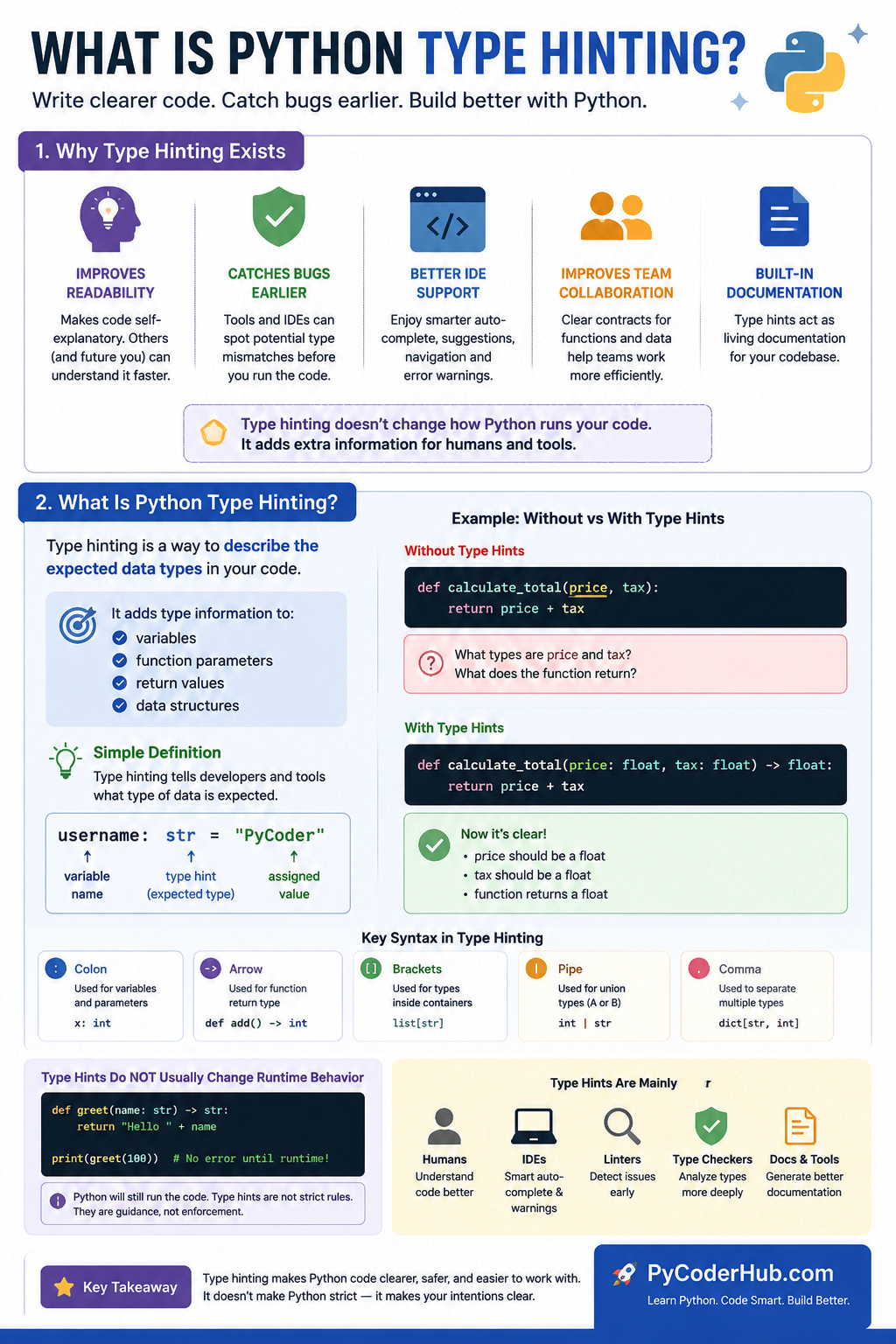
As you can see, Python type hinting is less about forcing strict rules and more about making code easier for humans and development tools to understand. This balance between flexibility and clarity is what makes Python’s gradual typing system so powerful.
3. The Most Important Truth About Type Hints
Before going deeper into Python type hinting, there is one extremely important truth every beginner must understand:
Python does NOT automatically enforce type hints in normal runtime execution.
This is probably the biggest misunderstanding beginners have when first learning type hinting.
Many people see this:
username: str = "PyCoder"or this:
def greet(name: str) -> str:
    return "Hello " + name
and assume Python will strictly block incorrect data types automatically.
But that is usually not how Python works.
Python Still Remains Dynamically Typed
Even after adding type hints, Python still behaves like a dynamically typed language.
This means variables can still hold different types during runtime.
Example:
user_score: int = 95

user_score = "Excellent"
Python still allows this assignment.
The type hint says the variable is expected to contain an integer, but Python itself does not immediately stop you from assigning a string later.
This surprises many beginners because the syntax looks strict, but Python intentionally keeps its flexible nature.
Here is another example:
def multiply_number(value: int) -> int:
    return value * 2

print(multiply_number("5"))
At first glance, it may look like Python should reject this immediately because:
valueis hinted asint- but
"5"is a string
However, Python still runs the function.
In fact, the output becomes:
55Why?
Because string multiplication is valid in Python:
"5" * 2produces:
'55'This clearly shows something important:
Type hints themselves usually do not control runtime behavior.
Python mainly checks whether operations are valid during execution, not whether type hints were followed correctly.
Then What Are Type Hints Actually For?
If Python usually ignores type hints during execution, then what is their real purpose?
Type hints mainly help:
- humans reading code
- IDEs like PyCharm or VS Code
- autocomplete systems
- linters
- static type checkers
- documentation tools
For example, your IDE may warn you before running code:
greet(100)because it detects:
- the function expects
str - but
intwas provided
This allows developers to catch mistakes earlier during development instead of discovering problems later at runtime.
Type Hints Exist as Metadata
Another interesting beginner-friendly fact is this:
Python actually stores type hints internally as metadata.
You can see this using:
def greet(username: str) -> str:
    return "Hello " + username

print(greet.__annotations__)
Output:
{'username': <class 'str'>, 'return': <class 'str'>}The __annotations__ attribute stores the type hint information in dictionary form.
This shows that Python does remember the hints internally.
However, simply storing the hints does not mean Python automatically enforces them.
Think of it like labels attached to the code.
The labels exist, but Python usually does not use them to strictly control execution.
A Helpful Mental Model
A good way to think about type hints is:
Type hints describe developer intentions, not strict runtime rules.
They communicate:
- what type is expected,
- what the code was designed to work with,
- and how functions are intended to be used.
But Python still preserves its flexible dynamic behavior unless additional tools enforce stricter checking.
4. Dynamic Typing vs Static Typing vs Gradual Typing
To fully understand Python type hinting, you first need to understand three very important concepts:
- dynamic typing,
- static typing,
- and gradual typing.
These ideas form the core foundation behind how Python handles type hints.
Many beginners become confused here because they hear statements like:
- “Python is dynamically typed”
- “Type hinting makes Python statically typed”
- “Python now supports gradual typing”
At first, these statements may sound contradictory.
But once you understand the differences clearly, Python’s type hinting system becomes much easier to understand.
What Is Dynamic Typing?
Python is traditionally known as a dynamically typed language.
This means Python determines data types during runtime automatically.
You do not need to declare variable types manually before using them.
Example:
username = "PyCoder"
score = 95
is_active = True
Python automatically understands:
"PyCoder"is a string95is an integerTrueis a boolean
The developer does not need to specify these types explicitly.
To learn how Python automatically handles variable types at runtime, read our complete guide on dynamic typing in Python.
What Is Static Typing?
Statically typed languages work differently.
In static typing, variable and function types are usually declared explicitly and checked more strictly before the program runs.
Languages like:
- Java,
- C++,
- C#,
- and TypeScript
commonly use static typing systems.
Example (similar idea):
(In Java Programming)
String username = "PyCoder";
Here:
- the variable is explicitly declared as a string
- assigning an incompatible type later may produce an error immediately.
To learn the complete difference between static typing and dynamic typing, read our detailed section comparing both typing systems in Python.
What Is Gradual Typing?
Python did not want to abandon dynamic typing completely.
At the same time, Python developers also wanted:
- better tooling,
- better readability,
- earlier bug detection,
- and improved maintainability.
So Python introduced something called:
gradual typing
Gradual typing combines:
- dynamic typing flexibility
- with optional static type information.
This means developers can choose:
- where to use type hints,
- how much typing to add,
- and when to add it.
Python allows:
- fully untyped code,
- partially typed code,
- and heavily typed code
all inside the same project.
That flexibility is the heart of gradual typing.
Example of Gradual Typing
Untyped Python code:
def greet(name):
    return "Hello " + name
Partially typed code:
def greet(name: str):
    return "Hello " + name
More fully typed code:
def greet(name: str) -> str:
    return "Hello " + name
All three versions are valid Python code.
This is a major difference between Python and many fully statically typed languages.
Comparison Table
| Feature | Dynamic Typing | Static Typing | Gradual Typing |
|---|---|---|---|
| Type checking timing | Runtime | Before execution / compile time | Optional combination |
| Type declarations required | No | Usually yes | Optional |
| Flexibility | High | Lower | Balanced |
| Readability support | Lower in large projects | Strong | Improved with optional hints |
| Developer control | Very flexible | More strict | Flexible + optional safety |
| Python type hinting support | Base behavior | Not fully | Yes |
A Simple Real-World Analogy
Think of these typing systems like driving rules.
Dynamic Typing
Like driving on an open road with very few restrictions.
You have freedom, but you must stay careful yourself.
Static Typing
Like driving with strict lanes, barriers, and checkpoints everywhere.
The system prevents many mistakes automatically.
Gradual Typing
Like choosing when to use safety features.
You still have flexibility, but you can add extra guidance and protection where needed.
That balance is exactly what Python type hinting tries to achieve.
Visual Comparison: Dynamic Typing vs Static Typing vs Gradual Typing
The following infographic visually explains the three major typing approaches used in programming languages. It also shows why Python chose gradual typing and how type hints help balance flexibility with code clarity.
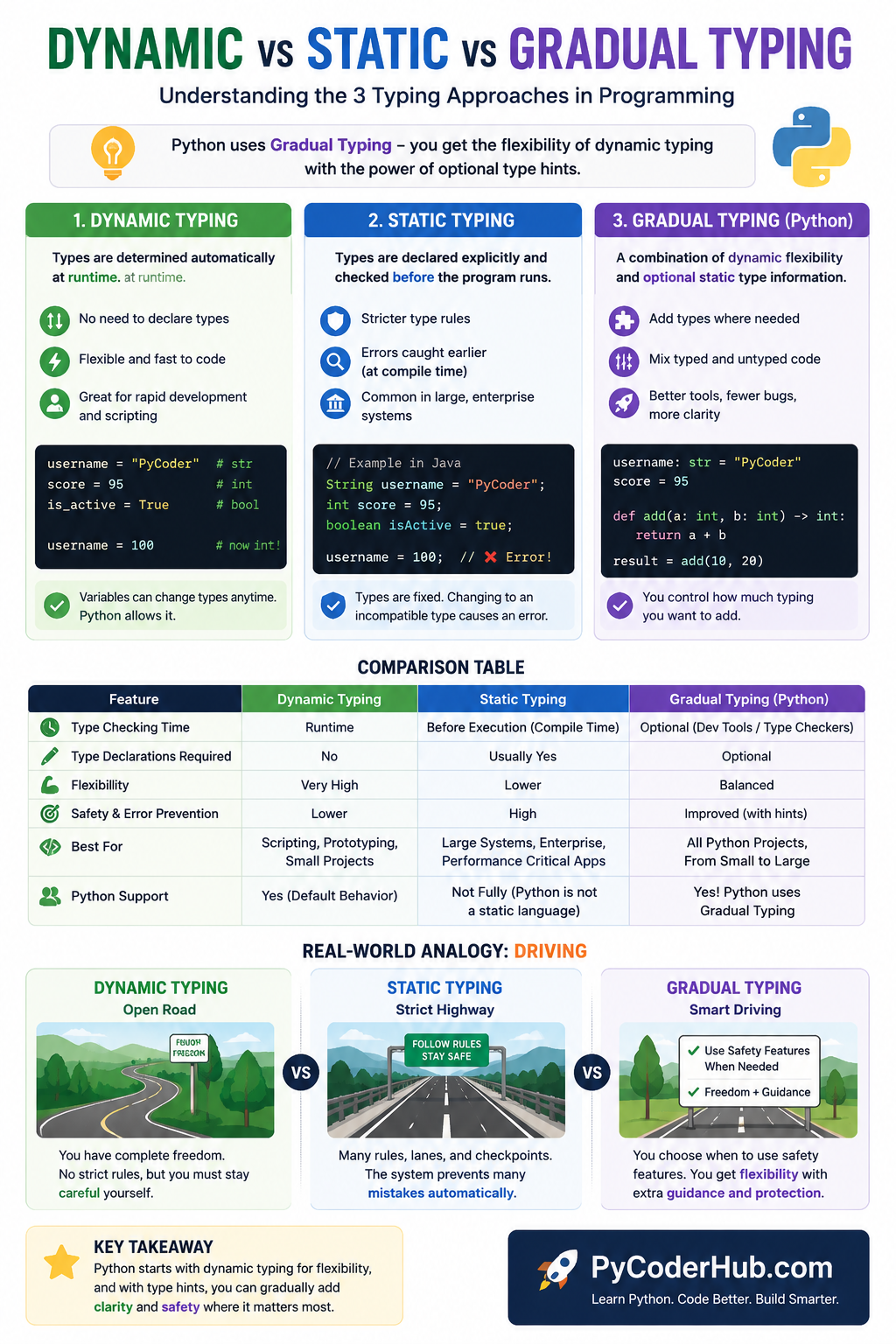
Understanding these three typing systems is one of the biggest keys to understanding modern Python type hinting. Python does not abandon dynamic typing — instead, it enhances it with optional type information through gradual typing.
5. Why Type Hinting Became Important in Modern Python
When Python was mainly used for:
- small scripts,
- automation,
- and quick prototyping,
dynamic typing alone was often enough.
Developers could write code quickly without worrying much about type clarity.
But Python eventually grew far beyond small scripting projects.
Today, Python is heavily used in:
- large web applications,
- enterprise systems,
- cloud platforms,
- machine learning,
- AI development,
- data science,
- cybersecurity,
- and massive backend infrastructures.
As projects became larger, maintaining Python code became more difficult.
Large Projects Need Better Code Communication
In a small script, developers usually remember:
- what each variable stores,
- what functions return,
- and how different parts connect together.
But in large projects:
- hundreds of developers may work together,
- code may stay active for years,
- and thousands of functions may interact across many files.
Better IDE Support Changed Modern Development
Modern Python development relies heavily on IDEs and smart editors like:
- PyCharm,
- VS Code,
- and other advanced tooling systems.
Type hints allow these tools to:
- provide smarter autocomplete,
- detect possible mistakes earlier,
- improve code navigation,
- and offer more accurate suggestions.
For example, if an IDE knows:
username: strit can intelligently suggest string methods automatically.
Without type hints, tools often need to guess more aggressively.
Type Hints Also Improved Documentation
One hidden benefit of type hints is that they act like built-in documentation.
For example:
def send_email(recipient: str, subject: str, message: str) -> bool:
    return True
Even before reading the function body, developers already understand:
- expected inputs,
- expected data types,
- and the return type.
This reduces the need for excessive explanatory comments.
6. A Brief History of Python Type Hinting (PEP 484 & Beyond)
Python type hinting did not appear overnight.
It evolved gradually as Python projects became larger and developers needed:
- better tooling,
- clearer code communication,
- and stronger type analysis support.
To understand modern Python type hinting properly, it helps to know a little history behind how it developed.
But do not worry — we will keep this practical and beginner-friendly instead of turning it into a deep history lesson.
PEP 484 — The Foundation of Modern Type Hinting
PEP stands for Python Enhancement Proposal, which is an official document used to propose and describe new features or improvements in Python.
The biggest turning point in Python type hinting came with:
introduced in Python 3.5.
PEP 484 officially introduced:
- standardized type hints,
- the
typingmodule, - and the foundation for gradual typing in Python.
This was the moment Python formally embraced optional type annotations.
Example:
def greet(username: str) -> str:
    return "Hello " + username
This syntax became the foundation of modern Python typing.
The typing Module
PEP 484 also introduced the:
typingmodule.
This module provided special typing tools such as:
ListDictTupleUnionOptional- and many others.
Example (older style):
from typing import List

student_names: List[str] = ["Aman", "Priya"]
At the time, this became the standard way to write advanced type hints.
PEP 526 — Variable Annotations
Initially, type hints mainly focused on functions.
Later, Python introduced:
which officially added variable annotations.
Example:
username: str = "PyCoder"This made type hinting feel more consistent across the language.
Now developers could annotate:
- variables,
- function parameters,
- and return values
using a unified syntax style.
PEP 585 — Simpler Built-in Generic Types
Earlier Python versions required importing many container types from the typing module.
For example:
from typing import List

student_names: List[str]
Later, PEP 585 simplified this syntax.
Modern Python now allows:
student_names: list[str]This became cleaner, shorter, and easier for beginners to read.
Today, this modern built-in generic syntax is usually preferred.
PEP 604 — The X | Y Syntax
Another important improvement came with:
This introduced the modern union operator:
|Before PEP 604, developers commonly wrote:
from typing import Union

user_id: Union[int, str]
Modern Python now allows:
user_id: int | strThis syntax is:
- cleaner,
- easier to read,
- and more beginner-friendly.
Important Beginner Insight
One important thing to understand is this:
Python typing evolved gradually over many years.
That is why you may sometimes see:
- older syntax styles,
- newer modern syntax,
- or mixed styles
while reading different Python tutorials or projects.
For example, both of these may still appear online:
Older style:
from typing import List

names: List[str]
Modern style:
names: list[str]Both are valid, but modern Python generally prefers the newer built-in style when possible.
Python Typing Continued to Evolve
After PEP 484, Python typing kept expanding rapidly.
New improvements focused on:
- better readability,
- stronger tooling,
- better IDE integration,
- and more expressive type systems.
Today, type hinting has become deeply integrated into:
- modern Python frameworks,
- large codebases,
- IDEs,
- linters,
- and static type checkers like:
mypypyright- and similar tools.
That gradual evolution is one of the reasons Python typing feels flexible instead of restrictive.
Want to explore the complete evolution of Python typing in more depth? Follow our detailed guide on the history of Python type hinting, where we explain major typing PEPs, old vs modern syntax, typing improvements across Python versions, and how Python’s gradual typing system evolved over time.
7. Type Hinting vs Type Casting (Very Important)
One of the biggest beginner confusions is mixing up:
- type hinting
and - type casting
This confusion happens because both topics involve data types, but they solve completely different problems.
Since the previous chapter focused on Python type casting, this is the perfect time to clearly separate these two concepts.
Understanding this difference is extremely important before moving deeper into Python type hinting.
The Core Difference
The simplest way to understand it is this:
| Concept | Purpose |
|---|---|
| Type Casting | Changes the actual data type |
| Type Hinting | Describes the expected data type |
This single distinction explains almost everything.
What Type Casting Does
Type casting changes one data type into another.
Example:
user_age = "25"

converted_age = int(user_age)

print(converted_age)
print(type(converted_age))
Output:
25
<class 'int'>
Here:
int(user_age)actually converts the string "25" into a real integer.
This directly affects runtime behavior.
The data itself changes.
What Type Hinting Does
Now compare that with type hinting:
user_age: int = "25"

print(user_age)
print(type(user_age))
Output:
25
<class 'str'>
This surprises many beginners.
Even though the variable is hinted as:
intthe actual value still remains a string.
Why?
Because type hinting does not convert data.
It only describes what type is expected.
Side-by-Side Comparison
| Feature | Type Casting | Type Hinting |
|---|---|---|
| Purpose | Convert data types | Describe expected types |
| Affects runtime behavior | Yes | Usually no |
| Changes actual data | Yes | No |
| Used for execution logic | Yes | Mainly for clarity and tooling |
| Helps IDEs and type checkers | Indirectly | Yes |
| Prevents invalid operations automatically | Sometimes through conversion | Usually no |
| Main goal | Data conversion | Code communication |
Type Hinting and Type Casting Can Work Together
In real programs, developers often use both together.
Example:
user_input: str = input("Enter your age: ")

converted_age: int = int(user_input)

print(converted_age + 5)
Here:
: strand: intare type hintsint(user_input)is type casting
The type casting changes the data.
The type hints describe the expected types for readability and tooling.
Visual Comparison: Type Hinting vs Type Casting in Python
The following infographic helps you clearly separate two beginner-confusing concepts in Python: type hinting and type casting. It visually shows how one describes expected data types while the other actually changes data at runtime.
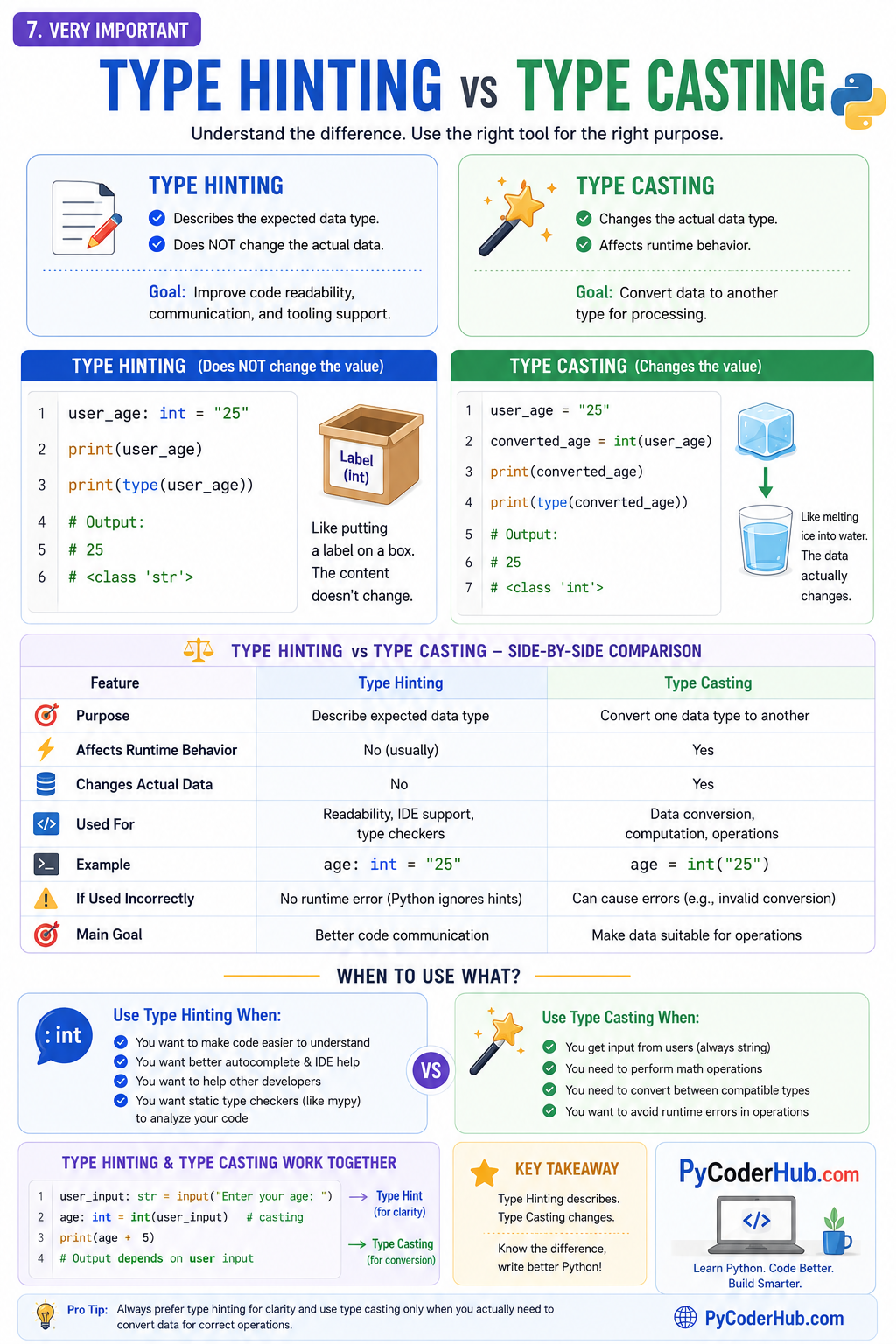
Once you understand the difference between describing data and converting data, Python type hinting becomes much easier to understand. This distinction is one of the most important foundations of modern Python typing.
8. What Type Hints Do NOT Do
After learning Python type hinting, many beginners accidentally expect type hints to behave like strict runtime rules.
But type hints have important limitations.
Understanding what type hints do not do is just as important as understanding what they do.
Type Hints Do NOT Enforce Types Automatically
This is the most important point.
Python usually does not block incorrect types automatically.
Example:
def greet(username: str) -> str:
    return "Hello " + username

greet(100)
Even though username is hinted as str, Python still attempts to run the code.
Type hints alone do not act like strict runtime protection.
Type Hints Do NOT Make Python Fully Statically Typed
Python still remains a dynamically typed language.
You can still write:
current_value: int = 100

current_value = "Python"
Python allows this during runtime.
Type hints add optional type information, but they do not completely transform Python into Java or C++ style static typing.
Type Hints Do NOT Improve Runtime Performance
Some beginners think adding type hints makes programs faster.
Normally, this is not true.
Type hints mainly help:
- readability,
- tooling,
- IDE analysis,
- and static type checking.
In standard Python execution, type hints usually do not significantly improve runtime speed.
Type Hints Do NOT Replace Testing
Even properly typed code can still contain:
- logical mistakes,
- incorrect calculations,
- bad conditions,
- or unexpected runtime behavior.
Type hints improve code clarity, but they do not replace:
- unit testing,
- debugging,
- or proper software design.
Type Hints Do NOT Prevent All Bugs
Type hints help reduce many mistakes, especially in large projects.
But they cannot guarantee bug-free code.
For example:
- incorrect business logic,
- database issues,
- API failures,
- and runtime edge cases
can still happen even in fully typed programs.
The Important Thing to Remember
A simple way to think about type hints is:
Type hints are guidance tools, not magical runtime protection systems.
Their main purpose is to:
- improve code communication,
- help developers,
- and help development tools analyze code more effectively.
That is what makes them powerful in modern Python development.
Quick Recap
Let’s quickly summarize the most important ideas from this lesson.
- Python type hints describe the expected data types used in code.
- Type hints are also called:
- type annotations
- typing annotations
- Python still remains a dynamically typed language.
- Type hints are usually ignored during normal runtime execution.
- Type hints mainly help:
- developers,
- IDEs,
- linters,
- and static type checkers.
:is used for:- variable annotations
- function parameter annotations
->is used for:- function return type annotations
- Python uses a system called gradual typing.
- Gradual typing allows:
- typed code,
- untyped code,
- and mixed code together.
- Type hints improve:
- readability,
- autocomplete,
- documentation,
- collaboration,
- and maintainability.
- Type hints do NOT:
- automatically enforce types,
- replace testing,
- prevent all bugs,
- or make Python fully statically typed.
- Modern Python development heavily relies on type hints for better tooling and clearer code communication.
Conclusion
Python type hinting is one of the most important additions to modern Python development because it helps make code easier to understand, maintain, and work with in large projects.
But the most important thing to remember is this:
Type hints usually describe expected data types — they do not automatically enforce them during runtime.
Python still remains a dynamically typed language.
Throughout this lesson, you learned:
- what type hinting is,
- why Python introduced it,
- how gradual typing works,
- how type hinting differs from type casting,
- and what type hints can and cannot do.
As you continue learning modern Python, type hints will appear everywhere:
- functions,
- variables,
- collections,
- frameworks,
- APIs,
- and large production codebases.
So do not think of type hints as “extra syntax.”
Think of them as a communication system that helps both humans and development tools understand code more clearly. 🐍
Suggested Posts
- Python Type Annotations Explained (Syntax Guide With Examples)
- Python Built-in Type Hints Explained (Lists, Dicts, Tuples & More)
- Python Union and Optional Type Hints Explained (With Any, Literal & Final)
- Python Generic Types Explained: TypeVar, Generics, Constraints & PEP 695
- Python Type Hinting Rules and Guidelines (PEP Recommendations Explained)
- Python Type Hint Errors Explained: Common Problems and How to Fix Them
- Python Type Hinting FAQs: Common Questions Answered

8 thoughts on “Python Type Hinting Explained (Beginner’s Guide)”