
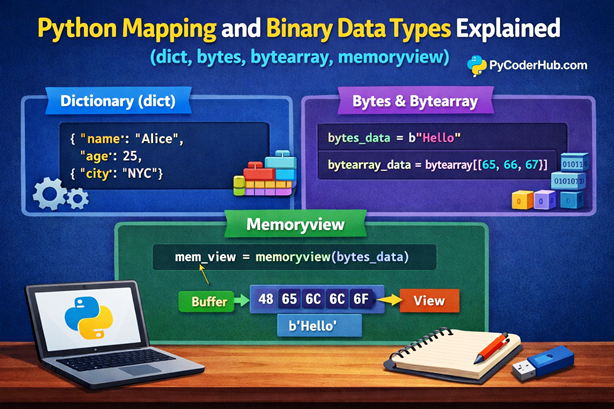
Introduction: Python Mapping and Binary Data Types
In the previous lesson, you explored Python collection data types like lists, tuples, sets, and strings—data structures that help you store and manage groups of values efficiently.
Now, let’s move one step further.
Imagine you’re organizing data in a real-world scenario. Sometimes, you don’t just want to store values—you want to connect them with meaningful labels. For example, instead of just storing "PyCoder", 35, "Python" in a list, it’s much more useful to store them as:
{"name": "PyCoder", "age": 35, "course": "Python"}This is where Python mapping and binary data types come into play.
- Mapping data types allow you to store data in key-value pairs (like a real-world dictionary).
- Binary data types help you work with raw data at a lower level, such as bytes used in files, images, or network operations.
In this lesson, you’ll learn how Python handles both structured mappings and low-level binary data in a simple and beginner-friendly way.
What You’ll Learn
By the end of this lesson, you will understand:
- What Python Mapping and Binary Data Types are
- How the dictionary (
dict) works in Python - How to create, access, and modify key-value pairs
- What binary data types are and why they are used
- The difference between
bytesandbytearray - How
memoryviewworks and why it is useful - Real-world use cases of mapping and binary data types
To make learning simple and structured, this lesson is divided into two main sections:
1. Mapping Data Type
In this section, you’ll learn about:
- Python dictionary (
dict) - Key-value pair structure
- Common operations and examples
2. Binary Data Types
In this section, you’ll explore:
bytesbytearraymemoryview- How Python handles binary data internally
This structured approach will help you clearly understand both high-level data organization and low-level data handling in Python—two essential concepts for becoming a confident Python developer.
Section #1: Python Mapping Data Type (dict)
What is a Mapping Data Type in Python?
A mapping data type in Python is used to store data in key-value pairs.
Think of it like a real-world dictionary :
- A word is the key
- Its meaning is the value
Similarly in Python:
- A key identifies the data
- A value stores the actual information
Real-World Analogy
Imagine a contact book:
Name → Phone NumberIn Python, this looks like:
contact_book = {
    "name": "PyCoder",
    "phone": "1234567890"
}
Here:
"name"and"phone"are keys"PyCoder"and"1234567890"are values
👉 This key-value relationship is what defines Python Mapping Data Types.
Understanding Python Dictionary (dict)
In Python, the built-in mapping data type is called a dictionary, written as dict.
A dictionary:
- Stores data in key-value pairs
- Uses curly braces
{} - Separates keys and values using a colon
:
Syntax Overview
dictionary_variable = {
    "key1": "value1",
    "key2": "value2"
}
Example
student_details = {
    "name": "PyCoder",
    "age": 21,
    "course": "Python"
}
Each key is unique and maps to a specific value.
Creating a Dictionary in Python
There are multiple ways to create a dictionary.
1. Basic Dictionary Example
user_profile = {
    "username": "pycoder_user",
    "level": "beginner"
}
2. Creating an Empty Dictionary
empty_dictionary = {}3. Using the dict() Constructor
user_data = dict(name="PyCoder", age=25)Accessing Values in a Dictionary
You can access dictionary values using their keys.
1. Using Keys Directly
student_info = {
    "name": "PyCoder",
    "age": 22
}

print(student_info["name"])
2. Using .get() Method
print(student_info.get("age"))3. Handling Missing Keys (Basic)
print(student_info.get("city", "Not Found"))If the key doesn’t exist, it returns a default value instead of an error.
Modifying a Dictionary
Dictionaries are mutable, which means you can change them after creation.
1. Adding New Key-Value Pairs
student_info["city"] = "Delhi"2. Updating Values
student_info["age"] = 233. Removing Items
student_info.pop("city")   # Removes specific key
del student_info["age"]    # Deletes key-value pair
Type Checking for Dictionary
You can check whether a variable is a dictionary using built-in functions.
Using type()
user_data = {"name": "PyCoder"}

print(type(user_data)) # Output: <class 'dict'>
Using isinstance()
print(isinstance(user_data, dict)) # Output: TrueThis is the recommended way in real-world code.
Type Conversion to Dictionary
You can convert other data types into a dictionary.
Converting List of Tuples → Dictionary
user_list = [("name", "PyCoder"), ("age", 25)]

converted_dictionary = dict(user_list)
print(converted_dictionary)
Output
{'name': 'PyCoder', 'age': 25}Using dict() Directly
user_data = dict(country="India", skill="Python")
print(user_data)
Output
{'country': 'India', 'skill': 'Python'}Section 1 Summary
- A mapping data type stores data in key-value pairs
- Python uses
dictto implement mapping - Dictionaries are mutable, fast, and widely used
- You can easily create, access, modify, and convert dictionaries
In the next section, you’ll explore Python binary data types, where data is handled in its raw form (bytes) for performance and low-level operations.
Section #2: Python Binary Data Types
What are Binary Data Types in Python?
While mapping data types (like dictionaries) help you organize structured data, binary data types deal with data in its raw form — bytes.
In simple terms:
- Computers store everything as binary (0s and 1s)
- Python provides special data types to work directly with this binary data
Where Are Binary Data Types Used?
Binary data types are commonly used in:
- File handling (images, videos, PDFs)
- Network communication (sending/receiving data over the internet)
- Performance-critical operations (working with large data efficiently)
Binary data types in Python mainly consist of three types: bytes, bytearray, and memoryview. While all of them work with binary data, they differ in mutability and how they manage memory.
Understanding bytes Data Type
The bytes data type represents a sequence of bytes (immutable).
This means:
- Once created, it cannot be changed
Basic Example
binary_data = b"Hello"

print(binary_data)
Output:
b'Hello'Key Points
- Uses prefix
bbefore string - Stores data in binary format
- Immutable (cannot modify after creation)
Understanding bytearray Data Type
The bytearray is similar to bytes, but with one key difference:
It is mutable (can be modified)
mutable_binary_data = bytearray(b"Hello")

mutable_binary_data[0] = 74   # ASCII value of 'J'

print(mutable_binary_data)
Output:
bytearray(b'Jello')Key Points
- Mutable version of
bytes - Useful when you need to modify binary data
Understanding memoryview
The memoryview allows you to access binary data without copying it.
👉 Think of it like:
A window that lets you see and work with data without duplicating it
Example
original_data = bytearray(b"Hello")

memory_view_object = memoryview(original_data)

print(memory_view_object[0]) # Output: 72
Why It’s Useful
- Avoids unnecessary memory usage
- Improves performance for large data
- Works with objects like
bytesandbytearray
Here, we’ve only covered a basic overview of Python Binary Data Types. In future lessons, we’ll explore bytes, bytearray, and memoryview in depth.
Difference Between bytes and bytearray
Both bytes and bytearray are used to work with binary data in Python. At first glance, they may look similar—but there are important differences that affect how and when you should use them.
👉 The main difference comes down to mutability (whether the data can be changed after creation).
Let’s understand this clearly with a comparison:
bytes vs bytearray Comparison Table
| Feature | bytes | bytearray |
|---|---|---|
| Mutability | Immutable | Mutable |
| Syntax | b"Hello" | bytearray(b"Hello") |
| Modification | Not allowed | Allowed |
| Memory Usage | Slightly more efficient | Slightly higher due to flexibility |
| Performance | Faster (fixed data) | Slightly slower (modifiable) |
| Use Case | Fixed binary data | Data that needs modification |
| Index Assignment | Not supported | Supported |
| Methods Support | Limited (no in-place changes) | More flexible (supports updates) |
| Typical Usage | Reading binary files | Editing binary data |
Key Takeaway
- Use
byteswhen your data should remain unchanged - Use
bytearraywhen you need to modify binary data
Type Checking for Binary Data Types
You can check binary data types using built-in functions.
Using type()
binary_data = b"Python"

print(type(binary_data)) # Output: <class 'bytes'>
Using isinstance()
print(isinstance(binary_data, bytes)) # Output: TrueType Conversion in Binary Data Types
Python allows easy conversion between strings and binary data.
String → Bytes (Encoding)
text_data = "Hello"

binary_data = text_data.encode()

print(binary_data) # Output: b'Hello'
Note: You might wonder why we don’t simply use bytes(text_data) like other type conversions. That’s because converting a string to bytes requires an encoding format (like UTF-8). The .encode() method automatically handles this, which makes it the preferred and cleaner approach.
Bytes → String (Decoding)
converted_text = binary_data.decode()

print(converted_text) # Output: Hello
Note: Similar to encoding, converting bytes back to a string also requires decoding using the same format. That’s why we use .decode() instead of str(), as it correctly interprets the binary data into readable text.
Creating bytearray from Bytes
binary_data = b"Hello"

mutable_binary = bytearray(binary_data) # Output: bytearray(b'Hello')
Note: Here, we directly used bytearray() because we are converting from an existing bytes object (binary data). However, when working with a Unicode string, we first need to use .encode() to convert it into bytes before creating a bytearray.
Section 2 Summary
- Binary data types work with raw data (bytes)
bytesis immutable, whilebytearrayis mutablememoryviewallows efficient data access without copying- These types are essential for file handling, networking, and performance optimization
Difference Between Mapping and Binary Data Types
Now that you’ve understood both Python mapping and binary data types, it’s important to clearly see how they differ from each other.
Even though both are built-in data types in Python, they serve completely different purposes:
- Mapping data types organize structured data using keys
- Binary data types handle raw data at a lower level
Comparison Table
| Feature | Mapping Data Type (dict) | Binary Data Types (bytes, bytearray, memoryview) |
|---|---|---|
| Data Structure | Key-value pairs | Sequence of raw bytes |
| Data Format | Human-readable (structured data) | Binary format (0s and 1s) |
| Purpose | Store and organize data | Handle low-level binary data |
| Mutability | Mutable | Depends (bytes immutable, others mutable/view-based) |
| Access Method | Using keys | Using index or slicing |
| Use Case | User data, configurations, objects | Files, images, networking, performance tasks |
| Readability | Easy to read and understand | Not human-readable |
| Example | {"name": "PyCoder"} | b"Hello" |
Key Takeaway
- Use mapping data types (
dict) when you need to store and manage structured, labeled data - Use binary data types when you need to work with raw data for performance or system-level tasks
Visual Representation of Python Mapping and Binary Data Types
To better understand the difference, here is a visual representation of Python Mapping and Binary Data Types:
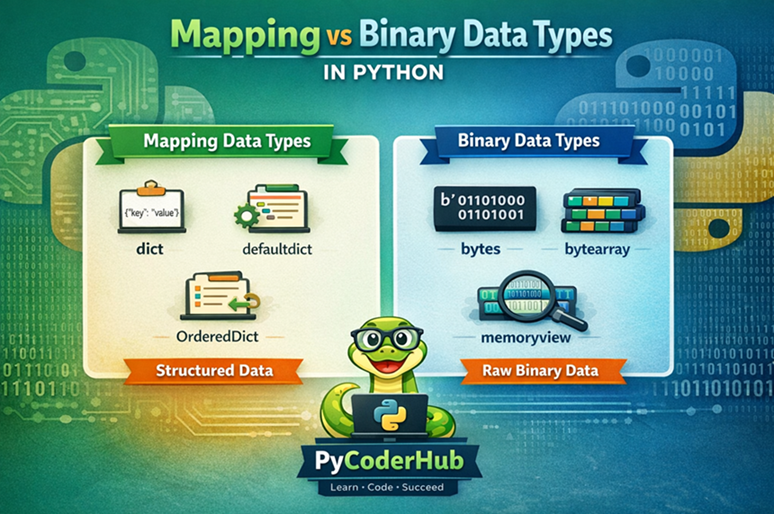
This visual highlights how mapping data types organize structured data, while binary data types handle raw data at a lower level.
Quick Recap
Let’s quickly summarize what you’ve learned about Python Mapping and Binary Data Types:
- Mapping Data Type (
dict) stores data in key-value pairs, making it ideal for structured and labeled data - Dictionaries are mutable, allow fast lookups, and are widely used in real-world applications
- You can create, access, modify, and convert dictionaries easily using built-in methods
- Binary Data Types (
bytes,bytearray,memoryview) work with raw binary data bytesis immutable, whilebytearrayis mutablememoryviewallows efficient access to binary data without copying it
- Encoding and decoding are required when converting between string and binary data
- Binary types are useful in file handling, networking, and performance-critical tasks
Final Thought
- Use mapping data types when working with structured, human-readable data
- Use binary data types when dealing with low-level, performance-oriented data processing
Conclusion
In this lesson, you explored the final part of Python Mapping and Binary Data Types, completing your foundational understanding of Python data types.
Let’s quickly connect everything:
- In the first part, you learned about Python Numeric Data Types (
int,float,bool,None) - In the second part, you explored Python Collection Data Types (
list,tuple,set,string) - And in this final part, you covered the remaining types: mapping (
dict) and binary (bytes,bytearray,memoryview)
Together, these three parts give you a complete picture of how Python stores and manages different kinds of data.
At this stage, you don’t need to master every detail—what matters is that you now understand:
- What each data type is used for
- When to choose one over another
👉 In the next lessons, you’ll move beyond types themselves and start learning the rules and guidelines related to Python data types, helping you write cleaner, more efficient, and error-free code.
This marks an important milestone in your Python journey—well done!
Suggested Posts
- Python Data Types Explained: Beginner-Friendly Introduction
- Python Numeric Data Types Explained (int, float, bool, None)
- Python Collection Data Types Explained (List, Tuple, Set, String)
- Python Data Types Rules and Guidelines: What You Must Know
- Mutable vs Immutable in Python (Data Types Explained with Examples)
- Python Data Types Errors Explained: Common Mistakes and How to Fix Them
- Python Data Types Best Practices: Write Cleaner, Efficient, and Error-Free Code
- Python Data Types FAQs: Clear Answers to Common Questions (Beginner to Advanced)


7 thoughts on “Python Mapping and Binary Data Types Explained (dict, bytes, bytearray, memoryview)”