
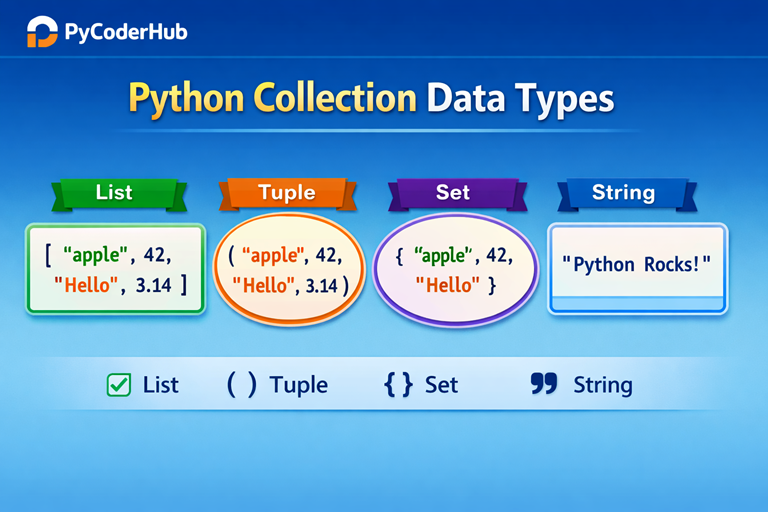
Introduction: Python Collection Data Types
In the previous lesson, you explored Python numeric data types like integers, floats, booleans, and None, which help store single values such as numbers or logical states.
But in real-world programming, you rarely work with just one value at a time.
Think of it like this: instead of storing one item, you often need a container to hold multiple items—like a shopping list, a collection of user names, or a group of values to process together.
That’s where Python collection data types come into the picture.
These data types allow you to store, organize, and manage multiple values efficiently within a single variable—making your code more powerful and practical.
What You’ll Learn
In this lesson, you will build a strong foundation in Python collection data types and understand how they work in real-world scenarios. You’ll learn:
- What collection data types are in Python
- Why collections are important in programming
- Overview of List, Tuple, Set, and String
- Key differences between these data types
- When to use each collection type
- Basic examples for better understanding
- Concepts like ordered vs unordered data
- Mutable vs immutable collections
To make learning simple and structured, this post is divided into three main sections:
- Sequence Data Types (List and Tuple)
- Set Data Type
- Text Data Type (String)
Each section will explain concepts step by step with clear examples so you can easily understand how Python collections work in practice.
Section #1: Python Sequence Data Types
What Are Sequence Data Types?
Imagine you have a playlist of songs or a list of your favorite movies. Each item is arranged in a specific order, and you can access any item by its position.
That’s exactly how sequence data types work in Python.
A sequence data type is an ordered collection of items, where:
- The order of elements is preserved
- Each item has a specific position (index)
- You can access items using their index number
This means the position of each item matters. If you change the order, the meaning or output can also change.
Key Characteristics:
- Stores multiple values in a defined order
- Each item is assigned an index (starting from 0)
- Supports index-based access (retrieve items using position)
Example:
favorite_fruits_list = ["apple", "banana", "mango"]- “apple” is at index 0
- “banana” is at index 1
- “mango” is at index 2
You can access any item like this:
print(favorite_fruits_list[1])Output:
bananaSequence data types form the foundation of working with collections in Python. In the next sections, we’ll explore the most commonly used sequence types.
Types of Sequence Data Types in Python
Python provides several built-in sequence data types, each designed for specific use cases. The most commonly used sequence types are:
List (list)
A list is a flexible and widely used sequence data type that allows you to store multiple items in a single variable.
- Ordered collection
- Mutable (you can modify, add, or remove items)
- Allows duplicate values
- Supports different data types in one list
Example:
student_scores_list = [85, 90, 78, 90]Lists are ideal when your data may change over time.
Tuple (tuple)
A tuple is similar to a list, but with one key difference—it is immutable.
- Ordered collection
- Immutable (cannot be changed after creation)
- Allows duplicate values
- Can store multiple data types
Example:
rgb_color_tuple = (255, 0, 0)Tuples are useful when you want to ensure that data remains constant.
Range (range)
A range is a special sequence type used to generate a sequence of numbers.
- Represents a sequence of numbers
- Commonly used in loops (for loop)
- Memory-efficient (does not store all values explicitly)
Example:
number_sequence_range = range(1, 6)This generates numbers from 1 to 5 (the end value is excluded).
Each of these sequence types has its own purpose, but all follow the same core idea: storing data in an ordered sequence where position matters.
Python Sequence Data Types Comparison: list vs tuple vs range
Now that you understand what sequence data types are, let’s compare the three most important ones: list, tuple, and range.
Think of them like different types of containers:
- A list is like a flexible shopping bag — you can add or remove items anytime
- A tuple is like a sealed box — once packed, you can’t change it
- A range is like a number generator — it creates values on demand instead of storing them
Key Differences at a Glance
| Feature | List (list) | Tuple (tuple) | Range (range) |
|---|---|---|---|
| Mutability | Mutable (can change) | Immutable (cannot change) | Immutable |
| Syntax | [item1, item2] | (item1, item2) | range(start, stop, step) |
| Use Case | Dynamic collections | Fixed collections | Generating number sequences |
| Memory Usage | Higher | Lower than list | Very low (lazy evaluation) |
| Performance | Slightly slower | Faster than list | Very efficient |
| Indexing | Supported | Supported | Supported |
| Slicing | Supported | Supported | Supported |
Type Checking & Type Conversion in Python Sequences
When working with sequence data types, it’s important to identify what type of data you’re dealing with and sometimes convert it into another type depending on your needs.
Think of it like checking a container label before using it — and if needed, transferring the contents into a different container.
In Python, different sequence types behave differently. So before performing operations, it’s a good practice to verify the data type.
1. Type Checking Using type() and isinstance()
Python provides built-in functions to check data types.
Using type()
user_data_collection = ["apple", "banana", "cherry"]

print(type(user_data_collection))
Output:
<class 'list'>Using isinstance() (Recommended)
user_data_collection = ("red", "green", "blue")

print(isinstance(user_data_collection, tuple))
Output:
TrueWhy use isinstance()?
- More flexible and readable
- Works better in real-world programs
- Supports checking against multiple types
2. Type Conversion (Type Casting) Between Sequences
Sometimes, you may need to convert one sequence type into another.
Convert to List
color_tuple_data = ("red", "green", "blue")

color_list_data = list(color_tuple_data)
print(color_list_data)
Convert to Tuple
number_list_data = [1, 2, 3]

number_tuple_data = tuple(number_list_data)
print(number_tuple_data)
Convert to Range (Indirectly)
generated_number_sequence = range(1, 6)

number_list_from_range = list(generated_number_sequence)
print(number_list_from_range)
Note:
- You cannot directly modify a
range - But you can convert it into a list or tuple to work with values
Important Points to Remember
- Type checking helps avoid errors when working with different sequence types
isinstance()is preferred overtype()in most cases- Conversion creates a new object, original data remains unchanged
- Not all conversions are direct (like
range)
Quick Summary
- Use
type()→ for simple type identification - Use
isinstance()→ for safer and flexible checks - Use
list(),tuple()→ to convert between sequence types
Understanding type checking and conversion helps you write more robust, flexible, and error-free Python code, especially when working with multiple data types together.
Section #2: Python Set Data Types
What Are Set Data Types?
Imagine you are collecting unique items like different email IDs or student roll numbers. No matter how many times you try to add the same value, it will only appear once.
That’s exactly how set data types work in Python.
A set data type is a collection of unique and unordered items, where:
- The order of elements is not preserved
- Duplicate values are automatically removed
- Items are stored in a way that focuses on uniqueness rather than position
This means you cannot rely on position (index), and the main focus is storing distinct values only.
Key Characteristics:
- Stores multiple values without any fixed order
- Does not allow duplicate values
- Does not support indexing or slicing
- Focuses on unique data collection
Example:
unique_number_collection = {1, 2, 2, 3, 4}
print(unique_number_collection)
Output:
{1, 2, 3, 4}- Duplicate values are removed automatically
- The order of elements may vary
Set data types are especially useful when you need to store unique values and remove duplicates automatically, without worrying about order.
Types of Set Data Types
Python provides two types of set data types, each designed for different use cases based on whether you want to allow changes or not.
Set (set)
A set is a mutable collection of unique elements. This means you can add, remove, or update items after the set is created.
Think of it like a flexible container where you can keep adjusting the contents, but duplicates are still not allowed.
Example:
user_unique_numbers = {1, 2, 3}

user_unique_numbers.add(4)   # Adding a new value
print(user_unique_numbers)
Output:
{1, 2, 3, 4}Key Points:
- Mutable (can be changed)
- No duplicate values allowed
- Unordered collection
Frozen Set (frozenset)
A frozenset is an immutable version of a set. Once created, you cannot modify its elements.
Think of it like a locked container — you can view the contents, but you cannot change them.
Example:
fixed_unique_values = frozenset([1, 2, 3])
print(fixed_unique_values)
Output:
frozenset({1, 2, 3})Note: If you tryfixed_unique_values.add(4),
you’ll get an error like:AttributeError: 'frozenset' object has no attribute 'add'
Key Points:
- Immutable (cannot be changed)
- No duplicate values allowed
- Unordered collection
Quick Comparison
- Set (
set) → Mutable, flexible - Frozen Set (
frozenset) → Immutable, fixed
Choosing between them depends on whether you need a modifiable collection or a fixed set of unique values.
Type Checking & Type Conversion in Python Set Data Types
When working with set data types, it’s important to know what type of data you are handling and how to convert it when needed.
Just like checking a label on a container before using it, type checking ensures you’re working with the correct data type, while type conversion helps you switch between compatible types.
Why Type Checking Matters?
Set data types (set and frozenset) behave differently from other collections, especially because:
- They are unordered
- They do not allow duplicates
- One is mutable, and the other is immutable
So verifying the type helps avoid unexpected errors.
1. Type Checking Using type() and isinstance()
Using type()
unique_values_set = {1, 2, 3}
print(type(unique_values_set))
Output:
<class 'set'>Using isinstance() (Recommended)
fixed_values_frozenset = frozenset([1, 2, 3])

print(isinstance(fixed_values_frozenset, frozenset))
Output:
TrueWhy prefer isinstance()?
- More flexible
- Works well in real-world conditions
- Can check multiple types at once
2. Type Conversion (Type Casting) with Set Data Types
You can convert other data types into sets to remove duplicates or to perform set operations.
Convert List to Set
number_list_data = [1, 2, 2, 3, 4]

unique_number_set = set(number_list_data)
print(unique_number_set)
Output:
{1, 2, 3, 4}Automatically removes duplicates
Convert Tuple to Set
number_tuple_data = (1, 2, 2, 3)

unique_number_set = set(number_tuple_data)
print(unique_number_set)
Convert Set to Frozen Set
modifiable_set_data = {1, 2, 3}

fixed_frozenset_data = frozenset(modifiable_set_data)
print(fixed_frozenset_data)
Important Points to Remember
- Sets remove duplicates automatically during conversion
- Order is not preserved when converting to/from sets
frozensetcannot be modified after creation- Type conversion creates a new object, original data remains unchanged
Quick Summary
- Use
type()→ for basic type checking - Use
isinstance()→ for safer and flexible checks - Use
set()→ to remove duplicates - Use
frozenset()→ to create immutable sets
Understanding type checking and conversion in set data types helps you manage unique data efficiently and write more reliable Python code.
Section #3: Python Text Data Type (String)
What Is a String in Python?
Imagine you are writing a message, storing a name, or saving a sentence. All of these are examples of text data.
That’s exactly what a string represents in Python.
A string is a data type used to store text (a sequence of characters), where:
- Each character is arranged in a specific order
- You can access characters using their position (index)
- It is enclosed within quotes (
' '," ", or''' ''')
This means strings behave like a sequence, but they are specifically designed to handle text data.
Key Characteristics:
- Stores text as a sequence of characters
- Maintains the order of characters
- Supports indexing and slicing
- Immutable (cannot be changed after creation)
Example:
user_message_text = "Hello, Python!"
print(user_message_text)
Output:
Hello, Python!Understanding Indexing in Strings
Each character in a string has a position (index), starting from 0.
user_message_text = "Python""P"is at index 0"y"is at index 1"t"is at index 2"h"is at index 3"o"is at index 4"n"is at index 5
You can access characters like this:
print(user_message_text[1])Output:
yStrings are one of the most commonly used data types in Python, forming the foundation for handling text-based data such as user input, messages, and file content.
Type Checking & Type Conversion with Strings
When working with strings, it’s important to know how to identify string data and convert other data types into strings (and vice versa when possible).
Think of it like handling text labels — sometimes you need to check if something is already text, and sometimes you need to convert numbers or other values into readable text.
1. Type Checking Using type() and isinstance()
Using type()
user_name_text = "PyCoder"

print(type(user_name_text))
Output:
<class 'str'>Using isinstance()
user_name_text = "PyCoder"

print(isinstance(user_name_text, str))
Output:
True2. Type Conversion (Type Casting) with Strings
You can convert other data types into strings using the str() function.
Convert Number to String
user_age_number = 25

user_age_text = str(user_age_number)
print(user_age_text)
Now the number is converted into text
Convert Boolean to String
user_status_flag = True

user_status_text = str(user_status_flag)
print(user_status_text)
Important Points to Remember
str()converts any data type into a string- Strings must contain valid numeric values for conversion to numbers
- Type conversion creates a new object, original value remains unchanged
Quick Summary
- Use
type()→ to check data type - Use
isinstance()→ for flexible type checking - Use
str()→ to convert data into string
Understanding type checking and conversion with strings helps you handle user input, display data, and data processing more effectively.
Comparing Sequence, Set, and Text Data Types
Now that you’ve learned about sequence, set, and string (text) data types, it’s important to understand how they differ from each other.
Think of it like choosing the right container:
- Sometimes you need ordered data (sequence)
- Sometimes you need unique values only (set)
- And sometimes you need to work with text data (string)
Each data type is designed for a specific purpose.
Key Differences at a Glance
| Feature | Sequence (List/Tuple/Range) | Set (set / frozenset) | String (str) |
|---|---|---|---|
| Order | Ordered | Unordered | Ordered |
| Duplicates | Allowed | Not allowed | Allowed |
| Indexing | Supported | Not supported | Supported |
| Mutability | List (mutable), Tuple (immutable) | Set (mutable), Frozenset (immutable) | Immutable |
| Use Case | General data storage | Unique values | Text handling |
| Data Type Nature | Collection | Collection | Text (sequence of characters) |
Real Code Comparison Example
Let’s see how these data types behave differently with the same kind of data:
# Sequence (List)
number_sequence_list = [1, 2, 2, 3]
print(number_sequence_list)

# Set
unique_number_set = {1, 2, 2, 3}
print(unique_number_set)

# String
text_data_string = "hello"
print(text_data_string)
Output:
[1, 2, 2, 3]
{1, 2, 3}
hello
Understanding the Difference
- List (Sequence) → Keeps order and allows duplicates
- Set → Removes duplicates and does not maintain order
- String → Stores text as ordered characters
Another Example (Indexing Behavior)
number_sequence_list = [10, 20, 30]
text_data_string = "Python"

print(number_sequence_list[1])   # Works
print(text_data_string[1])       # Works

# print(unique_number_set[1])   # Error: sets do not support indexing
Quick Insight
- Use sequence when order matters
- Use set when uniqueness matters
- Use string when working with text
Below is a visual representation comparing sequence (list), set, and string data types to help you quickly understand their key differences.
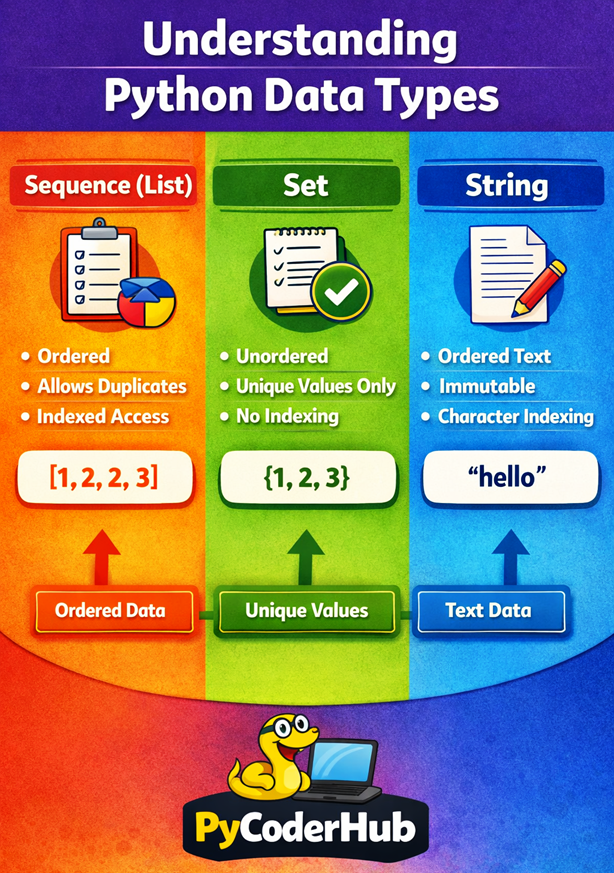
This illustrates the key differences between Python sequence (list), set, and string data types.
Quick Recap
Before moving to the conclusion, let’s quickly revise what you’ve learned in this lesson:
- Sequence Data Types (list, tuple, range) → Ordered collections where position matters and indexing is supported
- Set Data Types (set, frozenset) → Unordered collections that store unique values only
- String (str) → Text data type that stores characters in an ordered sequence
- List → Mutable, allows duplicates, best for dynamic data
- Tuple → Immutable, faster, best for fixed data
- Range → Efficient way to generate number sequences
- Set → Mutable, removes duplicates automatically
- Frozenset → Immutable version of set
- String → Immutable sequence of characters used for text handling
- Type Checking → Use
type()andisinstance() - Type Conversion → Use functions like
list(),tuple(),set(),frozenset(), andstr()
In short:
- Use sequence → when order matters
- Use set → when uniqueness matters
- Use string → when working with text
This recap gives you a solid overview of how different Python data types work and when to use each one.
Conclusion
In this lesson, you explored Python’s core collection and text data types, including sequences, sets, and strings. You learned how each type behaves, when to use it, and how type checking and conversion work in real scenarios. Choosing the right data type helps you write cleaner, more efficient, and error-free code. Mastering these basics builds a strong foundation for more advanced Python concepts ahead.
Suggested Posts
- Python Data Types Explained: Beginner-Friendly Introduction
- Python Numeric Data Types Explained (int, float, bool, None)
- Python Mapping and Binary Data Types Explained (dict, bytes, bytearray, memoryview)
- Python Data Types Rules and Guidelines: What You Must Know
- Mutable vs Immutable in Python (Data Types Explained with Examples)
- Python Data Types Errors Explained: Common Mistakes and How to Fix Them
- Python Data Types Best Practices: Write Cleaner, Efficient, and Error-Free Code
- Python Data Types FAQs: Clear Answers to Common Questions (Beginner to Advanced)

8 thoughts on “Python Collection Data Types Explained (List, Tuple, Set, String)”