
Introduction: Python Numeric Data Types (int, float, bool, None)
In the previous lesson, you learned what data types are in Python, why they matter, and how Python automatically handles different kinds of data behind the scenes. You also explored the main categories of built-in data types and saw a quick overview of how Python organizes them.
Now, it’s time to go one step deeper.
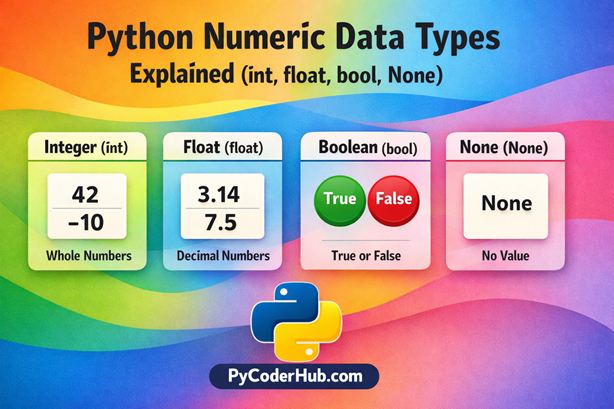
In this lesson, we’ll focus on some of the most fundamental and commonly used data types in Python — the ones you’ll use in almost every program you write. These include numeric values, logical (true/false) values, and situations where no value exists at all.
Think of it like this:
- Numbers help you measure and calculate
- Boolean values help you make decisions
- None helps you represent absence or missing data
Understanding these core data types will build a strong foundation for everything you learn next in Python.
What You’ll Learn in This Lesson
By the end of this lesson, you will be able to:
- Understand what Python Numeric Data Types are (
int,float,complex) - Learn how Python handles numbers automatically using dynamic typing
- Identify and use the Boolean data type (
TrueandFalse) - Understand how Boolean values work in real programs and conditions
- Learn what NoneType is and why it is important
- Compare numeric, boolean, and None values to avoid common confusion
- Check data types using built-in Python functions
- Perform basic type conversions between these data types
- Recognize common beginner mistakes and how to avoid them
How This Lesson Is Structured
Since we are covering three different types of data types in this lesson, we have divided the content into separate sections for each one.
We’ll start with the most commonly used and easiest to understand:
👉 Python Numeric Data Types
Let’s begin.
Section #1: Python Numeric Data Types (int, float, complex)
What Are Numeric Data Types in Python?
Numeric data types in Python are used to store and work with numbers. These numbers can be whole values, decimal values, or even more advanced mathematical forms.
In simple terms, whenever you want to:
- Count something
- Perform calculations
- Measure values
You are working with numeric data types.
For example:
- Age →
25 - Price →
99.99 - Temperature →
-5
All of these are numbers, and Python stores them using numeric data types.
Types of Numeric Data Types in Python
Python mainly supports three types of numeric data types:
- Integer (
int) → Whole numbers (like10,-3,0) - Floating Point (
float) → Decimal numbers (like3.14,99.99) - Complex (
complex) → Numbers with a real and imaginary part (like2 + 3j)
Each of these types is designed for a specific kind of numeric value. Don’t worry—we’ll explore each one with simple examples in the next sections.
Types of Numeric Data in Python
Integer (int)
Integers are used to represent whole numbers—numbers that do not have any decimal or fractional part.
These can include:
- Positive numbers →
10,25,100 - Negative numbers →
-1,-50,-999 - Zero →
0
In Python, integers are one of the most commonly used data types because they are simple and efficient for counting, indexing, and basic calculations.
user_age = 25
temperature_change = -5
total_items_in_cart = 0
In all the examples above, Python automatically recognizes these values as integers (int) without needing any special declaration.
Floating Point (float)
Floating point numbers (or floats) are used to represent decimal numbers—values that contain a fractional part.
These are useful when you need more precision than whole numbers, such as:
- Prices
- Measurements
- Percentages
Examples of float values:
3.1499.99-0.5
product_price = 99.99
pi_value = 3.14159
temperature_reading = -0.5
In Python, any number that contains a decimal point is automatically treated as a float.
- Even a number like
10.0is considered a float, not an integer. - Also, values like
4/3result in a float (e.g.,1.3333...), because division in Python always produces a decimal number.
Floats allow you to perform more precise calculations, but keep in mind that they may sometimes have small rounding differences due to how computers store decimal values internally.
Complex Numbers (complex)
Complex numbers are used to represent values that have both a real part and an imaginary part.
In Python, a complex number is written using j to represent the imaginary part.
For example:
complex_number_example = 2 + 3jHere:
2is the real part3jis the imaginary part
Complex numbers are not commonly used in everyday programming, but they are important in scientific calculations, engineering, and advanced mathematics.
For now, just understand that Python supports complex numbers as a built-in numeric type—you don’t need to go deep into them at this stage.
Python Numeric Data Types Comparison: int vs float vs complex
Understanding the difference between Python numeric data types is important for writing accurate and efficient programs. While all three—int, float, and complex—are used to store numbers, they behave differently depending on the type of value they represent.
Here’s a quick comparison:
- Integer (int) → Stores whole numbers (no decimal point)
- Float (float) → Stores decimal or fractional numbers
- Complex (complex) → Stores numbers with real and imaginary parts
The following is the visual representation to help you quickly understand the differences.
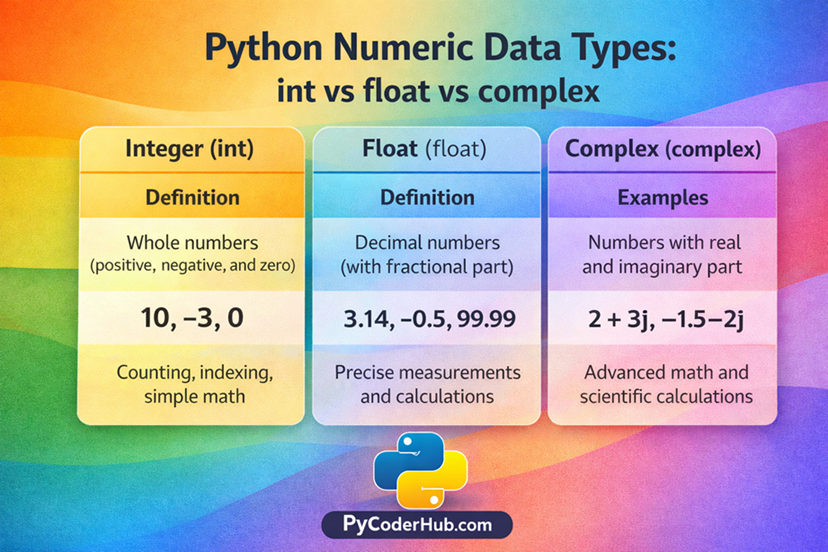
A simple comparison of Python Numeric Data Types showing how int, float, and complex differ in structure and usage.
How Python Automatically Detects Numeric Types
One of the most powerful features of Python is its dynamic typing. This means you don’t need to explicitly tell Python what type of data you are using—Python automatically detects it based on the value you assign.
Dynamic Typing in Action
When you assign a value to a variable, Python decides the data type on its own:
whole_number_value = 10
decimal_number_value = 10.5
complex_number_value = 2 + 3j
In this example:
whole_number_valueis automatically treated as an integer (int)decimal_number_valueis recognized as a float (float)complex_number_valueis identified as a complex number (complex)
You don’t need to write something like int() or float() while assigning values—Python handles it for you.
How Python Decides the Type
Python looks at the format and structure of the value to determine its type:
- If the value has no decimal point → it becomes an
int - If the value includes a decimal point → it becomes a
float - If the value contains a
j(imaginary part) → it becomes acomplex
This automatic detection makes Python code:
- Easier to write
- Cleaner to read
- Beginner-friendly
Checking Numeric Data Types in Python
Even though Python automatically detects data types, it’s often useful to check the type of a value, especially when debugging or learning.
Python provides a built-in function called type() to identify the data type of any value.
Using type() Function
You can use type() to check whether a value is an int, float, or complex:
print(type(10))        # <class 'int'>
print(type(3.14))      # <class 'float'>
print(type(2 + 3j))    # <class 'complex'>
Checking Variable Types
You can also check the type of variables:
user_score = 100
product_price = 49.99
complex_value = 1 + 2j

print(type(user_score))
print(type(product_price))
print(type(complex_value))
Why Use type()?
- Helps you confirm the data type of a value
- Useful for debugging errors
- Important when working with type conversions
Type Conversion Between Numeric Types
In Python, you can easily convert one numeric type into another using built-in functions like int() and float(). This process is called type conversion or type casting.
Converting int → float
You can convert an integer into a float using the float() function:
integer_value = 10
converted_float = float(integer_value)

print(converted_float)   # Output: 10.0
print(type(converted_float))  # Output: float
Python simply adds a decimal point, turning the integer into a float value.
Converting float → int
You can convert a float into an integer using the int() function:
decimal_value = 9.8
converted_integer = int(decimal_value)

print(converted_integer)   # Output: 9
print(type(converted_integer))  # Output: int
Important: When converting from float to int, Python removes the decimal part instead of rounding.
9.8→93.9→3
This is known as loss of data, because the fractional part is discarded.
Why This Matters
- Helps you control how numbers behave in calculations
- Prevents unexpected results when mixing data types
- Important for writing clean and predictable code
We’ll explore type casting in detail in a dedicated chapter, where you’ll learn how to convert between different data types safely, handle errors, and understand advanced conversion rules.
Section #2: Python Boolean Data Type (True or False)
What Is Boolean in Python?
The Boolean data type in Python is used to represent decision-making values. It helps your program decide what to do based on conditions—just like answering a simple yes/no question.
In real life, we constantly make decisions:
- Is the user logged in?
- Is the payment successful?
- Is the age greater than 18?
These types of questions have only two possible answers:
- Yes or No
In Python, these are represented using Boolean values:
True→ Yes / Condition is satisfiedFalse→ No / Condition is not satisfied
Key Point
Unlike numeric types that can store many values, the Boolean data type has only two possible values:
is_user_logged_in = True
is_payment_successful = False
These values are case-sensitive:
TrueandFalseare correct ✅trueandfalseare invalid ❌
Boolean values play a crucial role in controlling the flow of a program, especially when working with conditions, loops, and logical operations.
Types of Boolean Data Type in Python
True
The value True represents a condition that is correct, valid, or satisfied.
It is commonly used when:
- A condition is met
- A comparison returns a positive result
- A decision evaluates to “yes”
is_user_logged_in = True
is_age_valid = True
In simple terms, True means something is happening or allowed.
False
The value False represents a condition that is incorrect, invalid, or not satisfied.
It is used when:
- A condition is not met
- A comparison returns a negative result
- A decision evaluates to “no”
is_payment_successful = False
is_access_granted = False
In simple terms, False means something is not happening or not allowed.
Even though Boolean has only two values, they are extremely powerful because they control how your program makes decisions and behaves in different situations.
Boolean Values Examples
Boolean Values in Real-Life Programming
In real-world programs, Boolean values are used to represent decisions and conditions that control how the program behaves.
For example:
- Is the user logged in? →
TrueorFalse - Has the payment been completed? →
TrueorFalse - Is the entered password correct? →
TrueorFalse
These simple true/false checks help programs decide what action to take next.
Boolean Values in Python Code
In Python, you can directly assign Boolean values to variables:
is_user_logged_in = True
is_payment_successful = False
is_account_active = True
These variables can later be used to control different parts of your program.
How Boolean Works with Conditions
Boolean values are often the result of conditions or comparisons in Python.
user_age = 20
is_adult = user_age >= 18

print(is_adult)  # True
In this example:
- The condition
user_age >= 18is evaluated - Since it is true, Python returns
True
This is how Python uses Boolean values to make decisions and control the flow of a program.
Boolean vs Integer in Python (Important Concept)
At first glance, Boolean and integer values may look completely different—but in Python, they are closely related.
Key Relationship
In Python:
Truebehaves like1Falsebehaves like0
This means Boolean values can act like numbers in certain situations.
print(True + True)    # 2
print(False + 5)      # 5
print(True * 10)      # 10
Here, Python treats:
Trueas1Falseas0
But They Are Not the Same
Even though they behave like numbers, Boolean and integers are different data types.
print(type(True))   # bool
print(type(1))      # int
So:
Trueis Boolean (bool)1is Integer (int)
Why This Can Be Confusing
This behavior can sometimes create confusion for beginners:
print(True == 1)   # True
print(False == 0)  # True
Even though the result is True, it doesn’t mean they are the same type—it only means their values are considered equal in comparison.
Always remember: Boolean values can behave like integers, but they are not the same thing.
Type Checking and Type Casting with Boolean
Just like numeric data types, you can also check and convert Boolean values in Python using built-in functions.
Type Checking for Boolean
You can use the type() function to confirm whether a value is a Boolean:
print(type(True))    # <class 'bool'>
print(type(False))   # <class 'bool'>
This helps you verify that a value is of type bool.
Type Casting with Boolean
Python allows you to convert other values into Boolean using the bool() function.
print(bool(1))     # True
print(bool(0))     # False
Basic idea:
- Non-zero values →
True - Zero →
False
More Examples
print(bool(10))     # True
print(bool(-5))     # True
print(bool(0.0))    # False
Any numeric value that is not zero is treated as True, while zero (in any numeric form) is treated as False.
Important Note:
Type casting to Boolean is commonly used in conditions, but it can sometimes lead to confusion if you don’t clearly understand how different values are interpreted.
We’ll explore Boolean conversions in more detail in a dedicated section on type casting later.
Section #3: Python None Data Type (NoneType Explained)
What Is None in Python?
In Python, None is a special value that represents the absence of a value or no data.
It is not the same as:
0(a number)False(a Boolean value)""(an empty string)
Instead, None means nothing is assigned or available.
user_profile = NoneIn this example, the variable exists, but it doesn’t contain any actual data yet.
Why None Is Important in Python
The None value is very useful in real-world programming:
- Acts as a placeholder for data that will be assigned later
- Represents missing or unknown values
- Used as a default return value in functions when nothing is returned
It helps make your code more clear and intentional when no value is present.
Examples of None in Python
user_name = None
user_age = None
You might use None when:
- Data is not available yet
- A variable is declared but not initialized with real data
- You want to reset a value
Checking None Type
You can use the type() function to check the type of None:
print(type(None)) # <class 'NoneType'>The data type of None is called NoneType, and it has only one value: None.
This makes None unique compared to other data types, because it represents the concept of “no value” rather than storing actual data.
Comparing None with Other Values (Very Important)
One of the most common beginner confusions in Python is understanding how None compares with other values like 0, False, or empty strings.
Remember: None represents absence of value, so it behaves differently from other data types.
None vs 0 (Zero)
print(None == 0) # False0is a numeric valueNonemeans no value
They are completely different, so the result is False
None vs False
print(None == False) # FalseFalseis a Boolean valueNoneis absence of value
Even though both may feel similar, they are not equal
None vs Empty String
print(None == "") # False""is an empty string (still a value)Nonemeans no value at all
So they are not the same
Important Rule
Even if something looks “empty,” it doesn’t mean it is None.
| Value | Meaning |
|---|---|
0 | A number |
False | A Boolean value |
"" | An empty string |
None | No value |
This concept is very important because many bugs in beginner programs happen due to confusion between None, False, and 0.
Comparing Numeric, Boolean, and None Data Types
Understanding each data type individually is important—but knowing how they compare with each other is what truly builds strong Python fundamentals.
This section will help you clearly see the differences between numeric, Boolean, and None data types, so you can avoid common confusion and write better code.
Key Differences Table (Visual Friendly)
| Feature | Numeric (int, float, complex) | Boolean (bool) | None (NoneType) |
|---|---|---|---|
| Purpose | Store numeric values | Represent True/False decisions | Represent absence of value |
| Possible Values | Many (e.g., 10, 3.14) | Only two (True, False) | Only one (None) |
| Example | 25, 99.99, 2+3j | True, False | None |
| Used For | Calculations, measurements | Conditions, decision making | Missing or undefined data |
| Acts Like Number? | Yes | Sometimes (True = 1, False = 0) | No |
| Type Function Output | int, float, complex | bool | NoneType |
Real Code Comparison Example
Let’s see how these data types behave when used together in code:
numeric_value = 0
boolean_value = False
none_value = None

print(numeric_value == boolean_value)   # True
print(boolean_value == none_value)      # False
print(none_value == 0)                  # False
What’s Happening Here?
0 == False→ True
👉 BecauseFalsebehaves like0False == None→ False
👉 Boolean and None are different typesNone == 0→ False
👉 None is not a numeric value
Key Takeaway
- Numeric values store actual numbers
- Boolean values represent decisions
- None represents absence of value
Even if some values look similar, they behave very differently in Python.
Conclusion
In this lesson, you explored the core Python Numeric Data Types, along with Boolean and None, and learned how each plays a unique role in programming. From handling numbers and decisions to representing missing values, these data types form the foundation of Python logic. Understanding their differences and behavior will help you write more accurate and reliable code. As you move forward, this clarity will make learning advanced topics much easier.
Suggested Posts
- Python Data Types Explained: Beginner-Friendly Introduction
- Python Collection Data Types Explained (List, Tuple, Set, String)
- Python Mapping and Binary Data Types Explained (dict, bytes, bytearray, memoryview)
- Python Data Types Rules and Guidelines: What You Must Know
- Mutable vs Immutable in Python (Data Types Explained with Examples)
- Python Data Types Errors Explained: Common Mistakes and How to Fix Them
- Python Data Types Best Practices: Write Cleaner, Efficient, and Error-Free Code
- Python Data Types FAQs: Clear Answers to Common Questions (Beginner to Advanced)

9 thoughts on “Python Numeric Data Types Explained (int, float, bool, None)”