
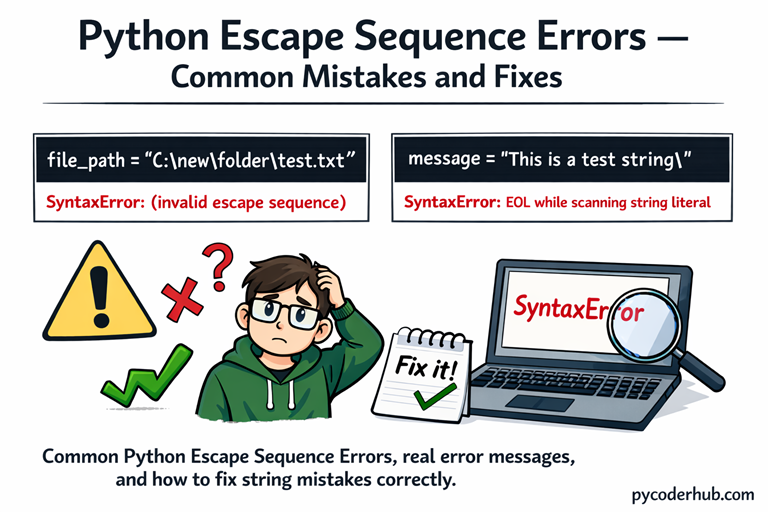
Introduction: Python Escape Sequence Errors & Common Mistakes
In the previous lesson, we learned about Python Escape Sequence Rules and Guidelines — how escape sequences work, when to use them, and how to write them correctly.
Now in this lesson, we’re going one step further.
Even when you understand the rules, Python escape sequence errors can still happen. A small mistake like a missing backslash, an invalid escape character, or an unclosed string can immediately break your code and lead to confusing error messages.
What You’ll Learn
- What Python Escape Sequence Errors are
- The most common escape sequence mistakes beginners make
- Why invalid escape sequence errors happen
- Understanding
SyntaxError: EOL while scanning string literal - Problems caused by Windows file paths (
\n,\t,\u) - When and why to use raw strings (
r"") - How Python interprets backslashes inside strings
- Step-by-step fixes for each common error
- Practical tips to avoid escape sequence confusion in the future
Let’s start with Error #1.
Error #1: Invalid Escape Sequence
What the Error Looks Like
You may see a warning or error like this:
SyntaxWarning: invalid escape sequence '\n'or sometimes:
SyntaxError: invalid escape sequenceWhy This Happens
In Python, the backslash (\) starts an escape sequence.
If you write a backslash followed by a character that does not form a valid escape sequence, Python does not know how to interpret it.
For example, \n is valid (new line).
But something like \d or an incorrectly used \n inside a file path can cause confusion.
Python expects a valid escape pattern — and when it doesn’t get one, it raises an invalid escape sequence error.
Example That Causes the Error
windows_file_path = "C:\new\docs\test.txt"
print(windows_file_path)
Why is this a problem?
Because:
\n→ interpreted as newline\t→ interpreted as tab
Python is not reading this as a file path — it’s interpreting escape sequences inside the string.
How to Fix It
Option 1: Use Double Backslashes
windows_file_path = "C:\\new\\docs\\test.txt"Option 2: Use a Raw String (Recommended)
windows_file_path = r"C:\new\docs\test.txt"Option 3: Use Forward Slashes
windows_file_path = "C:/new/docs/test.txt"How to Avoid This Mistake
- Always be careful when writing Windows file paths
- Remember that
\n,\t,\u,\xhave special meanings - Use raw strings (
r"") when dealing with paths or regex - Never assume
\behaves like a normal character inside strings
Key Takeaway
An invalid escape sequence happens when Python sees a backslash followed by something it doesn’t recognize as valid.
Understanding how Python interprets \ removes this confusion completely and helps you write safer, error-free strings.
Error #2: SyntaxError — EOL While Scanning String Literal
What the Error Looks Like
You may see an error like this:
SyntaxError: EOL while scanning string literal(EOL means End Of Line.)
In newer Python versions, it may appear as:
SyntaxError: unterminated string literalWhy This Happens
This error occurs when Python reaches the end of a line but realizes the string was never properly closed.
In many cases related to escape sequences, this happens because:
- You forgot to close quotation marks
- A backslash (
\) accidentally escapes the closing quote - You ended a line with a single backslash
Remember: the backslash tells Python, “the next character has special meaning.”
If used incorrectly, it can break the structure of your string.
Example 1: Missing Closing Quote
file_message = "This is a test
print(file_message)
Python keeps looking for the closing " — but it never finds one.
Example 2: Backslash Escaping the Quote
file_path = "C:\new_folder\"
print(file_path)
Here’s the problem:
The final \ escapes the closing ", so Python thinks the string continues — but the line ends.
That’s why it raises:
SyntaxError: unterminated string literalHow to Fix It
Option 1: Escape the Final Backslash
file_path = "C:\\new_folder\\"Option 2: Use a Raw String (But Be Careful)
file_path = r"C:\new_folder\\"Important: A raw string cannot end with a single backslash.
This will still cause an error:
file_path = r"C:\new_folder\"Because the final backslash escapes the closing quote even in raw strings.
How to Avoid This Mistake
- Always double-check that strings are properly closed
- Never end a normal string with a single backslash
- Be careful when copying Windows paths
- Remember: raw strings still cannot end with one single
\
Key Takeaway
This error is not random. It happens because Python reaches the end of the line while still expecting the string to continue.
Once you understand how backslashes interact with quotes, this confusion disappears completely.
Error #3: unicodeescape Codec Can’t Decode Bytes
What the Error Looks Like
You may see an error like this:
SyntaxError: (unicode error) 'unicodeescape' codec can't decode bytes in position 2-3: truncated \UXXXXXXXX escapeThis message looks scary — but the cause is actually simple.
Why This Happens
In Python, \u and \U are Unicode escape sequences.
\uexpects exactly 4 hexadecimal digits\Uexpects exactly 8 hexadecimal digits
When Python sees something like:
\UsersIt interprets \U as the beginning of a Unicode escape sequence — not as part of a Windows file path.
Since it does not find 8 valid hexadecimal digits after \U, it raises the unicodeescape error.
This is extremely common when writing Windows paths like:
C:\Users\Name\DocumentsExample That Causes the Error
windows_user_path = "C:\Users\PyCoder\Documents"
print(windows_user_path)
Why is this a problem?
Because:
\U→ Python expects 8 hex digits- It doesn’t find them
- So it throws a Unicode escape error
How to Fix It
Option 1: Use a Raw String (Best Solution)
windows_user_path = r"C:\Users\PyCoder\Documents"Option 2: Use Double Backslashes
windows_user_path = "C:\\Users\\PyCoder\\Documents"Option 3: Use Forward Slashes
windows_user_path = "C:/Users/PyCoder/Documents"All three solutions prevent Python from misinterpreting \U.
How to Avoid This Mistake
- Always use raw strings for Windows paths
- Be extra careful with
\uand\U - Remember that Python automatically treats them as Unicode escapes
- Never assume
\Uis just a normal character combination
Key Takeaway
The unicodeescape error happens because Python thinks you’re trying to write a Unicode escape sequence when you’re actually writing a file path.
Once you understand that \u and \U have special meaning, this confusion becomes easy to avoid.
Error #4: Unexpected Character After Line Continuation Character
What the Error Looks Like
You may see something like:
SyntaxError: unexpected character after line continuation characterAt first glance, this message feels confusing.
Why This Happens
In Python, a backslash (\) at the end of a line is treated as a line continuation character.
That means Python expects the statement to continue on the next line.
If you place any character after that backslash, even a space or a letter, Python raises this error.
The rule is simple:
A line continuation backslash must be the very last character on the line.
Example That Causes the Error
total_sum = 10 + \ 5
print(total_sum)
Problem:
There is a space and a number after the backslash.
Python expected the line to continue — not more characters on the same line.
Another Common Case
file_message = "Hello\ World"Here, \ (backslash + space) is not a valid escape sequence.
Python does not know how to interpret it.
How to Fix It
Option 1: Move the Expression to the Next Line Properly
total_sum = 10 + \
    5
Option 2: Avoid Using Backslash for Line Continuation (Recommended)
Use parentheses instead:
total_sum = (
    10 +
    5
)
This is cleaner, safer, and more readable.
Option 3: Remove the Unnecessary Backslash in Strings
file_message = "Hello World"How to Avoid This Mistake
- Never place any character after a line-continuation backslash
- Avoid using
\for line continuation when parentheses work better - Be careful with backslash + space combinations
- Remember: backslash always has special meaning in Python
Key Takeaway
This error happens because Python treats \ as a special control character — not as a normal symbol.
Once you understand that a backslash must either form a valid escape sequence or be the last character on a line, this confusion disappears.
Error #5: Using Escape Sequences Outside Strings
What the Error Looks Like
You may see errors such as:
SyntaxError: unexpected character after line continuation characteror
SyntaxError: invalid syntaxWhy This Happens
Escape sequences like:
\n(newline)\t(tab)\"(escaped quote)
only work inside strings.
If you try to use them outside quotation marks, Python does not treat them as text — it treats the backslash (\) as a special character.
Outside a string, a backslash is interpreted as:
- A line continuation character
- Or an invalid syntax element
That’s why Python raises an error.
Example That Causes the Error
new_line_character = \nThis is invalid because \n must be inside quotes to represent a newline character.
How to Fix It
Always Use Escape Sequences Inside Strings
print("Hello\nWorld")Assign Escape Characters as Strings
new_line_character = "\n"How to Avoid This Mistake
- Remember: escape sequences belong inside quotation marks
- If it’s not wrapped in
" "or' ', it is not a string - Think of
\n,\t, etc. as string instructions, not standalone code
Key Takeaway
Escape sequences are part of Python string syntax.
Using them outside a string causes errors because Python tries to interpret the backslash as code — not as text.
Once you remember that escape sequences only live inside strings, this confusion disappears.
Error #6: Confusion Between repr() and Printed Output
What the “Error” Looks Like
Sometimes there’s no actual error message — just confusion.
You might write this:
file_message = "Hello\nWorld"
print(file_message)
And see:
Hello
World
But then in the Python interpreter (or debugger), you see:
'Hello\nWorld'And you start wondering:
Why is
\nshowing again? Did it stop working?
Why This Happens
There is a difference between:
print()outputrepr()representation
When you use:
print(file_message)Python displays the interpreted string.
But when you inspect the variable directly in the interpreter:
file_messagePython internally uses:
repr(file_message)The repr() function shows the raw representation of the string, including escape sequences like \n.
It does not execute them — it shows how the string is stored.
Example to Demonstrate the Difference
file_message = "Hello\nWorld"

print(file_message)
print(repr(file_message))
Output:
Hello
World
'Hello\nWorld'
Notice the difference:
print()→ Executes the newlinerepr()→ Shows the escape sequence
How to Avoid This Confusion
- Use
print()when you want to see the actual output - Use
repr()when debugging string content - Remember that
repr()shows the true internal form of the string - Don’t assume escape sequences stopped working
Key Takeaway
There is no bug here.
print() shows the interpreted string.repr() shows the exact internal representation.
Once you understand this difference, a major source of string-related confusion disappears.
Error #7: Mixing Tabs (\t) and Spaces for Precise Text Alignment
What the Problem Looks Like
You try to align text using \t (tab) and spaces together:
print("Name\tAge")
print("PyCoder    25")
But the output looks uneven:
Name    Age
PyCoder    25
The columns don’t line up the way you expected.
Why This Happens
The escape sequence \t inserts a tab character — not a fixed number of spaces.
A tab moves the cursor to the next tab stop (usually every 8 characters, depending on environment).
That means:
\tdoes not always equal 4 spaces- Tab width can vary between editors and terminals
- Mixing tabs and manual spaces causes inconsistent alignment
So even though your code looks aligned, the output may not be.
Example Showing the Confusion
print("Product\tPrice")
print("Book\t100")
print("Notebook\t50")
Output might look like:
Product Price
Book    100
Notebook    50
Notice how the longer word shifts the alignment.
How to Fix It
Option 1: Use String Formatting (Recommended)
print(f"{'Product':<12}{'Price'}")
print(f"{'Book':<12}{100}")
print(f"{'Notebook':<12}{50}")
This ensures consistent column width.
Option 2: Use .ljust() for Alignment
print("Product".ljust(12), "Price")
print("Book".ljust(12), 100)
print("Notebook".ljust(12), 50)
How to Avoid This Mistake
- Do not rely on
\tfor precise layout - Avoid mixing tabs and manual spaces
- Use string formatting for clean alignment
- Remember:
\tdepends on environment settings
Key Takeaway
The \t escape sequence inserts a tab — not a fixed spacing rule.
If you need precise alignment, always use formatting methods instead of mixing tabs and spaces. That removes layout confusion completely.
Error #8: Assuming Escape Sequences Behave the Same in Every Terminal
What the Problem Looks Like
You write something like this:
print("Hello\bWorld")Or:
print("Loading...\rDone")And the output behaves differently depending on:
- Your terminal
- Your IDE console
- Jupyter Notebook
- Windows vs macOS vs Linux
Sometimes it works.
Sometimes it looks broken.
Sometimes it prints strange characters.
This creates confusion.
Why This Happens
Some escape sequences depend on terminal behavior, not just Python.
For example:
\b→ backspace\r→ carriage return\a→ bell (alert sound)\f→ form feed\v→ vertical tab
Python correctly inserts these control characters into the string.
But whether they visibly behave as expected depends on:
- The terminal emulator
- The operating system
- The output environment
Python does its job — the terminal decides what happens next.
Example 1: \b (Backspace)
print("ABC\bD")Expected idea:
\bmoves one character backwardCgets replaced byD
But in some environments you might see:
ABDIn others, you may see strange formatting.
Example 2: \r (Carriage Return)
print("Loading...\rDone")In many terminals, this overwrites the line:
DoneBut in some IDE consoles, you may see:
Loading...
Done
Because the environment does not fully process carriage return behavior.
Example 3: \a (Bell)
print("Warning!\a")On some systems:
- You hear a beep 🔔
On others:
- Nothing happens at all.
Important Understanding
These are called control characters.
They were designed for older terminal systems and printers.
Modern environments may:
- Ignore them
- Partially support them
- Render them differently
This is not a Python error.
It is an environment-dependent behavior.
Error #9: Confusing Escape Sequences with String Methods
What the Confusion Looks Like
Some beginners expect escape sequences like \n or \t to behave like string methods.
For example:
text_value = "Hello\nWorld"They may think:
\nis a formatting tool- It dynamically modifies text
- It works like
.replace()or.split()
But that’s not how escape sequences work.
Why This Confusion Happens
Escape sequences are interpreted when the string is created, not afterward.
For example:
text_value = "Hello\nWorld"Here, \n simply becomes a newline character inside the string.
It is not:
- A method
- A function
- A dynamic formatting rule
It’s just a character embedded in the string.
Once the string is created, \n has already been converted into an actual newline character.
Example to Understand the Difference
text_value = "Hello\nWorld"

print(text_value)
print(len(text_value))
The newline is counted as a single character.
Escape sequences modify how the string is stored — not how it behaves later.
How to Avoid This Confusion
- Remember: escape sequences are part of string literal syntax
- They are not string manipulation tools
- Use string methods like
.replace()or.strip()for modifying strings - Think of escape sequences as special characters, not actions
Key Takeaway
Escape sequences define characters inside a string.
They do not perform operations like string methods.
Understanding this removes a major conceptual confusion.
Error #10: Breaking JSON or Embedded Strings Due to Missing Escapes
What the Error Looks Like
When writing JSON-like or embedded strings, you might do this:
json_data = "{ "name": "Sam" }"This immediately raises a syntax error.
Why?
Because the inner double quotes are not escaped.
Why This Happens
Python sees:
"{ "and assumes the string ends at the second double quote.
The remaining text becomes invalid syntax.
When embedding quotes inside a string, they must either:
- Be escaped
- Or use different outer quotes
Correct Solutions
Option 1: Escape the Inner Quotes
json_data = "{ \"name\": \"Sam\" }"Option 2: Use Single Quotes Outside (Cleaner)
json_data = '{"name": "Sam"}'This avoids unnecessary escaping.
Another Common Embedded Case
html_snippet = "<div class="container">Hello</div>"This breaks for the same reason.
Correct version:
html_snippet = '<div class="container">Hello</div>'or:
html_snippet = "<div class=\"container\">Hello</div>"How to Avoid This Mistake
- Choose outer quotes carefully
- Escape inner quotes when necessary
- Be extra careful when writing JSON, HTML, or SQL strings
- When possible, use proper libraries instead of manual string building
Key Takeaway
Missing escapes inside embedded strings is one of the most common real-world string errors.
Always check how quotation marks interact inside your string literals.
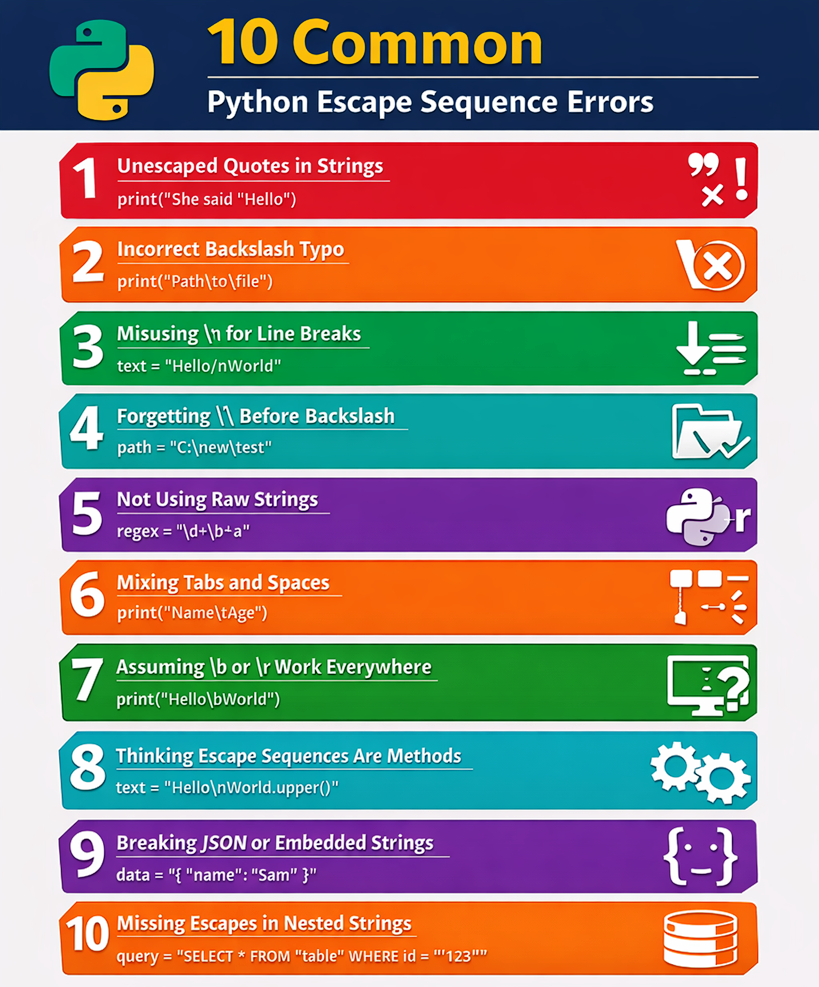
Python Escape Sequence Errors — Quick Summary
Below is an infographic representation summarizing all the escape sequence errors we explored in this lesson.
Use it as a quick visual recap to reinforce the concepts and avoid these mistakes in your own Python code.
Final Conclusion
Escape sequences may look small, but misunderstanding them can lead to confusing bugs and unexpected behavior. From unescaped quotes to terminal-dependent control characters, each mistake we covered reflects a common real-world issue. Once you understand how Python interprets backslashes and special characters, these errors become completely logical. Master this foundation, and string handling in Python will feel predictable and fully under your control.
Suggested Posts:
1. Python Escape Sequences Explained: Meaning, Purpose, and How They Work
2. How Common Python Escape Sequences Work: \n, \t, \, and Quotes Explained
3. Less Common Python Escape Sequences: \r, \b, \f, Unicode and More
4. Python Escape Sequence Rules: Syntax Requirements and Usage Guidelines
5. Python Escape Sequences Best Practices – Complete Guide
6. Python Escape Sequences FAQ – Common Questions, Confusion & Clear Answers

4 thoughts on “Python Escape Sequence Errors: Common Mistakes, Error Messages & How to Fix Them”