
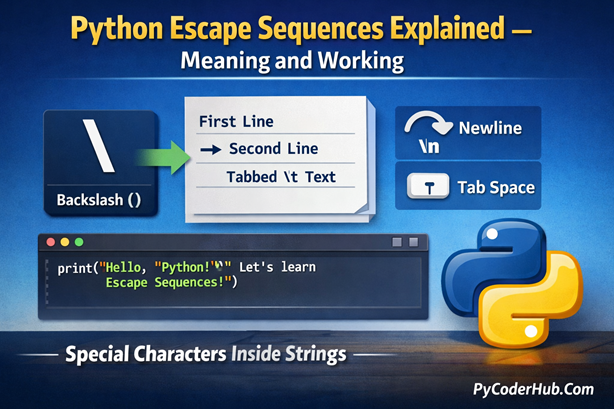
Introduction: Python Escape Sequences Explained
Have you ever run into a message like SyntaxError: EOL while scanning string literal and wondered what went wrong? Or maybe you typed a Windows path like "C:\Users\NewFolder" and Python objected because of \N? If that sounds familiar, you’ve already crossed paths with Python escape sequences — even if you didn’t know that’s what was happening behind the scenes.
At first glance, escape sequences look simple—just a backslash \ followed by a character.
But they play a powerful role in Python by controlling text formatting and allowing special characters inside strings.
In this complete lesson, we’ll break everything down step by step—starting from the very basics and gradually moving toward practical and slightly advanced concepts.
What You’ll Learn
- What an escape character is
- What an escape sequence means
- Why Python needs escape sequences
- How Python interprets them internally
- The full list of Python escape sequences
- Commonly used escape sequences (brief overview)
- Common beginner mistakes (brief overview)
- Why escape sequences don’t work in raw strings
- Why
repr()is important when working with strings
Now, before we start understanding escape sequences, there is often confusion between an escape character and an escape sequence. They sound similar, but they are not the same thing. So first, let’s begin with the most basic concept—the escape character.
Section 1: What Is an Escape Character in Python?
Before understanding escape sequences, we must clearly understand one small but powerful symbol:
\This symbol (backslash) is called the escape character in Python.
Definition
An escape character is a special character that tells Python:
“The next character should not be treated normally.”
In Python, the backslash \ is used as the escape character.
It does not usually appear in the final output.
Instead, it modifies the meaning of the character that comes after it.
Why Is It Called “Escape”?
The word escape means “to break away” or “to avoid the usual rule.”
Normally, certain characters in Python strings have special meaning.
For example:
- A double quote
"ends a string. - A single quote
'ends a string. - A newline moves text to the next line.
But what if you want to use those characters inside a string without ending it?
That’s where the escape character comes in.
It allows the next character to escape its normal behavior.
Simple Example
Consider this:
print("He said, "Hello"")This will cause an error because Python thinks the string ends before Hello.
Now look at this:
print("He said, \"Hello\"")Here, the backslash \ tells Python:
“Do not treat this double quote as the end of the string.”
So the output becomes:
He said, "Hello"In this case:
\= escape character\"= escape sequence
(We’ll fully understand escape sequences in the next section.)
Important Things to Remember
- The escape character in Python is always a backslash
\. - It affects only the character immediately after it.
- It usually does not appear in the final printed output.
- It changes how Python interprets the next character.
Key Point
Think of the escape character as a signal.
Whenever Python sees a backslash inside a string, it pauses and checks:
“Should I treat the next character differently?”
And that small pause changes everything.
Now that you clearly understand what an escape character is, the next step is to understand what happens when it combines with another character.
Let’s move to the next section and understand what an escape sequence is.
Section 2: What Is an Escape Sequence in Python?
Now that you understand the escape character (\), let’s move one step forward.
When the escape character is combined with another character, it forms something called an escape sequence.
Definition
An escape sequence is a combination of:
- The escape character
\ - Followed by another character (or characters)
Together, they represent a special meaning inside a string.
Escape character + another character = Escape sequence
In simple words:
An escape sequence is a group of characters that begins with the escape character (
\). Together, these characters represent one special character or instruction inside a string—either to include characters with special meaning or to control how the text is formatted.
For example:
\n→ New line\t→ Tab space\"→ Double quote inside a string\\→ A literal backslash
Each of these is an escape sequence.
Why It Matters
An escape sequence does not display exactly as it is written in the code.
Instead, Python interprets it and converts it into a special character.
Let’s compare two examples:
print("Hello World!")
print("Hello \nWorld!")
Output:
Hello World!
Hello
World!
Look carefully at the second line.
You wrote \n, but Python did not print \n.
Instead, it inserted a newline and moved World! to the next line.
This shows an important truth:
Escape sequences are instructions, not literal text.
When Python sees \n, it does not treat it as two separate characters (\ and n).
It interprets it as a command to create a new line.
That is why escape sequences matter — they control how text behaves, not just how it looks in code.
Escape Character vs Escape Sequence (Clear Difference)
This is where many beginners experience confusion.
| Concept | Meaning |
|---|---|
| Escape Character | The backslash \ alone |
| Escape Sequence | \ + another character that creates special meaning |
Easy Way to Remember
Escape character = the trigger
Escape sequence = the instruction
You cannot have an escape sequence without an escape character.
Important Points
An escape sequence is how Python represents:
- Special formatting
- Special characters
- Characters that cannot be typed directly
It allows you to control how text behaves inside a string.
Now that you understand what an escape sequence is, the next important question is:
Why do we even need them in the first place?
Let’s explore that next.
Section 3: Why Do We Need Escape Sequences?
At this point, you understand:
\is the escape character\n,\t,\"are escape sequences
But an important question remains:
Why do we need them at all?
Why couldn’t Python just treat everything as normal text?
The answer is simple:
Because some characters have special meaning in Python, and sometimes we need to control how text behaves inside strings.
1. To Include Special Characters Inside Strings
Some characters are used to define strings themselves.
For example:
print("Python is "powerful"")This causes an error because Python thinks the string ends before powerful.
To include quotes inside a string safely, we use escape sequences:
print("Python is \"powerful\"")Escape sequences allow us to include characters that would otherwise break the code.
2. To Format Text Properly
Escape sequences help us control formatting.
Example:
print("Name:\nAge:\nCity:")Output:
Name:
Age:
City:
Here, \n creates a new line.
Without escape sequences, formatting multi-line output would be difficult and messy.
3. To Insert Invisible Characters
Some characters cannot be typed directly from the keyboard.
Examples:
- Newline
- Tab
- Backspace
- Unicode symbols
Escape sequences allow us to represent these characters in a readable way inside code.
4. To Work with File Paths (Especially on Windows)
Windows file paths use backslashes:
C:\Users\Documents\NewFolderBut in Python, backslash starts an escape sequence.
So writing:
file_path = "C:\Users\NewFolder"May cause problems because \U and \N are treated as escape sequences.
To fix this, we either:
- Escape the backslashes:
"C:\\Users\\NewFolder" - Or use raw strings (which we’ll discuss later)
Escape sequences help Python correctly interpret such paths.
5. To Represent Unicode and Special Symbols
Python supports Unicode characters using escape sequences like:
\uXXXX\UXXXXXXXX
This allows us to include special symbols and international characters inside strings.
Key Points
In simple terms:
Escape sequences exist because strings are not just text — they are instructions for how text should behave.
Escape sequences are not optional decorations.
They are a fundamental part of how Python understands and processes strings.
Now that you know why they are needed, the next step is even more interesting:
How does Python actually interpret them internally?
Let’s move to Section 4.
Section 4: How Python Interprets Escape Sequences
Understanding what escape sequences are is good.
But understanding when and how Python interprets them is what builds real clarity.
This is where many beginners experience confusion.
Step 1: Interpretation Happens While Reading the String Literal
When Python sees a string like this:
print("Hello\nWorld")Python does not store the characters \ and n separately in memory.
Instead, during parsing (before execution), Python:
- Sees the backslash
\ - Checks the next character
- Recognizes
\nas a valid escape sequence - Replaces it with an actual newline character
So internally, the string becomes:
Hello
World
The conversion happens before the program runs.
Important: It Happens at Parse Time
Escape sequence interpretation happens when Python reads your source code — not when print() runs.
That means:
- The string is already processed
- The escape sequence is already converted
print()just displays the final result
This is a very important concept.
What Is Actually Stored in Memory?
Let’s experiment mentally.
If you write:
text_value = "Line1\nLine2"In memory, Python stores:
Line1- newline character
Line2
It does not store \ and n.
The escape sequence is converted into a real character.
What Happens with Invalid Escape Sequences?
If Python sees something like:
text_value = "Hello\qWorld"Python does not recognize \q as a valid escape sequence.
In modern Python versions, this usually produces a warning (and may become an error in stricter contexts).
This is because:
After seeing
\, Python expects a valid escape sequence.
Summary
When Python reads a string literal:
- It scans character by character.
- If it finds a normal character → store it directly.
- If it finds a backslash
\→ check the next character. - If it forms a valid escape sequence → convert it.
- If not → raise warning or error.
That’s the full internal logic.
Now that you understand how Python interprets escape sequences internally, the next logical step is to see the complete list of escape sequences Python supports.
Let’s move to Section 5.
Section 5: List of Python Escape Sequences
Python provides several built-in escape sequences that allow you to represent special characters and control how text behaves inside strings.
All escape sequences:
- Begin with a backslash (
\) - Are interpreted by Python as a single special character or instruction
Below is a categorized list of Python escape sequences with short explanations. (We’ll explore examples in the next section.)
Commonly Used Escape Sequences
\n – New line (moves the cursor to the next line)\t – Horizontal tab (adds spacing or alignment)\\ – Backslash\' – Single quote\" – Double quote
Whitespace and Formatting Escape Sequences
\r – Carriage return (moves cursor to the beginning of the line)\b – Backspace (removes the previous character)\f – Form feed (page break, rarely used today)\v – Vertical tab (rarely used)
Numeric and Character Code Escape Sequences
\ooo – Character with octal value ooo\xhh – Character with hexadecimal value hh\N{name} – Unicode character by name from the Unicode database\uXXXX – Unicode character with 16-bit hexadecimal value\UXXXXXXXX – Unicode character with 32-bit hexadecimal value
String and Encoding Related Escape Sequences
\a – Bell / alert (may produce a sound depending on system)\0 – Null character
Line Continuation Escape Sequence
\ (at the end of a line) – Allows a string to continue onto the next line without inserting a newline
Important Note for Beginners
Not all escape sequences are commonly used in everyday programming.
The most frequently used ones are:
\n, \t, \\, \', and \"
The remaining sequences exist for completeness, system compatibility, and advanced text handling (especially Unicode and encoding).
Understanding what each escape sequence does will help you write safer, clearer, and more predictable Python strings.
In this lesson, we won’t go deep into every escape sequence.
Instead, to build a strong foundation, we’ll now focus on a few of the most commonly used escape sequences and understand how they behave with simple, practical examples.
Let’s move to Section 6.
Section 6: Commonly Used Escape Sequences (With Examples)
In the previous section, you saw the complete list of Python escape sequences.
Now, let’s briefly understand the most commonly used ones with simple examples.
We’ll focus only on:
\n, \t, \\, \', and \"
\n – New Line
Moves the text to the next line.
print("Hello\nWorld")Output:
Hello
World
Here, \n inserts a newline between Hello and World.
\t – Horizontal Tab
Adds spacing (tab space) between text.
print("Name:\tPyCoder")Output:
Name: PyCoderIt is commonly used for alignment.
\\ – Backslash
Used to print a literal backslash.
print("C:\\Users\\Documents")Output:
C:\Users\DocumentsSince \ is the escape character, we must escape it to print it.
\' – Single Quote
Used to include a single quote inside a single-quoted string.
print('It\'s Python')Output:
It's PythonWithout the escape sequence, the string would end early.
\" – Double Quote
Used to include double quotes inside a double-quoted string.
print("He said, \"Python is powerful\"")Output:
He said, "Python is powerful"Here, we only learned these escape sequences briefly to understand their basic behavior.
Click here for the complete detailed guide on Python escape sequences, where we’ll explore each one with deeper explanations and practical scenarios.
Section 7: Why Escape Sequences Don’t Work with Raw Strings
By now, you understand that escape sequences like \n and \t are interpreted by Python and converted into special characters.
But something interesting happens when we use raw strings.
What Is a Raw String?
A raw string is created by adding the letter r before the string:
print(r"Hello\nWorld")Output:
Hello\nWorldNotice something important:
Python did not convert \n into a newline.
It printed \n exactly as written.
Why Does This Happen?
Normally, when Python reads a string, it interprets escape sequences during parsing.
But when you use a raw string:
Raw strings disable escape sequence interpretation.
Instead, it treats it as a normal character.
So:
"Hello\nWorld"→\nbecomes a newliner"Hello\nWorld"→\nstays as\n
This is the key difference.
Important Limitation of Raw Strings
Raw strings disable the interpretation of escape sequences like \n and \t.
But they do not disable the rule that:
A backslash can escape a quote during parsing.
So if a raw string ends with a single backslash:
r"C:\Users\"Python cannot determine where the string ends.
The final backslash appears just before the closing quote, and this prevents Python from properly recognizing the quote as the end of the string.
So remember:
Raw strings disable escape sequences, but they do not disable the rule that Python must correctly detect where the string ends.
Section 8: What Happens When You Use a Wrong Escape Sequence?
Now that you understand valid escape sequences like \n and \t, an important question arises:
What happens if you write an escape sequence that Python does not recognize?
Let’s see.
Example of an Invalid Escape Sequence
print("Hello \hWorld!")Here, \h is not a valid escape sequence in Python.
What Python Does
In modern Python versions:
- Python raises a SyntaxWarning
- The program still runs
- The backslash is treated as a normal character
Output:
Hello \hWorld!
SyntaxWarning: "\h" is an invalid escape sequence
So:
- Parsing does not fail
- Execution continues
- But Python warns you
Why It’s Only a Warning (Not an Error)
Historically, Python allowed unknown escape sequences.
To avoid breaking older code, Python:
- Keeps the characters literally
- Issues a warning instead of stopping execution
However, future versions of Python may become stricter.
So warnings should not be ignored.
When Does It Become an Error?
Some escape sequences are strictly validated.
For example:
print("\u123")This will raise a SyntaxError, because:
\urequires exactly 4 hexadecimal digits- The sequence is incomplete
In this case:
- Parsing fails
- Execution never begins
Key Points
When you use a wrong escape sequence:
- If Python can safely treat it as literal text → You get a warning
- If the sequence is structurally invalid (like incomplete Unicode) → You get a SyntaxError
Understanding this helps you avoid subtle bugs and write cleaner strings.
Section 9: How Escape Sequences Affect String Length in Python
When you type a string, what you see is not always what Python stores.
This is one of the most important things to understand about escape sequences:
Escape sequences may look like two characters, but after parsing, they often become one single character in memory.
Let’s prove this using the built-in len() function.
Normal String (No Escape Sequence)
greeting_message = "Hello"
print(len(greeting_message))
Output:
5This is simple.
Python counts:
- H
- e
- l
- l
- o
Total = 5 characters.
Newline Escape Sequence (\n)
text_with_newline = "Hi\n"
print(len(text_with_newline))
At first glance, you might think:
- H
- i
- \
- n
That looks like 4 characters.
But the output is:
3Why?
Because during parsing, Python converts \n into a single newline character.
So internally Python stores:
- H
- i
- (newline)
That’s only 3 characters.
Double Backslash (\\)
windows_path_fragment = "C:\\"
print(len(windows_path_fragment))
You typed:
- C
- :
- \
- \
That’s 4 visible characters.
But the output will be:
3Why?
Because \\ becomes a single backslash after parsing.
So Python stores:
- C
- :
- \
Only 3 characters.
Invalid Escape Sequence (\h)
Now let’s look at a wrong escape sequence:
text_with_invalid_escape = "Hello \h"
print(len(text_with_invalid_escape))
In many IDEs (like PyCharm), this runs with a warning:
SyntaxWarning: "\h" is an invalid escape sequenceBut the program still executes.
Why?
Because \h is not a valid escape sequence, so Python keeps it literally as:
- \
- h
That means both characters are stored.
So len() counts them separately.
Important Points
Now you can clearly see:
| What You Type | What Python Stores | Character Count |
|---|---|---|
\n | One newline character | 1 |
\\ | One backslash | 1 |
\h | Backslash + h | 2 |
This proves something very important:
Escape sequences are interpreted during parsing, and that affects how many characters are actually stored in memory.
Section 10: Why repr() Is Important for Escape Sequences
By now, you understand that escape sequences are interpreted during parsing.
Some sequences become a single character (\n), while invalid ones remain literal (\h).
But sometimes, when you print a string, you cannot clearly see what is actually stored inside it.
That’s where repr() becomes useful.
What repr() Does
The repr() function shows the official string representation — the exact way Python stores the string internally.
Example:
text_with_newline = "Hi\n"
print(text_with_newline)
print(repr(text_with_newline))
Output:
Hi

'Hi\n'
Notice the difference:
print()shows the interpreted resultrepr()shows the actual stored representation
Why This Matters
When learning escape sequences, confusion often happens because:
\ncreates a real line break\\becomes a single backslash- Invalid escapes may show warnings
repr() removes that confusion by showing the string exactly as Python understands it.
Tip: If escape sequences ever feel confusing: Use
repr().
It lets you see the string the same way Python sees it — and that clarity makes debugging much easier.
Final Conclusion
Escape sequences may look simple, but they reveal how Python actually reads and stores strings.
You learned how parsing interprets sequences like \n, why raw strings behave differently, and what happens with invalid escapes.
You also saw how len() and repr() help remove confusion by showing what Python truly stores in memory.
Now, you’re not just using escape sequences — you understand how the interpreter handles them.
Suggested Posts:
1. How Common Python Escape Sequences Work: \n, \t, \, and Quotes Explained
2. Less Common Python Escape Sequences: \r, \b, \f, Unicode and More
3. Python Escape Sequence Rules: Syntax Requirements and Usage Guidelines
4. Python Escape Sequence Errors: Common Mistakes, Error Messages & How to Fix Them
5. Python Escape Sequences Best Practices – Complete Guide
6. Python Escape Sequences FAQ – Common Questions, Confusion & Clear Answers

6 thoughts on “Python Escape Sequences Explained: Meaning, Purpose, and How They Work”