
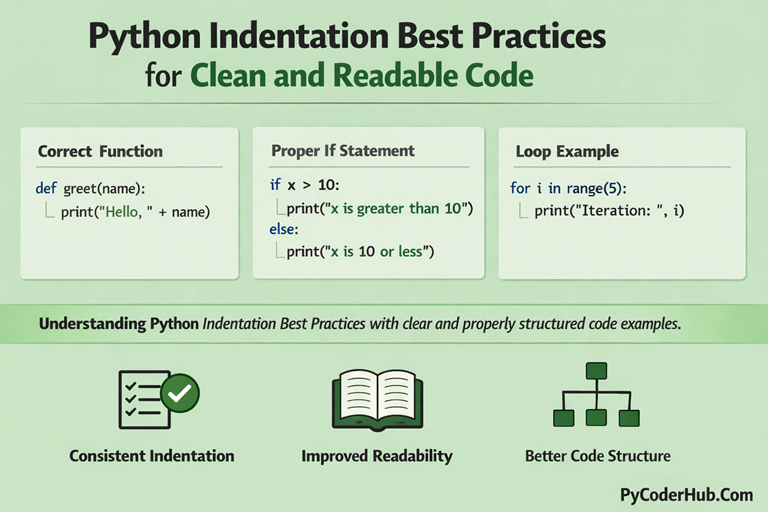
Introduction: Python Indentation Best Practices
We already learned what indentation is in Python, and we also explored the rules and common errors related to it. Now that you understand how indentation works and what can go wrong, it’s time to focus on writing cleaner and more professional code.
In this lesson, we will learn Python Indentation Best Practices that help you write clean, readable, and well-structured Python programs. These best practices will improve your coding style and make your programs easier to understand and maintain.
What You’ll Learn
In this post, you will learn:
- Why Python Indentation Best Practices are important
- How to use consistent 4-space indentation
- How to keep indentation clean and uniform throughout your code
- How to properly align nested blocks (if, loops, functions, classes)
- Why avoiding deep nesting improves readability
- How blank lines help structure your code
- How PEP 8 recommendations support better indentation
- How tools and editors can help maintain clean indentation
Before we start learning best practices, first understand why best practices matter for indentation. This will help you see the real value behind writing properly structured Python code.
Why Python Indentation Best Practices Matter
Before learning the actual techniques, it’s important to understand why Python Indentation Best Practices matter in real-world coding.
Improves Code Readability
Readability is one of the biggest strengths of Python. But that readability only works when indentation is clean and consistent.
When you follow Python Indentation Best Practices:
- Code blocks are clearly visible
- Logical sections are easy to identify
- Nested structures are easy to follow
- The program looks organized
Remember:
Good developers write code for humans first, computers second.
Makes Program Flow Clear
Python uses indentation to define blocks of code. That means indentation directly controls:
- What runs
- When it runs
- Under which condition it runs
When indentation follows best practices:
- Conditional blocks are clearly separated
- Loops are visually structured
- Functions have well-defined boundaries
- Classes look organized and predictable
Without proper indentation practices, even simple logic can look confusing.
Reduces Confusion in Nested Blocks
Nested blocks are where indentation becomes even more important.
Consider situations like:
- if statements inside loops
- loops inside functions
- conditionals inside conditionals
Without consistent indentation:
- It becomes hard to identify which block belongs where
- Logical mistakes become harder to detect
- Debugging becomes frustrating
Deep nesting is already complex. Poor indentation makes it worse.
Clean indentation reduces mental load and prevents confusion.
Helps Maintain Consistency Across Projects
Consistency is a professional habit.
If you use different indentation styles in different files, it creates visual inconsistency. This may not break the program, but it affects code quality.
Best practices ensure:
- Same indentation width everywhere
- Same formatting style across files
- Predictable structure throughout the project
When you follow consistent indentation practices:
- Your projects look professional
- Maintenance becomes easier
- Code review becomes faster
Consistency builds trust in your codebase.
In the next sections, we will explore the exact best practices you should follow to write clean and readable Python code.
Best Practice #1: Use 4 Spaces per Indent Level
In Python, indentation is not just for readability — it defines the structure of your program. That’s why following the correct indentation standard is very important.
According to PEP 8, Python officially recommends using 4 spaces for each indentation level. This keeps your code clean, consistent, and easy to understand across different editors and teams.
Why 4 Spaces?
- It creates a clear visual separation between blocks.
- It improves readability.
- It prevents formatting confusion.
- It matches professional Python coding standards.
Avoid This (❌): Wrong Indentation
if user_age > 18:
  print("Adult user")
Using 2 spaces may still run, but it does not follow the standard practice.
Do This (✔): Correct Indentation
if user_age > 18:
    print("Adult user")
The 4-space indentation inside the if block.
Tip
Configure your code editor to automatically insert 4 spaces when you press the Tab key. This helps maintain consistency in every Python project.
Following this simple rule makes your code look professional and reduces confusion while working on larger programs.
Best Practice #2: Never Mix Tabs and Spaces
One of the most common indentation mistakes in Python is mixing tabs and spaces. It may look fine in your editor, but Python treats them differently — and that can cause unexpected errors.
Even worse, the code might look properly aligned but still raise an IndentationError when executed.
Avoid This (❌): Mixed Indentation
if user_logged_in:
	print("Welcome back!")   # This line uses a tab
    print("Access granted")  # This line uses spaces
Here, one line uses a tab, and the other uses spaces. This creates hidden formatting confusion.
Do This (✔): Use Only Spaces
if user_logged_in:
    print("Welcome back!")
    print("Access granted")
Now both lines use 4 spaces, keeping indentation consistent and error-free.
Why This Rule Matters
- Prevents
IndentationError - Avoids hidden formatting confusion
- Keeps code consistent across different editors
- Makes collaboration easier in team projects
Tip
Set your editor to:
- Insert spaces instead of tabs
- Automatically convert tabs to 4 spaces
Consistency is key. When it comes to Python indentation, never mix tabs and spaces — ever.
Best Practice #3: Keep Indentation Consistent Throughout the File
In Python, consistency is everything. Even if your indentation is technically correct, inconsistent spacing can make your code messy and hard to read.
Your entire file should follow the same indentation pattern from top to bottom — no random changes, no uneven spacing.
Avoid This (❌): Inconsistent Indentation
def calculate_discount(price_value):
    if price_value > 100:
        discount_amount = 20
      final_price = price_value - discount_amount
        return final_price
Here, one line is misaligned. Even small inconsistencies can break the program or cause logical confusion.
Do This (✔): Consistent Indentation
def calculate_discount(price_value):
    if price_value > 100:
        discount_amount = 20
        final_price = price_value - discount_amount
        return final_price
Now every line inside the if block is aligned properly with 4 spaces.
Why Consistency Matters
- Makes code visually structured
- Reduces logical confusion
- Prevents accidental indentation errors
- Makes debugging much easier
- Improves collaboration in team projects
Tip
Once you choose 4 spaces (recommended), stick with it everywhere — functions, loops, conditionals, classes — everything.
Clean indentation = clean thinking.
Best Practice #4: Indent Code Only Inside Code Blocks
In Python, indentation defines what belongs to a block. So you should only indent code that is logically part of a structure like if, for, while, def, or class.
If you indent code that doesn’t belong inside a block — or forget to indent code that should — your program logic changes.
Avoid This (❌): Wrong Block Structure
if user_score > 50:
print("User passed")
print("Checking completed")
Here, the first print() should be inside the if block, but it is not indented — this will raise an error.
Another Logical Mistake (❌)
if user_score > 50:
    print("User passed")
    print("Checking completed")
In this case, both lines are inside the if block. If you only wanted the first message conditional, this changes the logic.
Do This (✔): Correct Block Structure
if user_score > 50:
    print("User passed")

print("Checking completed")
Now:
- The first line runs only if the condition is true.
- The second line runs always.
Why This Rule Matters
- Indentation controls execution flow
- Prevents logical confusion
- Makes program behavior predictable
- Keeps your code structure clean
Tip
Before running your program, quickly scan your indentation. Ask yourself:
“Does this line truly belong inside this block?”
In Python, indentation is not decoration — it defines what runs and when it runs.
Best Practice #5: Avoid Deep Nesting
Deeply nested code (too many indented levels) makes your program harder to read, understand, and maintain. When indentation keeps moving further right, confusion increases.
Python encourages writing flat and readable code instead of deeply nested structures.
Avoid This (❌): Too Much Nesting
if user_is_active:
    if user_has_subscription:
        if user_payment_status == "verified":
            if user_region == "India":
                print("Access granted")
This works, but it becomes difficult to read and debug as nesting increases.
Do This (✔): Cleaner Structure
if not user_is_active:
    return

if not user_has_subscription:
    return

if user_payment_status != "verified":
    return

if user_region == "India":
    print("Access granted")
Now the code is flatter, cleaner, and easier to follow.
Why This Rule Matters
- Improves readability
- Reduces logical confusion
- Makes debugging easier
- Follows clean coding principles
- Keeps indentation manageable
Tip
If your code goes beyond 3–4 indentation levels, consider restructuring it.
Use early returns, helper functions, or simplified conditions.
Cleaner indentation leads to cleaner thinking.
Best Practice #6: Indent Multi-Line Statements Properly
Sometimes a single line of code becomes too long. In such cases, you may break it into multiple lines. But when you do, indentation must clearly show that the statement continues.
Improper alignment in multi-line statements creates visual confusion and reduces readability.
Avoid This (❌): Unclear Continuation Indentation
total_price = base_product_price + tax_amount +
shipping_charge + service_fee
This looks broken and hard to read.
Do This (✔): Use Parentheses for Clean Indentation
total_price = (
    base_product_price
    + tax_amount
    + shipping_charge
    + service_fee
)
Now the continuation lines are clearly indented and easy to understand.
Another Clean Approach (✔)
if (
    user_is_active
    and user_has_subscription
    and user_payment_status == "verified"
):
    print("Access granted")
This structure improves readability without increasing confusion.
Why This Rule Matters
- Makes long statements readable
- Prevents formatting confusion
- Keeps logical grouping clear
- Follows clean Python style practices
Tip
When breaking long lines:
- Use parentheses instead of backslashes
- Align continuation lines clearly
- Keep indentation visually structured
Proper continuation indentation keeps your code clean and professional.
Best Practice #7: Let Tools Enforce Indentation
Even experienced developers make indentation mistakes. That’s why professional Python developers rely on formatting tools to automatically maintain consistent indentation.
Instead of manually fixing spaces every time, let tools handle it for you.
Why Use Formatting Tools?
- Automatically applies 4-space indentation
- Prevents mixing tabs and spaces
- Fixes alignment issues instantly
- Keeps your entire project consistent
- Saves time during development
Popular Python Formatting Tools
- Black – Automatically formats code according to Python standards
- autopep8 – Fixes PEP 8 style issues
- Flake8 – Detects style and indentation problems
Example
You may write slightly messy code like this:
def calculate_total_amount(product_price,tax_rate):
 return product_price + tax_rate
After running a formatter, it becomes clean and properly indented:
def calculate_total_amount(product_price, tax_rate):
    return product_price + tax_rate
Notice how the indentation and spacing are corrected automatically.
Tip
Configure your editor to:
- Format code on save
- Insert 4 spaces automatically
- Highlight indentation errors
Professional developers don’t rely on memory — they rely on tools.
Clean indentation should be automatic, not accidental.
Best Practice #8: Keep Function and Class Blocks Clearly Indented
In Python, functions and classes define major structural blocks of your program. Proper indentation inside them is essential to keep your code organized and readable.
Everything that belongs to a function or class must be indented one level (4 spaces) inside its definition.
Avoid This (❌): Incorrect Structure
def calculate_final_price(product_price, discount_amount):
final_price = product_price - discount_amount
return final_price
Here, the function body is not indented — this will raise an error.
Do This (✔): Correct Indentation
def calculate_final_price(product_price, discount_amount):
    final_price = product_price - discount_amount
    return final_price
Now the function body is clearly inside the def block.
Class Example
class OnlineStore:

    def __init__(self, store_name):
        self.store_name = store_name

    def display_store_name(self):
        print(self.store_name)
Notice:
- Methods are indented inside the class
- Method bodies are indented inside the method
- Each level moves exactly 4 spaces deeper
Why This Rule Matters
- Defines program structure clearly
- Prevents execution errors
- Makes code easier to scan
- Improves maintainability
- Reduces structural confusion
Tip
If your function or class body is not indented, Python will not understand it.
Indentation defines ownership — it tells Python what belongs where.
Clean structure = clean logic.
Best Practice #9: Align return, break, and continue with Their Block
Control statements like return, break, and continue must align properly with the block they belong to. Wrong indentation can completely change your program’s behavior.
Even a single extra space can move a statement inside or outside a block — and that changes what runs and when it runs.
Avoid This (❌): Wrong Alignment
def check_user_access(user_role):
    if user_role == "admin":
        print("Full access granted")
            return True
Here, return True is over-indented, which will raise an error.
Logical Mistake Example (❌)
def check_user_access(user_role):
    if user_role == "admin":
        print("Full access granted")
    return True
Now return True runs every time, not just for admin users. That changes the logic.
Do This (✔): Correct Alignment
def check_user_access(user_role):
    if user_role == "admin":
        print("Full access granted")
        return True

    return False
Now:
return Truebelongs inside theifblockreturn Falseruns only when the condition is not met
Why This Rule Matters
- Controls execution flow accurately
- Prevents hidden logical confusion
- Makes function behavior predictable
- Keeps block structure visually clear
Tip
After writing a function, quickly scan your return statements.
Ask yourself:
“Is this returning at the correct indentation level?”
Indentation doesn’t just organize code — it controls decision-making inside your program.
Best Practice #10: Keep Indentation Simple and Readable
Python is designed for readability. If your indentation makes the code hard to scan quickly, it’s a sign that the structure needs improvement.
Good indentation should make the program’s flow obvious — without needing extra explanation.
Avoid This (❌): Hard-to-Read Structure
if user_is_active:
    if user_has_subscription:
        if user_payment_status == "verified":
            print("Access granted")
        else:
            print("Payment pending")
    else:
        print("Subscription required")
This works, but the structure is heavy and slightly overwhelming to read.
Do This (✔): Simplified & Cleaner Structure
if not user_is_active:
    print("Account inactive")

elif not user_has_subscription:
    print("Subscription required")

elif user_payment_status != "verified":
    print("Payment pending")

else:
    print("Access granted")
Now the indentation is flatter and easier to understand at a glance.
Why This Rule Matters
- Improves readability
- Reduces nesting confusion
- Makes program flow obvious
- Helps beginners understand logic faster
- Keeps code professional
Tip
If someone else reads your code, they should understand the structure instantly just by looking at the indentation.
Clean indentation is not about adding spaces — it’s about making logic visually clear.
Best Practice #11: Use Blank Lines to Separate Logical Blocks
Indentation defines structure, but blank lines improve readability. While blank lines do not affect how Python runs your program, they make your code easier to scan and understand.
Proper spacing between logical sections keeps your indentation visually clean and organized.
Avoid This (❌): Everything Packed Together
def calculate_total_price(product_price, tax_amount):
    total_price = product_price + tax_amount
    return total_price
def display_total_price(total_price):
    print("Total:", total_price)
Here, both functions are stuck together. It feels crowded.
Do This (✔): Simplified & Cleaner Structure
def calculate_total_price(product_price, tax_amount):
    total_price = product_price + tax_amount
    return total_price


def display_total_price(total_price):
    print("Total:", total_price)
Now the structure is visually clear and easier to read.
Why This Rule Matters
- Improves readability
- Separates logical sections clearly
- Makes large files easier to navigate
- Reduces visual confusion
- Follows clean coding practices
Tip
Use:
- Two blank lines between top-level functions or classes
- One blank line inside functions to separate logical steps
Remember, indentation defines structure — blank lines improve clarity.
Best Practice #12: Follow PEP 8 Guidelines
If you want to write professional Python code, follow the official style guide — PEP 8. It defines standard rules for indentation, spacing, formatting, and overall code structure.
Following PEP 8 keeps your code consistent with the global Python community.
What PEP 8 Recommends for Indentation
- Use 4 spaces per indentation level
- Never mix tabs and spaces
- Keep indentation consistent
- Avoid unnecessary deep nesting
- Use tools to maintain formatting
Why This Rule Matters
- Makes your code industry-standard
- Improves collaboration
- Increases readability
- Reduces formatting confusion
- Builds professional coding habits
Tip
You don’t have to memorize every rule.
Use formatters and linters that automatically enforce PEP 8 guidelines.
Professional code isn’t just about working code — it’s about well-structured, readable code.
Final Conclusion
Python indentation is more than formatting — it defines how your program works. Clean, consistent indentation makes your code readable, predictable, and professional.
By following best practices and PEP 8 guidelines, you reduce errors and avoid logical confusion.
Remember: In Python, indentation is structure — and clean structure leads to clean code.
Suggested Posts:
1. Python Indentation Explained: What It Is and Why It Matters
2. Python Indentation Rules and Guidelines – Complete Usage Handbook
3. Block of Code and Nested Indentation in Python: Complete In-Depth Guide
4. Python Indentation Common Errors: Causes, Examples, and How to Fix Them
5. Python Indentation FAQ – Most Common Questions & Clear Answers

4 thoughts on “Python Indentation Best Practices for Clean and Readable Code”