
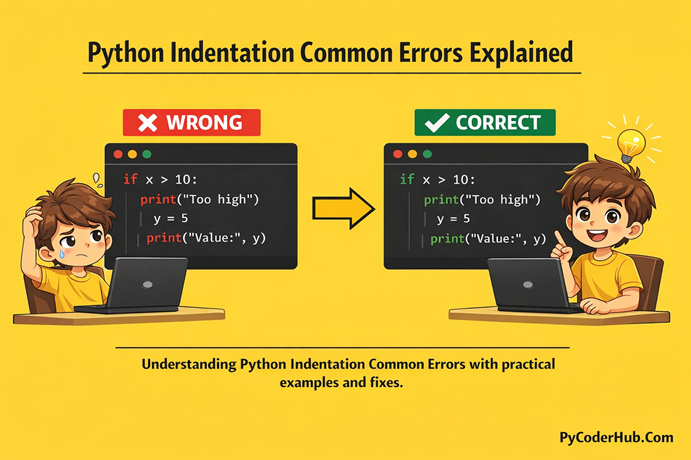
Introduction: Python Indentation Common Errors
In previous lessons we learn about the rules and guideline about indentation, why Python uses indentation to define code blocks, and how proper spacing controls program flow. We also understood how consistent indentation improves readability and prevents confusion in large programs.
Now it’s time to focus on something practical — Python Indentation Common Errors.
In this lesson, we will explore the most common indentation mistakes beginners (and sometimes even experienced developers) make. You’ll understand why these errors happen, how Python interprets them, and most importantly, how to fix them correctly. By the end, you’ll feel more confident handling indentation problems without panic.
What You’ll Learn
- What Python indentation errors actually mean
- The most common indentation mistakes beginners make
- Why
IndentationErrorhappens in Python - What causes the “unexpected indent” error
- The difference between tabs and spaces issues
- How inconsistent indentation breaks program flow
- Real code examples showing wrong vs correct indentation
- Simple and practical ways to fix indentation errors
After completing this lesson, you’ll be able to quickly identify and solve Python indentation problems in your own code.
Error #1: IndentationError in Python
What is IndentationError?
IndentationError is one of the most common issues covered under Python Indentation Common Errors. It usually appears when Python finds incorrect or missing indentation in your code.
Remember — Python uses indentation to define code blocks. So even a small spacing mistake can stop your program from running.
This error typically happens when:
- A block is not indented after a colon (
:) - The indentation level does not match surrounding code
- Spaces and tabs are used inconsistently
Example of IndentationError
if True:
print("Python Indentation Error")
Output
IndentationError: expected an indented blockWhy This Error Happens
In Python, any statement that ends with a colon (:) must be followed by an indented block.
Keywords like:
ifforwhiledefclasstrywith
all require indentation.
In the example above, the print() statement is not indented. So Python cannot determine which code belongs inside the if block.
How to Fix IndentationError
The solution is simple — indent the block properly.
Python’s recommended standard (PEP 8) is 4 spaces per indentation level.
Fixed Example
if True:
    print("Python Indentation Error")
Why the Fixed Code Works
Now the print() statement is clearly indented under the if condition.
Python understands that this line belongs to the if block, so the program runs without errors.
How to Avoid IndentationError
To prevent this common issue:
- Always indent code after statements ending with
: - Use 4 spaces per indentation level
- Do not mix tabs and spaces
- Enable “show whitespace” in your code editor
- Use modern editors like VS Code or PyCharm with linting enabled
- Be careful when copying and pasting code from websites
Quick Summary
IndentationError happens when Python cannot understand your code structure due to incorrect spacing. Since indentation defines blocks in Python, proper alignment is not optional — it is required.
Mastering this error is the first step toward fixing Python Indentation Common Errors confidently.
Error #2: Unexpected Indent Error in Python
What is “Unexpected Indent” Error?
Another very common issue is the “unexpected indent” error.
This error occurs when Python finds indentation where it is not required. In simple words, you added extra spaces at a place where Python was not expecting a new block.
Unlike IndentationError: expected an indented block, this error happens when you indent without a valid reason.
Example of Unexpected Indent
print("Start Program")

    print("This line has extra indentation")
Output
IndentationError: unexpected indentWhy This Error Happens
In Python, indentation is only allowed when starting a new block after a colon (:).
In the example above:
- The second
print()statement is indented. - But there is no
if,for,while,def, or any block-starting statement before it.
So Python gets confused because it sees indentation without context.
Another Common Situation
This also happens when indentation levels don’t match properly:
if True:
    print("Inside block")
      print("Wrong indentation level")
Here, the third line has inconsistent spacing compared to the second line, which causes an unexpected indent error.
How to Fix Unexpected Indent
Remove unnecessary indentation and align the code correctly.
Fixed Example
print("Start Program")
print("This line is correctly aligned")
Or in a block:
if True:
    print("Inside block")
    print("Correct indentation level")
Why the Fixed Code Works
Now:
- Indentation appears only after a colon (
:) - All lines inside the block use consistent spacing
- There are no random extra spaces
Python clearly understands the structure, so the program runs without errors.
How to Avoid Unexpected Indent
To prevent this error:
- Never indent a line unless starting a block
- Keep indentation levels consistent
- Use 4 spaces per level
- Avoid manually pressing space multiple times randomly
- Let your code editor auto-format indentation
- Enable indentation guides in your editor
Quick Summary
The unexpected indent error happens when Python sees extra indentation where it should not exist. Since indentation defines structure in Python, unnecessary spacing creates confusion and breaks execution.
Understanding this error helps you solve one more major part of Python Indentation Common Errors confidently.
Error #3: Inconsistent Use of Tabs and Spaces
What is the Tabs and Spaces Error?
One of the most frustrating issues is mixing tabs and spaces.
Python does not treat a tab and spaces as the same thing. Even if the indentation looks aligned in your editor, Python may read it differently — which leads to errors.
This usually results in:
TabError: inconsistent use of tabs and spaces in indentationExample of Tabs and Spaces Problem
if True:
	print("Using a tab here")
    print("Using spaces here")
(The first indented line uses a tab. The second uses spaces.)
Output
TabError: inconsistent use of tabs and spaces in indentationWhy This Error Happens
Python expects indentation to be consistent throughout the file.
The problem occurs when:
- One line uses a tab
- Another line uses spaces
- Both appear at the same indentation level
Even if they look aligned visually, Python internally counts them differently — which creates confusion and breaks execution.
How to Fix Tabs and Spaces Error
The best practice is simple:
Use only spaces (recommended: 4 spaces per indentation level).
Fixed Example (Using Spaces Only)
if True:
    print("Using spaces consistently")
    print("No indentation issues now")
Why the Fixed Code Works
Now:
- Both lines use the same type of indentation
- Each level uses exactly 4 spaces
- Python can clearly understand the block structure
No inconsistency means no error.
How to Avoid This Error
To prevent this common mistake:
- Always use 4 spaces (PEP 8 recommendation)
- Disable tabs in your editor
- Enable “Convert tabs to spaces”
- Use auto-formatting tools
- Avoid copying code from unknown sources without checking indentation
- Configure your editor to highlight tabs
Most modern editors like VS Code and PyCharm can automatically handle this if properly configured.
Quick Summary
Mixing tabs and spaces is a silent but serious issue. Even if your code looks correct, Python may interpret it differently.
The safest rule:
Use 4 spaces (✔)
Never mix tabs and spaces (❌)
Consistency is the key to error-free Python code.
Error #4: Unindent Does Not Match Any Outer Indentation Level
What is This Error?
Another important issue is:
IndentationError: unindent does not match any outer indentation levelThis error happens when you reduce indentation (unindent), but the new indentation level does not match any previous valid level.
In simple words — Python cannot find a matching block level for your unindented line.
Example of This Error
if True:
    print("Inside if block")
  print("Wrong unindent level")
Output
IndentationError: unindent does not match any outer indentation levelWhy This Error Happens
Let’s understand the problem:
- The first
print()is indented with 4 spaces. - The second
print()is indented with 2 spaces. - But 2 spaces was never a defined indentation level before.
Python expects indentation levels to match exactly with previous block levels. Since 2 spaces don’t match 0 or 4 spaces, Python throws an error.
How to Fix This Error
Make sure your unindent level matches a valid previous indentation level.
Fixed Example
if True:
    print("Inside if block")

print("Correct unindent level")
Why the Fixed Code Works
Now:
- The first
print()uses 4 spaces. - The last
print()uses 0 spaces. - Both levels (0 and 4) are valid and clearly defined.
Python understands the structure correctly.
Common Situations Where This Happens
This error often appears when:
- Manually adjusting indentation
- Copying and pasting code
- Mixing tabs and spaces
- Editing code in different editors
Sometimes the indentation looks correct but contains hidden spacing differences.
How to Avoid This Error
To prevent this issue:
- Always use 4 spaces consistently
- Never manually mix different indentation widths
- Enable indentation guides in your editor
- Use auto-format tools
- Convert all tabs to spaces
- Avoid uneven spacing like 2 or 3 spaces per level
Quick Summary
“Unindent does not match any outer indentation level” happens when Python cannot match your reduced indentation with a valid previous block.
This one usually appears due to uneven spacing. The solution is simple — keep indentation levels consistent and aligned properly.
Error #5: Missing Indentation After a Block Statement
What is This Error?
Another very common case happens when you forget to indent after writing a block statement.
In Python, whenever you write a statement that ends with a colon (:), the next line must be indented. If you forget to add the indented block, Python immediately raises an error.
This usually appears as:
IndentationError: expected an indented blockExample of Missing Indentation
for number_value in range(3):
print("Looping")
Output
IndentationError: expected an indented blockWhy This Error Happens
The for statement ends with a colon (:).
That colon tells Python:
“A new block of code is starting.”
But the print() line is not indented. So Python does not see any block under the loop — which breaks the program structure.
The same problem happens with:
ifelifelsewhiledefclasstrywith
All of these require an indented block immediately after them.
How to Fix This Error
Simply indent the code that belongs to the block.
Fixed Example
for number_value in range(3):
    print("Looping")
Special Case: Empty Block
Sometimes you intentionally want to leave a block empty. In that case, use the pass keyword.
Example Using pass
if True:
    pass
This tells Python:
“I am intentionally leaving this block empty.”
Why the Fixed Code Works
Now:
- The loop clearly contains an indented block.
- Python understands which statements belong inside the loop.
- The program executes without structure confusion.
How to Avoid This Error
To prevent this issue:
- Always check for a colon (
:) at the end of block statements - Immediately press Enter and indent the next line
- Use auto-indentation features in your editor
- If unsure, add
passtemporarily - Review your code structure before running
Quick Summary
Missing indentation after a block statement is one of the simplest yet most frequent Python Indentation Common Errors.
Whenever you see a colon (:), remember:
Indentation must follow (✔ )
Never leave a block empty without pass (❌ )
Understanding this rule makes your Python code structured and error-free.
Error #6: Incorrect Indentation Inside Nested Blocks
What is This Error?
When working with nested blocks (like if inside for, or if inside another if), indentation levels must increase properly.
If one nested level is misaligned, Python raises an indentation error.
Example of Incorrect Nested Indentation
for number_value in range(2):
    if number_value == 1:
    print("Number is 1")
Output
IndentationError: expected an indented blockWhy This Error Happens
Here’s the structure:
forstarts a block (needs indentation)ifstarts another block (needs further indentation)- But
print()is not indented under theif
Python cannot understand which block print() belongs to.
How to Fix It
Increase indentation properly for nested blocks.
Fixed Example
for number_value in range(2):
    if number_value == 1:
        print("Number is 1")
Tip: Each new block level = add 4 more spaces.
Quick Summary
Incorrect indentation inside nested blocks is a structural mistake in Python Indentation Common Errors. Always increase indentation level step-by-step for nested code.
Error #7: Over-Indenting a Line Inside a Block
What is Over-Indentation?
Sometimes developers accidentally add extra spaces inside a block, even though no new block starts.
This causes an “unexpected indent” or structure mismatch.
Example of Over-Indentation
if True:
    print("Correct line")
        print("Too much indentation")
Output
IndentationError: unexpected indentWhy This Error Happens
The second print() is indented more than required.
There is:
- No new
if - No loop
- No function
So Python does not expect another indentation level.
How to Fix It
Align both lines at the same indentation level.
Fixed Example
if True:
    print("Correct line")
    print("Proper indentation")
Quick Summary
Over-indentation creates unnecessary block levels. In Python Indentation Common Errors, remember: only indent when starting a new block.
Error #8: Missing Indentation in Function or Class Definition
What is This Error?
Functions and classes must contain properly indented blocks.
If you forget indentation inside them, Python throws an error.
Example
def greet_user():
print("Hello")
Output
IndentationError: expected an indented blockWhy This Error Happens
The def statement ends with :.
Python expects an indented block inside the function — but none was provided.
How to Fix It
Indent the function body correctly.
Fixed Example
def greet_user():
    print("Hello")
Quick Summary
Functions and classes always require indentation. Missing indentation inside them is a major part of Python Indentation Common Errors.
Error #9: Copy-Paste Indentation Problems
What is This Issue?
Sometimes your code looks correct, but it still throws indentation errors.
This often happens when copying code from:
- Websites
- PDFs
- Word documents
- Messaging apps
Hidden tabs or non-standard spaces can break indentation.
Why This Happens
Some platforms replace spaces with:
- Tabs
- Non-breaking spaces
- Special formatting characters
Python reads them differently, even if they look fine visually.
How to Fix It
- Delete and retype the affected lines
- Convert all indentation to spaces
- Use “Format Document” in your editor
- Enable “Show Whitespace”
- Use linting tools
Quick Summary
Copy-paste issues are silent but common. If your code looks correct but still fails, hidden characters might be the reason.
Error #10: Indentation Issues in Multiline Statements (Hanging Indent Problems)
What is This Error?
Another advanced case appears when writing multiline statements.
When a statement continues on the next line using:
- Parentheses
() - Brackets
[] - Braces
{}
Python expects the indentation to follow a clear and consistent structure. If alignment is incorrect, it may cause confusion or even raise an IndentationError.
This is commonly called a hanging indent problem.
Example of Incorrect Multiline Indentation
total_value = (
10 +
5 +
    3
)
Or:
user_details = {
"name": "PyCoder",
    "age": 25,
  "city": "Delhi"
}
Even if Python runs this, inconsistent indentation creates confusion and can lead to structure-related errors in larger blocks.
Why This Problem Happens
When breaking a statement into multiple lines:
- Indentation must clearly show continuation
- All continued lines should align properly
- Random spacing creates visual confusion
- Nested structures become hard to read
PEP 8 recommends using consistent hanging indentation.
Correct Way: Proper Hanging Indent
Fixed Example (Aligned Under Opening Parenthesis)
total_value = (
    10 +
    5 +
    3
)
Fixed Example (Vertical Alignment)
user_details = {
    "name": "PyCoder",
    "age": 25,
    "city": "Delhi"
}
Alternative Style (Vertical Alignment with Assignment)
total_value = (
    10
    + 5
    + 3
)
Or aligning with the first value:
total_value = (10 +
               5 +
               3)
The key is consistency.
Why Proper Indentation Matters Here
Even if Python does not always throw an error in multiline statements:
- Poor indentation reduces readability
- It increases confusion in nested logic
- It makes debugging harder
- It may cause indentation errors when combined with blocks
Clean alignment makes your code easier to understand and maintain.
How to Avoid Multiline Indentation Issues
- Use parentheses instead of backslashes for line continuation
- Indent continued lines by 4 spaces
- Keep multiline elements vertically aligned
- Do not mix different indentation styles
- Use auto-formatting tools
Quick Summary
Indentation issues in multiline statements may not always crash your program, but they create structure confusion and reduce readability.
Use consistent hanging indentation, align elements properly, and follow PEP 8 style to keep your Python code clean and professional.
Error #11: Logical Errors Due to Wrong Indentation
What Are Logical Indentation Errors?
Among all Python Indentation Common Errors, this one is the most dangerous.
Why?
Because no error message is shown.
The program runs successfully — but the output is wrong.
These errors happen when indentation changes the logical structure of your code. Python executes the program based on indentation, not based on what you intended.
This makes such bugs difficult to detect and sometimes very serious in real-world applications.
Example of Logical Indentation Error
for number_value in range(3):
    print("Processing number")
print("Loop finished")
Now imagine you intended both lines to be inside the loop.
Output
Processing number
Processing number
Processing number
Loop finished
The program runs fine.
But print("Loop finished") runs only once — not inside the loop.
Why This Happens
Python determines block structure strictly through indentation.
In the example:
- The first
print()is indented → inside the loop - The second
print()is not indented → outside the loop
Even though there is no syntax error, the logic is different from what you may have expected.
Another Common Logical Mistake
user_age = 18

if user_age >= 18:
    print("Eligible to vote")
    print("Please register")
print("Thank you")
If you intended "Thank you" to print only when the condition is true, the indentation is wrong.
Correct Version (If It Should Be Inside the Block)
user_age = 18

if user_age >= 18:
    print("Eligible to vote")
    print("Please register")
    print("Thank you")
Now all three lines belong to the if block.
Why Logical Indentation Errors Are Dangerous
- No error message appears
- Code executes normally
- Output is logically incorrect
- Bugs can go unnoticed
- Harder to debug in large applications
This makes them more serious than typical IndentationError issues.
How to Avoid Logical Indentation Errors
- Carefully check which lines belong to each block
- Use proper indentation guides in your editor
- Read your code structure visually
- Test your logic with sample inputs
- Keep blocks clean and clearly separated
- Avoid deeply nested code when possible
Quick Summary
Logical errors caused by wrong indentation do not crash your program — they silently change its behavior.
That’s why understanding indentation structure is critical. In Python, indentation doesn’t just format your code — it defines your program logic.
Key Takeaways: Python Indentation Common Errors
Now you have seen all the major Python Indentation Common Errors with examples and fixes.
Let’s quickly revise them in a simple one-line summary so you can remember them easily.
- IndentationError – Happens when a required indented block is missing after a colon (
:). - Unexpected Indent – Occurs when a line is indented without starting a new block.
- Tabs and Spaces Mix Error – Caused by inconsistent use of tabs and spaces in the same file.
- Unindent Does Not Match Any Outer Indentation Level – Triggered when indentation levels don’t align with previous blocks.
- Missing Indentation After Block Statement – Appears when you forget to indent after
if,for,while,def, etc. - Incorrect Nested Block Indentation – Happens when inner blocks are not indented properly inside outer blocks.
- Over-Indentation Inside a Block – Caused by adding extra spaces where no new block begins.
- Missing Indentation in Functions or Classes – Occurs when function or class bodies are not indented.
- Copy-Paste Indentation Problems – Hidden tabs or special spaces break indentation structure.
- Multiline Statement Indentation Issues – Inconsistent hanging indentation creates structure confusion.
- Logical Errors Due to Wrong Indentation – Code runs successfully but produces incorrect behavior because of wrong block structure.
Conclusion
Understanding Python Indentation Common Errors is essential because indentation defines the structure and logic of your program. Small spacing mistakes can either stop execution or silently change your program’s behavior. By writing consistent 4-space indentation and using proper editor tools, you can avoid most of these issues. Master indentation, and your Python code becomes cleaner, clearer, and error-free.
Suggested Posts:
1. Python Indentation Explained: What It Is and Why It Matters
2. Python Indentation Rules and Guidelines – Complete Usage Handbook
3. Block of Code and Nested Indentation in Python: Complete In-Depth Guide
4. Python Indentation Best Practices for Clean and Readable Code
5. Python Indentation FAQ – Most Common Questions & Clear Answers

4 thoughts on “Python Indentation Common Errors: Causes, Examples, and How to Fix Them”