
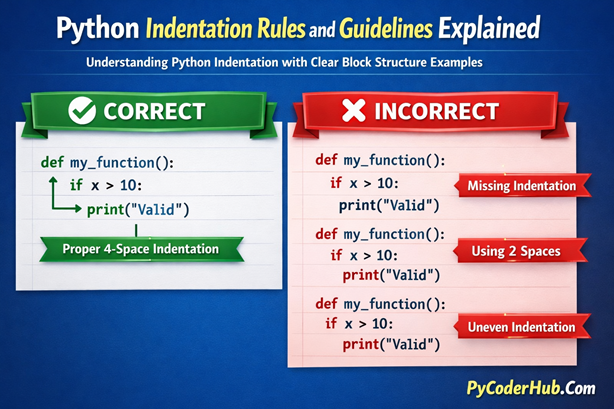
Introduction: Python Indentation Rules and Guidelines
In the previous lesson, you learned what indentation is and why it matters in Python. You saw that indentation is not just for readability — it actually defines how Python understands and executes your code.
In this lesson, we go deeper. We will explore Python Indentation Rules and Guidelines in detail, separating what Python strictly enforces from what the Python community recommends as best style.
Understanding this difference is essential. Some indentation mistakes will immediately break your program. Others will still run but reduce clarity and professionalism.
What You’ll Learn
In this lesson on Python Indentation Rules and Guidelines, you will learn:
- Which indentation rules are strictly enforced by Python
- Why indentation defines code blocks in Python
- When indentation errors cause syntax errors
- Why consistent indentation is mandatory
- What PEP 8 recommends for indentation style
- The difference between required rules and style guidelines
- Common indentation mistakes and how to fix them
By the end of this lesson, you will clearly understand both the technical and stylistic sides of Python indentation.
Before We Begin
Unlike some areas of Python, there is no single dedicated PEP (Python Enhancement Proposal) that exists only for indentation rules.
However, indentation behavior comes from two main sources:
- Strict rules enforced by the Python interpreter
- Style guidelines recommended in PEP 8
Python itself requires indentation for defining blocks of code. If you violate these structural rules, your program will raise errors.
On the other hand, PEP 8 provides style recommendations — such as using four spaces per indentation level — to make code more readable and consistent across projects.
Rule vs Guideline
It’s important to clearly understand the difference between a rule and a guideline when learning Python Indentation Rules and Guidelines.
Rule
- Enforced directly by Python
- Breaking it causes a syntax or indentation error
- The program will not run
Guideline
- Recommended by the Python community
- Improves readability and consistency
- Code may still run, but quality may suffer
In this post, you’ll see both. Each rule or guideline is explained with clear examples, common mistakes, and corrected code so you understand what Python requires and what Python recommends.
Rule #1: Indentation Defines Code Blocks
[Rule]
In Python, indentation is not optional. It defines the structure of your program.
Unlike many other programming languages that use curly braces {} to group code, Python uses indentation (whitespace at the beginning of a line) to determine which statements belong together.
If indentation is missing or incorrect, Python cannot understand your program’s structure and will raise an error.
What This Means
Whenever you write a statement that ends with a colon :, Python expects an indented block of code to follow.
Common examples include:
ifstatementsforloopswhileloopsdef(functions)classdefinitions
Correct Example
age = 18

if age >= 18:
print("You are an adult.")- The
print()statement is indented. - Python understands that it belongs to the
ifblock.
Incorrect Example (Missing Indentation)
age = 18

if age >= 18:
print("You are an adult.")
This will raise an IndentationError.
Python expects an indented block after the colon, but none is provided.
Why This Rule Exists
Python was designed to prioritize readability. By forcing indentation, Python ensures that:
- Code structure is visually clear
- Nested blocks are easy to understand
- Developers cannot write poorly structured code
Indentation is not just formatting — it is part of Python’s syntax.
Important Points
- Indentation defines code blocks in Python
- A colon
:must always be followed by an indented block - Missing indentation causes an immediate error
- This rule is strictly enforced by Python
Rule #2: Use Consistent Indentation Within a Block
[Rule]
In Python, all statements inside the same code block must use the same level of indentation.
If indentation levels are inconsistent within a block, Python will raise an error. Even small differences in spacing can break your program.
Indentation consistency is not just recommended — it is required.
What This Means
Once you indent a block, every line inside that block must:
- Use the same number of spaces
- Align vertically with other statements in the same block
Python compares whitespace exactly. It does not “guess” your intention.
Correct Example
if True:
    print("Line 1")
    print("Line 2")
print("Line 3")- All three
print()statements use the same indentation level. - Python clearly recognizes them as part of the same block.
Incorrect Example (Inconsistent Indentation)
if True:
    print("Line 1")
      print("Line 2")
    print("Line 3")
This will raise an IndentationError.
The second print() statement has extra spaces, making the block inconsistent.
Another Common Mistake
if True:
    print("Start")
  print("End")
The second line is not aligned with the first.
Python sees this as invalid structure.
Why This Rule Exists
Python relies entirely on indentation to understand block structure. If indentation is inconsistent:
- Python cannot determine which lines belong together
- The logical structure becomes unclear
- Execution becomes unpredictable
To prevent this, Python strictly enforces consistent indentation.
Important Points
- All lines inside the same block must have identical indentation
- Even one extra or missing space can cause an error
- Inconsistent indentation always results in an
IndentationError - This rule is strictly enforced by Python
Rule #3: A Colon (:) Must Be Followed by an Indented Block
[Rule]
In Python, whenever a statement ends with a colon :, it must be followed by an indented block of code.
The colon signals the start of a new code block. Without indentation after it, Python cannot determine the structure of the program.
If no indented block follows a colon, Python raises an error.
Statements That Require a Colon
Common Python statements that end with a colon include:
if,elif,elsefor,whiledef(function definitions)classdefinitionstry,except,finally
Every one of these must be followed by an indented block.
Correct Example
def greet():
print("Hello, Python!")- The function definition ends with a colon.
- The next line is properly indented.
- Python recognizes the function body.
Incorrect Example (No Indented Block)
def greet():
print("Hello, Python!")
This will raise an IndentationError.
Python expects an indented block after the colon but does not find one.
Another Common Mistake
if True:This will also raise an error.
A colon without a following indented block is incomplete syntax.
Temporary Placeholder
Sometimes developers use the pass keyword when they want to leave a block empty temporarily:
if True:
    pass
This is valid because pass acts as a placeholder inside the required indented block.
Why This Rule Exists
The colon tells Python:
“A block of code begins here.”
The indentation tells Python:
“These lines belong to that block.”
Both work together to define structure.
Important Points
- A colon
:must always be followed by an indented block - You cannot leave a colon without a body
- Missing indentation after a colon causes an error
- This rule is strictly enforced by Python
Rule #4: Use 4 Spaces for Each Indentation Level
[Guideline]
Python’s official style guide recommends using 4 spaces per indentation level.
This recommendation comes from PEP 8, which defines standard formatting practices for Python code.
Although Python does not force you to use exactly four spaces, following this guideline ensures consistency and readability across projects.
What This Means
Each time you create a new block (after a colon :), indent using four spaces.
If you nest blocks, increase indentation by another four spaces for each level.
Recommended Example (4 Spaces)
if True:
    print("Level 1")
    if True:
print("Level 2")- First block uses 4 spaces
- Nested block uses 8 spaces
- Clean and consistent structure
Technically Allowed (But Not Recommended)
if True:
  print("Level 1") #  2 spaces for indentation.
Python may still run this code if the indentation is consistent.
However:
- It does not follow standard style
- It reduces consistency across teams
- It can look unprofessional
Why 4 Spaces?
The 4-space standard:
- Makes nested code visually clear
- Avoids overly compressed blocks
- Prevents excessive horizontal spacing
- Creates consistency across the Python ecosystem
Almost all professional Python codebases follow this rule.
Important Points
- Use 4 spaces for each indentation level
- Increase by 4 spaces for nested blocks
- Python may allow other spacing, but PEP 8 recommends 4 spaces
- This is a style guideline, not a syntax rule
Rule #5: Do Not Mix Tabs and Spaces
[Rule]
In Python, mixing tabs and spaces for indentation can cause serious errors.
Although both tabs and spaces create indentation, Python treats them differently. If they are mixed within the same block, Python may raise a TabError or IndentationError.
Because indentation defines code structure, mixing whitespace characters can break your program even if the code looks visually aligned.
What This Means
You should choose one indentation method and use it consistently.
Modern Python development strongly prefers:
Spaces (specifically 4 spaces per level)
Most editors are configured to automatically insert spaces instead of tabs.
Example That May Cause an Error
if True:
    print("First line")
	print("Second line")
The first print() line uses spaces.
The second print() line uses a tab.
This can raise a TabError: inconsistent use of tabs and spaces in indentation.
Even if the lines appear aligned in your editor, Python sees them as different indentation levels.
Why This Rule Exists
Tabs and spaces are not equal:
- A tab’s visual spacing often varies depending on your chosen text editor.
- Spaces are consistent across environments
- Mixing both creates confusion and unpredictable behavior
To prevent structural errors, Python enforces consistency.
Best Practice
- Configure your editor to use spaces instead of tabs
- Use 4 spaces per indentation level
- Never mix tabs and spaces in the same file
Important Point
- Do not mix tabs and spaces for indentation
- Mixing them can cause
TabErrororIndentationError - Always use consistent indentation throughout your file
- This rule is strictly enforced by Python
Rule #6: Avoid Deeply Nested Indentation
[Guideline]
While Python allows nested blocks, deeply nested indentation reduces readability and makes code harder to maintain.
Every new level of indentation adds cognitive load. When blocks become too deeply nested, the structure becomes difficult to follow.
This is not a syntax error — your code may run perfectly — but it affects clarity and long-term maintainability.
Example of Deep Nesting
if condition_one:
    if condition_two:
        if condition_three:
            if condition_four:
print("Too deeply nested")- This code is valid. (✔)
- But it is difficult to read and understand quickly. (❌)
With multiple nested levels, it becomes harder to track which block belongs to which condition.
Why Deep Nesting Is a Problem
Deep indentation:
- Makes debugging more difficult
- Increases the chance of logical errors
- Reduces readability
- Makes future modifications harder
Professional Python code aims to stay flat and readable whenever possible.
Better Approach
Often, deep nesting can be reduced by:
- Using early returns
- Breaking logic into smaller functions
- Combining conditions logically
For example:
if not condition_one:
    return

if not condition_two:
    return

if not condition_three:
    return

print("Cleaner structure")- Same logic
- Less nesting
- Easier to read
Important Points
- Deep nesting is allowed but discouraged
- More indentation levels reduce readability
- Refactor complex blocks into smaller, clearer structures
- This is a style guideline, not a strict rule
Rule #7: Align Wrapped Lines Properly (Vertical Alignment or Hanging Indent)
[Guideline]
When a line of code is too long and needs to wrap onto the next line, Python allows you to continue it using parentheses, brackets, or braces.
In such cases, indentation should follow one of two recommended styles:
These formatting styles improve readability and make multi-line statements easier to understand.
When Does This Apply?
This guideline applies when:
- Writing long function calls
- Creating long lists, tuples, or dictionaries
- Breaking long conditional statements
- Splitting long expressions across multiple lines
Option 1: Vertical Alignment
You can align wrapped elements directly under the opening delimiter.
total_price = calculate_total(
    product_price,
    tax_amount,
    shipping_cost
)- Each argument is aligned vertically
- Clean and easy to scan
Another example:
numbers = [
    10,
    20,
    30,
    40
]
Option 2: Hanging Indentation
A hanging indent adds an extra indentation level to clearly separate wrapped lines.
total_price = calculate_total(
        product_price,
        tax_amount,
        shipping_cost
)
Here, the wrapped lines are indented further than the opening line.
This clearly signals continuation.
Incorrect Formatting Example
total_price = calculate_total(
product_price,
tax_amount,
shipping_cost
)- The wrapped lines are not indented. (❌)
- This reduces clarity and breaks visual structure. (❌)
Why This Guideline Exists
When lines wrap without proper indentation:
- Code becomes harder to read
- Visual grouping is unclear
- Maintenance becomes more difficult
Proper alignment ensures:
- Clear structure
- Logical grouping
- Consistent formatting across projects
Important Points
- Use vertical alignment or hanging indentation for wrapped lines
- Always indent continuation lines for clarity
- Never leave wrapped lines unindented
- This is a readability guideline recommended by PEP 8
Rule #8: Indentation Is Required Even for Empty Blocks
[Rule]
In Python, every statement that ends with a colon : must be followed by an indented block — even if the block is intentionally empty.
You cannot leave a block completely blank. If no code is needed yet, you must use the pass statement as a placeholder.
Without an indented block, Python raises an error.
Why This Happens
Statements like:
ifforwhiledefclasstry
always require a body.
Python does not allow empty blocks because indentation defines structure.
Incorrect Example (Empty Block)
if True:This raises an IndentationError.
Python expects an indented block after the colon but finds nothing.
Correct Example Using pass
if True:
pass- Valid syntax
- The block exists
- The program runs without errors
The pass statement tells Python:
“This block is intentionally empty.”
Another Common Scenario
While building a function:
def process_data():
    pass
his is useful when:
- You are planning the function
- You want to avoid syntax errors during development
- You are creating a placeholder for future logic
Why This Rule Exists
Python requires indentation to define structure.
Even if a block contains no logic yet, the structure must still exist.
The pass statement preserves that structure without performing any action.
Important Point
- A colon
:must always be followed by an indented block - Empty blocks are not allowed
- Use
passas a placeholder for empty blocks - This rule is strictly enforced by Python
Rule #9: Indent Comments to Match the Code Block
[Guideline]
Comments do not affect how Python executes code. They are ignored by the interpreter.
However, comments should follow the same indentation level as the code they describe. Properly indented comments improve readability and keep the structure visually clear.
While Python does not enforce comment indentation, clean formatting is strongly recommended.
Comments Inside an Indented Block
When writing comments inside a block, indent them to match the block level.
Correct Example
if True:
    # This block runs when condition is True
print("Hello")- The comment is indented at the same level as the code it explains. (✔)
- Structure remains clear and readable. (✔)
Incorrect Formatting Example
if True:
# This block runs when condition is True
print("Hello")- The comment is not indented. (❌)
- It breaks the visual structure of the block. (❌)
Even though Python may still run this code, the formatting is confusing.
Inline Comments
Inline comments should also align properly with the statement they describe.
count = 10 # Initial valueAvoid pushing inline comments too far right, as this reduces readability.
Why This Guideline Exists
Consistent indentation for comments:
- Preserves visual structure
- Makes code easier to scan
- Keeps related logic grouped together
- Improves professionalism
Even though comments do not affect execution, they affect understanding.
Important Points
- Comments do not change program behavior
- Indent comments to match the surrounding code block
- Keep comment alignment consistent
- This is a readability guideline, not a strict rule
Rule #10: Blank Lines Do Not Affect Indentation
[Guideline]
In Python, blank lines do not affect indentation or program execution.
You can freely use blank lines to improve readability and visually separate logical sections of code. Python ignores empty lines during execution.
However, blank lines should be used thoughtfully to enhance clarity, not create unnecessary spacing.
What This Means
Blank lines can be used:
- Between functions
- Between class definitions
- Between logical sections inside a function
- To separate complex blocks for clarity
They do not change indentation levels or block structure.
Example with Proper Blank Line Usage
def calculate_total(price, tax):
    total = price + tax

    # Return final value
    return total


def print_total(amount):
print("Total:", amount)- Blank lines separate logical sections
- Code remains structured and readable
Example Without Blank Lines
def calculate_total(price, tax):
    total = price + tax
    return total
def print_total(amount):
print("Total:", amount)- This is valid Python
- But it reduces readability
Important Clarification
Blank lines do not replace indentation.
This is incorrect:
if True:

print("Hello")
A blank line does not satisfy Python’s requirement for an indented block.
Indentation is structural.
Blank lines are visual.
Why This Guideline Exists
Proper use of blank lines:
- Improves readability
- Separates logical sections
- Makes code easier to scan
- Aligns with professional Python style
Excessive blank lines, however, can make code look fragmented.
Important Points
- Blank lines do not affect indentation or execution
- Use them to separate logical sections
- Never use blank lines as a substitute for indentation
- This is a readability guideline, not a strict rule
Rule #11: Let Tools Enforce Indentation Consistency
[Guideline]
Maintaining consistent indentation manually can be difficult, especially in larger projects.
That’s why PEP 8 encourages using automated tools to format code and enforce consistent style.
While Python enforces structural indentation rules, formatting tools help ensure your code follows recommended indentation guidelines such as using 4 spaces per level and proper alignment.
Why Use Formatting Tools?
Formatting tools help:
- Automatically apply 4-space indentation
- Remove mixed tabs and spaces
- Align wrapped lines correctly
- Maintain consistent formatting across teams
- Reduce human error
Instead of manually checking indentation, tools can fix it instantly.
Commonly Used Formatting Tools
Many Python developers rely on tools such as:
- Black (automatic code formatter)
- Autopep8 (formats code according to PEP 8)
- Ruff (linter and formatter)
- IDE auto-format features (like in VS Code or PyCharm)
These tools enforce indentation standards consistently across projects.
Important Clarification
- Formatting tools do not change Python’s core indentation rules.
- They help you follow recommended guidelines and avoid style inconsistencies.
- Your code must still obey Python’s structural indentation requirements.
Important Points
- Use formatting tools to maintain consistent indentation
- Tools help enforce PEP 8 indentation guidelines
- Automation reduces formatting mistakes
- This is a professional best-practice guideline
Python Indentation Rules and Guidelines — Summary
- Indentation Defines Code Blocks (Rule): Python uses indentation to determine structure, not curly braces.
- Consistent Indentation Within a Block (Rule): All statements inside the same block must use the exact same indentation level.
- Colon Must Be Followed by an Indented Block (Rule): Every statement ending with
:requires a properly indented body. - Use 4 Spaces Per Level (Guideline): Follow PEP 8 and use four spaces for each indentation level.
- Do Not Mix Tabs and Spaces (Rule): Mixing them can cause
TabErrororIndentationError. - Avoid Deep Nesting (Guideline): Excessive indentation levels reduce readability and increase complexity.
- Align Wrapped Lines Properly (Guideline): Use vertical alignment or hanging indentation for multi-line statements.
- Use
passfor Empty Blocks (Rule): Even empty blocks must contain an indented statement. - Indent Comments to Match Code (Guideline): Comments should follow the indentation level of the code they describe.
- Blank Lines Do Not Affect Indentation (Guideline): Use blank lines to improve readability, not to replace indentation.
- Let Tools Enforce Consistency (Guideline): Use formatters and linters to maintain proper indentation standards automatically.
Final Clarity: Rule vs Guideline
- Rule: Enforced by Python. Breaking it causes an error and stops execution.
- Guideline: Recommended for readability and consistency. Code may run, but quality may suffer.
By understanding both, you now know what Python strictly requires and what professional developers recommend.
Conclusion
Understanding Python Indentation Rules and Guidelines is essential for writing correct and readable Python code. Indentation in Python is not just formatting — it defines structure and controls program flow. By following strict indentation rules and recommended style guidelines, you avoid errors and write cleaner, more professional code. Mastering indentation is a foundational step toward becoming a confident Python developer.
Suggested Posts:
1. Python Indentation Explained: What It Is and Why It Matters
2. Block of Code and Nested Indentation in Python: Complete In-Depth Guide
3. Python Indentation Common Errors: Causes, Examples, and How to Fix Them
4. Python Indentation Best Practices for Clean and Readable Code
5. Python Indentation FAQ – Most Common Questions & Clear Answers

5 thoughts on “Python Indentation Rules and Guidelines – Complete Usage Handbook”