
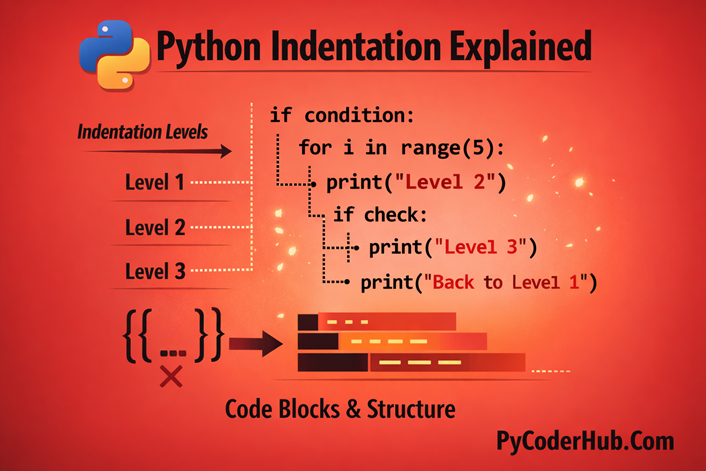
Introduction: Python Indentation Explained
Python is known for being clean, readable, and beginner-friendly. One of the biggest reasons for that is indentation. In many programming languages, symbols like curly braces are used to group code. But in Python, spacing at the beginning of a line decides how your code is structured and how it runs.
At first, indentation may seem like a small formatting detail. But in Python, it plays a much bigger role. Even a slight misalignment can change the behavior of your program.
In this lesson, we’ll clearly understand Python Indentation Explained in a simple and practical way. Instead of just memorizing patterns, you’ll see how indentation shapes the structure and flow of a Python program.
What you’ll learn in this lesson:
- What indentation means in Python
- How Python uses indentation to define code blocks
- Why indentation matters for program structure
- The concept of indentation levels
- The idea behind the 4-space standard
- The difference between structural indentation and visual alignment
- How indentation controls execution flow
Section 1: What Is Indentation in Python?
Indentation in Python
Indentation in Python means adding whitespace (usually spaces) at the beginning of a line to define how your code is structured.
In many programming languages like C, Java, or JavaScript, indentation is optional. It’s used only to make code look neat. But in Python, indentation is not just for readability — it is part of the language syntax itself.
That means:
“Python uses indentation to understand your program’s structure.“
If the indentation is wrong, your program will not run.
Simple Example of Indentation
if True:
    print("Indented block 1")
    print("Indented block 2")
Here’s what’s happening:
- The
if True:line ends with a colon: - The indented lines below it belong to the
ifblock - Both
print()statements are part of the same block because they share the same indentation level
If those lines were not indented, Python would raise an error.
What Is a Code Block?
A block is a group of statements that execute together.
In Python, blocks appear in:
ifstatementsforloopswhileloops- functions
- classes
try/exceptblocks
Instead of using curly braces {} like many other languages, Python uses indentation to define these blocks.
For example:
if user_age >= 18:
    print("Access granted")
    print("Welcome to the platform")
Both print statements belong to the if block because they are indented equally.
Understanding Indentation in Simple Terms
Let’s break it down clearly:
- Indentation defines hierarchy
- Lines with the same indentation belong to the same block
- Indentation shows logical structure visually
- What you see is exactly how Python interprets your code
- Indentation is mandatory — not optional
- Even one extra or missing space can change behavior or cause errors
This is why indentation is one of the most important fundamentals in Python.
Why Python Uses Indentation
Python was designed to prioritize readability.
Instead of adding symbols like {} or begin/end, Python uses whitespace to structure code naturally. This forces developers to write clean, well-formatted programs.
This design decision makes Python unique.
Benefits of Python’s Indentation
1. Cleaner Syntax
No extra braces or structural symbols clutter your code.
2. Less Visual Noise
The logic stands out clearly without unnecessary characters.
3. Consistent Formatting
All Python developers must follow the same indentation rules.
4. Reduced Structural Confusion
It’s visually clear which statements belong together.
5. Easier Code Reviews
Well-indented code is easier to read, debug, and maintain.
6. Encourages Good Habits
Python naturally pushes developers toward writing readable code.
Drawbacks of Python’s Indentation
While powerful, indentation can create challenges — especially for beginners.
1. Strict for New Learners
Beginners may struggle with indentation errors at first.
2. Confusing Error Messages
An IndentationError can feel unclear when you’re just starting.
3. Tabs vs Spaces Problem
Mixing tabs and spaces can break your code even if it looks aligned.
Python vs Other Languages (Comparison)
Most languages use braces {} to define blocks.
Let’s compare the same logic in Java and Python.
Java (Using Braces)
if (age >= 18) {
    System.out.println("You are an adult.");
} else {
    System.out.println("You are a minor.");
}
Python (Using Indentation)
if age >= 18:
    print("You are an adult.")
else:
    print("You are a minor.")
What Makes Python’s Style Different?
Notice the difference:
- No parentheses required around conditions
- No curly braces
- No semicolons
- Clean visual structure
- Less clutter
Python’s structure aligns logic with visual layout. What you see on the screen directly represents how Python executes the code.
This is one reason Python feels more readable — especially for beginners.
Important Points
Indentation in Python is not about style — it is about structure.
It defines:
- Program flow
- Logical grouping
- Execution hierarchy
If indentation is incorrect, the program either behaves differently or fails entirely.
Understanding indentation deeply will prevent confusion, errors, and structural mistakes as your programs grow larger.
Section 2: The Fundamental Principle of Indentation
Understanding indentation is not just about adding spaces — it’s about understanding how Python recognizes structure.
In Python, a block of code is created by consistent indentation. If the indentation level changes, Python assumes the logical structure has changed.
This is the core rule.
Standard Indentation Levels
According to PEP 8 (Python’s official style guide), the standard indentation level is
“4 spaces per indentation level.”
This is not random. It’s the convention followed by almost every professional Python project.
Let’s look at a simple example:
def greet():
    print("Hello")
What’s happening here?
- The first line defines a function named
greet(). - The second line is indented by 4 spaces.
- That indentation tells Python:
- “This line belongs to the function.”
If the print() statement were not indented, Python would raise an error.
In Python, everything inside a function must be indented. The indentation defines the function body.
In simple terms:
- The space before
print("Hello")connects it togreet() - Without indentation, the function would have no body
- Indentation creates the execution boundary
Why 4 Spaces?
You might wonder – why exactly 4 spaces?
Because:
- It creates clear visual separation
- It works well for nested structures
- It avoids excessive horizontal spacing
- It has become the universal Python standard
Using anything else (like 2 spaces or 3 spaces) won’t technically break Python — but it breaks consistency, and consistency matters.
Spaces vs Tabs: The Great Debate
Python allows both spaces and tabs for indentation.
But here’s the important rule:
- ❌ Never mix tabs and spaces in the same file.
Over time, the Python community has made one clear decision:
- ✅ Always use 4 spaces per indentation level.
This rule comes directly from PEP 8.
Recommended Approach (Using 4 Spaces)
def calculate_total(cart_items):
    total_amount = 0
    for cart_item in cart_items:
        total_amount += cart_item.price
    return total_amount
Notice how:
- The function body is indented once (4 spaces)
- The
forloop body is indented again (8 spaces total) - Each level visually represents logical depth
This makes the structure extremely clear.
Why Spaces Are Preferred Over Tabs
Tabs can behave differently depending on:
- Text editor settings
- IDE configuration
- System defaults
On one machine, a tab might equal 4 spaces.
On another, it might equal 8 spaces.
This leads to:
- Misaligned code
- Structural confusion
- Hidden formatting problems
Spaces, however:
- Look identical everywhere
- Ensure consistent alignment
- Prevent visual misinterpretation
- Reduce collaboration issues
That’s why professional projects standardize on spaces.
What Happens If You Mix Tabs and Spaces?
Python 3 strictly enforces indentation consistency.
If you mix tabs and spaces, Python raises:
“TabError: inconsistent use of tabs and spaces in indentation“
This immediately stops your program.
Even worse — sometimes the code may look aligned but still fail because Python detects different whitespace characters.
This is one of the most common beginner mistakes.
The Core Rule to Remember
Indentation must be:
- Consistent
- Predictable
- Visually aligned
- Logically structured
And in modern Python development:
- ✅ Always use 4 spaces
- ✅ Never mix tabs and spaces
- ✅ Follow PEP 8 conventions
Key Takeaway
Indentation is not decoration.
It is structure.
The number of spaces at the beginning of a line determines:
- Block ownership
- Execution flow
- Logical hierarchy
Mastering this principle early prevents confusion, hidden bugs, and frustrating errors later.
Section 3: Does Python Need Exactly 4 Spaces?
We already learned that PEP 8 recommends 4 spaces per indentation level.
But here’s the real question:
“Does Python actually require exactly 4 spaces?”
What if you use:
- 3 spaces?
- 2 spaces?
- 6 spaces?
Will Python reject your code?
In this section, we’ll test various indentation levels to explore how Python actually interprets spacing behind the scenes.
Very Important:
The goal here is understanding behavior, not changing best practices.
Example: Standard 4-Space Indentation
Most IDEs automatically insert 4 spaces when you start a new block.
def greet():
    print("Hello")
Here:
- The function
greet()is defined. - The
print()statement is indented with 4 spaces. - This follows PEP 8 and industry standards.
If we call greet(), the output will be:
HelloWhat Happens If We Use 3 Spaces?
Let’s manually change the indentation to 3 spaces:
def greet():
   print("Hello")
Output:
HelloSurprisingly — it works.
Python does not require exactly 4 spaces.
What matters is that the indentation is consistent within the block.
Trying 2 Spaces
Now let’s reduce it even further:
def greet():
  print("Hello")
Output:
HelloAgain, no error.
Python accepts this because the print() statement is still clearly part of the function block.
So What Does Python Actually Care About?
Here’s the key rule:
“Python does not enforce a specific number of spaces.
Python enforces consistency.”
That means:
- 2 spaces → valid
- 3 spaces → valid
- 4 spaces → valid
- 8 spaces → valid
As long as every line inside the same block uses the same indentation level, Python is satisfied.
The Real Problem: Inconsistent Indentation
Even though Python allows any number of spaces, it requires perfect consistency inside each block.
Let’s break it intentionally.
def greet():
    print("Hello")   # 4 spaces
   print("How are you?")   # 3 spaces
If you run this, Python raises:
IndentationError: unindent does not match any outer indentation levelWhy This Error Happens
Let’s analyze:
- The first
print()is indented 4 spaces. - The second
print()is indented 3 spaces.
Python now sees two different indentation levels inside what appears to be the same block.
It becomes structurally unclear:
- Is the second line part of the function?
- Is it part of another block?
- Is it closing something?
Python cannot determine the structure — so it stops execution.
This is where beginners often experience confusion.
The Correct Version
def greet():
    print("Hello")
    print("How are you?")
Now:
- Both lines use exactly 4 spaces.
- The block structure is clear.
- Python executes without error.
The Fundamental Rule (Very Important)
You may choose:
- 2 spaces
- 3 spaces
- 4 spaces
- Any number of spaces
But you must:
- Keep the spacing consistent within the same code block.
- Never mix indentation levels unintentionally
- Never mix tabs and spaces
Then Why Does Everyone Use 4 Spaces?
Even though Python doesn’t enforce 4 spaces, the community does.
Why?
Because:
- It creates consistent formatting across projects
- It improves readability in nested structures
- It aligns with PEP 8
- It avoids collaboration issues
- Every major Python codebase follows it
Think of 4 spaces as a professional standard — not a technical requirement.
Final Takeaway
Python does not care about the number of spaces.
Python cares about structural consistency.
Indentation defines:
- Block ownership
- Logical hierarchy
- Execution boundaries
And inconsistency breaks structure immediately.
So remember:
“You are free to select your own spacing increment, but once you’ve set it, you must maintain that consistency throughout.”
That’s the true principle behind Python indentation.
Section 4: Hanging Indents vs Vertical Alignment
As your Python programs grow, you’ll often write long lines of code — especially when working with:
- Function calls
- Mathematical expressions
- Complex conditions
- Lists, dictionaries, or tuples
Sometimes, these lines become too long to comfortably fit on one line.
When that happens, Python allows you to break a single statement across multiple lines — cleanly and safely — as long as it’s inside parentheses (), brackets [], or braces {}.
But how you indent those broken lines affects readability.
There are two widely accepted styles:
- Vertical Alignment
- Hanging Indentation
Let’s understand both.
Starting Example
Here’s a simple function definition:
def calculate_total(items, tax, discount=0, include_shipping=False):
    return "Function ran successfully"
Normally, we might call this function in one line:
result = calculate_total('item_prices', 'tax_rate', discount=10, include_shipping=True)This works perfectly.
But what if:
- The argument names are longer?
- There are more parameters?
- The line exceeds recommended length (PEP 8 suggests 79–88 characters)?
The line is now significantly more difficult to read.
That’s where multiline formatting helps.
Important Rule About Multiline Statements
When a statement is inside parentheses:
- Python automatically understands the statement continues.
- You do not need backslashes (
\). - Indentation is used for readability — not structure.
Now let’s explore the two main styles.
Method 1: Vertical Alignment
Vertical alignment means lining up each argument directly under the first argument after the opening parenthesis.
Example: Vertical Alignment
result = calculate_total('item_prices',
'tax_rate',
discount=10,
include_shipping=True)How This Works
- The second line starts directly under
'item_prices' - Each argument forms a clean vertical column
- Python treats this as one continuous statement
Visually, it creates a straight vertical stack.
When Vertical Alignment Works Well
- When argument names are short
- When the first argument position is visually clear
- When manual formatting is acceptable
However, there’s a limitation.
If you rename variables or adjust spacing before the function call, alignment can break and require reformatting.
That’s where the second style becomes more practical.
Method 2: Hanging Indentation
Hanging indentation places the opening parenthesis at the end of the first line and indents all arguments on the next lines by one consistent indentation level (usually 4 spaces).
Example: Hanging Indentation
result = calculate_total(
    'item_prices',
    'tax_rate',
    discount=10,
    include_shipping=True
)
How This Works
- The opening
(signals continuation - All arguments are indented one level deeper
- The closing
)aligns with the start of the statement - The structure remains stable even if the line above changes
This style is more flexible and easier to maintain.
Why Hanging Indentation Is Usually Preferred
Although both styles are valid under PEP 8, hanging indentation is generally recommended for real-world projects.
Why?
- More consistent in teams
- Works better with automatic formatters (like Black)
- Less fragile when refactoring
- Cleaner visual grouping
- Easier to maintain long-term
Most professional Python codebases prefer hanging indentation for these reasons.
Quick Comparison
Vertical Alignment
- Aligns arguments under the first argument
- Looks visually structured
- Can break when code changes
Hanging Indentation
- Indents arguments by one consistent level
- More stable during edits
- Preferred in modern Python projects
Key Concept to Remember
When breaking long lines:
- Use parentheses for implicit continuation
- Avoid backslashes
- Choose a consistent formatting style
- Prioritize readability over personal preference
Key Insight
Both vertical alignment and hanging indentation are correct.
But in professional Python development:
“Hanging indentation is more practical, scalable, and collaboration-friendly.”
Formatting isn’t just about making code look good — it’s about making it easy to read, review, and maintain.
And indentation plays a major role in that clarity.
Section 5: Structural Indentation vs Readability Indentation (Clearing the Confusion)
For some beginners, this may feel confusing.
Until now, we’ve learned that:
“Indentation in Python defines structure.”
But suddenly, when we use indentation inside parentheses, we say:
“It’s mainly for readability.”
- So which one is true?
- Did indentation change its purpose?
Let’s clear this confusion completely.
Normal Indentation (Outside Parentheses)
Let’s start with the standard case.
def greet():
    print("Hello")
Here’s what’s happening:
- The colon
:aftergreet()creates a block. - The indented line defines the function body.
- Without indentation, Python raises an error.
Example of incorrect structure:
def greet():
print("Hello")  # IndentationError
In this situation:
- Indentation is mandatory.
- It defines hierarchy.
- It defines execution boundaries.
- It defines block ownership.
So in normal cases:
“Indentation = Structure”
This is the foundation of Python.
Indentation Inside Parentheses
Now let’s look at something different:
result = calculate_total(
    'item_prices',
    'tax_rate',
    discount=10,
    include_shipping=True
)
Here:
- The opening
(tells Python the statement continues. - Python keeps reading until it finds the closing
). - No backslash is needed.
- No colon is involved.
- No new block is created.
Now here’s the important part:
The indentation of the arguments does not define structure.
Technically, this would still run:
result = calculate_total(
'item_prices',
'tax_rate',
discount=10,
include_shipping=True
)
It looks terrible — but Python accepts it.
So in this case:
“Indentation = Readability
Not structure.“
Why This Works
Block Indentation (Structural)
Triggered by a colon : after:
defifforwhileclasstry- etc.
This creates a new code block.
Indentation here is mandatory and structural.
Implicit Line Continuation (Non-Structural)
Triggered by:
([{
When Python sees an opening bracket:
- It already knows the statement is incomplete.
- It automatically expects continuation.
- It ignores indentation for structural meaning.
In this situation, indentation exists only to help humans read the code.
So Are You Correct?
If you’re thinking:
“Normally indentation defines structure, but inside parentheses it mainly improves readability.”
Yes — that understanding is correct.
The purpose of indentation does not change globally.
Instead, the context changes:
- After
:→ indentation defines structure. - Inside
() [] {}→ grouping is already defined by brackets.
So indentation becomes visual clarity — not structural necessity.
That’s the key insight.
Important Subtle Detail
Now let’s look at a mixed example:
if user_is_active:
    result = calculate_total(
        'item_prices',
        'tax_rate'
    )
What’s happening here?
There are two types of indentation:
- The first indentation (under
if) defines structure. - The deeper indentation (inside parentheses) improves readability.
So both concepts can exist in the same code.
This is where beginners sometimes experience confusion.
The outer indentation is structural.
The inner indentation is visual formatting.
The Clean Summary
Let’s simplify everything into one clear table:
| Context | Role of Indentation |
|---|---|
After : (blocks) | Structural and mandatory |
Inside () [] {} | Readability and formatting |
Indentation in Python has one fundamental role:
“It defines structure when creating blocks.“
However:
When parentheses, brackets, or braces are involved,
Python already understands grouping.
So indentation inside them becomes a readability tool — not a structural requirement.
Understanding this difference removes a major beginner confusion.
And once this clicks, Python’s indentation rules become much easier to reason about.
Section 6: PEP 8 Indentation Standards (Quick Overview)
Now that you understand how indentation defines structure in Python, it’s important to briefly look at the official style recommendations. Python follows a style guide called PEP 8, which provides consistency guidelines used across the community.
Below is a quick overview of indentation-related recommendations:
- Use 4 spaces per indentation level.
- Prefer spaces over tabs for indentation.
- Never mix tabs and spaces in the same file.
- Keep continuation lines clearly distinguishable from block indentation.
- Use hanging indents or vertical alignment for long lines inside parentheses.
- Align closing brackets properly (either under the first character or the start of the statement).
- Avoid backslashes for line continuation when parentheses can be used instead.
- Maintain consistent indentation throughout the entire project.
Note: Here we only learned the brief rules. Follow PEP 8 rules and guidelines for detailed explanations.
Section 8: How Indentation Shapes Program Flow
Indentation in Python doesn’t just organize code — it controls program behavior.
It determines:
- What runs
- When it runs
- Under what condition it runs
Because Python uses indentation to define blocks, changing indentation can completely change how your program behaves.
Let’s see how this works in different structures.
Controlling Conditional Execution
if / elif / else
In conditional statements, indentation decides which code runs when a condition is true or false.
user_age = 20

if user_age >= 18:
    print("Access granted")
else:
    print("Access denied")
Here:
- The indented line under
ifruns only if the condition is true. - The indented line under
elseruns when the condition is false.
If the indentation changes, the logic changes.
Example of incorrect structure:
if user_age >= 18:
print("Access granted")  # Error
Without proper indentation, Python cannot determine the conditional block.
So indentation defines under what condition code executes.
Loop Execution Scope
for and while Blocks
Loops repeat everything inside their indented block.
for number in range(3):
    print("Running loop")
The print() statement runs three times because it is inside the loop block.
Now look at this:
for number in range(3):
    print("Inside loop")

print("Outside loop")
The last line runs only once because it is not indented under the loop.
So indentation determines:
- What repeats
- What runs once
- Where the loop ends
Function Scope
Indentation also defines what belongs to a function.
def greet_user():
    print("Hello")
    print("Welcome")

print("Program finished")
Here:
- The two indented lines belong to the function.
- The last line runs immediately when the script executes.
If a line is not indented under the function, it is not part of the function body.
So indentation defines:
- What runs only when the function is called
- What runs immediately
Class Structure
Classes also rely on indentation to define structure.
Methods Indentation
class User:

    def greet(self):
        print("Hello User")
The method greet() is indented inside the class.
Without indentation, Python would not recognize it as part of the class.
Attributes Indentation
class User:

    user_role = "Member"

    def greet(self):
        print("Hello User")
The attribute and method both belong to the class because they share the same indentation level.
Indentation defines:
- What belongs to the class
- What belongs to a method
- What belongs outside the class entirely
Final Understanding
In Python, indentation directly shapes program flow.
It determines:
- What runs
- When it runs
- Under what condition it runs
- What repeats
- What belongs to which structure
This is why indentation is not just formatting — it is execution control.
Mastering this concept means mastering how Python thinks.
Conclusion
Indentation in Python is not just about making code look neat — it defines structure and controls execution. It determines what runs, when it runs, and under what condition it runs. From functions and loops to conditionals and classes, indentation shapes program flow at every level.
While Python doesn’t strictly require 4 spaces, consistency is mandatory, and following PEP 8 keeps your code clean and professional. Master indentation, and you master how Python thinks.
Suggested Posts:
1. Python Indentation Rules and Guidelines – Complete Usage Handbook
2. Block of Code and Nested Indentation in Python: Complete In-Depth Guide
3. Python Indentation Common Errors: Causes, Examples, and How to Fix Them
4. Python Indentation Best Practices for Clean and Readable Code
5. Python Indentation FAQ – Most Common Questions & Clear Answers

7 thoughts on “Python Indentation Explained: What It Is and Why It Matters”