
Introduction: Python Type Casting in Real-World Applications
In the previous lesson, we explored Python type casting rules—how conversions work, when they are safe, and where they can fail. That gave you control over how to convert data.
But here’s where many learners still face confusion:
Knowing the rules is one thing…
Using them correctly in real-world situations is another.
In actual programs, data rarely comes in the “perfect” type.
- User input always comes as text
- File data is often unstructured
- API responses contain mixed types
- And Python sometimes makes decisions for you using something called truthiness
This is where confusion usually begins.
For example:
- Why does
bool("False")returnTrue? - Why does
input()always give a string? - Why do some conversions silently lose data?
These are not just theoretical questions—they directly affect how your programs behave.
This lesson focuses on how type casting actually works in real-world scenarios, not just isolated examples.
You’ll learn how Python interprets values, how to safely convert real data, and how to avoid common mistakes that can break your code.
What You’ll Learn
In this lesson, you’ll learn:
- How truthiness works in Python and why it can be confusing
- How Python handles data conversion from user input, files, and APIs
- The difference between lossy and lossless conversions
- How to apply safe casting techniques to avoid runtime errors
- Common edge cases and mistakes developers make during type conversion
This lesson will act as your bridge from understanding rules → writing reliable real-world code.
Section 1: Why Real-World Data Is Always the “Wrong Type”
In this section, we’ll understand why type casting is not just a concept—but a real necessity in practical Python programs.
When you’re learning Python, most examples look clean and predictable:
user_age = 25
price_value = 99.99
Everything already has the “correct” type.
But in real-world applications, this almost never happens.
The Reality: Data Comes in Raw Form
In actual programs, data comes from external sources, and those sources don’t care about Python’s type system.
Here’s what typically happens:
User Input
user_age_input = input("Enter your age: ")Even if the user types 25, Python stores it as:
"25" # string, not integerFile Data (Text / CSV)
file_line = "100,200,300"All values are read as:
"100", "200", "300" # stringsAPI & JSON Data
api_response = {"price": "199.99", "in_stock": "true"}Even numeric and boolean-like values often arrive as:
"199.99"→ string"true"→ string
Why This Is a Problem
Python does not automatically assume your intention.
If you try to use these values directly:
total_value = "100" + 50You’ll get an error because Python won’t guess that "100" should be treated as a number.
Mental Model
Think of real-world data like raw materials.
- Input, files, APIs → raw, unprocessed
- Type casting → shaping those materials into usable form
If you skip this step, your program either:
- Breaks (errors)
- Or behaves incorrectly (hidden bugs)
Key Insight
Python is strict by design—it won’t convert data unless you explicitly tell it to.
This is actually a good thing, because it prevents silent mistakes.
Now that we’ve understood this section, a few important questions naturally come to mind:
- How does Python decide what a value actually means?
- When does it convert values automatically?
- And how can you safely handle real-world data?
But here’s the catch—before we answer any of these, we need to understand something even more fundamental: how Python interprets values internally using truthiness.
Section 2: Boolean Truthiness — Python’s Hidden Conversion System
In this section, we’ll learn how Python treats different values as True or False behind the scenes—even if you don’t use bool() yourself.
In Python, every value has an implicit boolean meaning.
This means:
Even if you don’t use True or False directly, Python still figures out whether a value should act like True or False in a condition.
This system is called truthiness.
What Is Truthiness?
Truthiness is Python’s way of answering a simple question:
“Does this value represent something… or nothing?”
Instead of requiring explicit True or False, Python allows values to behave like booleans.
Basic Examples
print(bool(1))        # True
print(bool(0))        # False
print(bool("Hello"))  # True
print(bool(""))       # False
Notice the pattern:
- Non-zero numbers → True
- Zero → False
- Non-empty values → True
- Empty values → False
Where Confusion Happens
This is where many beginners get it wrong.
print(bool("False")) # TrueWrong thinking:
‘False’ should be False.
Correct understanding:
Python checks if the string is empty or not, not what it says.
"False"→ not empty → True
Common Truthiness Rules
Here’s a simple mental grouping:
Considered False
00.0""(empty string)[](empty list){}(empty dictionary)None
Considered True
- Any non-zero number
- Any non-empty string
- Any non-empty collection
Mental Model
Truthiness is not about meaning—it’s about presence vs absence.
- Empty → False
- Something exists → True
Think of it like:
- Empty container → False
- Container with anything inside → True
Why This Is a “Hidden Conversion System”
Because Python applies it automatically in conditions:
user_input_text = input("Enter something: ")

if user_input_text:
    print("You entered something")
else:
    print("You entered nothing")
Here:
- Python internally does:
bool(user_input_text) - But you never explicitly wrote it
Important Insight
Truthiness is a form of implicit type conversion to boolean
This connects directly to type casting because:
- Python is silently converting values →
TrueorFalse - And your program logic depends on it
Why This Matters for Real-World Data
Now connect this to the previous section:
- User input → always string
- API data → often string
- File data → string
So when you write:
if api_response["is_active"]:You are relying on truthiness, not actual boolean values.
This can lead to unexpected behavior if the data is not what you think.
Section 3: Why Truthiness Matters in Real Code
In the previous section, you learned that Python automatically interprets values as True or False.
Now here’s the important part:
This behavior is used everywhere in real code—often without you realizing it.
And this is exactly where small misunderstandings turn into real bugs.
Example 1: User Input Validation
user_name_input = input("Enter your name: ")

if user_name_input:
    print("Name received")
else:
    print("Name is empty")
What’s happening?
- If user enters
"Ankur"→ True - If user presses Enter (
"") → False
Python is doing:bool(user_name_input) internally
The Hidden Risk
Now consider this:
user_input_text = "0"

if user_input_text:
    print("Valid input")
Output:
Valid inputWrong expectation:
“0 should mean False”
Reality:
"0"is a non-empty string- So it becomes True
Example 2: Numeric Logic Gone Wrong
entered_value_text = input("Enter a number: ")

if entered_value_text:
    print("Number provided")
If user enters:
0Still prints:
Number providedBecause:
"0"≠0- It’s a string → non-empty → True
Key Understanding
Truthiness does NOT check correctness—it only checks existence.
"0"→ exists → True"False"→ exists → True" "(space) → exists → True
Practical Insight
Never rely on truthiness when the actual value matters.
Use truthiness when:
- Checking empty vs non-empty
- Validating presence
Avoid truthiness when:
- Checking numeric meaning (
0,1) - Checking boolean meaning (
"True","False")
Truthiness is fast and convenient—but not always accurate.
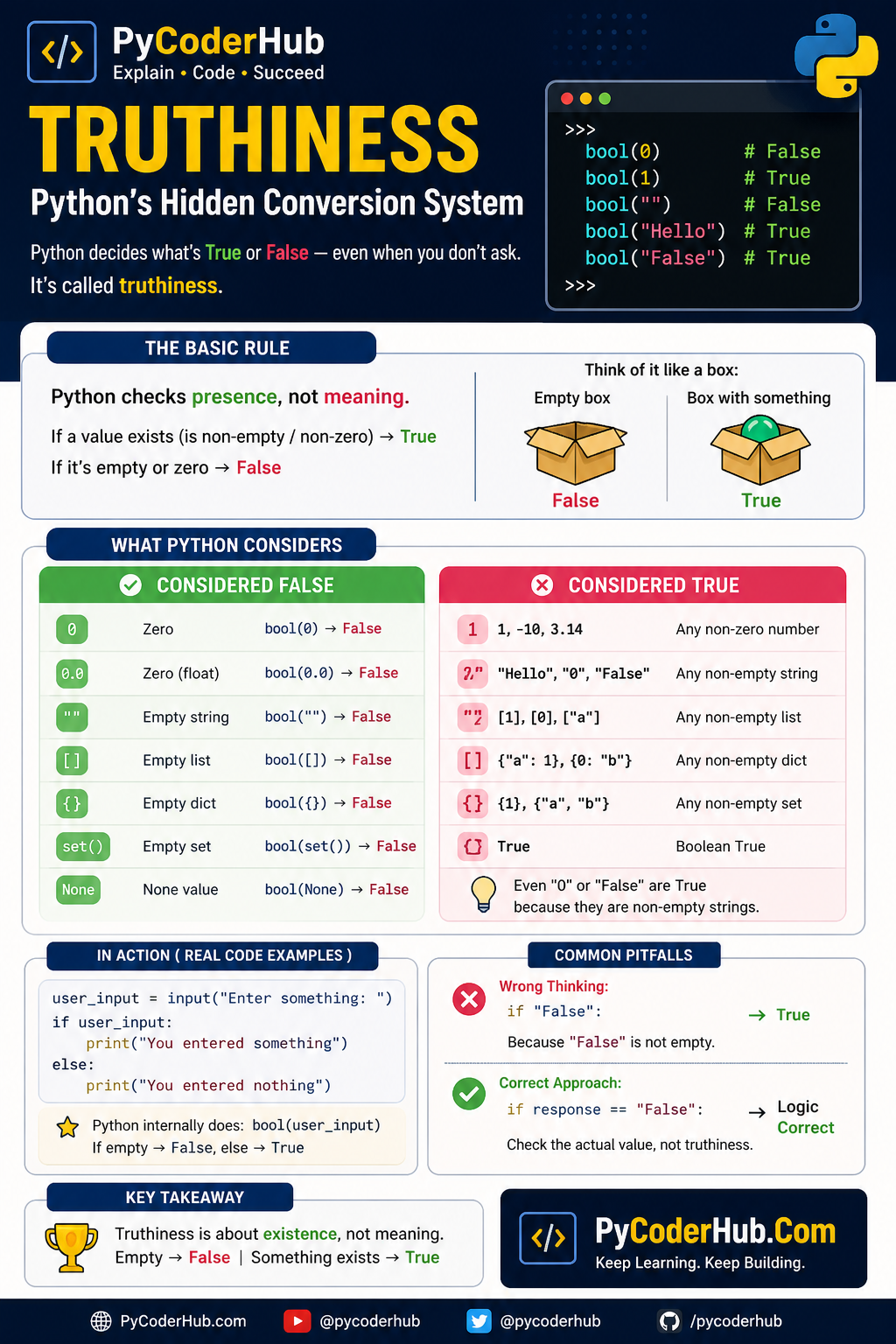
Truthiness in Python — Visual Guide (Infographic)
Understanding truthiness becomes much easier when you see patterns instead of memorizing rules. This infographic breaks down how Python decides whether a value is True or False, highlights common confusion points, and shows how this behavior appears in real code.
Now that we’ve learned how truthiness works, it’s time to understand another key concept: lossy vs lossless conversion in Python.
Section 4: Lossy vs Lossless Conversion — When Data Disappears
In this section, we’ll understand how some type conversions preserve data, while others silently lose it—and why this matters in real programs.
So far, you’ve seen how Python converts data and how it interprets values using truthiness.
But here’s another important layer most beginners miss:
Not all conversions are equal—some keep your data intact, while others quietly change or remove it.
Two Types of Conversion
Lossless Conversion (Safe)
A conversion is lossless when:
No information is lost during the conversion.
Example:
integer_value = 10
converted_float = float(integer_value)

print(converted_float)  # 10.0
What happened?
10→10.0- Value is still the same
- Only representation changed
No data lost → safe conversion
Lossy Conversion (Risky)
A conversion is lossy when:
Some part of the original data is removed or altered.
Example:
float_value = 10.75
converted_integer = int(float_value)

print(converted_integer)  # 10
What happened?
.75is completely removed- No rounding—just truncation
Data lost → lossy conversion
Why This Is Dangerous
Lossy conversions don’t raise errors.
They silently change your data.
Real-World Scenario: Money Calculation
price_value = 99.99
final_price = int(price_value)

print(final_price)  # 99
Problem:
- You just lost ₹0.99
- No warning from Python
Real-World Scenario: Measurements
height_value = 5.9
height_integer = int(height_value)

print(height_integer)  # 5
Precision is gone
Mental Model
Lossy conversion is like cutting data, not transforming it.
float → int→ cuts decimal partcomplex → int→ not allowed (too much data loss)
Think of it like:
- Lossless → changing container
- Lossy → throwing away part of the content
Important Insight
Python allows lossy conversions—but it assumes you know what you’re doing.
It does NOT:
- warn you
- stop you
- correct you
Just because a conversion “works” doesn’t mean it’s correct.
Always ask:
- Am I losing important data?
- Is precision important here?
Lossless conversion changes type.
Lossy conversion changes data.
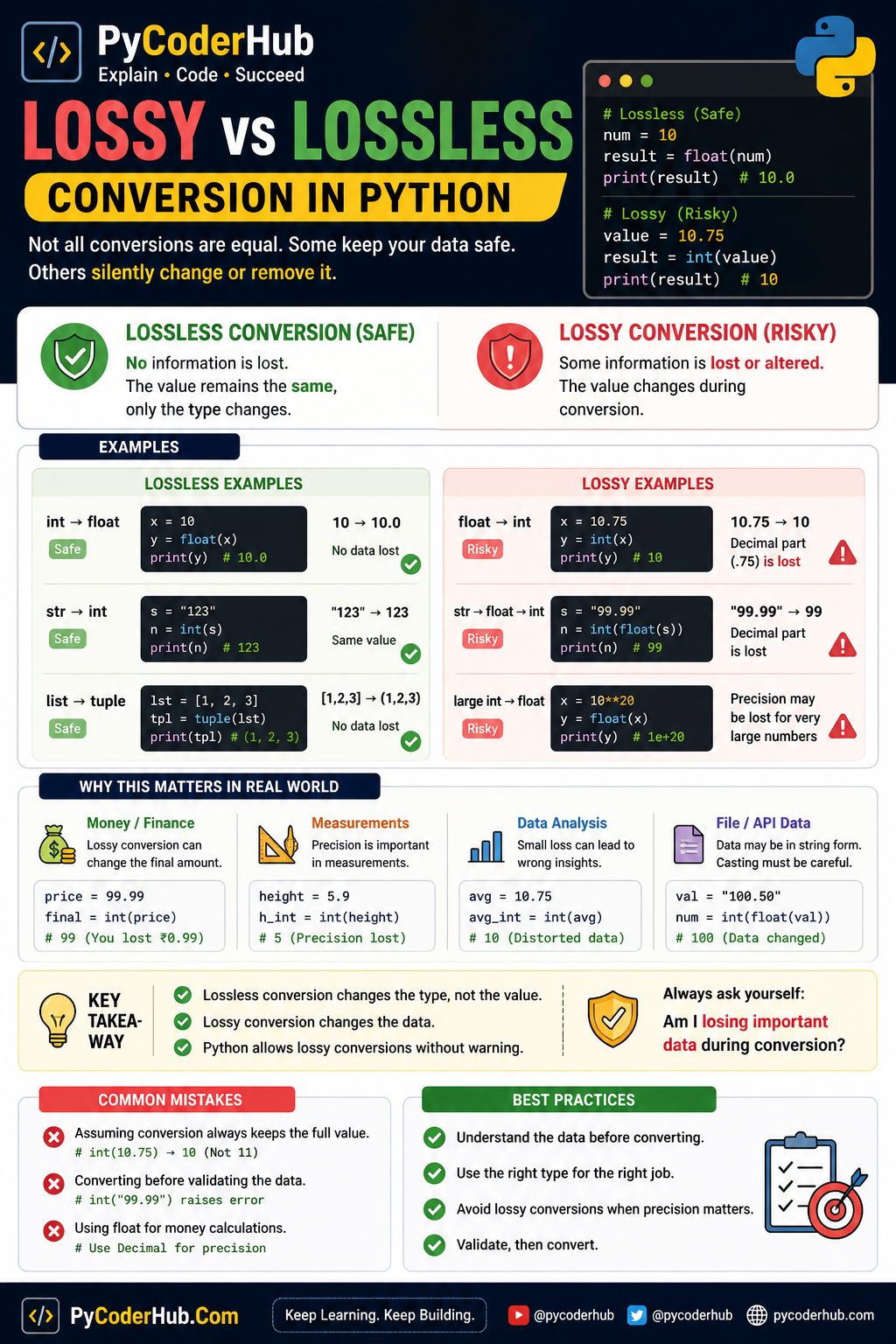
Lossy vs Lossless Conversion — Visual Guide (Infographic)
Understanding the difference between lossy and lossless conversion becomes much clearer when you can see how data changes. This infographic highlights how some conversions preserve your data, while others silently remove or alter it.
Now that you understand how data can be altered during conversion, the next step is how to handle real-world data safely.
Section 5: Type Casting with User Input
In this practical section, we’ll learn how to safely convert user input into the correct data type and avoid common runtime errors.
If there’s one place where type casting becomes immediately necessary, it’s user input.
Because in Python:
input() always returns a string—no matter what the user types.
Basic Example
user_age_input = input("Enter your age: ")
print(type(user_age_input))
Output:
<class 'str'>Even if the user enters:
25It is stored as:
"25" # string, not integerThe Problem
If you try to use this value directly in numeric operations:
user_age_input = input("Enter your age: ")
next_year_age = user_age_input + 1
You’ll get an error:
TypeError: can only concatenate str (not "int") to strThe Correct Approach: Explicit Type Casting
You must convert the input manually:
user_age_input = input("Enter your age: ")
user_age_number = int(user_age_input)

next_year_age = user_age_number + 1
print(next_year_age)
Mental Model
User input is always raw text—you must convert it before using it.
Think of it like:
- User gives you string data
- You decide what it should become:
- number
- boolean
- something else
Common Problem: Invalid Input
What if the user enters:
twentyuser_age_number = int("twenty")This will raise:
ValueError: invalid literal for int()Safe Casting with try-except
To handle this safely:
user_age_input = input("Enter your age: ")

try:
    user_age_number = int(user_age_input)
    print("Valid age:", user_age_number)
except ValueError:
    print("Invalid input. Please enter a number.")
Real-World Pattern: Combined Validation + Conversion
user_age_input = input("Enter your age: ").strip()

if user_age_input == "":
    print("Age is required")
else:
    try:
        user_age_number = int(user_age_input)
        print("Valid age:", user_age_number)
    except ValueError:
        print("Please enter a valid number")
Insight
Always remember:
- User input is always string first, data later
- Truthiness checks presence, not correctness
- Conversion without validation leads to errors
Never trust user input—it can be anything.
Section 6: Type Casting with File Data (CSV & Text)
In this section, we’ll learn how to transform file data (CSV/text) into the right Python types while preventing subtle bugs.
Working with files introduces the same core issue as user input—but at scale:
Everything you read from a file comes in as text (string).
Even if a file looks numeric, Python reads it as raw text.
Basic Example (Text File)
Suppose a file contains:
100
200
300
When you read it:
with open("numbers.txt") as file_object:
    for line_text in file_object:
        print(type(line_text.strip()))
Output:
<class 'str'>The Problem
If you try to use these values directly:
total_value = 0

with open("numbers.txt") as file_object:
    for line_text in file_object:
        total_value += line_text.strip()
You’ll get an error:
TypeError: unsupported operand type(s)Because:
"100"is a stringtotal_valueis an integer
Correct Approach: Convert While Reading
total_value = 0

with open("numbers.txt") as file_object:
    for line_text in file_object:
        number_value = int(line_text.strip())
        total_value += number_value

print(total_value)
Working with CSV Data
Suppose a CSV file contains:
101,25,99.99
102,30,149.50
Raw Read (All Strings)
with open("data.csv") as file_object:
    for line_text in file_object:
        row_values = line_text.strip().split(",")
        print(row_values)
Output:
['101', '25', '99.99']Proper Conversion
with open("data.csv") as file_object:
    for line_text in file_object:
        row_values = line_text.strip().split(",")

        user_id = int(row_values[0])
        age_value = int(row_values[1])
        price_value = float(row_values[2])

        print(user_id, age_value, price_value)
Safe Casting for File Data
Real files often contain:
- missing values
- invalid formats
- extra spaces
Safe Pattern
with open("data.csv") as file_object:
    for line_text in file_object:
        row_values = line_text.strip().split(",")

        try:
            user_id = int(row_values[0])
            age_value = int(row_values[1])
            price_value = float(row_values[2])

            print("Valid row:", user_id, age_value, price_value)

        except ValueError:
            print("Skipping invalid row:", row_values)
Real-World Pattern
with open("data.csv") as file_object:
    for line_text in file_object:
        row_values = line_text.strip().split(",")

        if len(row_values) != 3:
            continue

        user_id_text, age_text, price_text = row_values

        if user_id_text == "" or age_text == "" or price_text == "":
            continue

        try:
            user_id = int(user_id_text)
            age_value = int(age_text)
            price_value = float(price_text)

            print("Processed:", user_id, age_value, price_value)

        except ValueError:
            continue
Insights
- File data is structured text—not typed data
- Conversion is required for every numeric field
- Validation + conversion prevents silent data issues
File data is never guaranteed to be clean—even if you created the file.
Section 7: Type Casting with API & JSON Data
If file data felt structured, API data is where things become dynamic and unpredictable.
Because APIs usually return data in JSON format, which maps to Python dictionaries—but:
The structure is correct… the types are not always what you expect.
Basic Example (API Response)
api_response_data = {
    "user_id": "101",
    "age": "25",
    "price": "199.99",
    "is_active": "true"
}
At first glance, this looks fine.
But notice:
"101"→ string (should be int)"25"→ string (should be int)"199.99"→ string (should be float)"true"→ string (should be boolean)
The Problem
If you use these values directly:
price_total = api_response_data["price"] + 10You’ll get:
TypeErrorBecause:
"199.99"is a string10is a number
Correct Approach: Explicit Conversion
user_identifier = int(api_response_data["user_id"])
age_value = int(api_response_data["age"])
price_value = float(api_response_data["price"])
Working with Nested JSON
API data is often nested:
api_response_data = {
    "user": {
        "id": "101",
        "profile": {
            "age": "25",
            "premium": "false"
        }
    }
}
Safe Conversion
user_identifier = int(api_response_data["user"]["id"])
age_value = int(api_response_data["user"]["profile"]["age"])

premium_text = api_response_data["user"]["profile"]["premium"].lower()
premium_status = premium_text == "true"
Missing Keys Problem
Sometimes API responses don’t include expected fields:
api_response_data = {
    "user": {
        "id": "101"
    }
}
Risky Code
age_value = int(api_response_data["user"]["age"])Safe Access + Conversion
user_data = api_response_data.get("user", {})

age_text = user_data.get("age")

if age_text is not None:
    try:
        age_value = int(age_text)
    except ValueError:
        age_value = None
else:
    age_value = None
Defensive Conversion Pattern
def convert_to_integer_safely(value_text):
    try:
        return int(value_text)
    except (ValueError, TypeError):
        return None
Usage:
age_value = convert_to_integer_safely(api_response_data.get("age"))Real-World Scenario
api_response_data = {
    "price": "99.99",
    "discount": "10"
}

price_value = float(api_response_data["price"])
discount_value = int(api_response_data["discount"])

final_price = price_value - discount_value
print(final_price)
Insights
- API data may look correct—but types can be misleading
- Boolean values in APIs are often strings
- Missing or malformed data is common
Never use
bool()directly on strings from APIs.
Always:
- normalize (
lower()) - compare explicitly
Section 8: Safe Casting Patterns — Defensive Programming
By now, you’ve seen a pattern:
- User input → unpredictable
- File data → inconsistent
- API data → mixed and nested
Which leads to one important realization:
Type casting is not just about conversion—it’s about protection.
What Is Defensive Programming?
Defensive programming means:
Writing code that expects problems and handles them gracefully.
Instead of assuming:
- “This value will always be correct”
You assume:
- “This value might be wrong, missing, or invalid”
Pattern 1: Try–Except (Basic Safety)
user_age_input = input("Enter your age: ")

try:
    user_age_number = int(user_age_input)
    print("Valid age:", user_age_number)
except ValueError:
    print("Invalid input. Please enter a number.")
Use try-except when input is unpredictable.
Pattern 2: Pre-Validation Before Conversion
Sometimes, you can check before converting:
user_age_input = input("Enter your age: ").strip()

if user_age_input.isdigit():
    user_age_number = int(user_age_input)
    print("Valid age:", user_age_number)
else:
    print("Invalid input")
Limitation
isdigit()works only for positive integers- Fails for:
- negative numbers (
-10) - decimals (
10.5)
- negative numbers (
Pattern 3: Combined Validation + Conversion (Best Practice)
user_age_input = input("Enter your age: ").strip()

if user_age_input == "":
    print("Input required")
else:
    try:
        user_age_number = int(user_age_input)
        print("Valid age:", user_age_number)
    except ValueError:
        print("Invalid number format")
Always check for empty input first, then validate format.
Pattern 4: Reusable Safe Conversion Functions
Instead of repeating logic, create helper functions:
def convert_to_integer_safely(value_text):
    try:
        return int(value_text)
    except (ValueError, TypeError):
        return None
Usage
user_age_number = convert_to_integer_safely(user_age_input)

if user_age_number is None:
    print("Invalid age")
else:
    print("Age:", user_age_number)
Reusable functions make your code cleaner and consistent
Pattern 5: Safe Float Conversion
def convert_to_float_safely(value_text):
    try:
        return float(value_text)
    except (ValueError, TypeError):
        return None
Pattern 6: Safe Boolean Conversion (Important)
Never do this:
bool("false") # TrueCorrect Approach
def convert_to_boolean_safely(value_text):
    if isinstance(value_text, str):
        return value_text.strip().lower() == "true"
    return bool(value_text)
Boolean conversion must be explicit, not implicit
Pattern 7: Default Fallback Values
Sometimes you want a default instead of None:
def convert_to_integer_with_default(value_text, default_value=0):
    try:
        return int(value_text)
    except (ValueError, TypeError):
        return default_value
Usage
quantity_value = convert_to_integer_with_default(user_input, 1)Insights
- Safe casting prevents crashes
- Validation improves reliability
- Defensive code handles unknown inputs
Safe Casting Workflow — Visual Guide (Infographic)
Type casting becomes truly powerful when you follow a clear, repeatable process instead of converting data blindly. This workflow diagram shows how to safely handle real-world data step by step—from validation to conversion and error handling.
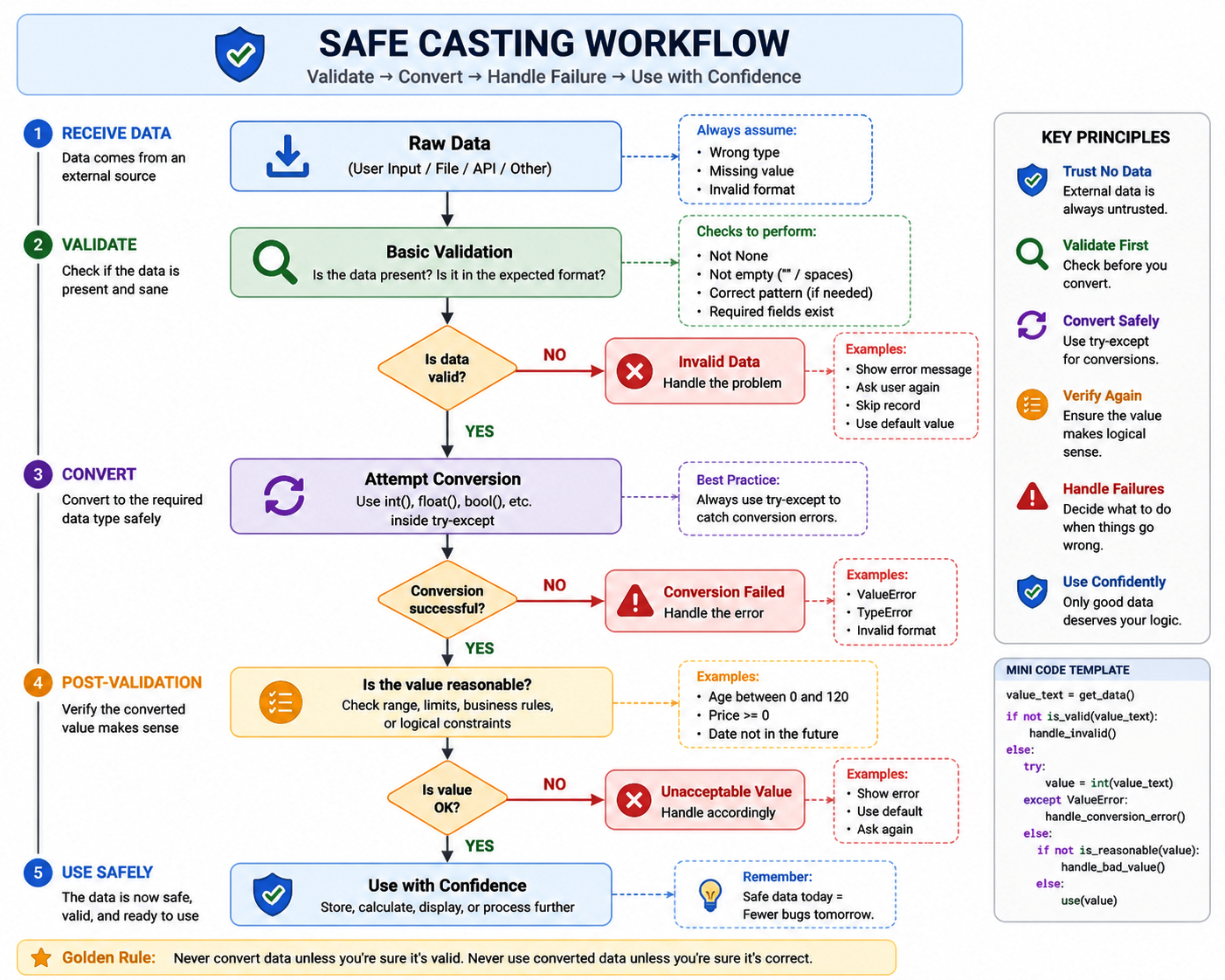
Use this as a practical blueprint whenever you’re working with user input, files, or API data to ensure your conversions are safe, reliable, and error-free.
Section 9: Edge Case Conversions — The Weird & Dangerous Ones
By now, you know how to convert data safely and handle real-world scenarios.
But Python has some edge cases where conversions behave in ways that are technically correct—but practically confusing.
These are the cases that don’t crash your program… but can quietly break your logic.
Case 1: Boolean as Numbers
print(int(True))   # 1
print(int(False))  # 0
Why?
In Python:
Truebehaves like1Falsebehaves like0
Case 2: Non-Empty Strings Are Always True
print(bool("0"))      # True
print(bool("False"))  # True
print(bool(" "))      # True
Wrong Thinking
“‘0’ or ‘False’ should be False”
Reality
- Only empty string → False
- Everything else → True
Truthiness checks emptiness, not meaning.
Case 3: Float to Int Does NOT Round
print(int(9.9))   # 9
print(int(-3.7))  # -3
int() cuts—not rounds.
Case 4: String to Int with Invalid Format
int("123abc") # ValueErrorConversion functions expect clean, exact format—no extra characters.
Case 5: Float Precision Issues
print(float(0.1 + 0.2))Output:
0.30000000000000004Why?
- Floating-point numbers have precision limits
- Not all decimal values can be represented exactly
Some numbers look simple—but aren’t stored exactly in memory.
Case 6: Empty Collections vs Non-Empty
print(bool([]))     # False
print(bool([0]))    # True
Content doesn’t matter—only emptiness matters.
Case 7: None Conversion Behavior
print(bool(None)) # FalseBut this fails:
int(None) # TypeErrorNone behaves like False in conditions—but cannot be converted to numbers.
Insights
- Python is consistent—but not always intuitive
- Truthiness ignores meaning and focuses on structure
- Some conversions silently modify data
Section 10: Summary — Real-World Conversion Cheat Sheet
After covering truthiness, data conversion, edge cases, and safe casting, let’s bring everything together into a simple, usable cheat sheet.
Real-World Type Casting Overview
| Scenario | Incoming Type | Required Conversion | Risk Level | Key Issue |
|---|---|---|---|---|
| User Input | str | int() / float() | High | Invalid input, empty values |
| File Data | str | int() / float() | Medium | Formatting, missing data |
| API / JSON | Mixed (often str) | Depends (int, float, manual bool) | High | Inconsistent types, nested data |
| Boolean Checks | Any type | bool() (implicit) | Medium | Truthiness confusion |
| Float → Int | float | int() | Medium | Data loss (truncation) |
Key Patterns to Remember
- Always assume external data is incorrect or incomplete
- Truthiness checks presence, not actual meaning
- Some conversions are lossy and silently change data
- Never rely on implicit behavior for critical logic
- Use safe casting (try-except) for unpredictable inputs
Quick Red Flags
Watch out when you see:
"False"behaving likeTrue"0"passing condition checksint(float_value)silently removing decimals- API values that look boolean but are actually strings
- Code that converts without validation
Safe Conversion Workflow (Mental Model)
Validate → Convert → Handle Failure
Instead of:
Convert → Hope it works
Final Insight
Type casting is not just about changing types—it’s about ensuring correctness, safety, and predictable behavior in real-world programs.
Conclusion: From Conversion Rules to Real-World Confidence
You started this chapter by learning what type casting is and how Python converts data between types.
Now, you’ve gone much deeper.
You’ve seen:
- How Python interprets values using truthiness
- How real-world data (input, files, APIs) comes in unexpected formats
- How some conversions are lossless, while others silently lose data
- How edge cases can create hidden bugs
- And most importantly, how to apply safe casting techniques to write reliable code
Type casting is not just a technical feature—it’s a decision-making tool.
Every time you convert data, you are deciding:
- What this value should represent
- How it should behave in your program
- Whether it is safe to use
Reliable programs are not built by correct conversions alone—they are built by safe and thoughtful conversions. 🐍
What’s Next?
Now that you’ve explored how type casting is used in real-world Python programs, including truthiness checks, data conversion, validation, and safe casting techniques, you’ve built a much more practical understanding of how conversions work in everyday coding.
In the next lesson, you’ll learn Python type casting best practices to write safer, cleaner, and more predictable code. You’ll also discover common mistakes to avoid and smart habits that help prevent bugs and unexpected behavior in real projects.
👉 Continue your learning here: Python Type Casting Best Practices: Write Safe, Predictable & Bug-Free Code
Suggested Posts
- Python Type Casting Explained (Type Conversion for Beginners)
- Python Type Casting Functions Explained (int, float, complex, bool, str)
- Advanced Python Type Casting Functions Explained (list, tuple, set, dict & More)
- Python Type Casting Rules: Complete Guide to Safe and Predictable Conversions
- Python Type Promotion Explained (Implicit Type Conversion & Type Hierarchy)
- Python Type Casting Best Practices: Write Safe, Predictable & Bug-Free Code
- Python Type Casting FAQs: Common Conversion Questions, Errors & Confusions Explained

5 thoughts on “Python Type Casting in Real-World Applications: Truthiness, Data Conversion & Safe Casting”