
Introduction: Advanced Python Type Casting Functions
In the previous lesson, you explored the core Python type casting functions — int(), float(), complex(), bool(), and str(). Those functions helped you understand how Python converts data between fundamental types and how values behave during conversion.
But real-world Python programming goes beyond just converting numbers and strings.
In practical scenarios, you often need to:
- Transform data into collections
- Remove duplicates
- Structure information into key-value pairs
- Convert numbers into different formats (binary, hex, etc.)
- Handle low-level data like bytes
That’s where advanced Python type casting functions come into play.
What You’ll Learn
In this lesson, you’ll master advanced Python type casting functions and understand how to use them in real-world scenarios.
By the end of this lesson, you will be able to:
- Convert data into collections using:
list(),tuple(),set(),dict()
- Understand how Python handles:
- Duplicate removal and unordered data (
set()) - Immutable vs mutable structures
- Duplicate removal and unordered data (
- Convert numbers into different formats:
- Binary (
bin()), Octal (oct()), Hexadecimal (hex())
- Binary (
- Work with byte-level data:
bytes(),bytearray(),memoryview()
- Use utility conversion functions:
frozenset(),chr(),ord(),repr(),ascii()
- Avoid common beginner confusion and mistakes
- Apply type casting in practical, real-world situations
How This Lesson Is Structured
To make learning easier and avoid confusion, this lesson is divided into three logical parts, based on importance and real-world usage:
PART 1: The Big Four (Deep Dive)
list(),tuple(),set(),dict()
These are the most important and widely used type casting functions.
You’ll learn them in deep detail with examples, use cases, and common mistakes.
PART 2: Practical Conversion Functions (Moderate Depth)
bin(),oct(),hex()bytes(),bytearray(),memoryview()ord(),chr()
These are practical and useful, but slightly less common than collections.
You’ll learn how they work and where they are used in real scenarios.
PART 3: Quick Utility Conversions (Lightweight Section)
frozenset()repr()ascii()
These are special-purpose functions.
You’ll learn them quickly without overloading your understanding.
Now that you understand what advanced Python type casting functions are and how this lesson is structured, it’s time to dive into the most important part.
Let’s start with PART 1: The Big Four and explore how Python converts data into powerful collection types.
PART 1: The Big Four (Deep Dive — Core of This Lesson)
In this part, you’ll explore the four most important advanced Python type casting functions—list(), tuple(), set(), and dict()—and learn how they convert and structure data for real-world use.
list() — Convert Data into a List
When working with data in Python, one of the most common tasks is to organize values into a structure you can easily loop through, modify, and process. That’s exactly where list() comes in.
The list() function is one of the most powerful and widely used functions because it allows you to convert different types of data into a list (ordered, mutable collection).
What is list()?
The list() function converts an iterable (like a string, tuple, set, etc.) into a list.
Syntax and Parameters
list(iterable)Explanation:
| Parameter | Description |
|---|---|
iterable | Any iterable object — string, tuple, set, dict, range, etc. |
Important Notes
- If you pass no argument, it returns an empty list
[] - If you pass an iterable, it converts each element into a separate list item
What is an iterable? An iterable is anything Python can loop through one item at a time. Strings, tuples, sets, dictionaries, and ranges are all iterables.
Conversion Examples
Let’s see how list() behaves with different data types:
String → List
text_value = "Python"
converted_list = list(text_value)
print(converted_list)
Output:
['P', 'y', 't', 'h', 'o', 'n']Each character becomes a separate element in the list.
Tuple → List
tuple_values = (10, 20, 30)
converted_list = list(tuple_values)
print(converted_list)
Output:
[10, 20, 30]Useful when you need to modify tuple data (since lists are mutable).
Set → List
set_values = {1, 2, 3, 4}
converted_list = list(set_values)
print(converted_list)
Output:
[1, 2, 3, 4]Order may vary because sets are unordered.
Dictionary → List
user_data = {"name": "PyCoder", "age": 21}
converted_list = list(user_data)
print(converted_list)
Output:
['name', 'age']By default, list() converts a dictionary into a list of its keys only.
Range → List
range_values = range(1, 6)
converted_list = list(range_values)
print(converted_list)
Output:
[1, 2, 3, 4, 5]Very useful when you want to store a sequence generated by range().
Real-World Use Cases
Here’s where list() is actually used in real programs:
1. Preparing Data for Loops
user_input = "hello"
for character in list(user_input):
    print(character)
2. Converting API or External Data
- Many APIs return data in formats like tuples or sets
- You often convert them into lists for easier handling
3. Making Data Editable
tuple_data = (1, 2, 3)
editable_data = list(tuple_data)
editable_data.append(4)
Lists allow modification, unlike tuples.
Confusion Breaker (Very Important)
Misconception:
list("hello")should give["hello"]
Reality:
list("hello")Output:
['h', 'e', 'l', 'l', 'o']Python treats a string as a sequence of characters.
Misconception:
list(dictionary)returns full key-value pairs
Reality:
list({"a": 1, "b": 2})Output:
['a', 'b']Only keys are returned.
Key Takeaway
list()is used to convert and organize data into a flexible, editable structure- It works with any iterable
- Understanding its behavior removes a lot of beginner confusion
tuple() — Convert to an Immutable Sequence
After learning how list() creates a flexible, editable collection, the next step is understanding tuple().
What is tuple() ?
The tuple() function converts data into a tuple, which is an ordered but immutable (unchangeable) collection.
Think of it like this:
- A list is like a notebook (you can edit it anytime)
- A tuple is like a printed document (once created, it cannot be changed)
Syntax and Parameters
tuple(iterable)Explanation:
| Parameter | Description |
|---|---|
iterable | Any iterable object — string, list, set, dict, range, etc. |
Important Notes
- If you pass no argument, it returns an empty tuple
() - If you pass an iterable, each element becomes a tuple item
- Tuples are ordered but cannot be modified after creation
What is Immutability? – Immutability means you cannot change the data after it is created.
Tuple vs list — The one key difference: A list uses
[]and can be modified after creation. A tuple uses()and cannot be modified after creation. That’s it!
Conversion Examples
String → Tuple
text_value = "Python"
converted_tuple = tuple(text_value)
print(converted_tuple)
Output:
('P', 'y', 't', 'h', 'o', 'n')List → Tuple
list_values = [10, 20, 30]
converted_tuple = tuple(list_values)
print(converted_tuple)
Output:
(10, 20, 30)Set → Tuple
set_values = {1, 2, 3}
converted_tuple = tuple(set_values)
print(converted_tuple)
Output:
(1, 2, 3)Order may vary because sets are unordered.
Dictionary → Tuple
user_data = {"name": "PyCoder", "age": 21}
converted_tuple = tuple(user_data)
print(converted_tuple)
Output:
('name', 'age')Like list(), it returns only keys.
Range → Tuple
range_values = range(1, 6)
converted_tuple = tuple(range_values)
print(converted_tuple)
Output:
(1, 2, 3, 4, 5)Real-World Use Cases
1. Returning Multiple Values from Functions
def get_user_details():
    return ("PyCoder", 21)

user_name, user_age = get_user_details()
2. Protecting Data from Modification
fixed_config = ("localhost", 8080)Ensures values are not accidentally changed.
3. Using as Dictionary Keys (Advanced Use)
- Tuples can be used as keys because they are immutable
- Lists cannot be used as keys
Confusion Breaker
Misconception:
Converting to tuple makes data completely “safe”
Reality:
nested_list = ([1, 2], [3, 4])
converted_tuple = tuple(nested_list)
You cannot change the tuple itself, but:
- You can modify the inner lists
Important:
- Tuple = immutable
- But elements inside may still be mutable
Key Takeaway
tuple()converts data into an ordered, immutable collection- Useful when data should remain unchanged
- Helps prevent accidental modifications
set() — Convert to a Unique Collection
After working with lists and tuples, you’ll often face a common real-world problem:
“How do I remove duplicate values from my data?”
That’s exactly where set() shines.
What is set()?
The set() function converts data into a set, which is an unordered collection of unique elements.
Think of it like a filter:
- You give it a collection
- It automatically removes duplicates
- And keeps only unique values
Syntax and Parameters
set(iterable)Explanation:
| Parameter | Description |
|---|---|
iterable | Any iterable object — string, list, tuple, dict, range, etc. |
Important Notes
- If you pass no argument, it returns an empty set
set()(not{}) - If you pass an iterable, duplicate values are automatically removed
- Sets are unordered, so output order is not guaranteed
One important rule: Set items must be hashable (immutable). This means you can store strings, numbers, and tuples inside a set — but not lists or dictionaries.
Conversion Examples
String → Set
text_value = "hello"
converted_set = set(text_value)
print(converted_set)
Output (order may vary):
{'h', 'e', 'l', 'o'}Duplicate 'l' is removed automatically.
List → Set
list_values = [1, 2, 2, 3, 4, 4]
converted_set = set(list_values)
print(converted_set)
Output:
{1, 2, 3, 4}Tuple → Set
tuple_values = (10, 20, 20, 30)
converted_set = set(tuple_values)
print(converted_set)
Output:
{10, 20, 30}Dictionary → Set
user_data = {"name": "PyCoder", "age": 21}
converted_set = set(user_data)
print(converted_set)
Output:
{'name', 'age'}Like list() and tuple(), it returns only keys.
Range → Set
range_values = range(1, 6)
converted_set = set(range_values)
print(converted_set)
Output:
{1, 2, 3, 4, 5}Real-World Use Cases
Removing Duplicate Values
user_ids = [101, 102, 102, 103, 104, 104]
unique_user_ids = set(user_ids)
print(unique_user_ids)
Common in:
- Data cleaning
- Form inputs
- Logs processing
Membership Testing (Fast Lookup)
allowed_users = {"admin", "editor", "viewer"}

if "admin" in allowed_users:
    print("Access granted")
Sets are faster than lists for checking existence.
Comparing Data Collections
set_one = {1, 2, 3}
set_two = {3, 4, 5}

common_values = set_one & set_two
print(common_values)
Useful for:
- Finding common elements
- Removing overlaps
Confusion Breaker
Misconception:
Sets maintain order like lists
Reality:
set([3, 1, 2])Output (may vary):
{1, 2, 3}Order is not guaranteed.
Misconception:
{}creates an empty set
Reality:
empty_value = {}
print(type(empty_value))
This creates a dictionary, not a set.
Correct way:
empty_set = set()Key Takeaway
set()converts data into a unique, unordered collection- Automatically removes duplicates
- Ideal for data cleaning and fast lookups
dict() — Convert to Key-Value Structure
So far, you’ve seen how to convert data into lists, tuples, and sets. But in real-world applications, data is often stored in a structured format with keys and values.
That’s where dict() comes in.
What is dict()?
The dict() function converts data into a dictionary, which stores information as key-value pairs.
Think of it like a contact list:
- Key → Name
- Value → Phone number
Syntax and Parameters
dict([mapping_or_iterable], **keyword_arguments)Explanation:
| Parameter | Description |
|---|---|
mapping_or_iterable | A mapping object or an iterable of key-value pairs (like list of tuples) |
**keyword_arguments | Key=value pairs passed directly as arguments |
Important Notes
- If you pass no argument, it returns an empty dictionary
{} - Input must contain pairs (key, value)
- Each pair must have exactly 2 elements
- Keys must be unique and immutable
Conversion Examples
List of Tuples → Dictionary
data_pairs = [("name", "PyCoder"), ("age", 21)]
converted_dict = dict(data_pairs)
print(converted_dict)
Output:
{'name': 'PyCoder', 'age': 21}List of Lists → Dictionary
data_pairs = [["a", 1], ["b", 2]]
converted_dict = dict(data_pairs)
print(converted_dict)
Output:
{'a': 1, 'b': 2}Using zip() → Dictionary
keys_list = ["name", "age"]
values_list = ["PyCoder", 21]

converted_dict = dict(zip(keys_list, values_list))
print(converted_dict)
Output:
{'name': 'PyCoder', 'age': 21}Keyword Arguments → Dictionary
converted_dict = dict(name="PyCoder", age=21)
print(converted_dict)
Output:
{'name': 'PyCoder', 'age': 21}Dictionary → Dictionary (Copy)
original_dict = {"a": 1, "b": 2}
copied_dict = dict(original_dict)
print(copied_dict)
Creates a shallow copy of the dictionary.
Real-World Use Cases
Structuring User Data
user_info = dict(name="PyCoder", age=21, country="India")Combining Data from Multiple Sources
keys = ["id", "score"]
values = [101, 95]

student_data = dict(zip(keys, values))
Converting Raw Data into Usable Format
- API responses
- CSV data
- Form inputs
Confusion Breaker (Very Important)
Misconception:
You can pass any list to
dict()
Reality:
dict([1, 2, 3])This will raise an error because values are not in pairs
Misconception:
Keys can repeat
Reality:
dict([("a", 1), ("a", 2)])Output:
{'a': 2}Duplicate keys are overwritten (last value wins)
Misconception:
Keys can be any type
Reality:
dict([[["list_key"], 1]])Error — lists are mutable and cannot be keys
Key Takeaway
dict()converts data into a structured key-value format- Requires properly formatted input (pairs)
- Essential for organizing real-world data
Visual Summary: The Big Four Type Casting Functions
Part 1 Complete!
You’ve now mastered the four most important Advanced Python Type Casting Functions:
list()→ flexible collectiontuple()→ immutable sequenceset()→ unique valuesdict()→ structured key-value data
Before moving ahead, here’s a quick visual recap of the Advanced Python Type Casting Functions you just learned in Part 1. This infographic helps you compare list(), tuple(), set(), and dict() at a glance—so you can clearly understand when and why to use each one.
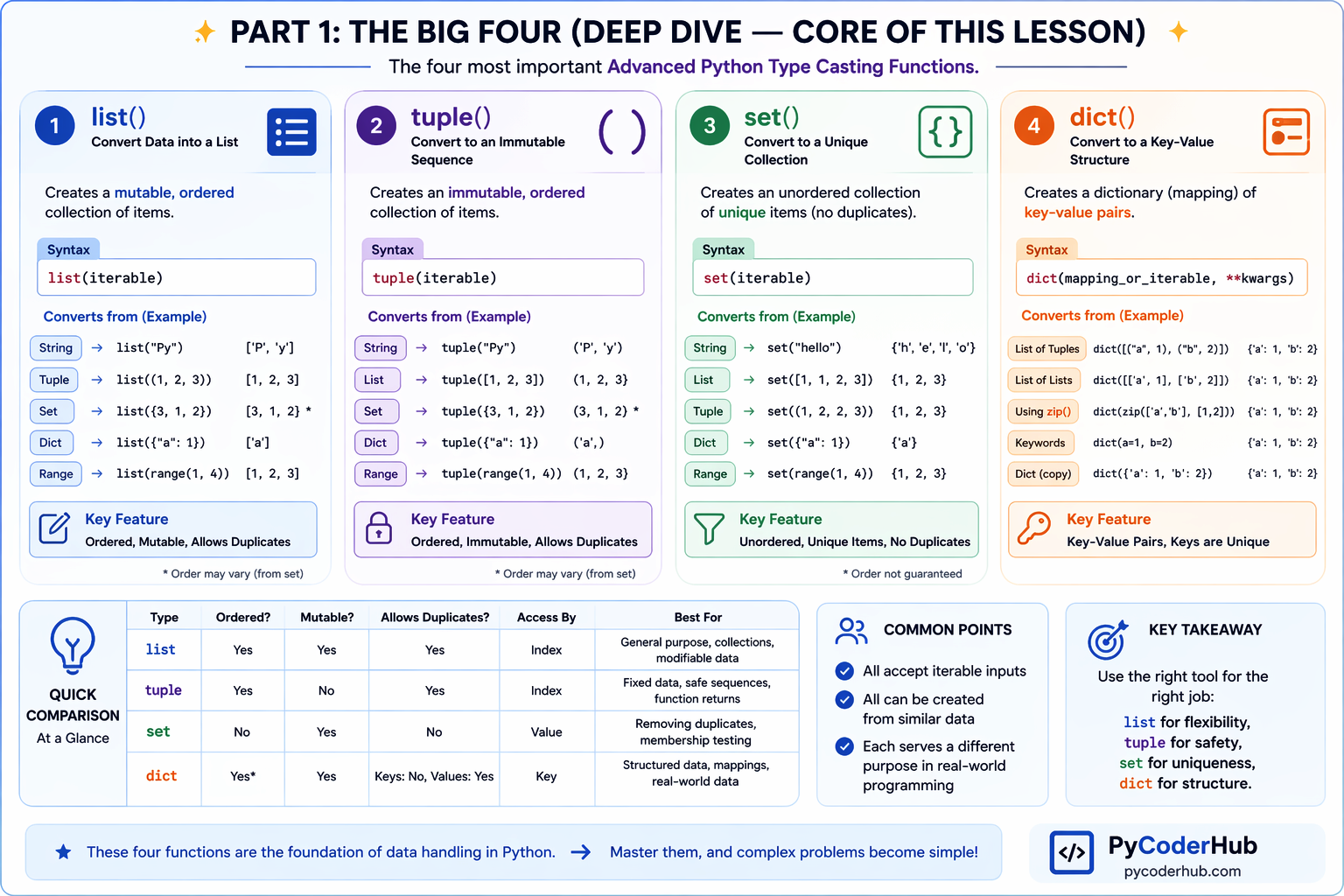
This visual makes it easier to choose the right data structure based on your needs—flexibility, immutability, uniqueness, or structured data.
Now let’s move to the next part and explore how Python converts numbers and handles lower-level data.
PART 2: Practical Conversion Functions (Moderate Depth)
In this part, you’ll explore practical functions like bin(), oct(), hex(), bytes(), bytearray(), memoryview(), ord(), and chr()—and learn how they convert data into different formats for real-world scenarios like encoding, number systems, and low-level data handling.
bin(), oct(), hex() — Number Base Conversions
In real-world programming, numbers are not always represented in the standard decimal (base 10) format.
Sometimes you need:
- Binary (base 2) → used in low-level systems, flags, bitwise operations
- Octal (base 8) → used in file permissions (Linux/Unix)
- Hexadecimal (base 16) → used in colors, memory addresses, debugging
That’s where these Advanced Python Type Casting Functions come in.
What Are Number Bases? (Quick Understanding)
- Decimal (base 10) → digits 0–9 (what we normally use)
- Binary (base 2) → only 0 and 1
- Octal (base 8) → digits 0–7
- Hexadecimal (base 16) → digits 0–9 and letters A–F
Python allows you to easily convert numbers into these formats using built-in functions.
bin() — Convert Integer to Binary
Syntax and Parameter
bin(integer_value)Parameter Explanation:
| Parameter | Description |
|---|---|
integer_value | An integer number to convert into binary |
Important Notes
- Accepts only integers
- Output starts with prefix
0b - Returns result as a string
Example
number_value = 10
binary_value = bin(number_value)
print(binary_value)
Output:
0b1010oct() — Convert Integer to Octal
Syntax and Parameter
oct(integer_value)Parameter Explanation:
| Parameter | Description |
|---|---|
integer_value | An integer number to convert into octal |
Important Notes
- Accepts only integers
- Output starts with prefix
0o - Returns result as a string
Example
number_value = 10
octal_value = oct(number_value)
print(octal_value)
Output:
0o12hex() — Convert Integer to Hexadecimal
Syntax and Parameter
hex(integer_value)Parameter Explanation:
| Parameter | Description |
|---|---|
integer_value | An integer number to convert into hexadecimal |
Important Notes
- Accepts only integers
- Output starts with prefix
0x - Uses digits 0–9 and a–f
- Returns result as a string
Example
number_value = 255
hex_value = hex(number_value)
print(hex_value)
Output:
0xffQuick Comparison Table
| Function | Output Prefix | Number System | Example Output |
|---|---|---|---|
bin() | 0b | Binary (base 2) | 0b1010 |
oct() | 0o | Octal (base 8) | 0o12 |
hex() | 0x | Hexadecimal (base 16) | 0xff |
Real-World Use Cases
Working with Binary Data
permission_flag = 5
print(bin(permission_flag))
Used in:
- Bitwise operations
- System-level programming
Representing Colors (Hex)
color_code = hex(255)
print(color_code)
Common in:
- Web development (
#ff0000) - Graphics
File Permissions (Octal)
permission = 7
print(oct(permission))
Used in:
- Linux/Unix file permissions
Key Takeaway
bin(),oct(), andhex()convert integers into different number system representations- Output is always a string with a prefix
- Useful in low-level programming, debugging, and real-world applications
bytes(), bytearray(), memoryview() — Byte-Level Type Casting
So far, you’ve seen how Python converts data into collections and number systems. Now we move one level deeper—how Python handles raw binary data (bytes).
These functions are used when working with:
- Files (images, videos, text files)
- Network data
- Encoding and decoding
- Performance-sensitive operations
Think of this as:
- High-level data → human-friendly
- Byte-level data → machine-friendly
bytes() — Immutable Byte Data
The bytes() function converts data into a sequence of bytes, where each value ranges from 0 to 255.
A byte is the smallest unit of data (8 bits).
Syntax and Parameter
bytes(source, encoding, errors)Parameter Explanation:
| Parameter | Description |
|---|---|
source | Data to convert (string, iterable of integers, etc.) |
encoding | Required when source is a string (e.g., "utf-8") |
errors | Optional error handling strategy |
Important Notes
- Values must be in range 0–255
- Result is immutable (cannot be changed)
- Strings must be encoded
Examples
String → Bytes
text_value = "Python"
byte_data = bytes(text_value, "utf-8")
print(byte_data)
Output:
b'Python'List → Bytes
number_values = [65, 66, 67]
byte_data = bytes(number_values)
print(byte_data)
Output:
b'ABC'bytearray() — Mutable Bytes
The bytearray() function is similar to bytes(), but with one key difference:
It is mutable (modifiable)
Syntax and Parameter
bytearray(source, encoding, errors)Parameter Explanation:
| Parameter | Description |
|---|---|
source | Data to convert (string or iterable of integers) |
encoding | Required for string input |
errors | Optional |
Important Notes
- Works like
bytes()but allows modification - Useful when you need to change binary data
Example
byte_data = bytearray([65, 66, 67])
byte_data[0] = 90
print(byte_data)
Output:
bytearray(b'ZBC')bytes() vs bytearray()
| Feature | bytes() | bytearray() |
|---|---|---|
| Mutable | No | Yes |
| Use Case | Fixed data | Editable data |
memoryview() — Memory-Efficient Data Access
The memoryview() function allows you to access data without copying it, making it more memory-efficient.
Instead of creating a new object, it views the existing data in memory.
Syntax and Parameter
memoryview(object)Parameter Explanation:
| Parameter | Description |
|---|---|
object | A bytes-like object (bytes, bytearray, etc.) |
Important Notes
- Does not copy data
- Provides direct access to memory
- Useful for large datasets
Example
byte_data = bytearray([10, 20, 30, 40])
memory_view = memoryview(byte_data)

print(memory_view[0])
Output:
10Key Takeaway
bytes()→ immutable binary databytearray()→ mutable binary datamemoryview()→ efficient memory access
These are useful when working with low-level data and performance optimization
ord() & chr() — Character ↔ Number Conversion
Now let’s explore two simple but powerful functions that work with characters and numbers.
ord() and chr() are opposites of each other:
ord()→ converts a character to its numeric (Unicode) valuechr()→ converts a number back to a character
Think of it like a translator:
- One converts letters → numbers
- The other converts numbers → letters
ord() — Character to Integer
The ord() function returns the Unicode code point of a character.
Syntax and Parameter
ord(character)Parameter Explanation:
| Parameter | Description |
|---|---|
character | A single character (string of length 1) |
Important Notes
- Accepts only one character
- Returns an integer value
- Based on Unicode (ASCII is a subset of Unicode)
Example
character_value = "A"
numeric_value = ord(character_value)
print(numeric_value)
Output:
65More Examples
print(ord("a"))   # 97
print(ord("0"))   # 48
print(ord("@"))   # 64
chr() — Integer to Character
The chr() function converts a number into its corresponding Unicode character.
Syntax and Parameter
chr(integer_value)Parameter Explanation:
| Parameter | Description |
|---|---|
integer_value | A valid Unicode code point (integer) |
Important Notes
- Accepts only integers
- Returns a string (character)
- Must be within valid Unicode range
Example
numeric_value = 65
character_value = chr(numeric_value)
print(character_value)
Output:
AMore Examples
print(chr(97))   # a
print(chr(48))   # 0
print(chr(64))   # @
Relationship Between ord() and chr()
character_value = "B"

numeric_value = ord(character_value)
converted_back = chr(numeric_value)

print(numeric_value)     # 66
print(converted_back)    # B
They are perfect opposites.
Real-World Use Cases
Basic Encoding / Decoding
character_value = "A"
encoded = ord(character_value) + 1
decoded = chr(encoded)

print(decoded)
Used in:
- Simple encryption logic
- Learning encoding concepts
Working with Characters in Loops
for code_point in range(65, 70):
    print(chr(code_point))
Output:
A B C D EKey Takeaway
ord()converts a character → numberchr()converts a number → character- They are simple but powerful for understanding encoding
Visual Summary: Practical Conversion Functions (Part 2)
Part 2 Complete!
Before moving to the final section, here’s a quick visual overview of the functions covered in Part 2. This infographic helps you understand how bin(), oct(), hex(), bytes(), bytearray(), and memoryview() work together to handle number systems and low-level data.
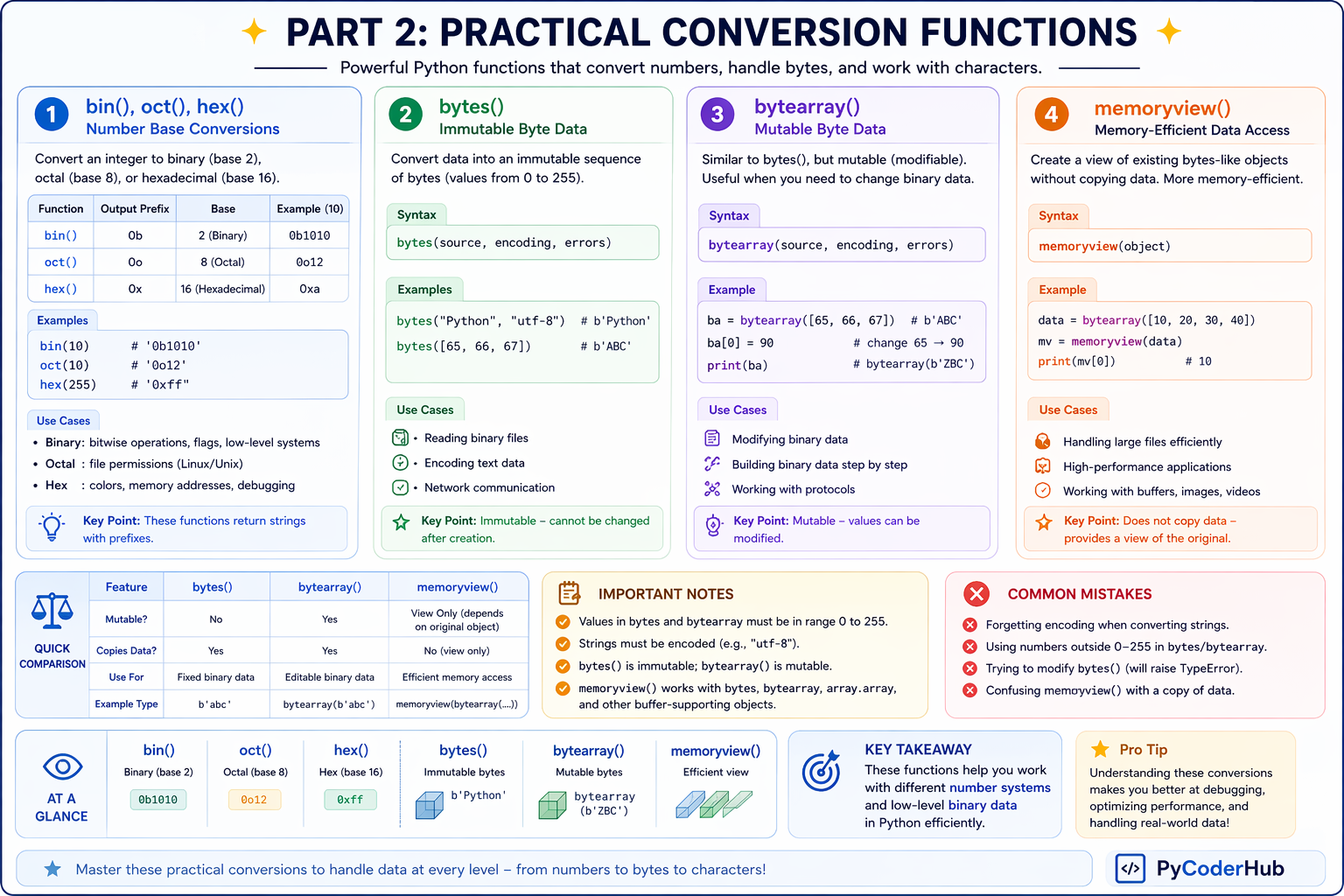
This visual helps you quickly decide when to use number conversions versus byte-level operations in real-world Python programs.
Next, let’s move to the final section of this lesson—quick utility functions that are useful in specific scenarios.
PART 3: Quick Utility Conversions (Lightweight but Useful)
In this part, you’ll explore utility-based Advanced Python Type Casting Functions like frozenset(), repr(), and ascii()—and learn how they help with immutability, internal data representation, and safe string handling in real-world scenarios like debugging and Unicode processing.
frozenset() — Immutable Set
The frozenset() function converts data into a set that cannot be modified.
It’s like a set(), but locked (immutable).
Syntax and Parameter
frozenset(iterable)Parameter Explanation
| Parameter | Description |
|---|---|
iterable | Any iterable object — string, list, tuple, set, dict, etc. |
Important Notes
- Returns an immutable set
- Does not allow duplicates (same as
set()) - Cannot add or remove elements after creation
Example
data_values = [1, 2, 2, 3]
frozen_data = frozenset(data_values)
print(frozen_data)
Output:
frozenset({1, 2, 3})repr() — Internal Representation
The repr() function returns the official string representation of an object.
It shows how Python internally represents the data.
Syntax and Parameter
repr(object_value)Parameter Explanation
| Parameter | Description |
|---|---|
object_value | Any Python object |
Important Notes
- Used mainly for debugging
- Shows raw, unformatted output
- Often includes escape characters
Example
text_value = "Hello\nWorld"
print(repr(text_value))
Output:
'Hello\nWorld'Notice:
\nis visible (not executed as newline)
Insight
print()→ user-friendly outputrepr()→ developer/debug output
ascii() — Safe ASCII Representation
The ascii() function returns a string where non-ASCII characters are converted into escape sequences.
Useful when working with Unicode data.
Syntax and Parameter
ascii(object_value)Parameter Explanation
| Parameter | Description |
|---|---|
object_value | Any Python object |
Important Notes
- Similar to
repr() - Converts non-ASCII characters into
\uformat - Helps in debugging encoding issues
Example
text_value = "नमस्ते"
print(ascii(text_value))
Output:
'\u0928\u092e\u0938\u094d\u0924\u0947'Mini Comparison: str() vs repr() vs ascii()
| Function | Purpose | Output Style |
|---|---|---|
str() | User-friendly display | Clean and readable |
repr() | Developer/debug view | Raw with escape characters |
ascii() | ASCII-safe output | Escaped Unicode |
Key Takeaway
frozenset()→ immutable version of setrepr()→ internal/debug representationascii()→ Unicode-safe representation
These functions are not used daily, but are extremely helpful in specific scenarios like debugging and data safety.
Visual Summary: Quick Utility Conversion Functions (Part 3)
Part 3 Complete!
You’ve now covered all major Advanced Python Type Casting Functions
Before wrapping up, here’s a quick visual recap of the functions covered in Part 3. This infographic highlights how frozenset(), repr(), and ascii() help with immutability, debugging, and safe string handling in Python.
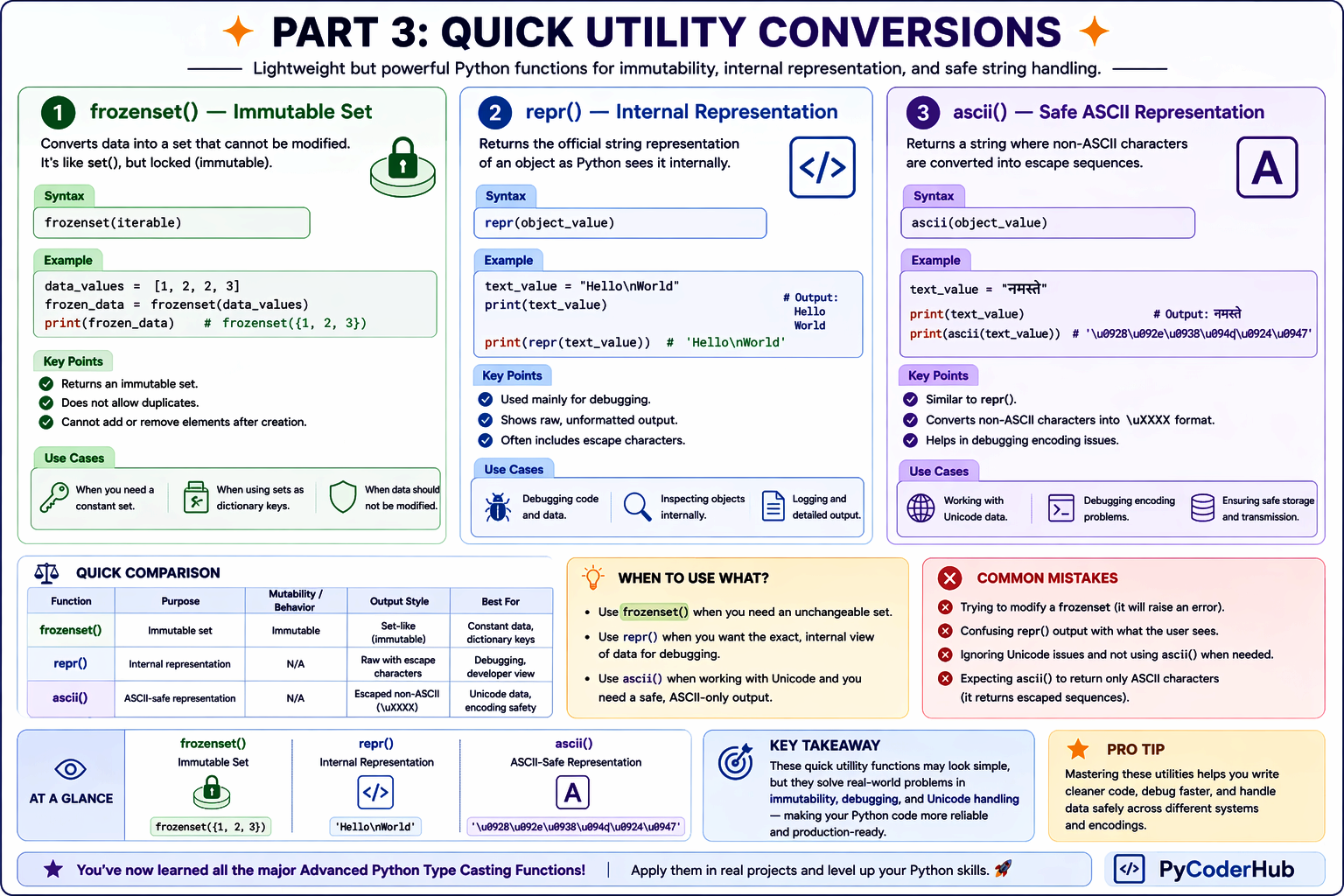
This visual helps you quickly understand when to use these utility functions in real-world scenarios like debugging and data safety.
Before we wrap up, let’s quickly go through a complete summary table and recap of all the Advanced Python Type Casting Functions covered in this lesson.
Complete Overview: All Python Type Casting Functions (Basic to Advanced)
Before wrapping up, here’s a complete overview of all Python Type Casting Functions covered across Lesson 2 and Lesson 3. This table brings everything together in one place—from basic conversions like int() and str() to advanced functions like dict(), bytes(), and repr()—so you can quickly understand what each function does and when to use it.
Master Summary Table
| Function | Converts To | Key Behavior | Common Use Case | Level |
|---|---|---|---|---|
int() | Integer | Converts numbers/strings to integer | Counting, math operations | 🟢 Basic |
float() | Float | Converts values to decimal numbers | Calculations | 🟢 Basic |
complex() | Complex | Converts to complex number | Scientific/math operations | 🟢 Basic |
bool() | Boolean | Converts based on truthiness | Conditions, logic | 🟢 Basic |
str() | String | Converts any value to string | Display, formatting | 🟢 Basic |
list() | List | Ordered, mutable collection | Data manipulation | 🟡 Core |
tuple() | Tuple | Ordered, immutable collection | Fixed data | 🟡 Core |
set() | Set | Unique, unordered elements | Remove duplicates | 🟡 Core |
dict() | Dictionary | Key-value mapping | Structured data | 🟡 Core |
bin() | Binary string | Prefix 0b | Bitwise operations | 🟠 Intermediate |
oct() | Octal string | Prefix 0o | File permissions | 🟠 Intermediate |
hex() | Hex string | Prefix 0x | Colors, debugging | 🟠 Intermediate |
bytes() | Bytes (immutable) | Values 0–255 | Encoding, files | 🟠 Intermediate |
bytearray() | Bytes (mutable) | Editable binary data | Data processing | 🟠 Intermediate |
memoryview() | Memory view | No copy, efficient access | Performance optimization | 🔴 Advanced |
ord() | Integer | Char → Unicode value | Encoding logic | 🟠 Intermediate |
chr() | Character | Unicode → Char | Character generation | 🟠 Intermediate |
frozenset() | Immutable set | No modification allowed | Constant data | 🟠 Intermediate |
repr() | String (raw) | Internal representation | Debugging | 🟠 Intermediate |
ascii() | ASCII-safe string | Escaped Unicode output | Encoding safety | 🟠 Intermediate |
How to Read This Table
- 🟢 Basic → Core beginner functions (Lesson 2)
- 🟡 Core → Most used in real-world data handling
- 🟠 Intermediate → Practical and scenario-based usage
- 🔴 Advanced → Performance or low-level usage
Quick Recap
Let’s quickly summarize what you’ve learned in this lesson:
- list(), tuple(), set(), dict() → Core functions to structure and organize data
- set() & frozenset() → Handle uniqueness and immutability
- bin(), oct(), hex() → Convert numbers into different base systems
- bytes(), bytearray(), memoryview() → Work with low-level binary data
- ord() & chr() → Convert between characters and numeric Unicode values
- repr() & ascii() → Help in debugging and safe string representation
- Each function solves a specific real-world problem, not just conversion
Complete Cheat Sheet: Python Type Casting Functions (Basics to Advanced)
Before you move on, here’s a complete visual cheat sheet of all Python Type Casting Functions covered across previous lessons—from basic conversions like int() and str() to advanced functions like dict(), bytes(), and repr().
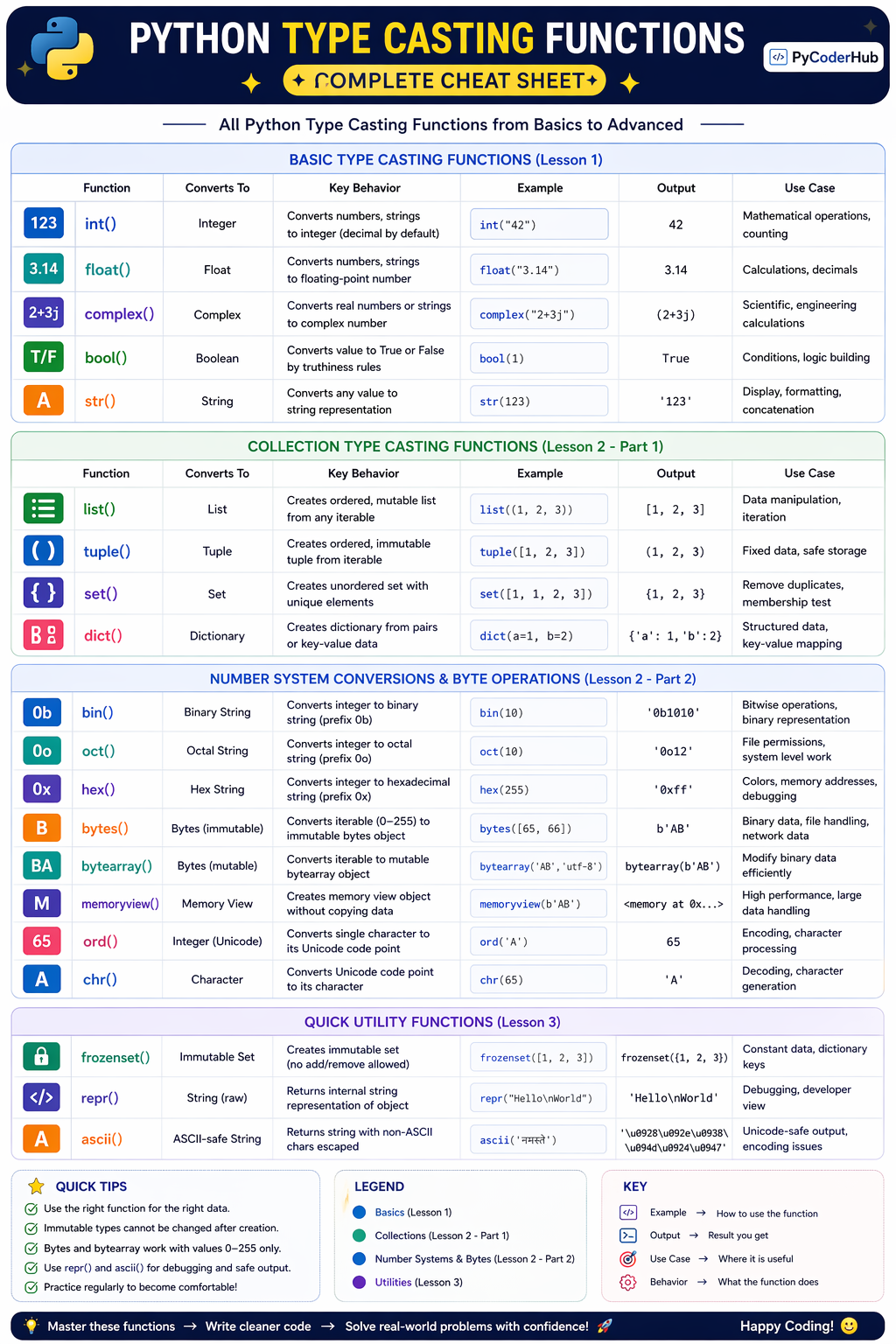
Use this cheat sheet as a quick reference whenever you need to choose the right type casting function in your Python programs.
Final Conclusion
Here’s the important thing most beginners don’t realize:
Python type casting is much bigger than just int(), float(), or str().
Once you move beyond basic conversions, you start seeing how Python can reshape data into completely different structures — lists into tuples, tuples into sets, dictionaries into key-value mappings, numbers into binary, and even characters into Unicode values.
That’s what makes advanced type casting powerful.
You learned that:
list(),tuple(),set(), anddict()are not just conversion tools — they help reorganize and structure data.- Functions like
bin(),oct(), andhex()reveal how computers represent numbers internally. - Byte-related functions (
bytes(),bytearray(),memoryview()) introduce low-level data handling used in networking, files, and performance-focused applications. - Utility functions like
repr()andascii()help developers debug, inspect, and safely represent data.
Most importantly, you now understand that Python type casting is really about transforming data into the form your program needs.
That mindset changes everything.
Instead of memorizing functions one by one, you can now think in terms of:
“What structure or representation does my program need next?”
And that’s how real Python developers use type casting in practical programming. 🐍
What You’ve Learned Across All 3 Lessons
Lesson 1 — gave you the big picture — what type casting is, why Python needs it, and the difference between implicit and explicit conversion. You learned that Python sometimes converts types automatically, but as a developer, you need to know how and when to do it yourself.
Lesson 2 — covered the five foundational casting functions — int(), float(), complex(), bool(), and str(). These are the building blocks — the functions you’ll use in virtually every Python program you ever write.
Lesson 3 — this lesson — completed the full picture. You went deep into the collection casters (list(), tuple(), set(), dict()), explored binary and character tools (bytes(), bytearray(), ord(), chr()), mastered number base converters (bin(), oct(), hex()), and wrapped up with the specialized tools (frozenset(), repr(), ascii()).
What’s Next?
Now that you’ve explored advanced type casting functions like list(), tuple(), set(), dict(), and more, you’ve learned how Python converts, organizes, and manages complex data structures in different situations.
In the next lesson, you’ll discover how Python automatically converts data types behind the scenes through type promotion and implicit type conversion. You’ll also understand Python’s type hierarchy and why certain operations automatically change data types during calculations.
👉 Continue your learning here: Python Type Promotion Explained (Implicit Type Conversion & Type Hierarchy)
Suggested Posts
- Python Type Casting Explained (Type Conversion for Beginners)
- Python Type Casting Functions Explained (int, float, complex, bool, str)
- Python Type Promotion Explained (Implicit Type Conversion & Type Hierarchy)
- Python Type Casting Rules: Complete Guide to Safe and Predictable Conversions
- Python Type Casting in Real-World Applications: Truthiness, Data Conversion & Safe Casting
- Python Type Casting Best Practices: Write Safe, Predictable & Bug-Free Code
- Python Type Casting FAQs: Common Conversion Questions, Errors & Confusions Explained

7 thoughts on “Advanced Python Type Casting Functions Explained (list, tuple, set, dict & More)”