
Introduction: Python Keyword Errors
In the previous lesson, we explored Python keywords in detail—what they are, how they work, and why they are reserved in the language. By now, you already understand that keywords play a critical role in defining Python’s syntax and structure.
However, understanding keywords is only one part of the learning process. The real challenge begins when you start writing code and encounter Python keyword errors. These errors are very common, especially for beginners, and often occur due to small mistakes like incorrect usage, wrong context, or simple confusion between keywords and identifiers.
The good news is that most of these errors are easy to fix—once you understand why they happen.
What You’ll Learn
In this lesson, you’ll learn:
- The most common Python keyword errors developers face
- Real code examples that produce keyword-related errors
- The exact reasons behind each error
- Step-by-step methods to fix these errors
- Clear explanations to strengthen your understanding
- Practical tips to avoid making these mistakes in the future
Before we start with Error #1, let’s first understand why these errors happen in the first place.
Why Python Keyword Errors Happen
Before fixing Python Keyword Errors, it’s important to understand why they occur. Most of these errors are not complex—they usually happen due to small misunderstandings about how Python treats keywords.
Let’s break down the main reasons:
Keywords are reserved words
Python keywords are reserved, which means they have predefined meanings in the language. You cannot use them as variable names, function names, or identifiers.
For example, using a keyword like for or if as a variable name will immediately result in a syntax error.
Strict Syntax Rules
Python follows very strict syntax rules. Keywords are not just words—they are part of Python’s grammar. Even a small mistake, like missing a colon after an if statement, can cause an error.
Unlike some languages, Python does not try to guess your intention—it expects exact syntax.
Confusion Between Keywords and Identifiers
A common source of confusion is mixing up keywords with identifiers (names you define, like variables or functions).
For example:
- Keywords →
if,while,return - Identifiers →
user_age,calculate_total,data_list
Using a keyword where an identifier is expected will always cause an error.
Case Sensitivity in Python
Python is a case-sensitive language. Keywords must be written exactly as defined.
For example:
ifvalid keyword ✅Ifnot a keyword ❌
This small difference often leads to unexpected issues.
Misunderstanding Soft Keywords
With newer Python versions, some keywords (like match and case) are soft keywords. They behave like keywords only in certain situations.
This can create confusion if you try to use them incorrectly or assume they behave like regular reserved keywords.
Now that you understand why these errors happen, let’s explore the most common Python Keyword Errors and how to fix them, starting with Error #1.
Error #1: Using a Keyword as a Variable Name
One of the most common Python keyword errors is trying to use a keyword as a variable name. This mistake usually happens when beginners are not yet familiar with Python’s reserved words.
Code Example (Error)
for = 10
print(for)
Error Message
SyntaxError: invalid syntaxReason
Python keywords are reserved words, meaning they already have a predefined purpose in the language.
In this example, for is a keyword used for loops. When you try to use it as a variable name, Python’s parser gets confused because it expects for to follow loop syntax—not act as a variable.
How to Fix
Rename the variable using a valid, descriptive identifier:
loop_counter_value = 10
print(loop_counter_value)
Explanation
In Python, variable names must follow identifier rules:
- They cannot be reserved keywords
- They should be meaningful and descriptive
- They must start with a letter or underscore
Keywords like if, else, for, while, return, etc., are strictly reserved and cannot be redefined.
How to Avoid This Error
- Always check the list of Python keywords before naming variables
- Use the built-in
keywordmodule:
import keyword

print(keyword.kwlist)- Use descriptive variable names (like
user_age,total_price) instead of short or risky names - Rely on IDEs or code editors—they usually highlight keywords automatically
Now that you’ve seen how using reserved words causes errors, let’s move to another common mistake—misspelling Python keywords.
Error #2: Misspelling a Python Keyword
Another very common Python keyword error occurs when a keyword is misspelled. Unlike natural language, Python does not tolerate spelling mistakes—every keyword must be written exactly as defined.
Code Example (Error)
whille True:
    print("Running loop")
Error Message
SyntaxError: invalid syntaxReason
Python keywords are strict and predefined, and the interpreter does not try to auto-correct or guess what you meant.
In this example, whille is not a valid keyword. Python only recognizes while, so it throws a syntax error when it encounters an unknown word.
How to Fix
Correct the spelling of the keyword:
while True:
    print("Running loop")
Explanation
Python treats keywords as part of its core syntax. Even a small typo makes the keyword unrecognizable, and Python interprets it as an invalid token.
This is why:
while✅ validwhille❌ invalid
There is no fallback or correction mechanism—accuracy is required.
How to Avoid This Error
- Use code editors or IDEs with syntax highlighting and auto-completion
- Practice commonly used Python keywords regularly
- Pay attention while typing—especially with similar-looking words
- Run your code frequently to catch errors early
Sometimes, the keyword is spelled correctly—but the error still occurs due to incorrect syntax. Let’s explore that next.
Error #3: Incorrect Use of Keywords in Syntax
In many cases, the keyword itself is correct—but the way it’s used in code is wrong. This leads to one of the most common Python keyword errors, especially for beginners learning Python syntax.
Code Example (Error)
user_age = 18

if user_age >= 18
    print("Eligible to vote")
Error Message
SyntaxError: expected ':'Reason
Many Python keywords require a specific syntax structure.
In this example, the if keyword must be followed by a condition and a colon (:). Missing the colon breaks the syntax, and Python raises an error.
How to Fix
Add the missing colon after the condition:
user_age = 18

if user_age >= 18:
    print("Eligible to vote")
Explanation
Python uses keywords like if, for, while, def, and class to define blocks of code. These blocks must follow a strict pattern:
- Condition or definition
- Colon (
:) - Indented block of code
Even though the keyword (if) is correct, missing part of the structure (like the colon) causes a syntax error.
How to Avoid This Error
- Remember that most block-defining keywords require a colon (
:) - Practice writing full syntax patterns, not just keywords
- Use IDEs that automatically suggest or insert colons
- Review your code structure carefully when errors appear
Now let’s look at a slightly advanced confusion that comes with newer Python features—soft keywords.
Error #4: Misusing Soft Keywords (match, case, _)
With newer Python versions, soft keywords introduce a different kind of Python keyword error. These errors don’t always come from invalid syntax—but from using keywords in the wrong context.
Code Example (Error / Confusion Case)
match = "Python"
print(match)
What Happens Here?
Surprisingly, this code does not throw an error.
That’s because match is a soft keyword, not a strictly reserved keyword.
Reason
Soft keywords behave like normal identifiers unless used in a specific syntax structure.
For example, match and case act as keywords only inside pattern matching:
user_input = "yes"

match user_input:
    case "yes":
        print("Confirmed")
Outside this structure, they behave like regular variable names.
This creates confusion because:
- Sometimes they act like keywords
- Sometimes they act like normal variables
Confusing / Incorrect Usage Example
user_input = "yes"

match user_input
    case "yes":
        print("Confirmed")
Error Message
SyntaxError: expected ':'How to Fix
Use soft keywords only within their valid syntax:
user_input = "yes"

match user_input:
    case "yes":
        print("Confirmed")
Explanation
Soft keywords were introduced to make Python more flexible. Unlike reserved keywords:
- They don’t always have a fixed meaning
- Their behavior depends on context
This is why Python allows match as a variable name—but also treats it as a keyword in pattern matching.
How to Avoid This Error
- Understand where soft keywords are actually used
- Learn pattern matching syntax before using
matchandcase - Avoid using soft keywords as variable names to reduce confusion
- Keep your Python version in mind (pattern matching is available from Python 3.10+)
Next, let’s explore errors that happen when keywords are used in the wrong context or scope.
Error #5: Using Keywords in the Wrong Context
Some Python Keyword Errors occur not because the keyword is wrong—but because it’s used in the wrong place. Certain keywords only work inside specific blocks of code, and using them outside those contexts leads to errors.
Code Example (Error)
return "Hello, PyCoder"Error Message
SyntaxError: 'return' outside functionReason
The return keyword is designed to be used inside a function.
When Python encounters return, it expects it to send a value back from a function. If no function is defined, Python doesn’t know where to return the value—so it raises an error.
How to Fix
Use return inside a properly defined function:
def get_greeting_message():
    return "Hello, PyCoder"

print(get_greeting_message())
Explanation
Some Python keywords are context-dependent, meaning they only work within certain structures:
return→ inside functionsyield→ inside generatorsawait→ inside async functions
Using these keywords outside their valid context breaks Python’s execution flow and results in errors.
How to Avoid This Error
- Learn where each keyword is valid before using it
- Always define functions when using
return - Understand advanced keywords like
yieldandawaitbefore applying them - Read error messages carefully—they often tell you exactly what’s wrong
Now, let’s look at a very common mistake related to block structure—indentation after keywords.
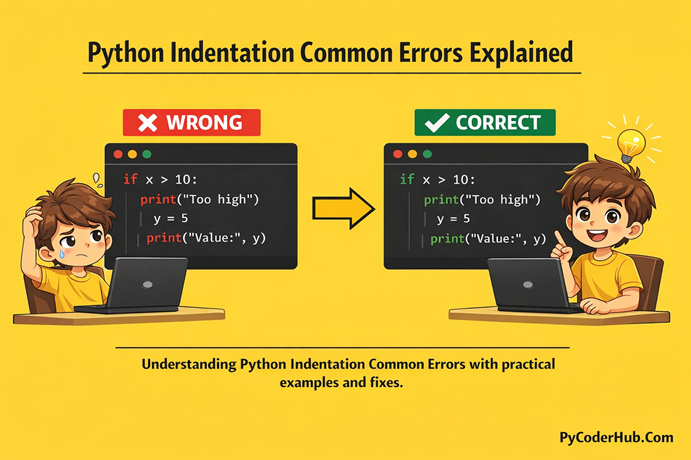
Error #6: Forgetting Indentation After Keywords
One of the most frequent Python Keyword Errors is forgetting to add proper indentation after keywords that define a code block. This mistake is very common among beginners transitioning from other programming languages.
Code Example (Error)
user_score = 85

if user_score > 50:
print("Passed")
Error Message
IndentationError: expected an indented blockReason
In Python, keywords like if, for, while, def, and class must be followed by an indented block of code.
In this example, the print() statement is not indented, so Python raises an error because it expects a block under the if statement.
How to Fix
Add proper indentation (usually 4 spaces):
user_score = 85

if user_score > 50:
    print("Passed")
Explanation
Unlike many programming languages that use braces {} to define blocks, Python relies entirely on indentation.
This means:
- Indentation is not optional—it’s part of the syntax
- All code inside a block must be consistently indented
- Even a single missing space can break the program
How to Avoid This Error
- Always indent code after block-defining keywords
- Use 4 spaces consistently (recommended by Python)
- Configure your editor to auto-indent code
- Avoid mixing tabs and spaces
Let’s look at one more important mistake—using outdated keyword syntax that no longer works in modern Python versions.
Error #7: Using Outdated Keyword Syntax (Version Compatibility Issues)
Another important Python keyword errors occurs when you write code using old or outdated keyword syntax that is no longer valid in the current Python version.
This usually happens when following old tutorials, books, or legacy code.
Code Example (Error)
print "Hello, PyCoder"Error Message
SyntaxError: Missing parentheses in call to 'print'Reason
In older versions like Python 2, print was treated like a keyword (statement).
However, in modern Python (Python 3+), print is a function, not a keyword. It must be used with parentheses.
So, using old syntax in a newer version causes a syntax error.
How to Fix
Update the code to match the current Python syntax:
print("Hello, PyCoder")Explanation
Python evolves over time, and some keywords or syntax rules change between versions:
- Old syntax may become invalid
- New keywords (like
match,case) may be introduced - Some keywords may change behavior
This is why code written for older versions may not work in modern Python.
How to Avoid This Error
- Always check which Python version you are using
- Follow updated documentation and modern tutorials
- Avoid copying code from outdated sources without verification
- Test code in your environment and update syntax when needed
Next, let’s explore a modern mistake that often happens when using f-strings—incorrectly placing keywords inside expressions.
Error #8: Using Keywords Inside f-Strings or Expressions Incorrectly
Modern Python features like f-strings are powerful, but they can also lead to Python keyword errors when keywords are used incorrectly inside expressions.
Code Example (Error)
user_score = 90
print(f"Final result: {return user_score}")
Error Message
SyntaxError: invalid syntaxReason
f-strings allow expressions inside {}, but not statements or keywords like return, break, or continue.
In this example, return is a keyword that can only be used inside a function—not inside an f-string expression.
How to Fix
Use only valid expressions inside f-strings:
user_score = 90
print(f"Final result: {user_score}")
Explanation
f-strings evaluate Python expressions, such as:
- Variables
- Calculations
- Function calls
But they do not support statements or control-flow keywords.
How to Avoid This Error
- Only use valid expressions inside
{}in f-strings - Avoid using keywords like
return,break,continueinside expressions - If logic is needed, compute it before the f-string
Now let’s look at a conceptual confusion that often leads to incorrect keyword usage.
Error #9: Confusion Between Keywords and Built-in Functions
Another subtle type of Python keyword errors comes from confusing keywords with built-in functions.
Code Example (Error)
def display_message():
    print("Hello, PyCoder")

result_value = print("Testing output")
What Happens Here?
This code runs without a syntax error, but:
print(result_value)Output:
NoneReason
print()is a built-in function, not a keyword- It performs an action (printing) but does not return a value
- On the other hand,
returnis a keyword used to send values from a function
This confusion leads to incorrect assumptions about how code behaves.
How to Fix
Use return when you need a value:
def get_message():
    return "Hello, PyCoder"

result_value = get_message()
print(result_value)
Explanation
- Keywords define structure and behavior (e.g.,
return,if) - Built-in functions perform actions (e.g.,
print(),len())
Understanding this difference is critical for writing correct logic.
How to Avoid This Error
- Learn the difference between keywords and built-in functions
- Don’t assume all Python commands behave the same
- Check whether a function returns a value or not
Finally, let’s look at how keywords can cause errors when used incorrectly with import statements.
Error #10: Incorrect Use of Keywords with import and from
This type of Python Keyword Errors occurs when you try to use reserved keywords in import statements.
Code Example (Error)
import ifError Message
SyntaxError: invalid syntaxReason
In Python, module names must follow identifier rules. Since keywords are reserved, they cannot be used as module names or imported identifiers.
Here, if is a keyword, so Python raises a syntax error.
Another Example
from math import forError Message
SyntaxError: invalid syntaxHow to Fix
Use valid module and identifier names:
import math

from math import sqrt
print(sqrt(16))
Explanation
importandfromexpect valid identifiers- Keywords cannot be used as identifiers anywhere in Python
- This rule applies across variables, functions, and imports
How to Avoid This Error
- Never use reserved keywords in import statements
- Follow valid naming rules for modules and variables
- Rely on IDE suggestions to avoid invalid imports
With all major Python Keyword Errors covered, let’s do a quick recap of the key mistakes before we move ahead.
Summary Table of Errors
Here’s a quick summary of the most common Python Keyword Errors you’ve learned:
| Error # | Mistake | Main Cause | Quick Fix |
|---|---|---|---|
| 1 | Using a keyword as a variable name | Keywords are reserved | Use a valid identifier name |
| 2 | Misspelling a keyword | Incorrect spelling | Use correct keyword syntax |
| 3 | Incorrect keyword syntax (missing colon, etc.) | Strict syntax rules | Follow proper structure (: and indentation) |
| 4 | Misusing soft keywords (match, case) | Context-based behavior | Use only in valid pattern matching syntax |
| 5 | Using keywords in the wrong context | Context restrictions | Use keywords like return inside valid blocks |
| 6 | Missing indentation after keywords | Python relies on indentation | Add proper indentation (4 spaces) |
| 7 | Using outdated keyword syntax | Version differences | Update code to modern Python syntax |
| 8 | Using keywords inside f-strings incorrectly | Invalid expressions | Use only valid expressions inside {} |
| 9 | Confusion between keywords and built-in functions | Misunderstanding behavior | Learn difference between return and functions like print() |
| 10 | Incorrect use of keywords with import | Keywords are not identifiers | Use valid module and function names |
Key Takeaways
- Python keywords are strict and cannot be modified or reused
- Most errors happen due to small syntax or context mistakes
- Understanding the reason behind errors makes debugging easier
- Writing clean, structured code helps avoid these issues completely
Now before we wrap up this post, let’s take a look at a visual representation of all Python Keyword Errors for a quick and easy revision.
Visual Summary of Python Keyword Errors
This is a quick visual recap of all errors covered.
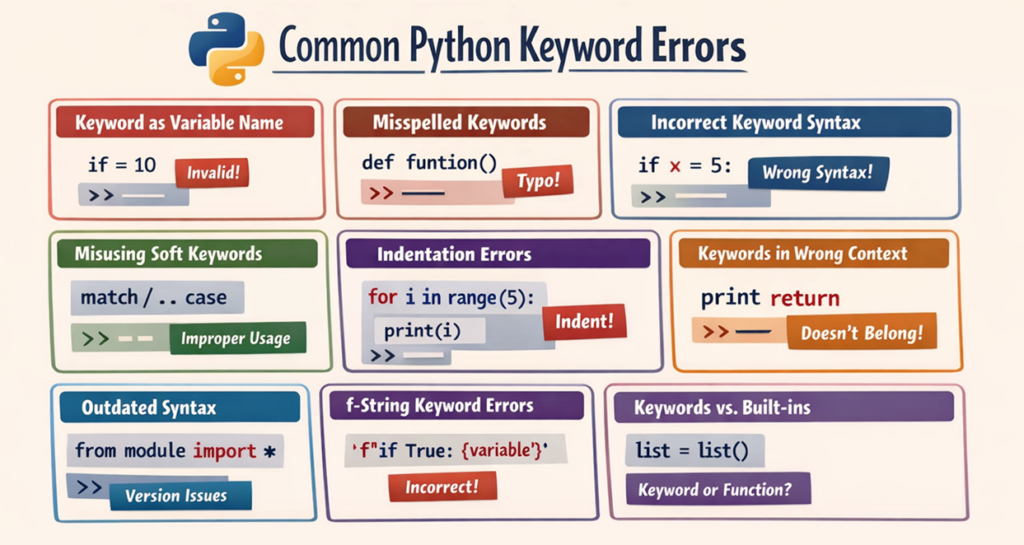
This visual summary helps you quickly revise all common Python Keyword Errors in one place.
Conclusion
Python Keyword Errors may seem small, but they can easily break your code if not understood properly. Most of these mistakes come from confusion around syntax, context, or keyword usage. By learning the reasons behind these errors and practicing correct patterns, you can write cleaner and more reliable Python code. Keep practicing, and these errors will quickly become easy to spot and fix.
Suggested Posts
- Python Keywords Explained – What Are Reserved Keywords in Python?
- Python Control Flow Keywords Explained (With Function and Class Examples)
- Python Exception Handling Keywords Explained (With Boolean and Import Examples)
- Python Scope Keywords Explained (del, global, nonlocal) With Operator and Async Keywords Examples
- Python Soft Keywords Explained: Meaning, History, List, Examples, and Differences from Reserved Keywords
- Python Keyword Rules and Guidelines: Using Reserved and Soft Keywords Correctly
- Python Keyword Module Explained: kwlist, iskeyword(), softkwlist with Examples
- Python Keywords Evolution: From Python 1 to Python 3.12+ (Complete Guide)
- Python Keywords Best Practices: Write Cleaner, Error-Free Code
- Python Keywords FAQ – Common Questions, Confusion & Clear Answers

5 thoughts on “Python Keyword Errors Explained: Common Mistakes and How to Fix Them”