
Introduction: Python Keyword Module
In the previous lessons, we explored Python keywords in depth—understanding what reserved keywords are, how soft keywords work, and the rules and guidelines for using them correctly. By now, you already know that keywords play a crucial role in defining the structure and syntax of Python programs.
But here’s an important question:
What if you want to check or work with Python keywords programmatically instead of memorizing them manually?
This is exactly where the Python Keyword Module becomes useful.
The Python Keyword Module allows you to access, check, and work with both reserved and soft keywords directly in your code. Instead of relying on static lists or documentation, you can use built-in functions to dynamically interact with keywords—making your programs more flexible and reliable.
In this lesson, we’ll take a practical step forward by learning how to use the Python Keyword Module effectively with real examples.
What You’ll Learn
In this guide, you will learn:
- What the Python Keyword Module is and why it is used
- A beginner-friendly introduction to modules in Python
- How to use kwlist to get all reserved keywords
- How to use softkwlist to access soft keywords
- How the iskeyword() function works with examples
- How the issoftkeyword() function works
- Practical examples of using the Python Keyword Module
- The difference between
help("keywords")and the keyword module - Advantages and best practices for using the module
Now before we start learning about the Python keyword module, let’s first understand what modules are and why we use modules in Python.
What is a Module in Python?
Before we dive deeper into the Python keyword module, it’s important to understand what a module actually is in Python. This will help you clearly see how and why the keyword module works.
Definition of a Module
A module in Python is simply a file that contains reusable code, such as functions, variables, or classes, which you can use in other Python programs.
In simple terms:
A module = a Python file that helps you reuse code instead of writing it again and again.
Python provides many built-in modules (like math, random, keyword), and you can also create your own modules to organize your code efficiently.
Why Do We Use Modules in Python?
Modules are an essential part of writing clean and efficient Python code. Here’s why:
Code Reusability
Instead of writing the same logic multiple times, you can write it once in a module and reuse it wherever needed.
Better Organization
Modules help you break large programs into smaller, manageable parts, making your code easier to read and maintain.
Avoid Repetition
By storing common functionality in modules, you avoid duplicating code, which reduces errors and saves time.
Example of Using a Module
Let’s look at a simple example using Python’s built-in math module:
import math

square_root_value = math.sqrt(25)
print(square_root_value)
Explanation:
import math→ Imports the math modulemath.sqrt(25)→ Uses a function(sqrt)from the module to calculate square root- Output →
5.0
This example shows how a module allows you to use pre-written functionality instead of implementing it from scratch.
Now that you understand what modules are and why we use them, let’s move forward and explore the Python Keyword Module in detail.
What is the Python Keyword Module?
Now that you understand what modules are, let’s focus on a specific and very useful built-in module: the Python Keyword Module.
Definition and Purpose
The Python Keyword Module is a built-in module that provides a way to work with Python keywords programmatically.
In simple terms:
It allows you to check, access, and interact with Python keywords directly in your code instead of relying on manual lists.
This module includes functions and lists that help you:
- Get all reserved keywords
- Access soft keywords
- Check whether a word is a keyword or not
This makes it especially useful when writing dynamic or validation-based programs.
Why the Python Keyword Module is Important
The Python keyword module is not just a theoretical concept—it has real practical value, especially as your programs grow. The module is essential for metaprogramming and tooling. If you are writing a code generator, a linter, or a system that takes user input to create database headers, you need a way to ensure that input won’t crash your script.
Avoid Memorization
At first glance this might seem trivial — just memorise the keywords, right? But Python’s list of keywords is not static across versions. Python 3.10 introduced match and case as soft keywords. Python 3.12 updated this further. Code generators, linters, IDEs, ORMs, and templating engines all depend on accurate, version-aware keyword detection. That’s where the keyword module becomes essential.
Dynamic Keyword Handling
Instead of using fixed or hardcoded keyword lists, you can dynamically fetch and check keywords. This ensures your code stays accurate even if Python updates in the future.
Useful in Tools and Validation
The module is commonly used in:
- Input validation (e.g., checking valid variable names)
- Code editors and IDEs (syntax highlighting)
- Static analysis tools and linters
Now that you understand what the Python Keyword Module is and why it matters, let’s explore its features and see how to use them in practice.
Why Use the Python Keyword Module Instead of Hardcoding Keywords?
When working with Python keywords, you might think of creating your own list of keywords and using it in your program. While this may seem simple at first, it can lead to several problems as your code grows or Python evolves.
This is exactly why using the Python Keyword Module is a better and more reliable approach.
Problems with Hardcoding Keywords
Outdated Keyword Lists
Python is continuously evolving. New keywords (especially soft keywords) can be introduced in newer versions. If you hardcode a list of keywords, it may become outdated over time, leading to incorrect results.
Error-Prone
Manually maintaining a keyword list increases the chances of mistakes—missing keywords, typos, or incorrect updates can break your logic or validation checks.
Benefits of Using the Keyword Module
Always Up-to-Date
The Python Keyword Module automatically reflects the keywords of the Python version you are using. This ensures your program always works with the correct and latest keyword set.
More Reliable
Instead of relying on manually written lists, you use trusted built-in functionality, which reduces errors and improves accuracy.
Cleaner Code
Using built-in functions like keyword.iskeyword() makes your code more readable and professional compared to checking values against a manually created list.
In short, the Python Keyword Module saves time, reduces confusion, and makes your code more robust. Next, let’s explore the features provided by this module and see how to use them in real examples.
Features of the Python Keyword Module
The Python Keyword Module provides several built-in attributes and functions that allow you to work with Python keywords efficiently. Instead of relying on manual lists or guesswork, these features give you direct access to keyword data and validation tools.
In this section, we’ll explore each feature of the Python Keyword Module one by one, along with examples and practical use cases.
These features include:
keyword.kwlist→ Get a list of all reserved keywordskeyword.softkwlist→ Access soft keywords (Python 3.10+)keyword.iskeyword()→ Check if a word is a reserved keywordkeyword.issoftkeyword()→ Check if a word is a soft keyword
Each of these plays a specific role in helping you understand and work with Python keywords programmatically.
Now, let’s start by exploring the first feature: keyword.kwlist, which provides the complete list of reserved keywords in Python.
keyword.kwlist (List of Reserved Keywords)
One of the most useful features of the Python Keyword Module is keyword.kwlist, which provides access to all reserved keywords in Python.
What is kwlist?
keyword.kwlist is a built-in list that contains all the reserved keywords available in the current Python version.
In simple terms:
It returns a complete list of keywords that cannot be used as variable names, function names, or identifiers.
Example of kwlist
import keyword

print(keyword.kwlist)
Explanation:
import keyword→ Imports the Python Keyword Modulekeyword.kwlist→ Returns the list of all reserved keywords- The output will be a list like:
['False', 'None', 'True', 'and', 'as', ...]
The exact list may vary depending on your Python version.
Example: Count Total Number of Keywords
import keyword

total_keywords = len(keyword.kwlist)
print(total_keywords)
Explanation:
len(keyword.kwlist)→ Calculates the total number of reserved keywords- The output will be an integer (for example:
35, depending on Python version)
This is useful when you want to quickly know how many keywords exist in your current Python environment.
When to Use kwlist
keyword.kwlist is useful in several situations:
- Display keyword list
Useful for learning or showing all Python keywords in one place - Educational tools
Helps in building tutorials, quizzes, or keyword reference tools - Basic validation (in some cases)
Can be used to check against a list of keywords (thoughiskeyword()is usually better)
Now that you’ve seen how to access all reserved keywords using keyword.kwlist, let’s move to the next feature: keyword.softkwlist, which deals with soft keywords in Python.
keyword.softkwlist (List of Soft Keywords)
After working with reserved keywords using keyword.kwlist, let’s now explore soft keywords using another feature of the Python Keyword Module.
What is softkwlist?
keyword.softkwlist is a built-in list that returns all soft keywords available in Python.
In simple terms:
It provides keywords that act like normal identifiers in most cases but have special meaning in specific contexts (like pattern matching).
Version Note (Python 3.10+)
- The
softkwlistfeature was introduced in Python 3.10 along with the new pattern matching syntax. - If you are using a version earlier than Python 3.10, this attribute will not be available.
- Soft keywords are not always treated as keywords—they behave like normal identifiers unless used in specific contexts.
Example of softkwlist
import keyword

print(keyword.softkwlist)
Explanation:
keyword.softkwlist→ Returns a list of soft keywords- Example output:
['_', 'case', 'match', 'type'](may vary by version)
Example: Compare Reserved Keywords vs Soft Keywords Count
import keyword

reserved_keywords_count = len(keyword.kwlist)
soft_keywords_count = len(keyword.softkwlist)

print("Reserved Keywords:", reserved_keywords_count)
print("Soft Keywords:", soft_keywords_count)
Output
Reserved Keywords: 35
Soft Keywords: 4
Explanation:
len(keyword.kwlist)→ Counts reserved keywordslen(keyword.softkwlist)→ Counts soft keywords- Helps you understand the difference between the two categories
This comparison is useful for learning how Python separates strict (reserved) keywords from context-based (soft) keywords.
Now that you understand how to access both reserved and soft keywords, let’s move to the next feature: keyword.iskeyword(), which allows you to check whether a specific word is a keyword or not.
keyword.iskeyword(): Check Reserved Keywords
After accessing keyword lists, the next important feature of the Python Keyword Module is the ability to check whether a specific word is a keyword or not.
What is iskeyword()?
keyword.iskeyword() is a built-in function that checks whether a given word is a reserved keyword in Python.
In simple terms:
It returns True if the word is a Python keyword, otherwise False.
Syntax of iskeyword()
keyword.iskeyword(word)word→ The string you want to check
Example of iskeyword()
Let’s explore keyword.iskeyword() with different types of inputs to clearly understand how it behaves.
import keyword

print(keyword.iskeyword('final'))
Explanation:
- Output → False
'final'is not a reserved keyword in Python, so the function returns False.
print(keyword.iskeyword('if'))Explanation:
- Output → True
'if'is a reserved keyword used for conditional statements, so it returns True.
print(keyword.iskeyword('If'))Explanation:
- Output → False
- Python keywords are case-sensitive
'if'is a keyword, but'If'is treated as a normal identifier
print(keyword.iskeyword('print'))Explanation:
- Output → False
'print'is a built-in function, not a keyword- In older versions of Python (Python 2),
printwas a keyword, but in modern Python it is a function
print(keyword.iskeyword('match'))Explanation:
- Output → False
'match'is a soft keyword, not a reserved keywordiskeyword()only checks reserved keywords, so it returns False
print(keyword.iskeyword(100))Explanation:
- Output → False
- Even though
100is not a string, the function does not raise a TypeError - Instead, it safely returns False because the input is not a valid keyword
These examples show that keyword.iskeyword() strictly checks reserved keywords and handles different inputs gracefully.
Now that you know how to check reserved keywords, let’s move to the next feature: keyword.issoftkeyword(), which works similarly but for soft keywords
keyword.issoftkeyword(): Check Soft Keywords
After learning how to check reserved keywords using keyword.iskeyword(), let’s now look at a similar function that works for soft keywords.
What is issoftkeyword()?
keyword.issoftkeyword() is a built-in function that checks whether a given word is a soft keyword in Python.
In simple terms:
It returns True if the word is a soft keyword, otherwise False.
Remember: Soft keywords are not always treated as keywords—they only act as keywords in specific contexts.
Example of issoftkeyword()
Let’s explore different cases to understand how this function behaves:
import keyword

print(keyword.issoftkeyword("match"))
Explanation:
- Output → True
'match'is a soft keyword used in pattern matching (Python 3.10+)
print(keyword.issoftkeyword("case"))Explanation:
- Output → True
'case'is also a soft keyword used withmatchstatements
print(keyword.issoftkeyword("if"))Explanation:
- Output → False
'if'is a reserved keyword, not a soft keyword
print(keyword.issoftkeyword("Match"))Explanation:
- Output → False
- Soft keywords are case-sensitive
'match'is valid, but'Match'is treated as a normal identifier
print(keyword.issoftkeyword("pycoder"))Explanation:
- Output → False
'pycoder'is not a keyword (neither reserved nor soft)
print(keyword.issoftkeyword(100))Explanation:
- Output → False
- Even with a non-string input, the function does not raise an error
- It safely returns False since the value is not a soft keyword
These examples show that keyword.issoftkeyword() works similarly to iskeyword(), but specifically targets soft keywords only.
Miscellaneous Features of the Python Keyword Module
Apart from built-in functions like kwlist and iskeyword(), the Python Keyword Module can also be used in different ways when importing, and it provides some useful built-in attributes that give information about the module itself.
Let’s explore these features.
Using the Module with an Alias (as Keyword)
You can import the keyword module using a shorter or custom name using the as keyword.
import keyword as keyword_module

print(keyword_module.kwlist)
Explanation:
import keyword as keyword_module→ Assigns an alias name- Useful when:
- Avoiding long names
- Preventing naming conflicts
- Improves code readability in larger programs
Importing Specific Features Using from
Instead of importing the entire module, you can import only the specific function or feature you need.
from keyword import iskeyword

print(iskeyword("for"))
print(iskeyword("pycoder"))
Explanation:
from keyword import iskeyword→ Imports only theiskeywordfunction- You can use the function directly without writing
keyword.every time - Makes your code shorter and more readable
Note: If you’re wondering why we didn’t use parentheses while importing (like
iskeyword()), it’s because we are importing the function itself—not calling it. Parentheses are only used when executing the function.
Getting Module Information
Python modules also provide some built-in attributes that give useful information.
__file__
import keyword

print(keyword.__file__)
Explanation:
- Shows the file path where the module is stored
- Helps understand where Python loads the module from
__name__
import keyword

print(keyword.__name__)
Explanation:
- Returns the name of the module
- For this module, it will output
'keyword'
__doc__
import keyword

print(keyword.__doc__)
Explanation:
- Displays the documentation string (docstring) of the module
- Provides a brief description of what the module does
These attributes are not specific to the keyword module—they are available in almost all Python modules and are useful for debugging and understanding code structure.
Visual Overview of Python Keyword Module Features
Understanding multiple functions together can sometimes create confusion.
This visual infographic gives you a quick and clear overview of the Python Keyword Module and its four main features in one place.
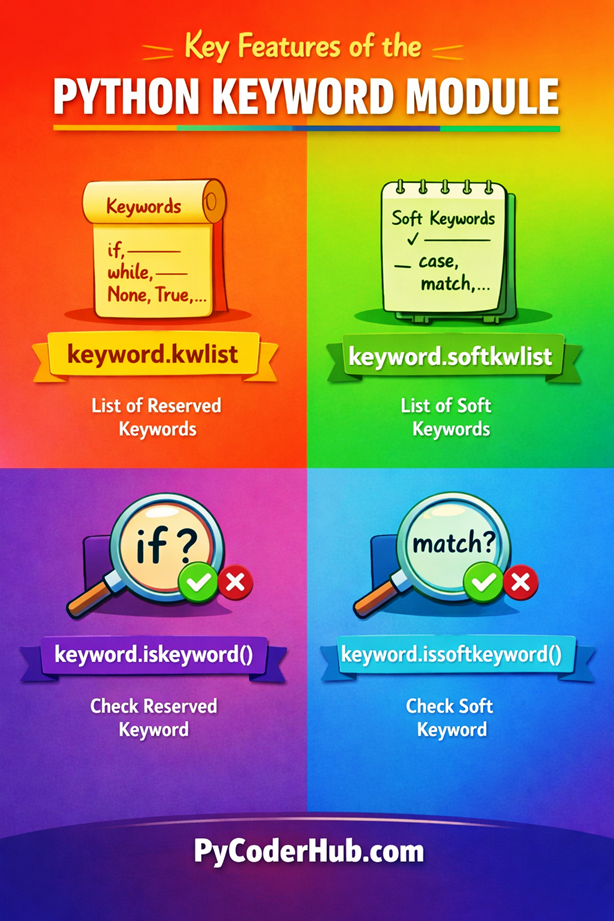
This visual summary helps you quickly recall the key features before moving to practical examples.
Python Keyword Module vs help(“keywords”)
When learning Python keywords, you might come across another built-in way to view them: help("keywords"). While both approaches provide keyword information, they serve different purposes.
Let’s understand how they compare.
What is help(“keywords”)?
help("keywords") is part of Python’s built-in help system that displays a list of all reserved keywords in a readable format.
help("keywords")Explanation:
- It prints a formatted list of Python keywords in the console
- Designed mainly for quick reference and learning
- Does not return data that can be used in programs
Key Differences
| Feature | Python Keyword Module | help(“keywords”) |
|---|---|---|
| Purpose | Programmatic usage | Quick reference |
| Returns data | ✔ Yes | ✘ No |
| Usable in code logic | ✔ Yes | ✘ No |
| Output format | List / Boolean | Printed text |
| Soft keywords support | ✔ Yes (softkwlist) | ✘ No |
| Best for | Automation, validation | Learning, quick lookup |
Which One Should You Use?
Use the Python Keyword Module when:
- You need to check keywords in your code
- You are building tools like validators, linters, or scripts
- You want dynamic and reusable functionality
Use help("keywords") when:
- You just want to quickly view all keywords
- You are learning or exploring Python basics
This distinction helps you choose the right approach depending on whether you are writing code or simply exploring Python keywords.
Conclusion
The Python Keyword Module provides a simple and reliable way to work with reserved and soft keywords programmatically. With features like kwlist, softkwlist, iskeyword(), and issoftkeyword(), you can build smarter and more accurate Python programs. It not only reduces confusion but also helps in writing cleaner and more maintainable code. Mastering this module gives you a practical edge when working with Python syntax and validation.
Suggested Posts
- Python Keywords Explained – What Are Reserved Keywords in Python?
- Python Control Flow Keywords Explained (With Function and Class Examples)
- Python Exception Handling Keywords Explained (With Boolean and Import Examples)
- Python Scope Keywords Explained (del, global, nonlocal) With Operator and Async Keywords Examples
- Python Soft Keywords Explained: Meaning, History, List, Examples, and Differences from Reserved Keywords
- Python Keyword Rules and Guidelines: Using Reserved and Soft Keywords Correctly
- Python Keyword Errors Explained: Common Mistakes and How to Fix Them
- Python Keywords Evolution: From Python 1 to Python 3.12+ (Complete Guide)
- Python Keywords Best Practices: Write Cleaner, Error-Free Code
- Python Keywords FAQ – Common Questions, Confusion & Clear Answers

2 thoughts on “Python Keyword Module Explained: kwlist, iskeyword(), softkwlist with Examples”