
Introduction: Python Keyword Rules and Guidelines
In previous lessons of this chapter, we explored what Python keywords are, how they work, and the different categories they belong to. We also examined the difference between reserved keywords and soft keywords, along with their roles in Python syntax.
Now that you understand the types of keywords Python provides, the next step is learning how to use them correctly in real code.
Like many parts of Python, keywords follow certain rules and recommended guidelines. Some rules are strictly enforced by the Python interpreter and will produce a syntax error if violated, while others are best practices that help improve code clarity and maintainability.
What You’ll Learn
In this lesson, you will learn:
- The difference between rules and guidelines when working with Python keywords
- Why reserved keywords cannot be used as identifiers
- How Python’s case sensitivity affects keyword usage
- How soft keywords behave differently from reserved keywords
- The recommended PEP 8 practice for avoiding keyword naming conflicts
- Why certain keywords like True, False, and None cannot be reassigned
- How to use Python’s
keywordmodule to inspect the keyword list programmatically - Best practices for writing clear and readable code when working with keywords
Rule vs Guideline — Understanding the Difference
Before we start exploring the specific rules related to Python keywords, it’s important to understand the difference between a rule and a guideline. In Python programming, these two terms may look similar, but they serve very different purposes.
What Is a Rule?
A rule is something that Python strictly enforces as part of its syntax. If a rule is violated, Python will not run the code and will immediately raise a syntax error.
Rules exist because certain words in Python have predefined meanings in the language grammar. These words are used to define program structure, control flow, and other core behaviors. Because of this, Python does not allow them to be used freely in places where they could break the language structure.
For example, the word class is a reserved keyword used to define classes. Trying to use it as a variable name breaks Python’s syntax rules.
Example:
class = 10Output:
SyntaxError: invalid syntaxIn this case, Python stops the program because the rule has been violated.
What Is a Guideline?
A guideline, on the other hand, is not enforced by the Python interpreter. Instead, it is a recommended practice that helps developers write clear, readable, and maintainable code.
Guidelines usually come from widely accepted coding standards such as PEP 8, Python’s official style guide. While ignoring a guideline will not cause a syntax error, it can make code harder for other developers to understand.
For example, when a variable name conflicts with a Python keyword, the recommended approach is to add a trailing underscore.
Example:
class_ = "Physics"This is not a strict rule—Python simply suggests this style to avoid confusion while keeping variable names meaningful.
Why This Difference Matters
Understanding the difference between rules and guidelines helps you write Python code that is both correct and well-structured.
- Rules ensure that Python code follows the language syntax and runs without errors.
- Guidelines help developers write code that is easier to read, maintain, and share with others.
In the following sections, we will go through the most important Python keyword rules and guidelines, explaining each one clearly with examples so you can understand how they apply in real Python programs.
Rule 1: Reserved Keywords Cannot Be Used as Identifiers
The first and most fundamental rule when working with Python keywords is that reserved keywords cannot be used as identifiers.
In Python, identifiers are the names used for elements such as:
- variables
- functions
- classes
- modules
- objects
However, certain words in Python are reserved for the language itself. These words have predefined meanings and are used by Python’s syntax to define program structure, control flow, logical operations, and other core behaviors. Because of this, Python does not allow them to be used as names for variables or other identifiers.
For example, the keyword for is used to create loops. If you try to use it as a variable name, Python will immediately raise a syntax error.
Example:
for = 10Output:
SyntaxError: invalid syntaxIn this case, Python cannot interpret the code correctly because for already has a specific meaning in the language grammar.
Why Python Enforces This Rule
Python’s interpreter relies on keywords to understand how a program is structured. Words like if, while, return, class, and import signal specific actions or behaviors in the code.
If these words were allowed to be used as identifiers, it would create confusion in the language syntax and make programs impossible to interpret correctly.
For example, consider this line:
if = 5Python would not be able to determine whether if represents a variable or the beginning of a conditional statement.
Correct Approach
Instead of using a reserved keyword as a variable name, choose a clear and descriptive identifier that does not conflict with Python’s syntax.
Example:
loop_count = 10This avoids any conflict with Python keywords while keeping the variable name meaningful and readable.
Understanding this rule is essential because it applies to all reserved Python keywords. Whenever you name a variable, function, or class, you must ensure that the name does not match any reserved keyword defined by Python.
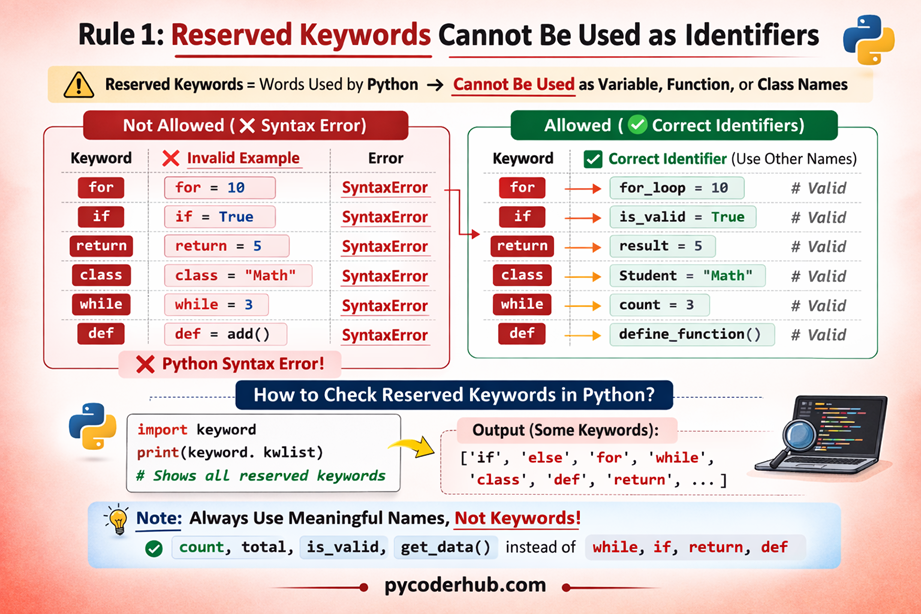
Reserved Keyword Restriction Chart
The following diagram illustrates how Python treats reserved keywords and why they cannot be used as identifiers such as variable, function, or class names. It also shows the correct approach by using valid identifiers that do not conflict with Python’s reserved words.
Rule 2: Python Keywords Are Case-Sensitive
Another important rule when working with Python keywords is that keywords are case-sensitive. This means that the exact spelling and letter casing of a keyword must be used as defined by the Python language.
In Python, uppercase and lowercase letters are treated as completely different characters. As a result, a keyword written with the wrong letter case will not be recognized as a keyword by the interpreter.
For example, the keyword if is used to create conditional statements. However, writing it as If or IF changes its meaning because Python no longer treats it as the keyword if.
Example of correct usage:
temperature_value = 30

if temperature_value > 25:
    print("The weather is warm.")
In this example, the keyword if is written exactly as Python expects, so the conditional statement works correctly.
Now consider what happens if the keyword is written with a different case:
temperature_value = 30

if temperature_value > 25:
    print("The weather is warm.")
Output
SyntaxError: invalid syntaxHere, Python does not recognize If as the keyword if. Instead, it interprets it as a normal identifier, which causes a syntax error because the interpreter cannot understand the structure of the statement.
Why Case Sensitivity Matters in Python
Python uses case sensitivity to clearly distinguish between keywords, identifiers, and other elements of the language. This rule ensures that the interpreter can accurately understand the structure of the code without confusion.
For example, all Python keywords follow a specific casing style:
- Most keywords are written in lowercase, such as
if,for,while,return, andimport. - Some keywords that represent constant values start with an uppercase letter, such as
True,False, andNone.
If the letter case is changed, Python will treat the word as a completely different identifier rather than a keyword.
Example:
true = True
print(true)
In this case:
Trueis the Boolean keyword constanttrueis treated as a normal variable name
Key Takeaway
When writing Python code, always ensure that keywords are written with their exact letter casing. Even a small change in capitalization can cause Python to misinterpret the code and produce a syntax error.
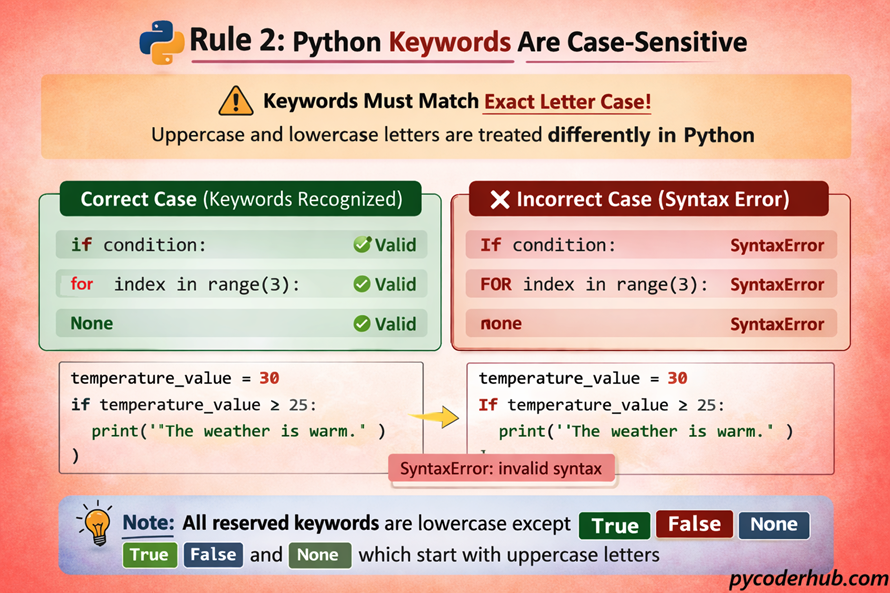
Python Keyword Case Sensitivity Chart
The diagram below illustrates how Python keywords are case-sensitive and must be written exactly as defined by the language. It also highlights that most keywords are lowercase, with only three reserved keywords starting with uppercase letters: True, False, and None.
Rule 3: Soft Keywords Act as Keywords Only in Specific Contexts
Unlike reserved keywords, soft keywords behave differently in Python. They are only treated as keywords in specific syntactic contexts and can still be used as normal identifiers in other parts of a program.
This means a soft keyword does not always function as a keyword. Instead, Python determines its meaning based on where and how it appears in the code.
Soft keywords were introduced with structural pattern matching in Python 3.10. Words such as match and case act as keywords only inside a match statement. Outside of that structure, they behave like regular identifiers.
For example, consider the following pattern matching statement:
number_value = 2

match number_value:
    case 1:
        print("One")
    case 2:
        print("Two")
In this example:
matchstarts the pattern matching statementcasedefines the individual patterns to check
Here, both match and case are treated as keywords because they appear inside the pattern matching syntax.
Soft Keywords Used as Normal Identifiers
Outside of pattern matching, these same words can be used as normal variable names because they are not globally reserved.
Example:
match = "Football"
case = "Example case"

print(match)
print(case)
Output:
Football
Example case
In this situation, Python interprets match and case as ordinary variable names, not keywords.
Best Practices: Although Python allows soft keywords to be used as normal identifiers, it is generally best to avoid using them as variable, function, or class names.
For example, using names like
matchorcaseas variables can make code harder to read—especially in programs that also use pattern matching. In such situations, readers may confuse whether the word is being used as a keyword or as a regular identifier.
Why Python Uses Soft Keywords
Soft keywords allow Python to introduce new language features without breaking existing programs.
If words like match and case were reserved globally, older Python code that used these names as variables would suddenly stop working. By making them context-dependent, Python ensures backward compatibility while still expanding the language syntax.
Key Takeaway
Soft keywords are different from reserved keywords because their meaning depends on context. They act as keywords only when used in specific language structures, such as pattern matching, and behave like normal identifiers in other situations.
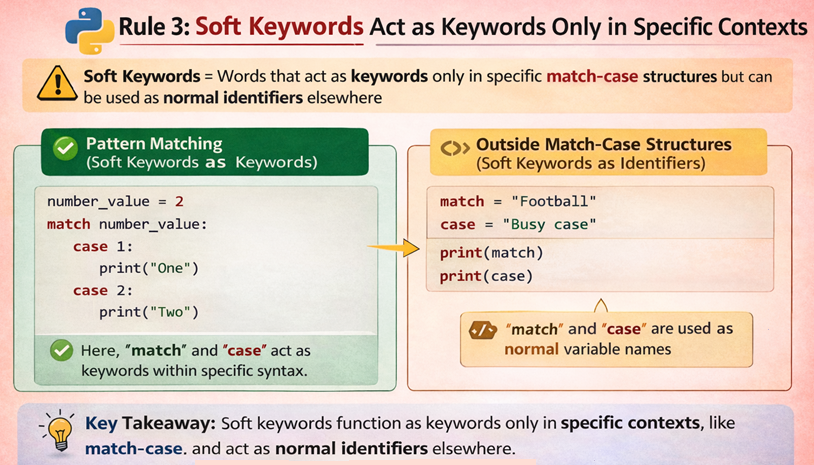
Soft Keywords Context Behavior Chart
The diagram below explains how soft keywords behave differently from reserved keywords in Python. It shows that soft keywords act as keywords only in specific syntax structures, while in other contexts they can still be used as normal identifiers.
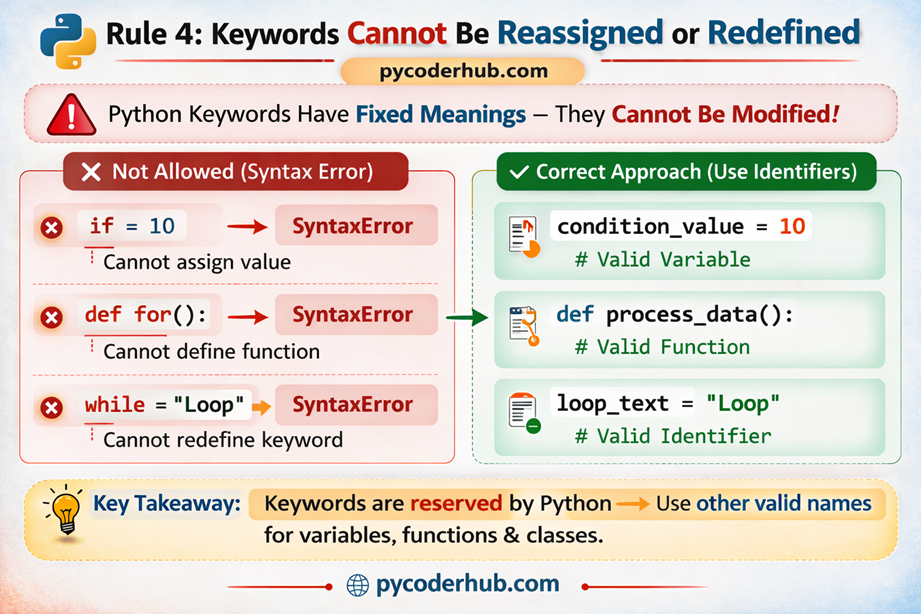
Rule 4: Keywords Cannot Be Reassigned or Redefined
Another important rule in Python is that keywords cannot be reassigned or redefined. Since keywords are a fundamental part of Python’s syntax, their meanings are fixed by the language itself.
This means you cannot assign a value to a keyword, redefine it as a function, or use it in any way that attempts to change its predefined behavior.
If Python allowed keywords to be modified, it would break the structure of the language and make programs impossible to interpret correctly.
Attempting to Assign a Value to a Keyword
Consider the following example:
if = 10Output:
SyntaxError: invalid syntaxHere, if is a reserved keyword used to create conditional statements. Python immediately raises a syntax error because keywords cannot be used on the left side of an assignment.
Attempting to Define a Function with a Keyword Name
The same restriction applies when defining functions.
Example:
def for():
    print("Example function")
Output:
SyntaxError: invalid syntaxIn this case, for is a keyword used for loops, so Python does not allow it to be used as a function name.
Why Python Enforces This Rule
Keywords are the building blocks of Python’s grammar. They define how statements, loops, conditions, and other language structures work.
If Python allowed keywords to be reassigned or redefined, the interpreter would no longer be able to understand the program’s structure. Preventing such usage ensures that Python code remains clear, predictable, and consistent.
Correct Approach
Instead of using keywords, always choose valid identifier names for variables, functions, or classes.
Example:
condition_value = 10or
def process_data():
    print("Processing data")
These names follow Python’s naming rules and do not conflict with the language’s keywords.
Key Takeaway
Python keywords have fixed meanings defined by the language, so they cannot be reassigned, redefined, or used as identifiers. Attempting to modify them will always result in a syntax error.
Python Keyword Reassignment Restriction Chart
The diagram below shows why Python keywords cannot be reassigned or redefined in a program. Since keywords have fixed meanings in Python syntax, attempting to use them as variables or function names results in a syntax error.
Python Keyword Rules Summary Chart
The following chart summarizes the four essential rules that control how Python keywords behave in code. These rules help developers understand the restrictions Python enforces to maintain clear and consistent program syntax.
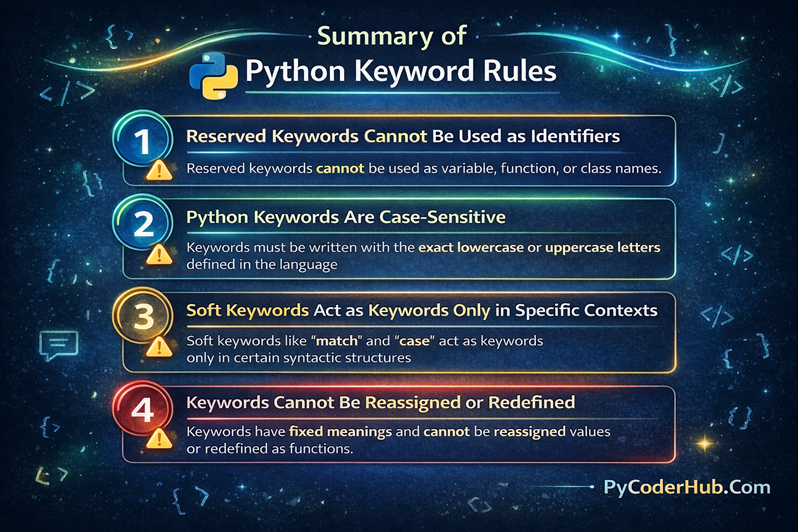
These four rules define the core restrictions Python enforces for keywords, ensuring that code remains consistent, readable, and syntactically correct.
Now that we have explored all the rules related to Python keywords, let’s move on to the guidelines section, where we will look at recommended practices for using keywords clearly and effectively in Python code.
Guideline 1: Avoid Using Soft Keywords as Identifiers
Although Python allows soft keywords to be used as normal identifiers, it is generally recommended to avoid using them as variable, function, or class names. Doing so can make code harder to read and may create confusion, especially in programs that also use structural pattern matching.
Soft keywords such as match and case act as keywords only within specific syntactic structures. Outside of those contexts, Python treats them like ordinary identifiers. While this flexibility helps maintain backward compatibility in the language, using these words as identifiers can make code less clear to readers.
For example, the following code is technically valid:
match = "Football"

print(match)
However, if pattern matching is used elsewhere in the same program, the word match might appear both as a keyword and as a variable name, which can make the code harder to understand.
A clearer approach is to choose descriptive variable names that do not resemble Python keywords.
Better example:
favorite_sport = "Football"

print(favorite_sport)
By using meaningful names, the purpose of the variable becomes clearer and the code remains easier to read and maintain.
Key Idea
Soft keywords can technically be used as identifiers, but avoiding them helps maintain clarity and reduces potential confusion, particularly in programs that use pattern matching syntax.
Guideline 2: Avoid Using Names That Closely Resemble Python Keywords
Even though Python allows many identifier names, it is a good practice to avoid variable or function names that look very similar to Python keywords. Names that closely resemble keywords can easily confuse readers and make the code harder to understand.
For example, developers sometimes create identifiers that differ from keywords by only one letter or a slight spelling change. While Python treats these as valid identifiers, they may appear almost identical to keywords when quickly reading the code.
Consider the following example:
iff = 10
fro = "example"

print(iff)
print(fro)
This code is technically valid because iff and fro are not Python keywords. However, these names strongly resemble the keywords if and for. When someone reads the code, they may momentarily think the words are part of Python syntax rather than identifiers.
A better approach is to use clear and descriptive names that do not resemble keywords.
Example:
condition_counter = 10
example_text = "example"

print(condition_counter)
print(example_text)
In this version, the identifiers clearly describe their purpose and do not resemble Python keywords, making the code easier to read.
Key Idea
Although Python permits identifiers that resemble keywords, it is better to choose distinct and descriptive names. This improves readability and reduces confusion for anyone reading or maintaining the code.
Guideline 3: Use a Trailing Underscore When a Name Conflicts with a Keyword
Sometimes you may want to use a variable name that happens to match a Python keyword. Since keywords cannot be used as identifiers, Python will raise a syntax error if you try to use them directly.
To solve this problem, the commonly recommended approach is to add a trailing underscore (_) to the identifier. This practice is suggested in Python’s style guide and helps avoid naming conflicts while keeping the variable name meaningful.
For example, consider the keyword class. If you try to use it as a variable name, Python will produce an error.
Example:
class = "Physics"Output:
SyntaxError: invalid syntaxInstead, you can add a trailing underscore to make the name valid:
class_ = "Physics"

print(class_)
Output:
PhysicsHere, class_ is a valid identifier because it is no longer the exact keyword class.
This technique is especially useful when working with data fields, parameters, or variable names that naturally match Python keywords.
Example:
from_ = "India"
global_ = True
By adding the underscore, the identifiers remain readable while avoiding conflicts with Python’s reserved keywords.
Key Idea
When an identifier name conflicts with a Python keyword, adding a trailing underscore is a simple and widely accepted solution that keeps the code both valid and readable.
Guideline 4: Use Python’s keyword Module to Check Keywords Programmatically
When writing Python code—especially tools, scripts, or programs that generate variable names dynamically—it can be helpful to verify whether a word is a Python keyword. Python provides a built-in module called keyword that allows you to check this programmatically.
Using this module helps ensure that automatically generated identifiers do not conflict with Python’s reserved keywords.
For example, the keyword module provides a list of all reserved keywords in Python.
Example:
import keyword

print(keyword.kwlist)
Output (example):
['False', 'None', 'True', 'and', 'as', 'assert', 'break', 'class', ...]This list contains all the reserved keywords defined by Python.
You can also check whether a specific word is a keyword using the iskeyword() function.
Example:
import keyword

print(keyword.iskeyword("for"))
print(keyword.iskeyword("variable_name"))
Output:
True
False
In this example:
foris identified as a Python keywordvariable_nameis not a keyword and can be used as an identifier
This technique is particularly useful when developing code generators, linters, compilers, or educational tools that need to validate identifier names automatically.
Key Idea
The keyword module provides a simple way to check Python keywords programmatically, helping developers avoid accidental conflicts when creating identifiers.
Guideline 5: Use a Code Editor with Syntax Highlighting
When writing Python code, it is highly recommended to use a code editor or IDE that provides syntax highlighting. Syntax highlighting visually distinguishes Python keywords, identifiers, strings, comments, and other elements by displaying them in different colors.
This feature makes it much easier to recognize Python keywords and language structures while reading or writing code.
For example, in most modern code editors:
- Keywords such as
if,for,while, andreturnappear in a distinct color - Strings are shown in another color
- Comments are usually displayed in a muted tone
This visual distinction helps developers quickly identify how the code is structured.
Example:
temperature_value = 30

if temperature_value > 25:
    print("The weather is warm.")
In a syntax-highlighting editor, the keyword if will appear in a different color from the variable temperature_value, making the control structure easier to recognize.
Why Syntax Highlighting Is Helpful
Using a syntax-highlighting editor helps developers:
- Identify Python keywords instantly
- Spot syntax mistakes more easily
- Improve code readability
- Understand program structure at a glance
Without syntax highlighting, all code appears in the same color, which can make it harder to distinguish keywords from identifiers.
Common Editors That Support Python Syntax Highlighting
Many popular editors and IDEs provide built-in Python syntax highlighting, including:
- Visual Studio Code
- PyCharm
- Sublime Text
- Notepad++
These tools automatically highlight Python keywords, helping you write cleaner and more readable code.
Key Idea
Using an editor with syntax highlighting makes Python keywords visually distinct, which improves readability and helps developers detect mistakes more quickly while coding.
Guideline 6: Check the Python Version for New or Updated Keywords
Python continues to evolve over time, and new language features may introduce additional keywords or soft keywords in newer Python versions. Because of this, it is a good practice to check which keywords exist in the version of Python you are currently using.
Understanding the keyword set of your Python version helps you avoid naming conflicts and ensures that your code remains compatible with the language features available in that version.
For example, structural pattern matching, introduced in Python 3.10, added soft keywords such as match and case. These words were not treated as keywords in earlier versions of Python. As a result, older programs might have used these words as normal identifiers.
Example using pattern matching:
number_value = 2

match number_value:
    case 1:
        print("One")
    case 2:
        print("Two")
If you are working with different Python versions, being aware of such changes helps prevent unexpected issues when running or maintaining code.
One simple way to check the keyword list for your Python version is by using the keyword module.
Example:
import keyword

print(keyword.kwlist)
This will display the list of reserved keywords supported by the currently installed Python version.
You can also check the Python version directly:
import sys

print(sys.version)
Key Idea
Always be aware of the Python version you are using, because newer versions may introduce additional keywords or soft keywords. Checking the keyword list for your version helps you avoid naming conflicts and stay up to date with Python language changes.
With this guideline, we have now covered the most important best practices for working with Python keywords. In the next section, let’s quickly recap all the rules and guidelines discussed in this lesson with a simple summary.
Python Keyword Rules and Guidelines – Quick Cheat Sheet
The following table provides a quick summary of the most important rules and guidelines for using Python keywords. This cheat sheet can help you quickly review the key concepts covered in this lesson.
| Type | Rule / Guideline | Key Idea |
|---|---|---|
| Rule | Reserved Keywords Cannot Be Used as Identifiers | Keywords like if, for, and class cannot be used as variable, function, or class names. |
| Rule | Python Keywords Are Case-Sensitive | Keywords must be written exactly as defined, such as if and not If. |
| Rule | Soft Keywords Work Only in Specific Contexts | Words like match and case act as keywords only inside pattern matching syntax. |
| Rule | Keywords Cannot Be Reassigned or Redefined | You cannot assign values to keywords or redefine them as functions or variables. |
| Guideline | Avoid Using Soft Keywords as Identifiers | Even though allowed, using names like match as variables may reduce readability. |
| Guideline | Avoid Names Similar to Keywords | Identifiers like iff or fro can confuse readers because they resemble keywords. |
| Guideline | Use a Trailing Underscore When Needed | Add _ when a name conflicts with a keyword, such as class_. |
| Guideline | Use the keyword Module | The keyword module can help check whether a word is a Python keyword. |
| Guideline | Use a Syntax-Highlighting Editor | Editors highlight keywords, making code easier to read and debug. |
| Guideline | Check Python Version for Keyword Changes | New Python versions may introduce new keywords or soft keywords. |
Key Takeaway
Python keywords form the foundation of the language’s syntax, so understanding both their rules and recommended usage guidelines helps you write clearer, more reliable Python code.
Python Keyword Rules & Guidelines – Visual Cheat Sheet
The following visual cheat sheet summarizes the most important Python keyword rules and practical guidelines covered in this lesson. It provides a quick overview to help you remember how keywords behave and how to use them correctly in real Python programs.
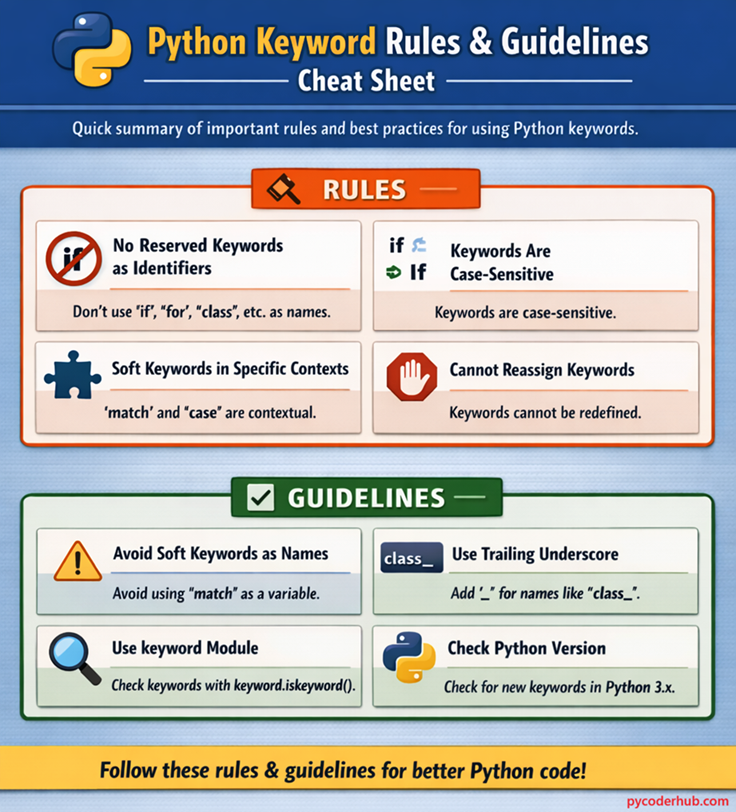
Understanding these Python keyword rules and guidelines helps you write cleaner, error-free, and more readable Python code.
Conclusion
Python keywords define the core structure of the language, so understanding both their rules and practical usage guidelines is essential for writing correct code. By following these rules, you can avoid syntax errors, and by applying the guidelines, you improve clarity and readability.
As you continue your Python journey, these small practices will make a big difference in writing clean and professional code. Keep them in mind, and you’ll build a strong foundation for more advanced concepts ahead.
Suggested Posts
- Python Keywords Explained – What Are Reserved Keywords in Python?
- Python Control Flow Keywords Explained (With Function and Class Examples)
- Python Exception Handling Keywords Explained (With Boolean and Import Examples)
- Python Scope Keywords Explained (del, global, nonlocal) With Operator and Async Keywords Examples
- Python Soft Keywords Explained: Meaning, History, List, Examples, and Differences from Reserved Keywords
- Python Keyword Module Explained: kwlist, iskeyword(), softkwlist with Examples
- Python Keyword Errors Explained: Common Mistakes and How to Fix Them
- Python Keywords Evolution: From Python 1 to Python 3.12+ (Complete Guide)
- Python Keywords Best Practices: Write Cleaner, Error-Free Code
- Python Keywords FAQ – Common Questions, Confusion & Clear Answers

5 thoughts on “Python Keyword Rules and Guidelines: Using Reserved and Soft Keywords Correctly”