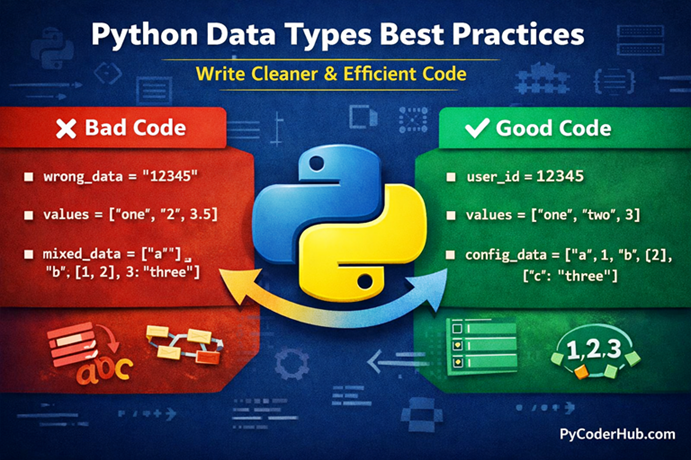
Introduction: Python Data Types Best Practices
In the previous lesson, we explored common Python data types errors and learned how small mistakes—like mixing data types or using the wrong structure—can lead to confusion and bugs in your code.
But knowing mistakes is only half the journey.
👉 The real goal is to write better code from the start, so you don’t run into those errors in the first place.
Think of it like this:
If errors are potholes on a road, then best practices are the smooth lanes that help you drive safely and efficiently.
In this lesson, we’ll focus on Python Data Types Best Practices—the smart habits that experienced developers use to write clean, efficient, and error-free code.
What You’ll Learn
In this guide, you will learn:
- How to choose the right data type for the right situation
- How to avoid unnecessary complexity and confusion
- When to use lists, sets, dictionaries, and other data types effectively
- How to write cleaner and more readable Python code
- Practical examples showing bad vs good code usage
- Simple tips to improve your coding habits and efficiency
Before we start with best practice #1, first understand why best practices are necessary for Python data types.
Why Python Data Types Best Practices Matter
Choosing the right data type in Python is not just about making your code work—it’s about making your code clear, efficient, and easy to maintain.
When beginners write code, they often focus only on getting the correct output. But in real-world programming, how you write the code matters just as much as the result. Poor data type choices can lead to confusion, unexpected bugs, and code that becomes difficult to understand later—even for the person who wrote it.
Think of data types like containers in a kitchen.
If you store sugar in a salt container, things might still “work” visually—but when someone uses it, the result will be completely wrong. Similarly, using the wrong data type can create hidden problems that are hard to detect.
Following Python Data Types Best Practices helps you:
- Write code that is easy to read and understand
- Avoid unnecessary errors and confusion
- Improve performance and efficiency
- Make your code easier to debug and maintain
- Build habits used by professional developers
Another important point is scalability. Code that works fine for small examples can break or become messy in larger applications if best practices are ignored. By using the right data types from the beginning, you ensure your code remains clean and reliable as it grows.
In short, best practices are not strict rules—they are smart decisions that help you write better Python code consistently.
Now that you understand why they matter, let’s start with the first best practice.
Best Practice #1 – Use the Right Data Type for the Right Job
Choosing the correct data type is the foundation of writing clean and efficient Python code. Using the wrong data type might still give you output, but it often leads to confusion, extra work, and hidden bugs later.
Without Best Practice (Wrong Approach)
user_age = "25"
total_price = "100" + "50"

user_data = ["PyCoder", 25, "True"]
With Best Practice (Correct Approach)
user_age = 25
total_price = 100 + 50

user_data = {
    "username": "PyCoder",
    "age": 25,
    "is_active": True
}
Explanation
Using the wrong data type is like using the wrong tool for a job.
👉 Imagine trying to measure weight using a ruler—it might give you some number, but it’s meaningless.
In the wrong example:
- “25” is stored as a string instead of a number
- “100” + “50” results in “10050” (string concatenation, not addition)
- A list is used for structured user data, which creates confusion about what each value represents
In the correct example:
- Numbers are stored as integers for proper calculations
- A dictionary is used to clearly label and organize user data
- Boolean values are used correctly instead of strings
👉 This makes the code more readable, logical, and reliable.
Why This is a Best Practice
This is considered a best practice because it ensures your code behaves correctly and remains easy to understand.
When you use the right data type:
- Python performs operations as expected (no unexpected results like string concatenation instead of addition)
- Your code becomes self-explanatory, reducing confusion for you and others
- It improves performance, since Python handles each data type differently under the hood
- It reduces the chances of bugs and logical errors
On the other hand, using incorrect data types may still work in some cases, but it creates hidden problems that become harder to fix as your code grows.
👉 In simple terms, the right data type helps your code stay correct, clean, and predictable.
When to Use This
Use the correct data type when:
- You are performing mathematical operations → use
intorfloat - You are storing true/false values → use
bool - You need labeled structured data → use
dict - You are working with ordered collections → use
listortuple
Pro Tip
Always ask yourself:
👉 “What kind of data am I working with?”
Choosing the right data type at the beginning saves time and prevents confusion later.
Summary
Using the right data type makes your code clear, efficient, and error-free, while the wrong choice leads to confusion and incorrect results.
Best Practice #2 – Avoid Unnecessary Type Conversions
Type conversion (changing one data type into another) is useful in Python—but doing it unnecessarily can make your code slower, harder to read, and more confusing.
Without Best Practice (Wrong Approach)
user_age = "25"

# Unnecessary repeated conversions
age_next_year = int(user_age) + 1
double_age = int(user_age) * 2

total_score = int("50") + int("30")
With Best Practice (Correct Approach)
user_age = 25

age_next_year = user_age + 1
double_age = user_age * 2

total_score = 50 + 30
Explanation
Unnecessary type conversion is like repeatedly translating the same sentence into another language just to understand it again and again.
In the wrong example:
- The same value is converted multiple times
- It adds extra processing and reduces readability
- Makes the code look cluttered and less efficient
In the correct example:
- Data is stored in the correct type from the beginning
- No repeated conversions are needed
- Code becomes cleaner and faster
Why This is a Best Practice
Avoiding unnecessary type conversions keeps your code efficient, readable, and clean.
When you minimize conversions:
- Your code runs faster by avoiding repeated operations
- It becomes easier to read and understand
- You reduce the chances of conversion-related errors
- Your logic stays simple and straightforward
Unnecessary conversions may not break your code immediately, but they create confusion and inefficiency—especially in larger programs.
👉 In simple terms, fewer conversions mean cleaner logic and better performance.
When to Use This
Use this practice when:
- You are working with values that will be used multiple times
- You can define the correct data type at the beginning
- You want to keep your code clean and efficient
- You are performing repeated calculations on the same data
Pro Tip
If you receive input as a string (like from input()), convert it once and store it in the correct data type—don’t convert it again and again.
Summary
Avoid unnecessary type conversions to keep your code simple, efficient, and easy to read, instead of cluttered with repeated operations.
Best Practice #3 – Choose Mutable vs Immutable Data Types Wisely
Understanding when to use mutable and immutable data types can help you avoid unexpected behavior and write more predictable Python code.
Without Best Practice (Wrong Approach)
user_scores = (10, 20, 30)

# Trying to update a tuple (immutable)
user_scores[0] = 50 # Output: TypeErrordefault_items = []
def add_item(item, items=default_items):
items.append(item)
return items
print(add_item("apple"))
print(add_item("banana")) # Unexpected resultWith Best Practice (Correct Approach)
user_scores = [10, 20, 30]

# Lists are mutable, so updates work
user_scores[0] = 50def add_item(item, items=None):
if items is None:
items = []
items.append(item)
return items
print(add_item("apple"))
print(add_item("banana")) # Works as expectedExplanation
Mutable and immutable data types behave differently when changes are involved.
👉 Think of it like this:
- Immutable types (like tuple, string) are like a sealed box — you can’t change what’s inside, you must create a new box
- Mutable types (like list, dict) are like a notebook — you can edit, add, or remove content anytime
In the wrong examples:
- Trying to modify a tuple leads to an error
- Using a mutable default argument (
list) causes unexpected data sharing between function calls
In the correct examples:
- A list is used where modification is needed
- A safe pattern (
None) avoids unwanted shared data
👉 Choosing the right type prevents confusion and unexpected behavior.
Why This is a Best Practice
Choosing between mutable and immutable data types wisely helps you write predictable and bug-free code.
When used correctly:
- You avoid unexpected data changes
- Your code behaves consistently across different parts of the program
- You prevent tricky bugs like shared mutable state
- It improves code reliability and maintainability
Ignoring this can lead to issues that are difficult to debug, especially in functions and larger applications.
👉 In simple terms, the right choice ensures your data behaves exactly as you expect.
When to Use This
Use this practice when:
- You need to modify data frequently → use mutable types like
list,dict - You want fixed, unchangeable data → use immutable types like
tuple,string - You are defining function parameters → avoid mutable default values
- You want to ensure data safety and consistency
Pro Tip
Use immutable data types whenever possible for safety, and switch to mutable types only when you actually need to modify data.
Summary
Choosing between mutable and immutable data types wisely helps you avoid bugs and ensures your code remains predictable and reliable.
Best Practice #4 – Use Built-in Data Types Instead of Custom Logic
Python already provides powerful built-in data types like lists, sets, and dictionaries. Trying to recreate their behavior manually often leads to complex, inefficient, and confusing code.
Without Best Practice (Wrong Approach)
user_items = []

def add_unique_item(item):
    for existing_item in user_items:
        if existing_item == item:
            return
    user_items.append(item)

add_unique_item("apple")
add_unique_item("banana")
add_unique_item("apple")  # Duplicate check manually
With Best Practice (Correct Approach)
user_items = set()

user_items.add("apple")
user_items.add("banana")
user_items.add("apple")  # Automatically handled
Explanation
Rewriting built-in functionality is like reinventing the wheel.
👉 Imagine building your own calculator just to add two numbers, instead of using one that already exists. It’s unnecessary and time-consuming.
In the wrong example:
- Manual logic is used to prevent duplicates
- Code becomes longer and harder to understand
- Performance is slower due to repeated looping
In the correct example:
- A set is used, which automatically handles unique values
- Code is shorter, cleaner, and more efficient
- Python does the heavy lifting internally
👉 Built-in data types are designed to solve common problems efficiently—use them.
Why This is a Best Practice
Using built-in data types ensures your code is efficient, readable, and reliable.
When you rely on built-in structures:
- Your code becomes shorter and cleaner
- You benefit from Python’s optimized internal implementations
- You reduce the chances of logical errors
- Your intent becomes clear to other developers
Custom logic for common tasks often introduces unnecessary complexity and confusion.
👉 In simple terms, built-in data types help you write better code with less effort.
When to Use This
Use this practice when:
- You need unique values → use
set - You need key-value mapping → use
dict - You need ordered collections → use
listortuple - You find yourself writing extra loops or checks for common tasks
Pro Tip
Before writing custom logic, ask yourself:
👉 “Does Python already provide a built-in way to do this?”
Most of the time, the answer is yes.
Summary
Using built-in data types instead of custom logic makes your code simpler, faster, and easier to maintain.
Best Practice #5 – Prefer Lists for Ordered Data, Sets for Unique Data
Choosing between a list and a set is a common decision in Python. Using the wrong one can make your code inefficient or harder to understand.
Without Best Practice (Wrong Approach)
user_ids = [101, 102, 103, 101, 104]

# Manually removing duplicates
unique_user_ids = []
for user_id in user_ids:
    if user_id not in unique_user_ids:
        unique_user_ids.append(user_id)
With Best Practice (Correct Approach)
user_ids = [101, 102, 103, 101, 104]

# Use set for unique values
unique_user_ids = set(user_ids)
Explanation
Lists and sets are designed for different purposes.
👉 Think of it like this:
- A list is like a queue — order matters, and duplicates are allowed
- A set is like a VIP guest list — each name appears only once
In the wrong example:
- A list is used even though duplicates are not needed
- Extra logic is written to remove duplicates
- Code becomes longer and less efficient
In the correct example:
- A set automatically removes duplicates
- No extra logic is required
- Code becomes cleaner and faster
👉 Choosing the right structure makes your intent clear.
Why This is a Best Practice
Using lists and sets correctly helps you write efficient and intention-driven code.
When used properly:
- You avoid unnecessary loops and checks
- Your code becomes simpler and faster
- It clearly communicates whether order or uniqueness matters
- You reduce chances of logical confusion
Using the wrong data type may still work, but it adds complexity and reduces clarity.
👉 In simple terms, the right choice makes your code more meaningful and efficient.
When to Use This
Use this practice when:
- You need to maintain order → use
list - You need only unique values → use
set - You want to remove duplicates quickly → convert list to set
- You don’t care about order but want fast lookup → use
set
Pro Tip
If you need both order and uniqueness, you can:
unique_ordered_items = list(dict.fromkeys(user_ids))👉 This keeps order while removing duplicates.
Summary
Use lists for ordered data and sets for unique data to keep your code clean, efficient, and easy to understand.
Best Practice #6 – Use Dictionary for Fast and Clear Data Access
When you need to store and access data using labels (keys), a dictionary is the best choice. Avoid using lists or other structures for this purpose, as they make your code harder to read and less efficient.
Without Best Practice (Wrong Approach)
user_data = ["PyCoder", 25, "India"]

# Accessing values using index (confusing)
username = user_data[0]
user_age = user_data[1]
user_country = user_data[2]
With Best Practice (Correct Approach)
user_data = {
    "username": "PyCoder",
    "age": 25,
    "country": "India"
}

username = user_data["username"]
user_age = user_data["age"]
user_country = user_data["country"]
Explanation
Using a list for structured data is like storing contacts without names—just numbers.
👉 Imagine your phone contacts showing only numbers without names. You’d have to remember who is who based on position—that’s confusing!
In the wrong example:
- Data is stored in a list without labels
- You must remember what each index represents
- This leads to confusion and errors
In the correct example:
- A dictionary uses keys (labels)
- Data becomes self-explanatory
- Accessing values is clear and meaningful
👉 Dictionaries make your data easier to understand and manage.
Why This is a Best Practice
Using dictionaries improves both performance and readability.
When you use a dictionary:
- Data access becomes faster (key-based lookup)
- Your code becomes self-explanatory
- You reduce confusion caused by index positions
- It becomes easier to maintain and update data
Using lists for labeled data may work initially, but it quickly becomes messy and error-prone.
👉 In simple terms, dictionaries help you write clear and efficient code.
When to Use This
Use this practice when:
- You need to store key-value pairs
- You want fast data lookup
- You are working with structured data (like user info, settings, records)
- You want your code to be readable and maintainable
Pro Tip
Use meaningful and descriptive keys in dictionaries—this makes your code even easier to understand.
Summary
Use dictionaries when working with labeled data to make your code clear, organized, and efficient.
Best Practice #7 – Avoid Mixing Data Types Unnecessarily
Mixing different data types in the same context can make your code confusing and lead to unexpected behavior. It’s better to keep your data consistent and predictable.
Without Best Practice (Wrong Approach)
user_values = [25, "30", 45, "50"]

total = 0
for value in user_values:
    total += int(value)  # Repeated conversion due to mixed types
With Best Practice (Correct Approach)
user_values = [25, 30, 45, 50]

total = sum(user_values)
Explanation
Mixing data types is like mixing different units of measurement without consistency.
👉 Imagine adding distances where some values are in meters and others in kilometers—you’d need to convert everything first, or the result will be confusing.
In the wrong example:
- Numbers are mixed with strings
- Extra conversions are required
- Code becomes harder to read and maintain
In the correct example:
- All values are of the same type (
int) - No conversion is needed
- Built-in functions like
sum()work smoothly
👉 Consistency makes your code simpler and more reliable.
Why This is a Best Practice
Avoiding mixed data types helps keep your code clean, predictable, and efficient.
When your data is consistent:
- You reduce the need for repeated type conversions
- Your code becomes easier to read and debug
- Built-in functions work without issues
- You avoid unexpected errors and confusion
Mixing types may seem harmless at first, but it creates unnecessary complexity as your program grows.
👉 In simple terms, consistent data types lead to simpler and more reliable code.
When to Use This
Use this practice when:
- You are working with collections of data (lists, sets, etc.)
- You are performing calculations or operations
- You want to use built-in functions efficiently
- You aim to keep your code clean and maintainable
Pro Tip
If your data comes from external sources (like user input), clean and convert it once at the beginning to maintain consistency throughout your code.
Summary
Avoid mixing data types unnecessarily to keep your code simple, consistent, and easy to work with.
Best Practice #8 – Use Meaningful Variable Names Based on Data Type
Choosing meaningful variable names based on the type and purpose of data makes your code easier to read and understand.
Without Best Practice (Wrong Approach)
data = ["PyCoder", 25, True]

value1 = data[0]
value2 = data[1]
value3 = data[2]
With Best Practice (Correct Approach)
user_info_list = ["PyCoder", 25, True]

username = user_info_list[0]
user_age = user_info_list[1]
is_user_active = user_info_list[2]
Explanation
Poor variable naming is like labeling all containers in a kitchen as “item1”, “item2”, and “item3”.
👉 You might still find what you need, but it takes extra effort and creates confusion.
In the wrong example:
- Generic names like
data,value1,value2don’t explain anything - It’s unclear what each value represents
- Code becomes hard to read and maintain
In the correct example:
- Variable names clearly describe the data they hold
- It’s easy to understand the purpose of each value
- Code becomes self-explanatory
👉 Good naming reduces confusion and improves readability.
Why This is a Best Practice
Using meaningful variable names improves code clarity and maintainability.
When variables are well-named:
- Your code becomes easy to read and understand
- You reduce confusion about what each value represents
- It becomes easier to debug and update code
- Other developers can quickly understand your logic
Poor naming may not break your code, but it makes it harder to work with.
👉 In simple terms, good names make your code clear and professional.
When to Use This
Use this practice when:
- You are creating variables for any type of data
- You want your code to be readable and maintainable
- You are working on larger programs or projects
- You want to follow clean coding practices
Pro Tip
Include hints about the data type in the name when helpful, like:
_listfor lists_dictfor dictionaries_setfor sets
👉 This makes your code even easier to understand.
Summary
Use meaningful variable names based on data type to make your code clear, readable, and easy to maintain.
Best Practice #9 – Use Type Checking When Necessary (But Don’t Overuse It)
Type checking can help you write safer code, but overusing it can make your code unnecessary complex and less “Pythonic”. The goal is to use it only when it truly adds value.
Without Best Practice (Wrong Approach)
user_input = "100"

# No type checking
total_value = user_input + 50  # This will cause an error
With Best Practice (Correct Approach)
user_input = "100"

if isinstance(user_input, int):
    total_value = user_input + 50
else:
    total_value = int(user_input) + 50
Explanation
Skipping necessary type checking is like assuming every container in your kitchen holds sugar—sometimes it might be salt.
👉 If you don’t check, you might get the wrong result or even break something.
In the wrong example:
- The code assumes
user_inputis a number - This leads to an error when trying to add a string and an integer
In the correct example:
- The type is checked before performing the operation
- Safe conversion is applied when needed
- Code becomes more robust and reliable
👉 However, over-checking every variable is unnecessary and clutters your code.
Why This is a Best Practice
Using type checking wisely helps you write safe and reliable code without unnecessary complexity.
When used correctly:
- You prevent runtime errors
- Your code becomes more robust and fault-tolerant
- You handle unexpected inputs gracefully
- You keep your code clean by avoiding excessive checks
Too much type checking, on the other hand, makes code verbose and harder to read.
👉 In simple terms, use type checking only where it actually matters.
When to Use This
Use this practice when:
- You are handling user input or external data
- You are unsure about the data type of a value
- You want to prevent runtime errors
- You are writing functions that accept flexible input types
Pro Tip
Prefer using isinstance() over direct type comparison (type()) because it is more flexible and works better with inheritance.
Summary
Use type checking only when necessary to make your code safe and reliable, without making it unnecessarily complex.