
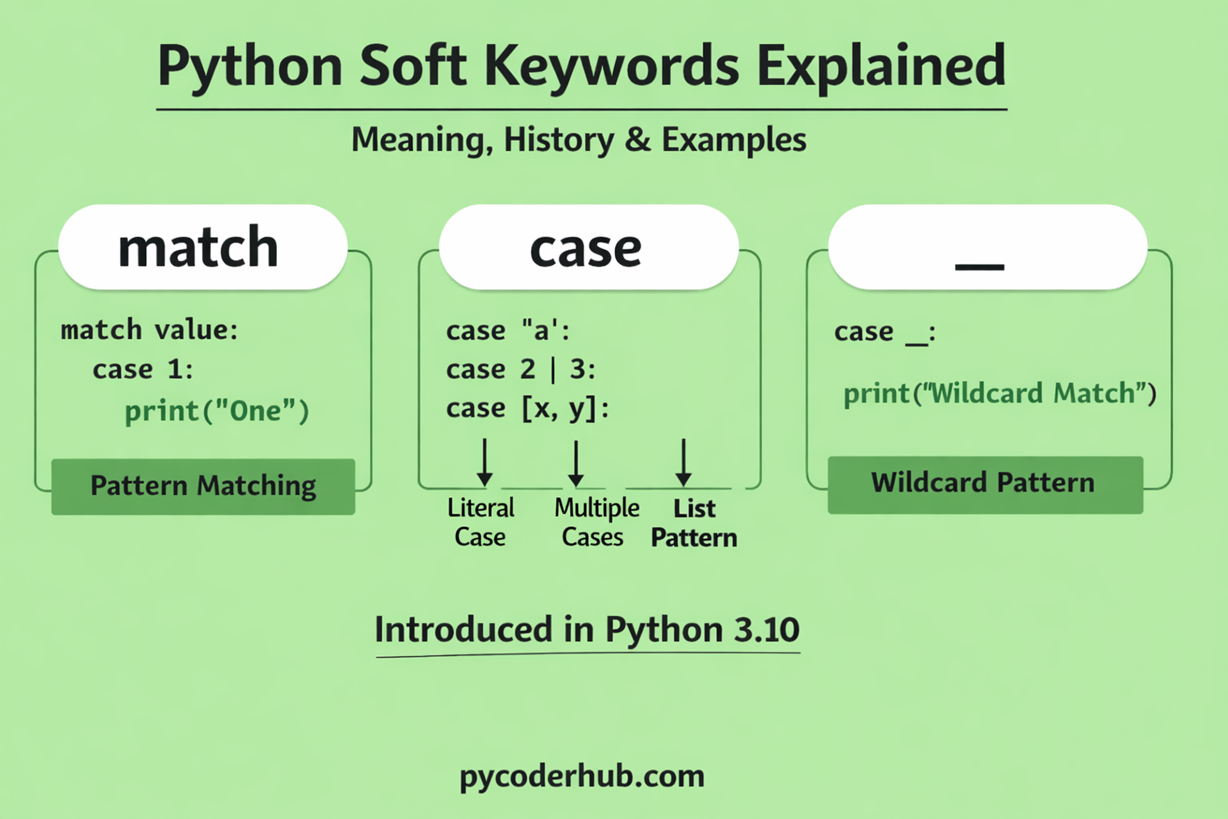
Introduction: Python Soft Keywords
In the previous lessons of this chapter, we explored Python reserved keywords in detail. You learned what Python keywords are, how they work in the language syntax. These keywords are strictly reserved, meaning they cannot be used as variable names, function names, or identifiers anywhere in a Python program.
However, modern Python introduced another interesting concept known as soft keywords. Unlike traditional reserved keywords, soft keywords behave differently because they are not reserved in every situation. Instead, they act like keywords only in specific contexts of Python syntax.
Soft keywords were introduced in Python 3.10 as part of the language’s evolution to support new features such as structural pattern matching, while still maintaining backward compatibility with older Python code. This design allows Python to add powerful new syntax without breaking existing programs that might already be using those words as variable names.
In this lesson, we will explore Python soft keywords in depth, understand why they were introduced, and learn how they work with practical examples.
What You’ll Learn in This Lesson
In this guide, you will learn:
- What Python soft keywords are and how they work
- Why Python introduced soft keywords in modern versions
- The history of soft keywords and when they were added to Python
- The complete list of Python soft keywords
- Detailed explanations of each soft keyword:
match,case, and_ - How soft keywords behave differently from reserved keywords
- Practical examples showing how soft keywords work in real code
- The difference between reserved keywords and soft keywords in Python
- How to check soft keywords in Python using the
keywordmodule
Now that you know what this lesson will cover, let’s start by understanding what soft keywords are in Python.
What Are Soft Keywords in Python?
In Python, most keywords are reserved keywords, which means they are permanently reserved by the language and cannot be used as variable names, function names, or identifiers. However, modern Python introduced a special category of keywords called soft keywords.
Python soft keywords are words that behave like keywords only in specific syntax contexts, rather than being reserved everywhere in the language.
This means a soft keyword can behave like a keyword in certain language constructs, but in other places it can still be used as a normal identifier (for example, as a variable name or function name).
In simple terms:
Soft keywords are context-dependent keywords.
Python treats them as keywords only when they appear in specific syntax.
This behavior makes soft keywords different from traditional reserved keywords. Instead of being globally restricted, they are recognized by the Python parser only when a particular language feature requires them. In all other situations, Python treats them like ordinary names.
Soft keywords were introduced to support newer language features—most notably structural pattern matching, which was added in Python 3.10. By using soft keywords, Python can add powerful new syntax without breaking older programs that may already use those words as identifiers.
For example, consider the following pattern matching code:
match user_choice:
    case 1:
        print("Option One Selected")
In this example, match and case behave like Python keywords because they are part of the pattern matching syntax. However, if they are used outside this structure, Python does not treat them as reserved keywords.
This flexible behavior is the key idea behind soft keywords in Python.
In simple terms:
- They function as keywords only when used in certain Python statements.
- Outside those statements, they can be used as variable names, function names, or identifiers.
- They were introduced to extend Python’s syntax without breaking existing code.
Why Python Introduced Soft Keywords
Python introduced soft keywords to make it easier to add new language features without breaking existing code. Before this concept existed, every new keyword added to the language became a fully reserved word, which could cause compatibility problems for older programs.
Let’s understand the reasons in detail.
1. To Preserve Backward Compatibility
One of Python’s core design goals is backward compatibility—older Python programs should continue to work even when the language evolves.
If Python adds a new regular keyword, any existing code that uses that word as a variable, function, or class name would immediately break.
Example of the problem:
case = "PyCoderHub"
print(case)
If case were introduced as a regular reserved keyword, the code above would suddenly become invalid.
Soft keywords prevent this issue because they are only treated as keywords in specific syntax, not everywhere in the language.
2. To Introduce New Syntax Safely
Python sometimes needs new words to support new language features. Instead of reserving those words globally, soft keywords allow Python to activate keyword behavior only inside certain grammar rules.
This makes it possible to add new syntax without affecting unrelated parts of the language.
A good example is structural pattern matching, introduced in Python 3.10.
user_status = "success"

match user_status:
    case "success":
        print("Operation completed successfully")
Here:
matchandcasebehave like keywords- But outside this structure, they can still be used as normal identifiers.
3. To Avoid Breaking Existing Codebases
Python is used in millions of projects worldwide, including large production systems. Even a small language change can affect a huge amount of code.
Soft keywords ensure that:
- Existing variable names remain valid
- Older scripts continue working
- Libraries and frameworks do not suddenly fail after upgrades
This approach makes Python upgrades much safer for developers.
4. To Support Modern Language Features
Modern programming languages often evolve by adding new syntax features. Python needed a way to support such improvements without constantly expanding the list of globally reserved words.
Soft keywords provide a balanced solution:
- New features can be introduced
- Existing code remains compatible
- The language stays clean and maintainable
Key Idea
The main reason Python introduced soft keywords is simple:
They allow Python to evolve by adding new syntax while keeping existing code safe and functional.
This design decision became especially important when Python introduced advanced features like pattern matching, where words such as match and case behave as keywords only within a specific syntax structure.
History of Soft Keywords in Python
Soft keywords are a relatively recent addition to Python. They were introduced to support new syntax features while keeping the language backward compatible. Understanding their history helps explain why Python needed them and how the concept evolved.
Python Version That Introduced Soft Keywords
Soft keywords were officially introduced in Python 3.10, which was released in October 2021. Their introduction was directly connected to a new language feature called Structural Pattern Matching.
Structural pattern matching allows developers to compare values against different patterns and execute specific blocks of code depending on which pattern matches. This feature works similarly to a switch or pattern matching system found in other programming languages, but it is more powerful and flexible.
A simple example of structural pattern matching looks like this:
match user_input:
    case 1:
        print("You selected option 1")
    case 2:
        print("You selected option 2")
    case _:
        print("Invalid option")
In this example, the match statement evaluates a value and compares it against multiple case patterns. Depending on the pattern that matches, Python executes the corresponding block of code.
The design and implementation of this feature were defined in a set of Python Enhancement Proposals (PEPs):
- PEP 634 – Structural Pattern Matching: Specification
- PEP 635 – Structural Pattern Matching: Motivation and Rationale
- PEP 636 – Structural Pattern Matching: Tutorial
These proposals explain how pattern matching works, why it was added to Python, and how developers can use it effectively.
Modern Python and Soft Keywords
Today, soft keywords are mainly associated with structural pattern matching. The most well-known examples include:
matchcase_(wildcard pattern in matching)
Python may introduce additional soft keywords in the future if new language features require them.
This design approach allows Python to continue evolving without unnecessarily increasing the list of globally reserved keywords.
How the Python Parser Handles Soft Keywords (Old Parser vs New Parser)
To understand why soft keywords work in Python, it helps to look at how Python’s parser processes code. The parser is the part of the interpreter that reads Python code and converts it into a structured representation that the interpreter can execute.
Soft keywords became possible largely because Python replaced its old parser with a more flexible new parser architecture.
The Old Python Parser (LL(1) Parser)
For many years, Python used a parser based on the LL(1) parsing algorithm.
What LL(1) Means
LL(1) is a parsing strategy where the parser:
- Reads the input Left-to-right
- Produces a Leftmost derivation
- Uses 1 token of lookahead
Because the parser could only look at one token ahead, the grammar had to remain simple and rigid.
Limitations of the Old Parser
The LL(1) parser had several limitations:
- Hard to extend grammar
Adding complex syntax features was difficult. - Keywords had to be globally reserved
The parser could not easily treat a word as a keyword only in specific contexts. - More complicated grammar workarounds
Language designers often had to restructure syntax to satisfy LL(1) restrictions.
Because of these limitations, introducing context-dependent keywords (like soft keywords) was not practical with the old parser.
The New Python Parser (PEG Parser)
Starting in Python 3.9, Python replaced the old LL(1) parser with a PEG parser.
The PEG parser was introduced through PEP 617.
What PEG Means
PEG stands for Parsing Expression Grammar.
Compared to LL(1), PEG parsers are:
- More flexible
- Easier to extend
- Better at handling complex language syntax
This new parser allows Python to define grammar rules that depend on context, which makes soft keywords possible.
How Soft Keywords Work With the PEG Parser
In Python 3.9, the language switched to a PEG (Parsing Expression Grammar) parser. This was a massive architectural shift.
- How it works: A PEG parser is much more powerful because it supports backtracking and infinite lookahead.
- The Contextual Logic: When the PEG parser sees the word
match, it doesn’t panic. It “tentatively” explores the rest of the line:- It sees
match. - It looks ahead: Is there an expression followed by a colon?
- If yes, it treats
matchas a keyword. - If it sees an equals sign (e.g.,
match = 5), it realizes the “keyword” path failed, “backtracks” to the start, and treatsmatchas a variable.
- It sees
Consider this valid Python 3.10 code:
match = [1, 2, 3]  # Assignment (Identifier)

match match:       # Statement (Keyword then Identifier)
    case [1, 2, 3]:
print("Success")- Line 1: The PEG parser sees
matchfollowed by=. It knows this is an assignment. - Line 2: The parser sees
matchfollowed by anothermatchand a:. It recognizes the structure of amatchstatement.
The old LL(1) parser would have seen the second match on Line 2 and gotten “confused” because it couldn’t distinguish between the command and the variable name in the same breath.
Old Parser vs New Parser (Quick Comparison)
| Feature | Old Parser (LL(1)) | New Parser (PEG) |
|---|---|---|
| Introduced | Early Python versions | Python 3.9 |
| Parsing method | LL(1) | PEG |
| Grammar flexibility | Limited | Highly flexible |
| Context-dependent syntax | Difficult | Easy |
| Soft keyword support | Not practical | Fully supported |
List of Soft Keywords in Python
As of the most recent versions of Python (including Python 3.12 and 3.13), the list of official soft keywords is quite short. Because they are designed to be “minimal impact,” Python only adds them when absolutely necessary for new syntax.
Here is the complete list currently recognized by the Python standard library:
| Soft Keyword | Introduced In | Primary Purpose |
|---|---|---|
| match | Python 3.10 | Starts a structural pattern matching block. |
case | Python 3.10 | Defines a specific pattern to match against in a match block. |
_ | Python 3.10 | Acts as a “wildcard” or “catch-all” pattern in a match block. |
type | Python 3.12 | Used for the new, cleaner Type Alias syntax. |
Visual Prepresentation
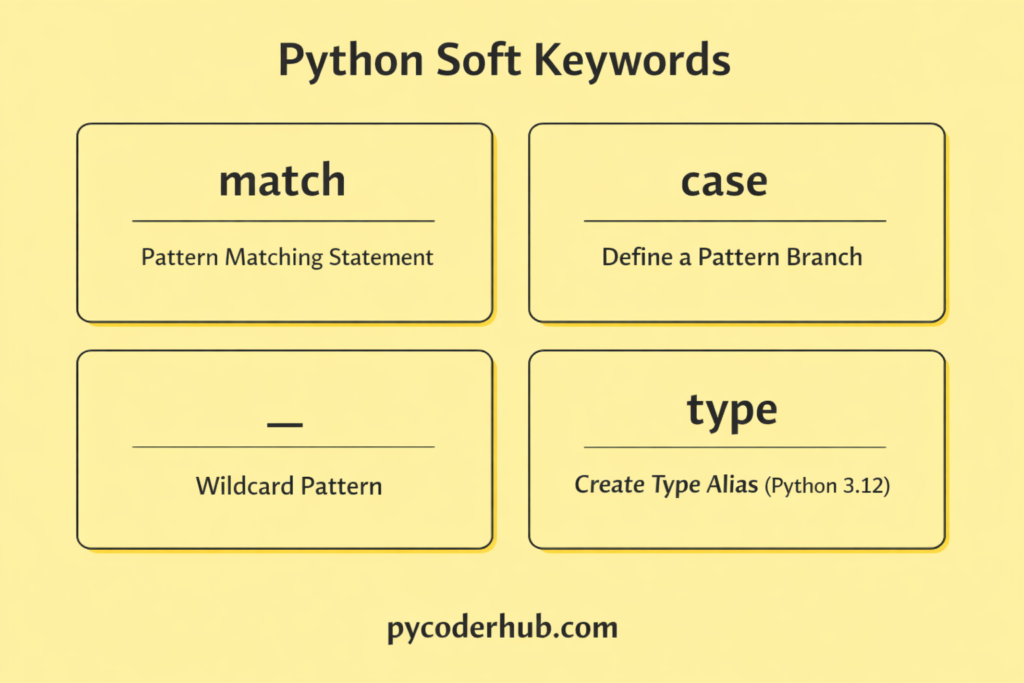
How to check the list on your machine
Since Python is always evolving, the list might grow in future versions (like Python 3.14 or 3.15). You can always see the definitive list for your specific version by running this in your terminal or IDE:
import keyword

# This will print the list of soft keywords for your version
print(keyword.softkwlist)
Output
['_', 'case', 'match', 'type']Why help('keywords') Cannot Show Python Soft Keywords
we can use the help() function to view the list of keywords available in Python. Running help('keywords') is a quick way to see all the reserved keywords defined by the language.
print(help('keywords'))This command displays the complete list of reserved keywords such as if, for, while, class, try, and others.
However, this method does not work for soft keywords.
The reason is that soft keywords are not globally reserved keywords. They only behave like keywords in specific syntax contexts, so Python does not include them in the list shown by help('keywords').
To see the list of soft keywords, Python provides the keyword module, which contains a separate list specifically for them.
Viewing Both Keyword Lists
The keyword module actually provides two useful attributes:
import keyword

print(keyword.kwlist)       # Reserved keywords
print(keyword.softkwlist)   # Soft keywords
Explanation:
keyword.kwlistreturns the list of reserved keywords.keyword.softkwlistreturns the list of soft keywords.
Soft Keyword 1: match Keyword Explained
What the match Keyword Does
The match keyword is used to start a structural pattern matching statement in Python. It was introduced in Python 3.10 and works with the case keyword to compare a value against multiple patterns.
The match statement behaves somewhat like a switch statement in other programming languages, but it is more powerful because it can match different types of patterns, not just simple values.
Basic Syntax of match Statement
The basic structure of a match statement is:
match value_to_check:
    case pattern_1:
        # code block
    case pattern_2:
        # code block
    case _:
        # default block
Explanation:
matchstarts the pattern matching block.value_to_checkis the value Python evaluates.- Each
casedefines a pattern to compare. - The
_pattern acts as a default case.
Example: Using match to Check Values
selected_option = 2

match selected_option:
    case 1:
        print("Home selected")
    case 2:
        print("Profile selected")
    case 3:
        print("Settings selected")
    case _:
        print("Invalid option")
Explanation:
selected_optionstores the value to check.match selected_optionbegins pattern matching.- Python compares the value with each
case. - When it finds
case 2, the corresponding code block runs.
Output:
Profile selectedWhen match Is Not Treated as a Keyword
Because match is a soft keyword, Python treats it as a keyword only inside a pattern matching statement.
Outside this syntax, it can still be used as a variable name.
match = "Python tutorial"

print(match)
Here, match behaves like a normal identifier, which is why Python allows it.
Soft Keyword 2: case Keyword Explained
What the case Keyword Does
The case keyword is used inside a match statement to define different patterns that Python should check.
Each case represents a possible condition that the matched value may satisfy.
Example: Using case in Pattern Matching
user_grade = "B"

match user_grade:
    case "A":
        print("Excellent")
    case "B":
        print("Very good")
    case "C":
        print("Average")
    case _:
        print("Needs improvement")
Explanation:
match user_gradeevaluates the value.- Each
casechecks a possible pattern. - When
"B"matchescase "B", Python executes that block.
Output:
Very goodWhen case Is Not Treated as a Keyword
Since case is a soft keyword, it can also be used as a variable name when it is not inside a match statement.
case = "Example variable"

print(case)
Python allows this because case becomes a keyword only within pattern matching syntax.
Soft Keyword 3: _ (Wildcard Pattern)
What the _ Soft Keyword Does
The underscore _ acts as a wildcard pattern in a match statement. It matches any value that was not matched by previous cases.
This works similarly to a default case.
Example: Using _ as a Default Pattern
day_number = 7

match day_number:
    case 1:
        print("Monday")
    case 2:
        print("Tuesday")
    case _:
        print("Other day")
Explanation:
- Python checks the patterns one by one.
- Since
7does not match1or2, the_wildcard pattern runs.
Output:
Other dayImportant Note About _
The underscore _ is not limited to pattern matching. In Python it is often used for:
- Temporary or unused variables
- Ignoring values in loops
- Interpreter results
Because of these uses, _ works as a soft keyword only inside pattern matching syntax.
Soft Keyword 4: type (Introduced in Python 3.12)
What the type Soft Keyword Does
The type keyword was introduced as a soft keyword in Python 3.12. It is used to define type aliases, which allow developers to create simpler names for complex types.
Type aliases are commonly used in type hinting and static typing.
Example: Creating a Type Alias
type UserID = intExplanation:
typestarts a type alias declaration.UserIDbecomes another name for theinttype.- This alias can then be used in type hints.
Example usage:
type UserID = int

def get_user(user_id: UserID):
    print(user_id)
Here, UserID acts as an alias for int, making type annotations clearer and more readable.
When type Is Not Treated as a Keyword
Just like other soft keywords, type behaves as a keyword only in type alias declarations.
In normal code, it still works as the built-in function type().
number_value = 10

print(type(number_value))
Output
<class 'int'>This context-dependent behavior is why type is considered a soft keyword rather than a reserved keyword.
Pro Tip: While you can use soft keywords as variable names, it’s usually better to avoid it. For an example, like using
match = 5might be legal, but it can make your code confusing for other developers who might mistake it for the start of a pattern-matching block.
Difference Between Reserved Keywords and Soft Keywords in Python
Python keywords can be divided into two categories: reserved keywords and soft keywords. While both are part of Python’s syntax, they behave differently in how strictly they are enforced by the language.
| Feature | Reserved Keywords | Soft Keywords |
|---|---|---|
| Definition | Permanently reserved words used by Python syntax | Context-dependent words that act like keywords only in specific situations |
| Usage Restriction | Cannot be used as identifiers anywhere in code | Can be used as identifiers outside their special syntax |
| Recognition | Always treated as keywords by Python | Treated as keywords only in certain grammar rules |
| Introduced For | Core language structure | Adding new syntax features safely |
| Examples | if, for, while, class, try | match, case, _, type |
Key Takeaway
- Reserved keywords are always restricted and cannot be used as identifiers.
- Soft keywords are flexible and behave like keywords only when required by specific Python syntax.
Note About the Term “Hard Keywords”
When comparing soft keywords and reserved keywords, some tutorials and educational resources use the term “hard keywords” to refer to traditional reserved keywords.
However, it is important to note that Python’s official documentation does not use the term “hard keywords.”
In the official terminology, Python simply refers to them as keywords (or reserved keywords) and soft keywords. The term “hard keywords” is mainly used informally by educators to make the distinction easier to understand.
Conclusion
Python soft keywords are a modern addition to the language that allow new syntax features to be introduced without breaking existing code. Unlike reserved keywords, they behave as keywords only in specific contexts, making Python more flexible and backward-compatible. Understanding how soft keywords like match, case, _, and type work helps developers better understand modern Python features such as structural pattern matching and type aliases. As Python continues to evolve, soft keywords will play an important role in expanding the language safely and efficiently.

6 thoughts on “Python Soft Keywords Explained: Meaning, History, List, Examples, and Differences from Reserved Keywords”