
Introduction: Python Keywords Explained
When you start learning Python, you quickly notice certain words behave differently. You can name a variable student_score, total_price, or user_name, but you can’t name it for, if, or class. Why?
That’s because some words in Python are reserved keywords. They have special meaning in the language and are used to define syntax and structure.
In this guide, we’ll break down what Python keywords are, why they are reserved, how they differ from identifiers and built-in functions, and how you can programmatically check them using Python’s keyword module. By the end, you’ll clearly understand how keywords shape Python code and why they are essential for writing correct programs.
What You’ll Learn
In this lesson, you will understand:
- What Python keywords are
- Why keywords are reserved in Python
- Whether Python keywords are case-sensitive
- How many keywords Python has
- How to list all Python keywords using code
- Different categories of Python keywords (overview)
- The difference between keywords and identifiers
- The difference between keywords and built-in functions
- What happens if you try to use a keyword as a variable name
- How to identify keywords using Python’s
keywordmodule - How the
iskeyword()function works
Now that you know what this post covers, let’s start from the beginning.
What Are Python Keywords?
Python keywords are reserved words that have predefined meanings in the Python language. These words are part of Python’s syntax and cannot be used as variable names, function names, class names, or identifiers.
In simple terms:
A Python keyword is a word that Python already understands and uses to perform a specific task.
For example:
ifis used for conditional statementsforis used for loopingclassis used to define a classreturnis used to send a value back from a functionTrueandFalserepresent Boolean values
These words are not ordinary names — they control how Python interprets your code.
Let’s look at a quick example:
student_score = 95This works perfectly because student_score is a valid identifier.
Now try this:
for = 95This will raise a SyntaxError because for is a reserved keyword. Python already uses for to define loops, so it cannot be reassigned.
Keywords form the core structure of Python programs. Without them, you wouldn’t be able to create conditions, loops, functions, classes, exception handling blocks, or logical operations.
In the next section, we’ll understand why Python reserves these words in the first place
Why Are Keywords Reserved in Python?
Now that you understand what Python keywords are, the next logical question is:
Why does Python reserve these words?
Why can’t we just use if, for, or class as normal variable names?
The answer is simple: to prevent confusion and protect the structure of the language.
A) Keywords Define Python’s Grammar
Python has its own grammar rules — just like English has grammar rules.
Keywords are part of that grammar. They tell Python how to interpret your code.
For example:
if student_score > 50:
    print("Pass")
Here, the word if tells Python:
“A conditional statement is starting now.”
If Python allowed you to use if as a variable name, the interpreter would not be able to understand whether you are:
- Starting a condition
- Or referring to a variable
That would break the language structure.
B) Keywords Prevent Syntax Confusion
Imagine this was allowed:
for = 10Now what would this mean?
Later in your program, if you wrote:
for number in range(5):
    print(number)
Python would be confused:
- Is
fora loop keyword? - Or is it the variable that stores 10?
This type of confusion would make code unpredictable and unreliable.
By reserving keywords, Python ensures:
- Clear syntax
- No interpretation conflicts
- Stable language behavior
C) Keywords Maintain Readability and Consistency
Python is known for its clean and readable syntax.
When you see words like:
whilereturnclasstryexcept
You immediately recognize their purpose.
If developers were allowed to redefine these words, every program could behave differently — and reading someone else’s code would become much harder.
Reserved keywords guarantee that:
ifalways means conditional branchingforalways means loopingdefalways defines a function
This consistency is one of the reasons Python is beginner-friendly.
What Happens If You Try to Use a Keyword?
Let’s test it:
if = 25You will get:
SyntaxError: invalid syntaxWhy?
Because Python blocks any attempt to override reserved words.
Simple Summary
Python keywords are reserved because they:
- Define the language structure
- Prevent syntax confusion
- Maintain readability and consistency
- Protect the interpreter’s parsing system
Without reserved keywords, Python would lose clarity and stability.
How Many Keywords Are There in Python?
Now that you understand what Python keywords are and why they are reserved, the next common question is:
How many keywords are there in Python?
The answer depends on the Python version you are using.
As of modern Python 3 versions, there are 35 reserved keywords. However, this number can change slightly between versions because Python continues to evolve.
That means:
- New keywords may be introduced
- Some keywords may become soft keywords
- The total count may increase in future releases
So instead of memorizing a fixed number, it’s better to know how to check them directly in your Python environment (we’ll see that in the next section).
Should You Memorize All Keywords?
No — and you don’t need to.
As a beginner, you will naturally learn keywords while writing code:
- You’ll use
if,else, andeliffor conditions - You’ll use
forandwhilefor loops - You’ll use
deffor functions - You’ll use
classfor object-oriented programming
Over time, they become familiar.
What matters more than memorizing them is:
- Understanding what they do
- Knowing that they cannot be used as variable names
- Knowing how to check them programmatically
And that’s exactly what we’ll cover next.
How to List All Python Keywords (Using help())
You don’t need to import anything to see the list of Python keywords.
Python provides a built-in documentation system through the help() function. You can use it to explore keywords directly.
To display all Python reserved keywords, simply run:
help("keywords")When you execute this in the Python interpreter, you will see output similar to:
Here is a list of the Python keywords.  Enter any keyword to get more help.

False               class               from                or
None                continue            global              pass
True                def                 if                  raise
and                 del                 import              return
as                  elif                in                  try
assert              else                is                  while
async               except              lambda              with
await               finally             nonlocal            yield
break               for                 not
This list shows all reserved keywords in your current Python version.
How to Get Detailed Information About a Keyword
The help() function can also provide detailed information about a specific keyword.
For example:
help("True")This will display documentation explaining what True represents in Python — including that it is a Boolean value.
You can also try:
help("for")This will show documentation explaining how the for loop works in Python syntax.
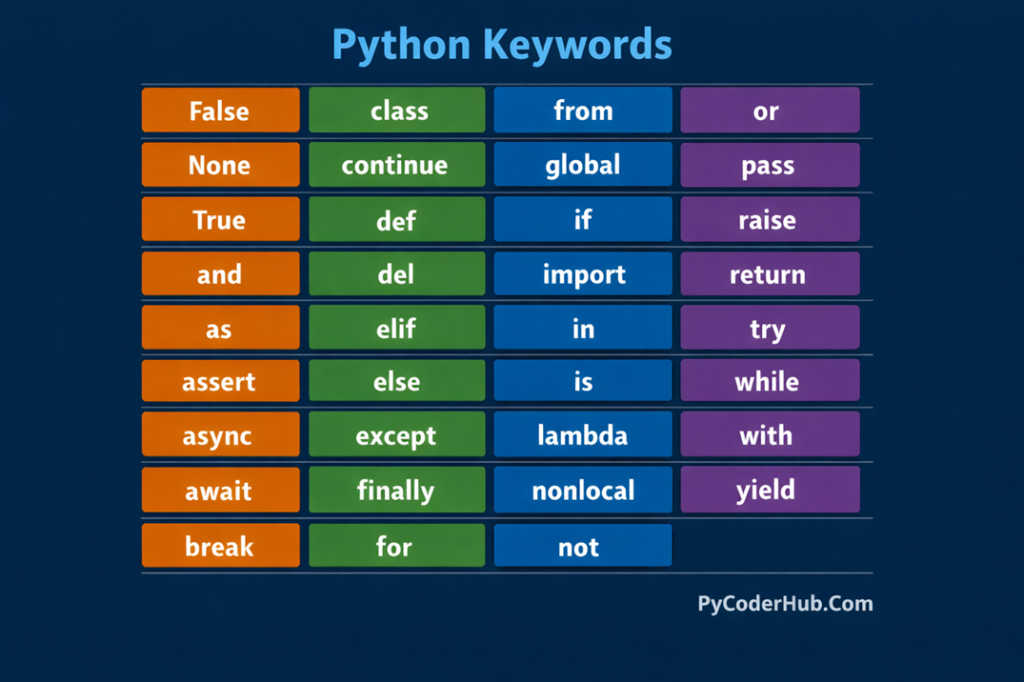
Before moving further, it helps to see all Python keywords in one place. The following reference image shows the complete list of reserved keywords used in Python, which cannot be used as variable names, function names, or identifiers.
Note:
If you look closely at the keyword list above, you’ll notice something interesting. Out of all Python keywords, only True, False, and None start with an uppercase letter. All other keywords are written in lowercase.
This is an important detail to remember because Python is a case-sensitive language. We’ll explore this concept more clearly in the upcoming section on keyword case sensitivity.
Using the keyword Module
In the previous sections, we used Python’s built-in help() system to view the list of keywords and explore their documentation. While that method is great for quick reference, Python also provides a dedicated module that allows you to work with keywords programmatically.
This module is called the keyword module.
The keyword module is part of Python’s standard library and provides tools to:
- Access the list of all Python keywords
- Count how many keywords exist in your Python version
- Check whether a specific word is a keyword
First, you need to import the module:
import keywordOnce the module is imported, you can use several helpful attributes and functions.
keyword.kwlist
The keyword.kwlist attribute returns a list containing all Python reserved keywords.
Example:
import keyword
print(keyword.kwlist)
Output will look similar to this:
['False', 'None', 'True', 'and', 'as', 'assert', 'async', 'await', 'break', 'class', 'continue', 'def', 'del', 'elif', 'else', 'except', 'finally', 'for', 'from', 'global', 'if', 'import', 'in', 'is', 'lambda', 'nonlocal', 'not', 'or', 'pass', 'raise', 'return', 'try', 'while', 'with', 'yield']Here:
keyword.kwlistreturns a Python keywords list- Each element in the list is a reserved keyword
- The list reflects the keywords available in your current Python version
This is one of the most reliable ways to get the exact keyword list directly from Python.
len(keyword.kwlist)
Since keyword.kwlist returns a list, you can easily count the number of keywords using the len() function.
Example:
import keyword

print(len(keyword.kwlist))
Output:
35This tells you how many reserved keywords exist in your current Python environment.
Remember that this number may change slightly in future Python versions as the language evolves.
keyword.iskeyword()
The keyword module also provides a useful function called iskeyword(). This function checks whether a given word is a Python keyword.
The function returns:
True→ if the word is a keywordFalse→ if the word is not a keyword
Example:
import keyword

print(keyword.iskeyword("for"))
print(keyword.iskeyword("student_score"))
Output:
True
False
Explanation:
"for"is a reserved keyword, so Python returns True"student_score"is a normal identifier, so Python returns False
This function is especially useful when writing tools that analyze or validate Python code.
Quick Summary
The keyword module provides three important tools:
| Tool | Purpose |
|---|---|
keyword.kwlist | Returns the complete list of Python keywords |
len(keyword.kwlist) | Counts the total number of keywords |
keyword.iskeyword() | Checks if a word is a reserved keyword |
Together, these tools allow you to explore and verify Python keywords directly through code.
Are Python Keywords Case-Sensitive?
Yes, Python keywords are case-sensitive.
This means that uppercase and lowercase letters are treated as different characters in Python. A keyword must be written exactly in the correct case for Python to recognize it.
For example, the keyword def is used to define a function:
def calculate_total_price():
    return 100
Here, def is written in lowercase, which is the correct form.
But if you change its case:
Def calculate_total_price():
    return 100
Python will raise an error because Def is not a valid keyword.
Example: Case Sensitivity in Keywords
Let’s look at a simple example:
print(True)
print(true)
Output:
True
NameError: name 'true' is not defined
Explanation:
Trueis a valid Python keyword that represents the Boolean value true.true(all lowercase) is not a keyword, so Python treats it as a normal identifier. Since it hasn’t been defined, Python raises aNameError.
This clearly shows that changing the letter case changes the meaning of the word in Python.
Important Observation from the Keyword List
Earlier, when we looked at the complete list of Python keywords, you might have noticed something interesting.
Out of all the keywords:
TrueFalseNone
are the only keywords that start with an uppercase letter.
All other Python keywords such as:
ifforwhilereturnclassimport
are written entirely in lowercase.
This pattern is intentional and helps maintain consistent and readable syntax in Python programs.
Key Points
- Python keywords are case-sensitive.
- Writing a keyword with incorrect capitalization will cause an error.
- Only
True,False, andNonestart with uppercase letters; all other keywords are lowercase.
Understanding this rule helps you avoid common beginner mistakes and ensures your Python code runs correctly.
Different Categories of Python Keywords (Short Overview)
As we learned earlier, Python currently has 35 reserved keywords. Each keyword has a specific purpose in the language.
To make them easier to understand, these keywords can be grouped into different categories based on how they are used in Python programs.
The following table shows the main keyword categories along with examples and their purpose.
| Category | Keywords | Explanation |
|---|---|---|
| Boolean & Null | True, False, None | Represent Boolean truth values and the absence of a value |
| Control Flow | if, elif, else, for, while, break, continue, pass | Used for decision-making and controlling loops |
| Functions & Classes | def, return, lambda, class, yield | Used to define functions, classes, and generators |
| Exception Handling | try, except, finally, raise, assert | Handle errors and debugging situations |
| Import & Modules | import, from, as, with(Context Management) | Used to import modules and manage external resources |
| Variable Scope & Object Handling | del, global, nonlocal | Control variable scope and object deletion |
| Operators (as Keywords) | and, or, not, in, is | Logical, membership, and identity operations |
| Asynchronous Programming | async, await | Used for asynchronous and concurrent execution |
These categories help organize Python keywords so they are easier to understand and remember.
Note:
In this section, we only looked at a short overview of keyword categories. In upcoming lessons, we will explore each category in detail and explain how every keyword works with practical examples.
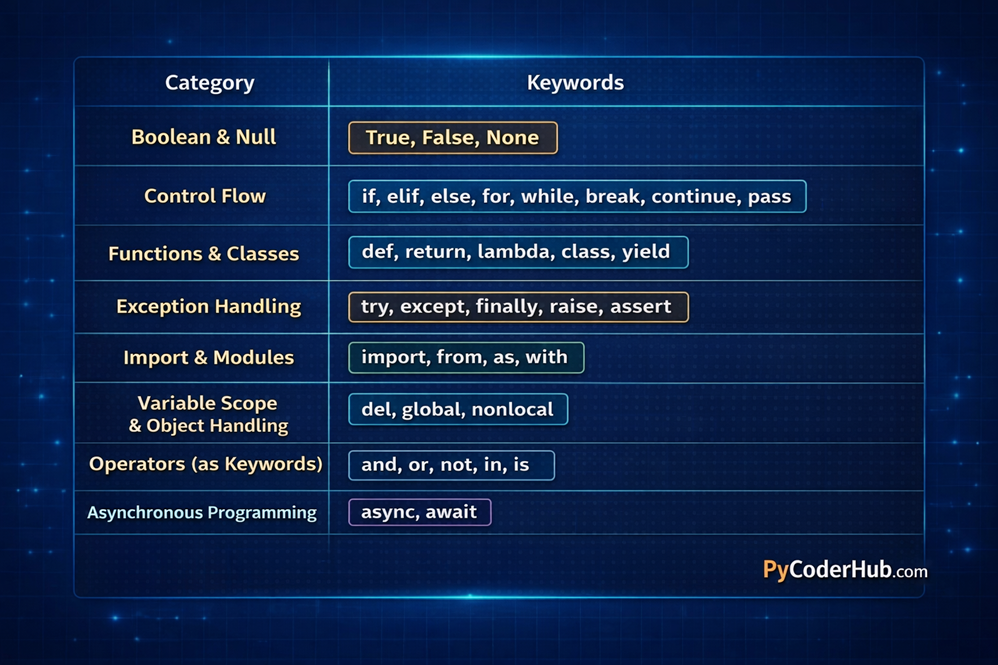
Python Keywords Categories Explained Visually
This visual chart groups Python keywords into logical categories to make it easier to understand how different keywords are used in Python programming.
Why These Keyword Categories Aren’t Official
If you explore different Python tutorials, books, or documentation websites, you may notice that keyword categories sometimes have different names. For example, one resource might call them Control Flow Keywords, while another may call them Decision-Making Keywords. This can sometimes create confusion for beginners.
The reason is simple: Python officially defines the keywords themselves, but it does not officially divide them into fixed categories.
In the official Python documentation, keywords are usually presented as a single list of reserved words that cannot be used as variable names, function names, or identifiers. The categories you see in tutorials are created by programmers, educators, and learning platforms to make the keywords easier to understand and remember.
Because these categories are not officially defined:
- Different resources may group keywords in slightly different ways
- Category names may vary between tutorials
- Some keywords may appear in multiple logical groups depending on context
However, the keywords themselves never change. Python always recognizes the same reserved words regardless of how they are categorized for learning purposes.
So when you see different category names in other tutorials, remember that the grouping is just for explanation — the Python keywords remain exactly the same.
Pro Tip: When learning Python keywords, focus more on what each keyword does rather than memorizing the category names. Different tutorials may organize keywords differently, but the keywords themselves and their behavior in Python always remain the same.
Difference Between Reserved Keywords and Built-in Functions
In Python, it’s important to understand the difference between reserved keywords and built-in functions, as beginners often confuse the two.
Keywords are special words that form the core structure of the Python language. They are reserved and cannot be used as variable names, function names, or any other identifiers. Examples include: if, else, for, class, def, and return. Keywords act like the grammar rules of Python — without them, the language wouldn’t make sense.
On the other hand, built-in functions are predefined utility functions provided by Python to make coding easier. Functions like print(), len(), type(), range(), and input() are ready to use without any imports. Unlike keywords, built-in functions can technically be reassigned by assigning them to variables (though this is strongly discouraged).
Think of it this way:
- Keywords → rules of the language
- Built-in functions → tools to get things done efficiently
Both Python keywords and built-in functions are always available, but built-in functions are not as restrictive as keywords.
Example 1: Assigning a Keyword
class = "Medical"
print(class)
Output
SyntaxError: invalid syntaxHere, Python raises an error because class is a reserved keyword, and you cannot use it as a variable name.
Example 2: Assigning a Built-in Function
type = "Built-in Function"
print(type)
Output
Built-in FunctionHere, type is a built-in function, but Python allows it to be reassigned to a variable. The program runs without any errors.
Note: Reassigning built-in functions is not good practice. We did it here purely as an experiment to illustrate the difference between keywords and built-in functions.
Major Differences Between Keywords and Built-in Functions
| Aspect | Reserved Keywords | Built-in Functions |
|---|---|---|
| Definition | Words that are part of Python’s syntax and have predefined meanings | Predefined functions provided by Python that perform common tasks |
| Examples | if, else, for, class, return, try | print(), len(), type(), range(), input() |
| Usage | Control flow, variable scope, defining classes, handling exceptions, etc. | Performing operations like printing, measuring length, type conversion, etc. |
| Can be redefined? | No. You cannot use a keyword as a variable name | Yes. You can redefine a built-in function as a variable, but it’s a bad practice |
| Number | Fixed set (35 keywords in Python 3.14) | More than 70 built-in functions available in Python |
Understanding this difference helps you clearly distinguish between Python’s language rules (keywords) and the tools provided to perform tasks (built-in functions).
Difference Between Keywords and Identifiers
In Python, it’s also important to understand the difference between keywords and identifiers, as beginners often mix them up while writing code.
Keywords are special reserved words that are part of Python’s syntax. They have predefined meanings and are used to define the structure and behavior of Python programs. Examples include: if, else, for, while, class, def, and return. Because these words are reserved by the language, they cannot be used as variable names, function names, or class names.
On the other hand, identifiers are names created by the programmer to identify elements in a program. These include names for variables, functions, classes, modules, and other objects. Identifiers help make the code readable and meaningful.
Examples of identifiers include: student_score, total_price, calculate_average, and user_name.
Think of it this way:
- Keywords → fixed words defined by Python
- Identifiers → custom names created by the programmer
Keywords control how Python code is structured, while identifiers help name and organize the data and objects used in a program.
Example 1: Using a Keyword as an Identifier
for = 10
print(for)
Output
SyntaxError: invalid syntaxHere, Python raises an error because for is a reserved keyword, and it cannot be used as a variable name.
Example 2: Using Identifiers Correctly
student_score = 90
print(student_score)
Output
90Major Differences Between Keywords and Identifiers
| Aspect | Keywords | Identifiers |
|---|---|---|
| Definition | Reserved words that have predefined meanings in Python | Names created by programmers for variables, functions, classes, etc. |
| Purpose | Define Python syntax and program structure | Identify elements within a program |
| Examples | if, for, class, return, import | student_name, total_price, calculate_total |
| Can be used as variable names? | No | Yes |
| Who defines them? | Python language | Programmer |
Understanding this distinction helps you avoid common naming mistakes and write clearer and more reliable Python code.
Soft Keywords in Modern Python
In addition to regular keywords, modern versions of Python also introduce something called soft keywords.
Soft keywords are words that behave like keywords only in specific situations, but in other contexts they can still be used as normal identifiers. This is different from regular Python keywords, which are always reserved and cannot be used as variable or function names.
Note:
Here we only provided a brief introduction to soft keywords. In a separate lesson, we will explore soft keywords in detail.
Conclusion
Python keywords are the foundation of the language’s syntax, helping define how programs are structured and executed. In this guide, we explored what keywords are, why they are reserved, how to list them, and how they differ from built-in functions and identifiers. Understanding these concepts will help you write clearer and error-free Python code. As you continue learning Python, you’ll naturally become more familiar with these keywords through regular coding practice.

8 thoughts on “Python Keywords Explained – What Are Reserved Keywords in Python?”