
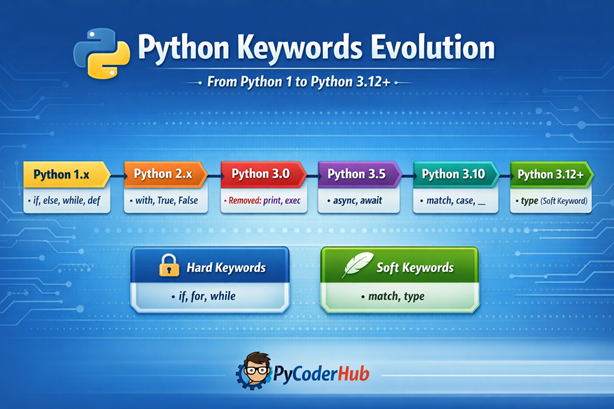
Introduction: Python Keywords Evolution
In the previous lesson, you explored what Python keywords are, how they work, and why they are essential in writing correct and readable code. You also learned about reserved words, soft keywords, and how Python treats them differently depending on context.
But one important thing to understand is that Python keywords are not fixed forever.
As Python evolved over time, its keyword set also changed—some keywords were added, some were removed, and others were introduced with more flexibility. These changes reflect how Python has grown from a simple scripting language into a powerful, modern programming language.
In this lesson, you’ll take a deeper look at the Python keywords evolution, exploring how keywords have changed from early versions of Python to the latest releases. This will help you understand not just what keywords exist, but also why they exist.
What You’ll Learn
By the end of this guide, you will:
- Understand the Python Keywords Evolution from Python 1 to Python 3.12+
- Learn how keywords changed across major Python versions
- Identify which keywords were added, removed, or modified over time
- Understand the introduction of async and await in modern Python
- Explore the concept of soft keywords like
match,case, andtype - Compare keyword behavior in Python 2 vs Python 3
- Learn how to check keywords based on your Python version
Now that you know what this lesson covers, let’s start with a quick recap of Python keywords before exploring how they evolved over time.
Quick Recap — What Are Python Keywords?
Python keywords are reserved words with predefined meanings that form the core syntax of the language. These words are used to define structure, control flow, and logic in your code, which means you cannot use them as variable names, function names, or any other identifiers.
Traditionally, Python used what we now call hard keywords, which are always reserved and cannot be reused in any context (like if, for, while). However, in modern Python, a new concept called soft keywords was introduced—these are context-dependent keywords that behave like normal identifiers outside specific use cases (such as match, case, and type).
This distinction plays an important role in understanding how Python continues to evolve without breaking existing code.
Before diving into evolution, let’s go back to where it all started.
Python Keywords in Early Versions (Python 1.x Era)
Characteristics of Early Python Keywords
In the early days of Python (Python 1.x), the keyword set was small, simple, and easy to understand. The language was primarily designed for readability and basic scripting, so the keywords focused only on core programming constructs like conditions, loops, and function definitions. At this stage, Python did not include any advanced paradigms—there was no support for asynchronous programming, pattern matching, or modern control flow techniques. This simplicity made Python beginner-friendly, but also limited in terms of advanced capabilities.
Common Keywords in Python 1.x
Some of the most commonly used keywords in Python 1.x included:
if,else→ for conditional logicfor,while→ for loops and iterationdef→ for defining functionsclass→ for object-oriented programmingimport→ for including modulesreturn→ for returning values from functions
These keywords formed the foundation of Python’s syntax, many of which are still used today in modern Python versions.
Limitations of Early Keyword Design
While the early keyword set was clean and minimal, it came with several limitations due to the absence of modern programming features. Python 1.x did not support:
- Asynchronous programming → no
asyncorawait - Context managers → no
withstatement for resource handling - Advanced control flow → no pattern matching like
match-case
Because of these limitations, developers had to rely on more manual and sometimes less efficient approaches to handle complex tasks. These gaps eventually led to the introduction of new keywords and features in later Python versions.
Evolution in Python 2.x
Key Additions in Python 2.x
Python 2.x introduced a few important updates to the keyword system, gradually moving the language toward a more modern design. One of the most notable additions was the with keyword, introduced in Python 2.5 through the __future__ module. It enabled the use of context managers, making resource handling (like file operations) cleaner and more efficient.
Additionally, True, False, and None became more standardized and consistently used across Python code. While they existed earlier, their role became more clearly defined as core language constants.
Keywords That Behaved Differently
Some keywords in Python 2.x behaved quite differently compared to modern Python:
print→ used as a statement, not a functionexec→ also used in statement form for dynamic code execution
This meant you could write:
print "Hello PyCoder"Instead of the function-style syntax used in Python 3. These differences often caused confusion when transitioning between Python 2 and Python 3.
Transitional Nature of Python 2
Python 2.x acted as a bridge between early Python and modern Python. It retained many old design choices while gradually introducing improvements that would later become standard in Python 3.
This version prepared developers for:
- Cleaner and more consistent syntax
- Better handling of resources
- Future language features and paradigms
Python 2 laid the foundation, but the real transformation came with Python 3.
Major Keyword Changes in Python 3.x
Python 3 brought some of the most significant transformations in the evolution of keywords. Unlike Python 2, which acted as a transition phase, Python 3 focused on clean syntax, modern features, and long-term consistency. Let’s explore the key changes version by version.
Python 3.0 — Breaking Changes
Python 3.0 introduced major breaking changes that directly impacted how certain keywords behaved:
print→ converted into a function (no longer a keyword)exec→ removed from the keyword list and treated differently
These changes made the language more consistent and intuitive, aligning Python with modern programming practices.
Python 3.5 — Introduction of Async Programming
Python 3.5 marked the beginning of asynchronous programming support with the introduction of two new keywords:
asyncawait
These keywords enabled developers to write non-blocking, concurrent code, which is essential for tasks like web development and I/O operations.
Initial Behavior
When first introduced:
asyncandawaitwere not fully reserved keywords- They had limited usage contexts
- Could still be used as identifiers in certain cases
This was done to avoid breaking existing code.
Python 3.7 — Async Keywords Become Fully Reserved
In Python 3.7, the transition was completed:
asyncandawaitbecame strict (hard) keywords- They could no longer be used as variable or function names
This solidified their role in Python’s syntax and made async programming a core part of the language.
Python 3.10 — Pattern Matching Revolution
Python 3.10 introduced a completely new control flow feature: pattern matching, along with new keywords:
matchcase_(used as a wildcard)
Why This Was a Big Change
This update was a major milestone because:
- It introduced a new way to write conditional logic
- Inspired by pattern matching concepts from other languages
- Required a more flexible keyword system
To support this without breaking existing code, Python introduced the concept of soft keywords.
Python 3.12+ — Introduction of ‘type’ as a Soft Keyword
In newer Python versions (3.12+), another important addition was made:
typeintroduced as a soft keyword
This keyword is primarily used in type-related features and pattern matching improvements, especially as Python continues to enhance its typing system.
This marks a shift toward context-based keyword design.
Instead of making every new keyword fully reserved, Python now prefers a more flexible approach using soft keywords, allowing the language to evolve without causing unnecessary breaking changes.
Introduction to Soft Keywords (Modern Python Concept)
As Python continued to evolve, it needed a way to introduce new language features without breaking existing code. This led to the introduction of a modern concept known as soft keywords—a flexible approach to keyword design.
What Are Soft Keywords?
Soft keywords are context-dependent keywords, meaning they behave like keywords only in specific situations. Unlike traditional (hard) keywords, they are not reserved globally, so you can still use them as variable names, function names, or identifiers in other parts of your code where they don’t act as keywords.
This makes them far more flexible and helps reduce conflicts with existing codebases.
For a deeper understanding of how soft keywords work and where they are used, check out our detailed guide on soft keywords in Python.
Examples of Soft Keywords
Some commonly used soft keywords in modern Python include:
matchcase_(used as a wildcard in pattern matching)type
These keywords only gain special meaning in specific contexts, such as pattern matching or typing features.
Why Python Introduced Soft Keywords
Python introduced soft keywords to solve a critical challenge—how to evolve the language without disrupting older code. This approach offers several advantages:
- Avoid breaking existing code that may already use these words as identifiers
- Allow gradual language evolution without strict restrictions
- Support modern features like pattern matching and advanced typing
This flexibility is made possible by Python’s PEG (Parsing Expression Grammar) parser, which enables context-aware parsing and allows keywords to behave differently depending on where and how they are used.
This shift toward soft keywords represents a major step in making Python more adaptable, future-ready, and developer-friendly.
Version-Wise Keyword Changes Summary
Understanding how keywords evolved becomes much clearer when you look at them version by version. The table below highlights the most important keyword additions and removals across major Python releases.
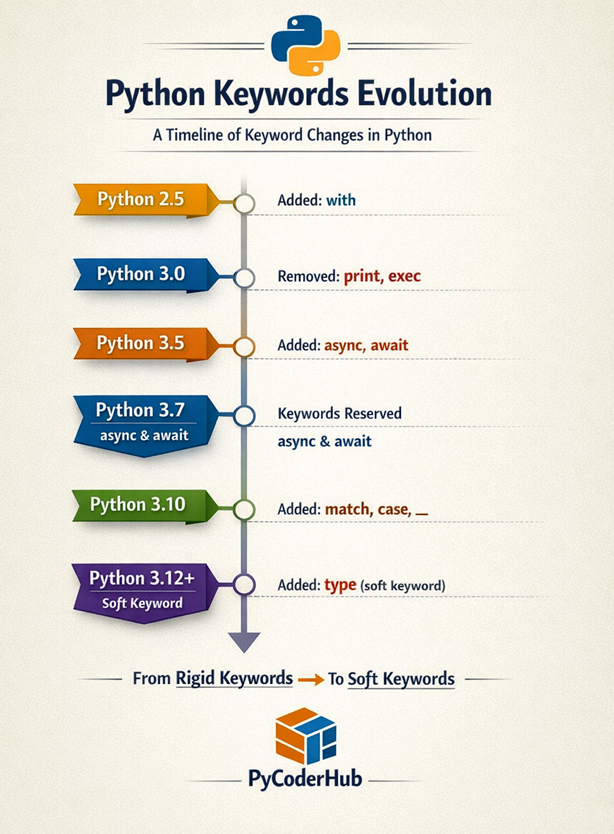
Timeline Table
| Python Version | Added Keywords | Removed Keywords |
|---|---|---|
| Python 2.5 | with | — |
| Python 3.0 | — | print, exec |
| Python 3.5 | async, await | — |
| Python 3.7 | (async, await became fully reserved) | — |
| Python 3.10 | match, case, _ | — |
| Python 3.12 | type (soft keyword) | — |
Key Insights from the Timeline
- Python gradually introduced modern programming features through new keywords
- Some keywords like
printandexecwere removed or redesigned for better consistency - The introduction of
asyncandawaitmarked the beginning of asynchronous programming support - Python 3.10 introduced pattern matching, bringing a new coding style
- Recent updates focus on flexibility, using soft keywords like
typeinstead of strict reservations
This timeline clearly shows how Python evolved from a simple language into a modern, feature-rich programming ecosystem.
Version-Based Code Examples (Understanding the Evolution)
One of the best ways to understand the Python Keywords Evolution is by looking at how code changed across different versions. These examples highlight how certain keywords were introduced, modified, or replaced over time.
Example 1 — print Statement vs Function
In Python 2, print was a keyword (statement), but in Python 3, it became a function.
# Python 2
print "Hello PyCoder"# Python 3
print("Hello PyCoder")Key Difference:
- Python 2 uses
printwithout parentheses - Python 3 requires parentheses since it is now a function
Example 2 — exec Statement vs Function Behavior
In Python 2, exec was used as a statement, while in Python 3 it behaves differently and is no longer a keyword.
# Python 2
exec "print('Hello PyCoder')"# Python 3
exec("print('Hello PyCoder')")Key Difference:
execis no longer a keyword in Python 3- It is used as a built-in function instead
Example 3 — Introduction of async and await
Modern Python introduced asynchronous programming using new keywords.
async def fetch_user_data():
    await process_user_data()
Key Insight:
asyncdefines an asynchronous functionawaitpauses execution until the result is ready
These keywords became fully reserved starting from Python 3.7.
Example 4 — Pattern Matching with match and case
Python 3.10 introduced a new control flow structure using soft keywords.
def check_user_input(user_input_value):
    match user_input_value:
        case 1:
            return "One"
        case _:
            return "Other"
Key Insight:
matchworks like an advancedif-elifstructurecasedefines different conditions_acts as a wildcard (default case)
Example 5 — Soft Keyword type in Modern Python
In Python 3.12+, type was introduced as a soft keyword, meaning it behaves like a keyword only in specific contexts while still working as a normal name elsewhere.
# Using type as a soft keyword (Python 3.12+)
type UserAge = int
type UserName = str

# Using type as a normal built-in function
user_value = 25
print(type(user_value))
Key Insight:
- In the first part,
typeacts as a soft keyword to define type aliases - In the second part,
typebehaves as a regular built-in function - This clearly shows that
typeis not reserved globally, but only gains special meaning in specific syntax
Future of Python Keywords
As Python continues to evolve, its approach to keywords is also becoming more flexible, scalable, and developer-friendly. Instead of introducing rigid changes, Python is now focusing on adapting the language in a way that minimizes disruption while still enabling powerful new features.
What to Expect
More soft keywords
Future Python versions are likely to introduce more soft keywords instead of hard keywords. This allows new syntax and features to be added without affecting existing codebases.
Context-based parsing improvements
With the adoption of the PEG parser, Python can better understand context, making it easier to implement advanced features without strict keyword restrictions.
Minimal breaking changes
Python’s development now strongly emphasizes backward compatibility. New keyword-related changes will be designed to avoid breaking older code, ensuring smoother transitions between versions.
This shift shows that Python is moving toward a more evolution-friendly design, where new capabilities can be introduced without sacrificing stability or simplicity.
Visual Timeline of Python Keyword Evolution
To better understand the Python Keywords Evolution, here’s a visual timeline that highlights how keywords have changed across major Python versions—from early releases to modern Python 3.12+.
How to Check Keywords in Your Python Version
Since Python keywords can change across versions, it’s important to know how to check the exact list of keywords available in your current Python environment. This helps you avoid errors and write version-compatible code.
Using the keyword Module
Python provides a built-in module called keyword that allows you to retrieve the list of keywords programmatically.
import keyword

print(keyword.kwlist)        # List of hard (reserved) keywords
print(keyword.softkwlist)    # List of soft keywords
Key Points:
keyword.kwlistreturns all hard (reserved) keywordskeyword.softkwlistreturns all soft keywords (introduced in modern Python)- These lists may vary depending on your Python version
Key Takeaways (Quick Recap)
- Python Keywords Evolution shows how the language has grown from a simple keyword set to a modern, feature-rich system
- Early Python versions focused on basic constructs, while newer versions introduced advanced capabilities
- Python 3 brought major changes, including removal of old keywords and introduction of async programming
- Features like
matchandcaseintroduced a new control flow approach through pattern matching - Modern Python uses soft keywords like
typeto add flexibility without breaking existing code - Understanding keyword evolution helps you write clean, version-compatible, and future-proof code
Conclusion
Python Keywords Evolution reflects how the language has continuously adapted to modern programming needs while maintaining simplicity. From basic constructs in early versions to flexible soft keywords in recent releases, Python has evolved without breaking its core philosophy. Understanding this evolution not only strengthens your fundamentals but also helps you write more future-ready and version-compatible code.

One thought on “Python Keywords Evolution: From Python 1 to Python 3.12+ (Complete Guide)”