Introduction: Python Keywords Best Practices
In the previous lesson, you explored common Python keyword errors and how to fix them effectively. That gave you a solid understanding of what not to do when working with keywords.
Now, it’s time to take things one step further.
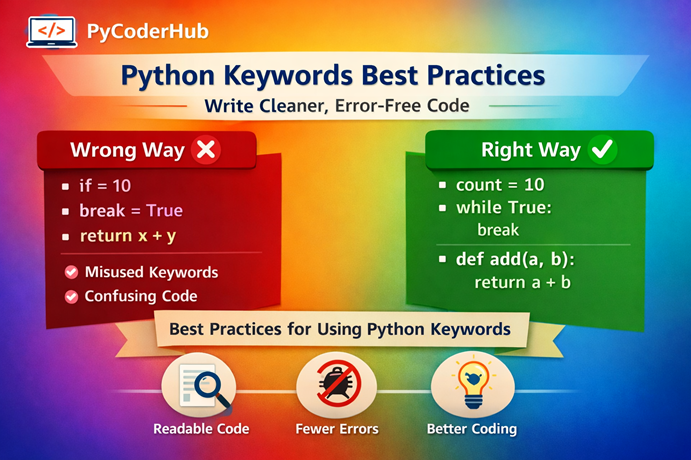
In this lesson, you’ll learn Python Keywords Best Practices—the techniques experienced developers follow to write clean, readable, and error-free code. Instead of just avoiding mistakes, the focus here is on using keywords in a way that improves clarity, structure, and overall code quality.
What You’ll Learn
By the end of this lesson, you will:
- Understand the most important Python Keywords Best Practices
- Learn how to use keywords correctly in real-world scenarios
- Identify bad vs good keyword usage with practical examples
- Improve code readability using clean keyword structures
- Avoid confusion caused by complex or incorrect keyword usage
- Write more professional and maintainable Python code
Before we dive into Best Practice #1, let’s first understand why following these best practices actually matters in real-world programming.
Why Python Keywords Best Practices Matter
Python keywords may look simple, but they play a critical role in how your code is structured and understood. Using them correctly is not just about avoiding errors—it’s about writing code that is clean, readable, and easy to maintain.
Let’s explore why following Python keywords best practices is important in real-world programming.
Improves Code Readability
Well-structured keyword usage makes your code easier to read and understand.
Poor readability:
user_input_value = 10
if user_input_value > 5:
    if user_input_value < 20:
        print("Valid")
Better readability:
user_input_value = 10

if 5 < user_input_value < 20:
    print("Valid")
In the second example, the condition is more concise and easier to follow.
Readable code helps you and others quickly understand the logic without unnecessary confusion.
Reduces Errors and Bugs
Incorrect or careless keyword usage often leads to syntax errors or unexpected behavior.
Error-prone code:
def calculate_sum(number_one, number_two):
print(number_one + number_two)
Correct code:
def calculate_sum(number_one, number_two):
    print(number_one + number_two)
Proper use of keywords like def requires correct structure and indentation.
Following best practices minimizes mistakes and makes debugging much easier.
Helps in Team Collaboration
When multiple developers work on the same codebase, consistency becomes very important.
Inconsistent usage:
if user_age > 18:
    print("Adult")
else:
        print("Minor")
Consistent and clean usage:
if user_age > 18:
    print("Adult")
else:
    print("Minor")
Consistent keyword usage ensures everyone understands the code in the same way.
Clean and standardized code improves teamwork and reduces misunderstandings.
Makes Code Future-Proof
Python evolves over time, and new keywords (like match, case) are introduced.
Outdated approach:
if status_code == 200:
    print("Success")
elif status_code == 404:
    print("Not Found")
Modern approach:
match status_code:
    case 200:
        print("Success")
    case 404:
        print("Not Found")
Staying updated with keyword usage helps you write modern and efficient code.
Future-proof code adapts better to new Python versions and best practices.
Quick Recap
- Clean keyword usage improves readability
- Proper structure reduces errors
- Consistency helps in collaboration
- Updated practices keep code modern
- Simplicity makes code easier to maintain
Now that you understand why Python keywords best practices matter, let’s start with the first and most fundamental rule.
Best Practice #1 – Never Use Keywords as Identifiers
One of the most fundamental rules in Python is: keywords are reserved and cannot be used as variable names, function names, or identifiers. Ignoring this rule leads to immediate syntax errors and breaks your code.
Wrong Example
if = 10
print(if)def return():
print("Hello")Correct Example
user_count = 10
print(user_count)def display_message():
print("Hello")Explanation
Python keywords such as if, return, for, while, and class have predefined meanings in the language. They are part of Python’s syntax and are used to control the flow and structure of your program.
When you try to use a keyword as an identifier, Python cannot distinguish between its intended meaning and your usage. This creates confusion for the interpreter, resulting in a syntax error.
Why This Is a Best Practice
- Prevents syntax errors before execution
- Keeps your code aligned with Python’s rules
- Avoids confusion for both the interpreter and developers
- Encourages meaningful and descriptive naming
Tip
If you’re unsure whether a word is a keyword, you can check it using Python:
import keyword

print(keyword.iskeyword("if"))      # True
print(keyword.iskeyword("user"))    # False
This helps you safely choose valid and descriptive variable names.
Now, let’s move to the next best practice and understand how to use keywords in the correct context.
Best Practice #2 – Use Keywords in the Correct Context
Python keywords are designed to work in specific places within your code. Using them outside their intended context leads to errors and unexpected behavior.
Understanding where and how to use each keyword is a key part of following Python keywords best Practices.
Wrong Example
return "Hello World"breakcontinueCorrect Example
def get_message():
    return "Hello World"

print(get_message())for number in range(5):
if number == 3:
break
print(number)for number in range(5):
if number == 2:
continue
print(number)Explanation
Some keywords are only valid in specific contexts:
return→ Only inside a functionbreak→ Only inside loops (for,while)continue→ Only inside loopsyield→ Only inside generator functions
When these keywords are used outside their proper context, Python raises a syntax error because the structure of the code becomes invalid.
Why This Is a Best Practice
- Prevents logical and syntax errors
- Ensures correct program flow
- Makes your code predictable and structured
- Helps you understand how Python execution works
Pro Tip
Always think of keywords as structure builders, not just words.
Each keyword defines a specific block or behavior in your code.
If you place them incorrectly, the entire structure breaks.
Next, let’s look at how overusing keyword-based structures can make your code unnecessarily complex.
Best Practice #3 – Avoid Overusing Complex Keyword Structures
Using Python keywords like if, for, while, and try is essential—but overusing them, especially with deep nesting, can make your code hard to read and maintain.
Clean code is not about using more keywords—it’s about using them wisely and efficiently.
Wrong Example (Overly Complex and Nested)
user_score_value = 75

if user_score_value > 50:
    if user_score_value < 100:
        if user_score_value % 2 == 0:
            print("Valid even score")
Correct Example (Simplified and Clean)
user_score_value = 75

if 50 < user_score_value < 100 and user_score_value % 2 == 0:
    print("Valid even score")
Explanation
In the wrong example, multiple if statements are nested inside each other, making the code longer and harder to follow.
In the correct example, the same logic is written in a single, clear condition using:
- chained comparisons
- logical operators (
and)
This reduces unnecessary complexity while keeping the logic intact.
Why This Is a Best Practice
- Improves readability and clarity
- Reduces code length without losing meaning
- Makes debugging easier
- Avoids “arrow-shaped” deeply nested code
Pro Tip
If your code starts shifting too much to the right due to nesting, it’s a sign that you should simplify it.
Aim for flat and readable structures instead of deeply nested blocks.
When Nesting Is Okay
Not all nesting is bad. Use it when:
- Logic genuinely depends on previous conditions
- Breaking it would reduce clarity
The goal is not to eliminate nesting, but to avoid unnecessary nesting.
Next, let’s explore why staying updated with new Python keywords is also an important best practice.
Best Practice #4 – Stay Updated with New Keywords
Python continues to evolve, and with new versions, new keywords and language features are introduced. Staying updated helps you write modern, cleaner, and more efficient code.
Ignoring these updates can leave your code outdated and sometimes harder to maintain.
Outdated Approach
status_code_value = 404

if status_code_value == 200:
    print("Success")
elif status_code_value == 404:
    print("Not Found")
elif status_code_value == 500:
    print("Server Error")
Modern Approach (Using match and case)
status_code_value = 404

match status_code_value:
    case 200:
        print("Success")
    case 404:
        print("Not Found")
    case 500:
        print("Server Error")
Explanation
Python introduced the match and case keywords (structural pattern matching) to handle multiple conditions more cleanly than long chains of if-elif.
- The older approach works fine but becomes harder to read as conditions grow
- The modern approach is cleaner, more structured, and easier to extend
Why This Is a Best Practice
- Keeps your code aligned with modern Python standards
- Improves readability for multi-condition logic
- Makes complex condition handling more structured
- Prepares you for real-world, up-to-date codebases
Pro Tip
Not every new keyword needs to be used everywhere.
Use modern keywords when they improve clarity, not just because they are new.
Important Note: The
matchstatement is available from Python 3.10+.
If you’re working in older environments, the traditionalif-elifapproach is still valid.
Next, let’s understand how soft keywords can sometimes create confusion if not used carefully.
Best Practice #5 – Be Careful with Soft Keywords
Not all keywords in Python behave the same way. Some are soft keywords, meaning they only act as keywords in specific contexts and can behave like normal identifiers elsewhere.
This flexibility can be useful—but it can also create confusion if not handled carefully.
Confusing Usage
match = 10
case = 20

print(match + case)match = "hello"
if match == "hello":
print("Matched")Clear and Recommended Usage
status_code_value = 200

match status_code_value:
    case 200:
        print("Success")
    case 404:
        print("Not Found")
Explanation
Soft keywords like match, case, and _:
- Act as keywords only in specific syntax structures
- Behave like normal variable names in other places
In the wrong example, match and case are used as variable names. While this is technically valid, it creates confusion because the same words are also used in pattern matching.
In the correct example, match and case are used in their intended context, making the code clear and meaningful.
Why This Is a Best Practice
- Avoids confusion between identifiers and keywords
- Improves code clarity and readability
- Prevents misunderstandings for other developers
- Makes your code more consistent and professional
Pro Tip
Even if Python allows using soft keywords as variable names, it’s better to avoid it.
Prefer descriptive names like:
match_result_value
case_number_value
Instead of:
match
case
Important Insight
Soft keywords are context-sensitive, which means their behavior depends on how they are used.
This is different from reserved keywords like if, for, or while, which are always restricted.
Next, let’s look at why proper indentation after keywords is essential in Python.
Best Practice #6 – Maintain Proper Indentation After Keywords
In Python, indentation is not just about formatting—it is part of the language syntax. Keywords like if, for, while, def, and class define blocks of code, and indentation is what tells Python where those blocks begin and end.
Incorrect indentation can lead to errors or completely change how your code behaves.
Wrong Example (Missing / Incorrect Indentation)
user_age_value = 20

if user_age_value > 18:
print("Adult")def display_message():
print("Hello World")Correct Example (Proper Indentation)
user_age_value = 20

if user_age_value > 18:
print("Adult")def display_message():
print("Hello World")Explanation
When you use a keyword that starts a block (like if or def), Python expects an indented block of code immediately after it.
- The wrong examples are missing indentation, which results in an IndentationError
- The correct examples use consistent indentation (typically 4 spaces), clearly defining the code block
Why This Is a Best Practice
- Prevents syntax and indentation errors
- Clearly defines code structure
- Improves readability and consistency
- Ensures Python executes the code as intended
Pro Tip
Always use 4 spaces for indentation (recommended by PEP 8) and stay consistent throughout your code.
Avoid mixing tabs and spaces, as it can lead to unexpected errors.
Common Mistake
if True:
    print("Line 1")
      print("Line 2")
Inconsistent indentation like this can break your code even if it looks visually similar.
Next, let’s learn how to write clean and readable conditions using Python keywords.
Best Practice #7 – Write Clear and Readable Conditions
Conditions are one of the most common places where Python keywords like if, elif, and else are used. Writing them clearly is essential for making your code easy to understand and maintain.
Overly complex or cluttered conditions can quickly create confusion—even if the logic is technically correct.
Wrong Example (Complex and Hard to Read)
user_age_value = 25
user_has_permission = True

if user_age_value > 18 and user_age_value < 60 and user_has_permission == True:
    print("Access granted")
Correct Example (Clean and Readable)
user_age_value = 25
user_has_permission = True

if 18 < user_age_value < 60 and user_has_permission:
    print("Access granted")
Explanation
In the wrong example:
- The condition is unnecessarily long
user_has_permission == Trueis redundant
In the correct example:
- Chained comparison (
18 < user_age_value < 60) simplifies the logic - Boolean condition is written directly (
user_has_permission) - Overall readability is significantly improved
Why This Is a Best Practice
- Makes conditions easier to read at a glance
- Reduces unnecessary complexity
- Helps prevent logical mistakes
- Improves maintainability of code
Pro Tip
Break complex conditions into smaller, meaningful parts when needed:
is_valid_age = 18 < user_age_value < 60
has_access = user_has_permission

if is_valid_age and has_access:
    print("Access granted")
This makes your logic more expressive and self-explanatory.
Avoid This Pattern
if user_has_permission == True:Instead, always prefer:
if user_has_permission:By writing clean and readable conditions, you make your keyword-based logic simple, expressive, and easy to follow.
Next, let’s explore why misusing keywords for clever shortcuts can actually harm your code quality.
Best Practice #8 – Don’t Misuse Keywords for Clever Tricks
Python allows you to write very compact and clever code using keywords like lambda, try, if, and more. While this might look impressive, overusing such tricks can make your code difficult to read and maintain.
Remember: readability is more important than cleverness.
Wrong Example (Overly Clever and Hard to Read)
user_numbers_list = [1, 2, 3, 4]

result_values = list(map(lambda number_value: number_value * 2 if number_value % 2 == 0 else number_value, user_numbers_list))
print(result_values)try: print(10 / 0)
except: print("Error")Correct Example (Readable and Clear)
user_numbers_list = [1, 2, 3, 4]
result_values = []

for number_value in user_numbers_list:
    if number_value % 2 == 0:
        result_values.append(number_value * 2)
    else:
        result_values.append(number_value)

print(result_values)try:
result_value = 10 / 0
except ZeroDivisionError:
print("Error")Explanation
In the wrong examples:
- A complex
lambdafunction is used with inline conditions, making it hard to understand - A one-line
try/excepthides important details and catches all exceptions (which is risky)
In the correct examples:
- Logic is written step-by-step using
forandif, improving clarity - Specific exception (
ZeroDivisionError) is handled properly
Why This Is a Best Practice
- Improves readability and maintainability
- Makes debugging easier
- Prevents hidden bugs and unexpected behavior
- Keeps your code beginner-friendly and professional
Pro Tip
If someone has to pause and think hard to understand your code, it’s too complex.
Prefer simple and explicit keyword usage over compact but confusing expressions.
When Clever Code Is Acceptable
- For very small, obvious operations
- When it improves readability (not reduces it)
Example:
squared_numbers = [number_value ** 2 for number_value in range(5)]This is clean and widely accepted.
Best Practice #9 – Use is vs == Correctly
Understanding the difference between is and == is essential for writing correct Python code.
Wrong Example
user_input_value = None

if user_input_value == None:
    print("No value provided")
Correct Example
user_input_value = None

if user_input_value is None:
    print("No value provided")
Explanation
==checks value equalityischecks object identity (whether both refer to the same object in memory)
For special values like None, Python recommends using is.
Why This Is a Best Practice
- Prevents subtle bugs
- Follows Pythonic conventions
- Makes intent clear and explicit
Best Practice #10 – Use Logical Keywords (and, or, not) Carefully
Logical keywords are powerful, but incorrect usage can make conditions confusing and error-prone.
Wrong Example
user_age_value = 25

if user_age_value > 18 or user_age_value < 60:
    print("Valid age")
Correct Example
user_age_value = 25

if 18 < user_age_value < 60:
    print("Valid age")
Explanation
- The wrong condition always evaluates to
Truefor most values - Misusing
orinstead ofandcreates logical errors
Why This Is a Best Practice
- Prevents logical mistakes
- Makes conditions accurate and meaningful
- Improves code clarity
Pro Tip
When conditions get complex, break them into variables:
is_above_minimum_age = user_age_value > 18
is_below_maximum_age = user_age_value < 60

if is_above_minimum_age and is_below_maximum_age:
    print("Valid age")
Best Practice #11 – Prefer elif Over Nested if-else
When handling multiple conditions, using elif is cleaner than deeply nested if-else blocks.
Wrong Example (Nested Conditions)
user_score_value = 75

if user_score_value >= 90:
    print("Grade A")
else:
    if user_score_value >= 75:
        print("Grade B")
    else:
        if user_score_value >= 50:
            print("Grade C")
Correct Example (Using elif)
user_score_value = 75

if user_score_value >= 90:
    print("Grade A")
elif user_score_value >= 75:
    print("Grade B")
elif user_score_value >= 50:
    print("Grade C")
else:
    print("Fail")
Explanation
- Nested conditions increase complexity
elifcreates a clean, linear flow of logic
Why This Is a Best Practice
- Improves readability
- Reduces nesting
- Makes logic easier to follow
Pro Tip
Use elif when conditions are mutually exclusive.
Best Practice #12 – Use Exception Keywords Properly (try, except, finally, else)
Error handling keywords should be used carefully to avoid hiding bugs or creating unstable code.
Wrong Example (Overly Broad Exception)
try:
    result_value = 10 / 0
except:
    print("Something went wrong")
Correct Example (Specific Exception Handling)
try:
    result_value = 10 / 0
except ZeroDivisionError:
    print("Cannot divide by zero")
else:
    print("Operation successful")
finally:
    print("Execution completed")
Explanation
- A bare
except:catches all exceptions, including unexpected ones - Using specific exceptions makes debugging easier
elseruns if no exception occursfinallyalways executes
Why This Is a Best Practice
- Prevents hidden bugs
- Improves error handling clarity
- Makes code more robust and predictable
Pro Tip
Always catch specific exceptions, not everything.
Best Practice #13 – Use pass Sparingly
The pass keyword is used as a placeholder, but overusing it can hide incomplete logic.
Wrong Example (Unnecessary Usage)
if True:
    pass
Correct Example (Meaningful Placeholder)
def future_feature_function():
    pass  # To be implemented later
Explanation
passdoes nothing—it simply allows empty blocks- It should only be used when a block is syntactically required but not yet implemented
Why This Is a Best Practice
- Prevents silent logic gaps
- Makes incomplete code intentional
- Improves code clarity
Pro Tip
If logic exists, don’t replace it with pass.
Best Practice #14 – Use in for Membership Testing
The in keyword provides a clean and efficient way to check if a value exists in a collection.
Wrong Example (Manual or Inefficient Check)
user_numbers_list = [1, 2, 3, 4]

if user_numbers_list.count(3) > 0:
    print("Found")
Correct Example (Using in)
user_numbers_list = [1, 2, 3, 4]

if 3 in user_numbers_list:
    print("Found")
Explanation
- The
inkeyword directly checks membership - It is more readable and efficient than manual checks
Why This Is a Best Practice
- Simplifies code
- Improves readability
- Reduces unnecessary operations
Pro Tip
You can also use not in:
Now that you’ve covered all the Python Keywords Best Practices, let’s take a quick visual summary to reinforce these concepts in a simple and clear way.
Visual Representation of Python Keyword Best Practices
To simplify everything we’ve covered, here’s a quick visual summary of all essential best practices.
This chart helps you recall key rules at a glance and reinforces correct keyword usage in Python.
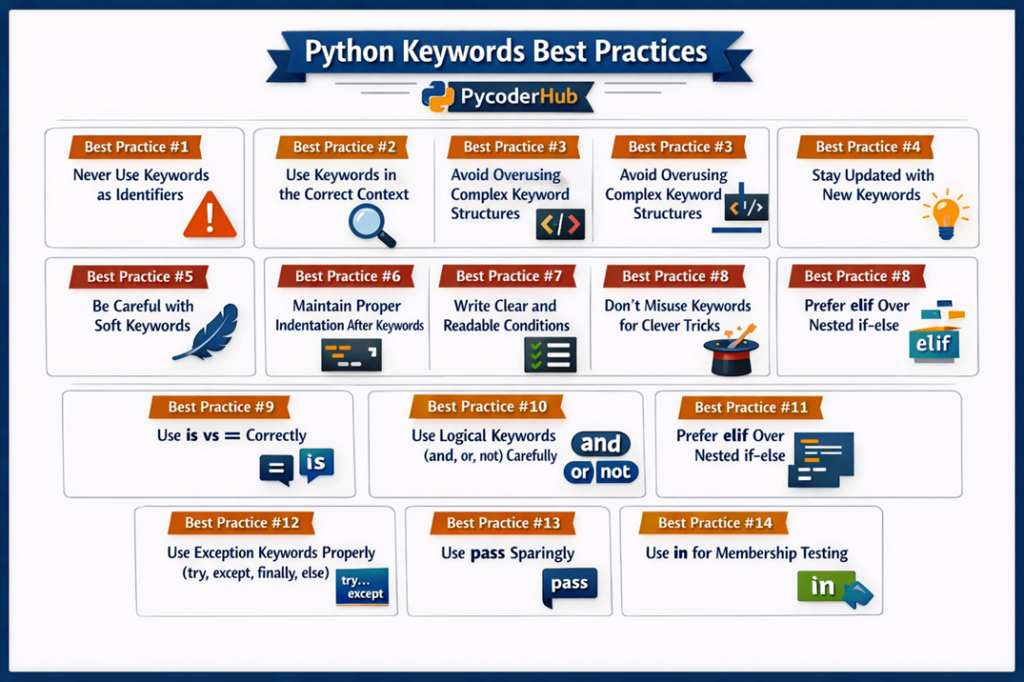
This visual recap serves as a quick reference to help you apply Python keyword best practices more confidently in your daily coding.
Conclusion
By following these Python keywords best practices, you can write cleaner, more readable, and error-free code. Proper keyword usage not only improves code quality but also makes your programs easier to understand and maintain. Focus on clarity, simplicity, and correct usage, and you’ll build a strong foundation for writing professional Python code.