
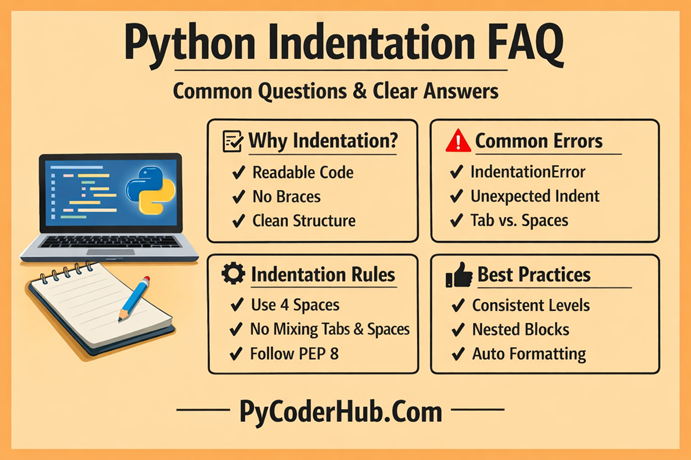
Introduction: Python Indentation FAQ
After learning Python indentation rules, best practices, errors, and PEP 8 guidelines, you might still have some practical doubts. That’s completely normal.
In this final lesson, we answer the most common Python indentation questions that beginners and even intermediate developers often search for.
Category 1: Basics of Python Indentation
Q – What is indentation in Python?
Ans – Indentation in Python means adding spaces (or tabs) at the beginning of a line of code to define a block.
In Python, indentation is not just for readability — it is syntactically required.
Example:
if user_age >= 18:
    print("User is eligible to vote")
The indented line belongs to the if block.
Q – Why is indentation important in Python?
Ans – Indentation is important because:
- It defines blocks of code.
- It determines program flow.
- It improves readability.
- It prevents logical confusion.
- Python will throw errors if indentation is incorrect.
Unlike languages like C, C++, or Java that use { }, Python uses indentation instead.
Q – Is indentation optional in Python?
Ans – No. Indentation is mandatory in Python.
If you forget indentation after statements like if, for, while, def, class, Python raises an error.
Example of incorrect code:
if total_amount > 100:
print("Discount applied")
Error: IndentationError: expected an indented block
Q – Is indentation considered syntax in Python?
Ans – Yes, indentation is part of Python’s syntax.
In many programming languages, indentation is only for readability. But in Python, indentation defines block structure. If indentation is incorrect, the program will not run.
For example:
if account_balance > 0:
    print("Transaction allowed")
If the print() line is not indented, Python raises an error. That means indentation is not optional styling — it is a syntactical rule of the language.
So yes, indentation is officially part of Python syntax.
Q – Does indentation affect program output?
Ans – Yes. Wrong indentation can change logic without showing any syntax error.
Example:
Correct:
if user_logged_in:
    print("Welcome")
    print("Dashboard loaded")
Wrong:
if user_logged_in:
    print("Welcome")
print("Dashboard loaded")
In the wrong version, "Dashboard loaded" will run every time, even if the user is not logged in.
Category 2: Python Indentation Rules & Guidelines
Q – How many spaces should be used for indentation?
Ans – Python officially recommends 4 spaces per indentation level (as per PEP 8 style guide).
Example:
for product_name in product_list:
    print(product_name)
Always use 4 spaces consistently.
Q – Can we use tabs instead of spaces?
Ans – Technically yes, but it is strongly discouraged.
Mixing tabs and spaces causes errors like:
TabError: inconsistent use of tabs and spaces in indentation
Best practice: Always use spaces.
Most editors automatically insert 4 spaces when you press Tab.
Q – What happens if I mix tabs and spaces?
Ans – Python will raise a TabError.
Example:
if order_confirmed:
	print("Order placed") # Normal Spaces
    print("Thank you")    # Tab Spaces
This will cause an error because indentation levels are inconsistent.
Q – Do blank lines affect indentation?
Ans – No. Blank lines do not affect indentation.
You can freely use blank lines to improve readability.
Q – Is indentation checked before execution?
Ans – Yes.
Python checks indentation during the parsing stage — before actual execution begins.
If indentation is incorrect, the program will not run at all.
Example:
if total_price > 500:
print("Premium customer")
Python immediately throws:
IndentationError: expected an indented block
This means indentation errors are detected early, before runtime logic begins.
However, logical indentation mistakes (wrong block placement but valid syntax) are not detected — and those are more dangerous.
Q – Do comments affect indentation?
Ans – No. Comments do not affect block structure.
Example:
if payment_successful:
    # show confirmation message
    print("Payment completed")
Q – What is PEP 8 and how is it related to indentation?
Ans – PEP 8 is the official Python style guide.
It recommends:
- 4 spaces per indent
- Avoid mixing tabs and spaces
- Keep indentation consistent
- Limit line length
Following PEP 8 ensures professional-level code.
Category 3: Blocks of Code & Nested Indentation
Q – What is a block of code in Python?
Ans – A block of code is a group of statements that belong together under a condition, loop, function, or class.
Example:
if temperature > 30:
    print("It is hot")
    print("Stay hydrated")
Both print statements belong to the same block.
Q – What is nested indentation?
Ans – Nested indentation happens when one block exists inside another block.
Example:
if user_logged_in:
    if user_is_admin:
        print("Admin dashboard")
Here, the second if is inside the first block.
Q – How many levels of nesting are allowed?
Ans – Python does not limit nesting levels.
However, deep nesting makes code hard to read and increases confusion.
Best practice: Avoid more than 3–4 levels of nesting.
Q – How does indentation work in loops?
Ans – Example with for loop:
for product_price in product_price_list:
    discounted_price = product_price * 0.9
    print(discounted_price)
All indented lines run for each iteration.
Q – How does indentation work in functions?
Ans – Everything inside a function must be indented.
def calculate_total_price(item_price, tax_rate):
    total_price = item_price + (item_price * tax_rate)
    return total_price
If indentation is wrong, Python throws an error.
Category 4: Python Indentation Common Errors
Q – What is IndentationError?
Ans – IndentationError occurs when Python finds incorrect indentation.
Example:
if customer_age > 18:
print("Eligible")
Error: expected an indented block.
Q – What is TabError?
Ans – TabError occurs when tabs and spaces are mixed.
Example:
if order_status == "confirmed":
	print("Order confirmed")
    print("Shipping soon")
Solution: Use only spaces.
Q – What causes “unindent does not match any outer indentation level”?
Ans – This error happens when the indentation level does not align with any previous block.
Common causes:
- Mixing tabs and spaces
- Removing spaces accidentally
- Copy-paste from different editors
- Incorrect manual indentation adjustment
Example:
if user_active:
    print("User logged in")
  print("Welcome")
The second print() has inconsistent indentation, so Python cannot match it to any outer block.
Solution:
- Use 4 spaces consistently
- Convert all tabs to spaces
- Enable “show whitespace” in your editor
This error is purely about structure mismatch.
Q – Can wrong indentation cause logical errors?
Ans – Most modern code editors provide automatic conversion.
In VS Code:
- Open Command Palette
- Search: “Convert Indentation to Spaces”
- Choose 4 spaces
In PyCharm:
- Go to Settings → Editor → Code Style → Python
- Set “Use tab character” OFF
You can also use formatters like:
blackautopep8
These tools automatically convert tabs into 4 spaces and standardize formatting.
Best practice: Configure your editor to insert spaces when you press the Tab key.
Q – Can copied code cause indentation issues?
Ans – Yes — very often.
When you copy code from:
- Websites
- PDFs
- Word documents
- Chat apps
Hidden characters or tab formatting may get included.
This leads to errors like:
TabErrorIndentationError- “unindent does not match any outer indentation level”
Best practice after pasting code:
- Select all code
- Convert indentation to spaces
- Reformat using an auto-formatter
This avoids hidden formatting problems.
Q – Can wrong indentation cause logical errors?
Ans – Yes — and these are the most dangerous.
Example:
for item_price in shopping_cart:
    total_amount += item_price
    discount = total_amount * 0.1
Here, discount is recalculated every loop — which may not be intended.
Correct:
for item_price in shopping_cart:
    total_amount += item_price

discount = total_amount * 0.1
Program runs successfully in both cases — but output differs.
Q – Why does Python say “unexpected indent”?
Ans – This happens when indentation appears where it is not required.
Example:
print("Start")
    print("Wrong indent")
Q – How can I fix indentation errors easily?
Ans – Follow these rules:
- Use a good code editor (VS Code, PyCharm).
- Enable “show whitespace”.
- Convert tabs to spaces.
- Use auto-format tools like
black.
Category 5: Python Indentation Best Practices
Q – What are the best practices for indentation?
Ans – Here are the most important ones:
- Use 4 spaces per level.
- Never mix tabs and spaces.
- Keep nested blocks minimal.
- Align related statements properly.
- Follow PEP 8 guidelines.
- Use auto-formatting tools.
Q – How to keep nested blocks clean?
Ans – Instead of deep nesting:
if user_logged_in:
    if user_email_verified:
        if user_has_subscription:
            print("Access granted")
Better approach:
if not user_logged_in:
    return

if not user_email_verified:
    return

if not user_has_subscription:
    return

print("Access granted")
This improves readability and reduces confusion.
Q – Should I align code visually or logically?
Ans – Always follow logical block structure, not visual alignment tricks.
Incorrect style:
total_amount      = 100
discount_amount   = 10
final_total       = 90
Avoid excessive manual alignment.
Q – How does indentation improve code readability?
Ans – Indentation:
- Makes hierarchy clear
- Shows control flow
- Reduces mental effort
- Makes debugging easier
- Helps team collaboration
Clean indentation = clean thinking.
Q – Can tools automatically fix indentation?
Ans – Yes.
Popular tools:
black(auto formatter)autopep8ruff- VS Code format on save
These tools enforce consistent formatting.
Category 6: Advanced & Practical Questions
Q – Is indentation required after every colon (:)?
Ans – Yes — whenever colon starts a block.
Examples:
- if
- elif
- else
- for
- while
- def
- class
- try
- except
- finally
Example:
try:
    print("Trying")
except Exception:
    print("Error occurred")
Q – Can indentation affect performance?
Ans – No. Indentation does not affect performance.
It only affects code structure and execution flow.
Q – Why does Python prefer indentation instead of curly braces?
Ans – Because:
- It enforces clean code.
- It improves readability.
- It avoids unnecessary symbols.
- It reduces visual clutter.
Python philosophy: “Readability counts.”
Q – What happens if a block is empty?
Ans – Python does not allow empty blocks.
You must use pass.
Example:
if feature_enabled:
    pass
Q – How can beginners avoid indentation confusion?
Ans – Follow these guidelines:
- Always use 4 spaces.
- Use an IDE.
- Practice nested examples.
- Keep blocks small.
- Read clean Python code daily.
Consistency removes confusion.
Q – Is indentation a common interview topic?
Ans – Yes — especially for beginner and intermediate Python roles.
Interviewers may ask:
- Why does Python use indentation?
- What happens if indentation is wrong?
- What is the recommended indentation level?
- Difference between TabError and IndentationError?
- How to avoid logical indentation mistakes?
Sometimes they give a small code snippet and ask what the output will be. Many candidates make mistakes due to incorrect block understanding.
Conclusion
This FAQ marks the completion of Chapter 6: Python Indentation – Complete Guide.
At this point, indentation should no longer feel strict or confusing. You now understand how it defines blocks, controls program flow, prevents errors, and improves readability in real-world projects.
With this clarity, you’re not just “making the code run” — you’re writing structured, professional, and maintainable Python code with confidence.
Suggested Posts:
1. Python Indentation Explained: What It Is and Why It Matters
2. Python Indentation Rules and Guidelines – Complete Usage Handbook
3. Block of Code and Nested Indentation in Python: Complete In-Depth Guide
4. Python Indentation Common Errors: Causes, Examples, and How to Fix Them
5. Python Indentation Best Practices for Clean and Readable Code

3 thoughts on “Python Indentation FAQ – Most Common Questions & Clear Answers”