
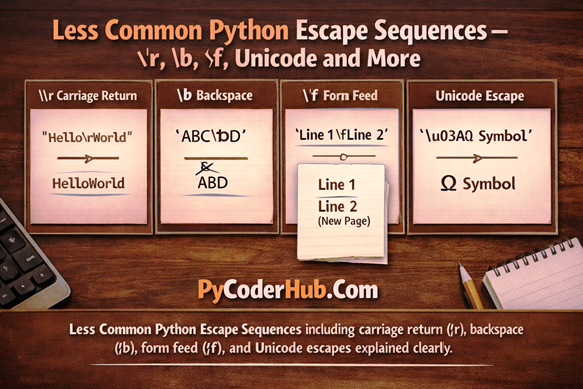
Introduction: Less Common Python Escape Sequences
In the previous lesson, we learned about the most common and widely used escape sequences in Python — such as \n, \t, \\, and quotes. Those are the ones you’ll use regularly in everyday string handling.
Now in this lesson, we move beyond the basics.
Python supports several other escape sequences that are less common, more specialized, or designed for specific situations. Even if you don’t use them every day, understanding these escape sequences will give you deeper control over Python strings — and remove any remaining confusion about how special characters behave.
What You’ll Learn
In this lesson on Less Common Python Escape Sequences, you will learn:
- What
\r(carriage return) does and how it differs from\n - How
\b(backspace) works inside strings - What
\f(form feed) represents and where it may appear - How Unicode escape sequences like
\u,\U, and\Nwork - Which escape sequences are rarely used today
- When these sequences are practical — and when they’re not
- How Python interprets these characters internally
Let’s look at them one by one.
Escape Sequence #1: \r — Carriage Return
The escape sequence \r represents a carriage return.
It moves the cursor back to the beginning of the current line without creating a new line.
This is very different from \n.
\n→ moves to the next line\r→ stays on the same line but resets the cursor position
Because the cursor returns to the start, any new text printed after \r can overwrite the existing content.
Understanding the Difference Between \n and \r
\ncreates a new line and moves the cursor downward.\rkeeps the cursor on the same line but jumps back to the beginning.
That’s why \r is often used when updating text dynamically in the console.
Example 1: Without Using \r
status_message = "Processing...Done"
print(status_message)
Output
Processing...DoneWhat Happens Here?
- The text prints normally.
- The cursor stays at the end of the line.
- Nothing is overwritten.
- Everything appears exactly as written.
Example 2: Using \r
status_message = "Processing...\rDone"
print(status_message)
Output
DoneWhy Does This Happen?
- First,
Processing...starts printing. \rmoves the cursor back to the beginning of the same line.Doneis printed starting from the beginning.- The previous text gets overwritten.
The result? Only Done remains visible.
Example 3: Using \r Multiple Times
progress_steps = "Step 1\rStep 2\rStep 3"
print(progress_steps)
Output
Step 3Step-by-Step Breakdown
Step 1is printed.\rresets the cursor to the beginning of the line.Step 2overwritesStep 1.- Another
\rresets the cursor again. Step 3overwrites everything before it.
Only the final text remains visible.
Why It Exists
The concept of carriage return comes from older typing systems and early computer terminals, where returning the carriage meant moving the typing position back to the start of the line.
Modern systems still support it — which is why Python includes \r — but it is mainly useful in console-based output.
Important Points
\rdoes not create a new line.\rmoves the cursor to the start of the current line.- It overwrites existing content on the same line.
- Output behavior can vary slightly depending on the terminal or environment.
- In some IDEs or notebooks, it may not behave exactly like a traditional terminal.
- It is mostly used for console updates and status displays.
Escape Sequence #2: \b — Backspace
The escape sequence \b represents a backspace character.
It moves the cursor one position backward.
In many terminal environments, this can result in the previous character being removed or overwritten.
Think of it like pressing the Backspace key on your keyboard — but inside a string.
How \b Works
- It shifts the cursor one position to the left.
- If new text is printed afterward, it may overwrite the previous character.
- The visual effect depends on the terminal or environment.
Unlike normal string editing in code, \b does not modify the string itself.
It only affects how the output is displayed.
Example 1: Without Using \b
sample_text = "HelloX"
print(sample_text)
Output
HelloXWhat Happens?
- The text prints exactly as written.
- Nothing is removed.
- The cursor stays at the end of the line.
Example 2: Using \b
sample_text = "HelloX\b"
print(sample_text)
Output (in many terminals)
HelloWhy?
HelloXstarts printing.\bmoves the cursor one position backward.- The previous character (
X) is effectively removed from visible output.
The result looks like the X was deleted.
Example 3: Using Multiple \b
You can use more than one backspace to remove multiple characters.
excited_text = "Python!!!\b\b\b"
print(excited_text)
Output (in many terminals)
PythonExplanation
- Each
\bmoves the cursor back one position. - Three backspaces move back three positions.
- The three exclamation marks are removed from the visible output.
Example 4: Using \b at the Beginning of a String
sample_text = "\bPython!!!"
print(sample_text)
Output (in most environments)
Python!!!Why Nothing Changes
- The string begins with
\b. - The cursor is already at the start of the line.
- There is no previous character to move back to.
- Therefore, the backspace has no visible effect.
The rest of the string prints normally.
Does \b Actually Modify the String?
No — \b does not modify the original string.
In Python, strings are immutable, which means they cannot be changed after they are created. When you write:
sample_text = "Hello"
sample_text = "Hello\b"
Python does not edit the original "Hello" string.
Instead, it creates a new string object that contains the backspace character.
Internally, "Hello\b" is simply:
H e l l o \bThe \b is just another character stored in memory.
When you print the string, the terminal interprets \b as a backspace command and moves the cursor backward. But the actual string data remains unchanged.
Why \b Is Rarely Used Today
- Terminal behavior is not always consistent.
- IDEs may not display it properly.
- String operations provide cleaner and more predictable control.
Because of this, \b is mostly seen in simple console scripts or older terminal-based programs.
Important Points
\bdoes not truly delete characters from a string.- It only affects cursor position in output.
- Some environments may not interpret
\bvisually. - Behavior can vary between terminals, IDEs, and notebooks.
Escape Sequence #3: \f — Form Feed
The escape sequence \f represents a form feed character.
Historically, form feed was used in printers to move the paper forward to the top of the next page.
In modern systems, however, this behavior is rarely relevant.
What Does \f Actually Do?
- It inserts a special control character into the string.
- Some environments may interpret it as a page break.
- Most modern terminals simply display it as whitespace or ignore it.
Unlike \n, which clearly moves text to a new line, \f does not have a consistent visual effect today.
Example
page_text = "Page 1\fPage 2"
print(page_text)
Output (varies by environment)
In most modern terminals, you may see:
Page 1 Page 2Or sometimes a small blank space between the two texts.
In very old printing systems, \f could trigger a new physical page — but this is no longer common.
Why \f Is Rarely Used Today
- Modern printers do not rely on character-based page control.
- Terminals and IDEs handle formatting differently.
- Software libraries manage pagination instead of control characters.
- Its visual behavior is inconsistent across platforms.
Because of this, \f is mostly seen in documentation, older systems, or very specific text-processing scenarios.
Imporntant Points
\frepresents a form feed (historical page break).- It is stored as a single character in the string.
- Modern environments rarely interpret it as an actual page break.
- Its visible behavior varies across systems.
Escape Sequence #4: \v — Vertical Tab
The escape sequence \v represents a vertical tab character.
Historically, a vertical tab was meant to move the cursor downward to the next vertical tab stop, somewhat similar to how \t moves it horizontally to the next horizontal tab stop.
However, unlike \n, it does not reset the cursor to the beginning of the line.
Instead, it moves the cursor downward while keeping the same horizontal position — at least in systems that properly support it.
How \v Differs from \n
\n→ Moves to a new line and starts from the beginning.\v→ Moves downward but may preserve horizontal alignment.\t→ Moves horizontally to the next tab stop.
In modern environments, the visible behavior of \v is often inconsistent.
Example 1: Using \n
text_with_newline = "Line 1\nLine 2"
print(text_with_newline)
Output
Line 1
Line 2
Here, Line 2 clearly starts from the beginning of the next line.
Example 2: Using \v
text_with_vertical_tab = "Line 1\vLine 2"
print(text_with_vertical_tab)
Output (varies by environment)
Line 1
       Line 2
The spacing and alignment may differ depending on the terminal or IDE.
In many modern environments, \v behaves similarly to a newline or may simply appear as whitespace.
Important Note About Modern IDEs
If you are using an IDE like PyCharm, VS Code, or running code inside a notebook environment, you may not see the exact historical behavior of \v.
Modern consoles often:
- Treat
\vas simple whitespace - Display it similarly to
\n - Or ignore its original vertical tab stop behavior
This does not mean it is invalid — it simply means modern systems do not rely on vertical tab positioning anymore.
Why \v Is Rarely Used Today
- Modern terminals do not consistently support vertical tab stops.
- Behavior varies across platforms and environments.
- Text formatting is usually handled by software libraries.
- More predictable layout control methods exist.
Because of this, \v is rarely used in everyday Python programming.
Escape Sequence #5: \ooo — Octal Value Escape
The escape sequence \ooo allows you to represent a character using its octal (base-8) numeric value.
Here, ooo stands for up to three octal digits (from 0 to 7) that define the character’s code.
This feature originates from older character encoding systems and is rarely used in modern Python code — but it is still fully supported.
Basic Syntax
"\ooo"\→ Starts the escape sequenceooo→ Octal number (000 to 377)- Python reads up to three octal digits
Valid range:
000to377(octal)- Which equals
0to255in decimal
Example: Printing a Character Using an Octal Value
octal_character = "\101"
print(octal_character)
Output
AWhy Does This Work?
101(octal) =65(decimal)- ASCII value
65represents the characterA - Python converts the octal number into its corresponding character
So "\101" is simply another way of writing "A".
Another Example
octal_word = "\120\171\164\150\157\156"
print(octal_word)
Output
PythonEach character is represented by its octal ASCII value.
Why \ooo Is Rarely Used Today
Although valid, octal escapes are not common in modern Python for several reasons:
- They are harder to read.
- They reduce code clarity.
- Hexadecimal (
\xhh) is clearer and more widely recognized. - Unicode escapes (
\uand\U) are more explicit and modern.
Important Rules to Remember
- Only digits 0–7 are allowed.
- Python reads up to three octal digits after the backslash.
- If more digits follow, Python stops reading after three.
- The resulting character depends on the encoding (usually ASCII/Unicode).
Escape Sequence #6: \xhh — Hexadecimal Value Escape
The escape sequence \xhh allows you to insert a character using its hexadecimal (base-16) value.
Here, hh represents exactly two hexadecimal digits.
This escape is commonly used when working with:
- ASCII characters
- Byte values
- Binary data
- Low-level text processing
Compared to octal escapes, hexadecimal escapes are clearer and more widely used in modern Python.
Basic Syntax
"\xhh"\→ starts the escape sequencex→ indicates hexadecimal notationhh→ exactly two hex digits
Valid digits:
0–9a–fA–F
Example 1: Printing a Character Using a Hex Value
hex_character = "\x41"
print(hex_character)
Output
AWhy Does This Work?
41(hexadecimal) =65(decimal)- ASCII value
65represents the characterA - Python converts the hex value into its corresponding character
So:
"\x41" == "A"Example 2: Multiple Hex Escapes in One String
hex_word = "\x48\x65\x6c\x6c\x6f"
print(hex_word)
Output
HelloConversion Breakdown
| Hex | Character |
|---|---|
| 48 | H |
| 65 | e |
| 6c | l |
| 6c | l |
| 6f | o |
Each hexadecimal value is converted into its ASCII equivalent.
Why \xhh Is Still Relevant Today
Unlike octal escapes, hexadecimal escapes are still commonly used because:
- They are easier to read.
- They match common encoding standards.
- They are widely used in byte strings.
- They are clear in networking and binary contexts.
However, for modern text containing non-ASCII characters, Unicode escapes (\u, \U) are usually preferred.
Important Points
- Exactly two hexadecimal digits must follow
\x. - Python reads only the next two digits.
- Valid characters are
0–9,a–f, andA–F. - Invalid or incomplete hex values raise a syntax error.
- It remains relevant in modern Python programming.
Escape Sequence #7: \uXXXX — 16-bit Unicode Escape
The escape sequence \uXXXX allows you to insert a Unicode character using its 16-bit hexadecimal code.
Here, XXXX represents exactly four hexadecimal digits.
This is extremely useful when:
- You know the Unicode code point
- You want to insert special symbols
- You need non-ASCII characters
- You’re working with mathematical or language-specific symbols
Unlike octal or basic hex escapes, \uXXXX works directly with Unicode — which makes it modern and widely relevant.
Basic Syntax
"\uXXXX"\→ starts the escape sequenceu→ indicates Unicode (16-bit format)XXXX→ exactly 4 hexadecimal digits
Valid digits:
0–9a–fA–F
Example 1: Printing a Unicode Character
unicode_symbol = "\u03C0"
print(unicode_symbol)
Output
πWhy Does This Work?
03C0(hexadecimal) =960(decimal)- Unicode code point 960 represents π (Greek small letter pi)
- Python converts the Unicode value into the actual character
So:
"\u03C0" == "π"Example 2: Multiple \uXXXX in One String
greek_letters = "\u03B1\u03B2\u03B3"
print(greek_letters)
Output
αβγConversion Breakdown
| Hex Code | Character |
|---|---|
| 03B1 | α |
| 03B2 | β |
| 03B3 | γ |
Each escape sequence becomes one Unicode character.
Example 3: Mixing Text and Unicode
circle_formula = "Area of circle = πr² \u03C0"
print(circle_formula)
Output
Area of circle = πr² πThis is very useful when embedding:
- Mathematical symbols
- Currency symbols
- Accented letters
- Foreign language characters
Why \uXXXX Is Important Today
Unlike some older control characters, \uXXXX is:
- Modern
- Widely used
- Unicode-based
- Essential for internationalization
It plays a key role in writing global-ready Python programs.
Important Rules
- Exactly 4 hexadecimal digits must follow
\u. - Invalid or incomplete sequences raise a SyntaxError.
\uXXXXcan represent only characters in the Basic Multilingual Plane (BMP).- For larger Unicode code points,
\UXXXXXXXXis required.
Escape Sequence #8: \UXXXXXXXX — 32-bit Unicode Escape
The escape sequence \UXXXXXXXX allows you to insert a Unicode character using its 32-bit hexadecimal code point.
Here, XXXXXXXX represents exactly eight hexadecimal digits.
This escape is used for characters that:
- Exist outside the Basic Multilingual Plane (BMP)
- Include many emojis
- Include historic scripts
- Include rare or special symbols
While \uXXXX covers only 16-bit Unicode values (BMP), \UXXXXXXXX can represent any valid Unicode character.
Basic Syntax
"\UXXXXXXXX"\→ starts the escape sequenceU→ indicates 32-bit UnicodeXXXXXXXX→ exactly 8 hexadecimal digits
Valid digits:
0–9a–fA–F
Example 1: Printing an Emoji
emoji_character = "\U0001F600"
print(emoji_character)
Output

Why Does This Work?
0001F600(hexadecimal) =128512(decimal)- Unicode code point
U+1F600represents the grinning face emoji - Python converts the code point into the actual character
So:
"\U0001F600" == "😀"Example 2: Multiple 32-bit Unicode Escapes
emoji_sequence = "\U0001F60A \U0001F44B \U0001F680"
print(emoji_sequence)
Output

Conversion Breakdown
| Hex Code | Character | Description |
|---|---|---|
| 0001F60A | 😊 | Smiling Face |
| 0001F44B | 👋 | Waving Hand |
| 0001F680 | 🚀 | Rocket |
Each 32-bit Unicode escape becomes one emoji character.
Example 3: Mixing Text and Emoji
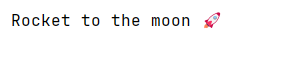
message = "Rocket to the moon \U0001F680"
print(message)
Output
This is especially useful for:
- Emojis
- International text
- Special symbols
- Rare Unicode characters
Why \UXXXXXXXX Is Important
Unlike older control characters such as \f or \v, this escape is:
- Modern
- Actively used
- Essential for emoji handling
- Important for global applications
It allows Python programs to fully support the entire Unicode standard.
Important Rules
- Exactly 8 hexadecimal digits must follow
\U. - Incomplete or invalid sequences raise a SyntaxError.
- It can represent all Unicode characters, including:
- BMP characters
- Supplementary planes
- Leading zeros are required if the code point has fewer than 8 digits.
Escape Sequence #9: \N{name} — Unicode Character by Name
The escape sequence \N{name} allows you to insert a Unicode character using its official Unicode name.
Instead of remembering numeric codes like \u03A0, you can use a human-readable character name. This makes your code more readable and self-explanatory, especially when working with symbols and special characters.
Basic Syntax
"\N{name}"\N→ indicates a Unicode character by name{name}→ official Unicode character name (case-sensitive)
Example: Using a Unicode Character Name
text = "\N{GREEK CAPITAL LETTER PI}"
print(text)
Output
ΠExplanation
- Python looks up the Unicode character named
GREEK CAPITAL LETTER PI. - It inserts the corresponding symbol into the string.
- No numeric value is required.
Example: Using Common Symbols
text = "Copyright \N{COPYRIGHT SIGN} 2026"
print(text)
Output
Copyright © 2026This is much clearer than using numeric escape values like \u00A9.
What Happens If the Name Is Invalid?
text = "\N{INVALID NAME}"This raises a SyntaxError because Python cannot find a Unicode character with that exact name.
Common Unicode Characters You Can Use
Legal & Symbols
| Escape Sequence | Output | Description |
|---|---|---|
\N{COPYRIGHT SIGN} | © | Copyright |
\N{REGISTERED SIGN} | ® | Registered trademark |
\N{TRADE MARK SIGN} | ™ | Trademark |
\N{DEGREE SIGN} | ° | Degree symbol |
\N{SECTION SIGN} | § | Section symbol |
Currency Symbols
| Escape Sequence | Output | Description |
|---|---|---|
\N{DOLLAR SIGN} | $ | US Dollar |
\N{EURO SIGN} | € | Euro |
\N{POUND SIGN} | £ | British Pound |
\N{YEN SIGN} | ¥ | Japanese Yen |
\N{INDIAN RUPEE SIGN} | ₹ | Indian Rupee |
Mathematical Symbols
| Escape Sequence | Output | Description |
|---|---|---|
\N{PLUS-MINUS SIGN} | ± | Plus-minus |
\N{MULTIPLICATION SIGN} | × | Multiplication |
\N{DIVISION SIGN} | ÷ | Division |
\N{NOT EQUAL TO} | ≠ | Not equal |
\N{LESS-THAN OR EQUAL TO} | ≤ | Less than or equal |
Arrows
| Escape Sequence | Output | Description |
|---|---|---|
\N{LEFTWARDS ARROW} | ← | Left arrow |
\N{RIGHTWARDS ARROW} | → | Right arrow |
\N{UPWARDS ARROW} | ↑ | Up arrow |
\N{DOWNWARDS ARROW} | ↓ | Down arrow |
When Should You Use \N{name}?
Use it when:
- You want better readability
- You don’t want to memorize hexadecimal codes
- You are working with symbols in educational or readable code
- You want to avoid confusion caused by numeric escape values
Important Rules
- The name must match the official Unicode character name exactly
- Names are case-sensitive
- Must be enclosed in curly braces
{ } - Available in Unicode strings (default in Python 3)
If even a single character in the name is wrong (extra space, missing word, wrong case), Python will raise a SyntaxError
Final Conclusion
In this lesson, you explored the most commonly used Python escape sequences and learned how they control special characters inside strings. From basic ones like \n and \t to advanced Unicode escapes like \UXXXXXXXX and \N{name}, you now understand how Python interprets them internally.
Escape sequences should no longer feel confusing — they should feel logical, predictable, and fully under your control.


2 thoughts on “Less Common Python Escape Sequences: \r, \b, \f, Unicode and More”