
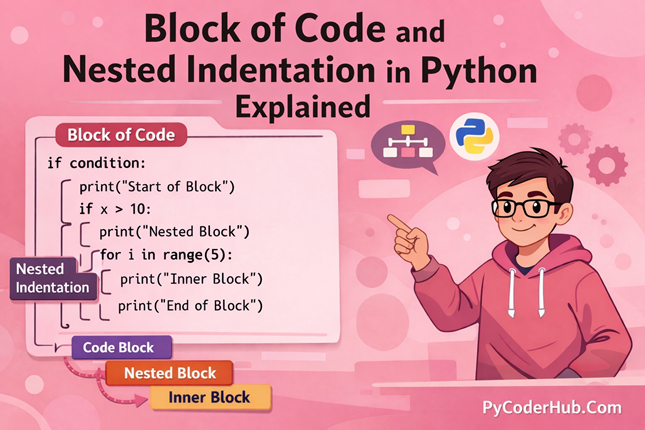
Introduction: Block of Code and Nested Indentation in Python
In previous lessons, you learned what indentation is and the rules of indentation in Python. You understood why indentation is mandatory, how Python uses it to define structure, and what happens when indentation is incorrect.
Now it’s time to go deeper.
In this lesson, we’ll move beyond basic indentation rules and explore two powerful structural concepts: Block of Code and Nested Indentation. These are the foundations of how Python organizes logic, controls execution flow, and builds readable programs.
Understanding these concepts will remove confusion about how Python groups statements and how multi-level logic actually works behind the scenes.
What You’ll Learn
- What a Block of Code in Python actually means
- How Python identifies and defines a block
- Why blocks are essential for program structure
- Different types of code blocks (if, loops, functions, classes, etc.)
- What Nested Indentation is and why it exists
- How Python executes nested blocks step by step
- Common mistakes beginners make with nested indentation
- Best practices to write clean and readable nested code
- How deeply nested logic can be improved and refactored
By the end of this lesson, you’ll clearly understand how Python builds structure using indentation and how nested blocks shape real program behavior.
Let’s start with block of code…
Section 1: What Is a Block of Code in Python?
Before understanding nested indentation, you must clearly understand what a block of code actually is.
A block of code is the basic structural unit of a Python program. It defines which group of statements belong together and should execute under the same condition or structure.
In Python, blocks are not defined using curly braces {} like in many other programming languages. Instead, Python uses indentation to group related statements into a block.
That’s what makes indentation so powerful in Python — it does not just improve readability, it defines structure.
1.1 Definition of a Block of Code
What Is a Block of Code?
A block of code is a group of one or more statements that are indented at the same level and executed together as a single unit.
In simple words:
A block of code is a set of statements that belong to the same control structure and run together.
Whenever you see a colon : in Python (after if, for, while, def, class, etc.), Python expects an indented block immediately after it.
Example:
if user_age >= 18:
    print("Access granted")
    print("Welcome to the platform")
Here:
- Both
print()statements are indented at the same level. - They belong to the same block.
- They will execute together if the condition is true.
If they are not indented, Python will raise an error.
How Python Groups Statements
Python groups statements based purely on indentation level.
All statements that:
- Have the same indentation
- Appear after a colon (
:) - Are aligned vertically
are considered part of the same block.
Example:
for number in range(3):
    print("Loop started")
    print("Current number:", number)
    print("Loop iteration completed")
All three print() statements:
- Have identical indentation
- Belong to the
forloop block - Execute during each loop iteration
Now look at this:
for number in range(3):
    print("Inside loop")

print("Outside loop")
Here:
- The first
print()is inside the block. - The second
print()is outside the block. - The indentation level determines execution scope.
This is how Python visually and logically groups code.
Single Statement vs Block of Statements
It’s important to understand the difference between a single statement and a block.
Single Statement
A single statement performs one action.
Example:
print("Hello World")This is just one independent statement.
Block of Statements
A block contains multiple related statements grouped together under a control structure.
Example:
if account_balance > 0:
    print("Processing transaction")
    print("Transaction successful")
    print("Updated balance displayed")
Here:
- The three
print()statements form one block. - They execute together.
- They depend on the
ifcondition.
Without indentation, Python cannot identify this grouping.
Why This Difference Matters
Understanding this difference removes confusion about:
- Why some lines execute conditionally
- Why some lines execute repeatedly
- Why some lines execute only once
A single statement runs independently.
A block runs as part of a structure.
In Python:
Indentation is not decoration — it defines program behavior.
And this is why mastering blocks of code is essential before learning nested indentation.
Next, we’ll understand how Python actually identifies a block and what role the colon (:) plays in defining structure.
1.2 How Python Identifies a Block
Now that you understand what a block of code is, the next important question is:
How does Python know where a block starts and ends?
Unlike many other programming languages, Python does not rely on symbols like {} to define blocks. Instead, it uses two simple but powerful things:
- The colon (
:) - Indentation
Let’s understand both clearly.
Role of the Colon (:)
In Python, the colon (:) signals the start of a block.
Whenever you write a control statement such as:
ifelifelseforwhiledefclasstryexceptwith
You must end that line with a colon.
Example:
if user_score > 80:
    print("Excellent performance")
Here:
- The colon tells Python:
👉 “A block of code is coming next.”
Without the colon, Python raises a syntax error.
The colon itself does not define the block — it simply prepares Python to expect an indented block immediately after it.
Importance of Indentation
After the colon, indentation actually defines the block.
Python looks at indentation level to decide:
- Which statements belong to the block
- Where the block ends
- Which statements are outside the block
Example:
if temperature > 30:
    print("It is hot outside")
    print("Stay hydrated")

print("Weather check complete")
Here:
- The two indented
print()statements belong to theifblock. - The last
print()is not indented. - That means it is outside the block.
Python determines structure purely by whitespace at the beginning of a line.
If indentation is inconsistent, Python will throw an IndentationError.
That’s why indentation in Python is not optional — it is mandatory.
Comparison with Other Languages
In languages like C, C++, or Java, blocks are defined using curly braces {}.
Example (conceptually):
if (condition) {
    statement1;
    statement2;
}
There, braces define the block. Indentation is only for readability.
But in Python:
- There are no curly braces for blocks.
- Indentation defines structure.
- Whitespace has meaning.
This design choice makes Python code cleaner and more readable — but it also means you must be disciplined with indentation.
Why Python Does Not Use Curly Braces
Python was designed with readability as a top priority.
Using indentation instead of braces:
- Forces clean formatting
- Prevents messy one-line structures
- Makes hierarchy visually clear
- Reduces structural confusion
Because indentation is required, every properly written Python program naturally looks organized.
You don’t need extra symbols to understand structure — the layout itself explains it.
Summary of How Python Identifies a Block
- A colon (
:) signals that a block will begin. - Indentation defines which statements belong to that block.
- The block ends when indentation level decreases.
In short:
Colon introduces the block.
Indentation defines the block.
Understanding this mechanism is essential before moving to nested indentation, where blocks exist inside other blocks.
Next, we’ll explore why blocks of code matter and how they shape program execution.
1.3 Why Blocks of Code Matter
Understanding what a block is and how Python identifies it is important — but the real question is:
Why do blocks of code actually matter?
Blocks are not just a formatting rule. They directly control how your program behaves.
Let’s break this down clearly.
Blocks Control Execution Flow
Blocks determine what runs, when it runs, and under what condition it runs.
For example:
if user_is_logged_in:
    print("Access granted")
    print("Loading dashboard")

print("Application running")
Here:
- The two indented statements run only if the condition is true.
- The last statement runs no matter what.
The block controls conditional execution.
Similarly:
- In loops → blocks define what repeats
- In functions → blocks define what belongs to the function
- In try-except → blocks define error handling behavior
Without blocks, Python would not know which statements belong to which logic.
Blocks Define Structure and Hierarchy
Blocks create a visual and logical hierarchy in your program.
Look at this structure:
if account_active:
    if account_balance > 0:
        print("Transaction approved")
This clearly shows:
- The second condition depends on the first.
- The inner block is inside the outer block.
- There is a parent-child relationship between blocks.
Indentation visually represents program hierarchy.
The deeper the indentation, the deeper the logical level.
This structured design makes programs easier to understand and maintain.
Blocks Improve Readability
One of Python’s biggest strengths is readability.
Because blocks rely on indentation:
- Code looks organized
- Related statements are grouped visually
- Logical sections are clearly separated
Compare messy logic with properly structured blocks — the structured version is always easier to read.
Clean blocks reduce mental effort when reading code.
That’s why Python forces indentation instead of making it optional.
Blocks Prevent Logical Confusion
Improper blocks lead to major logical errors.
Example:
if user_age >= 18:
    print("Eligible to vote")
print("Please verify identity")
Here, the second statement runs regardless of age.
If someone mistakenly indents it:
if user_age >= 18:
    print("Eligible to vote")
    print("Please verify identity")
Now both statements run only when the condition is true.
A small indentation change completely alters program behavior.
This is why blocks prevent confusion — when written correctly, they clearly show:
- Which code belongs together
- Which code depends on conditions
- Which code is independent
Next, we’ll explore block scope and lifetime to understand how variables behave inside blocks.
1.4 Block Scope and Lifetime
Understanding blocks is not just about structure — it’s also about scope.
Many beginners assume that variables created inside a block disappear after the block ends. But in Python, things work a little differently.
Let’s clear this confusion properly.
Execution Scope Inside Blocks
A block defines where code runs, but it does not always define a new variable scope.
Example:
if user_score > 50:
    result_message = "Passed"

print(result_message)
If the condition is true:
result_messageis created inside the block.- It can still be accessed outside the block (only if the condition is true and the variable was created).
However, if the condition is false:
- The block does not execute.
result_messageis never created.- Accessing it outside the block will raise a
NameError.
So the important idea is:
In Python, conditional blocks do not create a new scope —
but variables inside them only exist if the block actually runs.
This is a very important distinction.
The block controls execution.
It does not automatically isolate variables like a function does.
Variables Inside Conditional Blocks
Let’s look at another example:
if account_active:
    account_status = "Active"

print(account_status)
If account_active is True, this works fine.
But if the condition is False, Python raises an error because account_status was never created.
This is an important concept:
- Variables inside conditional blocks are created only if the block executes.
- They are not restricted to the block.
- But they must exist before being accessed.
So the block controls creation timing, not variable lifetime scope.
Difference Between Block Scope and Function Scope
This is where many learners get confused.
In some programming languages, every block creates a new scope.
But in Python:
if,for, andwhileblocks → do NOT create a new scope.- Functions → DO create a new local scope.
- Classes → create their own namespace.
Example with function scope:
def calculate_discount(price_amount):
    discount_value = price_amount * 0.10
    return discount_value

print(discount_value)   # This will cause an error
Here:
discount_valueexists only inside the function.- It cannot be accessed outside.
That’s true scope isolation.
So remember:
- Block → controls execution
- Function → controls variable scope
They are not the same thing.
Next, we’ll explore the common types of code blocks used in Python programs.
1.5 Common Types of Code Blocks
Now that you understand what a block is and how scope works, let’s explore the most common types of code blocks in Python.
Blocks appear in different structures, and each one serves a specific purpose in controlling program behavior.
Conditional Blocks (if, elif, else)
Conditional blocks allow your program to make decisions.
They execute code only when a condition is true.
Example:
user_age = 20

if user_age >= 18:
    print("Eligible to vote")
elif user_age == 17:
    print("Almost eligible")
else:
    print("Not eligible")
Here:
- Each condition introduces its own block.
- Only one block runs depending on the condition.
- Indentation defines which statements belong to each condition.
Conditional blocks are used when logic depends on decisions.
Loop Blocks (for, while)
Loop blocks repeat a group of statements multiple times.
Example using for:
for number in range(3):
    print("Current number:", number)
Example using while:
counter_value = 0

while counter_value < 3:
    print("Counter:", counter_value)
    counter_value += 1
In both cases:
- The indented statements form the loop block.
- Everything inside the block repeats.
- The block ends when indentation ends.
Loop blocks are used when you need repetition.
Function Blocks (def)
Function blocks define reusable pieces of logic.
Example:
def calculate_discount(price_amount):
    discount_value = price_amount * 0.10
    final_price = price_amount - discount_value
    return final_price
Here:
- The indented lines belong to the function block.
- The block runs only when the function is called.
- Functions create a new local scope.
Function blocks are used to organize and reuse logic.
Class Blocks (class)
Class blocks define blueprints for creating objects.
Example:
class UserAccount:
    account_type = "Standard"

    def display_account_type(self):
        print(self.account_type)
Inside a class block:
- Attributes are defined.
- Methods (functions inside classes) are declared.
- The class creates its own namespace.
Class blocks are used in object-oriented programming.
Next, we’ll look at empty blocks and understand the purpose of the pass statement.
1.6 Empty Blocks and the pass Statement
Now that you understand different types of blocks, here’s an important rule:
A block in Python cannot be empty.
Whenever you write a colon (:), Python expects at least one indented statement underneath it.
If nothing is written, Python raises an error.
Why Empty Blocks Cause Errors
Consider this code:
if user_logged_in:This will immediately raise a SyntaxError.
Because:
- The colon tells Python a block is coming.
- Python expects an indented statement.
- But nothing is provided.
Even this causes an error:
if user_logged_in:
    # check user access
A comment does not count as a statement.
Python still sees the block as empty.
So every block must contain at least one executable statement.
How pass Works
This is where the pass statement becomes useful.
pass is a special keyword in Python that does nothing.
It acts as a placeholder so that Python sees a valid statement inside the block.
Example:
if user_logged_in:
    pass
Now:
- The block is not empty.
- Python is satisfied.
- The program runs without error.
pass tells Python: “Do nothing here — I’ll add logic later.”
Now that you clearly understand blocks, their structure, and how they behave, we’re ready to move to the next major concept: Nested Indentation in Python
Section 2: Understanding Nested Indentation in Python
Now that you clearly understand what a block of code is, let’s move one level deeper.
In real programs, blocks rarely exist alone.
Most of the time, you’ll have a block inside another block.
That structure is called Nested Indentation.
2.1 What Is Nested Indentation?
Definition
Nested indentation happens when one block of code is written inside another block, creating multiple levels of indentation.
In simple words: Nested indentation means a block inside another block.
Each new level of indentation represents a deeper level of logic.
Block Inside Another Block
Let’s look at a simple example:
user_age = 20
has_valid_id = True

if user_age >= 18:
    if has_valid_id:
        print("Access granted")
Here’s what’s happening:
- The first
ifcreates a block. - Inside that block, there is another
if. - The second block is nested inside the first block.
The inner block runs only if both conditions are true.
So execution flow becomes layered.
This is nested indentation in action.
Visual Hierarchy Explanation
Nested indentation creates a visual hierarchy in your code.
Look at the indentation levels:
if condition_level_one:
    # Level 1 block

    if condition_level_two:
        # Level 2 block

        if condition_level_three:
            # Level 3 block
Each additional indentation level means:
- You are going deeper into the logic.
- The execution depends on all outer conditions.
Think of it like steps:
- Step 1 must be true
- Then Step 2 must be true
- Then Step 3 executes
The indentation visually shows this dependency.
The deeper the indentation, the deeper the logical dependency.
Next, we’ll explore why nested indentation exists and how Python executes nested blocks step by step.
2.2 Why Nested Indentation Exists
Now that you understand what nested indentation is, the next important question is:
Why do we even need nesting?
Why not just write everything at one level?
The answer is simple:
Real-world logic is layered — and nested indentation allows Python to represent that layered thinking.
Logical Decision Making
In real programs, decisions are rarely based on a single condition.
Often, one decision depends on another.
Example:
user_logged_in = True
account_active = True

if user_logged_in:
    if account_active:
        print("Access to dashboard granted")
Here:
- First, we check if the user is logged in.
- Only then do we check if the account is active.
- Only if both are true does the final action happen.
The second condition logically depends on the first.
Nested indentation reflects this dependency clearly.
Multi-Level Conditions
Some situations require multiple layers of checking.
Example:
exam_score = 85
attendance_percentage = 90

if exam_score >= 50:
    if attendance_percentage >= 75:
        print("Student passed")
Here:
- Passing the exam depends on score.
- But also depends on attendance.
- Both conditions must be satisfied.
Instead of writing a long combined condition, nesting sometimes makes the logic clearer and easier to understand.
Each level handles a specific rule.
Controlled Execution Flow
Nested indentation allows precise control over when code executes.
Execution flows from outer block to inner block.
Think of it as a gated system:
- First gate opens → outer block
- Second gate opens → inner block
- Final action executes
If any gate fails, execution stops at that level.
This gives you fine-grained control over program behavior.
Real-World Reasoning Analogy
Imagine entering a secure building:
- First, security checks your ID.
- Then, reception verifies your appointment.
- Then, access is granted to a specific floor.
Each step depends on the previous one.
That’s nesting.
It would not make sense to verify your appointment before confirming your identity.
Nested indentation mirrors this real-world layered reasoning.
Next, we’ll explore the common types of nested indentation patterns you’ll see in real Python programs.
2.3 Common Types of Nested Indentation
Nested indentation appears in different patterns depending on what kind of logic you are building. Let’s explore the most common types you’ll see in real Python programs.
Nested Conditionals (if inside if)
This is the most common form of nesting.
It happens when one condition depends on another.
user_logged_in = True
has_subscription = True

if user_logged_in:
    if has_subscription:
        print("Premium content unlocked")
Here:
- The second
ifruns only if the firstifis true. - The inner block depends entirely on the outer block.
This pattern is useful when decisions must happen in steps.
Nested Loops (Loop Inside Loop)
Nested loops are commonly used when working with multi-dimensional data, such as tables or grids.
for row_number in range(2):
    for column_number in range(3):
        print("Row:", row_number, "Column:", column_number)
Here:
- The inner loop runs completely for each iteration of the outer loop.
- If the outer loop runs 2 times and the inner runs 3 times,
- The inner block executes 6 times total.
Nested loops increase execution depth, so they must be used carefully to avoid performance issues.
Loop Inside Conditional
Sometimes you only want to run a loop when a condition is satisfied.
user_is_admin = True

if user_is_admin:
    for report_number in range(3):
        print("Generating report:", report_number)
Here:
- The loop runs only if the condition is true.
- If the condition is false, the loop never executes.
This structure combines decision-making with repetition.
Conditional Inside Loop
This is very common when processing data.
for number_value in range(5):
    if number_value % 2 == 0:
        print("Even number:", number_value)
Here:
- The loop runs repeatedly.
- Inside each iteration, a condition is checked.
- Only certain iterations trigger the inner block.
This pattern is powerful for filtering, validation, and selective processing.
2.4 How Execution Flows in Nested Blocks
Understanding nested indentation is not just about structure — it’s about understanding how Python executes the code step by step.
Nested blocks create depth in logic, and Python follows a very specific execution path.
Let’s break it down clearly.
Step-by-Step Execution Explanation
Python executes code from top to bottom, line by line.
When it encounters a control statement:
- It evaluates the condition.
- If the condition is
True, it enters the block. - If
False, it skips that block entirely.
In nested structures, this process repeats at each level.
Example:
user_logged_in = True
has_subscription = True

if user_logged_in:
    print("User verified")

    if has_subscription:
        print("Access granted")
Step-by-step execution:
1. Python checks user_logged_in
2. It is True, so Python enters the first block
3. It prints "User verified"
4. Python encounters the second if
5. It checks has_subscription
6. It is True, so it enters the nested block
7. It prints "Access granted"
Execution moves deeper only when each outer condition is satisfied.
Order of Evaluation
In nested blocks:
- Outer condition is always evaluated first
- Inner condition is evaluated only if the outer block runs
Think of it like layers:
Layer 1 → Must pass
Layer 2 → Must pass
Layer 3 → Then execute
If any outer condition fails:
- Python skips the entire inner structure.
- Execution jumps back to the previous indentation level.
This ensures controlled and predictable flow.
How Python Moves In and Out of Blocks
When indentation increases:
- Python moves deeper into logic
When indentation decreases:
- Python moves back out to the previous level
Example:
if condition_one:
    print("Inside level 1")

    if condition_two:
        print("Inside level 2")

    print("Back to level 1")

print("Outside all blocks")
Execution flow:
- Enter level 1
- Possibly enter level 2
- Exit level 2 (dedent)
- Continue at level 1
- Exit level 1
- Continue globally
Indentation visually shows this movement.
Indentation Level as Execution Depth
Each indentation level represents execution depth.
- No indentation → Global level
- 1 indentation → First depth level
- 2 indentations → Second depth level
- 3 indentations → Third depth level
The deeper the indentation:
- The more conditions must be satisfied
- The more dependent the logic becomes
You can think of nested indentation as a staircase:
- Each step down adds dependency.
- Each step up reduces dependency.
Conclusion
Blocks of code and nested indentation are the foundation of Python’s structure and execution flow. Blocks define which statements belong together, while nested indentation shows how logic depends on other logic. Once you understand how Python moves through blocks and nesting, reading and writing complex programs becomes much easier. Mastering these concepts is essential before moving on to advanced control flow and real-world Python applications.
Suggested Posts:
1. Python Indentation Explained: What It Is and Why It Matters
2. Python Indentation Rules and Guidelines – Complete Usage Handbook
3. Python Indentation Common Errors: Causes, Examples, and How to Fix Them
4. Python Indentation Best Practices for Clean and Readable Code
5. Python Indentation FAQ – Most Common Questions & Clear Answers

5 thoughts on “Block of Code and Nested Indentation in Python: Complete In-Depth Guide”