
Introduction: Strong Typing in Python
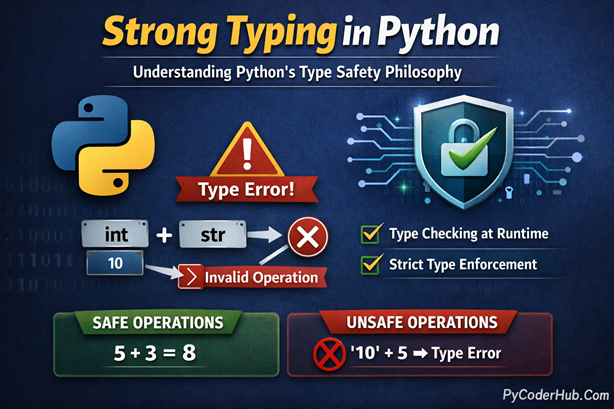
Strong typing in Python is one of the most misunderstood concepts, especially because Python is also a dynamically typed language. Many developers assume that dynamic typing automatically means weak typing—but in Python, that assumption is incorrect. Python follows a strict type safety philosophy that prevents unsafe operations between incompatible data types, and understanding this behavior is essential for writing reliable, predictable, and error-free code.
In this in-depth guide, you’ll explore how Python’s type system actually works, what strong typing really means, and why Python raises errors instead of silently converting values.
What You’ll Learn in This Post
- What a type system is in programming and why it exists
- What strong typing means in practical terms
- How weak typing differs from strong typing
- Python’s overall typing philosophy
- Additional insights into Strong Typing in Python
- Why strong typing and dynamic typing are not the same thing
- How and why Strong Typing in Python matters for safe code
- A clear comparison of strong vs. weak typing
- Common misconceptions that cause confusion about Python’s typing model
So now, before understanding strong typing, it’s important to first understand what a type system is in programming, because strong typing is a direct result of how a language designs and enforces its type system.
Understanding Type Systems in Programming Languages
Before we talk about Strong Typing in Python, it’s important to understand what a type system actually is and why every programming language needs one.
At its core, a type system is the set of rules a programming language uses to define, manage, and enforce different kinds of data. Since programs work entirely with data—numbers, text, collections, objects—the language must know what kind of data it is dealing with and how that data can be used safely.
In simple terms, typing describes how a language:
- Assigns types to values
- Checks those types during operations
- Prevents invalid or meaningless interactions between data
Types in Python: A Simple Example
In Python, you can define variables like this:
total_items = 10          # Integer
product_price = 99.99     # Float
course_name = "Python"   # String
Even though Python does not require you to explicitly declare types, each value still has a definite type:
total_itemsis an intproduct_priceis a floatcourse_nameis a str
Python automatically assigns these types at runtime.
The Purpose of a Type System
A well-defined type system exists to protect your code from logical errors. It ensures that programs do not silently perform unsafe or meaningless operations, such as:
- Dividing a string by a number
- Adding incompatible data types
- Treating text as numeric data
This enforcement is what makes programs easier to debug, maintain, and trust.
Understanding how a type system works is the foundation for understanding Strong Typing in Python, because strong typing is not about how variables are declared—but about how strictly a language enforces type rules when data interacts.
What Is Strong Typing in Programming?
A strongly typed language strictly enforces rules about how different data types can interact with each other. This means the language does not silently convert one type into another just to make an operation work.
In a strongly typed system, every operation must be logically valid, and if two data types are incompatible, the language immediately raises an error instead of guessing your intention.
Python is strongly typed, which is why it refuses to mix incompatible types without explicit instructions from the developer.
How Strong Typing Works in Python
In Python, values always carry their type, and those types are respected at runtime. When you attempt an operation involving mismatched types, Python checks whether that operation makes sense. If it doesn’t, Python stops execution and raises a TypeError.
Example 1: Type Error Due to Incompatible Types
item_count = 10
text_value = "5"

result = item_count + text_value
print(result)
Output:
TypeError: unsupported operand type(s) for +: 'int' and 'str'Why This Error Happens
item_countis an integertext_valueis a string- Adding a number and a string has no clear, safe meaning
Python refuses to guess whether you want to:
- Convert
"5"into a number, or - Convert
10into text
Because Python is strongly typed, it requires you to explicitly state your intention.
Explicit Type Conversion (Correct Approach)
result = item_count + int(text_value)
print(result)   # Output: 15
Here, you clearly tell Python how to handle the mismatch by converting the string into an integer.
This explicit conversion is a key characteristic of Strong Typing in Python.
Example 2: Lists and Strings Cannot Be Mixed
programming_language = "Python"
number_list = [1, 2, 3]

print(programming_language + number_list)
Output:
TypeErrorExplanation
- A string represents text
- A list represents a collection of values
- Combining them directly has no logical interpretation
Python blocks this operation instead of producing unpredictable behavior.
Why This Behavior Is a Good Thing
This strict enforcement of type rules:
- Prevents silent bugs
- Makes program behavior predictable
- Forces developers to write intentional, readable code
- Catches mistakes early during execution
In other words, Strong Typing in Python acts as a safety net, ensuring that your code only performs meaningful operations.
What Is Weak Typing?
While strongly typed languages enforce strict type rules, weakly typed languages are much more lenient. In a weakly typed system, the language will often perform implicit type conversions (also called type coercion) automatically, trying to make operations “just work” even when the types don’t strictly match.
This can make coding faster and more concise, but it also introduces risks: the language may guess your intention incorrectly, leading to unexpected results or subtle bugs.
Languages like JavaScript and PHP are classic examples of weakly typed languages.
Example 1: Implicit Conversion in JavaScript
let result = 10 + "5";
console.log(result);  // Output: "105"
Explanation
10is a number,"5"is a string- JavaScript automatically converts the number
10into a string - Then it concatenates
"10"+"5"→"105"
This is convenient for quick concatenation, but it can be misleading if you expected a numeric sum.
Example 2: Type Coercion During Multiplication
console.log("5" * 2); // Output: 10Explanation
"5"is a string,2is a number- JavaScript implicitly converts
"5"into a number - Multiplication proceeds, giving
10as the result
While this may seem helpful, such automatic conversions can confuse beginners and sometimes result in inconsistent behavior, especially in larger programs where types are not obvious.
Why Weak Typing Can Be Risky
- Unexpected results: The language makes assumptions that may not match your intent
- Hard-to-find bugs: Silent type coercion can introduce subtle errors
- Inconsistent behavior: Different operations may coerce types differently
In contrast, strongly typed languages like Python prioritize clarity and predictability over convenience, forcing developers to explicitly manage type conversions.
Python’s Typing Philosophy: Strong and Dynamic
Python is often described as both strongly typed and dynamically typed, a combination that gives the language its unique balance of flexibility and safety. Understanding this philosophy is essential to write predictable and bug-free Python code.
What Strongly and Dynamically Typed Means in Python
- Strongly typed:
Python will not automatically convert incompatible types during operations. It enforces type rules strictly, raising errors whenever an operation doesn’t make logical sense. - Dynamically typed:
You don’t need to declare a variable’s type explicitly. Python automatically assigns the type at runtime based on the value. This allows variables to change type dynamically as your program runs.
Example: Dynamic Typing in Action
x = 10         # x is an integer
x = "Python"   # x now becomes a string
print(x)       # Output: Python
Here, Python doesn’t restrict a variable to one type. The same variable can hold an integer, then a string, and Python will track its type automatically.
Example: Strong Typing in Action
x = "Python"
y = 5

print(x * y)  # Output: PythonPythonPythonPythonPython
print(x + y)  # TypeError: can only concatenate str (not "int") to str
This demonstrates Python’s core principle of strong typing: “Don’t guess what I mean.” The interpreter never assumes your intent; it only allows operations that are logically valid.
Why Python’s Typing Philosophy Matters
Strong typing in a dynamically typed language like Python is especially valuable in larger projects or collaborative environments:
- Prevents silent bugs caused by unintended type coercion
- Makes programs more predictable and consistent
- Encourages explicit, intentional coding — aligning with The Zen of Python: “Explicit is better than implicit.” — PEP 20
Python’s philosophy ensures you enjoy the flexibility of dynamic typing without sacrificing the safety of strong typing, striking a balance that few other languages achieve.
Additional Insights on Strong Typing in Python
Even though Python is strongly typed, it still allows certain type interactions when they make logical sense according to its internal rules. Some of these examples can confuse beginners, but they illustrate an important principle: strong typing doesn’t mean rigid; it means predictable and explicit.
Example 1: Boolean Arithmetic
print(True + 1) # Output: 2At first glance, this might seem like Python is breaking its strong typing rule. But here’s what’s really happening:
- In Python,
boolis a subclass ofint:
issubclass(bool, int) # Output: True- Therefore:
Truebehaves like the integer1Falsebehaves like the integer0
So when you do True + 1, Python interprets it as 1 + 1 → 2.
Even though booleans can participate in arithmetic, they remain a distinct type:
type(True) # <class 'bool'>This is still strong typing because Python explicitly knows how to handle this combination; it’s not guessing your intent.
Example 2: String Repetition
print(10 * "5") # Output: 5555555555At first, it might look like Python is multiplying a number by a string—but that’s not arithmetic multiplication. Python defines this operation as string repetition:
"5" * 10 # → "5555555555"- Python repeats the string 10 times
- The operation is explicitly defined in the language rules
However, if you try an incompatible combination:
print("5" * "10")You’ll get:
TypeError: can't multiply sequence by non-int of type 'str'This enforces Python’s “Don’t guess what I mean” rule, preventing unsafe operations.
More Examples of Python’s Strong Typing
| Operation | Result | Explanation |
|---|---|---|
10 + "5" | TypeError | Cannot add int and str |
10 - "5" | TypeError | Cannot subtract str from int |
10 * "5" | "5555555555" | String repetition, explicitly allowed |
True + 1 | 2 | Bool is a subclass of int |
False + 10 | 10 | Bool behaves like 0 |
10 == "10" | False | Different types, comparison fails |
[] == False | False | List vs boolean |
0 == False | True | Special inheritance rule |
Key Takeaways
- Strong typing in Python doesn’t mean rigidity
- Every operation is explicitly defined, not guessed
- Python allows logical type interactions, like booleans in arithmetic or strings repeated by integers
- Incompatible operations always raise
TypeError, ensuring predictable, safe, and maintainable code
Essence of Python’s Strong Typing Philosophy:
“Don’t guess what I mean — only do what’s clearly defined.”
Strong Typing vs. Dynamic Typing — Not the Same Concept
Many beginners assume that strong typing and dynamic typing describe the same thing. This confusion is understandable—but incorrect.
In reality, these terms describe two completely different properties of a programming language.
- Dynamic typing answers when types are checked
- Strong typing answers how strictly type rules are enforced
Python happens to support both, which is why this distinction is so important to understand.
Strong Typing vs. Dynamic Typing: Comparison Table
| Concept | Meaning | Python’s Behavior |
|---|---|---|
| Strong Typing | Enforces strict type compatibility and prevents automatic conversion between unrelated types | Python is strongly typed — it raises an error for "10" + 5 |
| Dynamic Typing | Determines and assigns variable types at runtime instead of at compile time | Python is dynamically typed — a variable can change type anytime |
Example: Seeing Both Concepts in Action
# Dynamic typing in action
value = 10
value = "Ten"    # Allowed — type changes at runtime

# Strong typing in action
text_number = "10"
actual_number = 5

print(text_number + actual_number)  # TypeError
What’s Happening Here?
- Dynamic typing allows the variable
valueto change from anintto astrwithout any issue. - Strong typing prevents the operation
str + intbecause it has no clearly defined meaning.
Python doesn’t guess your intent—it enforces type rules strictly.
Key Differences to Remember
- Dynamic typing controls when types are checked
→ Python checks types at runtime - Strong typing controls how strictly types are enforced
→ Python refuses unsafe or unclear type interactions
These concepts are independent, which means a language can combine them in different ways.
Comparing Strong and Weak Typing
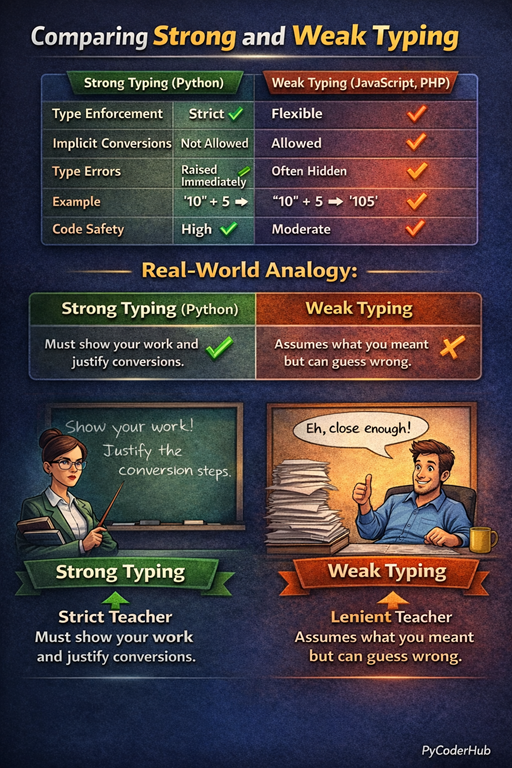
To truly understand Strong Typing in Python, it helps to compare it directly with weak typing. Both approaches aim to handle data types, but they differ greatly in how strictly rules are enforced and how much the language tries to “help” by guessing your intent.
Strong Typing vs. Weak Typing: Comparison Table
| Feature | Strong Typing (Python) | Weak Typing (JavaScript, PHP) |
|---|---|---|
| Type enforcement | Strict | Flexible |
| Implicit conversions | Not allowed | Allowed |
| Type errors | Raised immediately | Often hidden |
| Example | "10" + 5 → Error | "10" + 5 → '105' |
| Code safety | High | Moderate |
Real-World Analogy
Think of strong typing as a strict teacher:
- You must show your work
- Every conversion must be justified
- If something doesn’t make sense, it’s rejected immediately
Think of weak typing as a lenient teacher:
- They assume what you meant
- They let things slide to keep you moving
- But sometimes, their guesses are wrong
Below is a visual comparison of strong and weak typing using a real-world teacher analogy for better understanding.
Common Misconceptions About Strong Typing in Python
Strong typing in Python is often misunderstood, especially because Python is also dynamically typed. Let’s clear up some of the most common misconceptions that create confusion around Python’s type system.
1. “Strong typing means you must declare types.”
This is a very common misunderstanding.
- Declaring types explicitly is a feature of static typing, not strong typing.
- Strong typing is about how strictly a language enforces type rules during operations.
Python is strongly typed and dynamically typed, meaning:
- You don’t declare types upfront
- But Python still enforces strict type compatibility at runtime
2. “Weak typing makes code easier.”
At first glance, weak typing may seem more convenient because the language performs automatic type conversions. However:
- Implicit conversions can hide bugs
- Code behavior can become unpredictable
- Debugging becomes harder in large projects
Strong typing may feel stricter, but it ultimately makes code safer, clearer, and more maintainable.
3. “Python doesn’t care about types.”
This is completely false.
Python absolutely cares about types—it just determines them at runtime instead of compile time. If you attempt an invalid operation between incompatible types, Python raises a TypeError immediately.
Dynamic typing does not mean ignoring types.
4. “Dynamic typing means weak typing.”
These are two separate concepts.
- Dynamic typing controls when types are checked
- Strong typing controls how strictly type rules are enforced
Python proves that a language can be dynamic and strongly typed at the same time.
5. “Type hints make Python statically typed.”
Type hints improve code readability and tooling, but they:
- Do not enforce types at runtime
- Do not change Python into a statically typed language
Python remains dynamically and strongly typed, even when type hints are used.
6. “Strong typing slows down development.”
Strong typing doesn’t slow development—it reduces mistakes.
- Errors are caught earlier
- Code behavior is more predictable
- Collaboration becomes easier in team environments
In the long run, strong typing saves time by preventing hard-to-find bugs.
Final Thought
Most confusion around Strong Typing in Python comes from mixing up typing style (static vs dynamic) with type enforcement (strong vs weak). Once you separate these ideas, Python’s typing philosophy becomes clear, logical, and powerful.
Conclusion
Strong Typing in Python is not about restricting developers—it’s about protecting them. Python enforces strict type rules at runtime to prevent unsafe operations, eliminate confusion, and ensure that code behaves exactly as written. Even though Python is dynamically typed, it never compromises on type safety, choosing clarity and correctness over guessing intent.
By understanding how Python’s type system works, the difference between strong and weak typing, and why dynamic typing is a separate concept, you gain a deeper appreciation of Python’s design philosophy. Strong typing helps catch errors early, improves code readability, and makes large codebases more reliable—perfectly aligning with Python’s core principle: explicit is better than implicit.
Suggested Posts:
1. Python Variables Explained in Depth: A Detailed Guide
2. Assigning Multiple Values to Python Variables: A Complete Guide with Examples
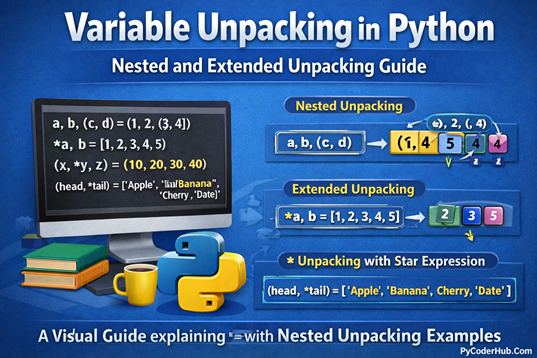
3. Variable Unpacking in Python: A Complete Guide with Nested Unpacking Examples
4. Python Variable Naming Rules and Conventions (PEP 8 Explained with Real-World Examples)
5. Dynamic Typing in Python Explained: How Python Handles Types at Runtime
6. Python Variables FAQs: Common Questions Answered for Beginners

8 thoughts on “Strong Typing in Python Explained: Understanding Python’s Type Safety Philosophy”