
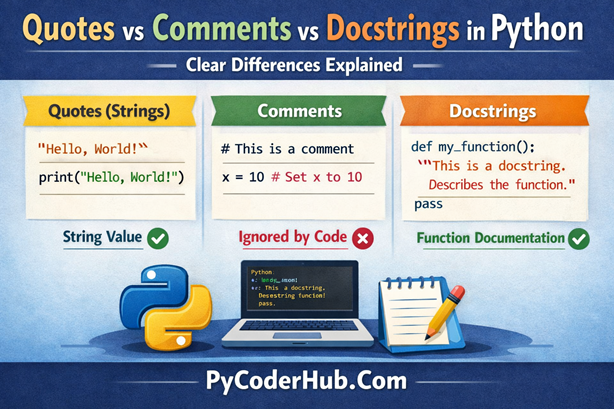
Introduction: Quotes vs Comments vs Docstrings in Python
In Python, quotes, comments, and docstrings often look similar—but they serve very different purposes. Many beginners (and even intermediate developers) mix them up, which leads to messy code, unclear documentation, and sometimes silent bugs that are hard to trace.
Have you ever wondered:
- Why triple-quoted strings sometimes behave like comments—but aren’t?
- When to use
# commentsversus"""docstrings"""? - Whether quoted text inside your code is executed, ignored, or documented?
You’re not alone. This confusion is extremely common, especially when learning Python the right way.
In this lesson, we’ll clearly separate quotes, comments, and docstrings, explain how Python treats each one internally, and show you exactly when and why to use them.
What You’ll Learn in This Lesson
By the end of this guide, you will be able to:
- Understand the core differences between quotes, comments, and docstrings in Python
- Know when each one is evaluated, ignored, or stored by Python
- Use comments for clarity without abusing them
- Write proper docstrings that follow PEP 257 guidelines
- Avoid common mistakes where triple quotes are misused as comments
- Choose the right tool for the right purpose in real Python projects
Why This Confusion Happens in Python
Python is famous for being simple, readable, and flexible—and that’s exactly why this confusion exists.
Python doesn’t force you to write things in one strict way. Instead, it gives you freedom. But with that freedom comes a subtle problem: different things can look the same, even when they behave very differently.
Let’s break down the real reason this confusion happens.
The Core Reason Behind the Confusion
At the heart of it, Python treats these three things very differently:
- Quotes always create strings
- Comments are completely ignored by Python
- Docstrings are strings with a special purpose
The tricky part?
All three can look almost identical when you’re just reading the code.
A Visual Problem, Not a Syntax Problem
Consider this example:
# This is a comment

"This is a string"

"""This looks like a comment,
but it is actually a string"""
To a human reader, all three lines feel similar—they’re just text, right?
But to Python, they are not even close.
- The first line is ignored entirely by the interpreter.
- The second line creates a string object.
- The third line also creates a string object, even though many beginners assume it’s a comment.
Python does not automatically treat triple quotes as comments.
Where Docstrings Add More Confusion
Now let’s look at this:
def calculate_total(price, tax):
    """Calculate the final price including tax."""
    return price + tax
Here, the triple-quoted string suddenly behaves differently.
This string becomes a docstring because:
- It appears immediately after a function definition
- Python stores it as metadata in
__doc__
So now we have a situation where:
- Triple quotes sometimes behave like normal strings
- Sometimes they become docstrings
- And sometimes developers misuse them as comments
Same syntax. Different behavior.
What Python Actually Cares About
Python doesn’t care how long the quotes are.
It doesn’t care how nice the text looks.
It only cares about where the string is placed.
- Is it assigned to a variable? → It’s a string
- Is it floating in the code? → It’s still a string
- Is it right after a module, class, or function definition? → It becomes a docstring
Only comments (#) are truly ignored.
The Key Insight to Remember
If you remember just one thing, remember this:
Comments are for humans.
Strings are for Python.
Docstrings are for documentation tools and introspection.
Once you understand how Python treats these internally, the confusion disappears—and your code instantly becomes cleaner, more professional, and easier to maintain.
What Python Actually Executes vs What It Completely Ignores
Before we compare quotes, comments, and docstrings, we need to understand one foundational idea:
Python does not treat all text in your code equally.
From Python’s point of view, everything falls into one of two categories:
- Code that gets executed or processed
- Text that is completely ignored
Python executes—or at least processes—the following:
1. Strings (Assigned or Unassigned)
Any text wrapped in quotes is a string object, whether you store it in a variable or not.
message_text = "Hello, PyCoderHub"This string is created and stored in memory.
Now look at this:
"This string is not assigned to anything"Even here, Python still creates a string object.
It doesn’t disappear. It simply isn’t used.
This is why using triple quotes as “comments” is a bad habit—Python still processes them.
2. Docstrings
Docstrings are real strings with a special role.
def fetch_user_data():
    """Fetch and return user data from the database."""
    pass
Python:
- Creates a string object
- Attaches it to
fetch_user_data.__doc__ - Makes it available to tools like
help()and IDEs
So docstrings are executed, stored, and accessible, not ignored.
3. Expressions
Any valid expression is evaluated by Python.
2 + 3Even if the result isn’t stored, Python still evaluates it.
The same rule applies to strings:
- Python sees them
- Python processes them
- Python does not ignore them
Python Ignores These Completely
There’s only one thing Python truly ignores:
Comments: Anything after a # is invisible to the interpreter.
# This is a comment
total_price = price + tax  # Inline comment
Comments:
- Are never executed
- Are never stored
- Do not exist at runtime
They are 100% for humans, not for Python.
The One Rule That Explains Everything
Here’s the mental model every Python developer should use:
If it’s inside quotes, Python processes it.
If it starts with#, Python ignores it.
Docstrings don’t break this rule—they extend it.
That’s why:
- Triple-quoted strings are not comments
- Docstrings are not ignored
- And comments are the only safe way to leave notes for yourself
Once you understand this execution vs ignore split, the difference between quotes, comments, and docstrings becomes crystal clear—and your Python code instantly levels up.
Quotes in Python: What They Actually Do Behind the Scenes
In Python, quotes are never decorative.
They are not comments.
They are not ignored.
Whether you use single ('), double ("), or triple (''' / """) quotes, Python treats them the same at a fundamental level:
Quotes always create a string object.
No exceptions.
What Happens When Python Sees Quotes?
The moment Python encounters quotes in your code, it does three things:
- Creates a string object in memory
- Parses it during execution
- Either stores it or discards it, depending on context
This happens even if the string looks useless or isn’t assigned to anything.
Python doesn’t ask, “Do you need this?”
Python simply follows the rules.
Assigned vs Unassigned Strings
Let’s look at the obvious case first:
welcome_message = "Welcome to PyCoderHub"Here:
- A string object is created
- It is stored in the variable
welcome_message - You can reuse it later
Now look at this:
"Welcome to PyCoderHub"This line often surprises beginners.
Even though:
- The string is not assigned to a variable
- The string is not printed
- The string appears to do nothing
Python still treats it as a valid string expression.
This single rule explains why:
- Triple-quoted strings are not comments
- Random quoted text can impact performance (slightly)
- Misused triple quotes can confuse readers and tools
- Docstrings work the way they do
Many developers mistakenly believe:
“If it’s not assigned, Python ignores it.”
That is not true for strings.
Python only ignores comments (#)—nothing else.
Python Comments: Text the Interpreter Completely Ignores
In Python, comments exist only for humans.
They are meant to explain why something is done—not how Python should run it.
From the interpreter’s point of view, comments simply do not exist.
Single-Line Comments in Python (#)
Python supports only one official comment syntax:
# This explains why we validate user input
validated_user_age = int(user_age)
Here’s what really happens:
- Python reads the line
- It skips everything after
# - It executes only the actual code
The comment never becomes part of the program.
Key Behavior of Python Comments
This is absolute and non-negotiable:
- Python never executes comments
- Comments do not exist at runtime
- You cannot access comments via code
- No memory is used
- No objects are created
As far as Python is concerned, comments are invisible.
Python Has No Multi-Line Comment Syntax
This is where most beginners slip—and the confusion begins.
Python does not have C-style or Java-style multi-line comments.
It does not support:
/* This is a multi-line comment */If you come from another language, your brain expects this to exist.
But Python deliberately chose not to include it.
The Common Mistake: Using Triple Quotes as Comments
Because Python lacks multi-line comments, many developers assume this works:
"""
This is a multi-line comment
explaining complex logic
"""
It looks like a comment.
It feels like a comment.
But it is not a comment.
What This Really Is
That block is:
- Not ignored
- Not a comment
- A multi-line string object
Python:
- Creates the string
- Parses it
- Then discards it if unused
Using triple-quoted strings as comments is technically wrong, even if the code “works.”
Remember: Python has only one way to write comments:
#. Everything else inside quotes is a string—always.
Docstrings in Python: Strings That Actually Mean Something
A docstring is not a comment.
It may look similar, but it behaves very differently.
In Python, a docstring is a real string with a defined purpose—to document code in a way that Python itself understands.
This is not a convention.
This is built into the language.
What Makes a Docstring Special?
Not every triple-quoted string is a docstring.
A string becomes a docstring only when specific rules are met.
For Python to treat a string as a docstring:
- It must be the very first statement
- It must appear inside a module, class, or function
- Python must be able to attach it to that object
If any of these conditions fail, the string is just a normal string—nothing more.
Example: A Function Docstring
def calculate_total_price(item_price, tax_rate):
    """Calculate the final price including tax."""
    return item_price + (item_price * tax_rate)
Let’s break down what happens here.
- Python defines the function
calculate_total_price - It sees the first statement inside the function is a string
- Python recognizes this string as a docstring
- The string is automatically stored in:
calculate_total_price.__doc__That’s it. No extra code. No configuration.
Why This Behavior Is Powerful
Because Python stores docstrings internally, they unlock features you use every day—often without realizing it.
This is why:
- IDEs show inline documentation and tooltips
- The built-in
help()function works - Auto-generated documentation tools can read your code
- Teams can understand your functions without opening the source
Try this:
help(calculate_total_price)Python doesn’t guess.
It reads the docstring.
Docstrings vs Regular Strings
Here’s the key distinction:
- A regular string is just data
- A docstring is documentation attached to code
Same syntax.
Completely different role.
That’s why docstrings should:
- Explain what the function does
- Describe parameters and return values
- Focus on behavior, not implementation details
Remember: A docstring is a string that Python saves as documentation.
A comment is text that Python never sees.
Once you understand this, docstrings stop feeling magical—and start feeling like one of Python’s most powerful features.
Triple Quotes in Python: When They Become Docstrings—and When They Don’t
Triple quotes are powerful—but also dangerously misunderstood.
One of the most important things to remember is this:
Triple quotes do not automatically create a docstring.
They only create a docstring under very specific conditions.
Everywhere else, they are just regular strings.
When Triple-Quoted Strings Become Docstrings
A triple-quoted string is treated as a docstring only if both of these rules are true:
- It is the first statement
- It appears inside a valid scope (module, class, or function)
Let’s look at a correct example.
def display_welcome_message():
    """Display a welcome message to the user."""
    print("Welcome!")
What happens here:
- Python defines the function
display_welcome_message - The very first statement inside the function is a string
- Python recognizes it as a docstring
- The string is automatically attached to:
display_welcome_message.__doc__Because of this:
- IDEs can show documentation
help(display_welcome_message)works- Documentation tools can extract meaning
This is a real docstring.
When Triple Quotes Are Just Regular Strings
Now let’s look at a slightly different version.
def display_welcome_message():
    print("Welcome!")

    """This is NOT a docstring"""
At a glance, this looks harmless.
But Python sees something very different.
Here’s what actually happens:
- The function is defined
- Python executes
print("Welcome!") - Python then encounters a string that is not the first statement
Because of this:
- The string is not attached to the function
- It does not become part of
__doc__ - Documentation tools ignore it completely
What you’re left with is:
- A normal, unused string object
- Created and discarded during execution
- Providing zero documentation value
Python reads it—but no one else benefits from it.
Why This Difference Is Critical
Many developers assume:
“If I use triple quotes inside a function, it’s documentation.”
That assumption is wrong—and it leads to:
- Missing docstrings
- Broken documentation
- Confusing code reviews
- IDEs showing no help
Same syntax.
Different placement.
Completely different outcome.
Triple quotes create strings.
Placement decides whether they become docstrings.
If the string is not the first statement, it’s not a docstring—no matter how nicely written.
Quotes vs Comments vs Docstrings (Conceptual Comparison)
| Feature | Quotes (Strings) | Comments | Docstrings |
|---|---|---|---|
| Executed by Python | Yes | No | Yes |
| Exists at runtime | Yes | No | Yes |
| Creates an object | Yes | No | Yes |
| Ignored by interpreter | No | Yes | No |
| Used for documentation | No | No | Yes |
| Accessible via code | No | No | Yes (__doc__) |
Shown by help() / IDEs | No | No | Yes |
| Intended audience | Python runtime | Humans only | Humans + tools |
Comments are ignored.
Strings are executed.
Docstrings are executed strings with a documented purpose.
Once this table makes sense, you’ve basically mastered the entire topic.
Runtime Behavior Differences
Strings
- Parsed and executed by Python, may consume memory, and exist during program execution
Comments
- Removed before execution, completely ignored by Python, and have zero runtime impact
Docstrings
- Stored in memory, accessible at runtime, and used by IDEs,
help(), and documentation tools to improve readability and usability
Conclusion
Understanding the difference between quotes, comments, and docstrings removes one of Python’s most common sources of confusion. Comments are ignored, strings are executed, and docstrings are executed strings with a documented purpose. Once you know how Python treats each one internally, your code becomes clearer, more readable, and easier to maintain. Master this distinction, and you’ll write Python code the way it’s meant to be written.
Suggested Posts:
1. Python Quotes Explained – Single, Double, and Triple Quotes with Best Practices
2. Python Quotes Rules and Guidelines – A Complete Usage Handbook
3. Python Quotes – Best Practices, Common Pitfalls, and Tricky Scenarios Explained
4. Python Quotes FAQ – Common Questions and Clear Answers

3 thoughts on “Quotes vs Comments vs Docstrings in Python: What’s the Difference and When to Use Each”