
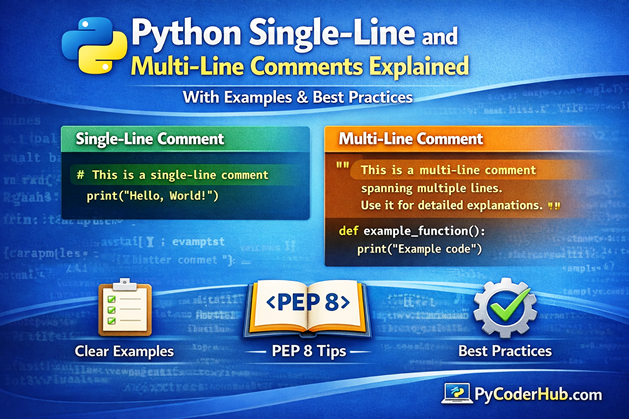
Introduction: Python Single-Line and Multi-Line Comments
In the previous lesson, we learned what Python comments are and why they are essential for writing clean, readable, and professional code. Now, it’s time to go one step further and focus on Python Single-Line and Multi-Line Comments—the most commonly used ways to document logic, explain decisions, and improve code clarity.
In this lesson, we’ll break down how different types of comments work in Python, where each type should be used, and how to avoid common mistakes—especially around multiline commenting, which often confuses beginners. You’ll also learn how Python interprets comments versus string literals and why following PEP 8 guidelines matters for long-term maintainability.
What you’ll learn in this post:
- How single-line comments in Python work and when to use them
- Inline comments as a subtype of single-line comments
- Different approaches to writing multiline comments in Python
- Using multiple single-line comments (
#) as block comments - Triple-quoted string literals and why they are considered pseudo multiline comments
- How the placement of triple quotes affects behavior
- A practical comparison of single-line vs multi-line comments in Python
- Key PEP 8 guidelines for Python comments
By the end of this guide, you’ll have a clear and practical understanding of Python Single-Line and Multi-Line Comments, allowing you to write code that is easier to read, easier to maintain, and easier for others—including your future self—to understand.
Python Comments (A Quick Reminder)
In the previous lesson, we learned what Python comments are and why they are important for writing clean and readable code. A Python comment is a line of text that the interpreter ignores during execution, meaning it does not affect how the program runs.
Comments are used to explain logic, clarify decisions, and make code easier to understand and maintain.
In this tutorial, we’ll focus on the two main types of comments used in Python:
- Single-line Comments
- Multi-line (Pseudo) Comments
You’ll learn how each type works, when to use them, and the correct syntax to follow. We’ll also clear up common misconceptions and show practical examples to help you apply comments effectively in real-world Python programs.
Single-Line Comments in Python
Single-line comments are the most common and widely used type of comments in Python. They allow you to add short explanations, notes, or reminders directly into your code without affecting how the program runs.
A single-line comment starts with the hash symbol (#). Everything written after # on that line is completely ignored by the Python interpreter. The comment applies only to that specific line, which means each new comment must begin with its own #.
Important Point: Unlike languages such as C or Java—where you have different syntaxes for single-line (
//) and multi-line (/* ... */) comments—Python keeps things simple. There is no closing symbol for single-line comments because Python automatically treats everything after#as a comment until the end of the line.
This simplicity makes single-line comments easy to write, read, and maintain.
Why Use Single-Line Comments?
Single-line comments serve several important purposes in real-world Python code:
- Code documentation
Explain what a line of code does or why it exists, making the logic easier to understand later. - Debugging and testing
Temporarily disable a line of code without deleting it—very useful when testing or troubleshooting. - Marking TODOs or notes
Leave reminders for future improvements or unfinished tasks. - Explaining complex logic
Clarify calculations, conditions, or algorithmic steps that are not immediately obvious.
Used correctly, single-line comments improve readability without cluttering the code.
Syntax of Single-Line Comments in Python
The syntax is straightforward:
# This is a single-line comment
print("Hello, World!")
Anything written after # is ignored during execution. In this example, only the print() statement runs, while the comment is skipped.
Examples of Single-Line Comments
1. Comment Placed on a New Line
# Store the user age
age = 25

print(age)
Explanation:
The comment explains the purpose of the variable age. This is helpful when variable names alone don’t fully describe intent.
2. Commenting Out Code Using a Single-Line Comment
# print("This line is commented out and will not run.")
print("This line will execute normally.")
Explanation:
The first line is ignored because it starts with #. This is a common technique to disable code temporarily without removing it.
3. Commenting Out Code to Prevent Errors
# The following line is commented out and will NOT execute
# result = 10 / 0   # This would cause a ZeroDivisionError

print("Program continues without running the commented-out code.")Explanation:
# result = 10 / 0is skipped by Python, so the error never occurs.- The program continues normally and prints the message.
This technique is often used during debugging.
4. Commenting Out a Debug Print Statement
# print("Debug: user_data =", user_data)
print("Processing completed.")
Explanation:
Debug messages are useful during development but unnecessary in production. Commenting them out keeps the code clean.
5. Temporarily Disabling a Function Call
def greet():
    print("Hello!")

# greet()  # Disabled for now
print("Program continues...")
Explanation:
The function exists but is not executed because the call is commented out.
6. Commenting Out a Line Inside a Loop
for iteration_number in range(3):
    # print("Loop iteration:", iteration_number)  # Debug output disabled
    print(iteration_number)
Explanation:
This is useful when debugging loops without flooding the output.
7. Commenting Out a Variable Assignment
# unused_value = 42
active_value = 10
print(active_value)
Explanation:
Commenting out unused variables helps test alternative logic without deleting code.
8. Organizing Code Into Logical Sections
# -------------------------
# 1. Import Dependencies
# -------------------------
import math
import random


# -------------------------
# 2. Define Helper Functions
# -------------------------
def calculate_area(radius):
    return math.pi * radius ** 2

def generate_random_number():
    return random.randint(1, 10)


# -------------------------
# 3. Main Program Logic
# -------------------------
radius = 5
area = calculate_area(radius)
random_number = generate_random_number()


# -------------------------
# 4. Output Results
# -------------------------
print("Area:", area)
print("Random Number:", random_number)
Why this is useful:
- Makes large files easier to navigate
- Groups related logic together
- Improves readability and maintainability
Summary
Single-line comments are simple but powerful. When used thoughtfully, they make your Python code easier to understand, debug, and maintain—without adding unnecessary confusion or clutter.
Next, we’ll look at inline comments, a special subtype of single-line comments, and learn when (and when not) to use them effectively.
Inline Comments in Python (Subtype of Single-Line Comments)
An inline comment is a comment written on the same line as a statement. Just like regular single-line comments, inline comments start with the hash symbol (#), and Python ignores everything written after it.
Inline comments are considered a subtype of single-line comments because they follow the same rules—the only difference is their placement. Instead of appearing on a separate line, inline comments sit next to the code they explain, making them useful for quick clarifications.
Because inline comments share the same line as executable code, they should be short, precise, and easy to scan.
Simple Inline Comment Example
price = 499 # Product price in USDExplanation:
The inline comment explains what the value 499 represents. This is helpful when the meaning of a number is not immediately obvious.
Using Single-Line and Inline Comments Together
# Calculate the total price including tax

price = 100       # base price
tax_rate = 0.18   # 18% tax rate

total = price + (price * tax_rate)  # calculate final amount

print("Total:", total)  # output result
What this example shows:
- The top comment is a single-line comment that describes the purpose of the code block.
- The comments next to
price,tax_rate, andtotalare inline comments explaining individual lines. - Both comment styles work together to improve clarity without cluttering the code.
This combination is very common in well-written Python programs.
When to Use Inline Comments
Use inline comments when:
- A line of code needs brief clarification
- A value, condition, or operation may not be immediately obvious
- You want to explain what a specific part of the line represents
Avoid inline comments when:
- The comment becomes too long
- The explanation distracts from the code
- The same explanation could be written as a separate single-line comment
Bad Inline Comment Example
price = 499 # This price is set because the company decided in 2020 after reviewing market trends...Why this is bad:
The comment is too long and makes the line harder to read. Long explanations should always be placed on a separate line above the code.
Key Point
Inline comments are best used for short, focused explanations. When kept concise, they complement single-line comments and make Python code easier to read and understand—without introducing confusion or visual clutter.
Next, we’ll explore multi-line (pseudo) comments in Python and clarify how they differ from single-line and inline comments.
Multiline Comments in Python
Multiline comments are used when you need to write longer explanations, document logic that spans multiple steps, or describe an entire section of code. They are especially useful when a single-line comment is not enough to clearly communicate intent.
However, an important thing to understand upfront is this:
Python does NOT have a dedicated syntax for true multiline comments like some other programming languages.
For example:
- C / Java use
/* ... */ - Python does not support this syntax
Instead, Python developers rely on two practical approaches to achieve multiline commenting.
Ways to Write Multiline Comments in Python
Python supports multiline-style commenting using the following two methods:
- Using multiple single-line comments (
#) — also called block comments - Using triple-quoted string literals — often called pseudo multiline comments
Let’s explore each method in detail and understand when (and when not) to use them.
Method 1: Using Multiple Single-Line Comments (#)
(Block Comments – Recommended Approach)
The most common and recommended way to write multiline comments in Python is to use multiple single-line comments together. Each line starts with the # symbol, and when these lines are placed consecutively, they form a block of comments.
This style is commonly known as block comments.
Technically speaking, block comments are not a separate syntax.
They are simply multiple single-line comments grouped together.
Example 1: Basic Multiline (Block) Comment
# This block of comments explains the next section of code.
# We are validating user input and checking if the age
# is within a realistic human range.
# If not, we raise a ValueError.
Explanation:
Each line starts with #, and block together, they explain what the upcoming code is supposed to do.
Example 2: Describing a Section of Code
# -------------------------------
# Block comment describing a task
# This section calculates the area
# -------------------------------

radius = 5
area = 3.14 * radius ** 2
print(area)
Example 3: Explaining Complex Logic
# Check if the number is prime:
# 1. Numbers less than 2 are not prime
# 2. Check divisibility from 2 to sqrt(n)
# 3. If divisible, it's not prime

number = 11
Explanation:
Here, comments outline the algorithm step by step before the actual implementation.
Method 2: Using Triple-Quoted String Literals
(Pseudo Multiline Comments)
Python also allows the use of triple-quoted string literals to appear like multiline comments. This method uses:
- Triple double quotes →
""" ... """ - Triple single quotes →
''' ... '''
If such a string is not assigned to any variable and not used as a docstring, Python creates it and then immediately discards it.
Because of this behavior, it looks like a multiline comment—but it’s not a real comment.
Example: Using Triple Double Quotes
print("Multiline Comments")

"""
This looks like a multiline comment.
But it is actually a string literal
that is not assigned to any variable.
"""
Example: Using Triple Single Quotes
print("Multiline Comments")

'''
This is another example
of a pseudo multiline comment
using triple single quotes.
'''
Why This Works (Internally)
- Python creates a string literal
- The string is not assigned
- It is not a docstring
- Python discards it immediately
This makes it a no-op (no operation) at runtime.
Important Warning: These Are NOT Real Comments
Even though triple-quoted strings behave like comments, they are not actual comments:
- Python still parses them
- They temporarily exist in bytecode
- They are not ignored like
#comments - They should not be used as a replacement for real comments
Example:
print("Multiline Comments")
"Unassigned string"
Output:
Multiline CommentsThe string does nothing—but it is still not a comment.
Docstrings vs. Pseudo Multiline Comments (Very Important)
Triple-quoted strings have a real and important purpose in Python:
They are used to write docstrings.
Docstrings:
- Use triple quotes (
""" ... """) - Are stored in the
__doc__attribute - Are accessible at runtime
- Provide documentation for IDEs and tools like
help()
Example: Docstring Demonstration
"""This is a module docstring"""

print("Multiline Comments")
print(__doc__)
Output
Multiline Comments
This is a module docstring
Here, the triple-quoted string is not ignored—it becomes the module’s documentation.
Final Recommendation
- Use
#block comments for multiline explanations - Avoid using triple-quoted strings as comments in production code
- Use triple-quoted strings only for docstrings
This distinction is critical for writing clean, professional Python code.
Difference in Placement of Triple Quotes
When working with triple-quoted string literals, the placement of the opening triple quotes can subtly affect the resulting string value. This difference becomes important only when the string is assigned to a variable or used as a docstring.
Let’s understand this with a clear example.
Example: Triple Quotes on the Same Line vs. a New Line
# Triple quotes start on the same line
text_same_line = '''This is a multiline comment
written using
triple single quotes'''

# Triple quotes start on a new line
text_new_line = '''
This is a multiline comment
written using
triple single quotes
'''

print(repr(text_same_line))
print(repr(text_new_line))
Output
'This is a multiline comment\nwritten using\ntriple single quotes'
'\nThis is a multiline comment\nwritten using\ntriple single quotes\n'
What’s the Difference?
text_same_line- No extra newline at the beginning
- No extra newline at the end
- The string starts exactly where the opening triple quotes begin
text_new_line- Contains a leading newline (
\n) - Contains a trailing newline (
\n) - This happens because the string starts after the opening triple quotes and ends before the closing ones
- Contains a leading newline (
In simple terms, starting triple quotes on a new line adds extra line breaks to the string.
Does This Matter for Multiline “Comments”?
In most cases—no.
When triple-quoted strings are used as unassigned strings (pseudo multiline comments), this difference:
- Does not affect program execution
- Does not change behavior
- Is safely ignored at runtime
However, this difference does matter when:
- The string is assigned to a variable
- The string is used as a docstring
- The content is processed, printed, or stored
In those cases, the extra newlines become part of the actual string value.
Why repr() Is Used Here
The repr() function shows the official, unambiguous representation of an object.
- It reveals hidden characters like
\n - It is mainly used for debugging and inspection
- It helps developers understand the exact content of a string
Without repr(), these newline differences would not be obvious.
Single-Line vs Multi-Line Comments in Python
Understanding the difference between single-line comments and multi-line comments is important for writing clean, professional Python code. While both are used to add explanations, they behave very differently under the hood and are meant for different purposes.
Python strongly encourages the use of single-line comments (#) for most commenting needs, while triple-quoted strings serve a more specific role—mainly for documentation.
Let’s compare them side by side.
Key Differences Between Single-Line and Multi-Line Comments
| Feature | Single-Line Comment (#) | Multi-Line Comment (Triple Quotes ''' / """) |
|---|---|---|
| Syntax | Starts with # | Enclosed in ''' ... ''' or """ ... """ |
| Purpose | Short explanations and notes | Longer text blocks or documentation |
| Interpreter Behavior | Completely ignored by Python | Parsed as a string literal |
| Runtime Effect | No memory or bytecode impact | Exists briefly; ignored only if unused |
| Typical Use Case | Explaining intent, inline clarification, TODOs, section notes | Writing docstrings for modules, classes, and functions |
| Best Practice | Preferred for all comments; use multiple # for blocks | Use only for docstrings; avoid as general comments |
| Inline Usage | Can appear after code on the same line | Cannot be placed inline with executable code |
| Example | count = 5 # current value | """This function adds two numbers.""" |
How to Choose the Right Comment Type
Use Single-Line Comments (#) when:
- Explaining why a line or block of code exists
- Adding quick notes or reminders
- Commenting out code during debugging
- Organizing code into logical sections
Even for multiline explanations, prefer block comments made of multiple # lines.
Use Triple-Quoted Strings only when:
- Writing docstrings
- Documenting public APIs
- Describing modules, classes, or functions
- Providing documentation accessible via
help()or IDEs
They are not real comments and should not be used as a general replacement for #.
Important Point: In Python, single-line comments are the standard and recommended way to comment code, while multi-line comments using triple quotes are meant strictly for documentation. Knowing this distinction helps you write cleaner, more maintainable, and more Pythonic code.
Note on PEP 8 Guidelines
In addition to the concepts covered in this post, Python provides official PEP 8 guidelines that define how comments should be written and formatted for consistency and readability. These guidelines cover things like comment placement, spacing, capitalization, and tone.
For a detailed and practical explanation of Python’s PEP 8 rules for comments—with examples and best practices—refer to our dedicated guide on PEP 8 Guidelines for Python Comments.
Conclusion
Understanding Python Single-Line and Multi-Line Comments is essential for writing clean, readable, and maintainable code. In this post, we explored how single-line comments, inline comments, and block comments work, why Python does not support true multiline comments, and how triple-quoted strings behave as pseudo comments. More importantly, we clarified when each approach should be used—and when it should be avoided.
By using # for regular comments and reserving triple-quoted strings strictly for docstrings, you align your code with Python’s design philosophy and PEP 8 best practices. Thoughtful comments focus on why the code exists, not just what it does, helping both you and others understand the logic behind your programs. As you continue writing Python code, make comments a habit—not as clutter, but as a tool for clarity and professionalism.
Suggested Posts:
1. Python Comments Explained — Best Practices & Guidelines for Clean Code
2. PEP 8 Guidelines for Python Comments: How to Write Clean Code and Avoid Common Mistakes
3. Python Comments FAQ: Everything You Need to Know (Beginner to Advanced)

8 thoughts on “Python Single-Line and Multi-Line Comments Explained (With Examples & Best Practices)”