Introduction: Python Quotes Best Practices
In the previous lesson, we already explored what single quotes, double quotes, and triple quotes are, how they work in Python, and the official quote usage rules and guidelines. You learned the syntax, basic behavior, and when each quote type is allowed.
Now it’s time to go a step further.
Knowing how quotes work is only half the story. In real-world Python code, how you choose and use quotes directly affects readability, clarity, and long-term maintainability. Poor quote choices don’t always cause syntax errors—but they often lead to confusion, inconsistent code, and strings that are hard to read or modify later.
What you’ll learn in this lesson:
- How to choose the right quote type for better readability
- Why consistency in quote usage matters in real projects
- Common quote-related mistakes that cause confusion or bugs
- How to handle nested quotes, escaping, and multiline strings
- Practical tips for writing clean, predictable, and readable strings
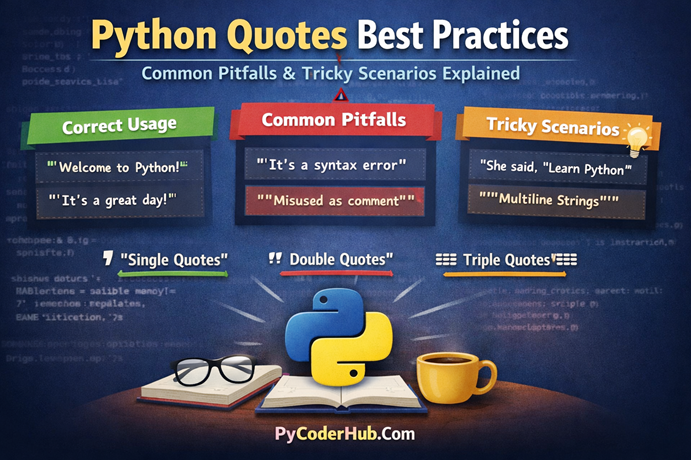
This post is divided into three clear sections:
- Section 1: Python quotes best practices
- Section 2: Common pitfalls and mistakes developers make
- Section 3: Tricky real-world scenarios and how to handle them correctly
We’ll begin with best practices, because good habits prevent most quote-related problems before they even happen.
Section 1: Python Quotes Best Practices
Using quotes in Python may look simple at first, but how you use them has a big impact on code readability, maintainability, and professionalism. Clean quote usage helps your code explain itself, reduces confusion, and prevents subtle bugs—especially in larger projects.
Let’s break down the most important best practices one by one.
1. Choose Quotes for Readability, Not Preference
Python treats single quotes (') and double quotes (") exactly the same. There is no performance difference, no functional advantage, and no “better” quote from Python’s perspective.
The real difference is human readability.
Instead of choosing quotes randomly or based on habit, choose the quote type that makes the string easier to understand at a glance.
welcome_message = "Welcome to PyCoderHub!"
file_error_message = "File not found"
Or
welcome_message = 'Welcome to PyCoderHub!'
file_error_message = 'File not found'
Both styles are perfectly valid. The important things to notice are that:
- The text is easy to read
- No unnecessary escaping is used
- The purpose of the string is instantly clear
Now compare this with a poor readability choice:
welcome_message = 'Welcome to PyCoderHub!'
file_error_message = "File not found"
This isn’t wrong, but it introduces confusion without benefit—especially when the quote style keeps changing.
Why readability matters
When you revisit your code after weeks or months—or when someone else reads it—your brain should not waste energy decoding strings.
Readable strings:
- Reduce mental load
- Make bugs easier to spot
- Improve learning for beginners
Best practice: Let the content of the string decide the quote type—not personal preference or habit.
2. Be Consistent with Quote Usage Across Your Code
One of the fastest ways to make Python code feel messy is inconsistent quote usage
Bad example (inconsistent style):
page_title_text = "Python Quotes Guide"
page_subtitle_text = 'Best Practices and Pitfalls'
page_footer_text = "Learn Python the right way"
There’s no technical error here—but visually, it feels disorganized.
Better example (consistent style):
page_title_text = "Python Quotes Guide"
page_subtitle_text = "Best Practices and Pitfalls"
page_footer_text = "Learn Python the right way"
This version is easier to scan and feels intentional.
Why consistency matters
Consistent quote usage helps:
- Your brain scan code faster
- Teams collaborate more smoothly
- Code reviews focus on logic, not formatting
- Large codebases stay predictable
Most professional Python teams choose one default style (usually double quotes) and apply it everywhere unless there’s a strong reason not to.
Best practice: Pick a default quote style for your project and stick to it unless readability clearly improves by switching.
3. Use Double Quotes When Strings Contain Apostrophes
Apostrophes (') are extremely common in real-world text—especially in user messages, logs, errors, and UI content.
Using single quotes in these cases forces escaping, which hurts readability.
Less readable:
user_feedback_message = 'I\'m learning Python quotes'The backslash adds visual noise and makes the string harder to read.
More readable:
user_feedback_message = "I'm learning Python quotes"This version:
- Reads naturally
- Avoids escaping
- Looks clean and professional
Real-world scenarios where this matters
- User messages
- Notifications
- Error descriptions
- Logs and debug output
- UI labels and tooltips
Best practice: Use double quotes whenever the text contains apostrophes.
4. Use Triple Quotes Only When They Add Real Value
Triple quotes (''' or """) are designed for multiline strings, not regular single-line text.
Good use of triple quotes (multiline formatting):
email_message_body = """Hello User,

Thank you for joining PyCoderHub.
We’re excited to have you on this learning journey.

Regards,
Team PyCoderHub
"""
Here, triple quotes:
- Preserve line breaks
- Improve readability
- Match the structure of the message
Unnecessary use of triple quotes:
status_message = """Success"""This provides no benefit and makes the code look heavier than needed.
When triple quotes make sense
Use them for:
- Email templates
- Multiline logs
- SQL queries
- Large blocks of formatted text
- Docstrings (covered separately in Python documentation rules)
Avoid them for:
- Simple messages
- Labels
- Short responses
Best practice: Use triple quotes only when multiline formatting genuinely improves clarity.
5. Write Quotes That Make Code Self-Explanatory
Strings are not just data—they are communication. Poorly written strings often require extra comments to explain them.
Less clear:
# Display error
error_message = "Invalid input"
This tells what happens, but not why.
More clear and self-explanatory:
validation_error_message = "Invalid input: value must be a positive number"Now the string itself explains:
- What went wrong
- What the expected input is
Why this matters long-term
Clear strings:
- Reduce the need for comments
- Help future maintainers understand intent
- Improve debugging and user experience
- Make logs and errors actionable
If a string needs a comment to explain it, that’s often a sign the string itself can be improved.
Best practice: Write strings that clearly communicate intent without relying on extra comments.
Summary
Quotes may look small, but consistent, readable quote usage is a hallmark of professional Python code. When your strings are clean and intentional, your entire codebase becomes easier to understand, debug, and scale.
Section 2: Common Pitfalls When Using Python Quotes
Note to the Reader
Before diving into this section, you may notice that some quote-related concepts look familiar from the best practices section. This is intentional.
In Section 1, we focused on how Python quotes should be used correctly. In Section 2, we revisit the same ideas from a different perspective—examining what goes wrong when those best practices are ignored, misunderstood, or applied incorrectly. The goal here is not repetition, but deeper understanding through contrast, supported by new examples and added details.
This approach continues in Section 3, where these same concepts are explored again in tricky and real-world scenarios. Seeing the same rules through best practices, common mistakes, and edge cases helps reinforce how Python quotes behave in real code—not just in theory.
Now let’s continue.
Even though Python strings look simple, small mistakes with quotes can lead to confusing code, hidden bugs, and unnecessary syntax errors. Most of these issues don’t come from lack of knowledge—but from habits formed early on.
Let’s look at the most common quote-related pitfalls and how to avoid them.
1. Mixing Quote Types Without Purpose
Python allows single quotes ('), double quotes ("), and triple quotes (''' / """). The problem starts when these are mixed randomly, without any clear reason.
Problematic example:
username_label_text = "Username"
password_label_text = 'Password'
submit_button_label_text = "Submit"
Technically correct—but visually inconsistent.
Why this is a problem
Random quote switching:
- Breaks visual rhythm
- Forces the reader to constantly re-adjust
- Signals poor structure or lack of standards
- Makes large files feel messy and unpolished
This kind of inconsistency adds mental overhead without providing any benefit.
Cleaner and more professional approach:
username_label_text = "Username"
password_label_text = "Password"
submit_button_label_text = "Submit"
Now the code:
- Looks intentional
- Is easier to scan
- Feels predictable and maintainable
Avoid: Mixing quote styles unless the content itself requires it (for example, handling apostrophes).
2. Forgetting to Escape Quotes Inside Strings
Unescaped quotes are one of the most common causes of Python syntax errors, especially for beginners.
Broken code (syntax error):
quoted_message_text = "He said, "Python is awesome""Python gets confused because it thinks the string ends too early.
Fixed version using escaping:
quoted_message_text = "He said, \"Python is awesome\""This works, but excessive escaping can reduce readability.
Cleaner and more readable solution:
quoted_message_text = 'He said, "Python is awesome"'By switching the outer quote type, you:
- Avoid backslashes
- Improve readability
- Make the string feel more natural
Real-world impact
This pitfall commonly appears in:
- User messages
- Logs
- Dialog text
- API responses
- JSON-like data
Tip: When escaping starts cluttering your string, switch quote types instead—it’s usually cleaner.
3. Misusing Triple Quotes as Comments
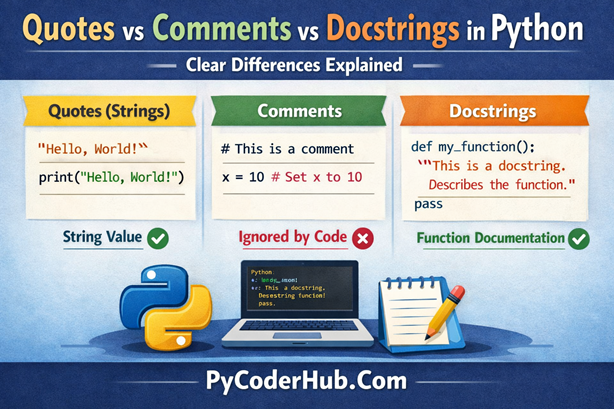
A very common misunderstanding: triple quotes are not comments.
Incorrect usage:
"""This is not a comment"""Python treats this as a string literal, not a comment.
If it’s not:
- Assigned to a variable, or
- Used as a docstring
Then Python creates the string object and immediately discards it. While this doesn’t usually break your code, it is:
- Misleading
- Unprofessional
- Conceptually incorrect
Correct way to write comments:
"""This is not a comment"""Why this matters
Using triple quotes as comments:
- Confuses beginners reading your code
- Breaks Python conventions
- Can cause confusion with actual docstrings
Use
#for comments. Use triple quotes only for docstrings or meaningful multiline strings.
4. Creating Unintended Multiline Strings
Triple-quoted strings preserve everything exactly as written, including line breaks, indentation, and whitespace.
Example:
multiline_text_block = """
Hello
World
"""
This string actually contains:
- A leading newline before
Hello - A newline between
HelloandWorld - A trailing newline after
World
Visually, this may not be obvious—but Python sees it clearly.
Why this is dangerous
Hidden whitespace can:
- Break formatted output
- Cause test failures
- Introduce subtle UI issues
- Produce unexpected comparison results
For example:
print(multiline_text_block)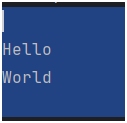
The output contains extra blank lines you didn’t intend.
Be careful: Triple quotes preserve whitespace exactly as written—nothing is ignored.
5. Overusing Triple Quotes for Simple Text
Triple quotes are powerful—but power doesn’t mean they should be used everywhere
Over-engineered example:
submit_button_text = """
Submit
"""
This creates:
- A multiline string
- Extra whitespace
- Unnecessary complexity
Clean and correct version:
submit_button_text = "Submit"Overusing triple quotes:
- Makes code bulky
- Slows down visual scanning
- Adds formatting risks
- Signals misunderstanding of string types
Triple quotes should solve a problem—not create one.
Tip: Don’t over-engineer string formatting when a single-line string does the job perfectly.
Summary
Most quote-related bugs aren’t about Python—they’re about habits. Clean, intentional quote usage makes your code easier to read, easier to review, and easier to trust.
Section 3: Tricky Python Quote Scenarios Explained
Some quote situations in Python look simple but behave in unexpected ways. These are the cases where beginners often get stuck—and where even experienced developers pause to think.
Understanding these tricky scenarios will help you write cleaner, safer, and more predictable string code.
1. Quotes Inside Quotes
One of the most common real-world scenarios is putting quotes inside a string, such as dialog text, messages, or logs.
Correct nesting examples:
dialog_text = "She said, 'Python is fun'"Or:
dialog_text = 'She said, "Python is fun"'Both are valid and readable.
Why this works
Python reads the outer quotes as string boundaries and treats the inner quotes as normal characters. There is no confusion as long as the outer and inner quotes are different.
Bad (hard to read) approach:
dialog_text = "She said, \"Python is fun\""This works—but the escaping makes the string harder to read, especially when strings get longer.
Tip: Always choose the outer quote based on what appears inside the string. This keeps strings natural and readable.
2. Escaping Quotes vs Switching Quote Types
Escaping quotes is sometimes necessary—but in many cases, it’s completely avoidable.
Escaped version:
quote_message_text = "It\'s Python"This is valid Python—but it introduces an unnecessary backslash.
Cleaner and more readable version:
quote_message_text = "It's Python"Or
if apostrophes are common in your text:
quote_message_text = "It's Python, and it's powerful"When escaping is necessary
Escaping becomes unavoidable when:
- Both single and double quotes appear frequently
- The string is dynamically generated
- You’re working inside a specific format (like JSON or regex)
Example:
complex_quote_text = "She said, \"It's Python, not Java\""Guideline: Prefer switching quote types for readability. Escape only when there’s no cleaner option.
3. Multiline Strings and Hidden Whitespace
Triple-quoted strings preserve everything—including indentation, spaces, and line breaks.
Example:
sql_query_text = """
    SELECT * FROM users
"""
This string contains:
- A leading newline
- Four spaces before
SELECT - A trailing newline
Why this can cause problems
Hidden whitespace can:
- Break SQL queries
- Cause string comparison failures
- Introduce formatting bugs
- Fail strict tests
For example:
if sql_query_text == "SELECT * FROM users":
    print("Match")
This condition will fail, even though the text looks similar.
Safer alternatives
Use .strip() when appropriate:
clean_query_text = sql_query_text.strip()Or align content carefully:
sql_query_text = (
    "SELECT * "
    "FROM users"
)
Watch out: Indentation inside triple quotes becomes part of the string—always.
4. Quotes in Print Statements vs Code Logic
A string can be technically correct but still poorly written for humans.
Example:
print("Error: File not found. Please check the path.")This message is:
- Clear
- Actionable
- Easy to understand
Compare it with:
print("Error")Both run fine—but only one actually helps.
Clear strings improve:
- Debugging speed
- User experience
- Log usefulness
- Long-term maintenance
Logs and print statements are often read under stress—during errors or failures. The clearer the message, the faster the fix.
Rule: Write strings for humans first, Python second.
5. Quotes in Docstrings vs Regular Strings
At first glance, docstrings and triple-quoted strings look the same—but they serve very different purposes.
Docstrings:
- Use triple quotes
- Appear immediately after a module, class, or function definition
- Document behavior, inputs, and outputs
- Are accessible via
__doc__and help tools
Example:
def calculate_total_price(price, tax_rate):
    """Calculate the total price including tax."""
    return price + (price * tax_rate)
Regular strings:
- Store data
- Appear anywhere in code
- Are not documentation
- Are not automatically accessible as metadata
Example:
description_text = """Calculate the total price including tax."""This is just a string—not documentation.
Confusing docstrings with regular strings:
- Breaks documentation tools
- Misleads readers
- Reduces code clarity
Context matters: Use quotes based on intent, not just appearance.
Summary
The trickiest Python quote problems aren’t syntax issues—they’re thinking issues. Once you understand why quotes behave the way they do, you’ll stop guessing and start writing strings with confidence.
Final Summary
Python quotes are about readability, not just syntax – Thoughtful quote usage improves clarity and long-term maintainability.
Important Points:
- Choose quotes based on readability – Let the string content decide which quote type fits best.
- Stay consistent across your project – A predictable quote style makes code easier to scan and review.
- Avoid unnecessary escaping – Switching quote types is usually cleaner than adding backslashes.
- Use triple quotes only when they add clarity – Multiline formatting should solve a real readability problem.
Common mistakes to avoid:
- Mixing quote styles randomly – Inconsistency creates confusion without any benefit.
- Treating triple quotes as comments – Triple quotes create strings, not comments.
- Ignoring hidden whitespace – Indentation and newlines in triple-quoted strings can cause subtle bugs.
- Thoughtful quote usage leads to better code – Clean, intentional strings make Python code more professional and human-friendly.
Conclusion
Python quotes may look simple, but using them correctly has a powerful impact on code quality. When you choose quotes for readability, stay consistent, and avoid common pitfalls, your strings become clearer and more reliable. Thoughtful quote usage reduces confusion, prevents subtle bugs, and makes your code easier to maintain. In the end, clean quotes help your Python code speak clearly—to both humans and Python.