
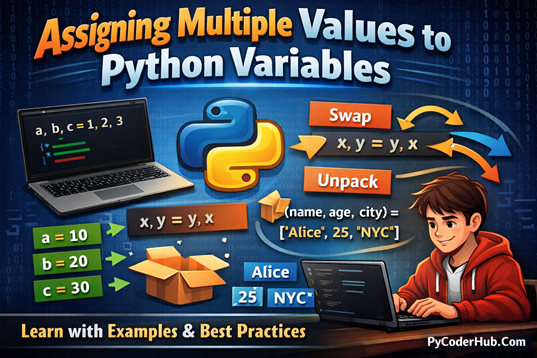
Introduction: Assigning Multiple Values to Python Variables
In the previous post, we learned what Python variables are, how to create them, and how to assign values to a single variable. That foundation is essential—but Python doesn’t stop there. One of its most powerful and beginner-friendly features is the ability to assign multiple values to multiple variables in a single line.
In this detailed guide, we’ll explore assigning multiple values to Python variables, a concept that helps you write cleaner, more readable, and more Pythonic code. You’ll see how Python handles multiple assignments internally and why this feature is widely used in real-world programs.
What you’ll learn in this chapter:
- How to assign multiple values to multiple variables in one statement
- Unpacking values from lists, tuples, and other collections
- Using the asterisk (
*) operator for flexible unpacking - Practical examples to understand when and why multiple assignment is useful
By the end of this chapter, you’ll be able to confidently work with multiple variable assignments and understand how Python makes complex data handling simple and elegant.
Multiple Assignment Fundamentals
Multiple assignment in Python allows you to assign more than one value in a single statement. Instead of writing repetitive lines of code, Python gives you several flexible options to assign, reuse, and rearrange values efficiently. This feature not only reduces code length but also improves readability and clarity, especially when working with related data.
In this section, we’ll break down the core patterns of multiple assignment in Python. This concept can be broadly divided into four main patterns:
- Assigning Multiple Values to Multiple Variables
- Assigning One Value to Multiple Variables (Chained Assignment)
- Assigning Multiple Values to One Variable
- Variable Swap (Swapping Values Between Variables)
Each of these patterns is commonly used in real-world Python code and solves a specific type of problem. We’ll explore each pattern in detail, with clear explanations and practical examples.
Let’s start with the first and most commonly used pattern.
1. Assigning Multiple Values to Multiple Variables
The most common form of multiple assignment is assigning multiple values to multiple variables in a single line. Python lets you do this cleanly and readably.
Example:
user_id, login_attempts, welcome_message = 101, 3, "Welcome back!"

print(user_id)          # Output: 101
print(login_attempts)   # Output: 3
print(welcome_message)  # Output: Welcome back!
print(user_id, login_attempts, welcome_message)
# Output: 101 3 Welcome back!
What’s happening here? Tuple Packing and Unpacking
This syntax works because of tuple packing and tuple unpacking.
- On the right side,
101, 3, "Welcome back!"is automatically packed into a temporary tuple:(101, 3, "Welcome back!") - On the left side, Python unpacks that tuple and assigns each value to the matching variable based on position.
So this line:
user_id, login_attempts, welcome_message = 101, 3, "Welcome back!"Is conceptually the same as:
# Conceptual equivalent (how Python thinks internally)
temporary_values = (101, 3, "Welcome back!")

user_id = temporary_values[0]          # 101
login_attempts = temporary_values[1]   # 3
welcome_message = temporary_values[2]  # Welcome back!
You usually don’t write it this long way, but understanding this process helps remove confusion about how multiple assignment works behind the scenes.
Another example:
Let’s look at another simple case of assigning multiple values to multiple variables.
product_price, tax_amount, total_cost = 500, 50, 550Just like before, the right side is packed into a tuple, and the left side unpacks it.
Equivalent forms
All of the following statements work the same way in Python:
(product_price, tax_amount, total_cost) = (500, 50, 550)
(product_price, tax_amount, total_cost) = 500, 50, 550
product_price, tax_amount, total_cost = (500, 50, 550)
Python matches each variable with one value, based on position.
Works with Any Iterable
Multiple assignment is not limited to tuples. It works with any iterable object, as long as the number of values matches the number of variables.
first_score, second_score = [85, 92]          # List unpacking
city_code, area_code = (91, 22)               # Tuple unpacking
first_letter, second_letter = "OK" # String unpackingfirst_score→ 85second_score→ 92first_letter→'O'second_letter→'K'
Mixing Different Data Types
Python allows you to assign different data types in a single statement.
employee_name, employee_age, employee_rating = "Rohit", 28, 4.7

print(employee_name)    # Output: Rohit
print(employee_age)     # Output: 28
print(employee_rating) # Output: 4.7
Using Complex Expressions
You can also assign the results of expressions, not just literal values.
base_salary, yearly_bonus = 40000 + 5000, 5000 * 2

print(base_salary)   # Output: 45000
print(yearly_bonus)  # Output: 10000
Python evaluates each expression first, then assigns the results to the corresponding variables—making multiple assignment both powerful and flexible.
Mandatory Rule for Multiple Assignment
There is one strict rule you must always follow when assigning multiple values to multiple variables:
The number of variables on the left must match the number of values on the right.
If this rule is broken, Python raises a ValueError.
Examples of Errors
# Too many values
team_leader, team_member = "Rohit", "Ananya", "Kiran"
# ValueError: too many values to unpack

# Not enough values
city, country, continent = "Paris", "France"
# ValueError: not enough values to unpack
Explanation
1. Too many values
team_leader, team_member = "Rohit", "Ananya", "Kiran"- You provided 3 values (
"Rohit","Ananya","Kiran") but only 2 variables (team_leader,team_member). - Python doesn’t know where to put the extra value, so it raises a
ValueError.
2. Not enough values
city, country, continent = "Paris", "France"- You provided 2 values but have 3 variables.
- One variable (
continent) would be left without a value, so Python raises aValueError.
Note: This completes the topic of Assigning Multiple Values to Multiple Variables. Using this technique, you can assign several values in a single line, making your code cleaner, more readable, and Pythonic. Just remember the key rule: the number of variables must match the number of values.
Now, let’s move on to understand “Assigning One Value to Multiple Variables (Chained Assignment)”, another handy feature of Python that allows you to initialize multiple variables with the same value in a single line.
2. Assigning One Value to Multiple Variables (Chained Assignment)
In Python, you can assign a single value to multiple variables in one line. This approach is known as chained assignment. Instead of repeating the same value again and again, you chain the assignment operator (=) to initialize multiple variables at once.
How Chained Assignment Works
In chained assignment, Python evaluates the right-hand expression only once and then assigns that value to each variable from right to left.
Basic Example
default_limit = minimum_limit = maximum_limit = 10What’s happening here?
- The value
10is evaluated only once - All three variables:
default_limitminimum_limitmaximum_limit
- Reference the same immutable integer object
Since integers are immutable, this behavior is completely safe and commonly used for setting default values, counters, or initial states.
Chained Assignment: Mutable vs Immutable Values
Python handles chained assignment very differently depending on whether the assigned value is immutable or mutable. Understanding this difference is important to avoid unexpected behavior in your programs.
Chained Assignment with Immutable Objects
Immutable objects cannot be changed after creation. Common immutable types include:int, float, bool, str, tuple, frozenset
When you use chained assignment with immutable values, there is no risk of side effects.
Example:
primary_language = secondary_language = backup_language = "Python"

print(primary_language)    # Output: Python
print(secondary_language)  # Output: Python
print(backup_language)     # Output: Python

primary_language = "Java"  # Only this variable changes

print(primary_language)    # Output: Java
print(secondary_language)  # Output: Python
print(backup_language)     # Output: Python
Explanation
"Python"is an immutable string- All variables initially reference the same value
- When
primary_languageis reassigned, Python creates a new string object - The other variables remain unchanged
Because immutable objects cannot be modified in place, chained assignment with them is safe and predictable.
Chained Assignment with Mutable Objects
Mutable objects can be modified after creation. Common mutable types include:list, dict, set, bytearray, and most custom objects
With mutable values, chained assignment can cause confusion and bugs.
Example:
pending_orders = processed_orders = archived_orders = []

print(pending_orders)    # Output: []
print(processed_orders)  # Output: []
print(archived_orders)   # Output: []

pending_orders.append("Order-101")

print(pending_orders)    # Output: ['Order-101']
print(processed_orders)  # Output: ['Order-101']
print(archived_orders)   # Output: ['Order-101']
Why this happens
- Only one list object is created in memory
- All variables reference that same shared list
- Modifying the list through one variable affects all others
This behavior often leads to unexpected results, especially for beginners.
Correct Way to Assign Separate Mutable Objects
If you want independent mutable objects, assign them separately:
pending_orders, processed_orders, archived_orders = [], [], []Now each variable refers to a different list object, and changes to one will not affect the others.
Mandatory Rule for Chained Assignment
Chained assignment has one strict rule:
There must be exactly one value on the right-hand side.
You cannot use chained assignment to distribute different values to different variables.
Invalid Examples
Multiple values (not unpacking)
first_value = second_value = 1, 2- This does not assign
1tofirst_valueand2tosecond_value - Instead, Python treats
1, 2as a tuple - Both variables receive the same tuple
(1, 2)
Two different values (invalid syntax)
minimum_score = maximum_score = 10 = 20- Python tries to assign a value to the literal
10 - Literals cannot be assignment targets
- This results in a syntax error
Valid Example
range_limits = backup_limits = (1, 100)- The right-hand side is one value (a tuple)
- Both variables reference the same tuple
Key Reminder
Chained assignment is meant for one shared value, not for unpacking multiple values.
Chained Assignment with Tuple Packing
As discussed earlier, chained assignment requires exactly one value on the right-hand side.
primary_user = secondary_user = backup_user = "Admin"Here, Python evaluates "Admin" once and assigns that single value to all variables.
Then why does this also work?
primary_user = secondary_user = backup_user = "Rohit", "Kunal"
print(primary_user)
# Output: ('Rohit', 'Kunal')
At first glance, it looks like two values are being assigned. But Python does not see it that way.
What Python Actually Does (Tuple Packing)
When Python encounters comma-separated values, it automatically packs them into a tuple.
So when Python sees:
"Rohit", "Kunal"It internally converts it to:
("Rohit", "Kunal")This process is called tuple packing.
The Actual Assignment
After tuple packing, the statement effectively becomes:
primary_user = secondary_user = backup_user = ("Rohit", "Kunal")Now there is only one value on the right-hand side—a tuple—so the mandatory rule of chained assignment is fully satisfied.
Even though "Rohit", "Kunal" looks like multiple values, Python treats it as one tuple, making this assignment completely valid and predictable.
Note: This completes the topic of Assigning One Value to Multiple Variables (Chained Assignment). This technique is useful for initializing multiple variables with the same value, especially for defaults and constants. Just remember to be cautious when using it with mutable objects, as they can lead to shared-state confusion.
Now, let’s move on to the next topic: Assigning Multiple Values to One Variable, where we’ll learn how Python groups multiple values into a single variable using packing.
3. Assigning Multiple Values to One Variable
In Python, a single variable cannot hold multiple independent values directly. Instead, the variable always stores one object, and that object may internally contain multiple elements.
This is usually done by grouping values inside a collection object such as a tuple, list, set, or dictionary. Python may also group values automatically when using packing or unpacking syntax.
Using Tuples (Most Common Method)
When you write comma-separated values on the right-hand side, Python automatically creates a tuple. This behavior is called packing.
user_scores = 80, 90, 85
print(user_scores)
# Output: (80, 90, 85)
Even though it looks like three values, user_scores stores one tuple object containing three items.
Using Lists
You can explicitly group multiple values into a list.
user_scores = [80, 90, 85]
print(user_scores)
# Output: [80, 90, 85]
Lists are mutable, so you can change their contents later.
user_scores.append(95)
print(user_scores)
# Output: [80, 90, 85, 95]
Using Sets
A set can also store multiple values, but it does not preserve order and removes duplicates.
unique_ids = {101, 102, 103}
print(unique_ids)
Using Dictionaries
A dictionary stores multiple key–value pairs inside a single object.
user_profile = {"name": "Rohit", "age": 28}
print(user_profile)
Again, the variable holds one dictionary object, even though it contains multiple values internally.
Assigning Multiple Values Through Unpacking
You can also assign multiple values to one variable using the asterisk (*) unpacking syntax.
*monthly_sales, = 1200, 1500, 1800
print(monthly_sales)
# Output: [1200, 1500, 1800]
Here, *monthly_sales collects all values into a list.
Another Example
first_day, *remaining_days = "Mon", "Tue", "Wed", "Thu"
print(remaining_days)
# Output: ['Tue', 'Wed', 'Thu']
This technique is useful when you want a variable to capture a flexible number of values.
Summary
- A variable cannot store multiple separate values directly
- It always stores one object that may contain multiple elements
- Tuples, lists, sets, and dictionaries are common containers
- Comma-separated values are automatically packed into a tuple
- The
*operator allows flexible value collection during unpacking
Note: This completes the topic of Assigning Multiple Values to One Variable. In Python, a variable always stores one object, and that object may internally hold multiple elements using collections or packing techniques. Understanding this concept helps avoid confusion when working with grouped data.
Now, let’s move on to the next topic: Variable Swap (Swapping Values Between Variables), where we’ll see how Python allows swapping values cleanly without using a temporary variable.
4. Variable Swap (Swapping Values Between Variables)
Python provides a simple and elegant way to swap the values of variables without using a temporary variable. This is one of Python’s most well-known features and helps keep code clean, short, and readable.
Traditional Approach (Using a Temporary Variable)
In many programming languages, swapping values requires a third variable.
current_score = 5
maximum_score = 10

# Temporary variable is required
temporary_score = current_score
current_score = maximum_score
maximum_score = temporary_score

print(f"current_score = {current_score}, maximum_score = {maximum_score}")
# Output: current_score = 10, maximum_score = 5
This approach works, but it is longer and less elegant.
Pythonic Swap (No Temporary Variable Needed)
Python allows you to swap values in a single line using tuple packing and unpacking.
current_score = 5
maximum_score = 10

current_score, maximum_score = maximum_score, current_score

print(current_score, maximum_score)
# Output: 10 5
How it works
- The right-hand side
maximum_score, current_scoreis packed into a temporary tuple - The left-hand side unpacks the values in reverse order
- No explicit temporary variable is needed
This makes swapping safe, fast, and readable.
Swapping More Than Two Variables
Python can also rotate multiple values at once, which is very useful in algorithms.
Example
first_step, second_step, third_step = 1, 2, 3

first_step, second_step, third_step = third_step, first_step, second_step

print(first_step, second_step, third_step)
# Output: 3 1 2
Here, all values are reassigned simultaneously, avoiding intermediate overwrites.
Important Point:
- Python allows variable swapping without temporary variables
- Swapping uses tuple packing and unpacking internally
- Multiple variables can be rotated in a single, clean statement
- This feature is widely used in sorting algorithms, loops, and state management
Note: With the end of this section, we have covered all the core patterns of multiple assignment in Python. These patterns form the foundation for writing clean, readable, and Pythonic code when working with multiple values and variables.
Patterns of Multiple Assignment We Covered
- Assigning Multiple Values to Multiple Variables
- Assigns different values to different variables in a single line using positional matching.
- Assigning One Value to Multiple Variables (Chained Assignment)
- Assigns the same value to multiple variables at once, commonly used for defaults and initial states.
- Assigning Multiple Values to One Variable
- Groups multiple values into a single object such as a tuple, list, set, or dictionary.
- Variable Swap (Swapping Values Between Variables)
- Swaps values cleanly without using a temporary variable through packing and unpacking.
Quick Comparison of Multiple Assignment Patterns
To wrap up this chapter, let’s quickly compare all four multiple-assignment patterns we’ve learned. Although the syntax may look similar, each pattern serves a different purpose. This comparison table will help you understand when to use which approach at a glance.
| Pattern | What It Does | Syntax Style | Common Use Case | Key Rule / Note |
|---|---|---|---|---|
| Assigning Multiple Values to Multiple Variables | Assigns different values to different variables in one statement | x, y = 10, 20 | Initializing related values together | Number of variables must match number of values |
| Assigning One Value to Multiple Variables (Chained Assignment) | Assigns the same value to multiple variables | a = b = c = 10 | Setting defaults, counters, flags | Safe for immutable values; be careful with mutable ones |
| Assigning Multiple Values to One Variable | Groups multiple values into one object | x = 1, 2, 3 | Storing related data together | Variable holds one collection object |
| Variable Swap (Swapping Values Between Variables) | Swaps values without a temporary variable | x, y = y, x | Swapping state in logic or algorithms | Uses packing & unpacking internally |
Conclusion
Assigning Multiple Values to Python Variables is a powerful feature that helps you write cleaner, more readable, and more efficient Python code. In this guide, we explored the core patterns of multiple assignment, including unpacking, chained assignment, and variable swapping. Understanding these techniques reduces confusion and improves code clarity in real-world programs. With regular practice, multiple assignment will quickly become a natural part of your Python coding style.
Suggested Posts:
1. Python Variables Explained in Depth: A Detailed Guide
2. Variable Unpacking in Python: A Complete Guide with Nested Unpacking Examples
3. Python Variable Naming Rules and Conventions (PEP 8 Explained with Real-World Examples)
4. Dynamic Typing in Python Explained: How Python Handles Types at Runtime
5. Strong Typing in Python Explained: Understanding Python’s Type Safety Philosophy
6. Python Variables FAQs: Common Questions Answered for Beginners

6 thoughts on “Assigning Multiple Values to Python Variables: A Complete Guide with Examples”