
Introduction: Dynamic Typing in Python
Have you ever noticed that in Python, you can assign a number to a variable and later assign a string to the same variable—and Python doesn’t complain at all?
This behavior exists because Dynamic Typing in Python allows variable types to be determined and changed at runtime, rather than being fixed at declaration.
This dynamic nature is one of the most defining and beginner-friendly features of Python. It enables developers to write clean, expressive code quickly without worrying about explicit type declarations. However, while this flexibility improves productivity and readability, it can also introduce hidden challenges if you don’t fully understand how Python handles types internally.
What You’ll Learn in This Post
- Understanding typing in programming languages
- What does dynamically typed mean in Python
- Static typing vs. dynamic typing (clear comparison)
- How dynamic typing works in Python at runtime
- Checking the type of a variable using
type() - Advantages of dynamic typing in Python
- Disadvantages and potential pitfalls of dynamic typing
- Type hinting in Python and why it exists
- Common misunderstandings about dynamic typing
Before we dive deep into Dynamic Typing in Python, it’s important to step back and understand one core idea. What does “typing” actually mean in programming, and how does Python interpret it?
So now, before understanding dynamic types, first understand what typing means in Python.
Understanding Typing in Programming Languages
Before exploring Dynamic Typing in Python, it’s important to clearly understand what typing means in the context of programming languages. In simple terms, typing defines how a language assigns data types to variables and how strictly it enforces rules around those types.
Every value in a program—such as numbers, text, lists, or objects—has a data type. Typing rules decide when these types are determined, how they are associated with variables, and whether or not the language allows different types to interact freely. This behavior directly affects code safety, flexibility, readability, and error handling.
What Does “Typing” Control?
Typing in a programming language answers three key questions:
- When is a variable’s type decided?
- Does the variable need an explicit type declaration?
- How strictly are operations between different types enforced?
Based on these rules, programming languages are generally categorized using two main typing dimensions.
| A. Static Typing vs. Dynamic Typing |
| B. Strong Typing vs. Weak Typing |
A. Static Typing vs. Dynamic Typing
Static Typing: The type of a variable is determined at compile time, and variables must be declared with a specific type before they are used. Languages like C, C++, and Java are statically typed. For example, in C, you must declare int x = 5; before using x as an integer.
Static Typing
In statically typed languages, a variable’s type is fixed before the program runs. You must declare the type explicitly, and it cannot change later.
Common characteristics:
- Types are checked at compile time
- Variables must be declared with a specific type
- Type-related errors are caught early
Languages like C, C++, and Java are statically typed. For example, in C, you must declare int x = 5; before using x as an integer.
Dynamic Typing
In dynamically typed languages, a variable’s type is determined at runtime, based on the value it currently holds. There is no need to declare the type explicitly.
Common characteristics:
- Types are decided at runtime
- Variables can be reassigned to different types
- Code is more flexible and concise
Python, JavaScript, and Ruby are dynamically typed languages.
B. Strong Typing vs. Weak Typing
This dimension focuses on how strictly a language enforces type rules during operations.
Strong Typing
A strongly typed language does not allow operations between incompatible types unless explicitly converted. Python is strongly typed.
Example:
number = 10
text = "20"

result = number + text  # TypeError
Python refuses to add an integer and a string, forcing you to make your intent explicit:
Weak Typing
In weakly typed languages, implicit type conversions are allowed, which can sometimes lead to confusing results.
Example (generic weak typing behavior) in JavaScript:
10 + "20" // Result: "1020"Instead of throwing an error, the language silently converts the number into a string. While this may seem convenient, it often introduces hard-to-detect logical errors, especially in large codebases.
Note: This section provides only a high-level overview of strong and weak typing. We will explore Strong Typing vs. Weak Typing in Python in detail, with real-world examples and edge cases, in a separate dedicated post.
Where Python Fits In
Python is dynamically typed and strongly typed.
This means:
- Variable types are determined at runtime
- Variables can change types freely
- Operations between incompatible types are strictly rejected
This combination gives Python its signature balance of flexibility and safety.
In the next sections, we’ll narrow our focus specifically to Dynamic Typing in Python—how it works internally, how Python tracks types in memory, and what this means for real-world development.
What Does “Dynamically Typed” Mean?
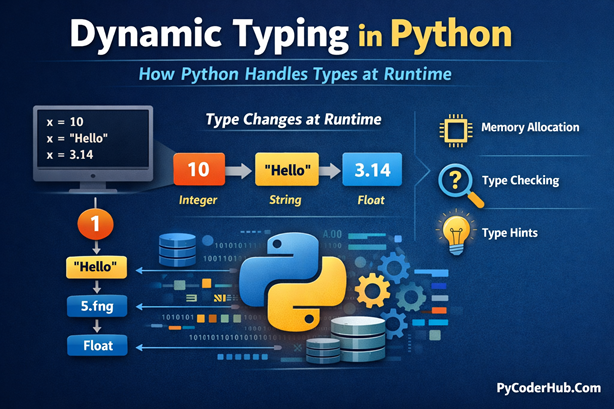
In simple terms, Dynamic Typing in Python means that the type of a variable is decided at runtime, not before the program runs. You don’t need to declare what type a variable should hold in advance. Instead, Python automatically determines the type based on the value assigned at that moment.
When you assign a value to a variable, the Python interpreter:
- Creates an object of the appropriate type
- Binds the variable name to that object
The type decision happens while the program is executing, which is the core idea behind dynamic typing.
A Simple Python Example
sample_value = 10          # sample_value refers to an integer object
sample_value = "Hello"     # now sample_value refers to a string object
Notice what’s happening here:
- You never told Python what type
sample_valueshould be - Python decided the type automatically based on the assigned value
Behind the scenes:
- When
sample_value = 10, Python binds the namesample_valueto an integer object - When
sample_value = "Hello", Python removes that reference and binds the same name to a string object
The variable name didn’t change—the object it points to did.
The Key Rule in Python (Very Important)
To truly understand Dynamic Typing in Python, remember these three rules:
- Variables are just names
- Objects (values) have types
- The binding between a name and an object can change at runtime
In other words:
The type belongs to the object, not to the variable.
This design choice is what allows Python variables to change behavior so easily during execution.
Static Typing vs. Dynamic Typing
To understand Dynamic Typing in Python more clearly, it helps to compare it directly with static typing. Both approaches define how a language handles variable types, but they differ fundamentally in when and how those types are enforced.
Static Typing vs Dynamic Typing (Comparison Table)
| Aspect | Static Typing | Dynamic Typing |
|---|---|---|
| When type is decided | At compile time | At runtime |
| Type declaration | Required explicitly | Not required |
| Can variable change type? | No | Yes |
| Type checking | Before program runs | While program runs |
| Error detection | Early (compile-time) | Later (runtime) |
| Code verbosity | More verbose | More concise |
| Flexibility | Lower | Higher |
| Example languages | Java, C, C++ | Python, JavaScript, Ruby |
| Example | int num = 10; | num = 10 |
| Performance | Faster | Slower |
This table highlights why Dynamic Typing in Python feels more flexible and beginner-friendly, while static typing prioritizes early error detection and strictness.
Comparing Code Examples
Let’s look at the same logic written in a statically typed language and in Python.
Java (Statically Typed)
int num = 10;
num = "Hello";  // Error: incompatible types
Explanation:
- The variable
numis explicitly declared as an integer - Once declared, its type is fixed
- Assigning a string later violates the type contract
- The compiler catches this mistake before the program runs
This is a core characteristic of static typing: the variable owns the type.
Python (Dynamically Typed)
num = 10
num = "Hello"   # Works perfectly
Explanation:
- No type declaration is required
- The type is inferred from the value at runtime
- The variable name
numis simply rebound to a new object - Python allows the type to change during execution
This behavior exists because Dynamic Typing in Python assigns types to objects, not to variable names.
How Dynamic Typing Works in Python
Dynamic Typing in Python is not a surface-level feature—it is deeply rooted in Python’s object model and runtime behavior. To truly understand how dynamic typing works, you need to shift your perspective from “variables storing values” to names referencing objects.
Let’s break this down step by step and see what happens under the hood.
1. Everything in Python Is an Object
In Python, every value is an object, and every object has a well-defined type.
Examples:
5is an object of typeint"hello"is an object of typestr3.14is an object of typefloat- Even functions, classes, and modules are objects
When you write:
numeric_value = 5Python does not store 5 inside numeric_value. Instead:
- Python creates an
intobject representing5 - The variable name
numeric_valuebecomes a reference to that object
This object-centric design is the foundation of Dynamic Typing in Python.
2. Variable Names Are Just Labels
A common beginner misunderstanding is thinking that variables contain values.
In Python, variables are not containers—they are labels (or references) pointing to objects in memory.
Consider this example:
dynamic_data = 100
dynamic_data = "Python"
What actually happens:
- First,
dynamic_datapoints to an integer object (100) - Later, Python creates a new string object (
"Python") - The name
dynamic_datais rebound to the new object - The original integer object may be garbage-collected if no references remain
The variable itself has no fixed type. Only the object it references does.
3. Runtime Type Resolution
Another critical part of Dynamic Typing in Python is runtime type checking.
Python does not decide how operations behave until the program is running. For example:
first_value = 10
second_value = 20
result = first_value + second_value
At runtime, Python:
- Checks the type of
first_value - Checks the type of
second_value - Determines how the
+operator should behave (numeric addition)
Now compare with this:
first_value = "Hello"
second_value = "World"
result = first_value + second_value
Here, the same + operator performs string concatenation, not addition. Python decides this at runtime, based entirely on object types.
This flexibility is powerful—but it also explains why certain type-related errors appear only when the code is executed, not beforehand.
4. Type Information Lives Inside Objects
Every Python object carries its own type information. You can inspect it at any time using built-in tools.
Example:
pi_value = 3.14

print(pi_value.__class__)  # <class 'float'>
print(type(pi_value))      # <class 'float'>
Here:
type()returns the object’s type__class__points to the class that created the object
This internal type metadata is what allows Python to:
- Change variable bindings freely
- Enforce strong typing rules
- Support advanced features like introspection and type hints
Checking the Type of a Variable Using type()
In Dynamic Typing in Python, a variable’s type is not fixed—it can change based on the value assigned at runtime. To inspect what type a variable is currently referring to, Python provides the built-in type() function.
The type() function returns the class of the object that a variable is currently referencing. This makes it especially useful in dynamically typed code, where the same variable name may point to different types at different points during execution.
Basic Usage of type()
Here’s a simple example that shows how the type of a variable can change over time:
data_value = 100
print(type(data_value))    # <class 'int'>

data_value = "Python"
print(type(data_value))    # <class 'str'>

data_value = [1, 2, 3]
print(type(data_value))    # <class 'list'>
Explanation:
- Initially,
data_valuerefers to an integer object - After reassignment, it refers to a string object
- Finally, it points to a list object
Each time, type() correctly reports the current object’s type.
Advantages of Dynamic Typing
One of the biggest reasons behind Python’s widespread adoption is Dynamic Typing in Python. This feature lowers the entry barrier for beginners while enabling experienced developers to build and iterate quickly. Let’s explore the key advantages that dynamic typing brings to real-world Python development.
Rapid Development and Prototyping
With dynamic typing, you can write working code faster because there’s no need to declare variable types upfront. Python lets you focus on logic and problem-solving, not on type definitions.
result = 10
result = result + 5
No type declarations, no extra syntax—just clean and direct code.
High Flexibility
Dynamic typing allows the same variable name to reference different types at different times:
dynamic_data = 123
dynamic_data = "Now I’m a string"
dynamic_data = [1, 2, 3]
Here, the variable dynamic_data:
- Starts as an integer
- Becomes a string
- Later points to a list
This level of flexibility is ideal for experimentation, quick testing, and exploratory coding—especially in interactive environments like notebooks and REPL sessions.
Easy to Write and Easy to Read
Python’s dynamically typed nature makes code cleaner and more readable. You don’t need to clutter your program with type declarations or manual conversions.
first_number = 10
second_number = 20
print(first_number + second_number)
The intent of the code is immediately clear. Python handles the types internally, allowing the code to read almost like plain English.
Polymorphism Made Simple (Duck Typing)
Dynamic typing enables a powerful concept known as duck typing:
“If it looks like a duck and quacks like a duck, it’s a duck.”
Python cares about what an object can do, not what type it claims to be.
Example:
def add(first_value, second_value):
    return first_value + second_value

print(add(5, 3))                 # Works with integers: 8
print(add("hello", "world"))     # Works with strings: helloworld
In this example:
- The
addfunction doesn’t care about types - It only requires that the objects support the
+operator - The same function works across multiple data types
This behavior is a direct benefit of Dynamic Typing in Python, making code more reusable, flexible, and expressive.
Disadvantages of Dynamic Typing
While Dynamic Typing in Python offers flexibility and faster development, it also introduces certain trade-offs that every Python developer should understand—especially when working on large, long-lived, or performance-critical projects. Let’s examine the most common drawbacks in detail.
Runtime Type Errors
One of the biggest downsides of dynamic typing is that type-related errors appear only at runtime, not before execution.
Example:
def add(first_value, second_value):
    return first_value + second_value

print(add(3, "5"))   # TypeError: unsupported operand types
Explanation:
- The function definition itself looks perfectly valid
- The error occurs only when this specific code path is executed
- In a statically typed language, this mistake would likely be caught at compile time
In Dynamic Typing in Python, the interpreter discovers type issues only when the program runs, which can lead to unexpected crashes in production if edge cases are not well tested.
Performance Overhead
Dynamic typing requires Python to:
- Inspect object types during execution
- Resolve method calls dynamically
- Perform runtime checks for every operation
This introduces performance overhead compared to statically typed languages like C or C++, where:
- Types are known in advance
- Many decisions are resolved at compile time
- The generated code can be heavily optimized
While Python is fast enough for most use cases, dynamic typing makes it less suitable for low-level, performance-critical systems without external optimization tools.
Harder Debugging in Large Codebases
As projects grow, dynamic typing can make code harder to reason about.
Consider this situation:
- A variable is reassigned multiple times across functions
- Its type changes based on different execution paths
- An error occurs only in a rare scenario
Because Dynamic Typing in Python does not enforce types upfront, these issues may remain hidden until a specific runtime condition is met. In contrast, statically typed languages catch many of these mistakes early through compile-time checks.
Type Hinting in Python
To reduce some challenges of Dynamic Typing in Python, Python introduced type hints (also called type annotations) in PEP 484. Type hints let you describe the expected data type of a variable or function, without enforcing it at runtime. Python remains dynamically typed—the interpreter simply ignores these hints while executing the code.
A normal variable assignment looks like this:
num_value = 10Here, Python infers the type automatically based on the value. This is pure dynamic typing.
With a type hint, you can write:
num_value: int = 10The : int part is only a hint. It documents your intention but does not restrict what value can be assigned later.
Type Hints Are Not Runtime Checks
Even with type hints, Python allows reassignment to a different type:
num_value: int = 10
num_value = "Hello"
print(num_value)   # Output: Hello
Python does not raise any error because type hints are not enforced at runtime. They exist as metadata, not rules.
Why Type Hinting Still Matters
Type hints are mainly used by IDEs and static type checkers, not by Python itself.
They help:
- IDEs provide better autocomplete and error hints
- Static tools like mypy or pyright detect type mismatches before runtime
For example, a static checker would warn that a variable annotated as int is being assigned a string—something Python itself allows.
Common Misunderstandings About Dynamic Typing
While Dynamic Typing in Python makes the language flexible and beginner-friendly, it also creates a lot of confusion—especially for those coming from statically typed languages. Many misconceptions arise from misunderstanding where types actually live and when they are enforced. Let’s clear up the most common ones.
Misconception 1: “Python variables have types”
This is one of the most common misunderstandings.
In Python, variables themselves do not have types. The objects they reference do.
data_value = 10
print(type(data_value))   # <class 'int'>

data_value = "Python"
print(type(data_value))   # <class 'str'>
Here:
- The variable name
data_valuestays the same - The object it points to changes
- The type belongs to the object, not to the variable
A helpful analogy is to think of variables as name tags. You can remove a name tag from one object and stick it onto another object at any time.
Misconception 2: “Dynamic typing means Python doesn’t care about types”
Dynamic typing does not mean type-free programming.
Python is dynamically typed but strongly typed. Every object has a well-defined type, and Python strictly enforces type rules at runtime.
text_value = "10"
number_value = 5
print(text_value + number_value)   # TypeError
Even though types are decided at runtime, Python will not perform unsafe or implicit type conversions. You can change types freely, but Python still requires operations to make sense.
Misconception 3: “Dynamic typing makes Python slow”
This statement is partially true but often misleading.
Dynamic typing does introduce some overhead because Python must check types during execution:
first_number = 10
second_number = 20
result = first_number + second_number
At runtime, Python checks the types before performing the addition. However, dynamic typing is not the only reason Python is slower than languages like C++.
The bigger reasons include:
- Python being interpreted
- Additional runtime checks
- Memory management overhead
When performance matters, tools like Cython, Numba, or PyPy can optimize type handling and execution speed.
Misconception 4: “Dynamic typing means I don’t need to worry about data types”
Some beginners assume Python will “figure everything out” automatically.
While Python infers types dynamically, you still need to understand what types your code expects and returns.
def divide(first_value, second_value):
    return first_value / second_value

print(divide(10, 2))        # 5.0
print(divide("10", "2"))    # TypeError
Python doesn’t require type declarations, but passing the wrong type will still break your program. Dynamic typing removes declarations—not responsibility.
Misconception 5: “Type hints make Python statically typed”
Adding type hints does not convert Python into a statically typed language.
score: int = 100
print(score)   # Output: 100

score = "High Score"
print(score)   # Output: High Score
Explanation:
- The variable
scoreis annotated withint - Python allows assigning a string later without raising any error
- The program runs normally because type hints are not enforced at runtime
A static type checker, however, would warn:
error: Incompatible types in assignment (expression has type "str", variable has type "int")This clearly shows that type hints do not make Python statically typed.
They only provide guidance for tools and developers, while Dynamic Typing in Python continues to work exactly the same at runtime.
Final Conclusion
Dynamic Typing in Python is a fundamental feature that defines how Python handles variables and data at runtime. By associating types with objects rather than variable names, Python allows developers to write flexible, readable, and expressive code without the overhead of explicit type declarations.
However, dynamic typing does not mean careless typing. Python is still strongly typed, enforces type rules during execution, and requires developers to understand the data flowing through their programs. Tools like type hints and gradual typing enhance code clarity and reliability without changing Python’s runtime behavior. When used thoughtfully, Dynamic Typing in Python becomes a strength that helps developers build clean, maintainable, and scalable applications with confidence.
Suggested Posts:
1. Python Variables Explained in Depth: A Detailed Guide
2. Assigning Multiple Values to Python Variables: A Complete Guide with Examples
3. Variable Unpacking in Python: A Complete Guide with Nested Unpacking Examples
4. Python Variable Naming Rules and Conventions (PEP 8 Explained with Real-World Examples)
5. Strong Typing in Python Explained: Understanding Python’s Type Safety Philosophy
6. Python Variables FAQs: Common Questions Answered for Beginners

14 thoughts on “Dynamic Typing in Python Explained: How Python Handles Types at Runtime”