
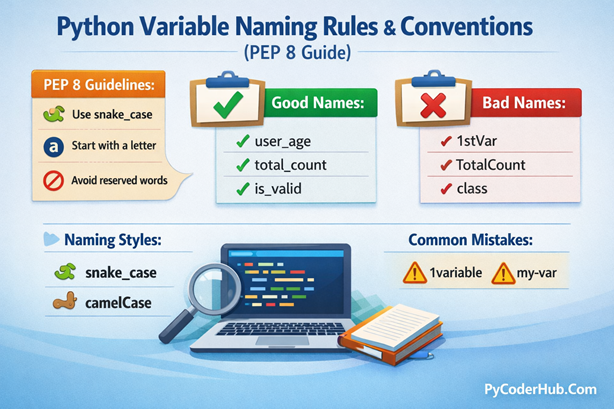
Introduction: Python Variable Naming Rules
Python Variable Naming Rules play a critical role in writing clean, readable, and maintainable Python code. While Python allows you to choose almost any name for a variable, not every name is a good one. Poor naming can create confusion, make code harder to understand, and lead to mistakes—especially in real-world projects and collaborative environments.
In this detailed guide, we will explore why variable names matter, the official Python variable naming rules, and the PEP 8 naming conventions that professional Python developers follow. You’ll also see how different naming styles affect code readability, compare real-world examples, and learn what naming patterns you should avoid as a beginner.
What You’ll Learn in This Guide
- Why Python Variable Naming Rules matter in real-world coding
- Official rules for naming variables in Python
- Python variable naming conventions recommended by PEP 8
- Different naming style variations (snake_case, camelCase, and more)
- Real-world code comparisons showing good vs bad variable names
- Variable names you should never use in Python programs
- Common beginner mistakes related to Python variable naming
- Best practices for writing clean, readable, and maintainable variable names
So before understanding these rules in detail, let’s first understand why writing correct variable names truly matters in Python.
Why Variable Naming Matters in Python
When learning Python, many beginners focus mainly on writing code that works. While that’s important, how your code reads is just as important—especially as programs grow larger. This is where Python Variable Naming Rules become essential.
A well-chosen variable name clearly explains what data the variable holds and why it exists, without requiring extra comments or explanations. Poor naming, on the other hand, creates confusion and forces anyone reading the code (including your future self) to guess what the program is doing.
Good variable naming helps make your code:
- Readable – the purpose of each variable is immediately clear
- Maintainable – easy to update or modify later
- Self-documenting – the code explains itself without comments
- Easier to debug – fewer assumptions and misunderstandings
- Easier for teams to understand – especially in collaborative projects
Bad Variable Naming Example
x = 500
y = x * 0.18
print(y)
At first glance, this code runs without errors—but it raises several questions:
- What does
xrepresent? - What is
ycalculating? - Why is
0.18used here?
This type of naming forces the reader to mentally decode the logic, which becomes harder as the codebase grows. In real-world projects, such unclear naming can easily lead to mistakes or incorrect assumptions.
Improved Variable Naming Example
product_price = 500
gst_rate = 0.18
gst_amount = product_price * gst_rate
print(gst_amount)
Now the same logic is instantly understandable:
product_priceclearly represents the price of a productgst_rateexplains the meaning of the value0.18gst_amounttells us exactly what is being calculated
Without reading any comments, we know this code calculates the GST amount for a product. This is a perfect example of how good naming makes code self-explanatory and professional.
Important Point: The difference between bad and good variable naming is not about syntax—it’s about clarity. Following proper Python Variable Naming Rules ensures your code is easier to read, easier to maintain, and far less prone to confusion.
Mandatory Python Variable Naming Rules (You Must Follow These)
Python enforces a strict set of rules when it comes to naming variables. These are not style guidelines—they are mandatory language rules. If you break any of them, Python will immediately raise a SyntaxError before your code even runs.
In this section, we’ll go through each rule in detail, look at valid and invalid examples, understand why the rule exists, and see how it affects real-world Python code.
Rule 1: Variable Names Must Start with a Letter or Underscore
In Python, a variable name must begin with:
- A lowercase letter (
a–z) - An uppercase letter (
A–Z) - An underscore (
_)
It cannot start with a number or special character.
Valid Examples
my_variable = 10
_private_data = "confidential"
UserName = "user_01"
Invalid Examples
1st_number = 5      # SyntaxError: invalid decimal literal
#@invalid_char = "hello"  # SyntaxError: invalid character in identifier
Why this rule exists:
Python uses numbers at the beginning of tokens for numeric literals. Allowing variables to start with numbers would create confusion during parsing.
Best practice: Always ensure your variable names start with meaning, not numbers. If you need numbers, place them later in the name.
Rule 2: After the First Character, Use Only Letters, Numbers, and Underscores
Once the first character is valid, Python allows:
- Letters (
a–z,A–Z) - Numbers (
0–9) - Underscores (
_)
Spaces and special symbols are not allowed.
Valid Examples
value1 = 10
user_name2 = "A"
total_3 = 300
Invalid Examples
user-name = "A"     # Hyphens are not allowed
price%off = 50      # Special characters are not allowed
Why this rule exists:
Characters like - and % already have special meanings in Python (subtraction, modulo). Using them in variable names would break the language syntax.
Best practice: Use underscores instead of spaces or hyphens to separate words.
Rule 3: Variable Names Are Case-Sensitive
Python treats uppercase and lowercase letters as completely different identifiers.
count = 10
Count = 20
COUNT = 30
All three variables above are distinct and unrelated.
Why this matters:
While case sensitivity gives flexibility, it can also introduce subtle bugs if naming is inconsistent.
Best practice: Stick to a single naming style (usually lowercase with underscores) to avoid confusion.
Rule 4: Variable Names Cannot Be Python Keywords
Python has a set of reserved keywords that are part of its syntax. These words have special meanings and cannot be used as variable names.
Some common Python keywords include:
class, def, for, while, return, pass,
break, continue, True, False, None
Invalid Example
class = 5 # SyntaxErrorValid Alternative
class_num = 5Why this rule exists:
Keywords are fundamental to how Python understands and executes code. Allowing them as variable names would break the language structure.
Tip: If a word feels “special” in Python, it’s probably a keyword—don’t use it as a variable name.
Rule 5: Do Not Use Built-in Function Names (Strongly Recommended)
Although Python technically allows it, you should never name variables after built-in functions such as:
print, input, len, sum, list, dictDoing so will override the original function, making it unusable in that scope.
What NOT to Do
print = "This is a string"Now, if you try to call:
print("Hello")Python raises:
TypeError: 'str' object is not callableWhat happened here?
printis a valid identifier- But it’s also a built-in function
- Assigning a value to
printshadows (overrides) the original function - Python now treats
printas a string, not a function
Best practice: Even if Python allows it, overriding built-in names leads to confusion, bugs, and broken code.
Rule 6: Variable Names Cannot Contain Spaces
In Python, spaces are not allowed in variable names. A space breaks the identifier and causes Python to misinterpret the variable as multiple tokens, resulting in a SyntaxError.
Invalid Example
user name = "PyCoder"Python treats user and name as separate elements, which makes the code invalid.
Valid Example
user_name = "PyCoder"Why this rule exists:
Spaces are used in Python to separate different parts of a statement. Allowing them inside variable names would confuse the interpreter.
Best practice: Use underscores (
_) to separate words when a variable name contains multiple terms.
Rule 7: Special Characters Are Not Allowed in Variable Names
Python does not allow special characters such as:
@ # $ % & * -These characters already have specific meanings in Python’s syntax and operators.
Invalid Examples
user-name = "dash_not_allowed"   # Hyphen is not allowed
user@email = "test@test.com"     # @ symbol is not allowed
$amount = 100                    # Dollar sign is not allowed
Each of the above examples will raise a SyntaxError.
Why this rule exists:
Special characters are reserved for operators and expressions. Using them in variable names would interfere with Python’s parsing logic.
Best practice: Stick to letters, numbers, and underscores only.
Rule 8: Variable Names Should Be Meaningful but Not Overly Long
Python allows long variable names, but longer is not always better. A variable name should clearly describe its purpose without becoming difficult to read or maintain.
Bad Example
totalNumberOfUsersWhoLoggedInToday = 55While this name is descriptive, it is unnecessarily long and reduces readability.
Better Example
logged_in_users = 55This version is:
- Clear
- Concise
- Easy to read
- Easy to reuse
Best practice: Choose names that are descriptive enough to explain the data, but short enough to keep your code clean.
Final Takeaway
These rules form the foundation of Python Variable Naming Rules. Breaking them will either:
- Cause immediate syntax errors, or
- Introduce hard-to-debug logic issues
In the next section, we’ll move beyond mandatory rules and explore PEP 8 naming conventions, which focus on writing clean, readable, and professional Python code.
Python Naming Conventions (PEP 8 Recommended Best Practices)
If Python variable naming rules are the laws of the language, then naming conventions are the etiquette. These conventions are not enforced by the Python interpreter, but they are essential for writing clean, readable, and professional code.
All official naming conventions are defined in PEP 8, Python’s style guide. Following PEP 8makes your code instantly familiar to other Python developers and significantly improves collaboration, readability, and long-term maintenance.
Convention 1: Use snake_case for Variables and Functions
According to PEP 8, regular variables and function names should use lowercase letters, with words separated by underscores (_). This style is known as snake_case and is the most widely accepted naming convention in Python.
Good Examples
# Variables
user_name = "charlie"
account_balance = 1050.75
is_logged_in = True

# Functions
def calculate_area(length, width):
    return length * width

def get_user_data(user_id):
    pass
Non-Pythonic Examples
# camelCase (common in JavaScript, not Python)
userName = "charlie"
calculateArea(a, b)

# PascalCase (reserved for classes)
UserName = "charlie"

# Hard to read
accountbalance = 1050.75
Why snake_case matters:
It improves readability, matches the standard library style, and makes your code look immediately “Pythonic.”
Convention 2: Use UPPER_SNAKE_CASE for Constants
Python does not have true constants, but PEP 8 defines a strong convention for values that should not be changed. These names are written in all uppercase letters, with underscores separating words.
Good Examples
PI = 3.14159
GRAVITY = 9.8
MAX_CONNECTION_ATTEMPTS = 5
API_BASE_URL = "https://api.example.com/v1/"
Why this convention matters:
It clearly signals that these values are configuration settings or fixed constants, even though Python technically allows reassignment.
Convention 3: Use a Single Leading Underscore for Internal Variables
A variable or method prefixed with a single underscore (_) indicates that it is intended for internal use only within a module or class.
Python does not enforce privacy, but this naming convention acts as a clear warning to other developers.
class ApiClient:
    def __init__(self, api_key):
        self.api_key = api_key
        self._internal_cache = {}

    def _make_request(self, endpoint):
        pass
Important note: This is a convention, not a security mechanism. It communicates intent, not restriction.
Convention 4: Understand Special “Dunder” (Double Underscore) Names
Names with double leading and trailing underscores are called dunder (double underscore) variables or methods. These have special meanings in Python’s data model.
You should never create your own dunder names unless Python explicitly defines them.
Common examples include:
__name__   # Indicates how a module is executed
__init__  # Class initializer
__str__   # String representation of an object
Rule: Use dunder names only when Python requires them.
Convention 5: Use _ for Intentionally Unused Variables
When a variable is required by syntax but its value is intentionally ignored, PEP 8 recommends using a single underscore (_) as a throwaway variable.
# Loop where the counter is not needed
for _ in range(5):
    print("Hello!")

# Tuple unpacking where only one value matters
_, middle_name, _ = ("John", "Fitzgerald", "Kennedy")
print(middle_name)
This clearly communicates that the unused values are intentionally ignored.
Convention 6: Choose Descriptive and Meaningful Names
Variable names should clearly describe what the data represents, not just store a value.
Poor Examples
d = 10
temp = 5
info = "python"
Better Examples
download_speed = 10
retry_limit = 5
language_name = "Python"
Tip: Good naming reduces confusion and removes the need for comments.
Convention 7: Avoid One-Letter Names (Except in Specific Cases)
Single-letter variable names are acceptable only in limited contexts, such as loop counters.
Acceptable Usage
for i in range(10):
    print(i)
Avoid in General Code
x = 10
y = 20
z = 30
Best Practices: Outside of loops, one-letter names hide intent and reduce readability.
Convention 8: Use Nouns for Variables and Verbs for Functions
A simple rule that greatly improves clarity:
- Variables should represent data → use nouns
- Functions perform actions → use verbs
Example: Variables
user_list
file_path
login_status
Example: Functions
get_user()
insert_data()
validate_email()
Final Takeaway
Following these PEP 8 naming conventions alongside mandatory Python Variable Naming Rules helps you write code that is:
- Clean
- Readable
- Professional
- Easy to maintain
- Instantly recognizable to other Python developers
Naming Suggestions in Different Coding Contexts
While Python Variable Naming Rules and PEP 8 conventions provide a solid foundation, good naming also depends on context. Different types of data benefit from slightly different naming patterns that make the code easier to read and understand at a glance.
Below are context-specific naming suggestions commonly used in real-world Python code.
Naming Variables for Strings
String variables usually store textual information, such as names, labels, messages, or locations. The variable name should clearly indicate what kind of text it holds.
Recommended Examples
user_name = "PyCoder"
city_name = "Earth"
Why this works:
- The names clearly describe the content
- The
_namesuffix signals a string value - Easy to understand without comments
Naming Variables for Numbers (Integers & Floats)
Numeric variables often represent counts, limits, totals, or measurements. The name should describe the meaning of the number, not just the value.
Recommended Examples
age = 21
max_retries = 3
Why this works:
ageclearly represents a person’s agemax_retriesexplains why the number exists- Avoids magic numbers with unclear purpose
Naming Variables for Lists
Lists usually store collections of related values. A good practice is to use plural nouns or add context to show that the variable contains multiple items.
Recommended Example
prices_list = [100, 200]Why this works:
- The plural idea (
prices) indicates multiple values - Makes it clear the variable holds a collection
- Improves readability in loops and conditions
Naming Variables for Boolean Values
Boolean variables should always read like yes/no questions. This makes conditional statements almost read like natural language.
Recommended Examples
is_logged_in = True
has_permission = False
can_execute = True
Why this works:
- Prefixes like
is_,has_, andcan_clearly indicate boolean intent - Conditions become self-explanatory:
if is_logged_in:
    pass
Naming Functions and Methods
Functions and methods perform actions, so their names should start with verbs. A good function name explains what the function does without reading its body.
Recommended Examples
def calculate_total():
    pass

def get_user_info():
    pass

def validate_email_format():
    pass

def send_notification():
    pass
Why this works:
- Verb-based naming clearly signals action
- Improves readability and discoverability
- Matches PEP 8 recommendations
Naming in Data Science and Machine Learning Contexts
In data science and machine learning, naming conventions slightly differ due to industry standards. Short but well-understood names are commonly used.
Common ML Naming Conventions
X = features_matrix        # Feature matrix
y = target_values          # Target labels

X_train, X_test = split    # Training and test datasets
y_pred = model.predict(X)  # Model predictions
Why this works:
Xandyare widely accepted conventions in MLX_train/X_testclearly indicate data purposey_predclearly represents predicted output
Important note: These short names are acceptable only because they are industry-standard in data science contexts. In general Python code, descriptive names are still preferred.
Key Takeaway
Good naming is not just about following rules—it’s about choosing the right name for the right context. By adapting your variable and function names based on data type and usage, you make your Python code clearer, more expressive, and easier to maintain.
Python Naming Style Variations (With Best-Use Cases)
When writing Python code, you’ll encounter several naming style variations, often called naming cases. While Python is flexible and technically allows many styles, PEP 8 recommends specific patterns to keep your code clean, readable, and consistent.
Let’s go through the most common Python naming styles and see where each one fits.
1. snake_case (PEP 8 Recommended)
This is the most important and widely used naming style in Python. PEP 8 recommends snake_case for:
- Variables
- Functions
- Methods
Words are written in lowercase and separated by underscores.
Example
file_name = "data.txt"

def calculate_total():
    pass
Why it’s recommended:
snake_caseimproves readability and matches the style used throughout Python’s standard library.
2. PascalCase (PEP 8 Recommended for Classes)
PascalCase capitalizes the first letter of each word and is reserved exclusively for class names.
class UserProfile:
    pass
Important rule: Do not use
PascalCasefor variables or functions—doing so makes code harder to read and breaks Python conventions.
3. camelCase (Allowed but Not Pythonic)
camelCase is popular in languages like Java and JavaScript, but it is rarely used in Python.
Example:
userName = "charlie"Why to avoid it: Although valid,
camelCaselooks out of place in Python code and reduces consistency with PEP 8.
4. SCREAMING_SNAKE_CASE (For Constants)
This style is used for module-level constants—values that should not change during program execution.
Example
MAX_RETRIES = 5Why it’s useful: It visually signals that the value is a constant, even though Python does not enforce immutability.
5. single_leading_underscore (Internal or “Private” Use)
A single leading underscore indicates that a variable or method is intended for internal use only.
Example
_internal_value = 10Key point: This is a convention, not a security feature. Python does not enforce access restrictions.
6. double_leading_underscore (Name Mangling)
Using double leading underscores triggers name mangling inside classes. This helps avoid accidental overrides in subclasses.
Example:
class Example:
    def __secret(self):
        pass
Python internally renames the method to include the class name, making it harder to access unintentionally.
Tip: This is an advanced feature and should not be overused.
7. __double_underscore_prefix_and_suffix__ (Dunder Methods)
Names with double leading and trailing underscores are special methods defined by Python itself.
Common Examples
__init__
__str__
__len__
Important rule: Never create your own dunder names. Use them only when Python defines their purpose.
8. UPPERCASE (Rare Alternative for Constants)
Sometimes constants are written in plain uppercase without underscores.
Example
PI = 3.14Recommendation: This is acceptable for very short names, but SCREAMING_SNAKE_CASE is preferred for clarity and consistency.
9. kebab-case (Not Allowed in Python)
kebab-case uses hyphens (-) between words. This style is invalid in Python because - is the subtraction operator.
Invalid Example
user-name = "abc" # SyntaxErrorTip: Always use underscores instead of hyphens.
10. Mixed Naming Styles (Allowed but Strongly Discouraged)
Python allows mixed styles, but they make code hard to read and inconsistent.
Example
user_Name = "abc"Why to avoid this: Mixing styles confuses readers and breaks visual consistency across your codebase.
Final Takeaway
Python supports many naming styles, but PEP 8 clearly defines which ones you should use and when. Sticking to the recommended styles ensures your code is:
- Consistent
- Readable
- Professional
- Easy to maintain
Common Naming Anti-Patterns: What Not to Do in Python
Understanding Python Variable Naming Rules is only half the battle. The other half is learning which naming habits hurt readability, create confusion, and lead to bugs.
Below are some of the most common naming anti-patterns you should actively avoid when writing Python code.
1. The Problem with Vague and Meaningless Names
Names like data, info, val, process, or handle may feel convenient at first, but they provide almost no information about what the code is actually doing.
Bad Example
def process(data):
    val = data[0]
    info = data[1]
    # ... many lines of code ...
    return val * info
This raises several questions:
- What does
processactually do? - What does
datacontain? - How are
valandinforelated?
You’re forced to read the entire function just to understand its purpose.
Improved Example
def calculate_total_price(items_in_cart):
    price_of_first_item = items_in_cart[0]
    quantity_of_first_item = items_in_cart[1]
    # ... many lines of code ...
    return price_of_first_item * quantity_of_first_item
Now the intent is clear:
- The function calculates a total price
- The input data is meaningful
- The relationship between variables is obvious
2. Don’t Shadow Python Built-in Names
Python provides many built-in functions and types such as:
list, dict, str, sum, max, minUsing these names for your variables is called shadowing, and it can silently break your code.
Bad Example
items = [1, 2, 3]
list = items.append(4)
print(list([5, 6]))  # TypeError
Here’s what went wrong:
listwas reassigned to a variable- The built-in
list()function is now inaccessible - The error appears far away from the real mistake
Correct Approach
item_list = [1, 2, 3]
item_list.append(4)

new_list = list(range(5))  # Built-in remains usable
Never reuse names of Python built-ins—even if the code seems to work at first.
3. The Danger of Ambiguous Single-Letter Names
Single-letter names are acceptable only in very limited cases, such as loop counters or mathematical formulas. Some letters should be avoided entirely.
Worst Offenders
l O IThese characters are easily confused with:
1 0 1Bad Example
l = 1
O = 0
I = l
This code forces the reader to stop and decipher characters, breaking flow and increasing mistakes.
Clear Alternative
index = 1
offset = 0
item_count = index
Clarity is always more important than brevity—especially when debugging.
4. Keep Naming Consistent Across Files and Modules
Inconsistent naming makes code harder to search, understand, and maintain.
Inconsistent
user_name = "PyCoder"
username = "PyCoder"
Consistent
user_name = "PyCoder"Once you choose a naming style, stick to it everywhere.
5. Avoid Unclear or Overly Short Abbreviations
Abbreviations often save a few keystrokes but cost clarity.
Bad Examples
usrnm, amt, qtyBetter Alternatives
user_name
amount
quantity
If the full word is commonly understood, write it out.
6. Avoid Plural Naming Confusion
Plural names should always represent collections, not single values.
Confusing Example
users = "PyCoder"Correct Usage
user = "PyCoder"
users = ["PyCoder", "Python"]
Singular names for single items, plural names for collections.
Final Takeaway
Most naming mistakes don’t break Python syntax—but they break readability. Avoiding these anti-patterns will help you write code that is:
- Easier to understand
- Easier to debug
- Easier to maintain
- More professional
Tools and Automation for Naming Enforcement
Following Python Variable Naming Rules consistently is easier with the right tools. Modern Python tooling can automatically detect and prevent poor naming practices.
- Linters (pylint, flake8):
Flag naming convention violations, shadowed built-ins, and inconsistent variable names. - Formatters (black):
Enforce a clean, consistent code style that aligns with PEP 8. - Static Analyzers (mypy):
Encourage clearer variable naming through type hints and static checks. - IDE Support (PyCharm, VS Code):
Highlight naming issues in real time, suggest better names, and warn about shadowing built-ins.
Key takeaway:
Use automation as a safety net—it helps you follow Python naming conventions without relying only on manual checks.
Conclusion
Mastering Python Variable Naming Rules is not just about avoiding syntax errors—it’s about writing code that is clear, readable, and easy to maintain. By understanding why variable names matter, following mandatory naming rules, applying PEP 8 conventions, and avoiding common anti-patterns, you build a strong foundation for writing clean and professional Python code.
Suggested Posts:
1. Python Variables Explained in Depth: A Detailed Guide
2. Assigning Multiple Values to Python Variables: A Complete Guide with Examples
3. Variable Unpacking in Python: A Complete Guide with Nested Unpacking Examples
4. Dynamic Typing in Python Explained: How Python Handles Types at Runtime
5. Strong Typing in Python Explained: Understanding Python’s Type Safety Philosophy
6. Python Variables FAQs: Common Questions Answered for Beginners

6 thoughts on “Python Variable Naming Rules and Conventions (PEP 8 Explained with Real-World Examples)”