
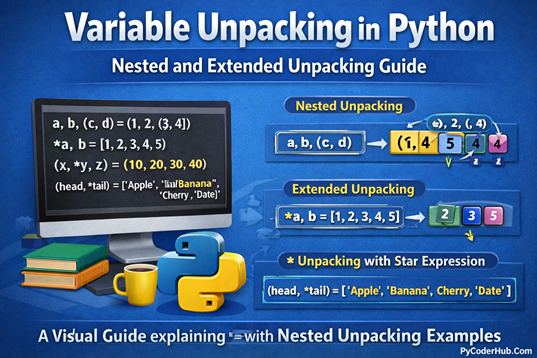
Introduction to Variable Unpacking in Python
In the previous chapter, we explored multiple assignment in Python variables, where we briefly touched on some basic examples of unpacking. Those examples showed what unpacking looks like—but not how it really works behind the scenes.
In this detailed guide, we’ll dive deep into Variable Unpacking in Python, breaking down its rules, common pitfalls, and real-world use cases. You’ll also learn how nested unpacking works and clearly understand the difference between Variable Unpacking vs. Collection Unpacking, a topic that often causes confusion for beginners.
By the end of this post, you’ll be able to use variable unpacking confidently and write cleaner, more Pythonic code.
What You’ll Learn in This Guide
- What Variable Unpacking is and how it works in Python
- The mandatory rules for unpacking that Python enforces
- Common unpacking errors, why they occur, and how to avoid them
- How star (
*) expressions enable extended unpacking - How nested unpacking works with complex data structures
- The clear difference between Variable Unpacking and Collection Unpacking
Let’s begin by understanding the core concept: what variable unpacking actually means in Python.
What Is Variable Unpacking in Python?
Variable unpacking is the process of assigning elements from an iterable (such as lists, tuples, strings, sets, or any iterable object) directly into multiple variables in a single statement. It makes assignments cleaner, easier to read, and more Pythonic.
It means Python takes an iterable and distributes its individual elements across multiple variables, based on position.
Example
math_score, science_score, english_score = [78, 85, 90]

print(math_score)      # Output: 78
print(science_score)   # Output: 85
print(english_score)   # Output: 90
print(math_score, science_score, english_score)
# Output: 78 85 90
Here, Python assigns each value from the list to the corresponding variable.
Any Iterable Can Be Unpacked
Unpacking a list
theme_colors = ["red", "green", "blue"]
primary_color, secondary_color, accent_color = theme_colors

print(primary_color, secondary_color, accent_color)
# Output: red green blue
Unpacking a string
first_char, second_char, third_char = "YES"

print(first_char)   # Output: Y
print(second_char)  # Output: E
print(third_char)   # Output: S
Each character in the string is treated as a separate element during unpacking.
Mandatory Rule for Unpacking
The number of variables on the left must match the number of values on the right, unless you use extended unpacking (*), which we’ll learn later in this section.
If this rule is violated, Python raises a ValueError.
Example (Correct Unpacking)
start_year, end_year = 2020, 2025

print(start_year)  # Output: 2020
print(end_year)    # Output: 2025
Here, the number of variables and values match, so unpacking works without any error.
Example (Incorrect Unpacking)
start_year, end_year = 2020, 2025, 2030- The right side has 3 values
- The left side has 2 variables
Python raises:
ValueError: too many values to unpackThis rule ensures that each variable receives exactly one value, keeping unpacking predictable and error-free—unless extended unpacking is intentionally used.
Unpacking Errors (Causes & Examples)
Error 1: Too Many Values to Unpack
This occurs when the iterable contains more values than the number of variables.
start_date, end_date = 2023, 2024, 2025Cause:
- Right side has 3 values
- Left side has 2 variables
Python raises:
ValueError: too many values to unpackError 2: Not Enough Values to Unpack
This happens when the iterable contains fewer values than the number of variables.
city_name, state_name, country_name = "Paris", "France"Cause:
- Left side expects 3 values
- Right side provides only 2
Python raises:
ValueError: not enough values to unpackNote:
At this point, we’ve completed the basics of variable unpacking in Python, including examples, mandatory rules, and common unpacking errors. Now that the foundation is clear, we’ll move on to the next topic—extended unpacking using the star (*) expression, which allows more flexible and powerful assignments.
Star (*) Expressions: Extended Unpacking
Python provides a flexible feature called extended unpacking, which uses the asterisk (*) operator. It allows you to capture multiple values into a single variable, removing the strict rule that the number of variables must exactly match the number of values.
Basic Concept
In extended unpacking, you place * before one variable on the left-hand side. Python then packs all remaining values into that variable as a list.
Only one starred (
*) variable is allowed in an unpacking assignment.
Example 1: Capture Remaining Values
first_item, *remaining_items = [10, 20, 30, 40]

print(first_item)        # Output: 10
print(remaining_items)  # Output: [20, 30, 40]
Explanation
- The first value (
10) is assigned tofirst_item - The
*remaining_itemsexpression tells Python to collect all leftover values - Python packs
20, 30, 40into a new list and assigns it toremaining_items
Example 2: Capture Middle Values
start_value, *middle_values, end_value = [1, 2, 3, 4, 5]

print(start_value)    # Output: 1
print(middle_values)  # Output: [2, 3, 4]
print(end_value)      # Output: 5
Explanation
- The first value (
1) goes tostart_value - The last value (
5) goes toend_value - The
*middle_valuesexpression captures everything in between - Python packs
2, 3, 4into a list
Example 3: Capture First Values
*initial_values, final_value = [100, 200, 300]

print(initial_values)  # Output: [100, 200]
print(final_value)     # Output: 300
Explanation
- The starred variable
*initial_valuescollects all values except the last one - Python packs
100and200into a list - The final value (
300) is assigned tofinal_value
Example 4: Extended Unpacking with Strings
first_char, *middle_chars, last_char = "Python"

print(first_char)     # Output: P
print(middle_chars)   # Output: ['y', 't', 'h', 'o']
print(last_char)      # Output: n
Explanation
- Strings are iterables, so they can be unpacked like lists or tuples
- The first character (
'P') is assigned tofirst_char - The last character (
'n') is assigned tolast_char - The
*middle_charsexpression captures all characters in between as a list
Important Points:
- The
*operator enables flexible unpacking - It collects multiple values into a list
- Only one starred variable is allowed per unpacking assignment
- Extended unpacking is extremely useful when dealing with unknown or variable-length data
Important Rules for Extended Unpacking
Extended unpacking with the * operator is powerful, but it follows strict rules. Understanding these rules will help you avoid syntax errors and confusion.
Rule 1: Only One Star Expression Is Allowed
You can use only one starred (*) variable in an unpacking assignment.
*first_part, *second_part, last_part = [1, 2, 3]
# SyntaxError
Python does not allow multiple * expressions because it would be unclear how to split the values.
Rule 2: Star Variable Always Receives a List
Even if the starred variable collects no values, it still receives an empty list.
first_value, *remaining_values = [10]

print(remaining_values)
# Output: []
This behavior is consistent and predictable, making it safe to use in conditional logic.
Rule 3: Star Unpacking Works Only Inside an Assignment Target List
The * operator for unpacking must be used on the left-hand side as part of an assignment target list.
Correct Usage (Inside an Assignment Target List)
main_value, *extra_values = [10, 20, 30]

print(main_value)    # Output: 10
print(extra_values)  # Output: [20, 30]
Here, *extra_values is part of the left-hand assignment target, so unpacking works correctly.
Incorrect Usage (Not Allowed Alone on the Right Side)
values = *[1, 2, 3]
# SyntaxError*data_values = 1, 2, 3
# SyntaxErrorIn these cases, the star expression is not inside a valid assignment target, so Python raises a syntax error.
Valid Use of Star on the Right Side (Inside Another Iterable)
You can use star unpacking on the right-hand side only when it is inside another iterable literal, such as a list or tuple.
combined_values = [1, 2, *[3, 4], 5]

print(combined_values)
# Output: [1, 2, 3, 4, 5]
Why this works
- The star expression is inside a list literal
- You are building a new collection, not unpacking into variables
- Python expands the iterable before creating the final list
Now, let’s move on to the next topic: Nested Unpacking in Python, where we’ll see how unpacking works with nested data structures and more complex real-world patterns.
Nested Unpacking in Python
Nested unpacking is an advanced form of variable unpacking where Python extracts values from nested data structures, such as lists inside lists, tuples inside lists, or deeply nested iterables. It allows you to assign values at different levels of a structure in a single, readable statement.
What Is Nested Unpacking?
Nested unpacking means unpacking values from a nested iterable by matching its internal structure on the left-hand side.
If the iterable on the right contains lists or tuples inside each other, the assignment targets on the left must follow the same nesting pattern.
In simple words:
You create a shape on the left side that mirrors the shape of the data on the right side, and Python fills in the values accordingly.
Basic Examples of Nested Unpacking
Example 1: Simple Two-Level Unpacking
nested_data = (1, (2, 3))

outer_value, (inner_value_one, inner_value_two) = nested_data

print(outer_value)        # Output: 1
print(inner_value_one)    # Output: 2
print(inner_value_two)    # Output: 3
Explanation:
- The outer tuple
(1, (2, 3))matches the unpacking pattern. outer_valuereceives1.(inner_value_one, inner_value_two)unpacks the inner tuple(2, 3).
Example 2: Unpacking a List Containing a Tuple
point_data = [10, (20, 30)]

x_coordinate, (y_coordinate, z_coordinate) = point_data

print(x_coordinate)  # Output: 10
print(y_coordinate)  # Output: 20
print(z_coordinate)  # Output: 30
Example 3: Unpacking Coordinate Data
coordinates = (1, 2, (3, 4))

x_axis, y_axis, (z_axis, w_axis) = coordinates

print(x_axis, y_axis, z_axis, w_axis)  # Output: 1 2 3 4
Example 4: Deeply Nested Structure
nested_values = [1, [2, [3, 4]]]

first_value, [second_value, [third_value, fourth_value]] = nested_values

print(first_value)   # Output: 1
print(second_value)  # Output: 2
print(third_value)   # Output: 3
print(fourth_value)  # Output: 4
Nested Unpacking with Star (*) Expressions
Nested unpacking can be combined with extended unpacking (*) to capture multiple values at a specific nesting level.
Example 1: Using * Inside Nested Unpacking
nested_data = [1, (2, 3, 4, 5)]

first_item, (second_item, *remaining_items) = nested_data

print(first_item)        # Output: 1
print(second_item)       # Output: 2
print(remaining_items)   # Output: [3, 4, 5]
Explanation:
second_itemreceives the first value of the inner tuple.*remaining_itemscollects all remaining inner values into a list.
Example 2: Star Unpacking Across Multiple Levels
complex_data = (10, [20, 30, 40, 50], 60)

start_value, [middle_first, *middle_rest], end_value = complex_data

print(start_value)    # Output: 10
print(middle_first)   # Output: 20
print(middle_rest)    # Output: [30, 40, 50]
print(end_value)      # Output: 60
Common Errors with Nested Unpacking
Error 1: Structure Mismatch
first_value, (second_value, third_value) = (1, 2, 3)Why this fails:
The left side expects two items:
- one standalone value
- one nested pair
But the right side provides three flat values, causing Python to raise a ValueError.
Error 2: Inner Structure Mismatch
first_value, (second_value, third_value) = (1, (2, 3, 4))Why this fails:
The inner tuple contains three values, but (second_value, third_value) expects only two, resulting in a ValueError.
Note: Nested unpacking is extremely powerful, but it requires the left-hand structure to precisely match the shape of the data. When used correctly, it leads to concise, expressive, and highly readable Python code.
Variable Unpacking vs. Collection Unpacking
Unpacking in Python is a single core mechanism, but developers often describe it using two different terms: variable unpacking and collection unpacking. These terms do not represent separate features—instead, they highlight two different perspectives of the same operation.
What Is Variable Unpacking? (Left-Side Perspective)
Variable unpacking focuses on the variables receiving the values during assignment. Multiple variables are assigned values from an iterable in a single statement.
a, b, c = [10, 20, 30]Meaning:
The variables a, b, and c unpack the values from the iterable and receive them individually.
What Is Collection Unpacking? (Right-Side Perspective)
Collection unpacking focuses on the iterable or collection being broken apart. The emphasis is on how Python separates the values inside the collection.
a, b, c = [10, 20, 30]Meaning:
The list [10, 20, 30] is unpacked into individual elements before being assigned to variables.
Example Showing Both Concepts Together
x, y, z = (100, 200, 300)- Variable unpacking:
x,y, andzreceive the values. - Collection unpacking: The tuple
(100, 200, 300)is unpacked into separate elements.
Summary
- Variable unpacking and collection unpacking are not different features.
- They are two ways to describe the same unpacking behavior in Python.
- Choose the term based on your explanation focus:
- Focus on the iterable → collection unpacking
- Focus on the variables → variable unpacking
Understanding this distinction helps reduce confusion in documentation and discussions while reinforcing how Python’s unpacking mechanism truly works.
Conclusion
Variable Unpacking in Python is a powerful feature that helps you write cleaner, more readable, and more expressive code. In this guide, we explored the core concepts of unpacking, including mandatory rules, common errors, and how extended unpacking with the star (*) expression adds flexibility to variable assignment. We also covered nested unpacking and clarified the difference between variable unpacking and collection unpacking, helping reduce common confusion around these topics. With a solid understanding of these concepts, you can confidently handle complex data structures and write more Pythonic code in real-world applications.
Suggested Posts:
1. Python Variables Explained in Depth: A Detailed Guide
2. Assigning Multiple Values to Python Variables: A Complete Guide with Examples
3. Python Variable Naming Rules and Conventions (PEP 8 Explained with Real-World Examples)
4. Dynamic Typing in Python Explained: How Python Handles Types at Runtime
5. Strong Typing in Python Explained: Understanding Python’s Type Safety Philosophy
6. Python Variables FAQs: Common Questions Answered for Beginners


6 thoughts on “Variable Unpacking in Python: A Complete Guide with Nested Unpacking Examples”