
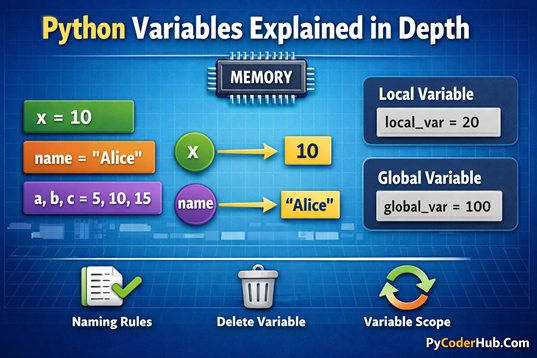
Introduction: Understanding Python Variables
If you are learning Python, understanding variables is one of the very first and most important steps. Variables act like containers that store data your program needs to work with. Without variables, you wouldn’t be able to save user input, perform calculations, keep track of values, or manipulate text in a meaningful way.
In this post, we’ll break down Python variables step by step. You’ll learn what variables actually are, how to name them correctly, and how Python manages memory behind the scenes—often in a very different way compared to other programming languages. We’ll also cover best practices that help you write clean, readable, and maintainable Python code, so you can avoid common beginner confusion and build a strong foundation for future topics.
What is a variable in Python?
In real life, we store items in different boxes and label them with names to remember what’s inside. Similarly, in Python, we store values and assign names to them. These names are called variables, and each variable holds a value
A variable in Python is a name that refers to a value stored in memory. Instead of working directly with raw data, Python allows you to assign a meaningful name to a value so that you can reuse it, modify it, and refer to it throughout your program.
In simple terms, a variable acts as a label for data. This label makes your code easier to read, understand, and maintain. For example, instead of remembering a number like 98.5, you can store it in a variable named student_score and use that name wherever needed in your program.
Example:
student_score = 98.5
print('I get', student_score) # Output: I get 98.5
Unlike some other programming languages, Python does not require you to declare a variable’s type in advance. A variable is created automatically when you assign a value to it. This makes Python flexible and beginner-friendly, but it also means that understanding how variables work is especially important.
In short, a Python variable:
- Is a name that refers to a value
- Is created automatically when a value is assigned
- Can hold different kinds of values
- Can be reassigned to point to a new value
- Plays a central role in how Python programs work
Understanding this concept clearly will make it much easier to learn topics like data types, conditions, loops, functions, and memory behavior in Python.
Creating and Assigning Variables in Python
In Python, creating a variable is simple: you just choose a meaningful name and assign a value to it using the assignment operator (=). There’s no need to declare the variable type beforehand, because Python is a dynamically typed language—it automatically detects the type based on the value you assign.
Basic Variable Creation and Assignment
Here’s an example:
student_name = "Alice"
student_score = 95
is_passed = Truestudent_nameholds a string value"Alice"student_scoreholds an integer value95is_passedholds a Boolean valueTrue
Python creates these variables as soon as the assignment is made, and the variable names now refer to the values in memory.
Some More Examples
Example 1: Three Different Variables and Printing One
name = "Alice"
age = 20
score = 95

print(score)
Output:
95Explanation:
- Here, we created three different variables:
name,age, andscore. - Each variable holds its own value.
- When we call
print(score), Python looks up the variablescorein memory and prints its value (95). - The other variables (
nameandage) are ignored because they were not referenced in this statement. - This demonstrates that only the variable being called shows its value in the output.
Example 2: Reassigning a Variable
value = 10
print("First value:", value)

# Update the variable with a new value
value = 25
print("Updated value:", value)
Output:
First value: 10
Updated value: 25
Step-by-Step Explanation:
value = 10- Python stores
10in memory and labels it with the namevalue.
- Python stores
print("First value:", value)- Python looks up
value→ finds10→ prints it.
- Python looks up
value = 25- Python creates a new value object
25in memory and updates the labelvalueto point to this new object. - The old value
10remains in memory until garbage collection (if no other variable references it).
- Python creates a new value object
print("Updated value:", value)- Python looks up
value→ now points to25→ prints the new value.
- Python looks up
Key Point:
- Python always uses the latest assignment for a variable.
- Reassigning a variable does not modify the previous value, it simply points the variable name to a new value.
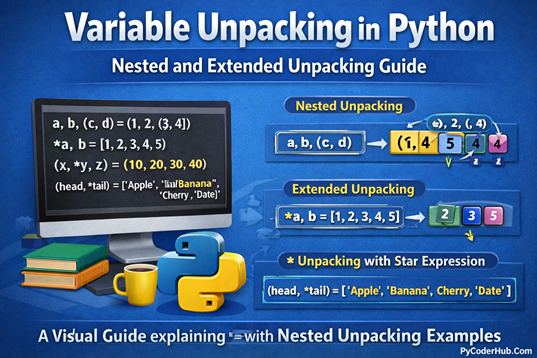
Assigning Multiple Variables at Once in Python
Python allows you to assign values to multiple variables in a single line, which makes your code cleaner and easier to read.
Assigning the same value to multiple variables:
x = y = z = 10
print(x, y, z) # Output: 10 10 10
Assigning different values to multiple variables:
a, b, c = 5, 10, 15
print(a, b, c) # Output: 5 10 15
Swapping values using multiple assignment:
x, y = 5, 10
x, y = y, x
print(x, y) # Output: 10 5
Note: Here we only learned the basics of multiple assignment. In the next post, we will explore multiple assignment and unpacking in depth, including advanced examples and practical use cases.
How Python Variables Work Behind the Scenes
In Python, a variable is not a “box” that holds a value directly. Instead, a variable is a label or reference that points to a value stored in memory. Understanding this concept is crucial because it explains why Python behaves differently compared to some other programming languages and why variables can be reassigned or shared across multiple names.
1. Variables as References
When you assign a value to a variable:
score = 95Python performs two main actions:
- Creates the value object
95in memory. - Assigns the label
scoreto point to this value.
score ─────▶ 95- The variable name
scoredoes not contain the value itself—it refers to the object in memory. - If you create another variable pointing to the same value:
another_score = scorescore ─────▶ 95
another_score ─────▶ 95Both variables now refer to the same object in memory.
2. Reassigning Variables
When you assign a new value to a variable, Python simply updates the reference to point to a new object:
score = 95
score = 88
Step-by-step explanation:
score = 95→ Python creates95and labelsscorescore = 88→ Python creates88and updatesscoreto point to it- The old value (
95) may be removed from memory if no other variable refers to it
score ─────▶ 88This is why Python variables are dynamic: they can reference different objects at different times.
3. Multiple Variables Pointing to the Same Object
Python allows multiple variables to reference the same object:
a = b = 50a ─────▶ 50
b ─────▶ 50- Both
aandbrefer to the same memory location - If one variable is reassigned, it only points to a new value; the other variable still points to the original value
a = 60a ─────▶ 60
b ─────▶ 504. Mutable vs Immutable Values
Understanding references becomes important when working with mutable and immutable objects:
- Immutable objects (like numbers, strings, tuples) cannot be changed. Reassigning a variable creates a new object.
- Mutable objects (like lists, dictionaries) can be changed without creating a new object. Multiple variables referring to the same mutable object will reflect changes made through any reference.
list1 = [1, 2, 3]
list2 = list1
list2.append(4)

print(list1)
Output:
[1, 2, 3, 4]- Both
list1andlist2refer to the same list object, so changes throughlist2are reflected inlist1.
Important Point to Remember:
- Variables are labels or references, not containers
- Reassigning a variable simply updates its reference to a new object
- Multiple variables can point to the same value or object
- Mutable and immutable objects behave differently because of references
- Understanding references is crucial for memory management, avoiding bugs, and working effectively with Python objects
Variables Refer to Memory Locations in Python
As we touched on some points in the previous section, “How Python Variables Work Behind the Scenes,” it’s clear that understanding memory references is very important. Since this concept often confuses beginners, we’re revisiting it here to clarify it in detail.
In Python, every value you create is stored in memory, and variables are simply labels that point to these memory locations. This concept is fundamental because it explains how Python handles reassignment, multiple variables, and mutable versus immutable objects. By understanding how variables reference memory, you’ll gain a much deeper insight into how Python works under the hood, which will help you avoid common mistakes and write more reliable code.
1. Checking Memory Location with id()
Checking Memory Location with id()
score = 95
print(id(score))
Output:
844795639274581- The number represents the unique memory location where Python stores the value
95. - Assigning the same value to another variable does not create a new object if the value is immutable:
another_score = score
print(id(another_score))
Output:
844795639274581- Both
scoreandanother_scorepoint to the same memory location, showing how Python efficiently reuses memory.
2. Reassigning a Variable Creates a New Reference
When you assign a new value to a variable, Python simply updates the reference to point to a new memory location:
score = 95
print("Before reassignment:", id(score))

score = 88
print("After reassignment:", id(score))
Output
Before reassignment: 941709563929824
After reassignment: 941709563930000- The first assignment stores
95in memory and labels it withscore. - After reassignment,
scorenow points to a new memory location for88. - The old value (
95) may be removed from memory if no other variable references it.
3. Multiple Variables Pointing to the Same Object
Python allows multiple variables to reference the same memory location:
a = b = 50
print(id(a))
print(id(b))
Output:
147859563931000
147859563931000- Both
aandbpoint to the same value50in memory. - Reassigning one variable updates only that variable’s reference:
a = 60
print(a)  # 60
print(b)  # 50
Understanding that variables are references to memory locations helps you:
- Avoid confusion with reassignment and variable updates
- Understand why mutable objects behave differently from immutable objects
- Write cleaner and more predictable Python code
- Grasp memory management and the basics of Python’s garbage collection
Variables Can Hold Different Types of Values in Python
In Python, a variable is not limited to holding just one kind of value. A single variable can store numbers, text, boolean values, or even complex data structures like lists and dictionaries. This flexibility comes from Python being a dynamically typed language, meaning you don’t need to specify a data type when creating a variable.
Python automatically determines the type of value based on what you assign to the variable.
1. Variables Holding Numeric Values
Variables can store numeric data such as integers and floating-point numbers:
total_students = 30
average_score = 85.5total_studentsholds an integer valueaverage_scoreholds a floating-point value- Python detects the data type automatically
2. Variables Holding Text (String Values)
Variables can also store text, known as strings in Python:
student_name = "Alice"
course_title = "Python Programming"- Strings are enclosed in quotes
- Variables pointing to strings behave like references to text objects in memory
3. Variables Holding Boolean Values
Boolean values represent True or False conditions:
is_registered = True
has_passed = False- Boolean variables are commonly used in conditions and decision-making
- They help control program flow using
ifstatements and loops
4. Variables Holding Collections of Values
Python variables can store multiple values at once using data structures:
marks_list = [85, 90, 78]
student_record = {"name": "Alice", "score": 95}- Lists store ordered collections of values
- Dictionaries store data as key–value pairs
- These objects are mutable, meaning their contents can change
Variable Naming Rules and Best Practices in Python
Choosing the right variable name is essential for writing readable and maintainable Python code. Python follows a set of strict naming rules, along with widely accepted naming conventions that help keep your code clean and understandable.
Basic Rules for Naming Variables in Python
- Variable names must start with a letter (a–z, A–Z) or an underscore (_)
- A variable name cannot start with a number
- Variable names can contain letters, numbers, and underscores only
- Spaces are not allowed in variable names
- Variable names are case-sensitive (
scoreandScoreare different) - Python keywords cannot be used as variable names (such as
if,for,class)
Common Naming Conventions (Best Practices)
- Use lowercase letters for variable names
- Use underscores to separate words (snake_case)
- Choose descriptive and meaningful names
- Avoid single-letter or unclear names
- Keep names short but readable
Examples
Valid and recommended:
student_score = 90
total_marks = 500
is_logged_in = True
Invalid or poor choices:
2score = 90
student score = 90
class = "Python"
Here, we’ve covered only the basic rules and conventions for naming variables. In a separate post, we’ll explore each rule in detail, along with real-world examples, common mistakes, and best practices to help you write professional-quality Python code.
Variable Scope in Python: Local and Global Variables
In Python, the scope of a variable determines where that variable can be accessed within a program. Variables are mainly categorized based on their scope as local variables and global variables. Understanding scope helps prevent unexpected behavior and name conflicts in your code.
Local Variables
- Defined inside a function
- Accessible only within that function
- Created when the function is called
- Destroyed after the function finishes execution
Global Variables
- Defined outside all functions
- Accessible throughout the entire program
- Can be read inside functions
- Must be explicitly declared using the
globalkeyword to modify inside a function
Example: Local vs Global Variable
global_message = "Hello from global scope"

def display_message():
    local_message = "Hello from local scope"
    print(local_message)

display_message()
print(global_message)
Output:
Hello from local scope
Hello from global scope
What this example shows:
local_messageis created inside the function, so it can only be used thereglobal_messageis created outside the function, so it can be accessed anywhere- Trying to use
local_messageoutside the function would cause an error
This example helps you visually understand how variable scope controls where a variable can be accessed.
This section introduces only the basic idea of variable scope. In a separate post, we will explore local and global variables in detail, including scope resolution, the
globalkeyword, and best practices with practical examples.
Deleting Variables in Python
In Python, variables can be removed when they are no longer needed. Deleting a variable means removing the reference to the object stored in memory, not necessarily deleting the object immediately.
Python provides the del keyword to delete variables.
Basic Rules for Deleting Variables
- The
delkeyword is used to delete a variable - Once deleted, the variable name is no longer available
- Accessing a deleted variable raises a
NameError - Deleting a variable removes its reference, not the object itself
- Memory cleanup is handled automatically by Python’s garbage collector
Example
user_score = 95
print(user_score)

del user_score
# print(user_score) # This will raise an error- The variable
user_scoreexists before deletion - After using
del, the variable is removed - Attempting to access it afterward causes an error
Conclusion
Understanding variables is a foundational step in learning Python, and in this guide, we’ve explored them from the basics to how they work behind the scenes. You’ve learned what variables are, how to create and assign them, how Python handles memory references, how variables can hold different types of values, and why naming rules, scope, and deletion matter in real-world code.
With this solid understanding, you’re now better equipped to write clean, readable, and reliable Python programs. As you move forward, these concepts will continue to appear in every Python topic you learn, making variables one of the most important building blocks in your Python journey.
Suggested Posts:
1. Assigning Multiple Values to Python Variables: A Complete Guide with Examples
2. Variable Unpacking in Python: A Complete Guide with Nested Unpacking Examples
3. Python Variable Naming Rules and Conventions (PEP 8 Explained with Real-World Examples)
4. Dynamic Typing in Python Explained: How Python Handles Types at Runtime
5. Strong Typing in Python Explained: Understanding Python’s Type Safety Philosophy
6. Python Variables FAQs: Common Questions Answered for Beginners

7 thoughts on “Python Variables Explained in Depth: A Detailed Guide”