
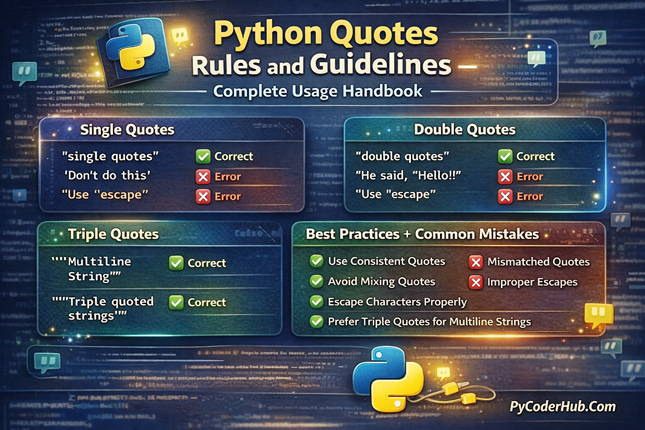
Introduction: Python Quotes Rules and Guidelines
In the previous lesson, you learned what Python quotes are and how to use single quotes, double quotes, and triple quotes to create strings and multi-line text. That foundation was important—but knowing how quotes work is only half the story.
In this lesson, we go a step further and focus on Python Quotes Rules and Guidelines—the rules Python strictly enforces and the guidelines developers should follow to write clean, reliable, and error-free strings. You’ll learn when to use which type of quote, why certain mistakes cause syntax errors, and how to write strings that are both correct and readable.
What you’ll learn in this post
- Core Python Quotes Rules and Guidelines you must follow
- Rules for using single quotes, double quotes, and triple quotes
- When Python treats quote usage as an error vs a style issue
- Proper handling of special characters and escape sequences
- Guidelines for writing clean, readable, and consistent strings
- Best practices for using quotes in docstrings and multi-line text
- How correct quote usage improves code quality and maintainability
Before diving into Python quotes rules and guidelines, let’s first learn an important thing: what Python officially says about quote rules.
Before We Begin: What Python Officially Says About Quote Rules
Before we start applying Python quotes rules and guidelines, it’s important to clear up a common confusion many learners have.
Python does not provide a dedicated PEP or official document that defines strict rules specifically for using single quotes, double quotes, or triple quotes. Unlike PEP 8, which focuses on code style, or PEP 257, which defines conventions for docstrings, quote usage in Python is primarily governed by language syntax and widely accepted community practices.
This means two things:
- Some quote-related rules are strictly enforced by Python. Breaking them will result in syntax errors or runtime errors.
- Other quote-related guidelines are not enforced by the interpreter, but are strongly recommended because they improve readability, consistency, and maintainability of Python code.
To avoid confusion while learning, keep this distinction in mind throughout this guide.
Rule vs Guideline (Important Distinction)
Rule → Enforced by Python at the syntax or runtime level
Guideline → Recommended by PEPs and the Python community for cleaner and more consistent code
In this post, you’ll see both. Each rule or guideline is explained with clear examples, common mistakes, and corrected code so you understand what Python requires and what Python recommends.
Now that this distinction is clear, let’s begin with the Python quote rules that Python strictly enforces.
Rule #1: Always Start and End a String with the Same Type of Quote
[Rule]
In Python, every string must start and end with the same type of quote. If a string begins with a single quote, it must end with a single quote. If it begins with a double quote, it must end with a double quote. The same rule applies to triple quotes.
This rule is strictly enforced by Python. Violating it will immediately raise a SyntaxError, and your code will not run.
Why This Rule Exists
Python uses quotes to determine:
- where a string starts
- where a string ends
If the opening and closing quotes don’t match, Python cannot understand where the string finishes. This creates confusion for the interpreter, and Python stops execution to prevent incorrect behavior.
Incorrect Examples (Common Mistakes)
message_text = 'Hello, Python"The string starts with a single quote and ends with a double quote.
error_message = "Invalid input'Mismatched quote types again — Python raises a syntax error.
documentation_text = """This is a multi-line string''Triple quotes must also match exactly.
Correct Examples
message_text = 'Hello, Python'message_text = "Hello, Python"documentation_text = """This is a multi-line string"""In all cases, the opening and closing quotes match perfectly.
What Error Will You See?
When this rule is violated, Python usually raises an error like:
SyntaxError: unterminated string literalThis means Python reached the end of the line without finding the expected closing quote.
How to Avoid This Mistake
- Always visually match your opening and closing quotes
- Let your code editor help — most editors auto-close quotes
- Be extra careful when copying strings from external sources
- Check multi-line strings carefully when using triple quotes
[Guideline] – Consistency Tip
Python allows both single quotes (' ') and double quotes (" "), but choose one style and stay consistent within the same file or project. Consistency improves readability and makes your code easier to maintain.
This guideline is not enforced by Python, but it is widely followed in professional Python codebases and aligns with PEP 8 style recommendations.
Summary
- Matching quotes are mandatory — Python enforces this rule
- Mismatched quotes cause syntax errors
- Consistent quote style is a guideline, not a rule
Now that you understand the most fundamental rule, we can move on to when and why to choose single quotes or double quotes, and how Python treats them internally.
Rule #2: Choose Single or Double Quotes Based on String Content
[Rule]
Python treats single quotes (' ') and double quotes (" ") exactly the same at the language level. However, the choice between them becomes critical when your string contains quote characters.
This rule is enforced by Python because using the wrong quote type can break the string and cause syntax errors.
Python-Enforced Rule
If a string contains a single quote, wrap the string in double quotes.
If a string contains a double quote, wrap the string in single quotes.
This prevents Python from confusing content quotes with string delimiters.
Why This Rule Matters
When Python encounters a quote character, it assumes the string ends there unless told otherwise. If you use the same quote type inside the string, Python believes the string ends early and throws an error.
Incorrect Examples (Very Common Mistakes)
user_name = 'It's a Python guide'Python thinks the string ends after It.
quote_text = "Python is "awesome""Python cannot determine where the string actually ends.
Correct Examples
user_name = "It's a Python guide"quote_text = 'Python is "awesome"'The outer quote type is different from the quote used inside the string.
[Guideline] Alternative Solution: Escape Characters
If changing quote types is not practical, Python allows escape characters using a backslash (\). This is valid, but usually less readable.
user_name = 'It\'s a Python guide'quote_text = "Python is \"awesome\""Works correctly, but readability may suffer.
Community Guideline: Prefer switching quote types over using escape characters for better readability.
This guideline is not enforced by Python, but it is widely followed and recommended in real-world codebases.
[Guideline] – Style Recommendation
Many Python projects prefer:
- Single quotes for simple strings
- Double quotes when the string contains apostrophes or contractions
The key is consistency within the same file or project, not the specific quote type.
Summary
- Single and double quotes behave the same in Python
- Choose quote type based on string content
- Avoid unnecessary escape characters when possible
- Consistency is a guideline, not a rule
Rule #3: Use Triple Quotes Only for Multi-line Text and Docstrings
[Rule]
Triple quotes (''' ''' or """ """) in Python are designed for multi-line strings and docstrings. Using them outside these purposes can lead to unclear code and unexpected formatting issues.
Python strictly enforces how triple quotes open and close, and misuse often results in syntax errors or confusing behavior.
Python-Enforced Rule
Triple-quoted strings must start and end with the same triple quote type and must not be left unterminated.
If Python cannot find the closing triple quotes, it raises a syntax error and stops execution.
What Triple Quotes Are Meant For
Triple quotes are mainly used for:
- Multi-line text blocks
- Documentation strings (docstrings)
- Strings that contain both single and double quotes
They preserve line breaks and indentation exactly as written.
Correct Examples
Multi-line string
welcome_message = """Welcome to PyCoderHub.
This guide will help you understand Python quotes.
Follow each rule carefully."""
Docstring example
def calculate_total_price():
    """Calculate and return the total price including tax."""
    pass
Python reads these exactly as written.
Incorrect Examples (Common Misuse)
page_title = """Home Page"Opening and closing quotes do not match.
description_text = '''This string never ends...Missing closing triple quotes → syntax error.
short_message = """Hi"""Technically valid, but unnecessary.
[Guideline] Docstring-Specific
According to PEP 257, docstrings should use triple double quotes (""" """), not triple single quotes.
def fetch_user_data():
    """Fetch user data from the database."""
    pass
This guideline is widely accepted and strongly recommended.
Summary
- Triple quotes are meant for multi-line text and docstrings
- Opening and closing triple quotes must match
- Avoid using them for short strings
- Use
""" """for docstrings as per PEP 257
Rule #4: Understand How Quotes Behave in Raw Strings
Raw strings in Python (prefixed with r or R) treat backslashes (\) as literal characters, not escape characters. This directly affects how quotes behave inside raw strings and can easily lead to mistakes if misunderstood.
Python strictly enforces the syntax rules of raw strings, especially at the end of the string.
Python-Enforced Rule
A raw string cannot end with an odd number of backslashes because the final backslash would escape the closing quote.
This rule is enforced at the syntax level.
Why Raw Strings Exist
Raw strings are mainly used for:
- File paths (especially on Windows)
- Regular expressions
- Strings with many backslashes
They make strings more readable by removing the need for repeated escaping.
Correct Examples
file_path = r"C:\Users\PyCoder\Documents"regex_pattern = r"\d+\.\d+"Backslashes are treated as literal characters.
Incorrect Examples (Very Common Errors)
invalid_path = r"C:\Users\PyCoder\"SyntaxError — raw string ends with a backslash.
broken_pattern = r"\"Python cannot determine where the string ends.
Correct Ways to Fix This
file_path = "C:\\Users\\PyCoder\\"file_path = r"C:\Users\PyCoder" "\\"Both approaches work correctly.
Quotes Inside Raw Strings
[Rule]
Raw strings do not change how quotes work. A raw string cannot contain the same quote character used to define it, because that quote will terminate the string.
text_message = r"It's a raw string"Correct.
text_message = r'It's a raw string'Invalid.
text_message = r"It\'s a raw string"Valid, but the backslash is treated as a literal character, not an escape.
Use raw strings only when they improve clarity, not everywhere.
Raw strings are powerful, but overusing them:
- can confuse beginners
- may hide real escaping issues
- isn’t always necessary
Summary
- Raw strings treat backslashes literally
- Raw strings cannot end with a single backslash
- Quotes inside raw strings still follow normal rules
- Use raw strings when they improve readability
Rule #5: Be Careful with Indentation and Whitespace in Multi-line Strings
[Rule]
In Python, multi-line strings preserve whitespace exactly as written, including indentation, line breaks, and spaces. This behavior is strictly enforced by Python and often surprises beginners.
If you don’t manage indentation carefully, your string output may contain unintended spaces or blank lines.
Python-Enforced Rule
Python does not automatically remove indentation or whitespace from multi-line strings.
What you write inside triple quotes is exactly what Python stores.
Why This Rule Matters
Multi-line strings are often written inside:
- functions
- classes
- loops
These code blocks are indented, and that indentation becomes part of the string content unless handled intentionally.
Common Unexpected Output
def show_message():
    message_text = """Welcome to PyCoderHub.
    Learn Python the right way."""
    print(message_text)
Output
Welcome to PyCoderHub.
    Learn Python the right way.
The second line contains extra leading spaces.
Corrected Version (Controlled Output)
def show_message():
    message_text = """Welcome to PyCoderHub.
Learn Python the right way."""
    print(message_text)
Output
Welcome to PyCoderHub.
Learn Python the right way.
Output is clean and predictable.
[Guideline] Using Parentheses for Better Control
For multi-line single-line output, use parentheses with normal strings instead of triple quotes.
message_text = (
    "Welcome to PyCoderHub. "
    "Learn Python the right way."
)
Output
Welcome to PyCoderHub. Learn Python the right way.Cleaner output, no accidental indentation.
Avoid triple quotes when whitespace matters.
Triple-quoted strings are powerful, but they should be avoided when:
- formatting must be precise
- output is user-facing
- indentation could cause bugs
[Guideline] Docstrings and Indentation
Docstrings do include indentation, but tools like documentation generators handle it correctly. Follow PEP 257 formatting, and avoid manually adjusting indentation inside docstrings.
def fetch_data():
    """
    Fetch data from the database.

    Returns:
        list: A list of records.
    """
    pass
This format is correct and widely accepted.
Important Point
- Multi-line strings preserve all whitespace
- Indentation inside triple quotes affects output
- Use parentheses for cleaner multi-line output
- Triple quotes are best for docstrings and formatted text
Rule #6: Use the Right Quote Type for Empty and Short Strings
[Rule]
In Python, empty strings and very short strings should be written clearly and consistently. While Python allows multiple valid ways to define them, some choices are strictly better for readability and maintainability.
Python-Enforced Rule
An empty string must be defined using matching quotes, just like any other string.
Python enforces the syntax, even for empty strings.
Valid Ways to Define an Empty String
empty_text = ""empty_text = ''Both are syntactically correct.
Invalid Example
empty_text = "SyntaxError — missing closing quote.
[Guideline] Readability Recommendation for Empty Strings
Use the same quote style for empty strings that you use for normal strings in the same file.
status_message = ""
error_message = ""
Consistent and readable.
Avoid Using Triple Quotes for Empty Strings
empty_text = """"""Technically valid, but unnecessary and confusing.
Triple quotes add no value for empty or short strings and reduce code clarity.
Quote Choice and Short Strings
For very short strings: Use single or double quotes, not triple quotes
yes_response = "Yes"
no_response = "No"
Clean and readable.
The shorter the string, the simpler the quote choice should be.
This makes code easier to scan and understand, especially for beginners.
Important Point
- Empty strings must still follow quote syntax rules
- Avoid triple quotes for short or empty strings
- Be consistent with quote style
- Prefer readability over clever formatting
Rule #7: Use Quotes Carefully in f-strings
[Rule]
Formatted strings in Python—such as f-strings—follow the same quote rules as normal strings. However, mistakes often happen when quotes are mixed with variables, expressions, or placeholders.
Python strictly enforces quote correctness in formatted strings. Any mismatch or misuse results in a syntax error.
Python-Enforced Rule
The outer quotes of a formatted string must not conflict with quotes used inside expressions or placeholders.
Quotes in f-Strings
f-strings evaluate expressions inside {} at runtime. The surrounding quotes define the string boundary and must remain intact.
Incorrect Example
user_name = "PyCoder"
message_text = f"Welcome to {user_name's} profile"
SyntaxError — invalid quote usage inside the expression.
Correct Examples
user_name = "PyCoder"
message_text = f"Welcome to {user_name}'s profile"user_name = "PyCoder"
message_text = f'Welcome to {user_name}\'s profile'Quotes are handled correctly.
Using Quotes Inside f-String Expressions
[Rule]
Strings inside {} must follow normal Python quote rules. Quotes used inside an f-string expression must not conflict with the quotes used to define the f-string itself.
user_name = "James"
text_message = f"Hello {user_name}, welcome to PyCoderHub!"
print(text_message)
Correct — no quote conflict.
Invalid Example (Quote Conflict)
text_message = f"Hello {"James"}, welcome to PyCoderHub!"Invalid — inner double quotes conflict with the outer double-quoted f-string.
Corrected Version
text_message = f'Hello {"James"}, welcome to PyCoderHub!'Correct — outer quotes are changed to single quotes.
Important Point
- f-strings follow normal quote rules
- Inner quotes must not conflict with outer quotes
- f-strings improve clarity and reduce errors
- Readability matters more than clever formatting
Rule #8: Byte Strings and Unicode Handling
[Rule]
Python supports different types of strings, and byte strings use a special quote syntax, while Unicode strings follow normal quote rules.
In Python 3, all regular strings are Unicode by default, whether you use single, double, or triple quotes.
text_message = "Hello Python"This is a Unicode string.
Byte Strings Use a Prefix
Byte strings must use the b prefix and can only store raw byte data, not Unicode characters.
binary_data = b"Hello"Valid byte string.
binary_data = b"Hello ✓"Invalid. Byte strings cannot contain Unicode characters.
Quote Rules Still Apply
Even with byte strings, normal quote rules do not change.
binary_data = b"It's Python"Valid.
binary_data = b'It's Python'Invalid. The quote closes the string early.
Important Point
- Use normal quoted strings for text (Unicode)
- Use byte strings only for binary data (files, network, encoding work)
- Quote matching rules apply equally to both
Understanding this distinction helps you avoid encoding errors and makes your Python code more predictable and reliable.
Python Quotes Rules — Quick Summary
Below is a concise summary of all the important Python quotes rules and guidelines covered in this chapter. Each point highlights the core takeaway so you can quickly revise or reference it later.
Python Quotes Rules — Key Takeaways
- Matching Quote Types (Rule): Opening and closing quotes must always be the same, or Python will raise a syntax error.
- Single vs Double Quotes (Guideline): Both quote types work the same in Python; choose one consistently based on readability and context.
- Triple Quotes (Rule): Triple quotes are required for multi-line strings and are the standard for writing docstrings.
- Escaping Quotes (Rule): Use a backslash (
\) when the same quote character appears inside a string. - Raw Strings (Rule): Raw strings do not change quote behavior; conflicting quote characters still break the string.
- Quotes in Docstrings (Guideline): Follow PEP 257 and use triple double quotes for all Python docstrings.
- Quotes in f-Strings (Rule): Expressions inside
{}must follow normal Python quote rules, just like regular Python code. - Community Best Practices (Guideline): Consistent quote usage improves readability and aligns your code with PEP 8 recommendations.
Rule vs Guideline — Final Clarity
Understanding the difference between a rule and a guideline will help you write correct and professional Python code.
Rule
- Enforced by Python at the syntax level
- Violations cause immediate errors
- Code will not run
Guideline
- Recommended by PEPs and the Python community
- Improves code clarity and maintainability
- Code may still run, but quality may suffer
Conclusion
Mastering Python quotes may seem simple, but using them correctly has a big impact on code correctness and readability. By understanding which rules are enforced by Python and which guidelines are recommended by the community, you can avoid common mistakes and write more reliable strings. With these quote rules and guidelines in place, your Python code becomes cleaner, clearer, and easier to maintain as your projects grow.
Suggested Posts:
1. Python Quotes Explained – Single, Double, and Triple Quotes with Best Practices
2. Python Quotes – Best Practices, Common Pitfalls, and Tricky Scenarios Explained
3. Quotes vs Comments vs Docstrings in Python – What’s the Difference and When to Use Each
4. Python Quotes FAQ – Common Questions and Clear Answers

3 thoughts on “Python Quotes Rules and Guidelines: A Complete Usage Handbook”