
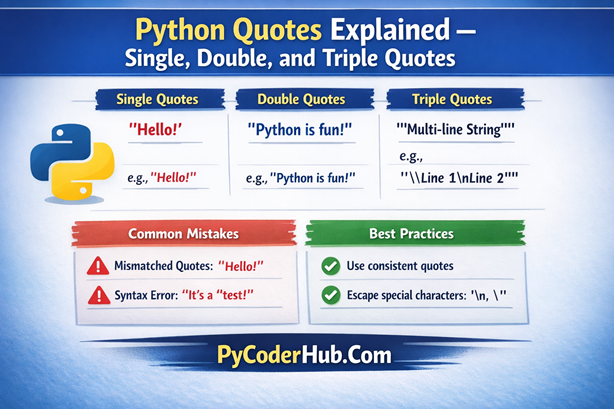
Introduction: Python Quotes Explained
Welcome back, PyCoders !
In this lesson, we’re diving into a deceptively simple part of Python that plays a huge role in how your code behaves: quotes. At first glance, quotes may seem like nothing more than punctuation marks wrapped around text. But in Python, they define how strings are created, interpreted, and displayed—and small mistakes here often lead to big confusion later.
Understanding how Python treats single quotes, double quotes, and triple quotes will help you avoid syntax errors, write clearer code, and follow consistent coding practices. More importantly, it builds a strong foundation for working with strings, documentation, and text-based data throughout your Python journey.
What You’ll Learn in This Post
- What strings are in Python and how quotes define them
- Why quotes matter and how Python interprets quoted text
- Single quotes in Python: usage, examples, and common mistakes
- Double quotes in Python and when they are more practical
- Triple quotes and their role in multi-line strings and docstrings
- Common quote-related mistakes that cause confusion or errors
- Best practices for choosing and using quotes consistently
So before we start understanding quotes in detail, it’s important to remember one key thing: quotes are only used with strings.
Let’s begin with a quick look at what strings are in Python and how they fit into the language.
Understanding Strings in Python
Before diving into how single, double, or triple quotes work, we need to understand what a string actually is—because quotes exist primarily to define strings in Python.
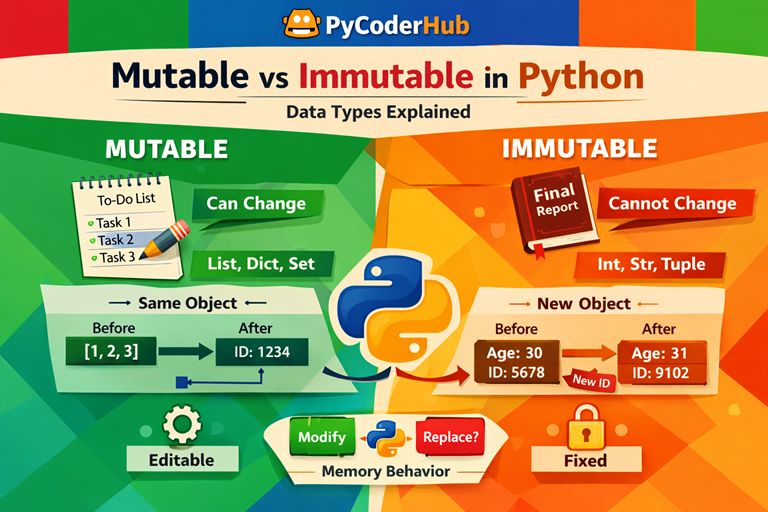
In Python, a string (str) is an immutable sequence of characters. Immutable simply means that once a string is created, its content cannot be changed directly. Strings are used to represent text-based data such as names, messages, file paths, URLs, configuration values, and even numbers when they are treated as text.
Python does not automatically assume something is text. Instead, quotes act as clear boundaries that tell Python:
“This content should be treated as a string.”
Important point to remember:
Anything enclosed inside quotes—letters, numbers, symbols, or even line breaks—becomes a string.
Basic Examples: Strings Defined Using Different Quotes
user_name = "PyCoder"               # string using double quotes
user_city = 'Delhi'                 # string using single quotes
user_status = """Active"""          # string using triple quotes
In these examples:
"PyCoder",'Delhi', and"""Active"""all represent strings in Python.- The quotes signal to Python that these values should be treated as text, not as variables or identifiers.
- Single quotes and double quotes behave the same way in Python—the choice between them is mostly about readability and consistency.
- Triple quotes can also define regular strings, but they are commonly used when a string needs special formatting, which we’ll explore later in this post.
The key difference is not what these strings contain, but how they are defined. Python allows multiple quote styles so developers can choose the most readable and practical option based on the situation.
Key Point
Strings in Python depend entirely on quotes. If quotes are missing, misplaced, or mixed incorrectly, Python raises syntax errors that can be confusing for beginners. Learning how each quote type works—and when to use it—helps you write cleaner, more readable code and prevents many common mistakes early on.
Now that you understand what strings are, the next step is to understand why quotes are so important in Python. Before exploring single, double, and triple quotes individually, let’s first look at how quotes shape the way Python interprets and handles string data
Why Quotes Are Important in Python
In Python, quotes are what turn plain text into usable data. Since strings appear in almost every Python program, understanding how quotes work is essential for writing code that is clear, reliable, and professional. When quotes are used correctly, they help Python interpret text exactly the way you intend.
Proper use of quotes:
- Improves code readability and clarity
- Reduces syntax errors and unexpected behavior
- Makes code easier to maintain and update over time
- Encourages consistency with Pythonic style conventions
You’ll encounter quotes in many everyday Python tasks, such as:
- Assigning values to variables
- Handling user input and output
- Working with file paths and file names
- Parsing JSON data and API responses
- Managing configuration and settings files
- Writing SQL queries and interacting with databases
- Formatting strings using f-strings
- Writing docstrings for functions, classes, and modules
Because quotes are used so widely across Python programming, mastering them is a key step toward writing clean, dependable, and Pythonic code.
The Three Types of Quotes in Python
In Python, every string begins with quotes. A string is simply a literal piece of text enclosed within quotation marks. For example, 'Hello World!' is a string because the text Hello World! is wrapped inside quotes. Without quotes, Python would not treat it as text at all.
So the important question becomes: which types of quotes can you use in Python to create strings?
Python supports three types of quotes for defining strings: single quotes, double quotes, and triple quotes. While all three are used to represent text, each serves a slightly different purpose. Choosing the appropriate quote type can improve readability, reduce confusion, and help you handle different kinds of string content more effectively.
Here’s a quick overview of each type:
- Single quotes (
' ') — Commonly used for short, simple strings, especially when the text contains double quotes. - Double quotes (
" ") — Often preferred when the string includes single quotes, such as contractions or possessives. - Triple quotes (
''' '''or""" """) — Used for strings that require special formatting, span multiple lines, or contain both single and double quotes.
Each quote type exists to solve a specific problem, not to add confusion. In the next sections, we’ll take a closer look at how each quote behaves, when to use it, and the common mistakes you should avoid.
Single Quotes in Python (' ')
Single quotes are the simplest and most commonly used way to define strings in Python. They work best for short, straightforward text and are especially convenient when your string contains double quotes that you don’t want to escape.
At a fundamental level, single quotes tell Python:
“Everything inside these quotes should be treated as text.”
They behave exactly like double quotes in terms of functionality—the choice mostly comes down to readability and consistency.
Key Points to Remember
- Text enclosed within
' 'is treated as a string - Ideal for short and simple string values
- Very useful when the string naturally includes double quotes (
") - Supports escape sequences such as:
\nfor a new line\'for including a literal single quote inside the string
Example: Using Single Quotes
programming_language_name = 'Python'
spoken_quote_text = 'She said, "Python is fun!"'
In this example:
- Both values are strings because they are enclosed in single quotes
- The second string contains double quotes, which work naturally without escaping
- Using single quotes here improves readability and keeps the string clean
Practical Tips for Using Single Quotes
- Stick to one quote style throughout your codebase for better readability
- If a string contains a single quote, use an escape character (
\') or switch to double quotes - Choose the quote type that minimizes escaping and keeps the string easy to read
Double Quotes in Python (" ")
Double quotes work exactly the same way as single quotes in Python, but they are often preferred when a string naturally contains single quotes, such as apostrophes in words or sentences. Choosing double quotes in these cases helps keep the string readable and avoids unnecessary escape characters.
Functionally, Python treats single and double quotes the same—the difference lies in clarity and convenience, not capability.
Key Points to Remember
- Text enclosed within
" "is treated as a string - Ideal when the string includes single quotes (
') or apostrophes - Helps reduce the need for escape characters
- Supports all standard escape sequences, such as:
\nfor new lines\tfor tabs\"for including a literal double quote
Example: Using Double Quotes
welcome_message_text = "Welcome to PyCoderHub"
daily_status_text = "It's a beautiful day!"
In these examples:
- Both values are strings defined using double quotes
- Python treats them the same way as strings defined with single quotes
- Double quotes are often preferred for readability and consistency, especially in text that includes apostrophes
Many developers prefer double quotes as a default style, but Python allows both—what matters most is choosing one and using it consistently.
Practical Tips for Using Double Quotes
- Prefer double quotes when your string contains apostrophes or contractions
- Avoid unnecessary escaping by choosing the quote style that fits the content
- Stay consistent across your project—mixing quote styles without reason can make code harder to read
Triple Quotes in Python (''' ''' or """ """)
Triple quotes are the most flexible type of quotes in Python. They allow you to define strings that span multiple lines and are widely used for docstrings, which are Python’s built-in way of documenting code. Unlike single or double quotes, triple quotes can hold large blocks of text without requiring special formatting.
One of their biggest advantages is that they can contain both single and double quotes naturally, making them ideal for descriptive text and documentation.
Key Points to Remember
- Text enclosed within
''' '''or""" """is treated as a string - Best suited for multi-line text or long string blocks
- Commonly used for docstrings in functions, classes, and modules
- Can include both
'and"characters without escaping
Example: Using Triple Quotes for a Multi-line String
multi_line_message_text = """This is a multi-line string.
It can span across multiple lines
and include 'single' and "double" quotes naturally."""
In this example:
- The string spans multiple lines without using special characters
- Line breaks are preserved exactly as written
- Both single and double quotes are included without causing errors
This makes triple quotes ideal for formatted text, messages, or long descriptions.
Example: Using Triple Quotes for a Docstring
def generate_greeting_message(user_name):
    """
    This function generates a friendly greeting message.
    It accepts a user name as input and returns a formatted string.
    """
    return f"Hello, {user_name}!"
Here:
- The triple-quoted string directly below the function definition is a docstring
- Python stores this documentation internally and makes it accessible through tools like
help() - Docstrings improve code readability and make your functions easier to understand and maintain
Practical Tips for Using Triple Quotes
- Use triple quotes when working with long or structured text
- Prefer triple double quotes (
""" """) for docstrings to follow common Python conventions - Avoid using triple quotes for simple, single-line strings unless there’s a clear reason
Comparison of Single, Double, and Triple Quotes in Python
Python allows you to create strings using single quotes, double quotes, or triple quotes. While all three are used to define strings, they are not used in the same situations. Each quote type has its own strengths, depending on the kind of text you’re working with.
The table below provides a quick side-by-side comparison to help you understand when and why each quote type is commonly used.
| Quote Type | Syntax Example | Common Use Case | Key Features |
|---|---|---|---|
| Single Quotes | 'Hello World!' | Short, simple strings; useful when the text contains double quotes | Clean and simple; works well for basic strings |
| Double Quotes | "Hello World!" | Short strings; convenient when the text contains apostrophes | Often preferred for readability and consistency |
| Triple Quotes | '''Hello World!'''"""Hello World!""" | Multi-line strings, docstrings, and long text blocks | Supports multi-line text; can contain both single and double quotes |
Quick Tips to Remember
- Single and double quotes behave the same way—choose the one that keeps your string easiest to read
- Triple quotes are best reserved for multi-line text and documentation
- Avoid mixing quote styles without a clear reason
- Consistent use of quotes makes your code cleaner and easier to maintain
Rules for Using Quotes in Python
Python provides flexibility when working with strings, but following a few simple rules helps you write code that is clean, readable, and free from common quote-related mistakes.
- Quotes must always match—start and end a string with the same quote type
- Use the opposite quote type to reduce unnecessary escaping
- Escape quotes only when the same quote appears inside the string
- Use triple quotes for multi-line text and long string blocks
- Prefer triple quotes when working with Markdown or HTML content
- Be mindful of indentation when using multi-line strings
- Use raw strings for file paths or regular expressions
- Use f-strings when inserting variables into strings
- Consistency in quote usage is more important than personal style
- Use parentheses to split long strings across lines for better readability
“Python does not have a dedicated PEP that enforces quote usage rules. Instead, quote usage is guided by PEP 8 style principles, PEP 257 docstring conventions, and widely adopted community practices that emphasize readability and consistency.”
Note: Here we’ve covered only a brief overview of the rules. For deeper explanations and real-world examples, refer to the Python Quotes Rule Guide for a detailed breakdown.
Common Mistakes With Quotes in Python (and How to Fix Them)
Before wrapping up this lesson, it’s important to address the mistakes Python learners most often make when working with quotes. These issues are common—not because Python is confusing, but because quotes look simple while doing very important work behind the scenes.
Let’s go through the most frequent problems, understand why they happen, and see the correct way to fix them.
Mistake 1: Mixing Opening and Closing Quotes
Example (Error):
text_message = "Python is awesome'
print(text_message)
Why this happens:
Python cannot determine where the string ends because the opening and closing quotes do not match.
Fix: Always use matching quotes
text_message = "Python is awesome"Mistake 2: Forgetting That Quotes End a String
Example (Error):
spoken_message = "He said "Hello" to everyone"Why this happens:
Python assumes the string ends at the second double quote, causing a syntax error.
Fix Option 1: Use the opposite quote type
spoken_message = 'He said "Hello" to everyone'Fix Option 2: Escape the internal quotes
spoken_message = "He said \"Hello\" to everyone"(Using opposite quotes is usually clearer and preferred.)
Mistake 3: Accidentally Creating a Multi-line String
Example (Error):
page_title = "Python Tips
and Tricks"
Why this happens:
Single and double quotes cannot span multiple lines.
Fix: Keep the string on one line
page_title = "Python Tips and Tricks"Or use triple quotes when multi-line text is intentional
page_title = """Python Tips
and Tricks"""
Mistake 4: Unexpected Newlines in Triple-Quoted Strings
Triple-quoted strings (''' ''' or """ """) preserve all formatting exactly as written, including spaces and invisible newline characters. This behavior is intentional, but it often surprises beginners who expect triple quotes to behave like single or double quotes.
Consider the following example:
status_message = """Hello"""
print(status_message)
At first glance, this looks like a normal one-line string. However, Python treats it as formatted text and includes a newline character based on how the triple quotes are placed in the code. As a result, the output may contain extra spacing or behave differently than expected when printed, compared, or written to a file.
This happens because triple quotes are designed for multi-line and formatted text, such as documentation or long messages. Python assumes that when you use them, the layout of the text matters—and it preserves that layout faithfully.
How to Fix It
If the string is meant to be a single line, avoid triple quotes altogether:
status_message = "Hello"If you need to use triple quotes but want to remove extra whitespace, clean the string explicitly:
status_message = """Hello""".strip()Best Practice: Use triple quotes only when you intentionally need formatted or multi-line text, such as docstrings or long text blocks. For simple, single-line strings, single or double quotes are clearer and safer.
Mistake 5: Concatenating Strings Without Parentheses
Example (Error):
message_text = "Python is "
               "awesome!"
Why this happens:
Python only auto-concatenates strings when they are on the same line or wrapped in parentheses.
Fix: Use parentheses
message_text = (
    "Python is "
    "awesome!"
)
Mistake 6: Misusing Raw Strings for File Paths
Example (Error):
file_path = r"C:\new\folder\test\"Why this happens:
Raw strings cannot end with a single backslash.
Fix Option 1: Add an extra backslash
file_path = r"C:\new\folder\test\\"Fix Option 2: Use escaped backslashes
file_path = "C:\\new\\folder\\test\\"Mistake 7: Inconsistent Quote Usage Across a File
Example (Confusing Style):
title_text = "Python Guide"
author_name = 'PyCoder'
summary_text = """Learn Python easily"""
Why this matters:
Mixing quote styles without reason makes code harder to read and maintain.
Fix: Pick a style and stay consistent
title_text = "Python Guide"
author_name = "PyCoder"
summary_text = "Learn Python easily"
Summary
Most quote-related errors come from small oversights, not complex logic. By understanding how quotes behave and choosing the right type for each situation, you can avoid syntax errors, reduce confusion, and write cleaner, more reliable Python code.
Best Practices for Using Quotes in Python
Here’s a quick, practical checklist you can follow whenever you work with quotes in Python. These best practices will help you write cleaner strings, avoid subtle bugs, and keep your code easy to read and maintain.
- Always use matching quotes — every string must start and end with the same quote type
- Choose the quote style that minimizes escaping — use single quotes inside double quotes or vice versa
- Use triple quotes only when working with multi-line content such as docstrings or long text blocks
- Escape characters only when necessary; excessive backslashes reduce readability
- Prefer f-strings for string formatting — they are cleaner, faster, and easier to maintain
- Use raw strings for regular expressions and Windows file paths to avoid double escaping
- Keep indentation clean when using triple-quoted strings, as whitespace is preserved
- Maintain consistency across your project — stick to one quote style unless there’s a clear reason to change
- Use parentheses to split long strings across lines instead of backslashes
- Test edge cases — unmatched quotes, accidental newlines, and unwanted escapes can introduce hard-to-spot bugs
Following these best practices will make your string handling more predictable and help you write clean, reliable, and Pythonic code.
Conclusion
Quotes may look like a small detail in Python, but they have a big impact on how your code works and how easy it is to read. As you’ve seen, single, double, and triple quotes each serve a purpose, and knowing when to use them helps you write strings that are clear, consistent, and free from subtle bugs.
By applying the rules, avoiding common mistakes, and following best practices, you’ll handle strings with more confidence and precision. Keep these principles in mind as you write Python code, and your programs will not only work correctly—but also reflect clean, Pythonic thinking.
Suggested Posts:
1. Python Quotes Rules and Guidelines – A Complete Usage Handbook
2. Python Quotes – Best Practices, Common Pitfalls, and Tricky Scenarios Explained
3. Quotes vs Comments vs Docstrings in Python – What’s the Difference and When to Use Each
4. Python Quotes FAQ – Common Questions and Clear Answers


6 thoughts on “Python Quotes Explained – Single, Double, and Triple Quotes with Best Practices”