
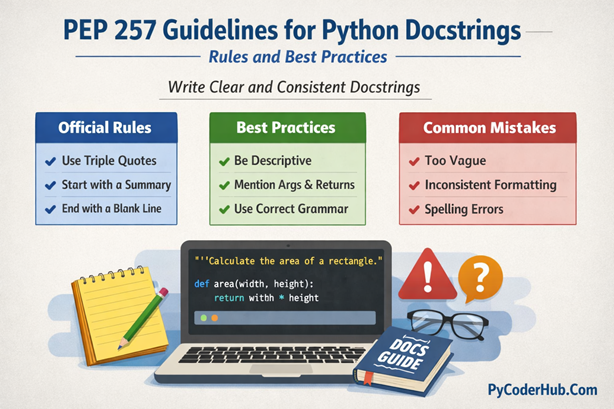
Introduction: PEP 257 Guidelines for Python Docstrings
In the previous lessons, we understood what Python docstrings are, why they matter, and how their structure and styles (Google, NumPy, and reStructuredText) help make code easier to read and maintain. By now, you already know how to write docstrings—but knowing how to write them isn’t enough.
To write consistent, professional, and Python-approved documentation, we need to follow the official guidelines that define how docstrings should be written. That’s exactly where PEP 257 Guidelines for Python Docstrings come into the picture.
In this lesson, we focus entirely on PEP 257, the official Python Enhancement Proposal that explains recommended conventions for writing docstrings. We’ll also look at common mistakes developers make when writing docstrings—and how to avoid them.
What You’ll Learn in This Lesson
By the end of this lesson, you will learn:
- What PEP and PEP 257 are, and why they matter in Python documentation
- The core principles behind PEP 257 Guidelines for Python Docstrings
- How to write one-line and multi-line docstrings correctly
- Where and how docstrings should be placed in modules, classes, and functions
- Common docstring mistakes that violate PEP 257 recommendations
- How to write clear, readable, and maintainable docstrings that follow Python standards
- Practical examples of correct vs incorrect docstrings
Before diving into the PEP 257 Guidelines for Python Docstrings, it’s important to first understand what PEP is and what PEP 257 specifically defines. This foundation will help you understand why certain docstring rules exist and how they fit into Python’s overall design philosophy.
Let’s begin by understanding PEP and PEP 257 in the next section.
PEP vs PEP 257: What’s the Difference?
Before we dive into the PEP 257 Guidelines for Python Docstrings, let’s clearly understand what PEP means and how PEP 257 fits into the bigger picture.
What Is PEP?
PEP stands for Python Enhancement Proposal. A PEP is an official design document that provides information, guidelines, or standards for the Python language. These documents are used by the Python community to propose new features, document best practices, and standardize how Python code should be written and maintained.
Some PEPs describe language features, while others focus on coding conventions and style. For example, PEP 8 defines the style guidelines for writing readable Python code, and PEP 257 focuses specifically on how docstrings should be written.
What Is PEP 257?
PEP 257 is the official guideline that defines conventions for writing Python docstrings. It does not enforce strict rules but provides recommended practices that help developers write docstrings that are clear, consistent, and easy to understand.
PEP 257 explains:
- Where docstrings should be placed
- How one-line and multi-line docstrings should be formatted
- How docstrings should describe modules, classes, functions, and methods
- What to include—and what to avoid—when documenting Python code
These recommendations ensure that docstrings work well with Python tools, documentation generators, and IDEs.
Why PEP 257 Matters
Following PEP 257 Guidelines for Python Docstrings helps you:
- Write documentation that looks professional and consistent
- Improve code readability for other developers (and your future self)
- Avoid confusion caused by unclear or misleading docstrings
- Align your documentation style with official Python standards
Now that you understand the difference between PEP and PEP 257, let’s move on to the actual PEP 257 guidelines and see how to apply them correctly in real Python code.
PEP 257 Guidelines for Python Docstrings
PEP 257 Guidelines for Python Docstrings define how docstrings should be written, structured, and placed to ensure clarity and consistency across Python codebases. These guidelines are not strict syntax rules but recommended conventions that help developers write readable, professional, and tool-friendly documentation.
Let’s now start exploring these guidelines one by one, beginning with the most fundamental rule of all.
Rule 1: Always Place the Docstring as the First Statement
According to PEP 257 Guidelines for Python Docstrings, a docstring must always be placed immediately after the definition of a module, class, function, or method. This means the docstring should be the very first statement inside the block—before any executable code.
If the docstring is not the first statement, Python will not recognize it as a docstring, and it will not be accessible using tools like help() or the __doc__ attribute.
Why This Rule Matters
Python internally associates docstrings with objects only when they appear as the first statement. If you place comments, variable assignments, or logic before the docstring, it becomes just a normal string—losing all its documentation benefits.
This rule ensures that:
- Documentation tools can automatically extract docstrings
- IDEs can show helpful tooltips
- The
__doc__attribute works correctly
Correct Example (Follows PEP 257)
def calculate_total_price(product_price, tax_percentage):
    """
    Calculate the total price including tax.

    Args:
        product_price (float): Base price of the product.
        tax_percentage (float): Tax rate applied to the product.

    Returns:
        float: Total price including tax.
    """
    tax_amount = product_price * tax_percentage
    total_price = product_price + tax_amount
return total_price- The docstring is the first statement
- Python recognizes it as an official docstring
- Accessible using
calculate_total_price.__doc__
Incorrect Example (Violates PEP 257)
def calculate_total_price(product_price, tax_percentage):
    tax_amount = product_price * tax_percentage

    """
    Calculate the total price including tax.
    """

    total_price = product_price + tax_amount
return total_price- The docstring is not the first statement
- Python treats it as a regular string
- Documentation tools will ignore it
Important Point: A docstring must always be the first statement inside a module, class, function, or method—otherwise, it is not a docstring at all.
Rule 2: Choose One-line or Multi-line Docstrings Appropriately
According to PEP 257 Guidelines for Python Docstrings, docstrings should be written as one-line or multi-line depending on the complexity of what you are documenting. Choosing the right format helps keep documentation clear, readable, and meaningful.
PEP 257 strongly recommends keeping docstrings concise, but not at the cost of clarity.
When to Use One-line Docstrings
Use a one-line docstring when:
- The object’s purpose is simple and obvious
- No additional explanation is required
- There are no parameters, return values, or side effects to explain
A one-line docstring should:
- Start and end on the same line
- Use triple double quotes
- Be a short, complete sentence
- End with a period
Correct Example: One-line Docstring
def is_even_number(number_value):
    """Return True if the number is even."""
return number_value % 2 == 0- Simple purpose
- Clear and concise
- Perfect use of a one-line docstring
Incorrect Example: Poor One-line Docstring
def is_even_number(number_value):
    """check even"""
return number_value % 2 == 0- Not a complete sentence
- Missing capitalization and period
- Lacks clarity and professionalism
When to Use Multi-line Docstrings
Use a multi-line docstring when:
- The function, class, or module performs complex logic
- Parameters and return values need explanation
- Behavior, side effects, or usage details must be documented
According to PEP 257 Guidelines for Python Docstrings, a multi-line docstring should:
- Start with a short summary line
- Leave a blank line after the summary
- Follow with a more detailed explanation if needed
Correct Example: Multi-line Docstring
def calculate_discounted_price(original_price, discount_rate):
    """
    Calculate the discounted price of a product.

    The discount is applied as a percentage of the original price.
    This function returns the final price after applying the discount.

    Args:
        original_price (float): Original price of the product.
        discount_rate (float): Discount percentage to apply.

    Returns:
        float: Final price after discount.
    """
    discount_amount = original_price * discount_rate
    final_price = original_price - discount_amount
return final_price- Summary line is clear
- Blank line improves readability
- Detailed explanation adds context
Incorrect Example: Poor Multi-line Docstring
def calculate_discounted_price(original_price, discount_rate):
    """
    calculate discounted price
    original_price is price
    discount_rate is discount
    """
    discount_amount = original_price * discount_rate
return original_price - discount_amount- Summary line not capitalized
- No blank line after the summary
- Unclear and unprofessional descriptions
Important Point: Use one-line docstrings for simple behavior and multi-line docstrings when more explanation is required—clarity always comes first.
Rule 3: Write a Clear and Descriptive Summary Line
One of the most important recommendations in PEP 257 Guidelines for Python Docstrings is that every docstring should start with a clear summary line. This summary line acts as a quick description of what the module, class, function, or method does.
Many tools and IDEs display only the first line of a docstring, which makes this rule especially important.
What Is a Summary Line?
A summary line is:
- The first line of the docstring
- A short, concise description of the object’s purpose
- Written as a complete sentence
- Capitalized and ending with a period
The summary line should answer the question:
“What does this code do?”
Correct Example: Good Summary Line
def fetch_user_profile(user_identifier):
    """
    Retrieve the user profile details from the database.

    This function queries the database using the provided user
    identifier and returns user-related information.
    """
return database_client.get_user(user_identifier)- Clear purpose
- Complete sentence
- Easy to understand at a glance
Incorrect Example: Weak Summary Line
def fetch_user_profile(user_identifier):
    """
    Fetch user
    """
return database_client.get_user(user_identifier)- Too vague
- Not a complete sentence
- Provides little useful information
Summary Line Should Be Imperative
According to PEP 257 Guidelines for Python Docstrings, the summary line should usually be written in the imperative mood (a command-style sentence). This matches how documentation reads naturally.
Correct Example: Imperative Style
def generate_invoice_number():
    """Generate a unique invoice number."""
return uuid_generator.create()- Imperative tone
- Clear and professional
Incorrect Example: Non-imperative Style
def generate_invoice_number():
    """This function generates an invoice number."""
return uuid_generator.create()- Wordy
- Less direct
- Not recommended by PEP 257
Important Point: The summary line should be short, clear, and written in the imperative mood—because it’s often the only part users see.
Rule 4: Use Triple Double Quotes Consistently
According to PEP 257 Guidelines for Python Docstrings, all docstrings must use triple double quotes ("""), even for one-line docstrings. While Python technically allows single quotes or triple single quotes, PEP 257 recommends triple double quotes for consistency across the Python ecosystem.
Why Triple Double Quotes?
Using triple double quotes ensures:
- Consistency in codebases
- Compatibility with documentation tools and IDEs
- Multi-line docstrings are handled cleanly without escape characters
This makes it easier for developers and automated tools to read and parse docstrings.
Correct Example: Triple Double Quotes
def calculate_area(radius):
    """Calculate the area of a circle given its radius."""
    import math
    return math.pi * radius ** 2
Incorrect Example: Single or Triple Single Quotes
def calculate_area(radius):
    '''Calculate the area of a circle given its radius.'''
    import math
return math.pi * radius ** 2- Uses
'''instead of""" - Not consistent with PEP 257 recommendations
Multi-line Docstrings with Triple Double Quotes
For multi-line docstrings, triple double quotes allow clean formatting without the need for escape characters.
def calculate_volume(length, width, height):
    """
    Calculate the volume of a rectangular prism.

    Args:
        length (float): Length of the prism.
        width (float): Width of the prism.
        height (float): Height of the prism.

    Returns:
        float: Volume of the prism.
    """
    return length * width * height
Important Point: Always use triple double quotes (
""") for all docstrings—this ensures consistency, readability, and PEP 257 compliance.
Rule 5: Proper Formatting of Multi-line Docstrings
When writing multi-line docstrings, PEP 257 recommends a clear and consistent format to improve readability.
Key Formatting Guidelines
- The first line is a short summary
- Followed by a blank line
- Then a detailed description if necessary
- All lines should be indented consistently with the surrounding code
Correct Example
def calculate_average(numbers):
    """
    Calculate the average of a list of numbers.

    This function sums up all numbers in the list and divides
    the total by the number of elements. Returns 0 if the list
    is empty.

    Args:
        numbers (list of float): List of numbers to average.

    Returns:
        float: Average value of the list or 0 if empty.
    """
    if not numbers:
        return 0
return sum(numbers) / len(numbers)- Blank line after summary
- Proper indentation
- Detailed explanation in separate paragraph
Incorrect Example
def calculate_average(numbers):
    """Calculate the average of a list of numbers.
    Sums all numbers and divides by length.
    Returns 0 if empty"""
    if not numbers:
        return 0
return sum(numbers)/len(numbers)- No blank line after summary
- Too condensed
- Harder to read and violates PEP 257
Important Point: Multi-line docstrings should start with a summary, include a blank line, and provide a detailed explanation in properly indented paragraphs.
Rule 6: Include Parameters, Returns, and Exceptions
PEP 257 recommends documenting function inputs, outputs, and potential exceptions for clarity, especially in multi-line docstrings.
highlight-text
- Args: Describe each parameter and its type
- Returns: State the return type and what it represents
- Raises/Exceptions: Mention exceptions the function may throw
Correct Example
def divide_numbers(dividend, divisor):
    """
    Divide two numbers and return the result.

    Args:
        dividend (float): Number to be divided.
        divisor (float): Number to divide by.

    Returns:
        float: Result of division.

    Raises:
        ValueError: If divisor is zero.
    """
    if divisor == 0:
        raise ValueError("Cannot divide by zero")
return dividend / divisor- Parameters, returns, and exceptions clearly documented
- Follows PEP 257 formatting
Incorrect Example
def divide_numbers(dividend, divisor):
    """
    Divides numbers
    """
    if divisor == 0:
        raise ValueError("Cannot divide by zero")
return dividend / divisor- Missing arguments description
- Missing return description
- Missing exceptions
Important Point: Always include parameters, return values, and exceptions in multi-line docstrings to make your documentation complete and useful.
Rule 7: Avoid Redundant or Obvious Information
PEP 257 advises not to repeat what the code already clearly expresses. Docstrings should add value, not restate the obvious.
Correct Example
def divide_numbers(dividend, divisor):
    """
    Divides numbers
    """
    if divisor == 0:
        raise ValueError("Cannot divide by zero")
return dividend / divisor- Clear and concise
- Adds useful information
Incorrect Example
def get_username(user_id):
    """This function gets the username by accessing the user_database dictionary."""
return user_database[user_id].username- Restates what the code already shows
- Verbose and unnecessary
Important Point: Avoid stating the obvious—docstrings should clarify purpose, not restate code.
Rule 8: Keep Docstrings Consistent Across the Codebase
Consistency is key in PEP 257 Guidelines for Python Docstrings. Use the same style (Google, NumPy, or reStructuredText) for all docstrings in a project. This makes code easier to read, maintain, and document automatically.
Correct Example
def add_numbers(a, b):
    """Add two numbers and return the result."""
    return a + b

def multiply_numbers(a, b):
    """Multiply two numbers and return the result."""
return a * b- Consistent one-line style
- Easy to scan across functions
Incorrect Example
def add_numbers(a, b):
    """Add two numbers."""
    return a + b

def multiply_numbers(a, b):
    """
    Multiply two numbers and return
    the result
    """
return a * b- Mixed one-line and multi-line styles
- Reduces readability across the codebase
Important Point: Keep docstring style consistent across all modules, classes, and functions for clarity and professionalism.
Rule 9: Avoid Side Effects or Implementation Details
Docstrings should describe what the code does, not how it does it internally. Focus on behavior, not implementation.
Correct Example
def fetch_data_from_api(endpoint):
    """Fetch data from the API endpoint and return the JSON response."""
    response = requests.get(endpoint)
return response.json()- Focuses on what the function does
- Omits internal implementation details
Incorrect Example
def fetch_data_from_api(endpoint):
    """Fetch data by sending a GET request, then parse the response to JSON."""
    response = requests.get(endpoint)
return response.json()- Too detailed about how the code works
- Could change if implementation changes
Important Point: Docstrings should explain behavior, not implementation details or side effects.
Rule 10: Keep Docstrings Up-to-date
Finally, PEP 257 emphasizes maintaining docstrings as code evolves. Outdated docstrings are worse than no docstrings—they mislead developers and users.
Tips to Keep Docstrings Updated
- Update docstrings whenever you modify function behavior
- Include new parameters or return changes
- Remove old or irrelevant information
Correct Practice
def send_email(to_address, subject, body, cc=None):
    """
    Send an email to the specified recipient with optional CC.

    Args:
        to_address (str): Recipient email address.
        subject (str): Email subject line.
        body (str): Email body content.
        cc (str, optional): CC recipient(s). Defaults to None.
    """
    # Updated implementation here
    pass
Reflects current function signature and behavior
Important Point: Always review and update docstrings when code changes to ensure accuracy and reliability.
Now that we have completed all the PEP 257 Guidelines for Python Docstrings, you should have a clear understanding of how to write consistent, readable, and Python-standard documentation.
In the next section, we’ll focus on the most common mistakes developers make while writing docstrings and learn how to avoid them to keep your documentation clean and professional.
Common Mistakes to Avoid When Writing Python Docstrings
Even when developers are familiar with PEP 257 Guidelines for Python Docstrings, certain mistakes appear repeatedly in real-world code. These mistakes don’t usually break programs, but they reduce clarity, professionalism, and usefulness of documentation.
Let’s look at the most common docstring mistakes—and how to fix them.
1. Writing Docstrings That Describe How Instead of What
Docstrings should explain what the function does, not the internal steps or implementation details. Low-level logic belongs in comments, not docstrings.
Bad Example:
def process_data(data_list):
    """
    Loop through the list, check each item, and append matches to result.
    """
Good Example:
def process_data(data_list):
    """
    Filter the input list and return items that match the criteria.
"""- Focuses on behavior
- Independent of implementation changes
2. Not Placing the Docstring as the First Statement
If a docstring is not the first statement, Python does not recognize it as a docstring.
Bad Example:
def calculate_total(price):
    tax = price * 0.18
    """Calculate the total price including tax."""
    return price + tax
Good Example:
def calculate_total(price):
    """Calculate the total price including tax."""
    tax = price * 0.18
return price + tax- ✔ Correct placement
- ✔ Accessible via
__doc__andhelp()
3. Writing Vague or Meaningless Docstrings
Docstrings like “Does something” or “Handles data” add no value and create confusion.
Bad Example:
def validate_email(email_address):
    """Validate email."""
Good Example:
def validate_email(email_address):
"""Check whether the given email address is valid."""- Clear purpose
- Helpful to readers and tools
4. Forgetting the Summary Line in Multi-line Docstrings
PEP 257 requires a short summary line, followed by a blank line before details.
Bad Example:
def generate_report(data):
    """
    This function generates a report based on the provided data
    and saves it to the output directory.
    """
Good Example:
def generate_report(data):
    """
    Generate a report from the provided data.

    The report is created in PDF format and saved
    to the output directory.
"""- Proper structure
- Easier to scan and read
5. Using Single Quotes Instead of Triple Double Quotes
While Python allows different quotes, PEP 257 recommends triple double quotes (""") for all docstrings.
Bad Example:
def get_status():
    '''Return the current system status.'''
Good Example:
def get_status():
"""Return the current system status."""- Consistent with Python standards
- Widely supported by tools
6. Including Obvious or Redundant Information
Docstrings should not repeat what is already obvious from the function name or code.
Bad Example:
def add_numbers(first_number, second_number):
    """Add first_number and second_number together."""
Good Example:
def add_numbers(first_number, second_number):
"""Return the sum of two numeric values."""- Adds value
- Cleaner and more professional
7. Letting Docstrings Go Out of Sync with Code
Outdated docstrings can be misleading and dangerous, especially in shared codebases.
Bad Example:
def send_notification(message):
    """
    Send an email notification to the user.
    """
(Function later changed to send push notifications)
Good Practice:
def send_notification(message):
    """
    Send a notification message to the user.
"""- Matches current behavior
- Prevents confusion
8. Using Comments Instead of Docstrings for Public APIs
Public modules, classes, and functions should always be documented using docstrings, not comments. Comments are meant for developers reading the source code, while docstrings are used by Python tools, IDEs, and documentation generators.
Bad Example:
# Calculate the total order price including tax
def calculate_order_total(order_amount, tax_rate):
    return order_amount + (order_amount * tax_rate)
Good Example:
def calculate_order_total(order_amount, tax_rate):
    """
    Calculate the total order price including tax.

    Args:
        order_amount (float): Base order amount.
        tax_rate (float): Tax percentage applied to the order.

    Returns:
        float: Final order total including tax.
    """
return order_amount + (order_amount * tax_rate)- Public API documented properly
- Compatible with
help()and documentation tools
9. Mixing Docstrings with Comment-Style Notes
Docstrings should contain clean, descriptive documentation, not internal notes such as TODOs, debugging hints, or implementation reminders. These belong in comments, not docstrings.
Bad Example:
def send_email_notification(recipient_email):
    """
    Send an email notification.

    TODO: Add retry logic
    NOTE: This uses SMTP for now
    """
Good Example:
def send_email_notification(recipient_email):
    """
    Send an email notification to the specified recipient.

    Args:
        recipient_email (str): Email address of the recipient.
    """
# TODO: Add retry logic- Docstring remains clean and user-focused
- Developer notes moved to comments
10. Forgetting That Docstrings Are User-Facing
Docstrings are not just for the original developer—they are user-facing documentation. They appear in IDE tooltips, help screens, and generated docs, so they should be written clearly and professionally.
Bad Example:
def refresh_cache():
    """
    This thing resets stuff so it works again.
    """
Good Example:
def refresh_cache():
    """
    Clear and rebuild the application cache.
"""- Professional language
- Clear intent
- Suitable for public documentation
Final Note
Avoiding these common mistakes will help you fully comply with PEP 257 Guidelines for Python Docstrings and write documentation that is clear, reliable, and maintainable.
Conclusion
In this lesson, we covered PEP 257 Guidelines for Python Docstrings, exploring every recommendation that helps you write clear, consistent, and professional Python documentation. These guidelines ensure your docstrings are readable, well-structured, and aligned with official Python standards.
We also reviewed common docstring mistakes and learned how to avoid them by keeping documentation user-focused and up to date. By following PEP 257 in your daily coding practice, you’ll create Python code that is easier to understand, maintain, and confidently share with others.
Suggested Posts:
1. Python Docstrings Explained: Definition, Syntax, Structure, and Style Types
2. Python Docstring Structure and Style Guide: Single-Line, Multi-Line, and Format Comparison
3. Python Docstrings FAQ: Common Questions Answered (Complete Guide)

5 thoughts on “PEP 257 Guidelines for Python Docstrings: How to Write Clear Documentation and Avoid Common Mistakes”