
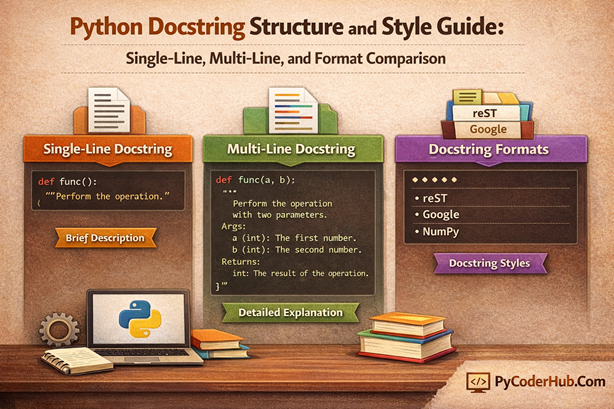
Introduction: Python Docstring Structure and Style Guide
Welcome back to PyCoderHub. In the previous lesson, we learned what Python docstrings are, how they work internally, where they must be placed, and how Python recognizes them as official documentation. We also explored docstring syntax, access methods, and briefly introduced docstring structures and style types.
In this lesson, we take the next step and focus entirely on how docstrings are written in practice. Instead of re-explaining the basics, this guide dives deep into docstring structure and style, helping you understand how to write docstrings that are clear, consistent, and suitable for real-world Python projects.
What you’ll learn in this post
- What “docstring structure” means in Python
- Single-line docstrings: structure, use cases, and best practices
- Multi-line docstrings: layout, sections, and formatting rules
- What docstring styles are and why they exist
- Google style, NumPy style, reStructuredText (reST) docstrings: structure, pros, and use cases
- A comparison of single-line vs multi-line docstrings
- A comparison of Google, NumPy, and reStructuredText styles
- The difference between docstrings and comments in Python
- When to use docstrings vs comments in real projects
By the end of this lesson, you’ll clearly understand how Python docstrings should be structured, how different style formats organize documentation, and how to choose the right approach to write professional, maintainable, and tool-friendly Python documentation.
Understanding Python Docstring Structure
A Python docstring structure defines how information inside a docstring is arranged and presented, not how it is visually formatted. In simple terms, structure answers questions like:
- What information should appear inside the docstring?
- In what order should that information be written?
- How long should the docstring be?
- Should it be written in one line or multiple lines?
This is different from docstring style.
- Structure focuses on content organization and layout
- Style focuses on formatting rules, such as Google style, NumPy style, or reStructuredText (reST)
Understanding this distinction helps avoid confusion, especially when writing professional documentation.
Why Docstring Structure Matters
When working on small scripts or quick experiments, you might feel that docstring structure is optional—and sometimes it is. A short description may be enough.
However, in real-world Python projects, structure becomes critical, especially when you are building:
- Libraries or frameworks
- Public APIs
- Open-source packages
- Team-based or long-term projects
A well-structured docstring makes your code:
- Easier to read and understand
- Easier to maintain and update
- Compatible with documentation tools like Sphinx
- More professional and developer-friendly
In short, good structure turns comments into proper documentation.
The Two Fundamental Docstring Structures in Python
Python supports two basic docstring structures, based on how much explanation your code needs:
1. Single-Line Docstrings
2. Multi-Line Docstrings
Let’s understand both in detail.
1. Single-Line Docstring Structure
What Is a Single-Line Docstring?
A single-line docstring is the simplest form of documentation in Python. As the name suggests, it fits entirely on one line and is written using triple quotes. This type of docstring is best suited for simple functions, methods, or classes where the purpose can be explained clearly in a single sentence.
Single-line docstrings focus only on what the code does, not how it works or why it exists. When used correctly, they keep documentation minimal, readable, and free from unnecessary clutter.
According to PEP 257, a proper single-line docstring should follow these rules:
- It must start and end on the same line
- It should be short, clear, and descriptive
- It should end with a period
You may also see single-line docstrings referred to as one-line docstrings—both terms mean the same thing.
Syntax of a Single-Line Docstring
A single-line docstring follows a very straightforward structure:
- It uses triple quotes (
""") - It appears immediately after the function, class, or method definition
- It contains only a short summary sentence
- No blank lines or additional sections are included
This minimal structure is intentional—it keeps documentation focused and lightweight.
Key Characteristics of Single-Line Docstrings
Single-line docstrings share a few defining traits:
- Written on one line with opening and closing quotes together
- Concise and direct, usually one sentence
- Ends with a period (recommended by PEP 257)
- Describes only the purpose of the code, not parameters or return types
If you find yourself needing more explanation, that’s usually a sign that a multi-line docstring would be more appropriate.
Example: Single-Line Docstring
def is_even_number(number_value):
    """Return True if the given number is even."""
    return number_value % 2 == 0
Explanation
- The docstring clearly states what the function does
- The sentence is short, direct, and action-oriented (
Return True) - The function’s behavior is obvious, so no extra details are required
- Parameters and return values are self-explanatory from the code itself
This is a perfect use case for a single-line docstring—simple logic with a clear purpose.
When to Use Single-Line Docstrings
Single-line docstrings work best when:
- The function performs one obvious task
- Parameters do not need explanation
- Return values are clear from context
- The code is small and easy to understand
They are ideal for internal utilities, helper functions, and straightforward methods.
Avoid using single-line docstrings for complex logic, public APIs, or reusable libraries, where readers may need more guidance.
Best Practices for Writing Single-Line Docstrings
Follow these best practices to keep your documentation clean and consistent:
- Start with a verb in the imperative form (e.g., Return, Check, Convert)
- Always end with a period
- Keep it to one sentence only
- Do not describe parameters, return types, or exceptions
A simple rule to remember:
If your explanation needs more than one sentence, switch to a multi-line docstring.
This guideline helps maintain clarity and prevents misuse of single-line docstrings in larger codebases.
2. Multi-Line Docstrings in Python
What Is a Multi-Line Docstring?
A multi-line docstring is used when a single sentence is not enough to explain what a function, method, class, or module does. Unlike single-line docstrings, it spans multiple lines and allows you to document behavior, parameters, return values, exceptions, and usage details in a clear and structured way.
Multi-line docstrings are essential in real-world Python codebases, especially for:
- Libraries and frameworks
- Public APIs
- Team projects and open-source code
- Complex or non-obvious logic
They provide context that the code alone cannot communicate.
Syntax of a Multi-Line Docstring
A typical multi-line docstring structure includes:
- Triple quotes (
""") to open and close the docstring - A one-line summary at the top
- A blank line separating summary and details
- One or more descriptive paragraphs
- Optional structured sections (such as parameters or returns)
This structure allows documentation tools and IDEs to extract meaningful information automatically.
Key Characteristics of Multi-Line Docstrings
Multi-line docstrings have several defining features:
- Written across multiple lines
- Begin with a brief summary line
- Include detailed explanations when needed
- May document parameters, return values, exceptions, and side effects
- Designed for clarity, completeness, and maintainability
They trade brevity for clarity—and in larger projects, that’s a good thing.
Example: Multi-Line Docstring
def calculate_discounted_price(original_price, discount_rate):
    """
    Calculate the final price after applying a discount.

    This function applies a percentage-based discount to the
    original product price and returns the discounted value.
    It assumes the discount rate is provided as a number
    between 0 and 100.

    Parameters:
        original_price (float): The original price of the product.
        discount_rate (float): The discount percentage to apply.

    Returns:
        float: The final price after applying the discount.
    """
    return original_price - (original_price * discount_rate / 100)
Explanation
- The first line summarizes the function’s purpose
- A blank line separates the summary from detailed behavior
- The description explains how the function works and what assumptions it makes
- Parameters and return values are clearly documented
- Readers can understand usage without reading the implementation
This is a textbook example of when a multi-line docstring is appropriate.
When to Use Multi-Line Docstrings
Use multi-line docstrings when:
- The function or class has non-trivial logic
- Parameters require explanation
- Return values are not immediately obvious
- Exceptions or edge cases exist
- The code is part of a public API or reusable library
If someone could misuse your function without proper explanation, a multi-line docstring is the right choice.
Best Practices for Writing Multi-Line Docstrings
To write effective multi-line docstrings, follow these best practices:
- Start with a short, imperative summary line
- Add a blank line after the summary (PEP 257 recommendation)
- Explain behavior in plain, readable language
- Keep descriptions focused—avoid restating the code
- Use consistent section ordering throughout the project
A helpful rule of thumb:
If your docstring explains inputs, outputs, or behavior, it should be multi-line.
Multi-line docstrings turn code into self-explanatory documentation and are a cornerstone of clean, professional Python projects.
Understanding Python Docstring Style
While docstring structure defines what information goes in a docstring and in what order, docstring style focuses on how that information is formatted and presented. In other words, style governs visual layout, indentation, section headings, and conventions used within a docstring.
Python doesn’t enforce a single style, but consistent formatting makes your code readable, professional, and compatible with documentation tools.
| Aspect | Docstring Structure | Docstring Style |
|---|---|---|
| Focus | What to include and in what order | How to format and present it visually |
| Example | Single-line or multi-line, summary, parameters | Google style, NumPy style, reST style |
| Purpose | Clarity and organization | Consistency, readability, and compatibility |
Tip to Remember: Think of structure as the skeleton and style as the skin and clothing that make it look polished.
Why Docstring Style Matters
Using a consistent style ensures that your docstrings are:
- Readable by humans – Clear section headings and indentation make code easier to understand
- Readable by tools – Documentation generators like Sphinx, PyDoc, or IDE tooltips parse these styles automatically
- Professional – Consistency across a project reflects quality and maintainability
Even if your project is small, adopting a style early prevents confusion and makes future maintenance easier.
Three Main Types of Python Docstring Style
When writing Python docstrings, developers commonly follow three main style conventions. These styles define how information is formatted, including section headings, indentation, and parameter descriptions.
The three widely used styles are:
1. Google Style
2. NumPy Style
3. reStructuredText (reST) Style
Note: These style categories are community conventions and are not officially defined by Python. They are widely adopted because they improve readability, maintainability, and compatibility with documentation tools.
Let’s understand them in detail.
1. Google Style Docstrings
Google Style Docstrings in Python
Google Style docstrings are one of the most popular docstring formatting conventions in Python. They are designed to be clean, readable, and intuitive, making them ideal for general-purpose projects, team codebases, and professional Python development.
This style emphasizes clarity, indentation, and structured sections for parameters, return values, and exceptions. Many developers adopt it because it is easy to read in both raw code and generated documentation.
Key Features of Google Style Docstrings
A) Imperative summary line
- The first line is a short, action-oriented description of what the function, class, or method does.
- Written in the imperative mood, e.g., “Return,” “Check,” “Calculate.”
B) Blank line after summary
- Separates the summary from detailed descriptions, improving readability.
C) Section headings
- Common headings include:
Args:– Lists function parameters and their typesReturns:– Describes the return value and typeRaises:– Lists any exceptions the function may throw
D) Indented descriptions
- Each parameter, return, or exception is described on a new line, indented for clarity.
E) Optional additional details
- You can include usage notes, examples, or explanations in the detailed section after the summary.
Syntax and Example
def calculate_discounted_price(original_price, discount_rate):
    """
    Calculate the final price after applying a discount.

    This function applies a percentage-based discount to the
    original product price and returns the discounted value.
    It assumes the discount rate is provided as a number
    between 0 and 100.

    Parameters:
        original_price (float): The original price of the product.
        discount_rate (float): The discount percentage to apply.

    Returns:
        float: The final price after applying the discount.
    """
    return original_price - (original_price * discount_rate / 100)
Explanation of the Structure
- Summary line:
Calculate the final price after applying a percentage discount.- Direct, imperative, and concise.
- Args section:
- Clearly lists each parameter with type information and description.
- Helps developers understand what to pass into the function.
- Returns section:
- States the return type and meaning of the value returned.
- Raises section:
- Documents any exceptions the function may throw.
- Useful for handling errors and writing robust code.
- Blank line after summary:
- Separates concise summary from detailed explanation for readability.
When to Use Google Style Docstrings
- Functions or classes with parameters and return values
- Team projects where readability and consistency matter
- Public APIs or libraries that others will use
- Codebases that may integrate with documentation generators like Sphinx or PyDoc
Best Practices for Google Style Docstrings
- Use an imperative tone for the summary line
- Include type hints for all parameters and return values (optional but recommended)
- Document exceptions that the function may raise
- Keep descriptions clear, concise, and readable
- Maintain consistent indentation across sections
Pros and Cons of Google Style Docstrings
Pros:
- Highly readable and clean, even for beginners
- Structured sections make it easy to understand parameters, return values, and exceptions
- Widely adopted in industry and open-source projects
- Compatible with documentation tools like Sphinx, PyDoc, and IDE tooltips
Cons:
- Slightly more verbose than single-line or minimal docstrings
- Section headers (
Args:,Returns:) may feel repetitive for very simple functions - Not officially enforced by Python, so consistency depends on developer discipline
Summary: Google Style docstrings strike a balance between simplicity and structured documentation, making them suitable for most professional Python projects.
2. NumPy Style Docstrings in Python
NumPy Style Docstrings in Python
NumPy Style docstrings are widely used in scientific, data analysis, and numerical Python projects. This style emphasizes structured sections with underlined headers and is particularly helpful for functions with multiple parameters, complex behavior, or detailed explanations.
NumPy style is readable both in raw code and when generating documentation with tools like Sphinx.
Key Features of NumPy Style Docstrings
A) Summary line
- A concise, imperative description of what the function, class, or method does.
B) Blank line after summary
- Separates the summary from detailed explanations or sections.
C) Section headers
- Typical sections include:
Parameters– Describes each input argument, its type, and purposeReturns– Explains the return value and its typeRaises– Documents exceptions
- Sections are underlined with dashes (
-) for clarity.
D) Indented content
- Descriptions for each parameter or return value are indented and clearly aligned.
E) Optional notes and examples
- You can include additional information, usage examples, or notes after main sections.
Syntax and Example
def multiply_numbers(a, b):
    """
    Multiply two numbers.

    Parameters
    ----------
    a : int or float
        The first number to multiply.
    b : int or float
        The second number to multiply.

    Returns
    -------
    int or float
        The product of a and b.
    """
    return a * b
Explanation of the Structure
- Summary line:
Multiply two numbers.- Direct and concise.
- Parameters section:
- Each parameter is listed with type information and description, separated by new lines.
- Returns section:
- Describes return type and purpose of the returned value.
- Optional sections:
- Notes, examples, or exceptions can be added for complex functions.
NumPy style ensures clarity, especially for functions with many parameters or scientific computations.
When to Use NumPy Style Docstrings
- Scientific or data-intensive projects
- Functions with multiple parameters or complex outputs
- Projects where detailed explanations are required for readability
- Libraries intended for research, analysis, or educational purposes
Best Practices for NumPy Style Docstrings
- Start with a summary line in the imperative form
- Use underlined section headers consistently
- Indent parameter and return descriptions properly
- Include type information for all parameters and outputs
- Add optional examples or notes for complex logic
Pros and Cons of NumPy Style Docstrings
Pros:
- Very structured and detailed, perfect for scientific projects
- Handles multiple parameters and complex functions clearly
- Readable and consistent, even for long docstrings
- Works well with documentation tools like Sphinx
Cons:
- Slightly more verbose than Google Style
- Underlined section headers can feel overly formal for small scripts
- Not officially enforced by Python, so discipline is required for consistency
3. reStructuredText (reST) Style Docstrings
reStructuredText (reST) style docstrings are the standard in Python’s official documentation and are heavily used in projects that leverage Sphinx for automatic documentation generation.
This style uses directive-based formatting, which allows IDEs and tools to parse docstrings and generate professional-looking documentation.
Key Features of reST Style Docstrings
A) Summary line
- Starts with a brief, imperative description of the function or class.
B) Blank line after summary
- Separates the summary from detailed descriptions or directives.
C) Directives
- Common directives include:
:param <name>:– Describes a parameter:type <name>:– Indicates the type of a parameter:return:– Describes the return value:rtype:– Specifies the return type:raises <Exception>:– Lists possible exceptions
D) Flexible formatting
- Supports detailed explanations, notes, examples, and references.
Syntax and Example
def divide_numbers(a, b):
    """
    Divide one number by another.

    :param a: Numerator
    :type a: float
    :param b: Denominator
    :type b: float
    :return: Result of division
    :rtype: float
    :raises ZeroDivisionError: If b is zero
    """
    if b == 0:
        raise ZeroDivisionError("Denominator cannot be zero.")
    return a / b
Explanation of the Structure
- Summary line:
Divide one number by another.- Clear, concise, and imperative.
- :param and :type directives:
- Each parameter is described and typed explicitly, improving readability and enabling automatic documentation generation.
- :return and :rtype directives:
- Clearly communicates the return value and its type.
- :raises directive:
- Documents exceptions that can be raised by the function, supporting better error handling.
When to Use reST Style Docstrings
- Libraries or projects intended for Sphinx documentation
- Functions with multiple parameters and exceptions
- Large projects that require standardized, tool-friendly documentation
- Codebases that emphasize formal documentation generation
Pros and Cons of reST Style Docstrings
Pros:
- Ideal for automatic documentation generation with Sphinx
- Explicitly documents parameters, return values, and exceptions
- Highly formal and consistent, suitable for large projects
- Compatible with professional Python library standards
Cons:
- More verbose and technical than Google or NumPy styles
- Can feel overly complicated for small scripts or simple functions
- Requires discipline to maintain consistent directives
NOTE: Google Style, NumPy Style, and reStructuredText (reST) Style are community conventions and are not officially enforced by Python. Each style has strengths and trade-offs, and the choice depends on project type, team, and documentation goals.
Note on Sphinx (Why It’s Mentioned in Docstring Styles)
When discussing popular Python docstring styles—Google, NumPy, and reStructuredText (reST)—you’ll frequently see Sphinx mentioned. This is because Sphinx is one of the most widely used documentation tools that extracts and renders Python docstrings into full documentation websites.
In simple terms:
- Sphinx reads Python objects and their
__doc__strings - It converts docstrings into HTML, PDF, and other formats
- It understands structured docstrings and formats sections like parameters, returns, and exceptions automatically
Different docstring styles exist largely because documentation tools like Sphinx need predictable, structured patterns to reliably extract and organize information.
Docstring styles help humans understand code, while tools like Sphinx help machines turn those docstrings into readable documentation websites.
Important Note: Sphinx Is Not a Docstring Generator
Sphinx does not generate, write, or modify docstrings. It simply reads existing docstrings from the __doc__ attribute and converts them into formatted documentation.
Any docstring—whether written manually, generated by an IDE helper, or suggested by an AI tool—must already exist in the source code. Sphinx acts only as a documentation renderer, not a docstring creator. It cannot invent documentation or attach docstrings to objects on its own.
Think of Sphinx as a viewer and formatter, not an author:
the responsibility of writing accurate and meaningful docstrings always belongs to the developer.
Comparison: Single-Line vs Multi-Line Docstrings
Both single-line and multi-line docstrings serve the same goal—explaining code behavior—but they are used in very different situations.
| Aspect | Single-Line Docstring | Multi-Line Docstring |
|---|---|---|
| Length | One line only | Multiple lines |
| Purpose | Brief summary | Detailed explanation |
| Complexity | Very simple logic | Moderate to complex logic |
| Parameters | Not documented | Clearly documented |
| Return values | Self-explanatory | Explicitly explained |
| Best for | Small utilities, helper functions | APIs, libraries, reusable code |
Tips:
- Use a single-line docstring when one sentence fully explains the behavior.
- Use a multi-line docstring when users need help understanding inputs, outputs, or behavior.
Comparison: Python Docstring Style Types
Python does not enforce a single docstring style, but three styles are widely used in real-world projects. Each style follows the same docstring structure, but differs in formatting and conventions.
| Style | Best Use Case | Readability | Tool Support |
|---|---|---|---|
| Google Style | General-purpose, team projects | High | Very good |
| NumPy Style | Scientific, data, numeric code | Very high for complex APIs | Excellent |
| reST Style | Large libraries, official documentation | Moderate | Native Sphinx support |
Key differences
- Google Style focuses on clean, human-readable sections.
- NumPy Style excels at documenting complex functions with many parameters.
- reST Style prioritizes documentation tools and formal structure.
Remember: All three styles are community conventions, not official Python rules.
Choosing the Right Docstring Structure and Style
Choosing the right docstring approach depends on what you’re building and who will read your code.
Recommended Guidelines
- Simple function → Single-line docstring
When the logic is obvious and needs only a short description. - Public API → Multi-line docstring
Public-facing code should always explain parameters, return values, and behavior clearly. - Team project → Agree on one style
Consistency matters more than which style you choose. - Libraries → Structured styles (Google / NumPy / reST)
Libraries benefit from well-structured docstrings that work with documentation tools.
Tip: Write docstrings for the reader, not for yourself. If someone else could misunderstand your function without documentation, use a multi-line docstring and a clear, consistent style.
Conclusion
Python docstrings are more than simple comments—they are a core part of writing clean, readable, and maintainable code. By understanding docstring structure, choosing between single-line and multi-line docstrings, and applying a consistent style, you make your code easier to use, review, and extend. Good docstrings reduce confusion and act as built-in documentation for both humans and tools.
In real-world projects, the goal is not perfection but clarity and consistency. Whether you choose Google, NumPy, or reST style, what matters most is using the right structure for the situation and sticking to one approach across your project. Well-written docstrings turn Python code into self-explanatory, professional-quality software.
Suggested Posts:
1. Python Docstrings Explained: Definition, Syntax, Structure, and Style Types
2. PEP 257 Guidelines for Python Docstrings: How to Write Clear Documentation and Avoid Common Mistakes
3. Python Docstrings FAQ: Common Questions Answered (Complete Guide)


3 thoughts on “Python Docstring Structure and Style Guide: Single-Line, Multi-Line, and Format Comparison”