
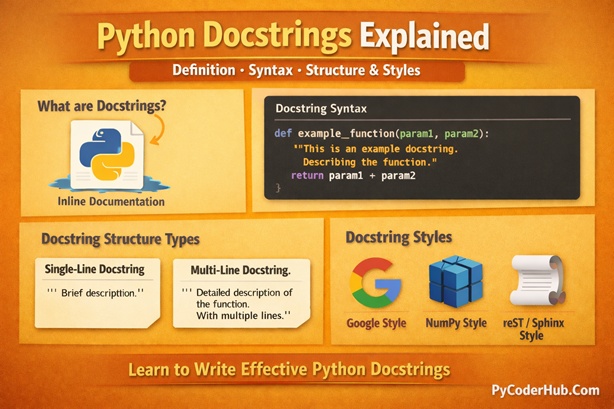
Introduction: Python Docstrings Explained
Welcome back to PyCoderHub. In this lesson, we’re focusing on one of Python’s most essential—but often overlooked—features: docstrings. Docstrings are more than just descriptive text; they are Python’s built-in documentation mechanism, designed to explain how modules, classes, functions, and methods are meant to be used.
In this detailed Python Docstrings Explained guide, you’ll learn how docstrings work internally, where they must be placed to function correctly, and how they differ from regular comments. We’ll also examine common docstring structures, compare widely used documentation styles, and follow PEP 257 recommendations to help you write clear, consistent, and professional Python documentation.
What you’ll learn in this post:
- What docstrings are in Python and why they are used
- The golden rule of writing valid Python docstrings
- Docstring syntax and how Python recognizes them
- Key characteristics that make a docstring valid
- How to create docstrings correctly in Python
- Different ways to access docstrings (
__doc__andhelp()) - Whether there are modules that help view docstrings
- Rules for writing valid docstrings in Python
- Docstrings vs comments in Python
- Where docstrings must be placed to work correctly
- Docstring structures: single-line and multi-line
- Commonly used docstring style types
By the end of this guide, you’ll not only understand how Python docstrings work, but also how to write clear, consistent, and professional documentation that improves code quality, collaboration, and long-term maintainability.
What Are Docstrings in Python?
A docstring (short for documentation string) is a special type of string literal used to document Python modules, classes, functions, and methods. It is written as the very first statement inside the code object it documents and serves as Python’s built-in documentation system.
The main purpose of a docstring is to clearly explain what a piece of code does, what inputs it expects, and what it returns. Well-written docstrings make code easier to understand, easier to maintain, and easier for others (or future you) to use correctly—without having to read the full implementation.
Note: Unlike regular comments, Python does not ignore docstrings. When the interpreter runs your code, it automatically stores the docstring in a special attribute called
__doc__. This allows docstrings to be accessed at runtime using tools likehelp(), IDE tooltips and automated documentation generators.
The Golden Rule of Writing Docstrings
A docstring should explain what the code does, not how it does it.
- Avoid describing implementation details or logic flow
- Focus on purpose, behavior, inputs, outputs, and usage
The how belongs in the code itself. Clean code plus clear docstrings is what defines professional Python programming.
Docstring Syntax in Python
Docstrings are written using triple quotes, either:
""" double quotes """(most commonly used)''' single quotes '''
Triple quotes allow docstrings to span multiple lines, which makes them ideal for detailed explanations, parameter descriptions, return values, and examples.
Example: A Simple Function Docstring
def greet_user(user_name):
    """Return a greeting message for the given user."""
    return f"Hello, {user_name}!"
Explanation
- The triple-quoted string appears immediately after the function definition, making it a valid docstring.
- The docstring briefly explains the function’s purpose—it returns a greeting message.
- Python automatically attaches this text to the function’s
__doc__attribute. - Tools like
help(greet_user)can now display this description without reading the function body.
This is a single-line docstring, which is ideal when a function’s behavior is simple and self-explanatory.
Key Characteristics of Python Docstrings
- Written using triple quotes:
""" """or''' ''' - Must appear as the first statement inside a module, class, or function
- Designed to describe:
- Purpose and behavior
- Parameters and return values
- Expected usage or examples (for complex cases)
- Stored in the
__doc__attribute at runtime - Used by tools such as:
help()pydoc- Sphinx
- IDEs and documentation generators
How to Create and Access Docstrings in Python
Docstrings are easy to write, but they follow specific rules that determine whether Python recognizes them as documentation or treats them as ordinary strings. In this section, we’ll learn how to correctly create docstrings and how to access them at runtime using Python’s built-in tools.
Creating Docstrings
Docstrings are created using triple-quoted string literals, most commonly triple double quotes (""" """). When such a string appears as the first statement inside a module, class, function, or method, Python automatically identifies it as that object’s docstring.
Triple quotes allow docstrings to span multiple lines, making them ideal for explaining behavior, parameters, return values, exceptions, and usage notes.
You can technically use either:
""" triple double quotes """''' triple single quotes '''
However, according to PEP 257, the recommended and standardized convention is to use triple double quotes. This keeps documentation consistent across libraries, frameworks, and the wider Python ecosystem.
Examples of Docstrings in Different Code Objects
Below are common examples showing how docstrings are written for different Python code objects. Each example follows PEP 257 conventions and demonstrates correct placement.
1. Function Docstring
def add_numbers(first_number, second_number):
    """Add two numbers and return the result."""
    return first_number + second_number
Explanation:
- The docstring appears immediately after the
defline. - It briefly explains what the function does, not how it performs the addition.
- This is a single-line docstring, suitable for simple, self-explanatory functions.
2. Class Docstring
class Person:
    """Represent a person with a name and age."""

    def __init__(self, person_name, person_age):
        """Initialize a Person object with name and age."""
        self.name = person_name
        self.age = person_age
Explanation:
- The class docstring describes the overall purpose of the class.
- The
__init__method has its own docstring explaining what initialization does. - Each class and method should document its own responsibility.
3. Module Docstring (Top of the File)
"""
This module provides utility functions for string processing.

It includes features such as text trimming and case conversion.
"""
Explanation:
- A module docstring must appear at the very top of the file.
- It describes the purpose and contents of the module as a whole.
- Module docstrings are especially important for libraries and packages.
Accessing Docstrings in Python
Once a docstring is written correctly, Python stores it in the object’s __doc__ attribute. This allows documentation to be accessed while the program is running, which is something regular comments cannot do.
Python provides two main ways to retrieve docstrings:
- Accessing Docstrings Using
help() - Accessing Docstrings Using the
__doc__Attribute
A) Accessing Docstrings Using help()
The help() function is the most user-friendly and interactive way to view docstrings. It formats the documentation, displays the function signature, and includes additional metadata such as module information.
Example
def greet_user(user_name):
    """Return a greeting message for the given user name."""
    return f"Hello, {user_name}!"
Now call help():
help(greet_user)Output
Help on function greet_user in module __main__:

greet_user(user_name)
    Return a greeting message for the given user name.
How help() Works
- Internally retrieves
greet_user.__doc__ - Formats the docstring for readability
- Displays the function signature and context
- Ideal for interactive exploration and learning unfamiliar code
B) Accessing Docstrings Using the __doc__ Attribute
Every Python object that supports documentation exposes a __doc__ attribute. This attribute stores the docstring as a plain string, exactly as written in the code.
Example
def calculate_square(number_value):
    """Return the square of the given number."""
    return number_value * number_value
Accessing the docstring directly:
print(calculate_square.__doc__)Output
Return the square of the given number.How __doc__ Works
__doc__is a standard string attribute- Returns the raw docstring without formatting
- Useful for:
- Documentation generators
- Introspection tools
- Automated analysis of code
Note: Python docstrings are stored only once—in the
__doc__attribute. Thehelp()function simply reads and formats that docstring for display.
Important Differences Between help() and __doc__
| Feature | help() | __doc__ |
|---|---|---|
| Output type | Formatted, readable | Raw string |
| Best used for | Interactive inspection | Programmatic access |
| Displays metadata | Yes (signature, module info) | No |
Uses __doc__ internally | Yes | N/A |
Example: Using Both help() and __doc__ Together
def divide_numbers(dividend, divisor):
    """
    Divide the dividend by the divisor and return the result.

    Raises:
        ZeroDivisionError: If the divisor is zero.
    """
    return dividend / divisor


print(divide_numbers.__doc__)  # Raw docstring
help(divide_numbers)           # Formatted documentation
This example highlights how:
__doc__gives direct access to the stored documentationhelp()presents the same information in a structured, readable format
Are There Modules That Help View Docstrings?
Yes. While Python stores docstrings in a single place—the __doc__ attribute—it also provides built-in tools and modules that help you retrieve, format, and display those docstrings in a more useful way.
It’s important to understand one core idea first:
Docstrings are never generated by tools. They are written by developers and stored only in
__doc__.
Everything else in Python’s documentation system works on top of that attribute.
__doc__: The Main Attribute
When you write a docstring, Python stores it exactly once—inside the object’s __doc__ attribute.
- Modules, classes, functions, and methods all expose
__doc__ - No import is required to access it
- It returns the raw documentation string, exactly as written
Because of this, every documentation tool in Python ultimately depends on __doc__.
The help() Function (Built on __doc__)
The help() function is the most common way developers view docstrings interactively.
Internally, help():
- Reads the object’s
__doc__attribute - Formats the content
- Adds contextual metadata (signature, module name, hierarchy)
- Displays it in a readable, structured layout
Key point:
help()does not store or create documentation—it only formats what already exists in__doc__.
The pydoc Module
Python’s pydoc module is the documentation engine that powers help().
help()internally usespydocpydocextracts documentation from__doc__- It can be used interactively or from the command line
This makes pydoc useful for:
- Browsing module documentation
- Generating text-based documentation
- Exploring unfamiliar libraries
Again, pydoc does not invent content—it only presents existing docstrings.
The inspect Module (Programmatic Docstring Access)
The inspect module is designed for introspection and advanced tooling.
It provides functions like:
inspect.getdoc()inspect.getsource()
When retrieving docstrings, inspect:
- Reads from
__doc__ - Cleans indentation
- Handles inherited docstrings
- Provides safer access for automation
What Tools Can and Cannot Do
What tools can do:
- Read docstrings from
__doc__ - Format and polish output
- Add metadata and structure
- Combine inherited docstrings
What tools cannot do:
- Generate docstrings automatically
- Replace missing documentation
- Create meaningful descriptions without developer input
Docstrings must always be written explicitly in the code.
Final Point: In Python,
__doc__is the single source of truth for documentation. Functions likehelp()and modules such aspydocandinspectsimply retrieve and enhance the presentation of that stored docstring—but they never generate documentation on their own.
This understanding is key to writing effective, professional Python documentation.
Rules for Writing Valid Docstrings in Python
Docstrings are simple to write, but Python is very strict about how it recognizes them. If even one rule is violated, the string is treated as a normal string literal and is not stored in the object’s __doc__ attribute.
Below are the essential rules you must follow to ensure your docstrings are valid and usable.
1. A Docstring Must Be a Literal String Constant
For Python to recognize a docstring, the first statement in the code block must be a literal string.
Valid:
"""This is a valid docstring."""Invalid:
"Docstring " + "text"Python does not evaluate expressions, function calls, or variable references as docstrings. Only a plain string literal qualifies.
2. A Docstring Must Appear Immediately After the Definition Line
A docstring must be the very first executable statement inside a module, class, function, or method—placed immediately after the def, class, or module header.
Valid placement:
def calculate_total(price, tax):
    """Return the total price including tax."""
    return price + tax
Invalid placement:
def calculate_total(price, tax):
    total = price + tax
    """Return the total price including tax."""
    return total
In the invalid example, the string is ignored as documentation because it is not the first statement.
3. Use Triple Double Quotes (""" """) as the Standard
Python allows both:
""" triple double quotes """''' triple single quotes '''
However, PEP 257 recommends using triple double quotes in all cases—even for single-line docstrings.
Why this matters:
- Consistency across projects
- Better compatibility with documentation tools
- Matches the style used by the standard library
Using triple double quotes is considered best practice, not just preference.
4. A Docstring Must Not Be Assigned to a Variable
Assigning a string to a variable—even if it looks like documentation—prevents Python from treating it as a docstring.
Invalid:
def process_data(data):
    description = """Process the input data and return the result."""
    return data
Valid:
def process_data(data):
    """Process the input data and return the result."""
    return data
Only an unassigned string literal placed first becomes the object’s __doc__.
5. A Docstring Must Not Be Used as an Expression
A string literal used as part of an expression, logging statement, or any other operation is not a docstring.
Invalid:
def fetch_data():
    print("""Fetch data from the server.""")
Even though this is a string, Python treats it as a runtime expression—not documentation.
Key Point: A valid Python docstring must be an unassigned, literal string placed as the very first statement inside a module, class, or function—preferably written using triple double quotes as recommended by PEP 257.
Where to Place Docstrings (They Must Be the First Statement)
In Python, a docstring is recognized only when it appears as the very first statement inside a module, class, function, or method. This rule is not optional—it’s how Python’s documentation system is designed to work.
Internally, Python follows a very simple check:
if the first statement inside a code block is a string literal, Python treats it as a docstring and stores it in the object’s __doc__ attribute.
If the first statement is anything else—a variable assignment, a function call, or even a comment—Python immediately concludes that the object has no docstring.
Important: Placing a string literal anywhere other than the first statement—below a variable, after a
print()call, or at the end of a function—will not count as a docstring. Python simply treats such strings as ordinary, unused string literals and ignores them during compilation.
Correct Docstring Placement
def greet_user():
    """Print a greeting message."""
    print("Hello!")
In this example:
- The triple-quoted string appears immediately after the
defline - Python recognizes it as a docstring
- The string is stored in
greet_user.__doc__ - Documentation tools can access it at runtime
Incorrect Docstring Placement (Not a Docstring)
def greet_user():
    print("Hello!")
    """This will NOT be recognized as a docstring."""
Accessing the docstring:
print(greet_user.__doc__)Output:
NoneIn this case:
- The first statement is
print("Hello!") - Python stops looking for a docstring immediately
- The triple-quoted string is ignored as documentation
- The function ends up with no docstring at all
Key Rule to Remember
A docstring must be the very first statement inside a module, class, function, or method—otherwise, Python will ignore it completely.
This single rule explains most “missing docstring” issues developers encounter.
Docstrings vs Comments in Python
In Python, docstrings and comments both help explain code, but they are designed for very different purposes.
Comments are written primarily for developers. They explain why certain logic exists, clarify tricky sections, or add context that the code itself cannot express.
Docstrings, on the other hand, are written for both developers and users. They document what a function, class, or module does and become part of the program at runtime.
Key Differences Between Docstrings and Comments
| Feature | Comments | Docstrings |
|---|---|---|
| Purpose | Explain logic for developers | Document functions, classes, and modules |
| Focus | Why the code exists | What the code does |
| Syntax | # single-line comment | """triple-quoted string""" |
| Placement | Anywhere in the code | Immediately after a function, class, or module definition |
| Execution | Ignored by the interpreter | Stored as part of the object |
| Runtime Access | Not accessible | Accessible via __doc__ or help() |
| Documentation Tools | Not included | Used by help(), pydoc, Sphinx |
| Visibility | Only visible in source code | Visible to users and tools |
| PEP Guidance | Covered by PEP 8 | Covered by PEP 257 |
Example: Docstrings vs Comments in Practice
def greet(user_name):
    """Return a personalized greeting message."""

    # This comment explains logic for developers only
    return f"Hello, {user_name}!"
What Happens Here?
- The docstring describes what the function does and is stored with the function.
- The comment explains something for developers reading the code.
- Only the docstring is accessible at runtime.
If you run:
print(greet.__doc__)Output:
Return a personalized greeting message.The comment is not accessible because comments are discarded by Python during execution.
When to Use Docstrings vs Comments
Use docstrings when:
- Describing what a function, class, or module does
- Writing public APIs or reusable code
- Supporting documentation tools and IDE help
Use comments when:
- Explaining why a specific implementation was chosen
- Clarifying complex or unusual logic
- Leaving notes for future maintainers
One Important Rule: Do not mix comments inside docstrings.
Docstrings document behavior; comments explain logic. Keeping them separate improves clarity and professionalism.
Docstring Structures: Single-Line and Multi-Line
A docstring structure refers to how a docstring is laid out, not the documentation style it follows. In Python, docstrings use two basic structural forms based on how much explanation is needed.
Single-Line Docstring
A single-line docstring fits on one line within triple quotes and briefly describes what the code does. It is best suited for simple, self-explanatory functions or methods.
Example:
def is_even_number(number_value):
    """Return True if the given number is even."""
    return number_value % 2 == 0
Use single-line docstrings when no additional details, parameters, or examples are required.
Multi-Line Docstring
A multi-line docstring is used when more explanation is needed. It usually starts with a short summary line, followed by a blank line and additional details such as parameters, return values, or notes.
Example:
def calculate_circle_area(radius_value):
    """
    Calculate the area of a circle.

    Parameters:
        radius_value (float): Radius of the circle.
    """
    return 3.14159 * radius_value * radius_value
Multi-line docstrings are commonly used for complex functions, classes, and public APIs.
Note: In this section, we covered only a brief overview of docstring structural types. To explore single-line and multi-line docstrings in depth—with best practices, edge cases, and real-world examples—refer to our dedicated guide on Python Docstring Structures.
Docstring Style Types
Docstring styles define how documentation content is formatted, not how long it is. While Python does not enforce any specific docstring style, the community has adopted a few well-established formats that improve readability and tool compatibility.
Below are the most commonly used docstring style types in Python.
Google Style Docstrings
Google style docstrings use clear, readable section headers such as Args, Returns, and Raises. This style is popular for its simplicity and is widely used in modern Python projects.
NumPy / SciPy (NumPyDoc) Style Docstrings
NumPy style docstrings follow a more structured and detailed format, using underlined section headers. They are commonly used in scientific, data analysis, and numerical computing libraries.
reStructuredText (reST) / Sphinx Style Docstrings
reStructuredText (reST) docstrings are designed for Sphinx-based documentation. They use markup syntax and are often found in large frameworks and long-term projects.
Note: This section provides only a high-level overview of common docstring style types. For a detailed comparison, examples, and guidance on choosing the right style, refer to our dedicated guide on Python Docstring Styles.
PEP 257 Recommendations for Docstrings
PEP 257 defines the official conventions for writing docstrings in Python. These recommendations are not enforced by the language but are widely followed to keep documentation consistent and readable across projects.
Key recommendations include:
- Always use triple double quotes (
""") for docstrings. - Start with a short summary line describing the object’s purpose.
- End single-line docstrings with a period.
- For multi-line docstrings, place the summary on the first line, followed by a blank line.
- Write docstrings as imperative sentences (for example, “Return the result”, not “Returns the result”).
- Keep docstrings focused on what the object does, not how it is implemented.
Note: This section covers only the core recommendations from PEP 257. To explore the complete guidelines, real-world examples, and common mistakes, refer to our dedicated post on PEP 257 Docstring Conventions.
Conclusion
Python docstrings are more than just documentation—they are a built-in feature that connects your code with tools, introspection, and long-term maintainability. By understanding how docstrings work internally, where they must be placed, and how they are accessed, you can write code that explains itself clearly and consistently.
By following PEP 257 recommendations, choosing the right structure and style, and applying docstrings correctly, you make your Python code easier to read, debug, and scale. Well-written docstrings benefit both humans and tools, making them an essential part of professional Python development.
Suggested Posts:
1. Python Docstring Structure and Style Guide: Single-Line, Multi-Line, and Format Comparison
2. PEP 257 Guidelines for Python Docstrings: How to Write Clear Documentation and Avoid Common Mistakes
3. Python Docstrings FAQ: Common Questions Answered (Complete Guide)

7 thoughts on “Python Docstrings Explained: Definition, Syntax, Structure, and Style Types”